
.webp)
Real-Time Threat Detection with Behavioral Biometrics



Bad leads should be stopped before they hit your CRM. If your forms get hit by bots, spam, or fake identities, behavioral biometrics helps by scoring how a person interacts with the form in real time.
Here’s the short version:
- Unprotected forms often see 15% to 40% bot submissions, and some high-value sectors can go past 50%.
- Post-submit review is too late because fake leads may already trigger routing, enrichment, and sales follow-up.
- Behavioral biometrics looks at typing rhythm, mouse movement, scroll behavior, field order, pauses, and paste patterns.
- It helps spot bots, scripted fills, LLM-written spam, synthetic identities, account takeover, and internal misuse.
- The best setup is to score sessions from page load to submit, then allow, step up, or send to review based on risk.
- A visible CAPTCHA on everyone can hurt completions by 8% to 12%, which is why multi-step forms beat static ones for balancing friction and conversion, so I’d use friction only when the session looks risky.
- For U.S. teams, privacy rules matter. BIPA and other state laws can affect notice, consent, retention, and access controls.
If I had to sum it up in one line: behavior beats content when I need to spot bad form traffic early.
What matters most is simple: watch the session live, score multiple signals together, keep the response light for low-risk users, and keep risky leads out of the pipeline.
Behavioral Biometrics Explained | How Your Behavior Becomes Your Identity
sbb-itb-5f36581
Behavioral Signals That Help Detect Threats During Form Sessions
Once a session begins, the job shifts to reading behavior and spotting what moves risk up or down.
Keystroke, Mouse, and Navigation Patterns
Some of the strongest signals come from timing and movement. Key hold time - how long someone presses a key - and the gap between keystrokes work alongside typing rhythm and correction patterns like backspacing and retyping to build a behavioral fingerprint that bots have a hard time copying. People type unevenly. Bots tend to type with machine-like consistency.
Mouse behavior tells a similar story. Human cursor movement is usually curved, a little messy, and full of small pauses or hover moments. Bot movement is often straight, stiff, or it skips from field to field without any pointer movement at all.
Navigation order also helps. Most people move through fields in the order they see them on the page, often following an impressive multi-step form design. Automated scripts often follow the raw HTML order instead, and that can look very different from the visual layout.
Session-Level Anomalies That Raise Risk Scores
These signals work best when the system scores them together, so action can happen before the lead reaches the CRM. Behavioral scoring systems can analyze more than 101 distinct data points in real time. Each one adds to a running risk score.
A few patterns tend to push that score higher:
- Copy-paste activity across several personal data fields, such as name, phone, and email. Pasting once in a while is normal. But when every field is filled that way, it can point to a script or a human fraud operation working from stolen data.
- Device mismatch. If the browser version, screen resolution, or other device traits don't line up with the reported User-Agent, that's a red flag. The same goes for headless browser signs tied to tools like Puppeteer or Playwright. That can signal automation even when the form data looks human.
Uniform timing can also be a warning sign. If someone moves through every field with no hesitation and makes zero typos, that looks less like a person and more like a system following a script.
Continuous Monitoring From Form Load to Submission
These signals need to be tracked from page load all the way to submission. Pre-engagement time matters. How long did the visitor wait before touching the first field? Did they scroll first? Did they switch tabs during the session? Early actions like these help set a baseline for everything that follows. A session token created at page load also helps confirm that the form was rendered in a browser, rather than being hit straight through a POST request to the endpoint.
After that, the system can watch each field interaction on its own, including pauses tied to cognitive load between different field types, correction sequences, and changes in focus.
Threat Types Behavioral Biometrics Can Catch in Real Time
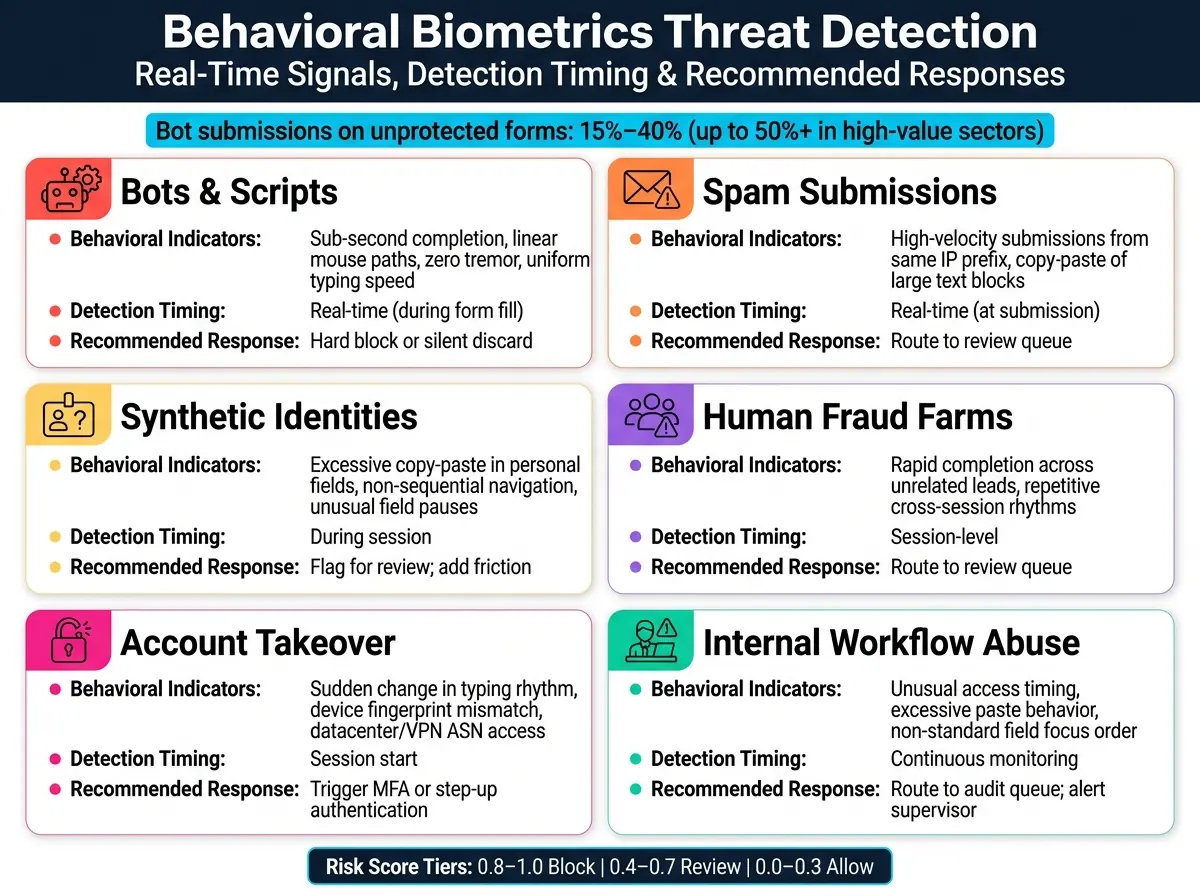
Behavioral Biometrics Threat Detection: Signals, Threats & Responses
These live signals usually point to three main threat groups: automation, human-assisted fraud, and account abuse.
Bots, Scripted Form Fills, and Spam Submissions
Automation often shows up fast. A form gets completed almost instantly, and every event lands with the same timing. That’s not how people act.
Human mouse movement has small involuntary micro-oscillations, or tremor, in the 3–25 Hz frequency band. Bots, on the other hand, often create smooth, machine-like paths with uniform jerk. If that tremor is missing, that’s a warning sign.
Bot traffic on unprotected lead forms is a bigger problem than many teams expect. Submission rates often fall between 15% and 40%, and in high-value sectors like insurance, they can climb past 50%. If your CPL is $30, one fake lead can end up costing $50–$100 once you add wasted sales time and CRM pollution. That’s why session-level detection matters. If you catch the bot before the lead hits the CRM, you cut off the mess upstream.
LLM-written spam adds another layer. The text can look natural enough to slip past content filters. Behavioral scoring picks up the signals that text-only checks miss.
Synthetic Identities and Suspicious Lead Creation
Synthetic identities are tougher because there may be a real person behind the keyboard. The risk goes up when personal fields are pasted in bulk, users skip steps that would normally happen in a human flow, or pause patterns don’t line up with normal form completion.
Human fraud farms create a similar problem. These teams use real people, so simple bot checks won’t stop them. Still, their sessions often look off compared with those of a real prospect: quick completion across unrelated leads, repeated rhythms across sessions, and high-velocity submissions from one source. Behavioral systems can spot those patterns and send the sessions for review.
Account Takeover and Internal Workflow Abuse
The same behavioral baseline still helps after login. A session may look trusted at first and then turn risky.
Account takeover (ATO) is a good example. Static checks may see a valid username and password and let the session in. Behavioral biometrics add another layer. If typing rhythm, mouse handling, or navigation style suddenly shifts away from the account’s normal baseline, the session should be flagged.
Internal workflow abuse gets less attention, but it’s a real issue. People with access to lead management tools can tamper with submissions or recycle leads. Behavioral monitoring helps catch this through signs like unusual access timing, repeated paste-heavy actions, or fast completion across unrelated leads .
The table below maps each threat type to its behavioral indicators, when detection happens, and the response that fits best:
| Threat Type | Behavioral Indicators | Detection Timing | Recommended Response |
|---|---|---|---|
| Bots & Scripts | Sub-second completion, linear mouse paths, zero tremor, uniform typing speed | Real-time (form fill) | Hard block or silent discard |
| Spam Submissions | High-velocity submissions from the same IP prefix, copy-paste of large text blocks | Real-time (submission) | Route to review queue |
| Synthetic Identities | Excessive copy-paste in personal fields, non-sequential navigation, unusual field pauses | During session | Flag for review; add friction |
| Human Fraud Farms | Rapid completion across unrelated leads, repetitive cross-session rhythms | Session-level | Route to review queue |
| Account Takeover | Sudden change in typing rhythm, device fingerprint mismatch, datacenter/VPN ASN access | Session start | Trigger MFA or step-up authentication |
| Internal Workflow Abuse | Unusual access timing, excessive paste behavior, non-standard field focus order | Continuous monitoring | Route to audit queue; alert supervisor |
Use the risk score to pick the lightest response that still protects the form flow. From there, the threat-specific score can decide what happens next: block, step up, or review.
How to Add Behavioral Biometrics to a Lead Capture Stack
Start With Passive Data Collection and Baseline Building
After session-level monitoring is in place, start in passive mode. The idea is simple: turn behavioral signals into routing decisions before a lead hits your CRM.
That means collecting interaction data first, then deciding where friction belongs. Look at signals like completion time, mouse movements, keystroke timing, and scroll behavior before you block or flag anything. From there, build baselines by traffic source and device.
At this stage, watch the numbers that matter most:
- Form conversion rate
- Abandonment patterns
- Bot detection rate
- False positive rate
- Downstream lead quality
Once you know what a normal session looks like for your audience, you can set thresholds based on your users, not guesswork. Device splits matter here. A normal mobile session can look very different from a desktop one, so mobile traffic shouldn't be scored against desktop behavior. Those baselines help you decide when friction should show up and when it shouldn't.
Use Risk Scoring and Adaptive Friction Instead of Blanket Blocking
Give each session a dynamic risk score on a 0.0–1.0 scale using several signals together: behavioral biometrics (25%), CAPTCHA scores (40%), device fingerprinting (20%), and IP intelligence (15%). One signal alone shouldn't make the call.
That score should trigger a tiered response:
| Risk Score | Level | Action |
|---|---|---|
| 0.8–1.0 | High | Block or step up |
| 0.4–0.7 | Medium | Apply an invisible secondary check or send to review |
| 0.0–0.3 | Low | Allow |
This is where a lot of teams get it wrong. Blanket blocking sounds clean on paper, but it can throw out good leads with the bad. A better move is adaptive friction. Invisible checks usually protect more conversions than visible CAPTCHA, and routing suspicious leads into review is safer than deleting them on the spot. That keeps CRM data cleaner without taking an unnecessary hit from false positives.
Where Reform Fits in a Real-Time Detection Workflow

Once the score is in place, the form layer needs to respond in real time. Reform's spam prevention, email validation, conditional routing, real-time analytics, and custom JavaScript let you tag, route, and review risky leads without custom backend work.
The workflow is straightforward: score the session, route the submission, tag the lead, then review or release it.
Reform's conditional routing can send high-risk submissions to a review queue, an alternate confirmation flow, or a step-up verification path, while low-risk leads go straight to your CRM. Its real-time analytics help you watch submission patterns as they happen, which makes it easier to spot sudden spikes or odd completion times before they dirty your pipeline. And with custom JavaScript support, you can embed a lightweight behavioral SDK directly into the form without a lot of extra setup.
The result is pretty practical: your sales team's queue stays clean, and your optimization data stays accurate.
Compliance, Governance, and Next Steps
U.S. Privacy, Retention, and Model Governance Requirements
Behavioral biometrics tracks how people move through a form - typing rhythm, mouse paths, and scroll behavior. For U.S. teams, that puts privacy and governance on the table from the start. Once live scoring goes live, your controls shape what data you can keep, how long you can keep it, and who gets access.
One state law that deserves close attention is the Illinois Biometric Information Privacy Act (BIPA), which sets strict notice and consent rules for collecting biometric identifiers.
At a practical level, compliance for form-based behavioral data usually comes down to four areas:
| Compliance Area | What It Means in Practice |
|---|---|
| Notice and Consent | Disclose behavioral tracking in your privacy policy and get explicit consent where state law requires it |
| Data Minimization | Collect only the signals you need - keystroke timing, mouse paths, and scroll behavior - not unnecessary PII |
| Retention Limits | Set expiration dates for behavioral profiles and session data; avoid indefinite storage |
| Auditability and Review | Document why each risk score was generated and schedule regular model reviews as bot techniques evolve |
On the governance side, risk scores should guide decisions, not make them on their own. Human teams still set policy and choose the next action based on explainable reason codes. That means tight access controls for audit logs and risk data, written escalation paths, and regular model reviews as bot tactics change.
Key Takeaways for Building Safer, Higher-Quality Form Flows
These controls help turn detection from a one-off tool into something your team can run every day.
As you build, keep a few rules in mind:
- Start passive. Build baselines first, and calibrate mobile separately from desktop.
- Score, don't block. Send medium- and high-risk sessions to review queues or step-up verification.
- Measure downstream, not just at the gate. Track contact rate, lead acceptance, and fraud-related loss. TCPA violations tied to fraudulent leads can cost between $500 and $1,500 per incident.
- Govern it like any other model. Retrain on a regular basis, document reason codes, and keep humans involved in borderline cases.
Done well, this leads to cleaner lead data, lower fraud loss, and less friction for real users.
FAQs
How accurate is behavioral biometrics?
Behavioral biometrics works well for threat detection because it looks at patterns that are tough to fake, such as mouse movement, typing rhythm, and scroll behavior.
In production, these systems usually reach an 85% to 95% true positive rate for bot detection, with a 2% to 5% false positive rate.
Results get better when those signals feed into a broader risk model instead of being judged on their own. In many cases, the system also needs data from multiple sessions to build a steady baseline of normal user behavior.
Will it hurt form conversion rates?
No. Behavioral biometrics runs quietly in the background, so it doesn't add extra steps or slow down legitimate users.
Instead of disruptive challenges like reCAPTCHA, it looks at natural behavior - such as typing rhythm, mouse movement, and scrolling - while protecting forms from bot traffic in real time.
What privacy rules should U.S. teams watch?
U.S. teams should keep a close eye on NIST guidance around continuous, risk-based authentication. It also makes sense to line that work up with fraud detection frameworks such as the FFIEC Cybersecurity Assessment Tool.
Behavioral analytics look at how a user interacts during a session, not just sensitive PII. That makes them a good fit for privacy-by-design. At the same time, teams should stay up to date on state privacy laws that govern data flows, consumer requests, and consent.
Related Blog Posts
Get new content delivered straight to your inbox

The Response
Updates on the Reform platform, insights on optimizing conversion rates, and tips to craft forms that convert.



Drive real results with form optimizations
Tested across hundreds of experiments, our strategies deliver a 215% lift in qualified leads for B2B and SaaS companies.
