
.webp)
Real-Time Threat Detection with Behavioral Data


Bad actors are targeting lead forms more than ever, with bots and spammers submitting fake data that clogs CRMs and wastes marketing budgets. Traditional defenses like CAPTCHA and IP blocking are failing, as bots now mimic human behavior with advanced tools. Real-time behavioral data offers a smarter way to tackle this problem by analyzing how users interact with forms - tracking typing speed, mouse movements, and submission timing to identify suspicious activity.
Key insights:
- 37% of web traffic in 2022 came from automated bots, with 27.7% being harmful bots.
- 62% of spam submissions in 2026 were AI-generated, bypassing keyword filters.
- Fake leads can cost businesses $50–$100 each, draining resources and skewing metrics.
- Behavioral signals like irregular typing, instant pasting, or rapid form submissions reveal potential threats.
- Tools like Reform use these insights to block bots, validate emails, and improve lead quality.
Behavioral scoring systems can achieve 96–99% spam detection accuracy, outperforming static defenses. By integrating these scores into workflows, businesses can route valid leads efficiently while flagging or blocking suspicious entries. This approach protects marketing investments, ensures cleaner data, and improves sales outcomes.
Common Threats in Lead Generation Forms
Lead generation forms are increasingly targeted by advanced threats. Recognizing these tactics is essential for deploying effective, real-time defenses based on user behavior.
Automated Bots and Scripts
Today’s bots are more advanced than ever. They leverage real Chrome instances through tools like Playwright and Puppeteer, rotate residential IPs, execute JavaScript, and mimic human actions like typing and mouse movements. These capabilities allow them to blend in seamlessly with legitimate users. One of their key uses is credential stuffing, where stolen username and password combinations are tested on lead forms tied to login or registration systems. Each fake submission not only wastes resources but also opens the door to account takeovers and other security risks.
And it’s not just bots causing problems - spam and fraudulent submissions are equally harmful.
Spam and Fraudulent Submissions
The rise of AI-generated content has made spam more sophisticated. By Q1 2026, 62% of spam submissions consisted of human-like text created by large language models (LLMs), making them nearly impossible for traditional keyword filters and Bayesian classifiers to detect. Cloudflare reported a 4x increase in form payloads containing AI-generated text in 2025 compared to the previous year.
These submissions aren’t harmless. They contaminate CRM systems with fake identities and harvested email addresses, skew conversion metrics, and waste marketing budgets by triggering automated follow-ups. For businesses running paid campaigns, the cost of a single fake lead - including ad spend, CRM storage, and sales team efforts - can range from $50 to $100. Multiply that by dozens or hundreds of fake leads, and the financial impact is staggering.
Limits of Standard Form Security
Traditional security measures like CAPTCHA and IP blocking are losing their effectiveness. Machine learning models can now bypass reCAPTCHA v2 with a 100% success rate, and CAPTCHA-solving services are available for as little as $0.001 per solve.
"The system designed to block machines is harder for real people than for the bots it was meant to stop." - Opportify
IP blocking isn’t much better. Spammers often use residential proxy networks, rendering blocklists ineffective. Similarly, honeypots fail against sophisticated bots that can analyze page elements and avoid detection. These outdated methods create a false sense of security, as fraudulent submissions can pass these checks and appear legitimate in your CRM. This highlights the importance of adopting behavioral analytics and multi-step forms for a more reliable and adaptable defense strategy.
sbb-itb-5f36581
Real-Time Behavioral Analytics as a Modern Defense
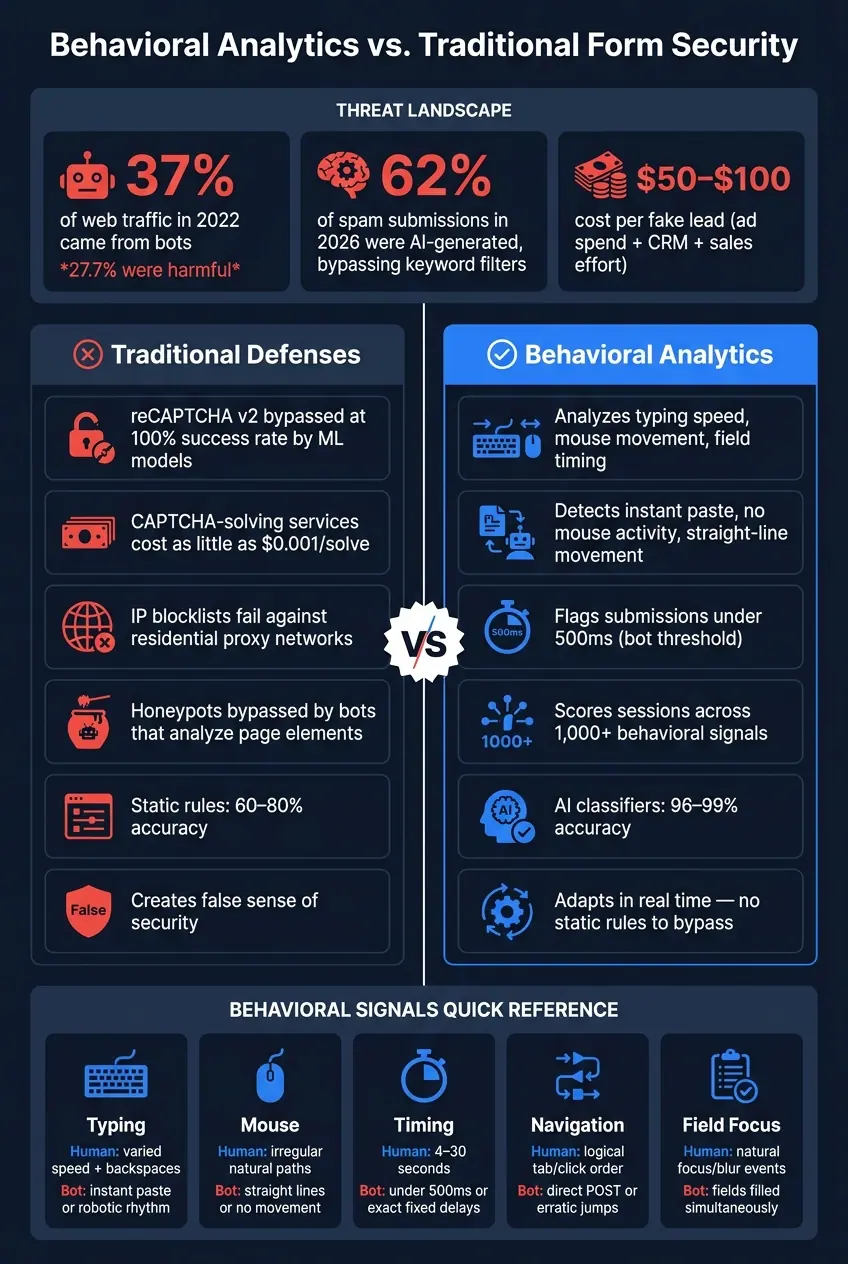
Behavioral Analytics vs. Traditional Form Security: Detection Accuracy & Threat Stats
The approach to combating online threats has evolved. Instead of focusing solely on what is submitted in a form, the spotlight is now on how the form is completed. Real-time behavioral analytics tracks every interaction a user has with a form, starting from the moment the page loads to the final click of the submit button. This method paints a detailed picture of user intent, making it incredibly challenging for bots to mimic human behavior consistently. By analyzing these interactions, it becomes easier to flag unusual patterns that may indicate a threat.
Behavioral Data Points That Signal Threats
Every genuine user leaves behind a unique behavioral trail. For instance, humans tend to move their mouse in unpredictable paths, click or tab between fields in a logical order, and occasionally backspace to correct mistakes. Bots, no matter how advanced, struggle to replicate these nuances perfectly.
Here’s a breakdown of key behavioral signals:
| Behavioral Signal | Human Pattern | Bot/Threat Pattern |
|---|---|---|
| Typing/Input | Typing speeds vary, with backspaces and pauses | Instant pasting or unnaturally rhythmic typing |
| Navigation | Logical tabbing or clicking between fields | Direct POST requests or erratic field completion |
| Timing | 4–30 seconds to fill a form | Submissions in under 500ms or with suspiciously fixed delays (e.g., exactly 5 seconds) |
| Mouse Movement | Irregular, natural paths | No pointer activity or straight-line movements |
| Field Interaction | Focus/blur events occur naturally | Fields filled simultaneously or without focus events |
Take submission timing as an example. Real users usually spend 4 to 30 seconds completing a short form, while bots often submit in under 500 milliseconds. Even stealthier scripts that try to mimic humans tend to use oddly precise delays, like exactly 5 seconds, which raises red flags. Another telltale sign is paste detection - if an email or name appears instantly without any keystrokes, it’s likely automated. These behavioral patterns form the foundation for identifying risks effectively.
Behavioral Scoring for Risk Assessment
By combining these data points, systems can calculate a numerical risk score that reflects the likelihood of a session being automated or fraudulent. This score is then processed by an AI classifier to determine a final risk verdict. For example, a session with only minor anomalies might score low risk, while one with multiple red flags - such as rapid submission, no mouse activity, and instant pasting - would score high and could be blocked automatically. Using this method, AI-powered classifiers can achieve spam detection rates of 96–99%.
Why Behavioral Analytics Outperforms Static Rules
Behavioral analytics provides a level of defense that static rules simply can’t achieve. Static methods are easy to bypass: AI-generated spam is often grammatically correct and contextually convincing, making word-based filters ineffective. Similarly, IP blocklists fail against residential proxy networks. Behavioral analytics, on the other hand, shifts the focus to the process of form completion rather than just the content submitted. As Raman Makkar, Founder of splitforms, explains:
"The new spam doesn't look like spam. So the new defense has to stop reading the text and start reading everything else: how the form was filled, by whom, from where, in what time, with what behaviour, and only then what was actually said."
Using Reform to Apply Real-Time Threat Detection

Theory is great, but without the right tools, it doesn’t go far. That’s where Reform steps in. It brings multiple layers of defense into one platform, giving marketing and RevOps teams the power to secure lead generation forms without needing to build custom security solutions. This streamlined system turns behavioral concepts into practical, actionable defenses.
Spam Prevention and Email Validation in Reform
Reform’s spam prevention acts as your first line of defense. It uses honeypot fields and bot detection to stop automated scripts before they can submit anything. On top of that, its email validation feature checks for common issues - like typos, unreachable domains, or disposable email addresses - helping to keep your lead pipeline clean. This is especially important because studies show that 5–10% of emails in marketing databases are either invalid or mistyped.
For B2B teams, this filtering is even more critical. Corporate email domains are 3–4 times more likely to convert into closed deals compared to disposable addresses. By catching these issues at the form level, you improve your pipeline accuracy and boost sales efficiency.
Real-Time Analytics for Spotting Suspicious Behavior
Stopping spam at the door is just the beginning. Reform’s real-time analytics keep an eye on what’s happening across your forms, helping you spot unusual activity as it occurs. If there’s a sudden spike in submissions, unusually fast completions, or odd geographic patterns, Reform flags it instantly - no waiting around for a weekly report.
Key metrics like submissions per hour, average completion time, and top email domains are tracked daily. For instance, if a form that usually gets 20 submissions per hour suddenly logs 200 in just 15 minutes - especially during off-hours - it’s a clear signal to investigate. Plus, Reform integrates with tools like webhooks, Zapier, and Segment, so any anomalies can trigger automated alerts or actions within your existing workflows.
Conditional Routing and Multi-Step Forms for Risk-Based Responses
Reform doesn’t just detect risks - it adapts to them in real time. Using conditional routing and multi-step forms, it tailors the user experience based on risk signals.
Here’s how it works: The first step gathers basic information like name, email, and company. If the email passes validation and the behavior looks normal, the user moves forward smoothly. But if the system detects red flags - like a disposable email or unusually quick form completion - the user is asked for additional verification, such as a phone number or a role-specific question.
Reform also integrates seamlessly with CRMs and marketing platforms like HubSpot or Salesforce. Hidden fields like spam_flag or email_quality can be mapped directly into these systems, ensuring low-risk leads go straight to sales while higher-risk entries are sent to a review queue. This way, your team can focus on quality leads without wasting time on questionable ones.
How to Set Up Behavioral Threat Detection
Collecting and Preparing Behavioral Data
Start by deploying a lightweight JavaScript tracking tag on your form pages. This will allow you to monitor the entire session, capturing details like keystroke patterns, mouse movements, focus shifts, and how long it takes to complete the form.
Once you've gathered the data, take steps to prepare it. Cross-check submissions with external signals: verify email MX records, flag disposable email domains, and confirm if the ZIP code aligns with the provided location. Filter out traffic from datacenter IP ranges, such as AWS, Google Cloud, or DigitalOcean, to eliminate non-human activity. On top of that, ensure your data handling complies with CCPA and SOC 2 Type II standards. This helps you avoid storing fake identity data or contacting individuals without their consent.
Building Behavioral Scoring Models
After preparing the data, the next step is to develop a scoring model to assess risk. Focus on three key layers: traffic intelligence, trust intelligence, and identity intelligence. This model should generate a structured risk verdict along with reason codes.
Two adjustments can greatly enhance your scoring system. First, apply a 2-second rule: flag or block forms completed in under two seconds since it's nearly impossible for a human to fill out a form that quickly. Second, include "amnesty" rules to avoid penalizing legitimate users. For instance, don't flag zero keystrokes if the user relied on browser autofill, and don't penalize mismatched phone area codes if the user is traveling or recently moved. Machine learning models that analyze over 1,000 signals can achieve 99.2% accuracy, far outperforming static rule-based systems, which typically range from 60–80% accuracy.
These risk scores then become the foundation for automating form responses.
Connecting Threat Detection to Form Workflows
Once you've established risk scores, the next step is to integrate them into your workflows. Use a tiered approach to respond to threats in real time:
| Risk Score | Risk Level | Recommended Action |
|---|---|---|
| 0.7–1.0 | Low | Accept and route to sales |
| 0.4–0.6 | Medium | Flag for review or add a verification step |
| 0.0–0.3 | High | Block or require additional challenge |
Embed these scores into hidden fields in your CRM - such as Salesforce, HubSpot, or Marketo - to automate routing. High-trust leads can be directed to live scheduling links, while low-trust submissions might go to a review queue or receive a pre-recorded demo. For submissions identified with high confidence as bots, consider a silent rejection: return a 200 OK response but discard the data on the backend. This prevents attackers from figuring out which layer of your defense triggered the block.
"The modern answer is a small layered stack: honeypots, timing checks, IP reputation, and CAPTCHA as an advisory tie-breaker rather than a gate." - ipsentry.io
In 2023, Epic Digital, under the leadership of CEO Fábio Munhoz, implemented real-time behavioral threat detection for its ad campaigns. The result? They blocked 500,000 bad actors and achieved a 10x ROI within just nine months. This success highlights the power of integrating detection directly into workflow actions.
Conclusion: Better Lead Quality Through Behavioral Threat Detection
Real-time behavioral threat detection isn’t just about better security - it’s also a game-changer for lead quality. By analyzing how visitors interact with your forms, you can spot bots, filter out junk submissions, and ensure your CRM is filled with leads worth pursuing. This is especially critical when 30.2% of all internet traffic now comes from bad bots, as highlighted in Imperva's 2023 report.
Fewer fake entries mean cleaner pipelines, more accurate sales forecasts, and less wasted time for your team. According to Validity's 2023 "State of CRM Data Health" report, bad data costs companies up to 12% of their revenue - a loss that behavioral detection at the form level can help reduce. Cleaner data doesn’t just save money; it also lays the groundwork for smoother user experiences.
By leveraging behavioral signals, you can balance security with high conversion rates. Risk-based checks only add friction when there’s a reason to suspect an issue, allowing most genuine visitors to complete forms effortlessly. This selective approach makes behavioral scoring far superior to blanket security rules. With real-time analysis, form security becomes an opportunity to improve lead quality, not a barrier to conversions.
Tools like Reform bring these capabilities into a simple, no-code platform. You can design landing page forms, set up layered defenses, and manage risk-based workflows - all without needing to code. Low-risk submissions go straight to your CRM or sales team, while suspicious ones are flagged for review or face additional verification steps, all within the same interface.
Make behavioral threat detection a central part of your lead generation strategy. Define what a quality lead looks like, configure your forms to capture key behavioral data, and continuously refine your thresholds. The result? A stronger, more valuable sales funnel.
FAQs
What behavioral signals best identify bots on lead forms?
Detecting bots on lead forms requires paying attention to how users interact with the form. Look for irregular typing patterns - bots often input data at a constant speed, unlike humans who naturally pause or vary their typing rhythm. Watch for mouse movements too. Humans move the mouse in fluid, unpredictable ways, while bots tend to move in straight lines or jump directly to fields.
Another clue is user engagement. Genuine users typically scroll, click, or interact with the page before submitting a form. Bots, on the other hand, might submit forms unnaturally fast or remain completely static. Lastly, check for device consistency by analyzing browser fingerprints or other device-specific details. This can help identify automated scripts trying to mimic human behavior.
How do you avoid blocking real users with autofill or accessibility tools?
To avoid accidentally blocking legitimate users, opt for invisible, passive detection methods rather than challenge-based tools like CAPTCHAs. These methods work quietly in the background, analyzing behavioral signals without interfering with the user experience. They also ensure smooth functionality with browser autofill features and accessibility tools like screen readers. Additionally, techniques such as honeypots can effectively catch low-effort spam when properly set up, all while keeping the experience seamless for genuine users.
How can I route or block submissions using a real-time risk score?
To manage or block submissions effectively using real-time risk scores in Reform, leverage conditional routing based on the data you collect. Reform’s spam filters help distinguish legitimate leads, and you can enhance this by incorporating risk signals - such as user behavior patterns or timing metrics - into your logic. This allows you to set up rules that automatically block submissions flagged as high-risk or direct quality leads to tailored follow-ups, like a VIP scheduling link, while filtering out less promising interactions.
Related Blog Posts
Get new content delivered straight to your inbox

The Response
Updates on the Reform platform, insights on optimizing conversion rates, and tips to craft forms that convert.




Drive real results with form optimizations
Tested across hundreds of experiments, our strategies deliver a 215% lift in qualified leads for B2B and SaaS companies.
