
.webp)
Nonprofit Data Transfer Checklist for Global Forms


If I launch a nonprofit form in another country, I need to check four things first: where the data goes, what the form collects, which vendors touch it, and what records I keep.
That’s the whole article in one line.
Here’s the short version:
- I map every field and every cross-border data path before launch
- I trim fields and review consent and privacy text for each country
- I check vendors, contracts, hosting, access, and hidden routing settings
- I log changes and keep one audit file for each live form
A few points stand out right away:
- Even remote access from another country can count as an international transfer
- A single form can trigger several transfer routes at once through payments, CRMs, cloud hosting, backups, and analytics
- Free-text fields can pull in special-category data by accident
- The article calls for a review at launch, after changes, and at least every 12 months
Put simply: if I don’t map the full data path before a form goes live, I can’t check consent, transfer tools, vendor terms, or audit records with confidence.
What follows is a clean pre-launch and post-launch checklist for donation, volunteer, event, and newsletter forms used across countries.
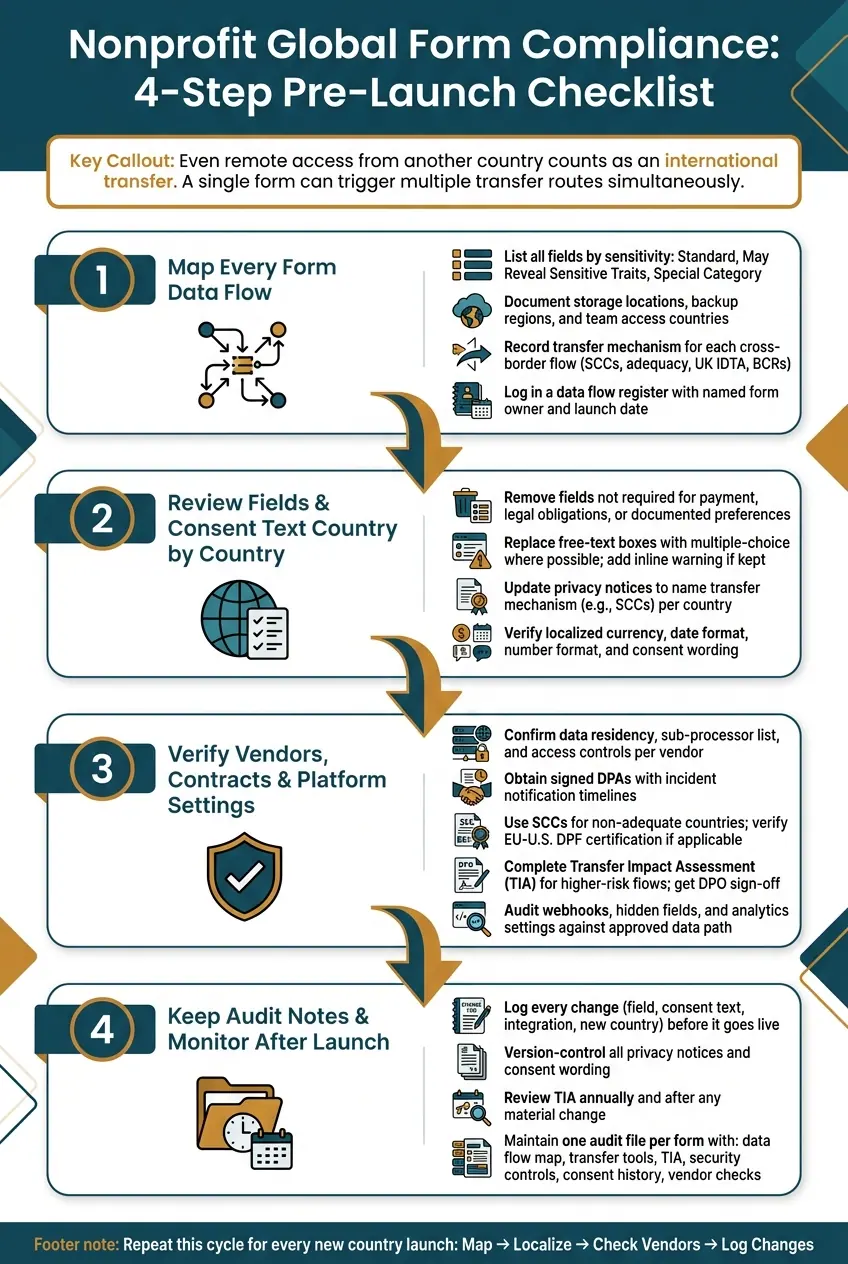
Nonprofit Global Form Compliance: 4-Step Pre-Launch Checklist
Cross-Border Data Transfer Regulations and Compliance Requirements | Exclusive Lesson
sbb-itb-5f36581
Checklist 1: Map every form data flow before launch
Data mapping sits at the center of every later compliance call. Before launch, map what you collect, where it goes, and who can access it.
List fields, purposes, and sensitive data
Start with a clear inventory for every field on the form. Cover identity, contact, donation, account, preference, and free-text fields. For each one, note its purpose and legal basis in every launch market.
Classify fields like this:
- Standard personal data: name, email, phone number, mailing or billing address, country, ZIP code, donation amount, recurring or one-time flag, and payment method.
- Data that may reveal sensitive traits: fields that could indirectly reveal religious affiliation, health status, political views, or union membership.
- Special-category data: explicit health details, religious beliefs, racial or ethnic origin, political opinions, sexual orientation, or union membership.
Free-text fields need extra care. A box labeled "Tell us why you give" can bring in health details, political opinions, or religious beliefs that donors did not mean to formally share. When you can, swap open comment boxes for multiple-choice options. If free text must stay, add a short inline note asking users not to share sensitive personal information.
Use this format:
| Field label | Purpose | Sensitivity level |
|---|---|---|
| First and last name | Issue tax receipts and personalize stewardship emails | Standard |
| Donation amount | Process payment and send acknowledgment | Standard |
| Recurring donation flag | Manage renewal and donor records | Standard |
| Open comments or "tell us why you give" | Donor engagement | Data that may reveal sensitive traits |
| Faith community affiliation | Volunteer matching | Special category |
Document storage locations, access points, and integrations
Once you know what you're collecting, trace where it goes. Map every system that touches a submission: the form platform, payment processor, CRM, email marketing tool, and analytics.
For each system, record:
- The main data center region
- Backup locations
- Which teams can access it
- Which countries those teams access it from
That last part matters more than many teams expect. A U.S.-based staff member and a regional officer in another country can create very different access patterns and risk levels.
A single form builder view can make this much easier. When connectors, APIs, and destinations sit in one place, teams can trace the full data path faster. Reform provides that visibility per form, which makes it simpler to confirm the approved data path before launch.
Record the transfer mechanism for each cross-border flow
After the systems are mapped, log the legal basis for each cross-border flow. Record the mechanism for every flow: adequacy, SCCs, UK IDTA/UK Addendum, or BCRs. Use consent or public-interest exceptions only when needed, and document them separately.
Log each flow in a data flow register tied to a named form owner and launch date. A lean register entry should include the source jurisdiction, destination country and system, data categories involved, transfer mechanism, and a reference to the supporting DPA or SCC. This register becomes your evidence file for regulators and auditors.
Use this map to cut fields you do not need and localize consent text country by country.
Checklist 2: Review fields and consent text country by country
Once you have your data flow map, use it to cut extra fields and tune the remaining text for each country where the form runs. The goal is simple: make sure what you collect, how you explain it, and how it appears on the page all make sense in every market.
Remove unnecessary fields and limit free-text collection
Look at each field and ask one thing: Is this strictly required for payment processing, legal obligations, or a documented supporter preference? If the answer is no, remove it before launch. Every optional field adds to your data footprint and increases compliance risk across every country where the form appears.
Free-text boxes need extra care. People often type more than you expect, and that can include health details, religious beliefs, or political views. That kind of data can trigger stricter transfer review. When you can, use multiple-choice options instead of open text. If a free-text field has to stay, add a short inline note telling users not to share sensitive personal details.
Update privacy notices to explain international transfers
After you trim the fields, review the disclosure that explains how the remaining data moves. Your privacy notice should spell out:
- what data is collected
- why it is used
- where it is transferred
- which approved transfer mechanism applies, such as SCCs or another approved transfer safeguard
It should also explain how users can withdraw consent and exercise their rights, using plain, direct language. No legal fog. Just say what happens and what people can do.
Confirm localized wording, date, and currency display
Wording and display should be reviewed together, country by country. The article uses en-US examples, but each country version needs its own check. A form can be legally sound and still trip people up if the date, amount, or wording feels off.
| Localization Element | Standard (en-US) | Country Check |
|---|---|---|
| Currency | $50.00 | Local currency symbol and decimal usage |
| Date format | 07/27/2026 | Whether DD/MM/YYYY is required |
| Number format | 1,000 | Period vs. comma as thousands separator |
| Consent text | Plain English | Meets local "clear and conspicuous" legal standards |
| Privacy notice | Transfer transparency | Lists the legal mechanism (e.g., SCCs) for each cross-border flow |
Flag any market with data localization or transfer restrictions before launch. That review can shape a very practical choice: which fields to collect, or whether the data should be hosted locally.
Checklist 3: Verify vendors, contracts, and platform settings
After your fields and consent text are locked in, check every vendor and platform setting that could send data outside the country.
Check data residency, sub-processors, and access controls
Start with three plain questions for each vendor: Where is data stored? Who can access it? What third parties do they pass it to? Even when data is stored in-country, support staff in another country viewing those records still counts as an international transfer.
Add every vendor to your data flow register as its own entry. Note the storage country, backup locations, access controls, and sub-processors. If a vendor can't give you a current sub-processor list, treat that as a red flag before launch. And if the vendor changes its storage region, access model, or sub-processors, update the transfer record before launch.
Review DPAs, SCCs, and transfer assessments
For every vendor that receives personal data, run through this checklist:
- DPA: Confirm you have a signed DPA that matches the actual data flow, including incident notification timelines and a promise to keep the sub-processor list up to date.
- SCCs: Use SCCs for transfers to non-adequate countries.
- EU-U.S. DPF: If you rely on the EU-U.S. DPF, verify certification and any limits on onward transfers.
- TIA: For higher-risk flows, complete a Transfer Impact Assessment and record whether extra safeguards are needed.
Have the DPO, legal counsel, or compliance lead sign off on each TIA before launch.
Align form-builder settings with the approved data path
Once the contracts are cleared, make sure the form-builder settings match the approved transfer route. Check webhooks, hidden fields, and analytics settings closely. Those settings can quietly send data to systems that were never part of the first review.
If you are using Reform, use conditional routing and least-privilege access so data stays on the approved path. For API and OAuth 2.0 integrations, audit permissions any time the approved workflow changes.
Checklist 4: Keep audit notes and monitor changes after launch
Launch is where monitoring begins. Once the form is live, keep its transfer record up to date so every cross-border data flow stays on paper. Use the approved launch file as your baseline, then compare every later change against it.
Log transfers, approvals, and form changes
When anything changes - a new field, updated consent text, a new integration, or a launch in another country - log it before it goes live. Keep the record simple:
- what changed
- the date
- the owner
- the approval status
Also, version-control your privacy notices and consent wording. That way, you can show exactly what a donor agreed to on any given date.
Review the TIA again every year and any time a material change affects the destination country's legal or security setting. Put that review schedule into your compliance calendar so each active global form gets checked at least once every 12 months.
Save every logged change in the audit file.
Build an evidence file for each live global form
Keep one audit file per form. The table below shows what your team should retain for each checklist item:
| Checklist Item | Evidence Artifact to Retain |
|---|---|
| Data Flow Map | Spreadsheet listing data categories, subjects, purpose, and destination country |
| Transfer Tool | Executed SCCs with the correct module, DPF certification proof, or BCR references |
| Risk Assessment | Signed TIA including third-country legal framework analysis |
| Security controls | Documentation of supplementary measures, such as encryption with EU-managed keys |
| Consent History | Version-controlled logs of privacy notices and localized consent wording |
| Vendor checks | Sub-processor DPF status checks and signed DPAs |
Every TIA and transfer map should include formal sign-off from your DPO or legal counsel. That signature helps show accountability. These records are your proof that the launch checklist stayed current. Keep fallback transfer tools on file.
Conclusion: The minimum checklist to repeat for every new country launch
For each new country launch, run the same cycle: map, localize, check vendors, and log changes.
FAQs
What counts as a cross-border data transfer?
A cross-border data transfer happens when personal data is sent to, accessed from, or processed in a country outside the jurisdiction where it started.
That can include data stored on servers in another country, remote access from another region, or automated processing that moves copies of data across borders.
It also includes transfers to a third country or an international organization that does not offer the same level of data protection.
Do small form changes require a new review?
Yes. Even small changes can trigger a new review, especially if your consent statement or data collection practices change.
Keep a version history that shows what each person agreed to when they submitted their data. Then update your records to confirm your data mapping and vendor disclosures still match internal policies and global transfer rules.
How should we handle free-text fields safely?
Use data minimization. Collect only the free-text information you need.
Free-text fields can easily pick up sensitive personal data. Because of that, they need stricter transfer reviews and tighter access controls.
It also helps to keep a moderation handbook in place. That handbook should spell out rules for prohibited content, translation checks, and when to escalate issues to legal.
Before any transfer, pseudonymize the data and encrypt the transmission. If possible, keep the cryptographic keys under your control.
Related Blog Posts
Get new content delivered straight to your inbox

The Response
Updates on the Reform platform, insights on optimizing conversion rates, and tips to craft forms that convert.


Drive real results with form optimizations
Tested across hundreds of experiments, our strategies deliver a 215% lift in qualified leads for B2B and SaaS companies.
