
.webp)
Form Data vs CRM Data For AI Scoring



If you use only form data or only CRM data, your AI lead scoring will miss half the picture.
I’d sum it up like this: form data tells you what a lead looked like at the moment they converted, and CRM data tells you what happened after. For AI scoring, you need both. One side gives the model input fields. The other gives it outcome labels like closed-won, closed-lost, or disqualified.
Here’s the short version:
- Form data is best for right-now intent
- CRM data is best for sales outcomes and deal history
- Form-only models often lean toward people who complete forms
- CRM-only models often lean toward old sales habits and messy records
- The best setup joins both into one training dataset with clean field mapping, shared definitions, and date-based model validation
A few numbers make the case clear:
- Multi-step forms average 13.85% conversion vs. 4.53% for single-page forms
- AI scoring often needs around 1,000–2,000 labeled won/lost records
- B2B contact data can decay by 2.1% to 2.5% per month
- CRM duplicate rates should stay under 3%
- Critical CRM field completeness should stay above 90%
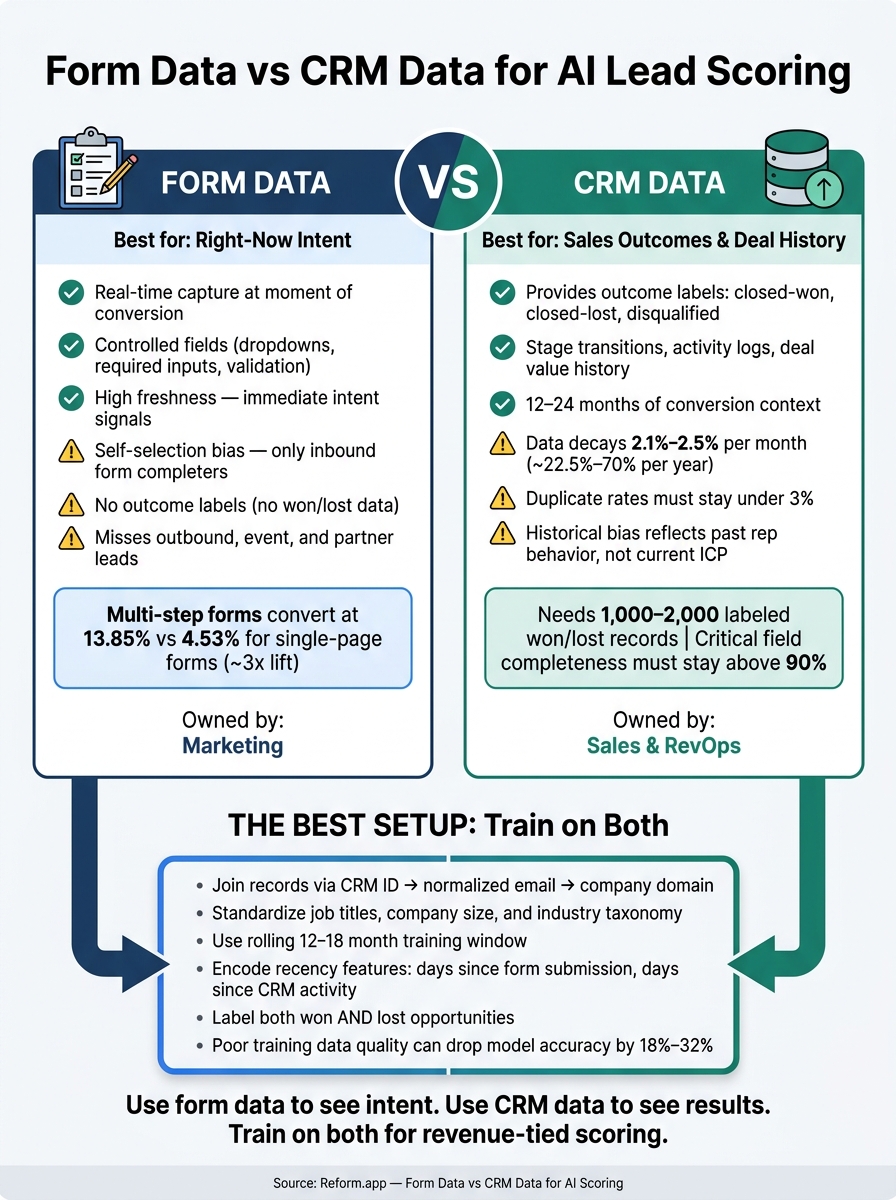
Form Data vs CRM Data for AI Lead Scoring: Side-by-Side Breakdown
Quick Comparison
| Factor | Form Data | CRM Data |
|---|---|---|
| Main use | Intent signals at submission | Outcome labels and sales history |
| Timing | Immediate | Often delayed |
| Data quality | More controlled fields | More gaps, duplicates, free text |
| Main bias | Self-selection from inbound leads | Past rep follow-up and targeting |
| Best for | Short-term lead ranking | Training on conversion outcomes |
| Main risk | Scores for submitters, not revenue | Repeats old pipeline behavior |
If I were putting this into one sentence, it would be: use form data to see intent, use CRM data to see results, and train the model on both if you want scoring tied to revenue instead of guesswork.
sbb-itb-5f36581
Form data for AI scoring: strong on freshness, limited on historical outcomes
Freshness, intent, and controlled field capture
Form data gives you a prospect’s details at the exact moment they act - requesting a demo, downloading a white paper, or signing up for a trial. That timestamp matters. It lets the model score intent right when the action happens, before CRM records have time to catch up.
There’s another plus here: form fields are controlled. Because the inputs come through required fields, dropdowns, and picklists, the data starts out standardized. That consistency makes model training much easier. Add real-time email validation and spam prevention, and you can block bot submissions and fake addresses before they hit your CRM.
Fresh data helps a lot. But if the form itself is weak, the model still ends up working with thin inputs.
Completeness and field quality depend on form design
Form design is a balancing act. Ask for too little, and you miss useful signals. Ask for too much, and people bail.
The sweet spot is usually a short set of high-value fields, like:
- Work email
- Company name
- Role
- Primary use case
Multi-step forms beat static ones by reducing friction and improving data collection. Studies show 13.85% average conversion for multi-step forms vs. 4.53% for single-page forms - about a 3x lift. In plain English, that means you can gather more qualifying details across a few steps without dumping everything on the visitor at once.
Conditional routing pushes this further. If someone picks "Enterprise" as their company size, you can show follow-up questions that fit that buyer. That kind of logic keeps the experience tighter and gives the model cleaner, more consistent features.
Reform uses multi-step flows, conditional routing, enrichment, spam prevention, email validation, and real-time analytics to keep records clean before CRM sync. Still, even clean form data can tilt the model if it mostly reflects one kind of buyer.
Bias in form-submitted datasets
The big problem with form data is self-selection. It only includes people who decided to fill out a form. So the model learns from form completers, not from the full set of buyers in your market.
That can skew scoring in a pretty obvious way. A model trained mostly on form submissions starts to favor the traits of people who complete forms. But those traits don’t always match the traits of the buyers who end up converting.
Some groups - small businesses, non-technical buyers, and international prospects - drop off from forms more often, so they show up less in the dataset even when they bring in revenue. Longer or more detailed forms make this worse. They tend to screen for buyers with more time, more motivation, or more internal resources.
The result? The model may undervalue leads from other channels or leads that don’t fit the usual “form-completer” pattern. And without CRM outcome data, it has no way to tell whether those patterns led to pipeline or revenue. It’s scoring for submissions, not for revenue.
That’s where CRM history comes in next: it shows which form signals actually turned into outcomes.
CRM data for AI scoring: strong on outcomes, weaker on freshness and consistency
CRM data is the stronger source for outcome data. But there’s a catch: the inputs are often older and a lot messier.
Outcome labels and deal history
CRM data gives you something form data can’t: the actual result. It shows which deals closed-won, which opportunities closed-lost, and which leads were disqualified. Those are the labels supervised learning models need. With that history, the model can start to learn which mixes of traits and actions tend to predict conversion.
For AI scoring to work well, you usually need 1,000–2,000 labeled closed-won and closed-lost records, along with 12–24 months of consistently tagged CRM history.
The final outcome is only part of the picture, and creating high-converting lead forms is essential for capturing the intent that precedes it. CRM history also adds context around how deals moved:
- Stage transition timestamps show how fast leads move through the funnel.
- Activity logs track calls, emails, meetings, and demos.
- Deal-level fields like deal value, discounts, and sales cycle length help the model tell apart fast, lower-value deals and slower, higher-value ones.
Those signals matter. But they only help if the fields behind them are clean.
Missing fields, stale records, and bad hygiene
CRM data is only as good as the process used to maintain it. And in practice, it’s often rougher than teams expect.
Key fields such as industry, employee count, and annual revenue are often blank, especially in older records or leads that reps entered by hand. Job titles also age fast. Data quality experts recommend a 90-day freshness window for B2B contact data in live records. After that, role accuracy and reachability can drop fast.
Duplicate contacts and accounts can do real damage. They split activity history across records, inflate pipeline numbers, and feed mixed signals into AI models.
Inconsistent picklists make things worse. If one rep enters an industry as "SaaS", another uses "Software as a Service", and a third types "software SaaS", the model reads those as different values even though they mean the same thing. Lifecycle stages have the same issue. Some reps skip stages. Others leave opportunities sitting as SQL for 90+ days with no movement. That makes conversion metrics shaky as training labels.
Historical bias and data ownership in RevOps and Sales
CRM data reflects past sales choices. It shows which segments your team focused on, which territories they worked, and which leads got fast follow-up. So when you train a model on CRM history, you’re also training it on what reps decided to work.
That can create a real problem. If enterprise accounts got faster follow-up and more touchpoints in the past, they’ll likely show stronger conversion rates in the data. But that doesn’t always mean they were better leads. It may just mean they got better treatment. A model trained on that pattern can keep scoring enterprise leads higher even if your team is now going after mid-market accounts. In other words, old sales behavior can keep steering new scoring. Historical bias can lock the model into the old ICP instead of the one your team is trying to build now.
Ownership makes this trickier. RevOps usually manages CRM architecture, field definitions, and data governance. Sales Ops and Marketing Ops, meanwhile, tend to own their own stage and pipeline fields. That means shared definitions aren’t optional. If marketing and sales mean different things by MQL, the model starts from inconsistent labels. Using a lead gen template with multiple outcomes can help standardize these paths from the start.
Used on its own, CRM history can hard-code old sales motion instead of current buying behavior.
That sets up the direct comparison of where form data and CRM data each do their best work.
Form data vs CRM data: a direct comparison across five key factors
Here’s the side-by-side view of the factors that matter most for model training.
| Factor | Form Data | CRM Data |
|---|---|---|
| Freshness | Real-time; captured at the exact moment of intent | Often delayed by days or weeks |
| Completeness | High for required fields; limited to what the prospect provides | Broader history, but often incomplete |
| Bias | Inbound self-selection bias; only reflects prospects who chose to engage | Past rep behavior and prioritization |
| Field Quality | High, with controlled inputs and validation | Variable; prone to free text, duplicates, and inconsistent taxonomies |
| Ownership | Marketing | Sales and RevOps |
Freshness and completeness
Form data has a clear edge on recency. If someone submits a demo request or pricing inquiry, that signal reflects what they want right now. For that reason, form data is usually the better input for spotting immediate intent.
CRM records give you more history. They may include multiple contacts, past opportunities, and activity logs. But there’s a tradeoff: B2B contact data decays at roughly 2.1% to 2.5% per month, which adds up to about 22.5% to 70% per year, depending on the study and segment. When CRM fields go stale, the model can get a warped picture of which accounts are still active.
For inbound, high-intent funnels like demo requests, trial signups, and pricing inquiries, recency often matters more than historical depth. The main question is simple: who looks ready to buy today? Form data usually answers that better. CRM history matters more when you're modeling account-level propensity across longer enterprise sales cycles, where prior buying behavior and engagement across many contacts start to matter more. Put plainly, freshness matters most when the model needs to rank near-term intent, not past account value.
Bias and field quality
Form data leans toward inbound prospects who were motivated enough to fill out a form. That leaves outbound leads, event contacts, and partner referrals underrepresented. The result? A model may score those channels too low, even when the leads are solid.
CRM data has a different bias. It reflects who the sales team chose to work in the past. And this is where day-to-day field quality often becomes the biggest issue. A well-built form uses powerful form templates with dropdowns, required fields, and validation to keep inputs clean and consistent. CRM data tends to collect years of free-text notes, duplicate records, and naming inconsistencies that pile up over time.
Benchmarks suggest that a duplicate rate under 3% and critical field completeness above 90% are good targets if CRM data is going to support scoring in a dependable way. Many teams miss those marks unless they run active data hygiene programs. When training data quality slips, model accuracy can drop by 18% to 32%, and fixing that often means a full retrain instead of light tuning.
Reform helps standardize form-side inputs with conditional routing, email validation, lead enrichment, and controlled fields. Still, even clean form data can point the model in the wrong direction if it comes from only one narrow segment of buyers.
Ownership and model training impact
Ownership shapes which signals and labels each team controls. Marketing owns forms, so form data lines up with marketing goals like conversion rate, field coverage, and routing rules. Sales and RevOps own CRM records, so CRM data lines up with pipeline stages, deal size, and closed-loop outcomes.
That split has a direct effect on model training. Form-only models are good at picking up live intent, but they usually lack outcome labels. CRM-only models have outcome labels, but they can miss fresh buying signals. That’s why the next step is to join form data and CRM data into one training dataset.
How to combine form data and CRM data into one scoring dataset
Bring both sources into one training set. Form data gives you current intent. CRM data gives you outcome labels. The tricky part is joining them cleanly so the model sees both signals in the same record.
The next move is simple in theory: turn those two sources into one training record.
How to join records and standardize features
Match records in this order: CRM lead/contact ID, normalized email, then company domain and standardized company name. Form records bring the first submission, while CRM records add the later outcome.
Once the match is stable, standardize fields before training. If you skip this step, the model ends up learning from messy inputs instead of buyer behavior.
Normalize:
- Company size into consistent ranges
- Job titles into function and seniority buckets
- Industry into a controlled taxonomy of 20–50 categories
Keep a version-controlled feature dictionary in RevOps or analytics. That gives everyone one shared reference point when fields change, picklists shift, or someone asks, “What exactly does this feature mean?”
Also preserve the key timestamps:
- Form submission time
- Lifecycle stage changes
- Opportunity created date
- Closed date
Those dates matter because they let you run date-based train/validation splits that mirror how the model will work in production.
After that, clean up bias and data decay.
How to reduce bias and data decay in a combined model
Balance channels, label lead source as a feature, and review performance by segment. Include leads from all major sources - website forms, sales-sourced, events, and partner referrals - and track precision and recall by source segment. That helps you spot cases where the model keeps over-scoring one channel.
You should also drop or flag CRM records that have been inactive for 12+ months, then retrain on a rolling 12–18 month window. On top of that, encode recency straight into the dataset with features like "days since last form submission" and "days since last meaningful CRM activity." That way, the model can treat older signals as weaker without tossing them out completely.
One more thing: label both won and lost opportunities. If lost examples are missing, the model starts leaning too hard on success patterns and learns the wrong lesson. At that point, it's not reading behavior anymore. It's reading old pipeline habits.
Those controls only hold up when Marketing and RevOps each manage their side of the process.
Responsibilities for marketers and RevOps teams
Marketing owns form design and field mapping. In plain English, that means making sure captured inputs flow cleanly into scoring features.
RevOps owns joins, schema, and label quality.
When both teams work from a shared field map and clear schema governance, the combined model stays on track even as forms and CRM picklists change over time.
FAQs
When is form data enough for AI scoring?
Form data can be enough for AI scoring if it's clean, structured, and detailed enough to show key buyer signals.
That usually means using validated, multi-step forms with real-time email validation, spam prevention, and lead enrichment. Your forms should also collect key fields like job role, company size, and budget. Tools like Reform can help standardize entries before they hit your CRM.
How much CRM history do I need to train a model?
Use about 12–24 months of CRM history. For training, aim for at least 200 closed-won and 200 closed-lost deals.
It also helps to have 1,000+ lead records and 120–200+ closed-won deals. More data gives the model a better shot at spotting patterns instead of guessing.
Your key labeled fields should be clean and about 70% complete. If that data is messy or missing, scoring quality drops fast.
Set aside 4–6 weeks for CRM data cleanup before training. That prep work can feel tedious, but it often makes the difference between a model that helps and one that sends your team on a wild goose chase.
What’s the best way to combine form and CRM data?
Use your CRM as the single hub. Sync form submissions into it with consistent field mapping and near real-time updates. That way, new data lands where it should without a mess of mismatched fields.
It also helps to validate and enrich data at submission. If key CRM fields are filled before scoring starts, your model has a much better shot at making solid calls from the start.
Store timestamps, too. They give the model a clean event timeline to learn from and make score updates fast when something changes.
And keep stage definitions clean and stable. If stages keep shifting, the model ends up learning from moving targets, which can throw off scoring.
Related Blog Posts
Get new content delivered straight to your inbox

The Response
Updates on the Reform platform, insights on optimizing conversion rates, and tips to craft forms that convert.




Drive real results with form optimizations
Tested across hundreds of experiments, our strategies deliver a 215% lift in qualified leads for B2B and SaaS companies.
