
.webp)
Sync Form Leads to HubSpot and Salesforce



If you use one form with HubSpot and Salesforce, the main job is simple: pick one system to lead, set field ownership up front, and use email for dedupe. If you skip that, attribution, routing, and owner sync can drift fast.
Here’s the short version:
- HubSpot-first: best when marketing owns source data, UTMs, and lead intake
- Salesforce-first: best when sales owns routing, assignment rules, and CRM timing
- Dual-write: best when both teams need the lead in both systems right away, but conflict risk is highest
- Reform → HubSpot → Salesforce: best when you want to clean, qualify, and shape data with multi-step forms before sales sees it
A few points matter in every setup:
- Use email as the main dedupe key
- Set one system per field as the source of truth
- Lock down attribution fields early
- Match owner records across HubSpot and Salesforce
- Use upserts instead of blind creates to cut duplicate leads
In many teams, even a small mapping mistake can affect 100% of new form submissions until it gets fixed. And in dual-write setups, shared fields can flip on a last-write-wins basis unless you set rules ahead of time.
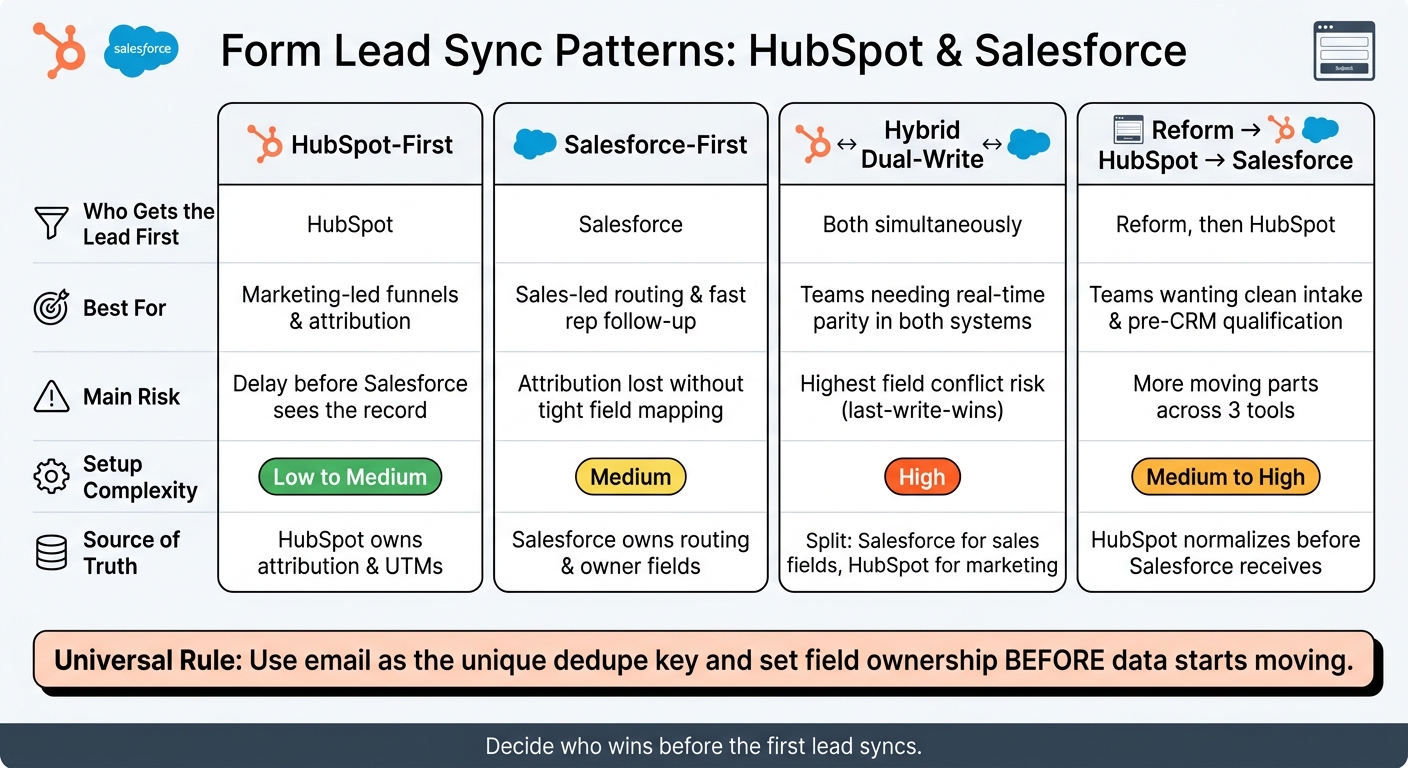
HubSpot vs Salesforce Form Sync Patterns: Which Is Right for You?
HubSpot Salesforce Integration V2: New Sync Engine & Feature Deep Dive
sbb-itb-5f36581
Quick Comparison
| Pattern | Who gets the lead first | Best for | Main risk |
|---|---|---|---|
| HubSpot-first | HubSpot | Marketing-led funnels and attribution | Delay before Salesforce sees the record |
| Salesforce-first | Salesforce | Sales-led routing and fast rep follow-up | Source data can get lost without tight mapping |
| Dual-write | Both at once | Teams that need both systems updated right away | More field conflicts |
| Reform → HubSpot → Salesforce | Reform, then HubSpot | Teams that want cleaner intake and qualification | More setup across 3 tools |
If I had to boil it down to one rule, it’s this: decide who wins before the first lead syncs.
1. HubSpot-First Sync
Use HubSpot-first when marketing needs to control lead capture, attribution, and first-pass routing before Salesforce gets the record. In this setup, the form submission lands in HubSpot first. HubSpot then creates or updates the contact, cleans up field values, records attribution, and syncs the record to Salesforce through the native connector.
Data Flow
With multi-step forms, HubSpot can save partial submissions at a step you choose. That helps you keep leads that start the form but never finish it. When the full submission comes in, the native connector maps HubSpot properties to Salesforce Lead fields. Order matters here. Attribution needs to be recorded before Salesforce has a chance to overwrite it.
Source Tracking
Capture UTMs in hidden fields at submit time and map them to HubSpot attribution properties. For example, map utm_source to Original Source Drill-Down 1. Then sync those fields one way from HubSpot to Salesforce so Salesforce keeps the first campaign context. After attribution is locked in, apply routing and ownership rules in HubSpot before the record moves into Salesforce.
Ownership Rules
Assign ownership in HubSpot with workflow rules based on territory, product interest, or round-robin logic. Then pass that owner into Salesforce. Keep HubSpot owners matched to active Salesforce users. If they don’t line up, ownership can fall back to the Salesforce owner. Once ownership is set, the next thing to watch is field conflict during sync.
Sync Conflicts
Avoid conflicts by setting one-way sync rules by field group. A simple split works well:
- Send attribution fields from HubSpot to Salesforce
- Send account and opportunity data from Salesforce to HubSpot
Also document lifecycle stage rules, since the native connector supports two-way sync. And turn on email-based deduplication in Salesforce to reduce duplicate Lead records when someone submits the form again. This setup gives HubSpot control at the front of the process, but it only stays steady if field mapping is clean and users stay aligned.
2. Salesforce-First Sync
This setup flips the HubSpot-first model on its head: Salesforce gets the lead first, and HubSpot gets the cleaned-up version after that.
Use Salesforce-first when the sales team owns the CRM and needs control over lead creation, assignment, and pipeline data before marketing automation starts. In this flow, the lead form sends data straight into Salesforce through the API or Web-to-Lead. Salesforce then creates or updates a Lead record. Once that happens, the native HubSpot–Salesforce connector picks up the record and syncs it into HubSpot. The big shift here is simple: sales rules run first, marketing comes second.
Data Flow
The form posts to Salesforce first. Salesforce runs duplicate checks, often using email-based matching, creates the Lead, and applies assignment logic. After that, the HubSpot–Salesforce connector mirrors the record into HubSpot as a Contact.
That mapping works like this:
- Salesforce Leads and Contacts map to HubSpot Contacts
- Accounts map to Companies
- Opportunities map to Deals
Because HubSpot gets the record only after Salesforce has processed it, HubSpot receives a handled record instead of raw form data.
Source Tracking
Capture UTM parameters, referral source, landing page URL, and campaign IDs as hidden form fields. Then store them in dedicated Salesforce fields like First Touch Source, Latest Touch Source, and UTM Campaign.
This matters a lot in a Salesforce-first setup. Since Salesforce handles the lead before HubSpot ever sees it, you need to preserve the original campaign data at this step. Then map those fields 1:1 into HubSpot contact properties so HubSpot can use them for reporting and segmentation.
In this model, Salesforce owns the original source fields, and HubSpot uses those mapped values for reporting and segmentation. It also helps to make Salesforce Lead Source read-only, so manual edits don’t wipe out campaign history.
If attribution data never makes it into HubSpot, your reports can show leads as direct or unknown even when they actually came from paid campaigns.
Ownership Rules
Salesforce should handle ownership. Use lead assignment rules, queues, or routing logic to assign the Lead before it reaches HubSpot.
Treat Salesforce as the source of truth for owner fields. Salesforce assigns the owner first, HubSpot mirrors that assignment, and aligned user records help avoid sync issues. If Salesforce and HubSpot users aren’t lined up properly, owner sync can break.
Sync Conflicts
The biggest trouble spots are shared fields, especially owner, title, and phone. In a Salesforce-first setup, most contact and company fields should sync Salesforce → HubSpot so sales edits in Salesforce stay in control.
Save HubSpot → Salesforce for marketing-only data, like email engagement metrics. If lifecycle stage is part of the sync, tie it to Salesforce status and opportunity stage instead of marketing activity alone.
For fields that need two-way sync, set one clear rule for each shared field. Most teams let Salesforce win. That tends to work best here. If a field is shared, Salesforce should own it unless you’ve clearly set it aside for marketing activity. And if both teams need the same write access, that’s usually the point where a dual-write setup makes more sense.
3. Hybrid Dual-Write Sync
In this setup, the form sends data to both systems at the same time, either in parallel or through middleware. Unlike first-write syncs, this model gives up a clean sequence in exchange for immediate parity between HubSpot and Salesforce.
This setup fits best when marketing depends on HubSpot for nurturing and attribution, while sales depends on Salesforce for pipeline and forecasting. The upside is obvious: both teams can work from their own system right away. The downside is just as clear: conflicts are more likely.
Data Flow
Each submission triggers two writes. HubSpot creates or updates a Contact. Salesforce creates or updates a Lead or Contact based on your matching rules. Use email as the main dedupe key, with company and name as backup. Use a shared key, like a submission ID or CRM ID, to connect records across both systems.
Before you switch this on, set one canonical field map so every form field has a destination in both HubSpot and Salesforce. For example, job_title should map to HubSpot’s jobtitle property and Salesforce’s Title field. Do this before the sync goes live, not after.
Source Tracking
Capture UTMs, referrer URL, landing page, and form ID as hidden fields, then write them to both systems at submission time. Keep HubSpot as the source of truth for marketing attribution, and stop Salesforce from overwriting those fields.
Ownership Rules
Owner sync is where things usually get messy. HubSpot and Salesforce both handle owner as a bi-directional sync, so the last write wins. If sales updates a record in Salesforce while marketing edits it in HubSpot, ownership can bounce back and forth.
A cleaner setup is to make Salesforce the authority for sales ownership and have HubSpot mirror that value.
Sync Conflicts
Dual-write setups raise conflict risk because both systems can update the same field. The fix is simple in theory, even if it takes discipline in practice: keep bi-directional sync limited to a small group of fields that both teams truly manage, and make the rest flow one way.
| Field Type | Sync Direction |
|---|---|
| Phone, Title, Company | Salesforce → HubSpot |
| Marketing source, UTMs | HubSpot → Salesforce |
| Owner | Two-way, with Salesforce authoritative |
| Lifecycle stage / Lead status | Shared lifecycle rules |
You should also define a small set of allowed stage changes. That helps prevent HubSpot automation and Salesforce processes from pushing the same record in opposite directions.
If that starts to feel hard to control, push validation and normalization upstream so the record gets cleaned using lead gen multi-step forms before either CRM touches it.
4. Reform + HubSpot + Salesforce Sync
This setup follows a simple path: Reform → HubSpot → Salesforce.
Reform collects the form submission. HubSpot creates or updates the contact first. Then HubSpot’s Salesforce sync sends that record downstream. In plain English, HubSpot acts as the intake and routing layer before the sales team sees the lead.
The tradeoff is pretty clear. You give up some of the speed that comes with sending data straight into the CRM, but you get cleaner intake and tighter control over fields.
Data Flow
This pattern is different from a first-write sync because it cleans and shapes the data before Salesforce ever touches it.
Start by connecting the form to HubSpot. From there, HubSpot passes only the right records into Salesforce. It uses inclusion rules to decide which contacts should sync.
Map the main identity fields from Reform into HubSpot first:
- first name
- last name
- phone
- company
- role
Then use HubSpot to normalize multi-step answers, dropdown values, and consent fields before Salesforce receives anything. Marketing attribution data like UTM source, campaign, and landing page should also stay intact so reporting still works downstream.
HubSpot can also validate, score, and segment contacts before sync. That matters. If you use an inclusion list so only qualified contacts move into Salesforce, the pipeline stays cleaner. And sales doesn’t have to sort through every top-of-funnel form fill.
Source Tracking
Reform should capture UTMs, referrer URL, landing page, and form ID at the time of submission, then pass those into HubSpot as read-only properties.
HubSpot should own the original source, original UTM parameters, and first-touch campaign metadata. Salesforce can receive the same values or a trimmed-down set if the sales team only needs basic visibility and reporting.
Ownership Rules
With this model, HubSpot should assign the first owner and then keep that owner intact in Salesforce.
That’s one of the big reasons teams use this setup. Ownership gets decided after validation but before Salesforce routing. So instead of throwing every raw lead into sales logic, you make the call once the record is cleaner.
If your sales team depends on Salesforce assignment rules, use those as a backup. Or use them only when HubSpot hasn’t already assigned an owner.
There’s one catch: the Contact Owner field can only point to active HubSpot users. That means every Salesforce owner needs a matching HubSpot user record, or ownership sync can break.
Sync Conflicts
The biggest trouble spots here are duplicate records, field overwrites, and owner mismatch.
The safest move is to set one source of truth for each field. Without that, things can get messy fast.
HubSpot deduplicates by email, so if someone submits a Reform form using an email that already exists, HubSpot updates the existing contact instead of making a new one. Still, duplicates can show up when a person uses alternate contact details. That’s why it helps to line up deduplication rules around email, domain, or your CRM’s match logic.
For field-level conflicts, set a clear precedence rule for each property. Marketing source fields should move HubSpot → Salesforce in one direction only. If a salesperson edits a field in Salesforce and HubSpot later updates that same property, the rule you set ahead of time decides which value wins.
That’s the core tradeoff with this pattern: less raw syncing, more control over what each system receives.
Pros and Cons of Each Sync Pattern
Every sync pattern makes a different tradeoff between speed, control, and setup effort. The table below gives you the quick version.
HubSpot-first puts HubSpot in charge of attribution. It works best when marketing needs control over first-touch data. The upside is stronger attribution. The downside is slower visibility in Salesforce, and bad filters can stop leads from ever reaching the CRM.
Salesforce-first puts Salesforce in charge of routing. It fits teams where sales owns routing and pipeline timing. The upside is fast intake for sales. The catch is that attribution can fall apart if your field mapping isn’t tight.
Hybrid dual-write lets both systems update at the same time, which sounds great on paper. Both teams get near real-time updates, but conflicts go up fast. You need strict field ownership, or things get messy.
Reform + HubSpot + Salesforce adds a cleanup step before data lands in either system. That means pre-CRM qualification, routing, and enrichment. The upside is cleaner intake and tighter control. The downside is simple: more moving parts to set up and watch.
| Sync Pattern | Strengths | Limitations | Setup Complexity | Best For |
|---|---|---|---|---|
| HubSpot-First | Strong marketing attribution; HubSpot owns source data and UTMs | Short delay before leads appear in Salesforce; bad filters can block leads | Low to Medium | Marketing-led teams focused on attribution and nurturing |
| Salesforce-First | Immediate sales routing; assignment rules and pipeline tracking start instantly | Attribution harder to preserve without careful field mapping | Medium | Sales-led teams with territory-based routing and fast response SLAs |
| Hybrid Dual-Write | Near real-time updates for both teams | Highest conflict risk; requires strict field ownership | High | Mature RevOps teams with strong data governance and dedicated oversight |
| Reform + HubSpot + Salesforce | Cleaner intake and routing; pre-CRM qualification and enrichment | More moving parts; integration mapping must be precise across three systems | Medium to High | Growth teams that want high-converting forms and flexible routing without engineering |
Use this comparison to line up your source of truth before you pick a sync model.
How to Choose the Right Sync Pattern
Now that you've seen the pattern options side by side, pick the one that lines up with your source of truth. In plain English: decide which system wins when two records don't match.
Go with HubSpot-first when marketing owns attribution and only sales-ready records should flow into Salesforce.
Choose Salesforce-first when sales owns routing and Salesforce needs to upsert by email before HubSpot gets the record.
Use hybrid dual-write only if both teams need to edit the same record in real time. If you take that route, set field ownership before you turn on bidirectional sync. If you skip that step, things can get messy fast.
Pick Reform when the form itself needs to validate, normalize, and route leads before either CRM receives anything.
If two patterns seem like a fit, use the scenarios below as the tie-breaker:
| Scenario | Recommended Pattern |
|---|---|
| High-volume inbound (ebooks, webinars) with UTM attribution | HubSpot-first |
| "Talk to Sales" or demo requests needing fast routing | Salesforce-first or Hybrid |
| SaaS trials with behavioral scoring across both teams | Hybrid dual-write |
| Enterprise ABM targeting named U.S. accounts | Salesforce-first or Hybrid |
| Paid media landing pages with spam prevention and enrichment | Reform + HubSpot + Salesforce |
One rule applies no matter which pattern you choose: use email as the unique key, upsert records, and set field ownership before data starts moving.
FAQs
How do I choose the right sync pattern?
Choose the setup that fits your workflow, your team’s technical bandwidth, and the amount of data you need to move.
- Direct API connections work best for simple, one-to-one integrations
- Webhooks are a good fit for real-time, event-driven, one-way data flow
- Middleware makes sense for more complex stacks or heavier data transformation
For standard workflows, start with native integrations. If you need deeper logic, custom API connections or middleware are usually the better next step.
Which system should own attribution data?
To avoid sync conflicts, give each field one system of record.
For attribution data like lead source and campaign IDs, that system should usually be your marketing automation platform or form capture tool. That way, one source writes the data, and the rest of your stack follows it.
Hidden fields in Reform make this easier. You can use them to collect UTM parameters and send that data straight to the right CRM properties.
Set these ownership rules before you configure your integrations. It’s a small step, but it keeps attribution clean and dependable.
How can I prevent duplicate leads?
Set one primary identifier - usually an email address - across both your form and CRM, and use upsert so matching records get updated instead of created again.
It also helps to standardize data formats, set clear deduplication and merge rules, and define field ownership so one system doesn’t overwrite the other.
Reform can help with email validation, spam prevention, and custom mapping before data syncs.
Related Blog Posts
Get new content delivered straight to your inbox

The Response
Updates on the Reform platform, insights on optimizing conversion rates, and tips to craft forms that convert.




Drive real results with form optimizations
Tested across hundreds of experiments, our strategies deliver a 215% lift in qualified leads for B2B and SaaS companies.
