
.webp)
Why Mobile App Forms Boost Conversions



Mobile app forms often beat mobile web and desktop forms because they ask for less work. When users are signed in, fields are prefilled, and the form shows up at the right moment, completion can jump from about 22% on mobile web to as high as 85% in app-based conversational flows.
Here’s the short version:
- Less typing wins. Short forms, prefill, address autocomplete, and mobile-ready inputs cut drop-off.
- Form structure matters. Multi-step flows can lift conversion by 21% to 86%, depending on the setup.
- Timing matters. In-app prompts shown after a key action can improve response rates by 30%.
- Data quality can improve too. App identity, enrichment, and direct CRM routing help teams get cleaner submissions and faster follow-up.
- The biggest lever is simple: keep field count low and only ask what you need.
If I had to boil the article down to one point, it would be this: apps do not win just because they are apps. They win when the form feels easy, looks short, and fits the moment.
Quick comparison
| Channel | What usually helps | What usually hurts | Typical result |
|---|---|---|---|
| Mobile app forms | Signed-in users, prefill, better timing, native inputs | Poor timing, too many fields | Highest completion when friction is low |
| Mobile web forms | Simple forms, good mobile layout | More typing, weaker context, more friction | Lowest completion in most cases |
| Desktop forms | Higher intent, easier typing | Long forms, weak structure | Often better than mobile web, but below strong in-app flows |
A few numbers stand out. Cutting a checkout form from 14 fields to 7 moved conversion from 2.3% to 6.8% in one example. And adding fields after the first few can push lead costs up fast, especially in B2B SaaS.
So when I read the research, the message is plain: shorter forms, step-by-step flows, conditional questions, and fast follow-up drive more submissions and more pipeline.
sbb-itb-5f36581
Evidence That Mobile App Forms Convert Better Than Mobile Web and Desktop
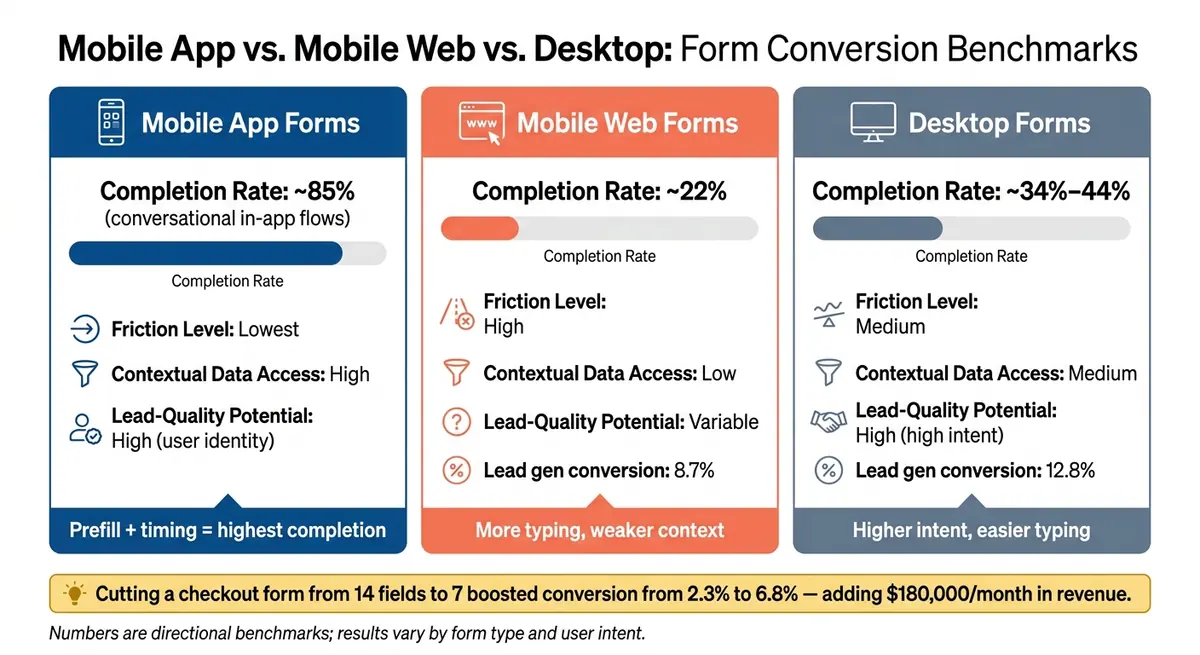
Mobile App vs. Mobile Web vs. Desktop Form Conversion Rates
When in-app forms cut friction and use app data well, they tend to beat both mobile web and desktop. The gap can be pretty wide.
The table below shows the general pattern. These numbers are directional, not fixed rules, since results shift based on form type and user intent.
| Metric | Mobile App Forms | Mobile Web Forms | Desktop Forms |
|---|---|---|---|
| Completion rate | ~85% for conversational in-app forms | ~22% | ~34%–44% |
| Friction Level | Lowest | High | Medium |
| Contextual Data Access | High | Low | Medium |
| Lead-Quality Potential | High (user identity) | Variable | High (high intent) |
The main lift comes from lower friction and better context, not just from being inside an app.
Completion Rate Benchmarks Across Devices and Channels
The difference shows up fast in the benchmark data. Mobile web forms usually convert at only 22%, while conversational in-app forms reach about 85%. Desktop sits between them, with completion rates of about 34% to 44%.
You see a similar split in lead generation. Mobile web forms convert at 8.7%, compared with 12.8% on desktop, which leaves a 32% gap. That gap gets smaller when apps lean on native tools like digital wallets and biometric inputs, especially during checkout.
That’s where channel and form design start to overlap. The app itself helps, sure, but the form pattern often does the heavy lifting.
What Studies Show About Multi-Step, Conversational, and Embedded In-App Forms
Form structure matters just as much as where the form appears. In mobile lead-gen flows, multi-step forms convert 86% higher than single-page forms. That sounds a little backward at first - wouldn’t fewer steps be better? Not always. A long page can feel like work, while smaller chunks feel easier to finish.
Conversational layouts push this even further. When a form feels more like a chat than a static list of fields, per-question abandonment drops from 18% to 3%. That’s a huge shift.
Apps also have a timing edge. They can show prompts right after onboarding or just after a key action, when user intent is strongest. In those moments, response rates can go up by 30%.
Higher completion is great, but it means more when those extra submissions are worth more.
How In-App Forms Affect Lead Quality and Revenue Downstream
Completion rate is only part of the picture. In-app forms can also bring in cleaner leads because app identity and behavior data help with qualification. Put simply, you’re not just getting more form fills - you may be getting better ones too.
One example comes from a 2026 Markana Media project. The team cut a mobile checkout form from 14 fields to 7. In two weeks, conversion jumped from 2.3% to 6.8%, which added $180,000 in monthly revenue.
Why Mobile App Forms Perform Better: UX Patterns Backed by Research
The conversion gap mostly comes down to three things: less typing, better mobile input design, and showing prompts when intent is highest.
Once an app has a user’s attention, the next gain usually comes from cutting friction at the field level. That’s where a lot of mobile forms win or lose.
Fewer Fields, Pre-Fill, and Reducing Input Effort
Field count is one of the clearest levers in mobile form design. Three-field forms convert at 25%, but pushing that to seven fields drops completion to 12%. In B2B SaaS, every field added after the first three costs about $10.75 per lead when cost per click is $10.
That drop makes sense. On mobile, every extra field feels a little heavier. Typing on a small screen gets old fast.
Apps have an edge here because they can pull from saved profile data, account details, and geolocation to fill in parts of the form for the user. Instead of asking someone to type the same basics again, the app can do part of the work. Address autocomplete APIs can improve mobile checkout conversion by 15% to 20%.
After field count, layout becomes the next source of friction.
Single-Column Layouts, Mobile Inputs, and Step-by-Step Forms
Small layout choices that barely matter on desktop can trip people up on mobile. Single-column, full-width inputs help users avoid pinch-and-zoom friction. Tap targets should also be 44–48 px tall so they’re easy to hit with a thumb.
Input type matching matters just as much. For example:
type="tel"opens a numeric keypad and can cut entry time by 50% or moretype="email"shows an email-ready keyboard with@and.
These sound like minor tweaks, but they smooth out the experience in places where mobile users often bail.
Longer forms also work better when broken into steps. A step-by-step flow with a progress bar produces an 86% conversion lift over a single-page form. Showing just one or two fields per screen improves focus by 57%. A progress bar helps too because people can see they’re moving forward instead of wondering how much is left.
Conditional Logic and Timing Forms to High-Intent Moments
The last lever is relevance: ask only what matters, and ask it when the user is most ready to answer.
Conditional logic hides fields that don’t apply and shows only the questions tied to earlier responses. So instead of dumping every possible field on the screen at once, the form changes as the user moves through it. That lowers perceived complexity without cutting the amount of data collected.
In-app environments also make timing much easier. A form can appear right after a key action, like finishing onboarding or visiting a pricing screen, when the user is already engaged and more likely to respond. When the form adjusts to the user and shows up at the right moment, it feels less like a survey and more like the next logical step.
Technical Advantages of In-App Forms for Measurement, Enrichment, and Follow-Up
Better UX gets users to the form. Then app data, analytics, and integrations help you get more from every submission.
Once UX cuts friction, in-app systems can keep improving performance after the form is submitted.
Using App Data to Enrich Leads Without Adding More Fields
In-app forms can pull from known account and session data, which means users don’t have to type the same details over and over. In B2B, that cuts manual work and can improve lead quality at the same time.
Lead enrichment tools can use an email domain to auto-fill company data. That simple step delivers a 9% lift in conversion by removing the need for manual entry. Instead of asking for everything up front, teams can also use progressive profiling to collect only 2–4 core fields first, then add to the record later.
That matters because every extra field adds effort. If the app already knows part of the story, the form shouldn’t ask the user to repeat it.
Event-Level Analytics for Testing and Funnel Optimization
The next edge is visibility. In-app forms can show field-level behavior, not just where people leave the form.
In-app analytics can reveal field-level abandonment, which makes friction much easier to spot and fix. For example, password fields alone drive a 10.5% mean abandonment rate. Teams can track:
- Form impressions
- Form starts
- Per-field exits
- Post-submit actions
That data helps pinpoint where the funnel leaks. If one field or step is driving drop-off, teams can test a specific fix instead of guessing. They might change the copy, reorder fields, or split one long form into steps by designing the perfect landing page form, then measure what changed with more confidence.
CRM and Marketing Automation Integration for Faster Lead Follow-Up
That visibility matters most when submissions hit sales systems right away.
Clean data handoff is one of the easiest places to lose lead value. Live validation improves completion rates by 5% to 13%, which means the CRM gets cleaner records from the start. From there, proper field mapping, routing logic, and direct CRM integration can send qualified submissions to the right rep or workflow while intent is still high.
In plain terms, speed matters. If a lead submits a form and the data flows straight into the right system without errors, the follow-up can happen while that person is still engaged.
Applying the Research With Reform and Key Takeaways
How Reform's Features Align With Research-Backed Conversion Drivers
Those findings map cleanly to three moves in Reform: multi-step flow, conditional routing, and lead enrichment.
Conversion drops hard after five fields, falling from 17.0% at five fields to 11.4% at seven. That matters because a long form doesn't just look like more work. It feels like more work. Split a 7-field form into steps and add a progress bar, and the form becomes easier to get through. Both changes cut perceived effort and can lift completion. In B2B lead-gen, multi-step forms have shown a 21% lift, and a progress indicator adds another 11–15%.
Conditional routing takes care of the rest. Instead of showing every field to every person, it hides questions that don't fit that user's path. That helps teams stay under the five-field threshold while still collecting the data they need. Reform's lead enrichment adds another layer by filling in company details from an email domain automatically, so users don't have to type those fields at all.
Using Reform Analytics and Integrations to Improve Form Performance
Once the form is live, measurement closes the loop. Reform's real-time analytics show view-to-completion, step drop-off, and abandoned submissions, which makes it easier to spot the exact field or step that breaks mobile flow.
Then teams can make one focused change at a time, like reordering fields, changing copy, or splitting a step, and check the result directly. CRM integrations route qualified submissions right away, so follow-up doesn't slow down after the form is finished.
Conclusion: What the Research Most Clearly Supports
Put together, the research points to one rule: reduce effort, capture only what matters, and route leads fast.
The main pattern is simple. Shorter, better-timed, more personalized forms convert best, and analytics plus fast routing help keep that gain in place.
The clearest takeaway is this: field count and form structure are the highest-leverage variables. Multi-step and conditional flows show steady gains across contexts. And without analytics tied to step-level behavior and CRM routing for fast follow-up, even a well-designed form leaves measurable pipeline on the table.
FAQs
Why do in-app forms convert better?
In-app forms tend to convert better because they ask less from people on small screens. On mobile, every extra field feels like work. And when labels are vague, people are more likely to give up before they finish. A shorter, guided form feels simpler, which makes it easier to complete.
They also cut friction in a few practical ways: mobile-friendly input, autofill, inline validation, and smart defaults. For distracted mobile users, that matters a lot. Fast, tap-friendly layouts and reassuring CTA copy can help more people finish the form and feel good about doing it.
How many fields should a mobile form have?
Keep mobile forms short. Ask only for the information you need.
Forms with 3 to 4 fields usually get the best baseline conversion rates. Once you go past that, completion rates often start to slip. In many cases, each extra field cuts the chance of completion by about 7% to 10%.
If your form needs more than 5 or 6 fields, switch to a multi-step form. It feels less heavy on a small screen and makes the whole thing easier to finish.
When should an app show a form?
Show forms where people are already active: first-run onboarding, main tasks, and actions they repeat often. That puts the form in front of users at the right moment and can lead to more conversions.
Keep forms short and dynamic. One question at a time often works best because it feels lighter and easier to finish. For feature rollouts or waitlists, ask for just an email and one qualifying question up front. Then use conditional logic to show follow-up questions only when they fit.
It also helps to trigger forms in small, high-intent moments. On mobile, that means designing for one-handed, thumb-based navigation so people can respond without friction.
Related Blog Posts
Get new content delivered straight to your inbox

The Response
Updates on the Reform platform, insights on optimizing conversion rates, and tips to craft forms that convert.



Drive real results with form optimizations
Tested across hundreds of experiments, our strategies deliver a 215% lift in qualified leads for B2B and SaaS companies.
