
.webp)
How To Fix Errors In Lead Nurturing Automation



Lead nurturing automation can save time and improve lead management, but common mistakes like faulty triggers, poor personalization, and overly complex workflows can hurt results. Fixing these issues requires:
- Refining enrollment triggers: Use precise criteria and behavioral filters to avoid mis-enrollments.
- Simplifying workflows: Break down tasks into smaller, focused units for easier management.
- Testing before launch: Simulate lead journeys and check for errors in logic, personalization, and integrations.
- Improving data sync: Ensure accurate CRM integration to prevent duplicate records or errors.
- Optimizing lead routing: Route leads based on key characteristics and engagement levels.
- Tracking performance: Regularly monitor metrics like click-through rates and conversion rates, and adjust workflows based on data.
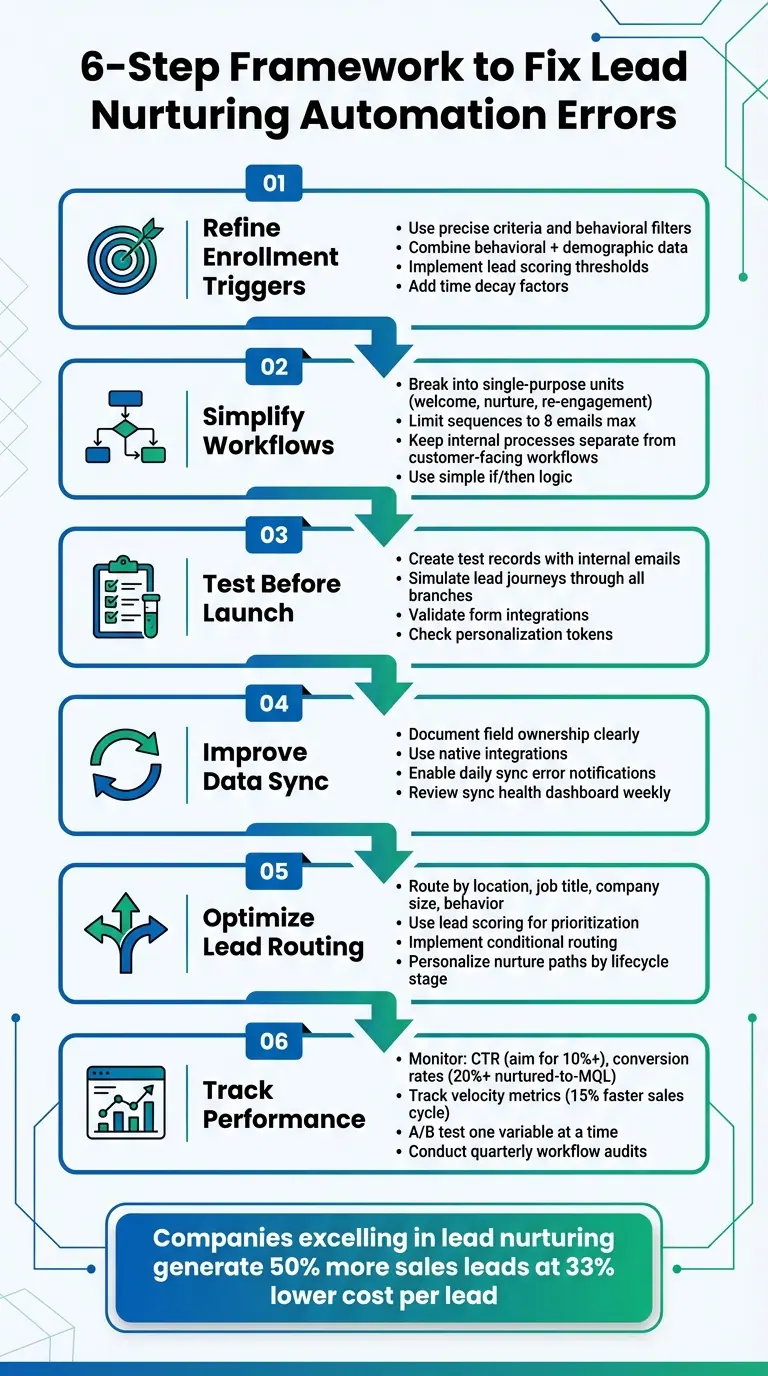
6-Step Framework to Fix Lead Nurturing Automation Errors
Step By Step: Automating Lead Nurturing with No Code in n8n
How to Identify and Fix Enrollment Trigger Problems
If your workflows are enrolling records unexpectedly, it's a clear sign that your triggers might not be set up properly. This often happens with triggers using "OR" logic, which can unintentionally include records that don’t meet all the intended criteria. On the other hand, re-enrollment restrictions, paused workflows, or immediate exit conditions can block leads that should qualify for enrollment.
Another common issue arises with blank property triggers. For example, if you use conditions like "is not equal to" or "does not contain", contacts with no value in that property might enroll by default. To fix this, add an AND condition that requires the property to have a known value.
Delays in data updates can also disrupt workflows. Sometimes, records enroll before key properties - like IP Country or Original Source - are updated, leading to routing errors or premature exits. Adding a short delay (around one minute) before the first action in your workflow can give the system enough time to update these properties.
Once you’ve resolved these foundational issues, you can refine your triggers further by incorporating more precise behavioral filters.
Refine Triggers Using Lead Behavior
To improve accuracy, combine behavioral filters with attribute-based criteria. For instance, use actions like form submissions, webinar sign-ups, or visits to pricing pages as part of your trigger conditions. Then, layer in demographic and firmographic details - such as location, account size, industry, or job title - to ensure the workflow aligns with each lead's profile.
You can also use lead scoring to make your triggers more precise. Set triggers to activate only when a lead reaches a specific score based on their engagement and profile fit. Don’t forget to factor in time decay - a lead who visited your site today should weigh differently than one who visited nine months ago. As Salesforce explains:
Accounting for decay over time ensures that each lead's website visit isn't given equal weight in their lead scores.
Before launching your workflows, use tools like "Test Criteria" or "Troubleshoot Enrollment" to confirm your triggers are working as intended.
After refining your triggers, take steps to prevent duplicate enrollments and over-enrollment.
Prevent Over-Enrolling Leads
To avoid leads being enrolled in multiple workflows at once, create a custom checkbox field, such as "Currently enrolled in lead nurture", to track active enrollment. At the beginning of each workflow, check this field. If it’s marked as true, exit the workflow. After the workflow ends, reset the field to "False" after a short delay (typically 4–5 days) to prevent immediate re-enrollment.
Exclusion filters are just as critical. Add AND conditions to your triggers to exclude leads whose lifecycle stage is set to "Customer", ensuring that existing customers aren’t mistakenly treated as prospects. You can also use your custom enrollment field to build exclusion lists for one-off promotional emails, keeping inboxes from being overwhelmed while leads remain in their nurture paths.
Lastly, make it a habit to audit your enrollment criteria every month. Look for deleted or merged property values, as these can lead to "invalid filter" errors that disrupt automation. If you need to move a lead’s lifecycle stage backward (for example, from Lead to Subscriber), use a "Clear property value" action first, as many systems block backward updates by default.
How to Simplify Complex Workflows
Overly complicated workflows can derail your lead nurturing automation efforts. Trying to manage multiple tasks - like scoring, routing, and nurturing - all within one workflow creates a system that's not only difficult to troubleshoot but also more prone to errors. Once you've refined your enrollment triggers, the next step is to simplify your workflow structure. The key? Break everything into smaller, more focused units and stick to clear, straightforward logic.
Break Workflows Into Single-Purpose Units
Divide your workflows into specific, dedicated tasks. For instance:
- Use one workflow for welcome sequences.
- Set up another for topic-based nurturing, where you deliver content tailored to specific interests.
- Create a separate workflow for re-engaging cold leads.
This method makes it much easier to monitor performance and pinpoint issues when something doesn't work as expected.
Keep internal processes separate from customer-facing workflows. For example, instead of mixing sales alerts into your nurture paths, design a dedicated workflow that triggers notifications only when a lead reaches a certain "hot" score. Similarly, if you're handling Closed-Lost opportunities, create small workflows tailored to specific reasons for the loss, such as budget constraints or choosing a competitor, rather than relying on a one-size-fits-all re-engagement sequence.
Another tip: limit your email sequences to no more than eight emails. By segmenting based on the lead's lifecycle stage - whether they're in Awareness, Consideration, or Decision stages - you ensure the content stays relevant and makes tracking goals easier. This is especially important when you consider that about 96% of website visitors aren’t ready to buy right away.
Once you've segmented your workflows, focus on applying clear logic to achieve direct and measurable results.
Use Simple Logic and Clear Goals
With smaller, focused workflows in place, stick to simple rules and well-defined goals. As Maryanne McWhirter from LeadG2 puts it:
The most effective workflows are simple. This is the number one biggest mistake made when creating a workflow. Just because you CAN create if/then branches... doesn't mean you SHOULD.
- Maryanne McWhirter, LeadG2
Start with your end goal and work backward. For example, if your ultimate aim is to get a lead to request a demo, map out the shortest and most effective path to achieve that. Use straightforward if/then branches and property updates to move leads between workflows instead of creating overly complex, branching trees.
To measure success, apply SMART goals (Specific, Measurable, Attainable, Realistic, and Timely) to each workflow unit. For instance, if your target is a 5% click-through rate - a solid benchmark for nurturing campaigns - you can quickly identify which workflows are underperforming and adjust accordingly. Also, don’t forget to add delays after "send email" actions. These pauses give leads time to engage with your content before the workflow evaluates their behavior and determines the next step.
How to Test Workflows Before Launch
Testing workflows before they go live is essential to avoid lead mismanagement and sending incorrect emails. Fortunately, most automation platforms come with built-in simulation tools that help you catch errors before they impact actual leads.
Start by creating test records using internal email addresses to mimic different lead scenarios. Use the platform's "Test criteria" feature to ensure these records meet the enrollment triggers, then run the "Test" feature to simulate the workflow path. This simulation reveals the record's journey and expected timestamps without executing any real actions.
Take time to confirm that each branch's actions align with the current data. If a branch depends on a prior workflow action, you might need to manually choose alternate branches to preview the next steps. This is also the perfect moment to check that personalization tokens - like {{first.name}} - display correctly by sending preview emails to your inbox.
Once you’ve verified the basics, simulate lead journeys to review how branch logic and data mapping function in real scenarios.
Simulate Lead Journeys
Use internal email addresses to create test contacts that simulate a range of lead behaviors without affecting real data. For example, set up one test record for a highly engaged lead and another for a less active prospect.
To avoid accidental sends during testing, include a temporary safety measure like an "Exit if email contains @yourcompany.com" condition in your workflow. Also, check for race conditions - these occur when actions like deal creation or property updates happen before earlier lifecycle updates are finished, potentially causing data sync issues.
When testing "Send email" actions, use the preview path feature to send all emails in a specific branch to your own inbox. This allows you to confirm formatting, links, and timing without overloading your test contacts with emails. If a record fails the simulation, look for error messages like "Record didn't meet enrollment criteria." Common causes include mismatched properties, non-marketing contact status, or the record already being enrolled in a restricted workflow.
Validate Reform Form Integration

After confirming the workflow's overall functionality and logic, turn your attention to form integrations. Testing Reform forms ensures that data flows seamlessly into your CRM. Run mock form submissions to verify that fields like Industry or Company Size map correctly to CRM objects. This step ensures that leads entering your system are properly nurtured, not lost in broken automation chains.
Use Reform's "Send Test Lead" feature to fill out required fields and submit them, then check your CRM’s download reports or sync logs to confirm the data appears as expected. Verify that form-based triggers successfully enroll these test leads into the appropriate workflows. As Manmeet Singh from Code and Peddle emphasizes:
Testing isn't optional; it's the difference between an automation that runs and one that performs.
Double-check that all mapped fields in Reform and your CRM match in both data type and API name to avoid sync errors. Regularly monitor integration logs to spot mismatches or rate-limiting issues between connected apps before they create bigger problems. Keep in mind that some systems may overwrite existing test data when you send a new test lead, so review each test submission immediately.
How to Improve Exit Goals and Re-Enrollment Logic
Long, drawn-out workflows can exhaust resources and overwhelm inboxes. To avoid this, it’s crucial to establish clear exit criteria and smart re-enrollment rules, ensuring leads move through your automation at a steady, effective pace.
Workflows should automatically conclude when a lead converts to a Marketing Qualified Lead (MQL) or Sales Qualified Lead (SQL). Similarly, if a lead enters an active sales conversation, they should be immediately removed from marketing nurture to prevent conflicting messages. As LeadOps.io explains:
Nurture isn't about staying in touch. It's about knowing when to move - or stop.
Negative engagement triggers are equally important. For example, hard bounces, unsubscribes, or complete inactivity after completing a workflow should prompt an exit. These triggers help streamline exit and re-enrollment processes.
Define Workflow Exit Criteria
Start by identifying the desired outcome, whether that’s transitioning a lead to sales or recycling them for re-qualification. For instance, in a webinar nurture workflow, leads should be removed as soon as they register to avoid redundant communications.
Make use of jump logic to fast-track high-intent leads. For example, if someone visits your pricing page, they should immediately move into a high-priority flow rather than continuing to receive general educational content. Similarly, decay triggers - like deducting 15 points after 30 days of inactivity - can help exit dormant leads or shift them into a re-warming sequence.
| Exit Category | Specific Criteria | Action Taken |
|---|---|---|
| Success | MQL/SQL conversion, Purchase, Event Registration | Exit and transition to Sales/Onboarding |
| Engagement Failure | Unsubscribe, Hard Bounce, Low Engagement | Exit and suppress from future marketing |
| Sales Conflict | Active Sales Opportunity, Demo Requested | Pause or suppress marketing nurture |
| Lifecycle Change | Lead disqualified, Account marked as "Not a Fit" | Exit and transition to suppression list |
Once exit criteria are clearly defined, focus on re-enrollment rules to re-engage promising leads.
Set Re-Enrollment Rules
Re-enrollment logic ensures leads can re-enter your workflows when fresh activity is detected. This is particularly useful for leads that were previously inactive or mistakenly removed. For example, lifecycle logic can re-engage disqualified leads after 90 days. New form submissions, such as those through Reform, can also serve as triggers to re-enroll leads into updated nurture paths.
To prevent overlapping emails, implement a custom checkbox field labeled "Currently enrolled in lead nurture." Check this field at the start of every workflow - if it’s marked "Yes", exit the lead immediately. Include a 4–5 day cooldown before resetting the checkbox to "No" to avoid rapid re-enrollment.
Additionally, create a cleanup workflow as a safety net. If a lead exits early due to achieving a goal or manual unenrollment, the "Currently enrolled" checkbox might stay checked, potentially blocking future workflows. The cleanup workflow should reset this field to "No" if the lead isn’t active in any system workflows. Considering that about 96% of website visitors aren’t ready to buy on their first visit, having strong re-enrollment logic in place is key to nurturing long-term conversions.
sbb-itb-5f36581
How to Optimize Data Sync and Integrations
When your automation tool and CRM don’t communicate properly, you risk creating duplicate records and outdated information. Most syncing problems come from preventable configuration errors, like improper field mapping or unclear data ownership. As RevBlack puts it, "Ignored errors lead to broken automations and unreliable reports". To avoid these pitfalls, focus on clear field ownership and well-defined integration settings to keep your data flowing smoothly.
Document Field Ownership
Before integrating systems, map out which system will serve as the authoritative source for each field. For instance, your CRM should always own critical identifiers like Record IDs (e.g., Contact ID, Lead ID, Account ID). Set your sync rules to ensure the CRM maintains control over these fields, avoiding accidental overwrites.
Be mindful of field type compatibility. For example, syncing a Salesforce picklist with a HubSpot open text field can cause errors [35,36]. Similarly, sending data that exceeds a field’s character limit - like 15 characters into a 10-character field - can lead to property value errors that disrupt workflows. To prevent these issues, create a dedicated integration user (e.g., hubspot@company.com) with full permissions at both the profile and field levels. This ensures your automation tool can access and update all necessary records without restrictions.
Once field ownership is sorted, take advantage of built-in integrations to simplify data syncing.
Use Reform's Integrations
Reform offers native integrations with tools like HubSpot, Salesforce, ConvertKit, and Zapier, enabling smooth data transfers. For example, when a lead submits a Reform form, their data is automatically mapped to the correct fields in your CRM. This minimizes errors like dropdown mismatches or character limit problems.
For more advanced workflows, Reform’s webhook integration can send real-time data to any endpoint upon form submission. This is especially useful for time-sensitive processes, like lead routing or updating multiple systems at once. A great example comes from Veo, a sports recording company, which used Zapier to automate its lead lifecycle over 1.5 years. By instantly syncing new leads from Facebook Lead Ads and Instagram to ActiveCampaign and Pipedrive, Veo reduced its cost-per-lead by 20% and boosted its lead conversion rate to 7.5%. Lars Christensen, Veo’s Social Ads Specialist, highlighted how this project allowed the sales team to access real-time data without needing a developer to connect multiple systems.
To stay ahead of potential issues, enable daily sync error notifications to catch problems early. Also, review your sync health dashboard weekly to identify recurring errors. Focus on fixing errors with the biggest business impact rather than simply addressing the highest number of issues.
How to Improve Lead Routing and Personalization
After refining your triggers and streamlining workflows, you can take your automation efforts to the next level by improving lead routing and personalization. These steps help ensure your leads stay engaged and receive communication that resonates with their needs.
When leads are misrouted or receive generic messaging, they quickly lose interest. In fact, 83% of customers only want to hear from you if your communication feels relevant and contextual, and 53% of buyers disengage as soon as content becomes irrelevant. The solution? Route leads based on key characteristics and tailor their nurture paths to fit their behavior.
Automate Routing by Lead Characteristics
Set up routing rules that assign leads to the appropriate team member based on factors like location, job title, company size, or behavioral cues. For instance, C-level executives from Fortune 500 companies can go straight to your Enterprise team, while mid-market prospects are directed to regional sales reps. Behavioral triggers, such as visits to your pricing page or downloads of product guides, can flag high-intent leads for immediate follow-up.
Use numerical lead scoring to rank prospects based on demographics and engagement levels, and implement round-robin logic to ensure timely follow-ups for all leads. To avoid routing errors, include safeguards like requiring a "known Company ID" in your enrollment triggers - this prevents incomplete records from being sent to your sales team.
Reform's conditional routing feature is another game-changer. It directs form submissions to specific workflows based on lead responses. Paired with Reform's real-time analytics, you can track which lead sources and traits drive the best results, allowing you to fine-tune your routing rules over time.
Once your leads are accurately routed, the next step is to personalize their experience to keep them engaged.
Personalize Nurture Paths
Generic outreach doesn't cut it anymore - 71% of consumers expect personalized interactions. Instead, create branching workflows that adapt to each lead's behavior. For example, share educational blog posts or videos with leads in the Awareness stage, case studies or webinars with those in the Consideration phase, and pricing guides or demo offers with those ready to make a decision.
To gather the data you need for personalization without overwhelming your leads, use progressive profiling. This approach collects information gradually over time, rather than forcing leads to complete lengthy forms. Reform’s multi-step forms make this process seamless by breaking questions into smaller, manageable sections, improving form completion rates while building a detailed profile for each lead.
As you learn more about your leads' preferences and challenges, you can trigger email sequences that address their specific needs instead of relying on generic content.
For leads that have gone quiet, set up re-engagement loops to reconnect. These workflows can activate after a set period of inactivity and use low-effort content - like infographics or quick tips - to re-capture their attention without overwhelming them. Adjust your messaging intensity to match their engagement level; bombarding inactive leads with excessive communication risks driving them away permanently.
How to Monitor and Optimize Workflow Performance
Once you've set up your workflows, the next step is making sure they actually deliver results. Monitoring performance isn't just a one-time task - it’s an ongoing process that keeps your automation effective. As Charlie Nadler, Chief Strategy Officer at Simple Machines Marketing, pointed out:
If a workflow isn't converting, it's not working.
To keep your automation on track, you need to consistently track key metrics and make data-driven tweaks.
Track Workflow Metrics
Start by keeping an eye on core stats like active contacts, completed contacts, goal completions, and lost contacts. These numbers give you a clear picture of how your workflow is performing. The "contacts who met goal" metric is your main success indicator, while "contacts lost" might highlight areas where things are falling short.
Engagement metrics are equally important. For instance, aim for email click-through rates (CTR) of 10% or higher, and a nurtured-to-MQL conversion rate of 20%. Velocity metrics, which track the time it takes for leads to move from enrollment to becoming sales opportunities, are also crucial. A well-optimized workflow should cut your sales cycle by about 15%. Tools like Reform's real-time analytics can help you spot where leads drop off in the process.
Don’t overlook technical issues either. Regularly review error logs to catch problems like failed property updates or email bounces that might derail parts of your audience. If your metrics start to slip, it might be time to refresh outdated content that no longer resonates with your audience or aligns with current trends.
Once you’ve got a handle on these metrics, you can use them to guide A/B testing for even better results.
A/B Test Workflows
Monitoring performance is only half the battle - testing variations is what takes your workflows to the next level. A/B testing is a powerful tool for fine-tuning. Before you start, make sure you have a clear hypothesis. Identify what you’re changing, why it matters, and which metric you expect to improve. Always test one variable at a time so you can pinpoint exactly what’s driving the results.
Start small by testing on a subset of your audience, then roll out the winning version to everyone else. If open rates are low, for example, experiment with subject lines - research shows that four-word subject lines often perform best. You could also try adding a personal name in the "From" field, which can boost open rates by 15% to 35%. Timing matters too; many audiences respond better to emails sent between 7–8 AM. Just make sure your results are statistically significant before making any permanent changes.
Conclusion
Fine-tuning triggers, streamlining workflows, and thoroughly testing integrations are key steps to maintaining successful automation. Keeping your lead nurturing automation running smoothly isn’t just a technical task - it’s essential for sustaining a strong revenue engine. As Jayvee Otares, RevOps Strategist at Revefied, aptly said:
Cleaning [workflows] up isn't just a 'tech admin' task - it's part of building a healthy revenue engine.
The payoff is clear: companies that excel in lead nurturing generate 50% more sales leads at a 33% lower cost per lead.
Start by identifying problem areas through analytics and error logs. Once pinpointed, refine your enrollment triggers and exit criteria to avoid bottlenecks or overloading leads. Simplify overly complex workflows by breaking them into smaller, single-purpose units. And don’t forget to test everything - especially integrations like Reform forms - to catch broken personalization tokens or logic errors before they impact prospects. Tools like Reform make integration and testing more efficient, helping you avoid costly mistakes.
Regular workflow audits are just as important. Review triggers, timing, and content relevance every quarter to keep up with shifting market dynamics and audience behaviors. Reform’s real-time analytics can help you track where leads drop off, giving you the data needed to run A/B tests and improve results.
While 91% of users consider marketing automation essential, it’s important to make automation feel personal. Keep your CRM data clean, implement lead scoring decay, and establish clear exit strategies. With the right tools and a thoughtful approach, automation can shift from being a potential headache to a dependable driver of growth.
FAQs
How can I make sure my lead nurturing automation is enrolling the right leads?
To make sure your lead nurturing automation is targeting the right people, start by setting clear criteria for enrollment. This might include actions like filling out a form or completing a specific task in your CRM. Be sure these criteria align with reliable data points to avoid confusion or missteps.
Use tools like email validation and spam filters to ensure incoming data is clean and focused on high-quality leads. Run tests with sample leads to double-check that your automation is enrolling only the right individuals and that exclusion rules are functioning as expected.
Keep a close eye on your analytics to catch any issues as they arise. Regular monitoring will help you adjust your setup to match shifts in customer behavior. With these steps, you’ll keep your lead nurturing workflows accurate and effective.
How can I simplify complex lead nurturing workflows?
To make lead nurturing workflows less overwhelming, start with a single, well-defined goal. For example, if your aim is to convert marketing-qualified leads into sales-qualified leads within three days, map out the process step by step, ensuring each action has a clear purpose tied to that goal.
Keep triggers simple by focusing on one main condition or using AND logic to combine criteria. Avoid stacking multiple OR conditions, as this can complicate the workflow unnecessarily. If your workflow needs to handle different customer journeys, break it into separate workflows tailored to each path. This not only reduces complexity but also makes updates more manageable.
Make it a habit to review and refine your workflows. Identify and remove steps that aren’t adding value or engaging your audience. Tools like Reform’s multi-step forms can simplify data collection at the start, minimizing the need for excessive branching later on. By following these strategies, you’ll create a streamlined workflow that’s easy to manage and delivers consistent results.
How can I test my lead nurturing workflows to ensure they work correctly?
To thoroughly test your lead nurturing workflows, start by outlining the key scenarios that need validation. This includes checking enrollment criteria, branching logic, and property updates. Prioritize testing the most intricate paths first to identify and resolve potential problems early on.
Leverage a test environment or dummy contacts to mimic real-world interactions. For instance, submit test entries through your forms or manually enroll test contacts to activate the workflow. Monitor the workflow in real time to verify that every condition, delay, and action operates as intended.
Once the workflow runs, review the outputs - such as emails sent, tasks created, or data logged - to ensure everything is working as planned. If you encounter any errors, address them, retest, and repeat the process until all scenarios perform flawlessly. A detailed testing process ensures your automation functions seamlessly, keeping your campaigns on track.
Related Blog Posts
Get new content delivered straight to your inbox

The Response
Updates on the Reform platform, insights on optimizing conversion rates, and tips to craft forms that convert.




Drive real results with form optimizations
Tested across hundreds of experiments, our strategies deliver a 215% lift in qualified leads for B2B and SaaS companies.
