
.webp)
GDPR Consent Form Tips for Sensitive Data


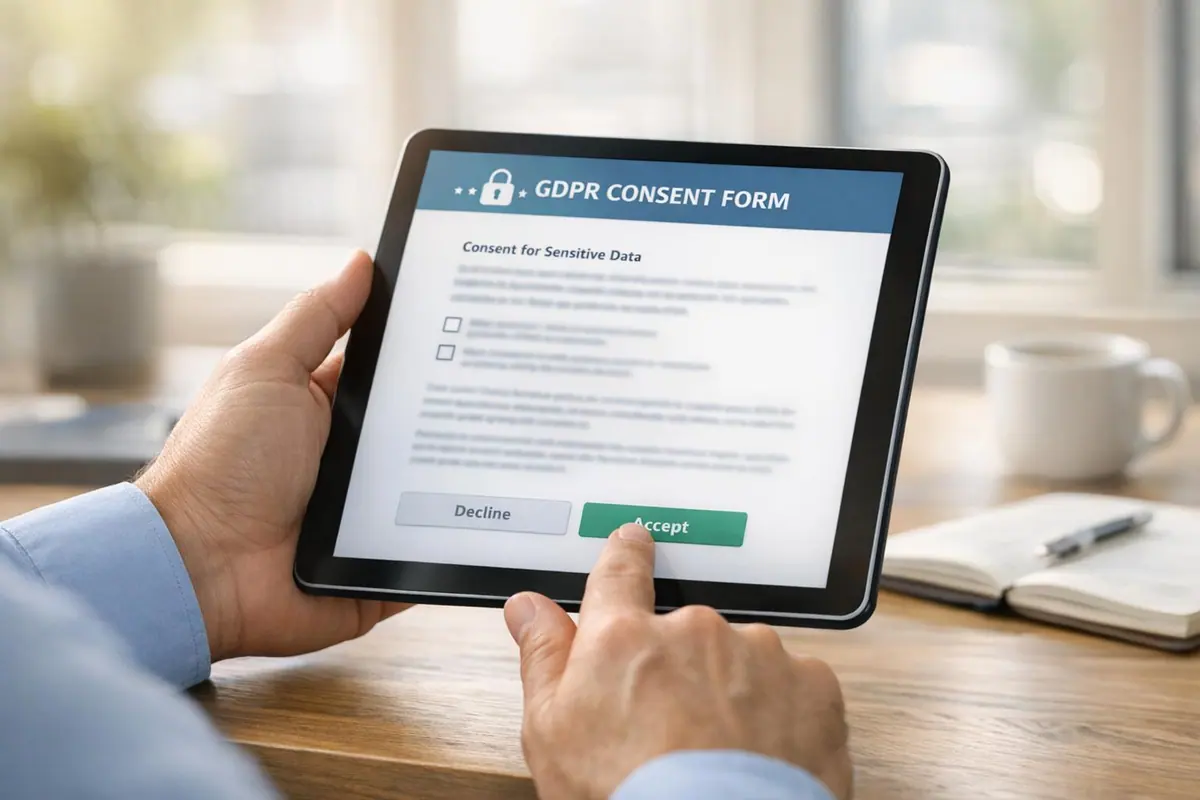
Handling sensitive data under GDPR requires explicit consent. Sensitive data, or "special category data", includes health records, biometric scans, and political opinions. Unlike standard data, processing this requires stricter safeguards to protect individual rights.
Key Takeaways:
- Sensitive Data Types: Health, biometric, genetic, racial/ethnic origin, political opinions, religious beliefs, trade union membership, sexual orientation, and sex life.
- Explicit Consent: Requires a clear written or verbal agreement (e.g., "I consent to the processing of my health data"). Actions like pre-checked boxes or inactivity don’t qualify.
- Separate Purposes: Consent forms must have distinct checkboxes for each data processing purpose.
- Transparency: Clearly state what data is collected, why, and for how long. Use plain language and avoid bundling consent with terms and conditions.
- Withdrawal: Make it as easy to withdraw consent as it is to give it. Stop processing immediately upon withdrawal.
- Security: Use robust safeguards like Data Protection Impact Assessments (DPIAs) and secure data routing.
Failing to comply can result in fines, as seen with Google’s €50 million penalty for inadequate consent practices. Use tools like Reform to streamline form design while ensuring compliance.
GDPR-Compliant Consent Form Checklist
Make Sure Consent is Explicit and Freely Given
When dealing with sensitive data, explicit consent requires a clear written or spoken agreement - actions like simply browsing or remaining inactive do not count. According to the ICO, valid consent must involve a clear affirmative action, meaning pre-checked boxes or passive behavior won't suffice.
Your forms should require users to actively opt in. This means using unchecked boxes alongside a specific statement like, "I consent to..." followed by the exact type of sensitive data you're collecting, such as health records, biometric details, or religious affiliations.
Consent must also be freely given, ensuring users have a genuine choice. For instance, if you're providing a service, don't make consent a condition unless the data processing is absolutely necessary for the service to function. A fitness app might need health data to operate, but tying app access to unrelated data sharing with advertisers would breach GDPR rules.
Additionally, each purpose for data processing should be addressed separately.
Separate Consent by Processing Purpose
Avoid lumping all data processing purposes into a single checkbox. GDPR emphasizes that users should have granular control over their data. If you're asking for consent for different purposes, such as medical research and personalized marketing, create individual checkboxes for each. This allows users to agree to one purpose while declining another.
Keep these consent options separate from your general terms and conditions. They should be easy to spot and clearly distinct. This approach not only helps prevent misuse of data (sometimes called "function creep") but also aligns with GDPR’s focus on transparency and user control.
Provide Clear Information to Users
Your consent form needs to spell out exactly what users are agreeing to. This includes identifying your organization as the data controller, naming any third parties who will access the data, specifying how long you’ll keep the data, and explaining how users can withdraw consent.
Use plain, straightforward language that your audience can easily understand. The ICO notes:
"if the request for consent is vague, sweeping or difficult to understand, then it will be invalid"
A layered approach often works best. Start with a concise summary of the key points, then link to more detailed privacy information for those who want to dive deeper. You might also use just-in-time notices - brief explanations that pop up next to specific form fields to clarify why certain information is needed. This transparency fosters trust and keeps your consent process GDPR-compliant.
Make Consent Withdrawal Easy
The GDPR mandates that withdrawing consent should be just as simple as giving it. If users opted in with a single click, they should be able to opt out just as easily - no digging through menus or contacting support. A clearly visible "Withdraw Consent" button in a privacy dashboard or user settings is a great solution. Some companies even include a floating icon on their website for quick access.
Once consent is withdrawn, stop processing the data immediately or anonymize it. Notify any third parties who previously received the data, and maintain timestamped records of both the original consent and its withdrawal. These records are crucial for demonstrating compliance if regulators come knocking.
Add Security Measures for Sensitive Data
After obtaining clear consent, it’s essential to safeguard sensitive data with strong security measures. Because processing this type of data carries higher risks under GDPR, you need robust protections in place. Start by conducting a Data Protection Impact Assessment (DPIA) to identify and address potential vulnerabilities.
Your consent form should use session-based storage to limit how long consent data remains on devices. Incorporate conditional routing to ensure sensitive data is only sent to secure, authorized systems. For example, if a user consents to share financial health data, that information should go directly to a secure endpoint rather than a general database. This kind of if-then logic minimizes risks.
Finally, maintain detailed audit trails that document who consented, when and how they did so (e.g., via checkbox or digital signature), and what information was presented at the time. These records provide essential proof of compliance if you’re ever audited.
How to Document and Prove Consent
Keep Audit Trails for Consent Actions
When it comes to GDPR compliance, keeping detailed records of consent is non-negotiable. The Information Commissioner's Office (ICO) emphasizes this point:
"Keep evidence of consent – who, when, how, and what you told people."
Your audit trail should cover four key aspects. Start by recording who gave consent, using identifiable details like a name, user ID, or IP address. Next, log when consent was provided, using an exact timestamp (e.g., January 14, 2026, at 3:42 PM EST). Then, document how the consent was obtained, such as through a specific form or URL. Finally, save a copy of the privacy notice or consent text shown to the user at the time of their agreement.
For sensitive personal data, ensure explicit consent is recorded with a clear statement instead of relying on a simple checkbox. Use version control to store previous versions of consent forms and privacy notices, linking each consent record to the exact version displayed at the time. If a user decides to withdraw their consent, log the date and time immediately and ensure your systems stop processing their data right away.
To enhance oversight, consider integrating your audit trails with real-time analytics to keep your consent management process running smoothly.
Use Real-Time Analytics and Tracking Tools
Real-time tracking tools are a game-changer for monitoring consent forms and catching potential compliance issues early. These tools can highlight patterns, like whether complex language or requests for sensitive data are causing users to abandon forms.
For example, Reform’s real-time analytics can identify where users hesitate or drop off during the consent process. This insight allows you to adjust your consent language or form structure to improve user experience, all while maintaining a transparent and reliable audit trail. The platform also automatically logs form interactions, creating the technical documentation needed to prove compliance.
How to Design Accessible and User-Friendly Consent Forms
Follow WCAG Accessibility Standards
Creating accessible consent forms isn't just about meeting GDPR requirements - it's about ensuring everyone, including individuals with disabilities, can understand and use them effectively.
Start with clear, plain language. The British Information Commissioner's Office emphasizes this point:
"If the request for consent is vague, sweeping or difficult to understand, then it will be invalid. In particular, language likely to confuse - for example, the use of double negatives or inconsistent language - will invalidate consent."
Make sure your forms avoid dark patterns. For instance, your "accept" and "decline" buttons should be equally visible and easy to access. In scenarios where accuracy is critical, such as newsletter sign-ups, require manual email entry to confirm user intent. Enhance usability with visual aids - like icons, diagrams, or color-coded sections - and offer multilingual support to ensure inclusivity. This approach aligns with the expectations of 75% of people who believe companies should prioritize data compliance.
To simplify the process of meeting accessibility standards, consider using no-code platforms that allow you to design forms without needing advanced technical skills.
Use Reform for Customizable and Accessible Forms

Reform makes it easier to design consent forms that are both user-friendly and compliant. With its no-code platform, you can create forms that align with GDPR guidelines while maintaining accessibility for all users. The platform allows you to customize every element, ensuring your forms meet both compliance and branding needs.
Reform provides tools for granular consent options, such as separating processing purposes with distinct checkboxes, giving users clear choices. Its multi-step forms and conditional routing help break complex information into manageable steps, delivering details at the right time without overwhelming users.
For those with advanced needs, Reform's Pro Plan includes support for custom CSS and JavaScript, enabling tailored accessibility improvements. Additionally, real-time analytics let you monitor how users interact with your forms, so you can refine the language and layout to improve clarity and compliance.
sbb-itb-5f36581
How Does GDPR Define User Consent?
Explicit Consent vs. Implied Consent
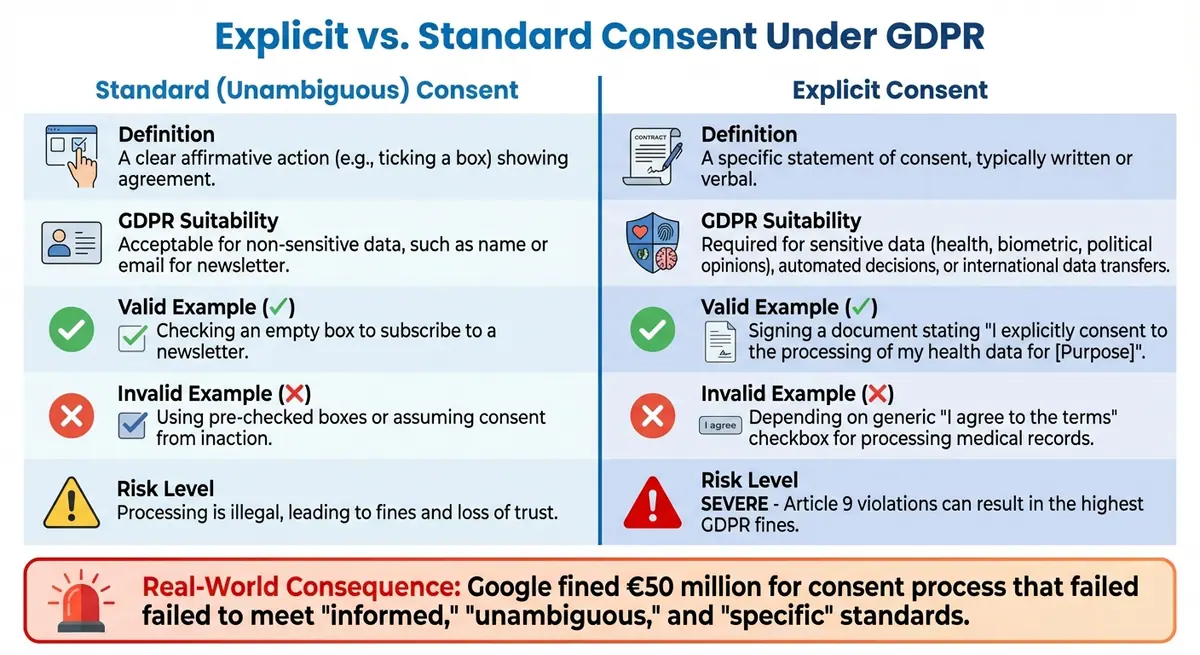
GDPR Explicit vs Implied Consent Requirements Comparison
Explicit consent involves a clear, written, or verbal statement - it's not just about a positive action. When it comes to sensitive data like health records, ethnicity, political opinions, or biometric details, Article 9 of the GDPR requires explicit consent. This means a clearly stated agreement, either in writing or verbally, is mandatory. Violating these rules, particularly with sensitive data, can result in hefty penalties.
The Information Commissioner's Office puts it plainly:
"Explicit consent must be expressly confirmed in words, rather than by any other positive action."
In other words, actions like submitting a form or relying on inferred gestures don't meet the standard for explicit consent. The table below highlights the main differences between explicit and implied consent.
Comparison Table
| Feature | Standard (Unambiguous) Consent | Explicit Consent |
|---|---|---|
| Definition | A clear affirmative action (e.g., ticking a box) showing agreement. | A specific statement of consent, typically written or verbal. |
| GDPR Suitability | Acceptable for non-sensitive data, such as a name or email for a newsletter. | Required for sensitive data, automated decisions, or international data transfers. |
| Example (Do) | Checking an empty box to subscribe to a newsletter. | Signing a document stating, "I explicitly consent to the processing of my health data for [Purpose]". |
| Example (Don't) | Using pre-checked boxes or assuming consent because a user didn’t opt out. | Depending on a generic "I agree to the terms" checkbox for processing medical records. |
| Risk of Non-Compliance | Processing is illegal, leading to fines and loss of trust. | Severe consequences; Article 9 violations can result in the highest GDPR fines. |
These differences underscore the strict rules for managing sensitive personal data. Missteps in this area can be costly. For instance, French data protection regulators fined Google €50 million because its consent process failed to meet the standards of being "informed", "unambiguous", and "specific". When sensitive data is involved, the expectations - and the risks - are even greater.
Key Takeaways for GDPR-Compliant Consent Forms
Best Practices Summary
When designing GDPR-compliant consent forms, it’s essential to stick to the core principles. For sensitive data, explicit consent is required - a clear written statement, not just a positive action. Always use active opt-in methods and avoid pre-ticked boxes, as they don’t meet GDPR standards.
Make sure to provide separate options for each processing purpose. Transparency is key: clearly state who you are, name any third-party controllers, and explain what data you’re collecting and why. Use plain, straightforward language that your audience can understand - ditch the legal jargon. Also, keep consent requests separate from your terms and conditions to avoid confusion.
Another critical point: users must be able to withdraw consent just as easily as they give it. The Information Commissioner's Office (ICO) emphasizes this clearly:
"It shall be as easy to withdraw as to give consent."
Lastly, maintain detailed records. Keep timestamped logs of who consented, when, and how.
For a practical approach, consider tools like Reform that simplify this process.
Create Better Forms with Reform
Putting these guidelines into action is easier with the right tools. Reform’s no-code form builder is designed to help you meet GDPR requirements without any technical hassle. Features like conditional routing allow you to offer specific consent options for different purposes, ensuring compliance. Plus, real-time analytics help you maintain the audit trails required by GDPR.
With additional perks like custom CSS support and accessible design features, Reform enables you to create consent forms that are legally compliant and user-friendly. It’s a practical way to meet both regulatory standards and your audience’s expectations.
FAQs
What’s the difference between explicit and implied consent under GDPR?
Under GDPR, explicit consent means individuals must actively and clearly agree to something, typically through actions like checking a box or signing a form. This consent must be specific, informed, and unambiguous. In contrast, implied consent, which depends on passive behaviors like pre-checked boxes or silence, is not acceptable under GDPR. The regulation emphasizes a clear, positive opt-in to give people complete control over their personal data.
What are the best practices for creating accessible and user-friendly GDPR consent forms?
To create GDPR consent forms that are both accessible and easy to use, focus on clear, straightforward language. Skip the legal jargon, keep sentences concise, and explain each data-processing activity right next to its corresponding checkbox. Separate consent requests by purpose, and limit the number of mandatory fields. Always include a prominently placed link to your full privacy policy, ensuring it blends seamlessly with the form's design.
Accessibility is key. Follow universal design principles by using high-contrast colors, labeling all input fields for screen readers, and ensuring that all controls are fully operable via keyboard. To improve user experience, consider using multi-step or conditional forms. These formats display only the fields that are relevant to the user, cutting down on unnecessary clutter and reducing mental effort.
Make opting in and out as simple as possible. Leave checkboxes unchecked by default, provide an easy way for users to withdraw consent, and confirm any changes with a clear success message. Additionally, log all interactions with timestamps to maintain a reliable record of consent, which is crucial for compliance. By following these practices, your forms can remain inclusive and effective.
How can I effectively document and prove user consent under GDPR?
To properly document user consent, make sure to log every instance of explicit opt-in. Include key details such as who gave consent, the date and time it was provided, the method of consent, and the specific purposes for which the data will be processed. Additionally, keep a record of any third-party disclosures tied to that consent.
Securely store these records using encryption and controlled access to protect their integrity. Incorporate timestamps to track changes and ensure accuracy. Regularly review and update your logs to keep them audit-ready. A well-maintained audit trail is crucial for demonstrating compliance and accountability under GDPR.
Related Blog Posts
Get new content delivered straight to your inbox

The Response
Updates on the Reform platform, insights on optimizing conversion rates, and tips to craft forms that convert.




Drive real results with form optimizations
Tested across hundreds of experiments, our strategies deliver a 215% lift in qualified leads for B2B and SaaS companies.
