
.webp)
GDPR Restriction Rights: Best Practices for Forms


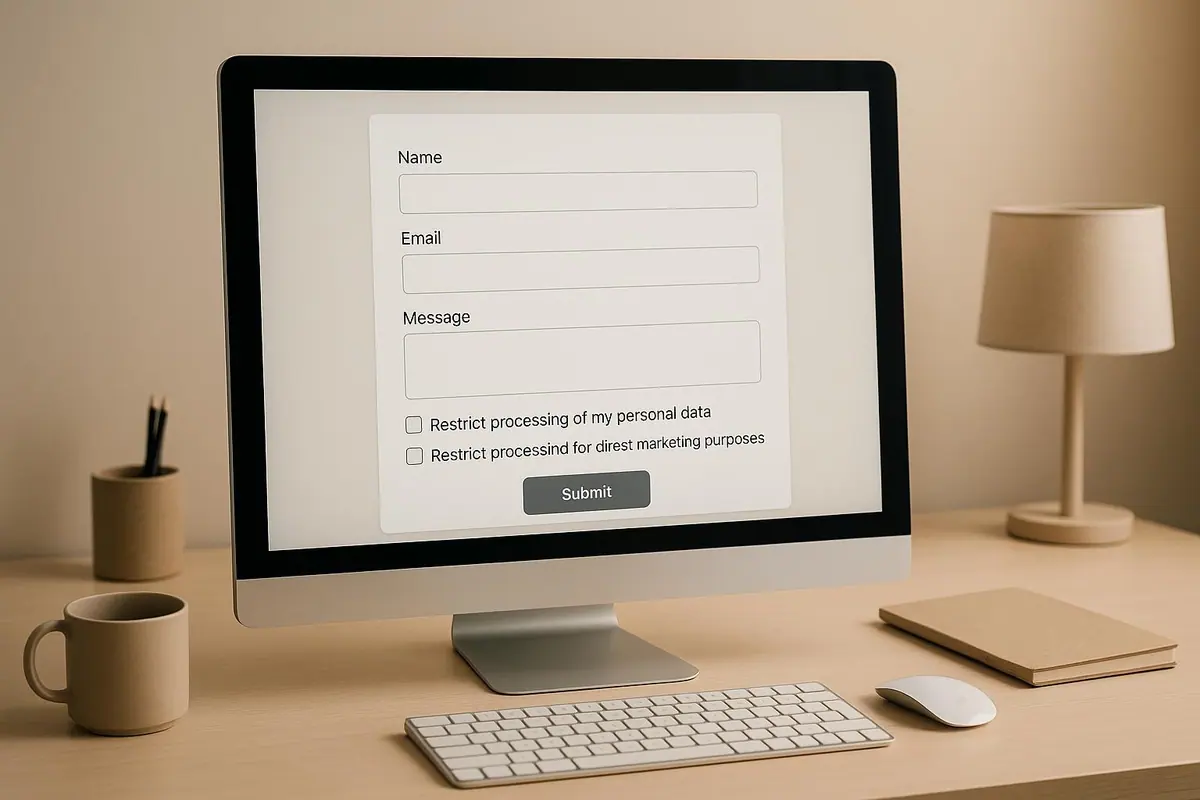
GDPR compliance is a must if you handle personal data from EU residents. One key aspect is the right to restrict processing under Article 18 of GDPR. This allows individuals to temporarily halt how their data is used without requiring deletion. For businesses, especially those using lead generation forms, this means pausing activities like email campaigns or CRM workflows while maintaining data storage.
To ensure compliance and build trust, here’s what you need to know:
- Explain restriction rights clearly in forms using simple language.
- Design dedicated forms for restriction requests to streamline processing.
- Use unchecked boxes for consent and restriction options to align with GDPR rules.
- Offer specific restriction choices (e.g., marketing emails, data sharing).
- Allow users to withdraw or update restrictions easily.
- Automate processes to pause data use instantly and maintain compliance.
- Keep detailed records of all requests for audits.
- Notify users before resuming data processing after restrictions are lifted.
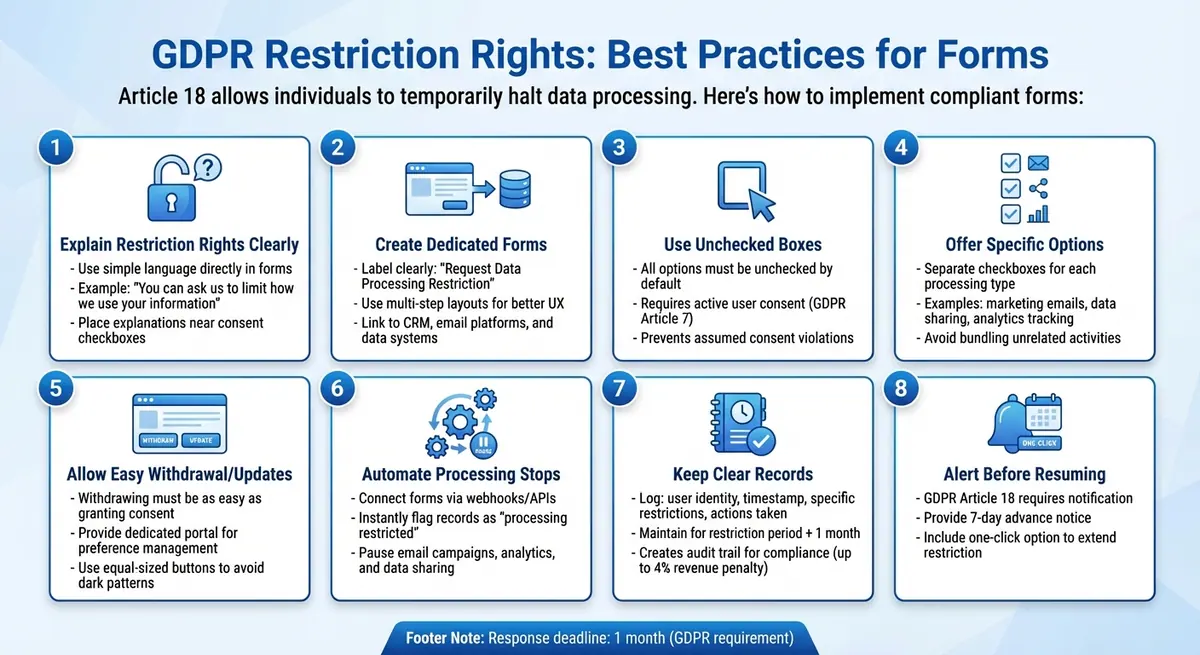
8 Best Practices for GDPR-Compliant Restriction Request Forms
1. Explain Restriction Rights Clearly in Your Forms
Clarity in Communicating GDPR Restriction Rights
The concept of "restriction of processing" under Article 18 of GDPR is often misunderstood. Instead of burying this information in a privacy policy, make it easy to understand by explaining it directly in your forms using clear, straightforward language.
For example, instead of saying, "You may restrict processing under Article 18", try something more user-friendly like:
"You can ask us to limit how we use your information - for example, we can store your data but avoid using it for marketing emails."
Highlight the key situations where users might want to request restrictions in a simple, scannable format:
- If they believe their data is inaccurate
- If they suspect their information is being used unlawfully
- If the data isn’t needed anymore but must be kept for legal purposes
- If they’ve objected to processing and their request is under review
Place these explanations near consent checkboxes or data-collection fields rather than hiding them in a footer link. This approach keeps things transparent and user-friendly.
Ease of User Interaction with Forms
When designing forms, keep them short and focused. Collect only the essentials - like name, email, and a brief description of what the user wants to restrict. Adding helpful tooltips or short notes, such as "We'll confirm your request and pause processing as specified," can make the process smoother for users.
Offer targeted options instead of forcing an all-or-nothing choice. For instance, include separate checkboxes for actions like:
- "Restrict marketing emails"
- "Restrict data sharing with partners"
- "Restrict analytics tracking"
This gives users more control over specific data processing activities without overwhelming them.
Transparency in Handling User Data Requests
Providing clear, detailed options builds trust and confidence. Use specific examples to explain how data is used, such as "weekly newsletters, product updates, and retargeting ads on social media." This transparency helps users make informed decisions about what they want to restrict.
For those who want more in-depth information, include a link like "Privacy & Your Rights" for comprehensive details. However, keep the most critical information visible and accessible directly on the form. This balance ensures users feel informed without being overloaded.
What Does The GDPR Restrict Processing Right Mean?
2. Create Dedicated Forms for Restriction Requests
Dedicated forms can play a crucial role in streamlining your GDPR compliance strategy, especially when it comes to handling restriction requests.
Simplify User Interaction with Clear Forms
A dedicated form for restriction requests ensures users know they are exercising their GDPR rights under Article 18. This clarity not only helps users but also allows your team to efficiently manage these time-sensitive requests, avoiding delays from a cluttered, generic inbox.
Label the form clearly with something like "Request Data Processing Restriction" and place it where users can easily find it - such as in your privacy center, account settings, or footer links. Keep the form straightforward by asking for only essential details, such as:
- User email or account information
- Specific processing activities to restrict (e.g., marketing emails, data sharing, profiling)
- An optional reason for the request (e.g., data inaccuracy, objection to processing, or legal retention requirements)
To improve usability, consider a multi-step layout:
- Identify the user.
- Allow users to select restrictions using checkboxes.
- Confirm the request.
This step-by-step format keeps the process simple, especially for mobile users, while ensuring you gather the necessary details.
Automate and Integrate for Better Compliance
Link your form to backend systems like your CRM, email platform, or data warehouse. This allows you to automatically pause data processing as soon as a request is submitted. Automation can handle tasks like:
- Suppressing users from email lists
- Stopping ad network syncing
- Flagging CRM records for restricted processing
By automating these steps, you minimize delays and reduce the risk of human error. Plus, it creates an audit trail, showing you acted within GDPR's required one-month response window. Tools with webhook or API capabilities can further streamline the process by routing submissions to your privacy or IT team, logging request details, and tracking deadlines.
Build Trust Through Transparency
A confirmation screen and follow-up email go a long way in building trust. Provide users with a reference number for their request, making it easier for them to follow up or confirm their rights have been exercised. Include key details like the timeline for your response (within one month, per GDPR) and any next steps, such as verification or situations where processing might still occur - for example, to fulfill legal obligations.
3. Use Unchecked Boxes for Consent and Restriction Options
Communicating GDPR Restriction Rights Clearly
When creating forms for consent and data restrictions, it's critical to leave all options unchecked by default. This ensures users make deliberate choices, aligning with GDPR guidelines.
Unchecked boxes require users to actively provide their consent, which meets GDPR Article 7 requirements. Pre-selected options violate these rules by assuming consent without explicit user action. For example, a checkbox like "I consent to marketing emails" must remain unchecked, allowing users to opt in voluntarily. This approach guarantees that their consent is specific, informed, and unmistakable.
Similarly, this method supports the right to restrict data processing under GDPR Article 18. If users wish to limit how their data is handled - whether due to accuracy concerns or objections to certain uses - forms should clearly present these choices without pre-selected defaults. For instance, a checkbox labeled "Restrict sharing my data with third parties" should remain unchecked to ensure users actively make that decision.
Making Forms User-Friendly
Unchecked boxes also simplify the user experience by ensuring selections are intentional. Providing clear, detailed options - like separate checkboxes for "Restrict marketing data processing" and "Restrict analytics tracking" - helps users focus on what matters to them. To prevent accidental selections and reduce form abandonment, use clear labels and allow enough spacing between checkboxes, especially for mobile users.
Ensuring Transparency in Data Handling
To demonstrate compliance during audits, record timestamps and user selections. Additionally, let users know what their choices mean. For example, include a note like, "Your data will remain stored but won't be used for marketing during the restriction period." Make it easy for users to update or withdraw their restrictions through a simple link or button. This ensures that withdrawing consent is just as effortless as giving it.
4. Offer Specific Options for Different Types of Data Processing
Clarity in Communicating GDPR Restriction Rights
Under GDPR, users must give specific consent for each processing purpose. To meet this requirement, break down data processing activities into clear categories so users can decide what to restrict. For instance, you could offer options like:
- Restrict marketing emails
- Restrict data sharing with third parties
- Restrict analytics tracking
Using straightforward, detailed labels helps build trust. Instead of vague terms like "marketing purposes", be specific: "We'll send you weekly product updates based on your browsing history." This kind of transparency aligns with GDPR's standard that consent must be specific, informed, and clear. When users fully understand what they’re agreeing to - or opting out of - they’re more likely to trust your business. In fact, a 2023 Cisco Data Privacy Benchmark Study revealed that 76% of consumers avoid purchasing from companies they don’t trust with their data. This underscores the importance of providing clear, user-friendly options in your forms.
Ease of User Interaction with Forms
Pair clear labeling with a simple and intuitive user experience. Make it just as easy for users to restrict data processing as it is to opt in by using separate, unchecked checkboxes for each option. Avoid bundling unrelated processing activities together.
To keep forms manageable, consider using multi-step designs. Conditional logic can help streamline the process - for example, if a user opts into marketing communications, additional options can appear to let them choose specific channels like SMS or phone calls. This method ensures users aren't overwhelmed, while still giving them detailed control over their preferences. Together, these strategies create forms that are both user-friendly and GDPR-compliant.
Transparency in Handling User Data Requests
After users make their selections, confirm their choices immediately with a summary like: "Marketing and third-party sharing restricted as of 12/16/2025." Include clear instructions for updating or withdrawing restrictions in the future. To ensure compliance, log timestamps and user preferences for audit purposes, and verify that your systems enforce these restrictions.
5. Let Users Withdraw or Update Restrictions Through Forms
Clarity in Communicating GDPR Restriction Rights
Making it easy for users to update or withdraw restrictions is a critical part of GDPR compliance. According to GDPR Article 7, withdrawing consent must be just as simple as granting it. Your forms should reflect this principle clearly. For instance, include a straightforward statement like "You can withdraw this restriction anytime via this form" on your confirmation page or website footer. Use user-friendly labels such as "Stop marketing emails" or "Update restriction on data sharing" instead of confusing legal jargon.
It’s also important to explain the impact of these actions. Let users know that withdrawing a restriction allows processing to resume, while applying one halts it. Clear communication like this not only builds trust but also ensures users fully understand their choices.
Ease of User Interaction with Forms
A user-friendly interface is essential for creating a seamless experience. Make sure withdrawal options are just as visible as opt-in choices. For example, use buttons of equal size for actions like "Withdraw" and "Confirm" to avoid misleading users with design tricks (sometimes called dark patterns). Avoid pre-checked boxes or bundling withdrawal options with unrelated terms and conditions - these practices can confuse users and undermine transparency.
Consider offering a dedicated portal where users can manage their preferences. Multi-step forms work well for this purpose. Use visual cues, like icons, to distinguish between different types of data processing (e.g., marketing versus analytics). Allow users to toggle specific restrictions on or off with a single click. A simple and intuitive process encourages users to engage and reinforces their confidence in your system.
Automation and Integration for Compliance
To ensure compliance and efficiency, integrate your forms with backend systems like CRMs and marketing automation platforms. When a user submits a request, your system should automatically update their record. For example, if a user restricts marketing emails, your email platform should immediately suppress future campaigns without requiring manual intervention.
Using tools like webhooks and APIs can extend this automation across your entire tech stack. This approach keeps all systems synchronized, reducing the risk of accidental errors and ensuring that every team is aware of the latest changes to user preferences.
Transparency in Handling User Data Requests
Once a user submits a request, confirm the update by detailing the changes made and specifying when they will take effect. Offering users access to their full preference history adds another layer of transparency and trust.
For audit purposes, log every update, including timestamps and details of the changes. These records not only demonstrate compliance during audits but also ensure you meet GDPR requirements, such as notifying users before resuming any previously restricted processing. Clear documentation is key to staying on top of your obligations and maintaining user trust.
6. Connect Forms to Systems That Stop Processing Automatically
Automating Compliance with Integrated Systems
When it comes to GDPR compliance, automation can make all the difference. While GDPR Article 18 allows up to one month for formal processing, automation enables you to halt data processing the moment a request is submitted. By linking your forms directly to systems like your CRM, email marketing platform, or other tools using webhooks or APIs, you can instantly flag a record as "processing restricted." This flag pauses actions such as email campaigns, analytics tracking, or sharing data with third parties.
For instance, a form submission can automatically update a contact's status in your CRM. Reform’s built-in CRM integrations make this process seamless - no manual steps or coding needed. Every system in your tech stack gets the restriction signal at the same time, ensuring nothing slips through the cracks.
Ensuring Transparency in User Data Requests
Beyond speeding up compliance, automation also creates a clear audit trail, which is crucial for demonstrating adherence to GDPR rules. As soon as a request is submitted, your system should log the details and send an automatic confirmation email to the user. This email should outline the restrictions applied and specify when they took effect.
To avoid accidental reactivation, include safeguards in your workflows, like reminders or alerts. Regular testing is also a must - simulate restriction requests to ensure every connected platform responds correctly. Any oversight could lead to unintended data processing, so robust documentation and frequent checks are essential.
Communicating GDPR Rights Clearly
Be upfront with users about what happens when they submit a request. Let them know that their submission triggers immediate automated actions, such as flagging their account and halting activities like marketing communications. The confirmation email should reassure users that restriction measures are in place and that all systems have been updated. Remember, GDPR requires you to notify users before resuming any restricted processing, so make sure your automated updates are clear and timely.
sbb-itb-5f36581
7. Keep Clear Records of All Restriction Requests
Automation and Integration for Compliance
Maintaining detailed records of restriction requests is crucial to meeting GDPR requirements. According to GDPR Article 5(2), organizations must document how they handle these requests and ensure they meet the one-month response deadline. Without proper documentation, businesses risk fines of up to 4% of their global revenue.
Your records should include key details such as the user's identity, the date and time of the request, the specific processing activities they want restricted (like marketing communications or data sharing), the reasons provided, the actions your organization took, and any notifications sent to the user. It's also important to log any updates or withdrawals of these requests, creating a complete and traceable history.
Transparency in Handling User Data Requests
Clear record-keeping goes hand-in-hand with automation to strengthen compliance. By linking your forms to your CRM or database, you can automatically log submission details. For example, Reform’s CRM integrations tag and store restriction requests immediately, ensuring accurate and timely record management.
Let users know that all restriction requests are timestamped and securely stored for compliance purposes. Additionally, send a confirmation email as soon as a request is logged, detailing the records created.
Regular audits are essential to ensure compliance. Review entries to confirm they include all necessary information, such as dates, the scope of the restriction, and actions taken. Experts recommend keeping these logs for at least the duration of the restriction period, plus an additional month, to provide a reliable audit trail should regulatory authorities inquire.
8. Alert Users Before You Resume Processing Their Data
Clear Communication on GDPR Restriction Rights
Before restarting any data processing, it's essential to notify users, as outlined in GDPR Article 18. This notification should explain the restriction that was in place, what has changed (e.g., data accuracy confirmed or an objection reviewed), which processing activities will resume, and how users can object again or file a complaint.
Use straightforward language in these notifications. For instance: "We will email you before resuming any data processing following your restriction request". Be specific about timelines, such as providing notice 7 days in advance, and include a simple one-click option for users to update preferences or extend the restriction. This approach not only ensures compliance but also builds trust by preventing unauthorized data processing.
Automating Notifications for Compliance
To avoid manual errors, automate the notification process. Connect forms to your CRM and marketing systems to automatically trigger email alerts as restrictions near expiration. For example, set up workflows to send messages like: "Your restriction ends in 30 days; reply to continue or extend." Automation ensures users are informed before processing resumes, reducing the risk of oversight.
Reform's conditional routing and CRM integration simplifies this process. When a restriction flag changes in your system, Reform can automatically send notifications and log the alerts for your audit trail. Real-time analytics track delivery and user responses, providing clear evidence that GDPR notification requirements have been met.
Documenting Notifications for Transparency
Once automated alerts are in place, ensure every notification is logged for audit purposes. Record details such as the date, time, delivery method, content, and user responses. Make these logs accessible through a user dashboard or data access request form, so you can demonstrate compliance during audits. This level of documentation reinforces transparency and accountability in handling user data.
9. Build Simple Forms That Collect Only Necessary Data
Communicating GDPR Restriction Rights Clearly
When designing forms, stick to the basics - only ask for the information you truly need. This aligns with the GDPR’s principle of data minimization, which emphasizes collecting only data that is adequate, relevant, and limited to the intended purpose. For restriction request forms, this means gathering just enough to identify the user and handle their request.
Be transparent about why you're collecting each piece of information. For instance, you could say, “We use your email to locate your account and process your restriction request.” Clear explanations like this help users feel more comfortable and encourage them to complete the form without feeling bogged down by overly technical or legal language. Keeping things simple and to the point makes the process easier for everyone.
Simplifying User Interaction with Forms
Short forms are better forms. By focusing on essentials - like just asking for an email to identify a user - you reduce the chances of users abandoning the form. Plus, fewer fields mean you're sticking to GDPR’s data minimization principle.
Reform’s customizable forms are a great example of this. They let you include only the necessary fields while offering user-friendly features like multi-step layouts. These features break complex processes into smaller, more manageable steps, making the experience smooth and straightforward. Brian Casel, Founder of ZipMessage, describes Reform as “a simple, fast forms solution.” Combined with backend automation, these forms strike a balance between simplicity and compliance.
Automating Compliance Through Integration
Automation can take your forms to the next level. By integrating forms with backend systems, you can handle data efficiently without overloading users with questions. Reform’s lead enrichment feature, for instance, automatically pulls in supplemental data, so you don’t have to ask for it upfront.
Additionally, linking your forms to your CRM ensures that when a restriction request is submitted, the user’s record is flagged automatically to stop further data processing. This approach keeps your forms minimal while ensuring you meet GDPR requirements quickly and effectively.
10. Link Restriction Management to Your CRM System
Automation and Integration for Compliance
Connecting restriction management to your CRM system simplifies and centralizes your compliance efforts. For example, when a user submits a restriction request - like asking to stop receiving marketing emails or to opt out of profiling - your CRM can be configured to update a processing status flag automatically. This ensures that the user's contact record is updated immediately, and any related campaigns are paused without delay.
To make this work effectively, set up custom fields in your CRM to capture restriction preferences. Use specific boolean fields like restrict_email_marketing or restrict_profiling that directly correspond to form inputs. Once these fields are updated, automation rules can take over, ensuring restricted contacts are excluded from email lists, ad audiences, and scoring models.
Transparency in Handling User Data Requests
Set up automated workflows to provide users with clear confirmation emails when their restriction requests are processed. For instance, a message might say: "You will no longer receive marketing emails, but essential service messages will still be sent." If processing needs to resume later, GDPR requires you to notify the user. To comply, create a "resume processing" workflow that sends a detailed, time-stamped email explaining the changes and their implications. These workflows make the process transparent and user-friendly.
It's also essential to maintain detailed, time-stamped records in your CRM for every restriction request. Track information like the request's date and time, the specific processing activities restricted, the source of the request (e.g., web form or support ticket), and the person who applied the change. These records not only help your team stay organized but also serve as evidence of compliance if regulators request it. Use CRM activity logs or custom compliance history objects to build an audit trail, and create dashboards to monitor metrics like the number of active restrictions and the average time it takes to process them.
Ease of User Interaction with Forms
No-code tools like Reform make it easy to create branded restriction request forms that integrate directly with your CRM. These forms can pass structured data - such as email addresses, customer IDs, restriction options, and timestamps - straight into the appropriate CRM fields. Once the data is mapped, the CRM updates the contact record and triggers workflows like "set contact to 'Restricted – marketing' and remove from all lists". This no-code approach allows your team to adjust restriction workflows quickly while ensuring GDPR compliance is managed automatically in the CRM backend.
How Reform Helps You Meet Restriction Rights Requirements

Reform's no-code form builder makes it easier to handle GDPR restriction requests. It captures user inputs, routes them to the right teams, and even triggers automatic updates in your systems. With its Qualification & Conditional Routing feature, you can create forms that adjust based on user choices. For instance, if someone selects "Restrict marketing emails" from a dropdown, the form can automatically send the request to your privacy team and update your CRM to flag that contact as restricted for marketing activities.
Reform also integrates seamlessly with CRMs, simplifying compliance further. Form submissions can directly update CRM fields through custom mapping. For example, a restriction request could update a field like "restrict_email_marketing", which then triggers automated workflows. These workflows might pause email campaigns, remove contacts from mailing lists, or create tasks for team members to review. The system ensures duplicate requests are handled correctly, and processing resumes only when the user reactivates their preferences.
To support GDPR's data minimization principle, Reform includes lead enrichment tools. These tools verify user identity without requiring excessive data collection. Instead of asking users to fill out multiple fields, Reform can match an email address to existing records, ensuring that the correct profile is updated. Be transparent about how this process works and provide a link to your privacy policy.
Reform also keeps detailed submission records, including timestamps and user choices. This documentation can be invaluable for internal audits or regulator inquiries, as it shows when processing was paused, what restrictions were applied, and when users were notified - all within GDPR's one-month response window.
When designing forms, use plain language, leave checkboxes unchecked by default, and offer clear, granular options (like separating marketing emails from profiling). Reform's multi-step forms allow you to explain restriction rights in a way that doesn't overwhelm users. Conditional logic ensures you only collect the information needed to identify the user and understand their specific request. Make these forms easy to find by linking them in email footers, privacy policies, and account settings. Together, these features make managing restrictions as simple as granting consent.
This streamlined approach with Reform ties directly into the lead generation strategies discussed earlier, ensuring compliance and user satisfaction go hand in hand.
Conclusion
Creating GDPR-compliant forms hinges on three key elements: clarity, automation, and transparency. Forms should clearly explain users' rights to restrict data processing, use unchecked boxes as the default setting, and provide tailored options for different types of data use. Importantly, users must have an easy way to withdraw or modify their restrictions, just as they did when granting consent.
Automation is a critical tool for ensuring compliance. It allows you to immediately halt data processing upon a user's request and keeps detailed logs of every action taken, helping to meet the one-month response deadline. Before resuming any data processing, notify users to maintain their trust and confidence.
Transparency is equally vital for building long-term trust. Make restriction request forms easy to locate - whether in email footers, privacy policies, or account settings. Collect only the information necessary to identify the user and process their request, adhering to the principle of data minimization. Handling requests promptly not only ensures compliance but also strengthens user relationships. These practices align with earlier recommendations for designing straightforward, user-friendly forms that inspire confidence.
FAQs
What steps can businesses take to comply with GDPR restriction requests?
To meet GDPR requirements for restriction requests, businesses need to act quickly to verify and process user requests to limit or delete their data. Keeping thorough records of these requests is crucial, as is ensuring that data processing practices are adjusted to reflect any changes.
Leveraging tools with built-in GDPR features - like real-time validation and customizable privacy notices - can simplify this process. Additionally, businesses should create user-friendly forms that clearly outline privacy policies and offer straightforward options for users to exercise their rights.
What are the best practices for creating GDPR-friendly restriction forms?
To design restriction forms that align with GDPR requirements, keep the focus on clarity and ease of use. Opt for straightforward, plain language to explain choices, ensuring the form is easy to understand for everyone, including users with disabilities. Features like multi-step navigation or conditional logic can make the process feel more intuitive, breaking it into manageable steps.
Incorporate real-time validation to catch errors as they happen, minimizing frustrations for users. Adding spam prevention tools helps safeguard the data's accuracy and integrity. You can also include customization options to match the form to your brand while staying compliant. By prioritizing a smooth user experience, you can make managing restrictions simple and hassle-free.
Why is automation essential for managing GDPR data processing restrictions?
Automation is essential for managing GDPR data processing restrictions effectively. It ensures that compliance with regulations is maintained consistently and in real time. By automating tasks like handling user consent, processing data updates, and managing restriction requests, the chances of manual errors are significantly reduced, and the entire process becomes much faster.
This approach not only helps businesses stay aligned with GDPR requirements but also frees up resources to focus on enhancing the user experience. In the long run, automation reduces the risk of non-compliance while saving both time and effort.
Related Blog Posts
Get new content delivered straight to your inbox

The Response
Updates on the Reform platform, insights on optimizing conversion rates, and tips to craft forms that convert.




Drive real results with form optimizations
Tested across hundreds of experiments, our strategies deliver a 215% lift in qualified leads for B2B and SaaS companies.
