
.webp)
GDPR vs. CCPA: Email Workflow Compliance



If you're running email campaigns, understanding GDPR and CCPA is crucial to avoid penalties. GDPR applies to EU/EEA data and requires explicit opt-in consent before sending emails. Using multi-step forms can help capture this consent clearly. CCPA, focused on California residents, allows an opt-out model, meaning you can send emails but must provide a clear way for users to opt out of data sales or sharing. Both laws give users rights over their data, like access, deletion, and correction, but GDPR's rules are stricter.
Key Differences:
- Consent: GDPR requires opt-in; CCPA allows opt-out.
- User Rights: Both provide access and deletion rights, but GDPR offers more granular control.
- Response Times: GDPR mandates a 30-day response; CCPA allows 45 days, extendable to 90.
- Breach Notifications: GDPR requires notice within 72 hours; CCPA has no strict deadline but emphasizes promptness.
Quick Comparison:
| Feature | GDPR | CCPA |
|---|---|---|
| Consent Model | Opt-in | Opt-out |
| Response Time | 30 days | 45-90 days |
| Breach Notification | 72 hours | No strict deadline |
| Data Sharing Rules | Prohibited without consent | Requires "Do Not Sell" link |
To simplify compliance, adopt GDPR’s stricter opt-in standard, but ensure CCPA-specific elements like the "Do Not Sell or Share My Personal Information" link are in place if you share data. Using optimized conversion paths to automate consent tracking and data requests can help meet both regulations' requirements.
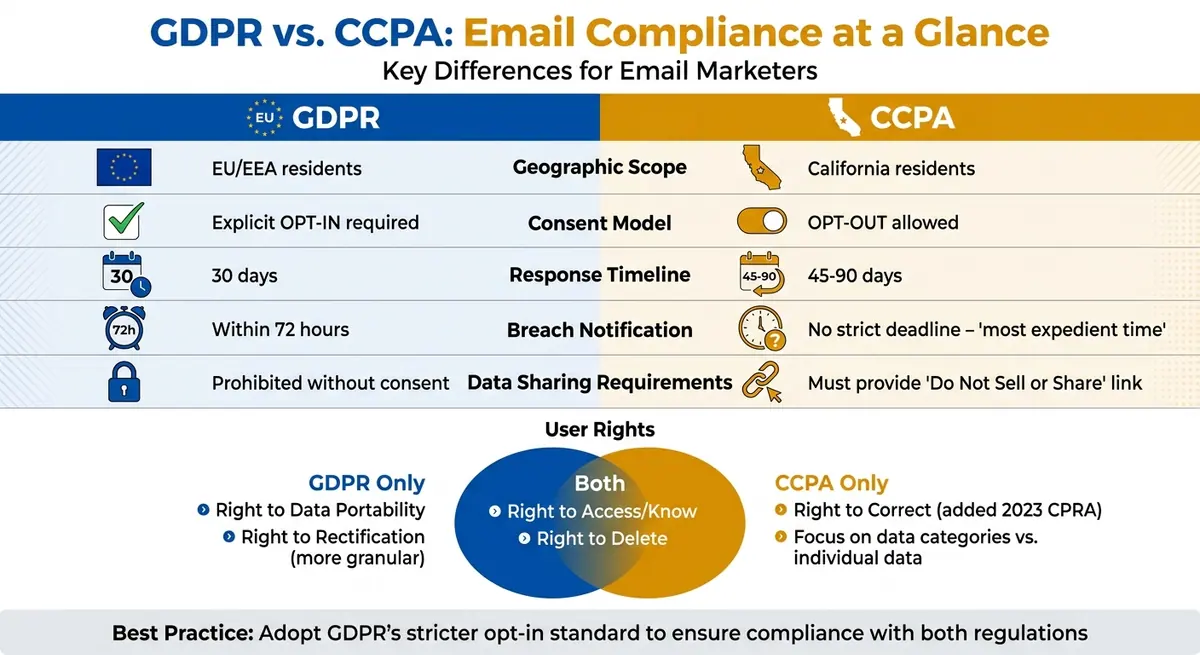
GDPR vs CCPA Email Compliance Requirements Comparison Chart
GDPR vs. CCPA: Core Differences for Email Compliance
Opt-In vs. Opt-Out: Different Consent Requirements
The GDPR and CCPA take very different approaches when it comes to consent. GDPR requires an explicit opt-in process, meaning users must actively give their consent before you can send them any emails. Without this explicit action, sending emails is prohibited under GDPR rules.
On the other hand, the CCPA operates on an opt-out model. Under this framework, you can collect and use email addresses by default, as long as you comply with CAN-SPAM regulations and provide users with an option to opt out of data sales or sharing. If your business shares email lists with advertising partners or co-marketing affiliates, you need to include a "Do Not Sell or Share My Personal Information" link on your website to stay compliant.
"The most common CCPA compliance gap I see in email marketing is list sharing. Companies share email lists with partners for co-branded campaigns and don't realize this triggers the 'Do Not Sell or Share' requirement."
In essence, GDPR focuses on regulating email sending, while CCPA emphasizes the handling and sharing of data. Adopting GDPR's stricter opt-in standard can help ensure compliance with CCPA's broader requirements.
Data Subject Rights: What Users Can Request
Both GDPR and CCPA grant users control over their personal data, but the specifics differ. GDPR gives users several rights, including:
- Right of Access: Users can request a copy of their data and details on its usage.
- Right to Erasure: Users can request their data be deleted.
- Right to Rectification: Users can ask for corrections to inaccurate data.
- Right to Data Portability: Users can obtain their data in a machine-readable format.
CCPA provides similar rights but frames them differently:
- Right to Know: Users can learn what data categories are collected, sold, or shared.
- Right to Delete: Users can request data deletion, though there are exceptions for business needs.
- Right to Correct: Users can request corrections to inaccurate information, added under CPRA in 2023.
The main distinction lies in the level of detail. GDPR's Right of Access offers granular insights into how individual data is used, while CCPA's Right to Know focuses more on transparency about data categories and business practices. Additionally, GDPR's deletion rights are broader but tied to specific legal grounds, whereas CCPA allows exceptions for data needed for essential business purposes.
For email compliance, your systems must be able to locate, export, or delete subscriber data across all platforms, including email providers, CRMs, analytics tools, and backups. Both regulations require identity verification before fulfilling these requests, adding another layer to the compliance process.
Response Timelines: How Fast You Must Act
Timely responses to user requests are critical under both regulations, but the deadlines differ. GDPR mandates a 30-day response window for any data subject request, whether it's for access, deletion, rectification, or portability. CCPA allows 45 calendar days to respond to requests to know, delete, or correct information, with the option to extend by another 45 days if the consumer is notified within the initial period.
For opt-out requests under CCPA, the timeline is shorter - you must act within 15 business days. Additionally, CAN-SPAM requires that unsubscribe requests for commercial emails be honored within 10 business days.
| Request Type | GDPR Timeline | CCPA Timeline |
|---|---|---|
| Access/Know Request | 30 days | 45 days (extendable to 90) |
| Deletion Request | 30 days | 45 days (extendable to 90) |
| Opt-Out/Data Sale | Immediate | 15 business days |
| Email Unsubscribe | Immediate | 10 business days (CAN-SPAM) |
Meeting these deadlines requires robust automation, accurate data tracking, synchronized suppression lists, and proper record-keeping. CCPA, for example, requires businesses to maintain records of consumer requests and their responses for at least 24 months.
sbb-itb-5f36581
Data Security and Accountability Requirements
Breach Notification Rules
The GDPR and California's breach notification laws take different approaches to timelines and thresholds for reporting data breaches. Under GDPR, organizations must notify authorities within 72 hours if the breach poses a risk to individual rights. California law, on the other hand, requires notification "as quickly as possible without unreasonable delay", but it doesn’t set a strict deadline.
The criteria for triggering a breach notification also vary. In California, a breach involves the unauthorized acquisition of unencrypted "personal information", such as an email address paired with a password or security question that grants account access. GDPR applies a broader standard, requiring notification for any breach of personal data that could impact the rights and freedoms of individuals. This means that even unauthorized access to personal data under GDPR could start the 72-hour clock.
| Feature | GDPR | CCPA / CA Breach Law |
|---|---|---|
| Notification Deadline | Within 72 hours of discovery | Most expedient time/without unreasonable delay |
| Threshold for Notice | Risk to individual rights and freedoms | Unauthorized acquisition of unencrypted personal info |
| Email-Specific Trigger | Any personal data (e.g., email address) | Email address plus password or security question |
| Attorney General Notice | Not required | Required if more than 500 California residents are affected |
Both regulations emphasize the importance of strong security practices. Encryption (both at rest and in transit), multi-factor authentication (MFA), and audit logging for mailbox and message access are critical. California law offers a safe harbor from certain civil damages if the compromised data was encrypted and the encryption key remained secure. Additionally, the CCPA gives consumers the right to pursue statutory damages ranging from $100 to $750 per incident if their data is breached.
"Article 34 (GDPR) allows organisations suffering a data breach to avoid the communication requirement if they used encryption to 'render the personal data unintelligible to any person unauthorised to access it.'" - Entrust
For email systems, implementing SPF, DKIM, and DMARC protocols can help prevent spoofing and unauthorized access. Automating data deletion or anonymization ensures that email data is retained only as long as necessary, reducing the potential impact of a breach. Preparing breach notification templates ahead of time can also simplify compliance. For California residents, these notices must be titled "Notice of Data Breach", use at least 10-point font, and include clear sections like "What Happened" and "What Information Was Involved."
These notification requirements lay the foundation for the documentation and accountability practices discussed next.
Documentation and Accountability Standards
Beyond breach notifications, maintaining detailed records is essential for compliance. GDPR requires organizations to demonstrate adherence to data protection principles through documentation, such as Records of Processing Activities (ROPA) outlined in Article 30. Companies involved in large-scale monitoring or processing of sensitive data must also appoint a Data Protection Officer (DPO). In contrast, the CCPA does not require a DPO but focuses heavily on transparency and consumer rights.
Under CCPA, businesses must provide clear privacy disclosures, including opt-out options for the sale or sharing of personal information. Companies are also required to keep records of consumer privacy requests and their responses for at least 24 months. The 2023 CPRA amendment adds further obligations, such as conducting regular cybersecurity audits and risk assessments.
For email automation systems, having a signed Data Processing Addendum (DPA) with service providers is crucial. This ensures they qualify as a "service provider" under CCPA or a "processor" under GDPR. Even when not legally required, maintaining a ROPA helps track email data activities. Automated logging of consent (opt-in) and deletion requests (opt-out) creates a clear audit trail. Using a portal or automated workflows for managing Data Subject Access Requests (DSARs) can help meet GDPR’s 30-day and CCPA’s 45-day response deadlines.
The penalties for non-compliance are steep. GDPR violations can result in fines of up to €20 million or 4% of global annual revenue, whichever is higher. Under CCPA, intentional violations carry fines of $7,500 per instance, while unintentional violations can result in $2,500 fines. For example, in 2020, the Italian telecommunications company Wind Tre faced a €17 million fine for multiple violations, including sending marketing emails without proper consent and failing to track opt-out requests adequately.
How to Build Compliant Email Workflows
Email Automation Compliance Checklist
Creating email workflows that comply with regulations requires more than just having policies in place - it demands technical measures. First, ensure your email service provider offers features like individual data export and permanent deletion. These tools are essential for meeting GDPR's 30-day and CCPA's 45-day response deadlines.
If you share email lists with partners or co-marketing affiliates, your website should include a clear "Do Not Sell or Share My Personal Information" link. This is a common requirement under CCPA that many organizations overlook.
Make it easy for users to submit data subject requests by providing both a dedicated web form and a contact email. Before granting access or deleting data, document the identity verification process and retain records of these interactions for at least 24 months. Even after deleting user data, maintain a suppression list of email addresses to avoid unintentionally re-adding these users to your marketing workflows.
Your privacy policy should detail the specific types of personal information you collect - like email addresses or engagement data - and explain why you collect it. If your workflows involve multiple marketing tools, consider using a consent management platform to centralize and track user consent across systems. Once your policies and processes are in place, you can focus on optimizing data collection using specialized tools like form builders.
Using Form Builders for Compliant Data Collection
The first step in building compliant email workflows is collecting data responsibly. Start by using reliable email validation tools to capture legitimate addresses only. For example, Reform’s email validation features help keep your CRM clean, while its spam prevention tools block fraudulent entries.
Conditional routing in signup forms can help you manage compliance by segmenting users based on location or consent. For instance, you can automatically apply GDPR’s opt-in rules for EU residents while using CCPA’s opt-out model for California residents. Reform integrates seamlessly with CRM and marketing automation tools, ensuring consent data is properly tracked across all systems. This creates the audit trail you need for accountability.
Store time-stamped records of consent, including the source and version of the policy users agreed to. Reform also provides real-time analytics and tracks abandoned submissions, helping you monitor form performance while keeping your compliance documentation up to date. With support for custom CSS and code, you can include the required consent language or checkboxes for different regulations, all while maintaining your brand’s look and feel.
For businesses that handle sensitive personal information under CPRA, Reform’s multi-step forms allow you to separate basic contact details from sensitive data collection. This makes it easier to respect users’ rights to limit how their sensitive information is used. Additionally, Reform’s headless forms feature ensures consistent compliance across all digital platforms, giving you full control over your data processes without sacrificing flexibility.
Understanding GDPR, CCPA, and CASL: Essential Privacy Laws Explained
Conclusion
Building email workflows that align with strict privacy standards can simplify compliance across various jurisdictions. While GDPR and CCPA have different requirements, using GDPR's explicit opt-in model as a global standard often meets the demands of both regulations, reducing the complexity of managing compliance.
The key difference lies in their approach to consent: GDPR mandates explicit permission before collecting data, whereas CCPA permits data collection by default but requires a clear opt-out option. By securing explicit consent from all users, you'll not only meet GDPR standards but also go beyond what CCPA requires. Under CCPA, if you share email lists with partners or advertising networks, you must also include a "Do Not Sell or Share My Personal Information" link.
Remember, GDPR's stricter rules for response times and breach notifications highlight the importance of strong compliance measures.
To stay compliant, keep detailed records of consent, data subject requests, and policy versions for at least 24 months. Invest in a solid technical setup that includes validated data collection, automated handling of requests, and effective consent tracking. These steps will help you build email workflows that protect user privacy while still achieving your marketing goals. By adopting these practices, you can create campaigns that prioritize privacy and deliver results.
FAQs
Do I need double opt-in for GDPR-compliant emails?
Yes, under GDPR, double opt-in is often used to ensure users explicitly agree to receive emails. This process involves users confirming their subscription through an additional step, like clicking a verification link sent to their email. It’s a way to verify consent and comply with GDPR’s stricter standards for protecting user data.
On the other hand, the CCPA takes a different approach with its opt-out model. Here, users are automatically included unless they actively choose to stop communications. This highlights a key difference: GDPR emphasizes proactive consent, while CCPA focuses on giving users the power to decline.
When does CCPA require a “Do Not Sell or Share” link?
The California Consumer Privacy Act (CCPA) mandates that businesses include a clear and accessible “Do Not Sell or Share” link on their websites. This link is crucial because it empowers consumers to opt out of the sale or sharing of their personal information. By providing this option, individuals gain greater control over how their data is handled and used by businesses.
How can I handle DSARs across my ESP, CRM, and backups?
Managing DSARs (Data Subject Access Requests) across your ESP, CRM, and backups can be a complex task. But automation can make it much easier while cutting down on errors. Plus, it’s a cost-efficient move - manually handling these requests costs an average of $1,524 per request.
Here are some ways to simplify compliance:
- Automate data aggregation: This ensures you can meet strict deadlines like GDPR’s 30-day limit or CCPA’s 45-day requirement without scrambling.
- Leverage AI tools: Use advanced tools to locate and compile personal data quickly and accurately.
- Audit your data repositories regularly: Make sure all relevant data is accessible and organized, so nothing gets overlooked.
By automating these processes, you’ll save time, reduce costs, and stay compliant with data privacy laws.
Related Blog Posts
Get new content delivered straight to your inbox

The Response
Updates on the Reform platform, insights on optimizing conversion rates, and tips to craft forms that convert.



Drive real results with form optimizations
Tested across hundreds of experiments, our strategies deliver a 215% lift in qualified leads for B2B and SaaS companies.
