
.webp)
Honeypot Field Setup Checklist



Honeypot fields are hidden form inputs designed to trap spam bots without disrupting user experience. Unlike CAPTCHAs, they work silently by detecting bot activity when these hidden fields are filled. Proper implementation can reduce spam submissions by up to 80%, and when combined with time-based validation, can block 99.5% of automated spam.
Key Takeaways:
- What they do: Honeypot fields catch bots by using hidden traps that bots can’t resist but humans don’t notice.
- Why they matter: Spam bots send 8 billion emails daily, and 51% of web traffic comes from bots. Honeypots help filter spam without frustrating real users.
- Common mistakes: Avoid
type="hidden", use realistic field names (e.g., "website"), and ensure server-side validation. - Best practices: Use CSS to hide fields, add attributes like
tabindex="-1", and combine with time-based checks for stronger protection. - Spam handling: Options include rejecting submissions, marking them as spam, or silently discarding them.
Honeypots are a simple yet effective way to block bots and protect your forms, but they require careful setup and maintenance to work effectively.
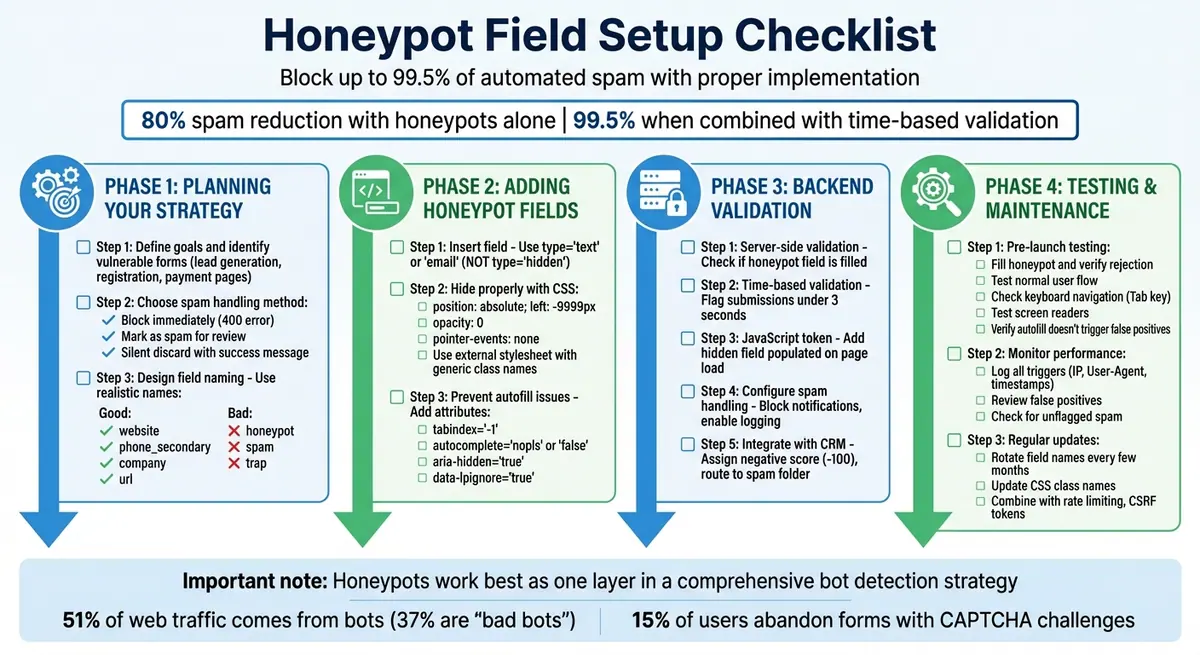
Complete Honeypot Field Implementation Checklist for Form Spam Protection
Add a Honeypot to Your Forms 🐝
Planning Your Honeypot Strategy
Before diving into the technical setup, take a moment to map out your honeypot's role and how it will handle flagged submissions. A solid plan ensures your honeypot works efficiently without disrupting genuine user interactions.
Define Your Goals and Scope
Start by pinpointing the forms most vulnerable to bot abuse. These are typically high-value forms like lead generation, registration, or payment pages that bots often target.
Decide how flagged submissions will be handled. You’ve got three main choices:
- Quietly block the submission altogether.
- Mark it as spam for manual review later.
- Silently discard the entry but display a success message to the user.
Also, consider whether your honeypot will operate solo or as part of a multi-layered defense. Combining honeypots with techniques like time-based checks (e.g., ensuring forms take at least 3–15 seconds to complete, depending on complexity) can help block up to 99.5% of spam submissions.
Design Your Honeypot Field
The effectiveness of your honeypot often hinges on how you name its hidden field. Bots are programmed to fill out fields they recognize, so choose names that sound realistic, such as "website", "phone_secondary", "url", or "company". Avoid obvious names like "honeypot" or "spam" - advanced bots are designed to bypass fields with giveaway names. A believable name is far more effective than relying on display properties alone.
You can stick with one cleverly named honeypot field or use two to three decoy fields to improve detection rates. For even better security, consider generating a unique hidden field name for each form rather than reusing the same one across your entire site.
Plan Validation and Lead Routing
Server-side validation is non-negotiable. Don’t rely solely on JavaScript; bots can easily bypass client-side rules. Instead, configure your server to check whether the honeypot field contains any data. If it does, flag the submission as spam.
Once your honeypot is set up, make sure your server validation aligns with its design. Filter out flagged entries from your CRM system and adjust lead-scoring metrics to reflect spam detection. Additionally, log the IP address and timestamp for every triggered honeypot. This data can help you identify spam patterns and fine-tune your security measures over time. Just remember to comply with GDPR requirements when handling IP addresses and timestamps.
Adding Honeypot Fields to Your Forms
Now that you’ve got your strategy ready, it's time to put the honeypot field into action. The idea is simple: create a trap that bots can’t resist but human users won’t even notice. And don’t worry - this won’t mess with your form’s usability or accessibility. Start by adding the field and styling it to stay out of sight.
Insert the Honeypot Field
To begin, insert a visible text input - like type="text", "email", or "checkbox" - instead of using a hidden field. Why? Because bots tend to skip over fields marked as type="hidden". Give the field a realistic name that bots are likely to recognize, such as website, fax_number, or phone. For added safety, include a label like "If human, leave blank" to guide users who rely on assistive technology and might otherwise interact with the field.
Hide the Field Properly
Don’t just rely on display: none - savvy bots can detect that. Instead, use a combination of techniques to hide the field. For example, you can position it off-screen using position: absolute; left: -9999px;. Other methods include setting opacity: 0, reducing its width to the bare minimum, and disabling pointer events with pointer-events: none. Always place these CSS rules in an external stylesheet and use generic class names like .form-helper to avoid giving away the field’s purpose. This layered approach ensures bots see the field in the DOM, while human users remain blissfully unaware.
Prevent Autofill and Accessibility Problems
Browsers and password managers might autofill the honeypot field, which could lead to false spam detections. To avoid this, set the autocomplete attribute to a non-standard value like nopls or false - as many browsers ignore off. Additionally, use tabindex="-1" to keep keyboard users from tabbing into the field, and add aria-hidden="true" so screen readers skip over it. To block password managers like LastPass, include attributes such as data-lpignore="true" and data-1p-ignore. Finally, test your form in popular browsers like Chrome, Safari, Firefox, and Edge to ensure everything works as intended - the honeypot should stay invisible to users but effective against bots.
| Attribute | Purpose | Recommended Value |
|---|---|---|
| tabindex | Prevents keyboard focus | -1 |
| autocomplete | Prevents browser autofill | nopls or false |
| aria-hidden | Hides element from screen readers | true |
| data-lpignore | Blocks LastPass autofill | true |
| name | Tricks bots into filling the field | website, fax_number, or phone |
sbb-itb-5f36581
Setting Up Backend Validation and Spam Handling
Your server plays a crucial role in managing form submissions. It needs to evaluate each one, filter out spam, and route genuine entries based on your business rules. This process ensures your CRM stays clean and free from clutter caused by junk data.
Implement Server-Side Validation
Start by having your server check the honeypot field in every incoming POST request. Submissions with non-empty honeypot data should be flagged as spam. Use the trim() function to catch entries that only contain whitespace. Another effective measure is a time-based validation - flag submissions completed in under three seconds as suspicious. Studies show that combining honeypot fields with time-based checks can block up to 99.5% of automated spam. This is particularly important given that bots make up 51% of all web traffic, with 37% classified as "bad bots".
For an additional layer of protection, implement a JavaScript token. Add a hidden field that gets populated with a unique value when the page loads. If this field remains empty or unchanged upon submission, it likely indicates a bot that doesn't execute JavaScript. Log honeypot triggers to identify patterns, but don't rely solely on them. Combine these measures with rate limiting, CSRF tokens, and IP blocking for forms that are highly targeted by bots.
Once flagged entries are identified, decide how your server will handle them.
Configure How Spam Is Handled
There are several ways to manage flagged submissions:
- Reject Immediately: Return a 400 Bad Request status, stopping the entry from reaching your database or CRM.
- Mark as Spam: Save flagged submissions in a separate folder for manual review, especially if you're concerned about false positives.
- Silent Discard: Use what Stefan Olaru, Cloud Architect & Developer, calls the "fake happiness" approach:
"If the backend validation fails because the honeypot was filled, don't throw an error, silently discard the submissions and show a success message. Make the spammer think their junk went through."
This method can mislead bots, reducing the likelihood of repeated spam attempts.
Regardless of the method you choose, ensure that flagged entries don't trigger backend notifications, such as emails to your sales team or updates to marketing tools. Enable logging to capture the results of honeypot checks, including reasons for failure like invalid hashes or overly fast submission times.
| Handling Method | Action Taken | Best For |
|---|---|---|
| Block/Reject | Entry is not saved; server returns an error (e.g., 400). | High-volume bot attacks; conserving storage. |
| Mark as Spam | Entry is saved in a "Spam" folder for manual review. | Minimizing false positives and training filters. |
| Silent Discard | Entry is discarded, and a generic success message is returned. | Tricking sophisticated bots and preventing re-attempts. |
Connect with Lead Scoring and Analytics
After filtering spam, integrate the results with your lead scoring system. Assign a heavy negative score - like -100 - to submissions flagged by the honeypot. This ensures bot-generated entries are excluded from marketing qualified lead (MQL) or sales qualified lead (SQL) statuses. Map honeypot results to a CRM field, such as "Spam Flag" or "Lead Source Detail", so flagged entries can be easily filtered out of sales reports and views. Backend workflows should automatically route these entries to a "Spam" folder or mark them as "Disqualified", preventing sales alerts or tasks from being triggered.
Flagged submissions should also be excluded from marketing dashboards and conversion rate calculations to maintain accurate performance metrics. If you're using AI or machine learning for lead scoring, remove these entries from training datasets to avoid skewing predictive models with false patterns. As Ami Heitner from Worknet.ai explains:
"Negative scoring acts as an automated gatekeeper. It protects your sales team's most valuable asset - their time - by proactively identifying and filtering out leads that do not align with your Ideal Customer Profile (ICP)."
Businesses that implement clear disqualification processes and filters have reported up to a 30% improvement in sales acceptance rates.
Testing and Maintaining Your Honeypot Setup
Test Before Going Live
Thorough testing is key to ensuring your honeypot does its job - blocking spam - without interfering with genuine users. Start by opening your developer tools, revealing the honeypot field by removing its CSS, and filling it with text. Submit the form to confirm it gets rejected. Then, simulate a typical user experience: fill out only the visible fields at a normal pace. This submission should go through without any issues.
Use the Tab key to navigate through the form, ensuring the honeypot field is skipped entirely. Test with popular screen readers to confirm that the hidden field remains inaccessible. Enable browser autofill and submit the form to check that saved data doesn’t accidentally populate the honeypot, which could lead to false positives. Don’t forget to inspect your browser console for JavaScript errors, as these could stem from caching, script conflicts, or plugin issues that disrupt validation.
Research indicates that about 15% of users abandon forms when faced with a CAPTCHA challenge, so smooth honeypot functionality is essential for keeping conversions high. To avoid tipping off bots, use realistic field names like website, phone, or url instead of something obvious like honeypot. Also, double-check that your CSS techniques are still effective at hiding the field from advanced bots.
Monitor Performance Over Time
Once your form is live, keep an eye on how your honeypot is performing. Log every trigger, including details like IP address, User-Agent, entered values, and timestamps. Use this data to build a dashboard that compares flagged spam submissions against legitimate ones, giving you a clear picture of how much spam is being blocked. Regularly review flagged entries to spot patterns and check for false positives - sometimes autofill or password managers can mistakenly populate hidden fields.
Manually review any unflagged spam that slips through to fine-tune your system. Additionally, conduct periodic accessibility audits using screen readers and keyboard navigation to ensure that legitimate users aren’t unintentionally interacting with the hidden fields.
Developer Zell Liew highlights an important detail:
"What actually fools the bots isn't
display:none, but thenameof the field. If you use sth likehp, it doesn't work anymore... But a valid-sounding name? Oh yeah."
Keep Your Setup Updated
As bots evolve, so should your honeypot setup. Use the data you’ve collected to identify trends and make adjustments. Rotate your honeypot field names every few months to keep them unpredictable. For example, switch from website to mobile or last-name. Avoid obvious CSS class names like .honeypot or .spam-trap - instead, go for generic ones like .form-helper. Moving your hiding CSS to an external stylesheet can also make it harder for bots to link styles to specific fields.
Modern bots often use headless browsers, which can detect basic traps. To stay ahead, honeypots should be just one part of a broader strategy. Combine them with other measures like rate limiting, CSRF tokens, and time-based checks. If you log spam attempts, make sure you comply with GDPR by either truncating or avoiding the storage of personally identifiable information.
OpenReplay offers a valuable reminder:
"Honeypot fields are not a silver bullet. Modern bots using headless browsers can detect and avoid them... They work best as one layer in a comprehensive bot detection strategy."
Conclusion
Checklist Summary
When planning your honeypot, go for realistic field names like company_website, alternate_email, or office_phone. Avoid giveaways like "honeypot" or "trap." To keep these fields hidden, use CSS techniques like pushing them off-screen or shrinking their size, rather than relying on display: none.
On the server side, validate submissions by rejecting any that include filled honeypot fields. For an added layer of deception, you can display a generic success message to confuse bots.
To enhance usability and prevent autofill hiccups, apply attributes like tabindex="-1", aria-hidden="true", and autocomplete="off" (or "nope").
Remember, maintaining your honeypot is an ongoing effort. Regularly check spam logs, update field names, and stick to generic CSS classes. Pairing honeypots with time-based validation - requiring 3–10 seconds before a form can be submitted - can block up to 99.5% of automated spam, a notable improvement over the roughly 80% reduction achieved with honeypots alone.
These steps lay the groundwork for an effective honeypot strategy, which can be further enhanced by leveraging tools like Reform.
How Reform Can Help

Reform takes these best practices and makes them even easier to implement. With built-in spam prevention features, you don’t need to write custom HTML, CSS, or backend validation scripts. A simple toggle enables advanced spam filters that automatically monitor hidden fields and block bot submissions - no coding required.
But Reform doesn’t stop at basic honeypots. It adds extra layers of security, including email validation, lead enrichment, and conditional routing, ensuring only quality leads make it to your CRM. Seamless integrations with popular marketing tools mean verified leads sync directly into your workflows, while spam is filtered out quietly in the background.
Reform’s real-time analytics let you track form performance and see exactly how many submissions are blocked, eliminating the hassle of manual log reviews. This streamlined approach also helps keep conversion rates high, especially since about 15% of users abandon forms when faced with CAPTCHA challenges. By simplifying the process, Reform ensures your forms are both user-friendly and highly effective.
FAQs
What’s the difference between honeypot fields and CAPTCHAs for preventing spam?
Honeypot fields are invisible form inputs meant to catch bots in the act. Since these fields are hidden from human users, legitimate visitors won't interact with them. Bots, however, will often fill them out, making it simple to filter out spam submissions without adding any hurdles for real users.
CAPTCHAs work differently. They require users to solve a challenge - like picking certain images or typing out distorted text - to prove they're not bots. While they can be useful, CAPTCHAs often come with downsides. They can disrupt the flow for users, create accessibility barriers, and aren't foolproof when it comes to blocking bots.
What are the best practices for naming honeypot fields to prevent spam effectively?
To boost the effectiveness of honeypot fields, stick to realistic and commonly used field names like email, phone, address, or url. Steer clear of overly obvious names such as honeypot or anything too generic, as many bots are designed to spot and ignore these. It's also a good idea to switch up the field names across different forms to avoid creating predictable patterns that bots could take advantage of.
What steps can I take to keep my honeypot fields effective against advanced bots?
To keep a honeypot field effective, use a standard <input type="text"> or <input type="email"> element, but hide it using external CSS instead of inline styles or an <input type="hidden">. Give the field a realistic and believable name, and make it a habit to update or randomize the name periodically to throw off bots. Regularly analyze form submissions for spam patterns and adjust your defenses as needed. You can also add extra layers of protection, like validation rules or email verification, to stay one step ahead of bots.
Related Blog Posts
Get new content delivered straight to your inbox

The Response
Updates on the Reform platform, insights on optimizing conversion rates, and tips to craft forms that convert.




Drive real results with form optimizations
Tested across hundreds of experiments, our strategies deliver a 215% lift in qualified leads for B2B and SaaS companies.
