
.webp)
How to Configure Secure Database Connections



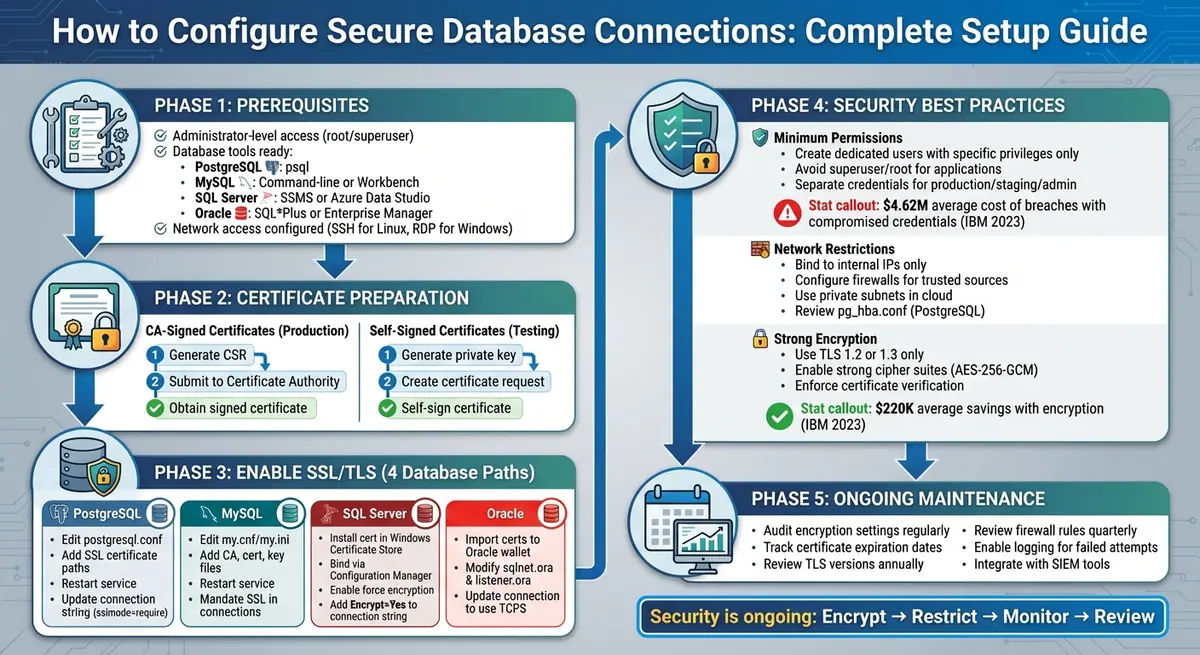
Every time your application connects to a database, sensitive data like credentials or financial information is at risk. Without encryption, attackers can intercept this data using techniques like man-in-the-middle attacks. The solution? Secure your database connections with SSL/TLS encryption to protect data in transit, meet compliance standards (e.g., HIPAA, PCI DSS), and reduce breach costs.
Here’s what you’ll learn in this guide:
- Why encryption matters: Protects confidentiality, integrity, and authenticity of data.
- How to prepare SSL/TLS certificates: Choose between CA-signed or self-signed certificates.
- Steps to enable SSL/TLS encryption: Configuration instructions for PostgreSQL, MySQL, SQL Server, and Oracle.
- Best practices for security: Enforce least privilege, restrict network access, and use strong encryption protocols.
Step-by-Step Guide to Configuring Secure Database Connections with SSL/TLS
Prerequisites for Configuring Secure Database Connections
Tools and Access You’ll Need
Before diving into secure database configurations, make sure you have administrator-level access (root or superuser) to modify settings and restart services. This is crucial for making changes to security protocols like SSL/TLS.
You'll also need the right tools for your database type:
- PostgreSQL: Use
psql. - MySQL: Choose between the command-line tool or Workbench.
- SQL Server: Go with SQL Server Management Studio (SSMS) or Azure Data Studio.
- Oracle: Use SQL*Plus or Enterprise Manager.
Additionally, ensure you have network access:
- For Linux systems, SSH access is required.
- For Windows systems, Remote Desktop Protocol (RDP) is necessary.
- For cloud-hosted databases, make sure security groups or firewalls are properly configured to allow access.
Once your tools and access are ready, you can move on to preparing SSL/TLS certificates.
Getting SSL/TLS Certificates Ready
SSL/TLS certificates are at the heart of securing database connections. You have two choices: CA-signed certificates or self-signed certificates.
-
CA-Signed Certificates: These are the go-to for production systems because they are automatically trusted by client applications. To get one, you’ll need to:
- Generate a Certificate Signing Request (CSR).
- Submit the CSR to a trusted Certificate Authority.
- Obtain the signed certificate along with any intermediate certificates.
-
Self-Signed Certificates: These are a good option for testing environments but not ideal for production, as they can trigger security warnings. To create one, use OpenSSL to:
- Generate a private key.
- Create a certificate request.
- Self-sign the certificate.
With your certificates prepared, you’ll be ready to secure your database connections effectively.
Go PostgreSQL Connection: How to Enable SSL for Secure Database Access
How to Enable SSL/TLS Encryption
Securing your database connection with SSL/TLS encryption is an essential step to safeguard your data. Each database system has its own requirements for certificate configuration and connection settings. Once you’ve set up the necessary prerequisites, here’s how you can configure SSL/TLS for some common database systems.
Setting Up SSL/TLS on PostgreSQL
Start by editing the postgresql.conf file to enable SSL and specify the paths to your SSL certificate, key, and CA files. Once these changes are made, restart the PostgreSQL service.
Next, update your client connection string to enforce encryption. For instance, add parameters like sslmode=require or sslmode=verify-full to ensure all connections are encrypted.
Setting Up SSL/TLS on MySQL
Locate your MySQL configuration file (such as my.cnf or my.ini) and add references to your CA, server certificate, and key files. After making these changes, restart the MySQL service.
To enforce secure communication, adjust your connection settings. Update your connection strings or options to mandate SSL for all database interactions.
Setting Up SSL/TLS on Microsoft SQL Server
Install your SSL certificate in the Windows Certificate Store and use SQL Server Configuration Manager to bind it to SQL Server. Then, enable "force encryption" in the server configuration, ensuring that only encrypted connections are allowed.
When updating your connection string, include Encrypt=Yes. If you're using a self-signed certificate, configure trust settings accordingly, or ensure proper validation for CA-signed certificates.
Setting Up SSL/TLS on Oracle Database
Oracle relies on the TCPS protocol for secure connections. Start by importing your SSL certificates into an Oracle wallet using Oracle Wallet Manager. Then, modify network configuration files like sqlnet.ora and listener.ora to reference the wallet and enable TCPS.
Finally, update your connection string to use the TCPS protocol, ensuring all communications are encrypted.
For detailed, step-by-step instructions, always consult the official documentation for your database system. Configuration details, such as file paths, parameter names, and command syntax, can vary depending on your environment and database version.
sbb-itb-5f36581
Best Practices for Database Security Configuration
Securing your database connections involves implementing multiple layers of protection. These strategies work together to reduce vulnerabilities and limit potential damage if credentials are compromised.
Use Minimum Required Permissions
Avoid using superuser or root accounts for everyday database access. Instead, create dedicated database users with only the permissions they need. For example, grant only SELECT, INSERT, and UPDATE privileges on specific tables.
- In PostgreSQL, avoid roles with
SUPERUSER,CREATEDB, orCREATEROLEprivileges for applications. - In MySQL, steer clear of
GRANT ALL ON *.*and instead target specific databases and tables with precise grants. - For SQL Server, define custom database roles with table-level permissions instead of using
db_ownerorsysadmin. - Oracle users should avoid granting system-level privileges like
DBA,ALTER SYSTEM, orCREATE ANY TABLEto application accounts.
It's also a good idea to use separate credentials for production, staging, and administrative roles. This approach ensures that if one set of credentials is compromised, the attacker cannot access everything. According to IBM's 2023 Cost of a Data Breach Report, breaches involving stolen or compromised credentials cost organizations an average of $4.62 million globally.
Review and refine privileges regularly using your database's administrative tools. Test your application in a staging environment with detailed logging enabled to identify the exact operations it performs. Gradually remove unused privileges and thoroughly test these changes before applying them to production.
Once permissions are tightened, move on to restricting network access to further reduce exposure.
Limit IP and Network Access
Restrict database connections to specific sources by binding the database listener to internal IP addresses instead of all network interfaces. For example:
- In PostgreSQL, set
listen_addressestolocalhostor internal subnet IPs instead of'*'. - In MySQL, configure
bind-addressto a private IP or127.0.0.1for local-only access.
Firewalls and security groups should allow inbound connections only from trusted sources, such as application servers, VPN-accessible admin hosts, or specific office IP ranges. PostgreSQL's pg_hba.conf file is particularly useful for restricting client IP ranges and enforcing SSL with entries like hostssl database_name user_name 10.0.0.0/24 md5.
For cloud environments, place database instances in private subnets behind firewalls. Use private endpoints or peering to avoid exposing database ports to the public internet. This segmentation ensures that even if attackers scan for open database ports, they won't find yours. Regularly review and maintain firewall rules, using clear naming conventions to manage access effectively and remove unused or overly broad entries.
These network restrictions work hand-in-hand with encryption practices to further reduce potential attack vectors.
Use Strong Encryption Protocols
Ensure all database connections use TLS 1.2 or TLS 1.3, and disable older versions like TLS 1.0, TLS 1.1, and all SSL protocols. Configure servers to allow only strong cipher suites, such as AES-256-GCM or ChaCha20-Poly1305, and block outdated options.
Here’s how to enforce encryption in popular databases:
- In PostgreSQL, set
ssl = onand configuressl_ciphersto use strong suites. - For MySQL, adjust
ssl_ciphersettings to prioritize AES-GCM suites. - SQL Server users should enable "Force Encryption" and manage TLS versions through Windows SChannel settings.
- Oracle databases require
SQLNET.ENCRYPTIONandSQLNET.CRYPTO_CHECKSUMto be set toREQUIREDwith robust algorithms like AES256.
Always enforce certificate verification on the client side to prevent man-in-the-middle attacks. For example, use PostgreSQL's sslmode=verify-full with a valid sslrootcert, or MySQL's ssl-mode=VERIFY_IDENTITY. Organizations that prioritize encryption often save an average of $220,000 in breach costs, according to IBM's 2023 report.
Store database credentials and TLS keys securely in a secrets manager or environment variables - never hardcode them in your application. Additionally, enable database query logging and monitor for failed login attempts, permission errors, and unusual access patterns. Integrate these logs with your SIEM tools to receive real-time alerts on suspicious activity.
Conclusion and Next Steps
Keeping your database connections secure is an ongoing process that shields your organization from potential breaches. By implementing measures like data encryption with TLS, validating certificates, enforcing strict access controls, and applying network restrictions, you've created a robust defense system to deter attackers.
Key Takeaways
Securing database connections involves several critical steps: installing certificates, activating TLS, and updating connection strings for each platform. Stick to the principle of least privilege and enforce network restrictions to reduce exposure. Always enable hostname or Distinguished Name (DN) verification to guard against man-in-the-middle attacks. Additionally, store credentials securely in environment variables or secrets managers - never hardcode them into your source code.
Once these basics are covered, shift your focus to regular monitoring and periodic reviews to maintain a strong security posture.
Maintaining Your Database Security
Beyond encryption and access controls, effective database security relies on consistent oversight. Make it a habit to audit encryption settings and track certificate expiration dates to avoid lapses. At least once a year, review your TLS versions and cipher suites, ensuring only TLS 1.2 or 1.3 with strong ciphers like AES-GCM are enabled. Every quarter, revisit your firewall rules to remove unused IP ranges or temporary exceptions.
Enable logging for failed login attempts, TLS negotiation errors, and unusual database queries. Integrate these logs with your SIEM tools to receive real-time alerts for potential issues. For organizations using external tools like Reform to collect lead data, pay extra attention to securing those database connections. Ensure TLS is enabled and permissions are kept to a minimum.
Use these steps as a checklist before deploying to production and plan to recertify your configurations every six to twelve months. This ensures your security measures remain aligned with your organization's policies and evolving threats.
FAQs
What is the difference between CA-signed and self-signed certificates?
When it comes to securing websites and applications, CA-signed certificates and self-signed certificates serve different purposes.
CA-signed certificates are issued by trusted Certificate Authorities (CAs). Because these authorities are widely recognized, browsers and devices automatically accept these certificates as secure. This makes them the go-to choice for public-facing websites and applications where trust and credibility are essential.
In contrast, self-signed certificates are created by the organization itself. While they do provide encryption, they aren’t trusted by browsers or devices by default. To use them, you’ll need to manually install the certificate to establish trust. This makes self-signed certificates more suited for internal systems, development projects, or testing environments where public trust isn’t a concern.
How can I make sure my database only allows connections from trusted sources?
To keep your database connections secure and restricted to trusted sources, start by using IP whitelisting. This ensures only approved IP addresses can access your database. Pair this with SSL/TLS encryption to protect data during transmission and block unauthorized interception.
Take it a step further by enforcing strong authentication methods, like certificates or VPNs, to confirm the identity of connecting clients. Additionally, keep database user permissions as limited as possible - grant access only to what’s absolutely necessary. Make it a habit to review access logs frequently to spot any unauthorized attempts or suspicious activity.
How can I regularly review and strengthen my database security settings?
To ensure your database stays secure, it's important to routinely review and adjust your security settings. Begin by reviewing access controls and permissions to confirm that only the right people can access your data. Make it a habit to apply security patches and updates as soon as they become available to address any vulnerabilities. Implement SSL/TLS encryption to protect data as it moves between systems, and keep an eye on activity logs to spot any unusual behavior.
You should also run vulnerability scans and consider penetration testing to uncover potential weaknesses. Regularly back up your data and test your recovery processes to ensure you can retrieve critical information when needed. Strengthen your authentication protocols by enabling multi-factor authentication, and clean up by removing unused accounts or unnecessary privileges. Staying up to date on new threats and best practices will go a long way in keeping your database secure.
Related Blog Posts
Get new content delivered straight to your inbox

The Response
Updates on the Reform platform, insights on optimizing conversion rates, and tips to craft forms that convert.



Drive real results with form optimizations
Tested across hundreds of experiments, our strategies deliver a 215% lift in qualified leads for B2B and SaaS companies.
