
.webp)
How to Use AI Lead Scoring in Financial Services



I use AI lead scoring to rank inquiries for follow-up - not to decide who gets a financial product. I start with one goal, such as a booked consultation within 30 days, and test whether scores help my team reach that goal.
Here’s the workflow I follow:
- Collect approved inputs. Use high-converting lead forms, such as those built with Reform, to gather service needs, location, and timing. Leave sensitive data out.
- Test before routing. Start with fixed scoring rules. Compare AI predictions with those rules using completed outcomes and the same follow-up capacity. A score of 80 out of 100 does not mean an 80% chance of conversion.
- Connect scores to the CRM. Keep score history, model versions, and routing reasons. Check consent, licensing, and service limits before assigning leads.
- Review results. Track conversions, response times, errors, and differences across groups. Keep human review and a rollback plan in place.
My guardrail: <u>Marketing Lead Score stays separate from credit approval, underwriting, pricing, eligibility, and product suitability.</u> Consent controls whether and how I can contact someone - not how I score their interest.
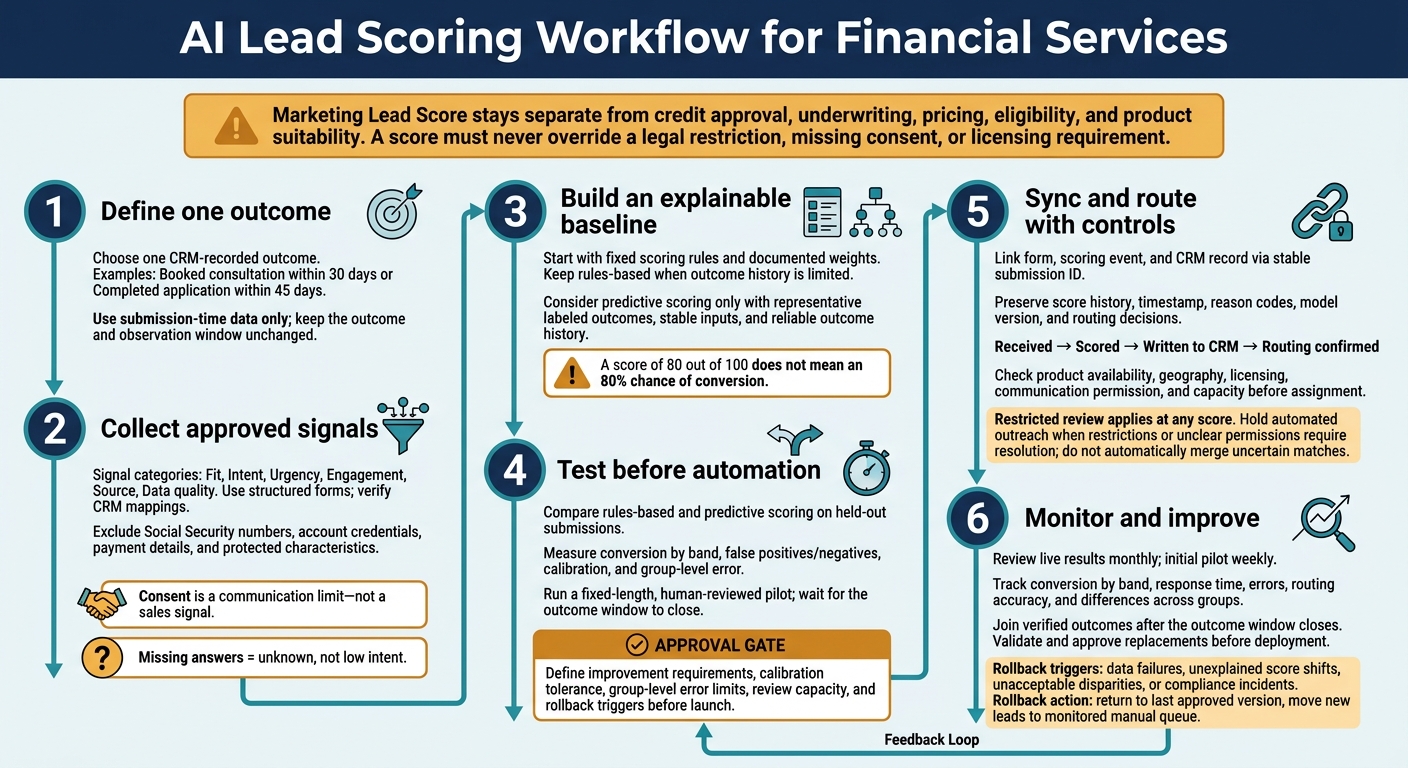
AI Lead Scoring Workflow for Financial Services
1. Set a Goal and Collect Form Data
Choose one CRM-recorded outcome before building the form. That might be a booked consultation within 30 days or a completed application within 45 days. Define the outcome precisely, use only data available at submission, and lock the cutoff date to prevent future data leakage.
Keep the outcome label separate from the actions a score triggers. Scores can assign owners, create tasks, or place leads in approved nurture paths. Require human review for ambiguous records, urgent service needs, and any action that could materially affect access to financial products or services. Record who can override routing, and require a reason for each override.
Once you’ve defined the outcome, choose the form fields that best predict it.
Choose Form Fields for Lead Signals
Group fields by the business question they answer:
- Fit: Product, customer type, state, and whether the firm serves the request.
- Intent: Information, quote, application, or advisor request.
- Urgency: Decision date or timeline.
- Engagement: Completion, return visits, appointment requests, and approved email activity, content views, or calculator use.
- Source: Referral, search, paid campaign, event, or customer referral.
- Data quality: Valid contact details and complete required fields.
Consent is a communication limit - not a sales signal. The same applies to opt-in status, contact preferences, and do-not-contact requests. Ask for broad financial ranges only when the service needs them and the request is proportionate to the stated goal.
Create a field inventory that records each field’s purpose, permitted use, and retention period. Then arrange the form so people see only the questions relevant to their request.
Build Structured Intake Forms With Reform
Use Reform to build branded, multi-step forms with conditional questions. Start with service interest, then display the relevant follow-ups.
Verify CRM field mappings, consent fields, and authentication. Test every branch before sending approved inputs to scoring.
Set Privacy and Compliance Limits
Limit the fields before building the model. Exclude Social Security numbers, account credentials, payment details, and protected characteristics from marketing scoring.
Have compliance review communication permissions, retention, and access controls before launch. Approve enrichment sources before enabling them; public data still needs permission and an accuracy review.
Test whether location, language, or referral source leads to unexplained differences in routing or contact rates. Keep fairness-testing data separate from production inputs, and restrict access.
sbb-itb-5f36581
2. Set Score Rules and Test AI Predictions
Set Weights and Score Bands
Turn the form fields into a simple scorecard, then test it against past outcomes. Start with a scorecard you can explain: fixed points, not learned predictions. The weights below are examples. Document and test each rule before launch.
Signal category Form field Score treatment Reason Stated need Requested service +15 for a supported service need Service match Timing Decision timeline +20 for 0–30 days; +10 for 31–90 days Stated urgency Fit Investment range, loan amount, or business revenue band +5 to +20 for approved service-fit criteria Fit with service requirements, not automatic intent Engagement Requested advisor call +10 to +15 Willingness to continue Data quality Valid email and complete required fields Gate follow-up, do not score consent Reliable contact Routing exception Product, state, licensing, or eligibility mismatch No score change; route to restricted review Service limits
Consent is a contact rule, not a lead-quality signal.
After defining the 0–100 index, assign 75–100 to same-hour follow-up, 50–74 to same-day follow-up, and 0–49 to nurture. Restricted review applies at any score and pauses automated product-specific routing. Check these thresholds against observed conversion and staffing.
If the team can make only 40 priority calls per day, use historical score distributions and conversion rates to set a manageable high-priority band.
If historical data is limited, keep the rules-based scorecard as your baseline.
Treat missing answers as unknown, not low intent. Keep “not provided” separate from “not applicable.” Only apply recency when the event has a defensible relationship to the defined outcome. Retain both the original timestamp and the adjusted score. Check missingness by source, device, and campaign so friction in multi-step forms doesn't become a scoring penalty.
Compare Rules-Based and Predictive Scoring
Let the quality of your outcome history determine whether predictive scoring is ready for routing.
| Dimension | Rules-based scoring | Predictive scoring |
|---|---|---|
| Transparency | Fixed rules | Needs explanation and validation |
| Historical-data needs | Can start with limited history | Needs representative labeled outcomes |
| Maintenance | Review weights and thresholds | Monitor, retrain, recalibrate |
| Appropriate use | Limited data or changing offers | Stable inputs and reliable outcome history |
Keep one primary outcome and one observation window unchanged throughout training and validation. Train on permitted submission-time inputs and fully observed outcomes. Then test on held-out submissions from a later period.
Exclude later sales dispositions, follow-up attempts, approval decisions, and account activity from model inputs. This prevents future data from leaking into predictions. Review contact timing separately: slow follow-up or fewer attempts can distort results. If outcome history is incomplete or doesn't represent the leads you'll route, keep the scorecard.
Test Scores Before Automating Lead Routing
Test both methods at the same follow-up capacity. Measure conversion by score band, false positives, false negatives, calibration, and group-level error rates across relevant groups and channels. A priority index is not a conversion probability. Validate calibration on data that wasn't used to fit the model.
Run a fixed-length, human-reviewed pilot with a defined comparison group. Wait for the outcome window to close before reviewing results. Keep licensing limits and restricted review in place throughout the pilot.
Before launch, document the required improvement over baseline, calibration tolerance, group-level error limits, and review capacity. Also define rollback triggers. Data failures, unexplained score shifts, unacceptable disparities, or compliance incidents should trigger a return to the last approved score version. Preserve score history and move new leads into a monitored manual queue.
Once the score passes pilot review, map it to the CRM and route leads by band.
3. Sync Scores With the CRM and Route Leads
Once testing is complete, sync the approved score to the CRM and use it for controlled routing.
Map CRM Fields and Keep Score History
Connect Reform submissions to the scoring service and CRM using a supported integration or middleware. Use a stable external submission ID to link the form record, scoring event, and CRM contact or lead.
Document the fields needed for routing and compliance: contact details, service interest, location, consent, source, campaign, and form version. Store the submission time, score, score band, reason codes, model version, owner, routing status, and final disposition. Keep each scoring event unchanged, and update a separate current-score field for active routing.
Match records first by verified email address. Then use a CRM account ID, phone number, or a reviewed combination of name and company. Don’t automatically merge uncertain matches. Make retries duplicate-safe so a repeated event doesn’t create another record, task, or assignment.
Track each stage: “received,” “scored,” “written to the CRM,” and “routing confirmed.” Keep failed writes in a secure holding queue, retry with increasing delays, and alert operations. Compare submission and CRM counts to catch missing records.
Route Leads by Score and Service Requirements
Before assigning an owner, check product availability, supported states or territories, employee licensing, required communication permission, and team capacity. A score must never override a legal restriction, missing consent, or licensing requirement.
In the CRM, show the score, score band, score timestamp, model version, top allowed reason codes, source, consent status, routing decision, assigned owner, response deadline, and override history.
Hypothetical band Example condition Owner Permitted action Response target Priority Score 80–100 and product, geography, licensing, and consent checks pass Licensed product specialist Human review and personalized follow-up using the permitted channel Within 1 business hour Qualified Score 60–79 and eligibility information is sufficiently complete Relevant product or regional team Review form details, verify missing information, and contact the lead Within 1 business day Nurture Score 30–59 and marketing permission is recorded Marketing nurture owner Send approved educational content and request additional information where appropriate Campaign cadence Review required Any score with unsupported state or territory, unclear consent, licensing conflict, sensitive request, or conflicting data Compliance or operations reviewer Hold automated outreach and resolve the restriction before reassignment Same business day Invalid or duplicate Duplicate, suspected spam, unverifiable contact information, or failed validation Data-quality owner Suppress, merge, or investigate according to documented procedures Within 2 business days
Record why each lead was routed, who approved any exception, and whether the action was completed. Apply opt-outs to nurture workflows immediately.
Track Results and Update the Model
Once routing is live, review results on a fixed monthly schedule. Track conversion by band, response time, booked meetings, qualified opportunities, application starts, funded/completed outcomes, opt-outs, duplicates, invalid data, routing accuracy, and override rate.
After the chosen outcome window closes, use the submission ID to join verified CRM outcomes to the training set. Leave unresolved labels out until they’ve been reviewed. Check for changes to forms, campaigns, products, or the CRM before blaming the model.
Retrain only when the evidence supports it, and validate the replacement before deployment. Record the reason for the change, model version, approval date, deployment date, rollback plan, and next review date. Retest affected workflows after material changes, and document monitoring, feedback, and change control.
Conclusion: Start With a Controlled Scoring Workflow
Start with one controlled pilot: one intake form, one service line, and one measurable outcome. Use Reform to collect approved signals through conditional questions, email validation, and spam prevention.
Document score weights, bands, and the action each band triggers. Test predictions before automating assignments, then sync scores and versions to the CRM. Name owners for follow-up, integration failures, model monitoring, and compliance review. Keep lead prioritization separate from credit eligibility and pricing.
Review the pilot weekly. Once it closes, compare the qualified-lead rate, time to first contact, and final outcomes against the baseline. Add products, fields, or automated actions only when results repeat, the data is reliable, and compliance and model risk reviewers approve.
FAQs
How much data do we need for AI lead scoring?
For effective AI lead scoring, aim for 1,000 to 2,000 labeled lead records and 12 to 24 months of consistently tagged CRM history. That dataset should include at least 200 closed-won and 200 closed-lost deals so the model can learn reliable patterns.
Keep key fields at least 70% complete. Before training, set aside 4 to 6 weeks to remove duplicate records and standardize fields.
How can we avoid overlooking low-scoring leads?
Give low-scoring leads a clear fallback path: automated follow-ups, educational resources, or nurture programs guided by additional signals. Define score bands and fallback rules for leads that don’t fit the scoring criteria. Check form and CRM data for missing key fields, invalid email addresses, and duplicate records.
Track false negatives in the CRM with standard rejection or qualification reason codes. As conversion patterns change, adjust thresholds or rules, or retrain the model.
When should we retrain our lead-scoring model?
Retrain when accuracy drops sharply, which may stem from a decline in training data quality. Weaker predictions or more conflicts can point to model drift.
Before retraining, check feature quality and threshold calibration. Adjusting thresholds may fix the problem. If it doesn’t, perform a full retrain.
Review the model monthly or quarterly, using conversion patterns to decide whether to adjust thresholds or retrain.
Related Blog Posts
Get new content delivered straight to your inbox

The Response
Updates on the Reform platform, insights on optimizing conversion rates, and tips to craft forms that convert.




Drive real results with form optimizations
Tested across hundreds of experiments, our strategies deliver a 215% lift in qualified leads for B2B and SaaS companies.
