
.webp)
Checklist for ISO 27001 Physical Security Compliance


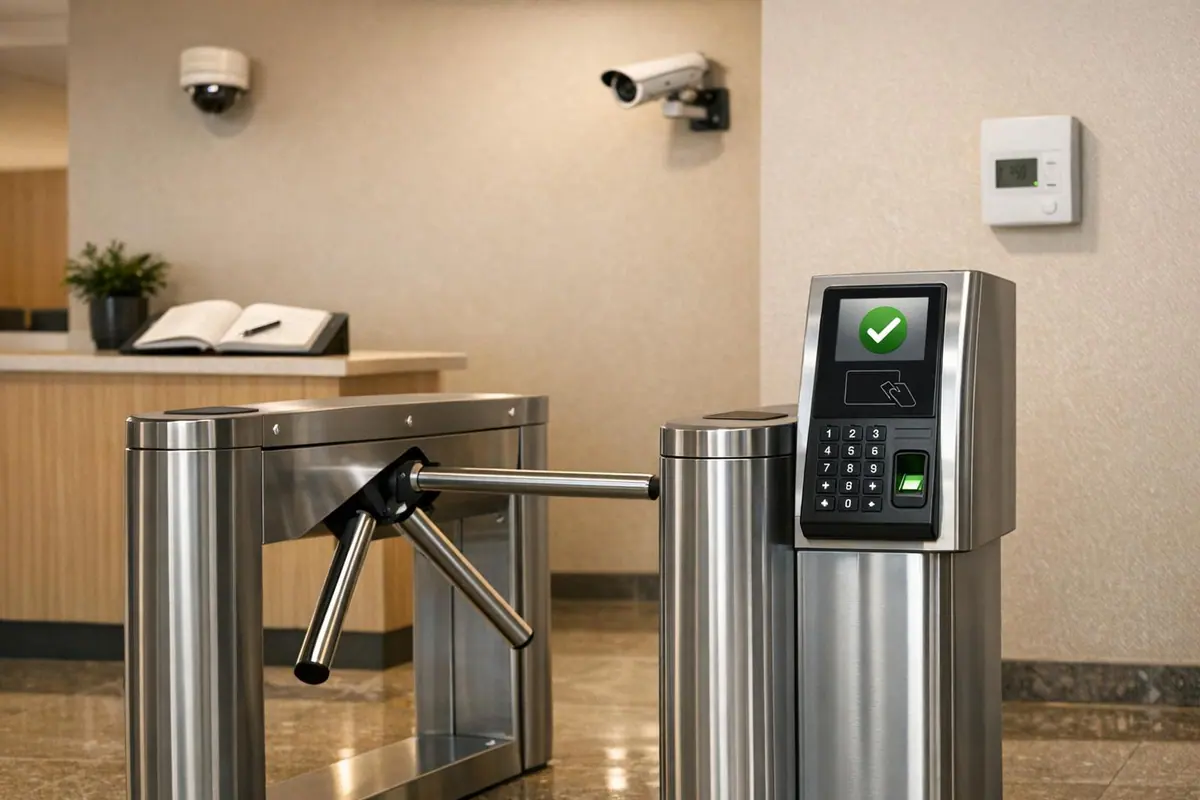
Protecting your physical spaces is just as critical as securing your digital assets. ISO 27001's physical security standards ensure your sensitive data stays safe from breaches, theft, and environmental risks. Here's a quick breakdown of the key steps to compliance:
- Secure Areas: Define and reinforce perimeters with multiple layers of protection (fences, ID readers, biometrics, and locked server racks). Avoid signage that reveals sensitive locations and minimize vulnerabilities like air vents.
- Access Controls: Use badge systems, biometrics, and logging tools to track and limit entry. Apply the principle of least privilege - only grant access where absolutely necessary. Keep visitor access tightly managed and logged.
- Equipment Protection: Lock servers in climate-controlled rooms, elevate hardware to prevent water damage, and install uninterruptible power supplies (UPS) to avoid outages.
- Cabling and Media Disposal: Secure cables in conduits, disable unused ports, and dispose of media securely through shredding or degaussing.
- Environmental Monitoring: Install sensors for fire, water leaks, and temperature changes. Feed alerts into a central monitoring system for real-time action.
- Incident Response: Document breaches, analyze vulnerabilities, and integrate physical alerts into broader security systems.
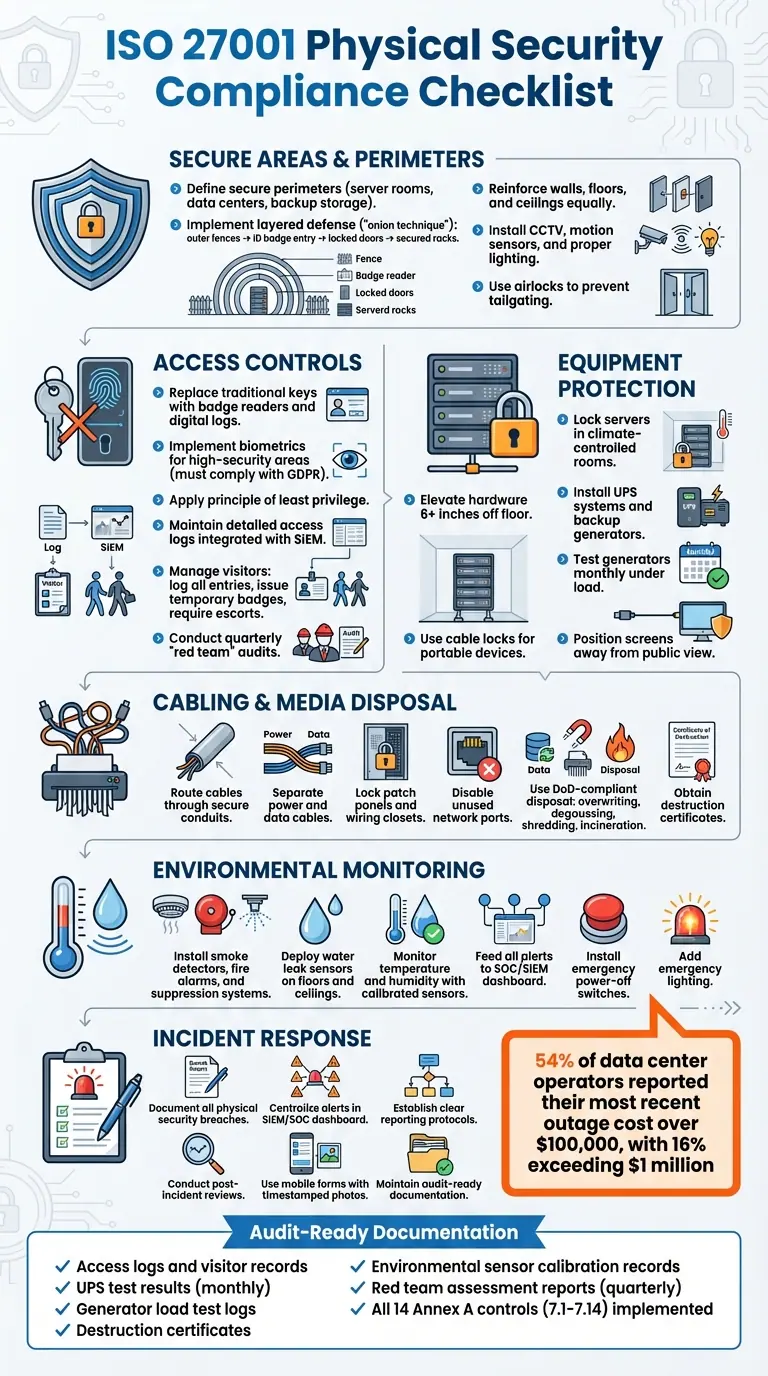
ISO 27001 Physical Security Compliance Checklist
Secure Areas and Perimeters
Defining Secure Perimeters
Start by identifying all locations where form data is stored - this includes server rooms, data centers, communication closets, and backup storage spaces. A secure perimeter refers to the boundary that separates areas with different levels of security. For instance, moving from a public hallway into a server room represents a transition across such a boundary.
The ISO 27001 standard emphasizes a layered defense strategy, often called the "onion technique." This approach involves multiple layers of protection: outer fences or walls, ID badge-controlled entry points, locked room doors, and finally, secured server racks or cabinets. Each layer serves as an additional hurdle for potential intruders.
Make sure the entire secure room - walls, floor, and ceiling - is reinforced equally to prevent breaches through weak points like false ceilings or raised floors. The level of protection should align with the sensitivity of the data being stored. For example, a room containing customer payment data needs far stricter security measures than a general office space.
Avoid placing signs that disclose the purpose of secure areas, and minimize potential vulnerabilities by restricting the size of apertures such as air vents and cable ducts to prevent tools or devices from being inserted. These well-defined perimeters create the foundation for effective surveillance and access control systems.
Perimeter Security Measures
All entry and exit points should be monitored with CCTV systems connected to your SOC (Security Operations Center) dashboard. Enhance these measures with motion sensors and proper lighting, especially in isolated areas like delivery docks and loading zones.
Airlocks - double-door systems that allow only one person to enter at a time - are an effective way to prevent tailgating. Additionally, schedule quarterly "red team" audits to uncover weaknesses in badge-only access systems.
| Defense Line | Physical Boundary | Security Measures |
|---|---|---|
| First Line | Site fence or exterior wall | Gates, guards, perimeter lighting, CCTV |
| Second Line | Building floor | ID badge readers, reception desks |
| Third Line | Server room | Reinforced doors, biometrics, alarms |
| Fourth Line | Server rack | Locked racks, cable locks |
Integrate alerts from physical security systems - such as badge-access irregularities or sensor activations - into your SOC dashboard. Regularly inspect these barriers and systems to verify their integrity and functionality.
Physical Access Controls
Authentication and Authorization
Traditional locks and keys come with significant downsides - they lack digital tracking and can be easily duplicated without authorization. To address these issues, many organizations now use badge readers paired with ID badges. These systems not only create digital logs of access but also allow for quick deactivation when an employee's role changes or they leave the company.
For environments requiring heightened security - like data centers handling sensitive payment data - biometric systems, such as fingerprint or facial recognition tools, provide a stronger layer of protection. However, these systems must comply with privacy regulations, such as GDPR, since biometric data is classified as highly sensitive.
The principle of least privilege is key to physical access management. As Matthew Peers, a GRC Consultant at IT Governance, emphasizes:
"Just because someone is an employee, doesn't mean they should be allowed to go everywhere. For example, if you have a room that stores sensitive information or equipment, only those who have a need to see or use it should be able to access that room."
Implement access zoning by configuring key cards to grant entry only to specific areas relevant to an employee's job. For instance, a marketing team member shouldn't have access to a server room.
| Control Method | Security Level | Key Considerations |
|---|---|---|
| Traditional Key/Lock | Basic | High risk if keys are lost or duplicated; lacks digital tracking. |
| PIN Pad / Keypad | Moderate | Codes can be shared or observed; requires frequent updates to maintain security. |
| ID Badge / Card Reader | High | Tracks access digitally; easy to deactivate; risk of theft or tailgating. |
| Biometrics | Very High | Difficult to forge; must comply with privacy laws like GDPR. |
Maintaining detailed access logs is critical. These logs should record who enters secure areas, along with dates and times. Modern systems can integrate with Security Information and Event Management (SIEM) tools to flag anomalies in real time. When employees leave or change roles, establish a formal process to collect all access devices, such as keys and ID badges, immediately.
It's equally important to apply strict controls to visitor access.
Visitor Management
Visitor access protocols should be as rigorous as those for employees. Start by logging every visitor at a staffed reception area. This log should capture their name, the purpose of their visit, entry and exit times, and the name of their host. Issue temporary badges or lanyards to clearly identify visitors.
Matthew Peers highlights the importance of visitor policies:
"One big thing clients often talk me through is their visitor policy: how do they process visitors? How do they make sure visitors only go to the designated areas? And so on. This fits into a wider conversation around physical access control."
Never allow visitors to roam unaccompanied in sensitive areas such as server rooms, filing cabinets with confidential documents, or workspaces where employees handle sensitive data.
Digitize visitor logs and include photos to create timestamped records that auditors can review if needed. When visitors leave, collect their temporary badges and record their departure time.
Additionally, loading docks and delivery areas should be isolated from spaces where sensitive information is processed. Delivery personnel should not have direct access to areas containing critical data. To identify potential weaknesses, conduct quarterly "red team" tests. These exercises involve volunteers attempting to bypass security measures, such as tailgating through badge-only doors or evading visitor protocols. Such tests can highlight vulnerabilities in your physical security processes.
Equipment and Cabling Protection
Securing Hardware
To keep your servers, routers, and firewalls safe, store them in locked racks within dedicated, climate-controlled rooms. This setup not only prevents unauthorized physical access but also shields the equipment from environmental hazards. For portable devices like laptops, secure them with cable locks to reduce the risk of theft.
Workstations should be positioned to ensure screens aren't visible to people in public or shared spaces. You can achieve this by angling displays away from open areas or using privacy filters.
Power outages are one of the most common causes of data center downtime. To counter this, install uninterruptible power supply (UPS) systems and backup generators. Test your generators monthly under load conditions, and keep a detailed log of the results to ensure reliability.
Once your hardware is secure, turn your attention to protecting the data pathways by safeguarding the cabling infrastructure.
Cabling Protection
ISO 27001 Control 7.12 emphasizes the importance of cable protection: "Cables carrying power, data or supporting information services should be protected from interception, interference or damage". To meet this standard, route all cables through secure conduits or cable trays. This reduces the risk of accidental damage or intentional tampering.
Keep power cables and data cables physically separated to minimize electromagnetic interference, which can disrupt data transmissions. Whenever possible, run telecommunications lines underground using armored conduits to prevent accidental cuts or damage.
Lock down all patch panels, wiring closets, and cable rooms. Use mechanical keys, PIN codes, or badge readers to control access to these areas. Additionally, label every cable at both ends with details of its source and destination. This practice makes inspections faster and helps you quickly identify unauthorized changes.
Finally, disable any unused network ports. As ISO consultant Pretesh Biswas points out:
"Having a live network port outlet in the lobby, with no additional technical controls, could potentially provide a hacker direct access into your organization's networks".
Environmental Controls and Monitoring
Environmental Protections
Environmental risks can lead to expensive disruptions. In fact, 54% of data center operators reported their most recent outage cost over $100,000, while 16% experienced losses exceeding $1 million. Power issues remain the primary culprit behind major data center failures.
To safeguard your servers, equip your facility with smoke detectors, fire alarms, and either clean agent or dry pipe sprinkler systems. Regularly inspect fire extinguishers - monthly checks are essential - and schedule annual maintenance for suppression systems.
Water leaks can be disastrous, so install sensors on both floors and ceilings, especially in below-ground rooms or areas near plumbing. Avoid placing server rooms in basements or underneath spaces with heavy water usage. Additionally, elevate equipment at least 6 inches off the floor to protect it from potential flooding caused by burst pipes or drainage issues.
Keeping HVAC systems within the recommended temperature and humidity ranges is another must. Use sensors to monitor these conditions, and ensure they are routinely calibrated to send alerts if limits are exceeded. Feed all environmental sensor alerts - whether for temperature spikes, water leaks, or power irregularities - into your Security Operations Center (SOC) or Security Information and Event Management (SIEM) system. This enables real-time correlation with digital security events.
Emergency power-off switches should be installed both inside and outside the data center for quick access during crises. Add emergency lighting in server rooms and closets to help staff navigate safely during power outages.
By implementing these steps, you establish a strong foundation for continuous environmental monitoring. Integrating these alerts with your broader physical security strategy ensures a more comprehensive approach to safeguarding your facilities.
Monitoring and Surveillance
Once environmental protections are in place, continuous monitoring becomes essential for identifying anomalies and preventing unauthorized access. According to ISO 27001:2022 Control 7.4, organizations must monitor their premises consistently to detect tampering or unauthorized entry. Use CCTV cameras, motion detectors, and alarms to achieve comprehensive coverage. Position cameras strategically at key locations, such as entrances, loading docks, and pathways leading to critical equipment.
As Iseo Blue puts it:
"Physical security monitoring is about having eyes and ears on the parts of your environment that matter – not just after an incident, but all the time".
To enhance security further, store DVR and NVR units in locked, tamper-proof cabinets. Keep the CCTV network separate from your main LAN to reduce vulnerabilities. Set recording retention periods based on your risk assessment and legal requirements, ensuring timestamps remain accurate for investigations.
Conduct quarterly "red team" exercises, where volunteers attempt to bypass security measures like badge-only doors or access restricted areas. These hands-on tests often reveal weaknesses that might not show up during desk reviews. Keep thorough records of all sensor tests, battery replacements for wireless devices, and firmware updates - this documentation is crucial for demonstrating compliance during ISO 27001 audits.
Configure alarms to notify maintenance teams or trigger suppression systems before minor issues escalate into major problems. Monitor your UPS units and backup generators continuously, and maintain detailed logs of monthly load testing results to ensure reliable performance during emergencies.
sbb-itb-5f36581
Clear Desk Policy, Media Disposal, and Incident Response
Clear Desk Policy
Leaving a workspace unsecured can expose sensitive information like passwords, financial records, and emails to unauthorized access. To avoid these risks, ensure all confidential documents and devices are secured when not in use. As Rhand Leal, ISO 27001 Lead Auditor, points out:
"A lack of care with a workspace can lead to compromised personal or organizational information. Passwords, financial data, and sensitive emails can be disclosed, impacting privacy or a competitive edge".
To minimize risks, lock away sensitive documents, USB drives, and external devices when they are not actively needed. Wipe whiteboards clean immediately after meetings and collect printed documents promptly.
Additionally, configure computers with time-activated, password-protected screensavers and lock screens manually whenever stepping away, even briefly. Position monitors to prevent sensitive information from being visible to passersby or through windows. Conduct regular clean desk audits - twice a year is a good benchmark - to ensure compliance and identify any overlooked materials. Transitioning to a paperless environment can also reduce the likelihood of sensitive information being left unsecured, as it discourages unnecessary printing and the use of sticky notes for passwords.
These practices create a solid foundation for managing media securely and responding effectively to incidents.
Secure Media Disposal
Sensitive data isn’t just stored on servers and laptops - it can also reside on USB drives, SSDs, and even the internal hard drives of printers and scanners. To ensure data is permanently erased, use Department of Defense (DoD)-compliant methods like overwriting, degaussing, shredding, or incineration.
Keep a detailed asset inventory to track all devices capable of storing data, ensuring none are overlooked during disposal. If you use external disposal services, thoroughly vet vendors, sign Non-Disclosure Agreements, and obtain official destruction certificates. Before equipment leaves your facility, remove all physical labels or organizational markings. Maintain timestamped logs of disposal activities, and conduct post-disposal audits to confirm the data has been irreversibly destroyed.
Once media disposal is managed securely, focus shifts to preparing for potential security breaches.
Incident Response Planning
ISO 27001 mandates a formal, documented process to address physical security breaches, such as unauthorized access or stolen hardware. This process should integrate seamlessly into the organization’s broader Information Security Management System (ISMS) and align with regulatory and governance requirements.
Centralize physical security alerts - like badge irregularities, temperature changes, or water leaks - into your SIEM or SOC dashboard to enable real-time event correlation. Establish clear reporting protocols so employees know how to notify security teams about lost devices or accidental data exposure. Use standardized checklists to document incidents, noting details like detection methods, affected systems, and response actions.
Post-incident reviews should focus on uncovering vulnerabilities rather than assigning blame. Tools like mobile forms with timestamped photo fields can help on-site staff document critical evidence, such as locked cabinets or secured workstations, ensuring the organization is always audit-ready.
ISO 27001:2022 Annex A 7.1 - Physical Security Perimeters Explained
Final Checklist
Achieving and maintaining ISO 27001 compliance demands ongoing attention and regular audits. As mentioned earlier, physical security measures play a key role in your overall information security strategy.
Key compliance steps include setting up secure perimeters with barriers like walls or fences, using multi-layered access controls such as key cards and biometric systems, and safeguarding equipment against environmental risks with tools like smoke detectors, water-leak sensors, and Uninterruptible Power Supplies (UPS). Proper management of storage media - whether disks, tapes, or paper documents - is essential, covering everything from acquisition to secure disposal through shredding or degaussing.
Beyond these measures, continuous monitoring and routine audits are crucial for staying compliant. Continuous monitoring, as required under Control 7.4, ensures real-time awareness. Feed alerts from physical security systems - such as unusual badge-access activity, temperature fluctuations, or water leaks - into your SIEM or SOC dashboards to correlate them with digital events. Here’s a quick checklist to help you maintain compliance:
- Establish secure perimeters and enforce layered access controls
- Use environmental sensors and UPS systems to protect equipment
- Monitor physical security alerts in real time via SIEM/SOC tools
- Test backup generators monthly under load conditions
- Conduct quarterly "red team" assessments to uncover weaknesses
- Regularly review access control lists and promptly revoke access for departing employees
- Keep detailed logs and destruction certificates for audits
Being audit-ready means keeping organized documentation, such as access logs, visitor records, UPS test results, and destruction certificates. Mobile forms with timestamped photos can simplify monthly checks of locked cabinets and secured workstations, providing strong evidence for auditors. Classify your locations as public, controlled, or restricted, and apply tailored monitoring measures based on the risk level of each site.
Lastly, ensure all 14 physical controls outlined in Annex A (7.1 to 7.14) are implemented - from perimeter defenses to equipment maintenance. Regular internal audits, scheduled at planned intervals, are key to keeping your Information Security Management System effective and compliant. This checklist emphasizes the importance of a continuous, integrated approach to ISO 27001 compliance.
FAQs
What are the key elements of a secure perimeter for ISO 27001 compliance?
Creating a secure perimeter is a critical step in meeting ISO 27001 compliance. This involves establishing clear physical boundaries to safeguard areas where sensitive data is stored or processed. The goal? To prevent unauthorized access and potential interference through multiple layers of security.
Here’s how it’s typically done:
- Physical barriers: Think walls, fences, locked doors, or gates - these restrict entry and act as the first line of defense.
- Access-control measures: Tools like keycards, biometric scanners, and keypad locks are essential. These are often backed by visitor logs and on-site security personnel to keep track of who’s coming and going.
- Monitoring systems: CCTV cameras, alarms, and intrusion detectors provide constant surveillance and enable quick responses to any breaches.
- Layered zones: Security increases as you move closer to critical areas. For instance, outer fences lead to controlled entry points, which then lead to highly secure rooms or storage spaces.
These steps are crucial for protecting sensitive locations like data centers and server rooms, ensuring they meet ISO 27001's physical security standards.
What are the best practices for managing and tracking visitor access to meet ISO 27001 physical security requirements?
To keep visitor access organized and secure, start by setting up a clear, documented process that aligns with ISO 27001 standards. Visitors should be registered in advance, show a valid government-issued ID upon arrival, and receive a temporary badge that clearly indicates the areas they are allowed to access. Be sure to log all relevant details - like entry and exit times, reason for the visit, and the name of the host - into a secure system. Regularly review these logs to spot and address any unusual activity.
Using tools like Reform can make this process much smoother. A no-code visitor registration form can gather key information such as the visitor's name, ID number, and purpose of the visit. It can also automate notifications to the host and security team, cutting down on manual errors and speeding up the process of issuing badges.
For an added layer of security, consider integrating visitor tracking with systems like CCTV and access-card readers. Make it a habit to audit visitor logs and investigate any inconsistencies, such as badges being used in unauthorized areas. This approach not only ensures compliance but also helps maintain a secure environment while meeting ISO 27001 requirements.
What environmental controls are required to protect data centers under ISO 27001?
ISO 27001 places a strong focus on shielding data centers from environmental risks as part of its physical security requirements. These measures are designed to protect against threats like natural disasters, fires, power failures, water damage, and extreme temperatures.
Here are some key environmental safeguards:
- Climate control: Automated systems monitor and regulate temperature and humidity to maintain stable conditions for sensitive equipment.
- Fire protection: Smoke and heat detectors, along with fire suppression systems like gas-based or water-mist extinguishers, help prevent and mitigate fire damage without harming equipment.
- Power backup: Uninterruptible power supplies (UPS), surge protectors, and backup generators ensure operations continue smoothly during power outages.
- Water protection: Leak detectors, raised flooring, and sealed enclosures are used to minimize risks from spills or flooding.
- Dust control: Air filters and sealed server racks reduce particulate buildup, protecting hardware from potential damage.
By implementing these controls, organizations can align with ISO 27001 standards, safeguarding the security and functionality of their data center operations.
Related Blog Posts
Get new content delivered straight to your inbox

The Response
Updates on the Reform platform, insights on optimizing conversion rates, and tips to craft forms that convert.


Drive real results with form optimizations
Tested across hundreds of experiments, our strategies deliver a 215% lift in qualified leads for B2B and SaaS companies.
