
.webp)
Checklist for Mobile Commerce Data Privacy Compliance


Mobile commerce businesses handle sensitive data like credit card details, location information, and biometric identifiers. Protecting this data is critical - not just to avoid penalties but to maintain customer trust. With privacy laws like the CCPA imposing fines of $2,500–$7,500 per violation and more states enacting regulations, compliance is non-negotiable. Here's what you need to know:
- Map Your Data: Identify and document all personal data you collect, its sources, and how it flows through your systems.
- Update Privacy Policies: Keep policies transparent, mobile-friendly, and updated annually to reflect current practices.
- Obtain Consent: Use clear opt-in and opt-out mechanisms, ensuring users can easily withdraw consent.
- Secure Data: Encrypt data, limit access, and automate deletion after retention periods.
- Handle Consumer Requests: Create simple systems to manage requests for data access, deletion, or correction within 45 days.
- Conduct Audits: Regularly review data practices and update policies to stay compliant with evolving laws.
- Use Privacy-Compliant Tools: Implement tools that minimize data collection and integrate seamlessly with your workflows.
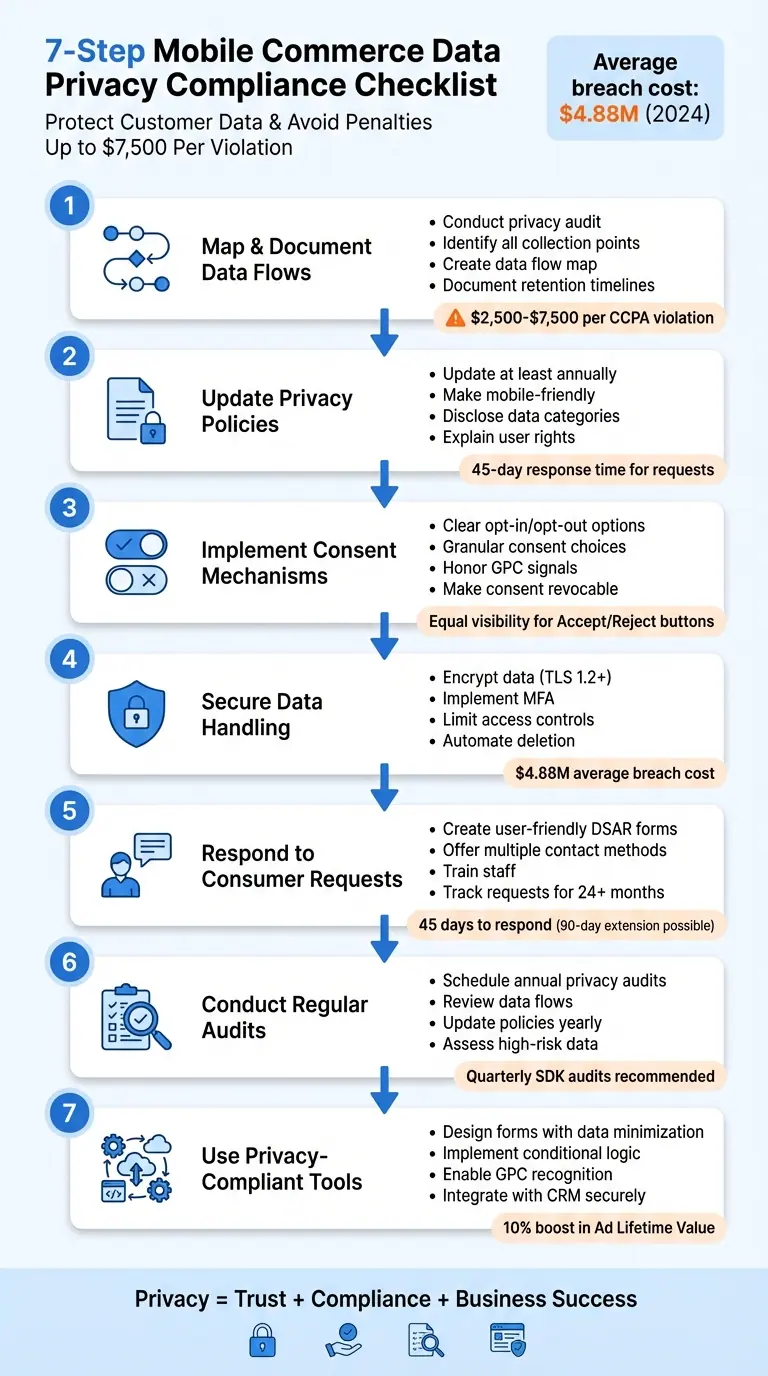
7-Step Mobile Commerce Data Privacy Compliance Checklist
Are Your E-commerce Data Privacy Practices Legally Sound?
Step 1: Map and Document Data Flows
To protect customer data, start by creating a detailed inventory of all the information your business collects. Laws like the CCPA require businesses to disclose the types of personal information they gather, where it originates, and why it’s collected.
Begin with a privacy audit to pinpoint every piece of personal data your mobile commerce operation handles. This includes obvious details like names, email addresses, and credit card numbers, but also less apparent data such as IP addresses, browsing habits, app usage, and behavioral insights used to build consumer profiles. The CCPA takes a broad view of personal information, defining it as any data "reasonably capable of being associated with" a specific individual or household. Once you’ve identified the data, map out its flow - tracking where it’s collected, why it’s needed, and how long it’s kept.
Identify Data Collection Points
List every source where user data enters your system. This includes forms for registration, orders, payments, and feedback, as well as chat functions and "Contact Us" pages. Don’t overlook third-party sources like payment processors, marketing tools, and social media integrations. Automated data collection methods - such as cookies, log files, web beacons, and analytics SDKs - also need to be accounted for. As Keith P. Enright, Chief Privacy Officer at Lucira Technologies, notes:
"An incomplete or improperly conducted assessment creates, rather than limits exposure."
Using tools like cookie scanners can help uncover hidden trackers that qualify as personal information under privacy laws. Create a data map to visualize how information moves within your organization, where it’s shared with third parties, and whether it crosses national borders. This level of transparency is essential, especially given the penalties for CCPA violations: $2,500 per unintentional violation and up to $7,500 for intentional violations or those involving minors under 16.
Analyze Data Purpose and Retention
For every piece of data you collect, document its purpose. This ensures you’re only gathering what’s necessary, minimizing risk. If a data point doesn’t serve a clear business need, don’t collect it.
Set specific retention timelines for each data type. For instance, contact details might be kept for the duration of an active account plus two years for tax or audit purposes. On the other hand, precise geolocation data used for delivery should be deleted immediately after the service is completed. Assign responsibility for ensuring data is deleted once its retention period ends. Proper documentation not only simplifies compliance with privacy laws but also ensures processes are efficient and traceable. Keep in mind, the California Privacy Protection Agency now evaluates CCPA violations on a case-by-case basis, and there’s no longer a grace period for correcting errors.
Step 2: Update Privacy Policies
Once you've mapped out your data flows, it's time to update your privacy policy to match your current data practices. This document is a cornerstone of your compliance efforts. For instance, the CCPA requires businesses to update their privacy policies at least once every 12 months or sooner if there are changes in how personal information is collected, used, or shared. Make sure the "last updated" date is clearly visible so users can easily confirm its relevance. Regular updates ensure your policy aligns with your operations and remains transparent.
For mobile commerce businesses, it's crucial to create legal disclosures that are easy to read on smaller screens. A layered format works well here: start with a brief summary, followed by detailed tracking information, and finish with statutory requirements to comply with GDPR Article 12.
Disclose Data Categories and Their Usage
Your privacy policy should include a detailed list of the types of data you collect. This could range from names and credit card numbers to geolocation, login credentials, and security codes. Clearly explain where this data comes from and why it's collected.
Josh Langeland, CIPM at Termly, highlights how broadly the CCPA defines personal information:
"Personal information is defined as information that identifies, relates to, describes, is reasonably capable of being associated with, or could reasonably be linked, directly or indirectly, with a particular consumer or household."
Make sure to specify which third parties receive this data and clarify whether it's sold or shared for advertising. Additionally, outline your data retention policies - either by detailing how long each type of data is kept or by explaining the criteria used to determine retention periods. If you collect data from minors aged 13–16, you must obtain explicit opt-in consent before sharing it. For users under 13, parental consent is mandatory.
Inform Users About Their Rights
Your privacy policy should also explain users' rights to access, delete, correct, or transfer their data. Provide at least two ways for users to contact you - such as a web form or an email address - and include clear instructions on how they can verify their identity.
To comply with CCPA, include links like "Do Not Sell or Share My Personal Information" in your app's menu. Additionally, honor opt-out signals such as Global Privacy Control (GPC) and include a non-discrimination statement. Keep in mind that you generally have 45 days to respond to verified user requests, with the option to extend this by another 45 days if necessary.
Step 3: Implement Consent and Opt-Out Mechanisms
Once you've updated your privacy policy and prioritized transparency, the next step is to create systems that allow users to easily opt in or out of data collection. This is not just about good practice - it's about avoiding steep penalties. Under the CCPA, unintentional violations can cost $2,500 per instance, while intentional violations or those involving minors under 16 can reach $7,500 per instance. To stay compliant, focus on designing clear and user-friendly consent controls.
Use Clear Opt-In and Opt-Out Options
Your app or website should give users straightforward choices about data collection. Instead of overwhelming users with all permissions upfront, request them only when necessary, such as during checkout or when accessing specific features. This makes the process less confusing and more transparent.
Rather than relying on a single "accept all" option, offer granular choices. For example, let users decide separately on permissions for analytics, marketing cookies, or other data types. Additionally, ensure that "Accept" and "Reject" buttons are equally visible and easy to select - this prevents any perception of manipulation.
For CCPA compliance, include clearly labeled links like "Do Not Sell or Share My Personal Information" and "Limit the Use of My Sensitive Personal Information" in prominent locations, such as your website footer or app menu. You must also respect automated opt-out signals, such as Global Privacy Control (GPC), sent through users' browsers. When asking for permissions, like access to a camera or location, explain the reason behind the request. Users are more likely to agree when they understand how their data will be used.
Ensure Consent is Revocable
It’s essential to make withdrawing consent as simple as giving it. Users should be able to change their preferences without hassle.
Provide a settings menu where users can review and adjust their consent choices. Include a clear "withdraw consent" option, and make sure your app continues to function smoothly when permissions are revoked. Importantly, users who opt out should not be penalized - this means no denial of services, no higher prices, and no reduction in quality. Keeping this balance aligns with your broader privacy commitments.
If you're collecting data through forms, tools like Reform can help you create privacy-compliant multi-step forms. These forms use conditional logic to adapt based on user preferences, ensuring you only gather the data users have explicitly agreed to share - all without disrupting the user experience.
Step 4: Secure Data Handling and Storage
Once you've obtained consent and updated your policies, the next crucial step is safeguarding the data you've collected. With the average global breach cost hitting $4.88 million in 2024, it's clear that mobile commerce needs to go beyond basic password protection. Strong security measures act as a protective barrier as you move forward with other compliance steps.
Implement Encryption and Access Controls
Start by encrypting data both at rest and in transit. Use HTTPS with TLS 1.2 or higher, and steer clear of outdated protocols like SSL. Leverage native encryption tools for mobile platforms, such as Keychain or Secure Enclave for iOS, and Keystore or StrongBox for Android.
"Encrypt sensitive data at rest and in transit. ... Use platform APIs for encryption. Do not attempt to implement your own encryption algorithms." - OWASP
Additionally, adhere to PCI DSS guidelines: encrypt cardholder data, use tokenization, and enforce multi-factor authentication (MFA). Limit data access by assigning unique employee IDs and immediately revoking access when roles or responsibilities change. Only provide access to employees who genuinely need it for their job functions.
Minimize Data Retention
Keep customer data only for as long as necessary and in line with legal obligations. For cardholder data, maintain logs for one year, ensuring the most recent three months are easily accessible. Automate secure deletion once the retention period ends. By storing less data, you reduce your risk exposure and make compliance audits or breach responses far more manageable.
sbb-itb-5f36581
Step 5: Respond to Consumer Rights Requests
Once your data security measures are solid, the next step is managing consumer rights requests effectively. You’ll need a system in place to handle requests for access, correction, and deletion quickly and efficiently. Under CCPA/CPRA guidelines, you’re required to respond to verified requests within 45 days. If needed, you can extend this deadline by an additional 45 days, provided you notify the consumer.
Create User-Friendly Request Forms
Make it easy for consumers to submit requests by offering multiple options, such as a DSAR form, a dedicated email address, or a toll-free number. Use plain, straightforward language in all these methods. Your forms should collect essential details like the user’s name, email address, and include a dropdown menu where they can specify their request type - whether it’s Access, Deletion, Correction, or Opt-Out. Also, ensure these forms are mobile-friendly and incorporate identity verification directly into the process.
Tools like Reform simplify this process. With its no-code form builder, you can design DSAR forms that include conditional routing for verification steps, spam prevention to avoid fake submissions, and email validation to confirm legitimate requests. It also offers real-time analytics to track submissions and integrates with your CRM to populate databases automatically and alert staff about upcoming deadlines.
Train Staff to Handle Requests Efficiently
Properly trained staff are essential for managing privacy requests and ensuring compliance. Make sure all relevant team members understand how to process these requests and stay updated on best practices. Additionally, keep a record of all consumer requests and your responses for at least 24 months.
"Strategizing ahead of time for what you need to do when customers contact you can save you a lot of complications down the road." - Red Clover Advisors
Having an updated data map can also make a big difference, allowing your team to quickly locate personal information when a request comes in. Automating processes and using centralized dashboards can help you track incoming requests more efficiently. Don’t forget to coordinate with third-party vendors who handle your consumer data to ensure they understand their role in fulfilling requests.
Step 6: Conduct Regular Audits and Updates
Once you've set up a system to manage consumer requests, the next step is keeping your compliance efforts up to date. Data privacy laws are constantly changing, and as your business evolves, what worked a few months ago might no longer cut it. Regular audits can help you spot any gaps before they become serious issues. After all, non-compliance can lead to hefty fines. These audits, along with policy updates, should be a core part of your privacy strategy.
Schedule Privacy Audits
Plan for an annual privacy audit to review your data practices and identify any compliance concerns. Start by determining which laws apply to your business - not just based on where you're located, but where your customers are. Document your data flows, including how data is collected, used, shared, stored, and any risks tied to mobile features like geofencing, social media integrations, or SDKs.
"A privacy compliance audit is an assessment that ensures your business complies with regulations like the GDPR, CCPA/CPRA, LGDB, and more. Essentially, it's a way to evaluate how your company keeps track of data." - Osano Staff
Consider using automated data discovery tools to make the process faster. These tools can locate and classify data across your systems in under an hour, cutting down on manual effort. Pay special attention to high-risk data, such as geolocation, biometric, and financial information, as these often require stricter opt-out mechanisms. Also, confirm that your system can handle Data Subject Access Requests within the required regulatory timeframes.
Update Policies for New Laws
In addition to technical audits, updating your privacy policies is critical to staying compliant with new regulations. Aim to revise your privacy policy at least once a year or whenever there are changes to your data practices. These updates should reflect evolving business operations and include details like data retention periods, sensitive data categories, and any third parties you share information with.
Before making updates, conduct a data inventory to identify all the personal information you collect and its purpose. Bring together a team from across departments - legal, IT, marketing, and public relations - to ensure the policy addresses all areas of your business. Map out how data moves between departments, to third parties, and across borders to ensure all transfers are properly disclosed. This thorough approach prevents incomplete assessments and ensures your policies align with your actual data practices.
Step 7: Use Privacy-Compliant Form Tools
As part of your ongoing privacy efforts, it's essential to revisit how you collect customer data. Start by evaluating the tools you use for data collection, especially your forms. These are often the first touchpoint where personal information is gathered, so selecting a tool that prioritizes privacy is crucial. A well-designed, privacy-compliant form ensures you're collecting only the data you need while aligning with your updated policies and data flows. The right tool can also simplify consent management, support data minimization, and streamline requests related to user data - all without requiring extensive technical expertise.
Design Forms with Privacy in Mind
Opt for a form builder that enforces data minimization by limiting the information collected to only what's necessary. Tools with conditional logic can display fields dynamically, ensuring users only see relevant questions. For instance, if someone opts out of marketing communications, the form shouldn't prompt them for unrelated preferences.
Your form should also allow for detailed consent options through targeted field logic. This is especially important under regulations like the CCPA, where intentional violations can lead to fines of up to $7,500 per offense.
"Only collect, use, retain, and share data in a manner that is reasonably necessary to achieve the goals you originally disclosed." – Termly
To further enhance privacy, use just-in-time notices that display relevant privacy disclosures as users input their data. Look for form tools that can automatically recognize and honor Global Privacy Control (GPC) signals from browsers. Additionally, incorporate identity verification features to handle data subject access requests (DSARs), allowing users to securely request changes, deletions, or access to their information.
Once your privacy-focused forms are set up, integrate them with your CRM and analytics systems to ensure smooth data handling while staying compliant.
Connect Forms to Your CRM for Better Efficiency
Tools like Reform offer seamless integrations with platforms such as HubSpot, Salesforce, Google Sheets, and Zapier, allowing form submissions to flow directly into your existing workflows without the hassle of manual data entry.
Ensure your chosen form tool includes encryption and access controls to protect data both in transit and at rest. Take advantage of features like real-time analytics and tracking for abandoned submissions to refine your forms and avoid unnecessary data collection. Reform also provides email validation, spam prevention, and lead enrichment features to maintain data quality while adhering to privacy standards. These capabilities can expedite DSAR responses within the required 45-day window, helping you avoid penalties that range from $2,500 to $7,500 for non-compliance.
Conclusion
Data privacy compliance isn’t just about avoiding penalties - it’s about building trust with your customers and ensuring long-term business success. By following this checklist, you’ve created a solid framework that safeguards both your users and your business, while positioning your mobile commerce venture as a trusted name in protecting data.
The businesses that will thrive in the years ahead are those that treat privacy as a strategic advantage rather than a regulatory hassle. With consent-focused strategies, you can unlock real benefits, like a 10% boost in Ad Lifetime Value and lower acquisition costs thanks to high-quality, consented data.
Privacy isn’t a one-and-done task - it’s an ongoing commitment. Regularly audit your data flows and third-party SDKs, ideally every quarter, and update your policies at least once a year. These steps ensure your practices stay aligned with your operations and the ever-changing regulatory environment. In this dynamic landscape, the right tools can make all the difference - not only in achieving compliance but also in streamlining your efforts.
The tools you choose play a critical role. This checklist lays the groundwork for leveraging technology effectively in your compliance efforts. Privacy-first platforms that offer features like automated consent management, encrypted data handling, and smooth CRM integration can help you scale your compliance strategy without overburdening your team. For instance, tools like Reform’s no-code form builder make it easy to create privacy-focused forms that manage consent seamlessly while syncing with your CRM. Adopting these technologies now ensures your business is ready for future regulatory shifts.
FAQs
How can mobile commerce businesses ensure compliance with data privacy laws?
To comply with U.S. data privacy laws like the CCPA or VCDPA, start by identifying which regulations apply to your app. Once you've pinpointed the relevant laws, create a plan to address any compliance gaps, focusing first on the most critical areas. A key step is mapping out all the data your app collects - such as payment details, location, and device information - and documenting how this data is processed and shared.
Update your privacy policy to clearly outline what data you collect, why you collect it, and who you share it with. Use straightforward, user-friendly language to meet legal disclosure requirements. Incorporate consent management tools to secure opt-in consent for sensitive data and tracking, and make it simple for users to withdraw consent whenever they choose.
Enhance your app’s security by using encryption, conducting regular vulnerability tests, and following secure storage practices. Set up processes to handle user data requests - like access or deletion - within the legally required timeframes. Finally, keep a close eye on your practices and update them as your app grows or as laws evolve. Staying proactive not only ensures compliance but also helps build trust with your users.
What steps should businesses take to handle consumer data requests under the CCPA?
To manage consumer data requests under the California Consumer Privacy Act (CCPA), businesses need a well-structured and documented process. First, confirm the identity of the individual making the request to ensure its legitimacy. Next, search through all relevant data systems to gather and prepare the requested information. Make sure to respond within the 45-day timeframe, whether by providing the requested data or confirming its deletion. Throughout, keep a detailed record of the steps taken for potential audits.
Leveraging automation tools or privacy management platforms can simplify this process, minimize mistakes, and help maintain compliance with CCPA guidelines.
Why is it important to regularly audit data privacy practices in mobile commerce?
Regular audits play a key role in ensuring compliance with data privacy regulations. They give businesses a clear picture of how data is being collected, stored, and used, while also revealing any weak spots or areas where compliance might be lacking.
By tackling these issues early, companies can steer clear of hefty fines, maintain user trust, and stay in step with changing privacy laws. Regular reviews also help your practices keep pace with new regulations and industry standards, making your mobile commerce operations both secure and reliable.
Related Blog Posts
Get new content delivered straight to your inbox

The Response
Updates on the Reform platform, insights on optimizing conversion rates, and tips to craft forms that convert.



Drive real results with form optimizations
Tested across hundreds of experiments, our strategies deliver a 215% lift in qualified leads for B2B and SaaS companies.
