
.webp)
Ultimate Guide to Cross-Platform Consent Sync



Cross-platform consent synchronization eliminates repetitive privacy prompts by ensuring your consent preferences are consistent across websites, apps, and devices. It simplifies user experience, aligns with global privacy laws like GDPR and CCPA, and helps businesses maintain accurate, centralized consent records. Here's what you need to know:
- How It Works: A unique identifier (e.g., hashed email) links your consent choices across platforms. These preferences are stored in a cloud-based profile, automatically applied wherever you log in.
- Why It’s Important: Reduces "banner fatigue", ensures compliance with privacy laws, and supports legal data usage across marketing tools and CRMs.
- Who Benefits: Multi-platform businesses, large enterprises, and ad publishers managing consent for vast user bases across regions and devices.
- Key Technologies: Webhooks, APIs, centralized consent platforms, and cross-domain data handling methods like subdomain sharing, APIs, and server-side management.
Ensighten CC - Cross-domain | Cross-device Consent
Core Components of Cross-Platform Consent Synchronization
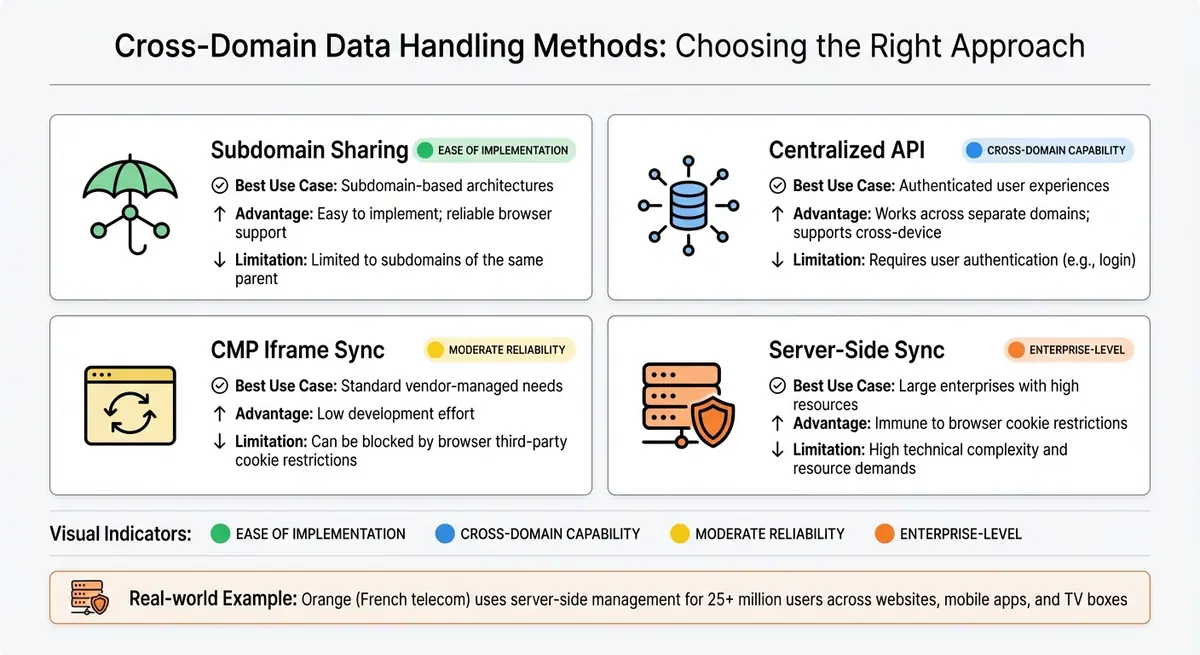
Cross-Domain Consent Data Handling Methods Comparison
To streamline consent management across platforms, three key technologies work together: webhooks and APIs for real-time updates, centralized consent management platforms to store and manage user profiles, and cross-domain data handling methods to ensure user preferences are maintained across websites and apps.
Webhooks and APIs
Webhooks and APIs enable instant, two-way communication between consent systems, using unique identifiers to fetch and update user preferences. For example, when someone unsubscribes from an email list, an inbound webhook updates the central consent database immediately. Simultaneously, an outbound webhook sends this updated information to all connected platforms, ensuring everything stays in sync without manual effort.
APIs play a crucial role by translating data between systems. Let’s say a user logs into your mobile app: the API quickly checks the central database to verify if preferences were already set on your website. However, it’s important to validate data before sending it to a "Create Consent" API. While APIs process requests quickly, invalid data formats can block updates from being applied to the user’s profile. For added security, authentication tokens should be generated server-side using JWTs, not client-side. Also, set a sync timeout - typically around 3 seconds - to ensure delayed responses don’t disrupt the user interface.
Centralized Consent Management Platforms
These platforms store user profiles in the cloud, making it easy to retrieve consent choices using a consistent identifier, such as a hashed email, phone number, or User ID, even when users switch devices.
"The user profile is shared across the cloud to additional devices or browsers where the user chooses to roam, safely creating a seamless user experience." - OneTrust
Centralized platforms use reconciliation logic to resolve conflicts between local device data and cloud data. A common approach relies on timestamps: if the cloud data is more recent than the local data, the system updates to match the latest information. In some cases, platforms default to the most restrictive setting (a "conservative opt-out") to minimize compliance risks when discrepancies arise. Didomi’s synchronization process runs every 24 hours by default, with a minimum interval of 6 hours to avoid slowing down page load times.
Cross-Domain Data Handling
Ensuring consent data moves smoothly between domains requires specific methods. Subdomain sharing is a straightforward option, where cookies are configured on a parent domain (e.g., .example.com) so they’re accessible across all subdomains. While simple to set up, this method only works for related domains. For broader use cases, centralized consent APIs store preferences in a database that multiple domains can access, making it ideal for authenticated users navigating between completely separate domains.
Iframe-based synchronization is another option, allowing consent signals to pass between domains. However, this method can face browser restrictions, particularly with third-party cookies. A more robust solution is server-side management, where consent states are handled on the server. This bypasses browser limitations entirely by injecting the necessary scripts directly, though it requires significant technical resources. For example, Orange, a French telecommunications company, uses server-side management to handle consent for over 25 million users across websites, mobile apps, and even TV boxes.
| Method | Best Use Case | Advantage | Limitation |
|---|---|---|---|
| Subdomain Sharing | Subdomain-based architectures | Easy to implement; reliable browser support | Limited to subdomains of the same parent |
| Centralized API | Authenticated user experiences | Works across separate domains; supports cross-device | Requires user authentication (e.g., login) |
| CMP Iframe Sync | Standard vendor-managed needs | Low development effort | Can be blocked by browser third-party cookie restrictions |
| Server-Side Sync | Large enterprises with high resources | Immune to browser cookie restrictions | High technical complexity and resource demands |
How to Set Up Cross-Platform Consent Synchronization
Setting up cross-platform consent synchronization involves three main steps: configuring your consent management platform (CMP) with proper security and identity settings, connecting webhooks and APIs for real-time data flow, and deploying tracking scripts across all your digital platforms while ensuring consistent user identification.
Configure Your Consent Management Platform
Start by defining a unique, hashed user identifier to link consent across platforms. This could be an email address, phone number, or an internal UUID. For example, OneTrust uses a unique identifier passed via JWT, while Didomi employs an organizationUserId. Always hash these identifiers using methods like SHA256 or HMAC SHA256 with a server-side secret to protect plain-text data.
To secure consent profiles, implement protocols like JWTs with public keys or hash digests with secrets and salts. For OneTrust, the sub claim is the only required field when creating the JWT. Next, configure consent categories. In Segment, for instance, you can create categories and map destinations like HubSpot or Google Ads to ensure proper data handling. Be meticulous about mapping all destinations; unmapped destinations might default to receiving all data, bypassing consent rules.
Enable specific data capture rules in your CMP settings. In OneTrust, options like "Capture Records of Consent" or "Create data subject profiles for known users" can be toggled on. Configure synchronization logic to resolve conflicts - OneTrust offers an "Override server consent" option to decide whether local anonymous consent or existing server consent takes precedence. Didomi, on the other hand, has a default sync frequency of 24 hours, with a minimum threshold of 6 hours to avoid performance issues. To prevent consent banner flickering during remote preference retrieval, enable the "delay notice" setting (sync.delayNotice: true in Didomi).
| Platform | Key Configuration Step | Authentication Method |
|---|---|---|
| OneTrust | Create Consent Group & Rules | JWT (JSON Web Token) with Public Key |
| Didomi | Enable sync.enabled |
Hash digest (MD5, SHA1, SHA256) |
| Segment | Map Destinations to Categories | CMP-specific wrapper (e.g., OneTrust) |
| iubenda | Activate Consent Database | API Key or subject_id unique identifier |
Once your CMP is configured, the next step is to set up real-time data synchronization using webhooks and APIs.
Connect Webhooks and APIs
Webhooks play a vital role in keeping consent data synchronized. Inbound webhooks update your CMP when external tools detect changes, such as a user unsubscribing via a Mailchimp link. Outbound webhooks notify external systems like CRMs or email providers when consent is updated within the CMP. This ensures consistent consent records across platforms, creating a unified "golden record."
Secure webhook payloads and API requests with authentication tokens. Set a 3-second timeout so that local data is used if requests are delayed. High-performance APIs, such as OneTrust's v1/preferences API, boast response times under 100 ms and can handle up to 3,000 requests per minute.
For platforms lacking native webhook support, consider services like Zapier, Make, or n8n to forward consent data. Standardize privacy notices (e.g., "Marketing") and link them to specific third-party consent items like email channels or mailing lists. Use timestamps to determine the most recent consent status - push local data if its timestamp is newer, or pull remote data if it's more up-to-date.
Deploy Across Your Platforms
To ensure proper functionality, inject the data subject parameter script before the CMP SDK. This ensures user preferences are loaded before the consent banner appears. For mobile apps, set the user identifier to an empty string upon logout to reset consent to an anonymous state.
Use debugging tools like Segment's Source Debugger or browser network inspectors to confirm the "consent object" is included in every event payload. When setting up category IDs in Segment, remember they are case-sensitive, cannot start with a number, and must be fewer than 35 characters. Test your deployment thoroughly by checking API response codes: a 200 indicates success with the current consent status, a 204 means cross-domain/device sync isn't active, and a 401 signals a missing or improperly formatted JWT.
sbb-itb-5f36581
Best Practices for Consent Synchronization
Once you've set up your synchronization system, it's important to follow some key practices to stay compliant and ensure a smooth user experience.
Maintain Regulatory Compliance
Link consent choices to a single user profile using a unique identifier - such as an email, phone number, or UUID. This prevents fragmented consent records and helps meet GDPR standards for maintaining accurate data processing records.
Generate JSON Web Tokens (JWT) on the server side to ensure secure access and maintain proper audit trails. The sub (subject) claim, which represents the unique user identifier, is typically the only mandatory field in the JWT. Enable "Capture Records of Consent" to create a legal audit trail that includes user status, timestamps, legal notices, and form wording.
Ensure consistency in consent purposes across all platforms, whether web or mobile. If a user encounters a purpose that wasn’t previously consented to, the consent banner must reappear. Suppress the banner only when the user's profile is fully synced. If any required consent purpose is missing, prompt the user again. Define clear logic for transitions from anonymous to known states, deciding whether to prioritize server-stored consent or local anonymous choices based on the most recent timestamp.
Regularly monitor API responses - such as 200, 204, and 401 - to quickly identify and address any synchronization issues.
Track Consent Updates in Real-Time
Keeping consent records up to date in real time is essential for both compliance and operational accuracy. Use APIs like OneTrust’s Get Preferences to fetch the latest consent status and instantly update your local systems.
Maintain detailed records in your Consent Database. Each record should include the user’s identity, proof of consent, a timestamp, the legal documents available at the time, and the method of collection. This provides a clear audit trail and transparency into your consent workflows.
Set up your Consent Management Platform (CMP) to use E-tag matching for efficient polling. If consent hasn’t changed since the last check, a 304 Not Modified response avoids unnecessary data transfers. For platforms without webhook support, automation tools can help forward consent data between systems without requiring custom code. Additionally, track how often users update their consent to refine synchronization intervals.
Use Reform Forms for Consent Collection

Reform's no-code, multi-step forms simplify consent collection and synchronization. Breaking down complex consent requests into smaller steps reduces cognitive load, making it easier for users to complete the process.
With conditional routing, you can guide users to specific consent paths based on their location. For example, users in California can be shown CCPA-specific options, while those in Europe see GDPR-compliant choices. This approach ensures you collect only the consent types relevant to each user’s situation - without needing manual scripts.
| Feature | Benefit for Consent Synchronization |
|---|---|
| Multi-step Forms | Simplifies complex consent requests, improving completion rates |
| Conditional Routing | Directs users to jurisdiction-specific consent paths (e.g., GDPR, CCPA) |
| CRM Integration | Ensures marketing teams contact only users with explicit consent |
| Real-time APIs | Instantly updates tracking scripts when users change consent status |
Reform’s CRM integrations ensure consent data flows seamlessly into your marketing and sales tools, allowing your teams to contact only users who’ve explicitly agreed. Real-time APIs further ensure that tracking scripts reflect changes in consent immediately, keeping your systems consistent. For cross-domain synchronization, make sure the user identifier is passed before loading the main consent management scripts to avoid mismatched consent states.
Common Problems and Solutions in Consent Synchronization
Even the most well-designed systems can encounter challenges. A key approach to resolving these issues is to prioritize the record with the most recent timestamp. This method effectively handles conflicts, such as when a user updates their preferences on one platform (e.g., mobile) while different settings exist on another (e.g., web browser). It also ensures that the latest user intent is captured, even when consent is provided before logging in.
Another common issue is mismatched consent purposes across platforms. For example, if a website requires consent for "Purposes A and B", but the mobile app adds "Purpose Z", a user who has only approved A and B will encounter the consent prompt again. The solution? Prompt the user to confirm consent for any missing purposes.
Resolving Data Conflicts
Conflicts can arise from various sources, and each requires a targeted resolution:
- Integration object conflicts: These occur when manual routing settings clash with user preferences. For instance, in Segment, the system prioritizes the consent object over the integrations object. If a user consents to ads but the integration object blocks Facebook, data flows to all ad destinations except Facebook, maintaining compliance.
-
Sync timeouts: If a synchronization request exceeds the standard timeout - often 3 seconds (3,000 milliseconds) - the system defaults to local consent data and retries on the next initialization. Unique identifiers, such as a hashed email or internal ID (
subject_idororganizationUserId), are essential for linking consent records across platforms, avoiding fragmented profiles.
Here's a quick reference for handling common conflicts:
| Conflict Type | Resolution Strategy |
|---|---|
| Timestamp Discrepancy | Prioritize the record with the most recent timestamp |
| Anonymous vs. Authenticated | Use timestamp precedence to capture the latest intent |
| Mismatched Purposes | Re-prompt the user for missing consent purposes |
| Integration vs. Consent Object | Prioritize the consent object for compliance |
| Sync Timeout | Default to local data and retry synchronization |
Up next: tackling webhook errors to maintain smooth synchronization.
Fixing Webhook Errors
Webhook errors are a common stumbling block, with authentication failures being a major culprit. Expired or incorrectly formatted JWTs can disrupt synchronization. To avoid this, ensure the "sub" claim in your JWT contains the correct unique user identifier, and verify that your public key matches the one used to sign the token. Some systems require token refreshes every six months to maintain connectivity.
Another frequent issue is signature verification errors, which occur when the receiving system cannot validate the SHA-256 HMAC signature sent by the webhook. Ensure your webhook integration is set to "Active" in the dashboard, as paused integrations (e.g., for maintenance) can lead to unexpected failures.
Keep an eye on API response codes to quickly identify and address issues:
| Code | Message | What It Means |
|---|---|---|
| 200 | Success | Consent status retrieved successfully |
| 204 | No Content | Cross-domain/device sync is not currently enabled |
| 304 | Not Modified | Consent hasn't changed since the last sync (E-tag match) |
| 401 | Unauthorized | Incorrect JWT formatting or invalid token |
Use tools like the "Test Trigger" feature to verify that data payloads reach their destination with all required fields. For cross-domain requests (e.g., calls to consent-api.onetrust.com), inspect network activity in your browser's developer tools to confirm proper execution.
Monitor System Performance
After resolving conflicts and errors, it's critical to monitor system performance. Begin by inspecting network activity to ensure data flows correctly between properties. For example, check endpoints like consent-api.onetrust.com/v1/preferences?syncgroup= to confirm synchronization is functioning as expected. Missing calls may signal a need to adjust your cross-domain configuration.
To prevent interruptions, set up automated token rotation before tokens expire. For systems with secure webhooks, schedule reminders to refresh long-lived access tokens - typically every six months - by updating parameters like FIDES__SECURITY__CONSENT_WEBHOOK_ACCESS_TOKEN_EXPIRE_MINUTES.
Consider implementing two-way sync webhooks to automatically update both your CRM and Consent Database. This reduces manual effort and minimizes delays. Additionally, perform profile verification to ensure everything is working as intended. Search for specific customer profiles and confirm that consent attributes are correctly displayed in the "Attributes" tab of your dataset. Configure merge policies, such as prioritizing certain datasets or using timestamp precedence, to ensure the most recent consent choice is applied.
Lastly, take advantage of tools like Segment's observability features. These can help you track synchronization issues, categorizing events discarded due to consent conflicts under "Filtered by end user consent" in the delivery overview. This makes it easier to pinpoint where data flow may be breaking down.
Conclusion: The Future of Consent Synchronization
As digital landscapes evolve, managing consent across platforms is no longer just a good idea - it’s a necessity. Businesses operating on multiple digital touchpoints need to ensure that user consent preferences travel seamlessly across websites, mobile apps, and other platforms. Without this synchronization, the risks are clear: frustrated users and potential regulatory issues.
The industry is shifting toward identity-based consent, leveraging unique identifiers secured by JWTs. This move away from cookie-based local storage to centralized cloud storage allows consent profiles to follow users across devices. When executed properly, this approach can even eliminate the need for repetitive consent banners once a user’s profile is fully synced across all properties.
To prepare for the future, consider these steps:
- Use dependable unique identifiers to connect user profiles.
- Centralize consent management across all domains and applications.
- Align and standardize consent purposes across platforms.
For example, if your mobile app requires consent for something not covered on your website, users will encounter a new banner. This makes alignment across platforms critical. These strategies can integrate seamlessly with advanced tools designed for modern consent management.
Reform simplifies consent collection by offering a user-friendly, no-code form builder that integrates directly with your consent management setup. Features like conditional routing, real-time analytics, and connections to CRM and marketing tools ensure that consent is collected efficiently at the moment of interaction. Whether it’s collecting email addresses for unique identification or managing consent preferences through multi-step forms, Reform’s platform makes the process straightforward - even for teams without technical expertise.
With privacy regulations becoming stricter and user expectations rising, businesses that invest in strong cross-platform consent synchronization now will be better equipped to adapt in the future. As highlighted in earlier sections, building a solid foundation - focused on secure authentication, centralized storage, and tools that balance compliance with user experience - will set the stage for growth across new platforms and markets in the years to come.
FAQs
How does cross-platform consent synchronization enhance the user experience?
Cross-platform consent synchronization ensures that your privacy preferences stay consistent no matter what device you’re using - be it a desktop, mobile app, or tablet. Once you set your preferences, like opting in to analytics or declining targeted ads, those choices are securely stored and automatically applied on future visits. This means no more dealing with repetitive consent prompts, cutting down on consent fatigue and making your experience smoother and more enjoyable.
This instant syncing allows you to switch between devices effortlessly, keeping your workflow uninterrupted and more efficient. For businesses, it’s a chance to build trust by consistently respecting user privacy choices, which can lead to improved satisfaction and better conversion rates. For those leveraging Reform’s no-code form builder, this feature ensures a privacy-compliant, seamless experience across all customer interactions, boosting both user engagement and brand credibility.
What key technologies are needed to synchronize user consent across platforms?
To align user consent across multiple platforms, three key components come into play:
- Consent Management Platform (CMP): This tool provides SDKs (Software Development Kits) for websites and apps, making it easy to collect user consent. It generates a detailed profile containing the consent string, purpose flags, and timestamps. These profiles can then be shared across various devices and browsers.
- Centralized Consent Database: Acting as a cloud-based hub, this database stores and manages all consent data. It allows businesses to access and update user preferences in real time, ensuring consistency no matter where the user interacts.
- User Identifier: This serves as the glue, linking a user's consent profile across different devices and browsers. It ensures that user preferences are recognized and respected everywhere.
When these technologies work together, businesses can stay compliant, avoid repetitive consent requests, and provide a smooth, consistent experience for users across all touchpoints.
How can businesses stay compliant with privacy laws when syncing user consent across platforms?
To comply with privacy laws, businesses need to start by obtaining clear and lawful user consent. For instance, under GDPR, consent must be freely given, specific, informed, unambiguous, and easily withdrawable. This often involves active opt-ins. In the U.S., while laws like the CCPA lean toward opt-out models, they still require transparent disclosures and straightforward options for users to decline data sharing. To meet these requirements, use plain language, offer separate consent options for different purposes (like marketing or analytics), and make it simple for users to adjust or withdraw their consent whenever they choose.
After collecting consent, it’s crucial to sync user preferences across all platforms and devices. This prevents users from encountering repetitive prompts and ensures their choices are respected everywhere. Typically, this is done by storing preferences in a cloud-based profile tied to a unique identifier. Apps and platforms can then access this profile to automatically apply the user’s settings, ensuring compliance while delivering a smooth experience.
Lastly, businesses must keep comprehensive consent records, including details like timestamps and purpose codes, to meet audit requirements. Tools like Reform simplify this process by allowing businesses to track consent, enforce separate permissions for various data uses, and integrate this information with CRM and marketing systems. By combining proper consent collection, cross-platform synchronization, and thorough record-keeping, businesses can meet legal obligations while maintaining a user-friendly approach.
Related Blog Posts
Get new content delivered straight to your inbox

The Response
Updates on the Reform platform, insights on optimizing conversion rates, and tips to craft forms that convert.




Drive real results with form optimizations
Tested across hundreds of experiments, our strategies deliver a 215% lift in qualified leads for B2B and SaaS companies.
