
.webp)
Audit Logs for Form Compliance


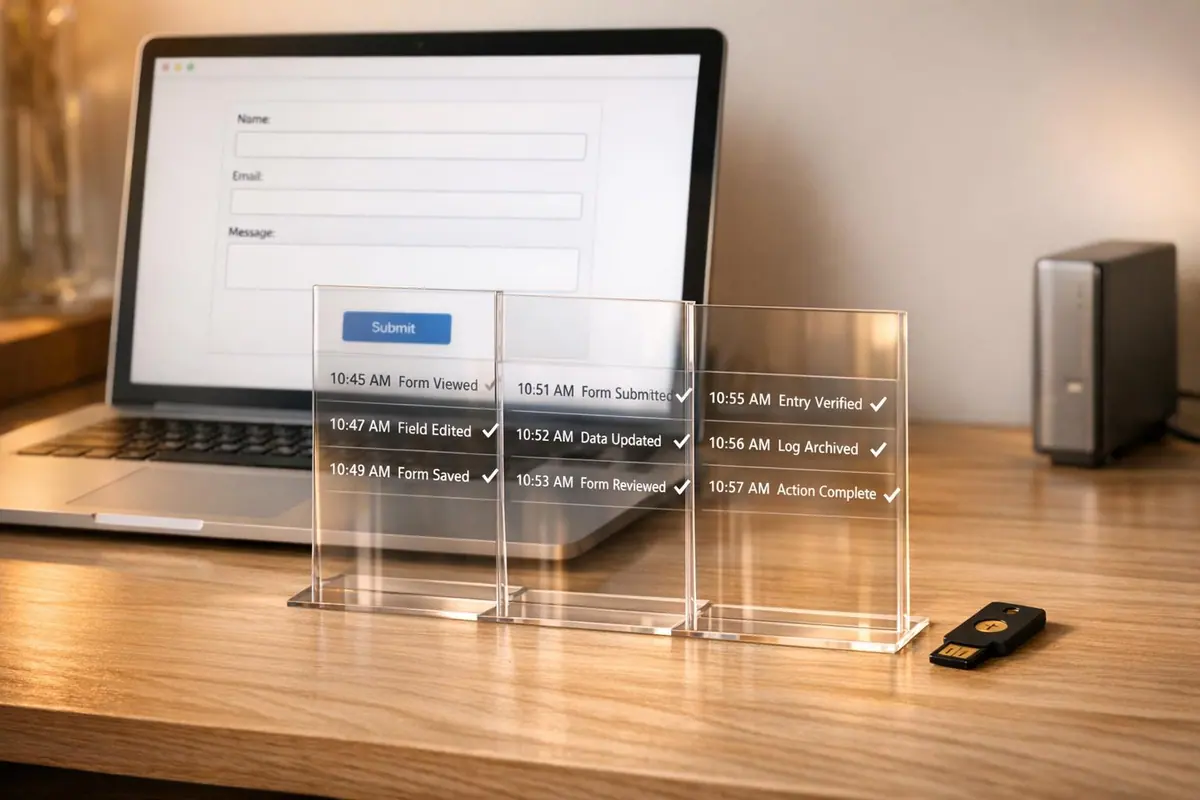
Audit logs are your go-to tool for tracking every action related to your online forms. They help you stay compliant with regulations like GDPR, CCPA, and HIPAA by recording who did what, when, and where within your system. These logs are critical for:
- Data Security: Spot issues like failed logins (
EAUTH_PASSWORD) or suspicious activity (SUBMISSION_READat odd hours). - Compliance: Prove your data handling meets legal standards, such as HIPAA’s six-year log retention rule.
- Troubleshooting: Diagnose form errors or integration issues using timestamps and event details.
To get started, enable logging, track key events (e.g., AUTH_LOGIN, FORM_UPDATE), and store logs securely using tamper-proof methods like WORM storage. Audit logs aren’t just records - they’re your safety net for compliance, security, and operational clarity.
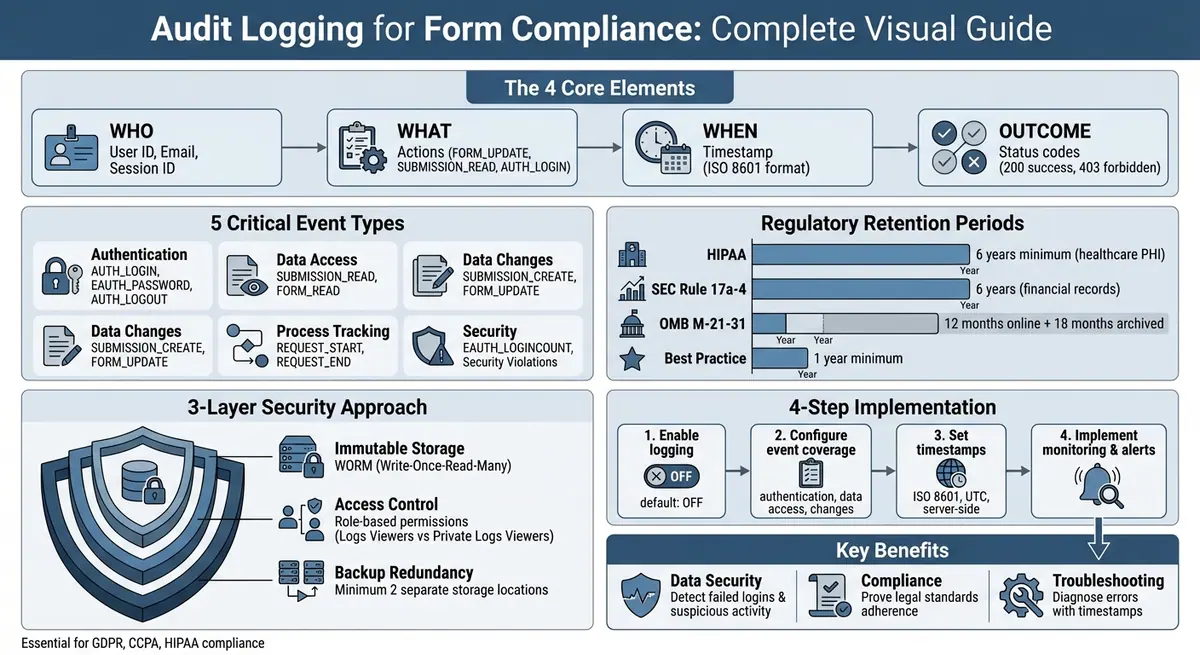
Complete Audit Logging Setup and Security Process for Form Compliance
What Are Audit Logs and Why They Matter for Forms
Definition of Audit Logs
Audit logs are detailed, time-stamped records that capture every action within your form system. They track the "who", "what", "where", and "when" of user activity, creating a reliable trail of events like user sessions and access changes.
For instance, when a user logs in, views a form submission, or edits a field, the system logs the event. Each record includes details like the date, the action performed, and the user ID. Examples of these events include authentication activities (AUTH_LOGIN, EAUTH_PASSWORD) and changes to data (SUBMISSION_CREATE, FORM_UPDATE).
These logs are especially important for forms because they often handle sensitive information.
Why Forms Need Audit Logs
Forms frequently collect sensitive data, making it essential to track every interaction for accountability and data integrity. Audit logs provide a clear record of actions, such as when a submission is viewed (SUBMISSION_READ), created (SUBMISSION_CREATE), or updated (SUBMISSION_UPDATE).
“Audit logging, or audit trails, answer a simple question: who did what, where, and when?”
In the event of a security breach, these logs act like a "black box", helping security teams piece together the sequence of events. This makes it possible to identify what data was accessed or compromised.
Compliance Standards That Require Audit Logs
Beyond security, audit logs play a crucial role in meeting regulatory requirements. Many U.S. regulations mandate detailed logging for organizations that handle personal data. For example:
- HIPAA: Healthcare organizations must record who accessed protected health information (PHI), when, and how. Logs must be retained for at least six years.
- OMB M-21-31: Federal standards require logs to be kept online for 12 months and archived for an additional 18 months.
Audit logs also help organizations demonstrate compliance with frameworks like ISO 27001 and SOC 1, which include logging as a key security measure. Without these records, proving that personal data is actively monitored and protected becomes nearly impossible during an audit.
What to Record in Form Audit Logs
The 'Who, What, When, Outcome' Framework
Every entry in an audit log should include four key elements: Who, What, When, and Outcome.
- Who: This could be a user ID, email address, or session ID.
- What: The specific action performed, such as
FORM_UPDATE,SUBMISSION_READ, orAUTH_LOGIN. - When: A precise timestamp marking the event.
- Outcome: The result of the action, like success or failure, often represented by status codes (e.g., 200 for success or 403 for a forbidden action).
This framework ensures the clarity and transparency needed for effective security monitoring and compliance. As OWASP emphasizes, "Application logging should be consistent within the application, consistent across an organization's application portfolio and use industry standards where relevant".
Form-Specific Data to Track
In addition to the core elements, form-specific details add valuable context to audit logs.
For each log entry, include identifiers like the form ID, submission ID, and revision ID to pinpoint the affected record. Capture the caller’s IP address, request method (e.g., POST or GET), and device details (browser and operating system) for forensic purposes. For more complex forms, track field-level changes, such as previous and updated values, validation rule triggers, and calculated variables.
Administrative actions require special attention. Log events like privilege changes, data exports, encryption key rotations, and the use of "break-glass" emergency accounts. For forms accessed via APIs, include a unique UUID for each request to link related events, from the request's initiation to its completion, including any validation errors along the way.
Security events should be classified on a severity scale from 0 (emergency) to 7 (debug). However, never log sensitive information like raw passwords, session tokens, or unencrypted personal data unless it is legally required and adequately protected.
These additional details strengthen compliance efforts and enable swift responses to incidents.
Why Complete Logs Are Necessary
Thorough and detailed logs play a critical role in ensuring accountability, reconstructing events, and detecting intrusions. They are indispensable for both security investigations and compliance audits.
While audit reduction tools can filter out up to 50% of low-value log entries - such as those generated by routine nightly backups - what remains must still be comprehensive enough to address investigative needs. Logs should include records of authentication attempts, data access, and configuration changes. Without this information, proving compliance becomes a challenge, and tracing the source of a breach may come too late to prevent damage.
How to Set Up Audit Logging for Forms
Turning On Audit Logging
By default, audit logging is often turned off to maintain system performance. In Reform, you can access logging features through the "Integrations" or "Code" sections of the platform. Here, you can set up custom event handlers to track specific form activities. For more advanced logging options, you'll need Reform's Pro Plan. Once logging is enabled, you'll want to configure it to cover all relevant events for thorough tracking.
Configuring Complete Event Coverage
After activating logging, the next step is to decide which events you want to track. Comprehensive event tracking includes:
- Authentication events: These include successful logins (
AUTH_LOGIN), failed login attempts due to incorrect usernames (EAUTH_NOUSER) or passwords (EAUTH_PASSWORD), and logouts (AUTH_LOGOUT). - Data access events: Track whenever forms or submissions are viewed, using events like
SUBMISSION_READorFORM_READ. - Data changes: Log the creation or modification of resources, such as
SUBMISSION_CREATEorFORM_UPDATE.
It’s also essential to monitor security-related events, such as validation failures, spam submissions, and attempted security violations. These logs can help detect malicious activity. For detailed tracking of user behavior, capture interactions like form input changes (onInput), page navigation (onPageChanged), and validation failures (onValidationFailed). Reform also supports webhooks, which can send form event data in real-time to external security systems.
| Event Category | Example Event Types | Description |
|---|---|---|
| Authentication | AUTH_LOGIN, EAUTH_PASSWORD, AUTH_LOGOUT |
Tracks user access and failed login attempts |
| Data Access | SUBMISSION_READ, FORM_READ, PROJECT_SETTINGS |
Logs when sensitive form data or settings are accessed |
| Data Changes | SUBMISSION_CREATE, FORM_UPDATE, ROLE_CREATE |
Records the creation, modification, or deletion of resources |
| Process Tracking | REQUEST_START, REQUEST_END |
Groups events within a single API request |
| Security | EAUTH_LOGINCOUNT, Security Violation |
Monitors for brute force attacks or unauthorized requests |
Setting Up Timestamps and User Attribution
Each log entry should include an accurate timestamp and be linked to a specific user or process. Use the ISO 8601 format (e.g., 2026-01-23T14:50:03.172Z), as it’s both machine-readable and includes time zone data (usually UTC). Always generate timestamps on the server side to prevent tampering.
For user attribution, rely on immutable unique identifiers like UUIDs or internal User IDs instead of usernames or email addresses, which might change over time. A standardized log format is recommended, such as:
date EVENT uuid projectId sessionId userId [additional info].
Pair each event with a sessionId and a unique request uuid to group related events. For example, a REQUEST_START and REQUEST_END should share the same UUID to track the duration and outcome of a single process. Additionally, include the caller's IP address and user agent in the log entry.
If you’re using third-party logging tools, avoid storing personally identifiable information (PII) in the logs. For systems handling large volumes of data, consider using an aggregation stack like Elasticsearch, Kibana, and Filebeat to make searching and visualizing logs more efficient.
How to Secure and Protect Audit Logs
Using Immutable Storage
Keeping audit logs tamper-proof is essential to ensure their integrity. Without proper safeguards, administrators could potentially alter or erase entries. A reliable solution is to use WORM (Write-Once-Read-Many) storage, which ensures that once a log entry is written, it cannot be modified or deleted - even by system administrators.
"Immutable audit logs capture every action as it occurred. They can't be altered or deleted." - hoop.dev
To further safeguard logs, cryptographic proofs can be used to maintain a chronological ledger of events, making it impossible to rewrite the operational history. If your logs are stored in the cloud, consider enabling Customer-Managed Encryption Keys (CMEK). This gives you control over encryption instead of relying on keys managed by the cloud provider.
After securing the logs' immutability, the next step is to control access to maintain their integrity.
Controlling Access and Preventing Changes
Restricting access is critical to protecting audit logs. Assign permissions carefully, distinguishing between roles like "Logs Viewers", who can access standard activity logs, and "Private Logs Viewers", who can view sensitive data access logs.
To further secure sensitive data, implement field-level access controls. This allows you to redact sensitive information, such as personally identifiable information (PII), while still enabling authorized users to view other log details. Another key practice is the segregation of duties - separate log management from log viewing. This prevents administrators from tampering with logs to conceal their actions.
Restricting access not only prevents unauthorized viewing but also ensures the reliability of audit logs as evidence. You can add an extra layer of security by setting up log-based alerting policies. These alerts notify your security team immediately if someone modifies the audit logging configuration or accesses logs using root-level permissions. Such alerts act as an early warning system for potential security threats.
Once access controls are in place, it’s important to protect against data loss by creating backups.
Creating Backup Copies of Audit Logs
Redundant storage is your safety net against data loss. To ensure audit logs are always available, store them in at least two separate locations. Use automated routing to send logs to long-term storage options like cloud storage buckets or database systems. This way, even if one storage device fails, logging continues uninterrupted.
"Vault does not respond to client requests it cannot log. Enabling at least two audit devices reduces the risk of Vault not responding to client requests when the only audit device becomes partially or fully unavailable." - HashiCorp
For added reliability, store logs in multiple versioned storage destinations, and regularly test restoration procedures. This ensures that your backups are functional and accessible when needed.
sbb-itb-5f36581
How to Use Audit Logs for Compliance and Monitoring
Generating Reports for Compliance Audits
Audit logs provide a detailed record of activities - who did what, where, and when - demonstrating the effectiveness of your security measures. Auditors typically examine key details such as user IDs, timestamps, and access logs to ensure compliance with regulations.
To simplify reporting, integrate audit logs with tools like Kibana or SIEM systems. For more advanced analysis, platforms like Google Cloud Log Analytics allow you to run SQL queries on grouped log entries, making it easier to spot trends and create reports that meet auditor expectations.
Retention requirements for audit logs vary depending on the regulations. For instance, HIPAA requires organizations to keep logs containing electronic Protected Health Information (ePHI) for at least six years. Similarly, SEC Rule 17a-4 enforces a six-year retention period for financial audit logs. In less regulated environments, retaining logs for a minimum of one year is considered a best practice. Maintaining a consistent log structure - for example, including fields like "date EVENT uuid projectId sessionId userId" - can help analysts and automated tools identify patterns across multiple channels.
These reports not only meet compliance needs but also support proactive monitoring.
Finding and Investigating Suspicious Activity
Audit logs are invaluable for spotting and investigating unusual behavior. For example, monitoring authentication failures can help identify potential threats. Events like "EAUTH_NOUSER" (login attempts with non-existent usernames), "EAUTH_PASSWORD" (incorrect passwords), and "LOGIN_FAILED" can point to brute-force or credential-stuffing attacks. A surge in failed logins often signals malicious activity.
Beyond login issues, you can review data access patterns for anomalies. Events such as "SUBMISSION_READ" and "FORM_READ" might reveal unauthorized access or unusual activity involving sensitive data. Metadata like caller IP addresses and authentication details can help distinguish legitimate administrative actions from external threats. For instance, a public IP accessing sensitive forms in the middle of the night could indicate a security breach.
It's also important to monitor configuration changes, such as "FORM_UPDATE", "ROLE_UPDATE", and "MODIFY_PERMISSIONS", which might indicate unauthorized alterations. Similarly, logs showing "Policy Denied" events can highlight attempts to bypass security policies, signaling potential unauthorized access attempts.
Setting up log-based alerts ensures your security team is immediately notified of high-risk events. Using unique identifiers - like "uuid" or "sessionId" - to group related log entries can help reconstruct the timeline of suspicious activities.
This approach strengthens both compliance and security, building on earlier logging practices.
Using Logs as Legal Documentation
Audit logs also play a vital role in legal contexts by establishing a clear chain of custody. They record when and how files were accessed or modified, providing a reliable trail of evidence. For logs to hold up as legal documentation, they must include detailed metadata such as caller identities, IP addresses, timestamps, and the specific method or API call used.
"Audit logs help you answer 'who did what, where, and when?' within your Google Cloud resources with the same level of transparency as in on-premises environments." - Google Cloud
Enabling Data Access audit logs for sensitive forms is crucial for verifying who accessed or modified data. To protect the integrity of these logs, restrict access using Identity and Access Management (IAM) roles, ensuring only authorized personnel can review sensitive information. Additionally, storing logs in encrypted, long-term storage helps maintain their security and reliability. With Cloud Logging, organizations can set custom retention periods - from as short as one day to as long as ten years - to meet specific legal and operational requirements.
Enabling audit logs and developing threat detections | Monitor and detect cyberthreats
Conclusion
Audit logs play a critical role in form-based lead generation by ensuring every action is traceable and accountable. They are essential for spotting security risks, resolving technical problems, and demonstrating compliance during audits.
By maintaining detailed audit logs, businesses can reassure customers that their data is handled securely while preserving data integrity across all operations. These logs act as an early warning system, helping to detect unusual activity before it becomes a problem. The key now is putting an effective audit logging strategy into action.
Start by enabling Data Access logs for your form resources. Use IAM to enforce least privilege, limiting who can access these logs. Store logs in immutable storage with defined retention policies, and integrate tools like Kibana or the Elastic Stack to make identifying patterns easier.
Ongoing monitoring is just as important. Set up automated alerts to flag potential threats and separate them from routine activity. Regularly review connector logs to ensure lead data transfers smoothly into your CRM, and keep an eye on incomplete responses to recover missed leads.
Strong audit logging not only boosts security but also simplifies compliance efforts. Whether you're adhering to HIPAA's six-year retention rule or a one-year minimum standard, establishing thorough audit trails now is a safeguard for the future.
If you're using Reform's conversion-focused form builder, applying these practices strengthens both security and compliance, ensuring every lead is managed with care and accountability.
FAQs
How do audit logs support compliance with regulations like GDPR and HIPAA?
Audit logs are essential for meeting regulatory requirements like GDPR and HIPAA. They provide a detailed record of data access and processing activities, helping to track who accessed sensitive information, when it was accessed, and what actions were performed. This level of detail supports both transparency and accountability.
A well-maintained audit trail allows organizations to prove compliance during audits, swiftly detect potential security threats, and ensure sensitive data is handled appropriately. Beyond meeting legal obligations, this practice strengthens trust with customers and stakeholders.
What information should be included in form audit logs to enhance security?
To strengthen security, audit logs for forms should record crucial details like user login attempts (successful and unsuccessful), timestamped activity events, and any modifications to access permissions. They should also include user identifiers, session IDs, and specifics about data access or changes, such as IP addresses and device information.
Keeping detailed and precise logs allows you to track activity more effectively, spot potential security threats, and meet compliance requirements for security protocols.
How can I keep my audit logs secure and reliable?
Ensuring your audit logs are secure and reliable is critical for safeguarding sensitive information and staying compliant with regulations. Start by setting up role-based access controls to limit who can view or modify these logs. This ensures that only authorized personnel have the necessary access.
Next, focus on secure storage. Use encrypted databases or trusted external storage solutions, and make sure encryption is active both while the data is being transmitted and when it’s stored. This extra layer of protection helps keep unauthorized users at bay.
For better usability, adopt a log format that’s easy to verify and analyze. This makes it simpler to spot issues when they arise. Monitoring tools are also key - enable features that can flag unusual activity, like failed login attempts or unauthorized access. Platforms like Reform offer built-in tracking tools that simplify audit log management while boosting compliance and data security.
Related Blog Posts
Get new content delivered straight to your inbox

The Response
Updates on the Reform platform, insights on optimizing conversion rates, and tips to craft forms that convert.



Drive real results with form optimizations
Tested across hundreds of experiments, our strategies deliver a 215% lift in qualified leads for B2B and SaaS companies.
