
.webp)
Best Consent Management Platforms for GDPR



If your site loads analytics, ad tags, or social pixels before consent, you may have a GDPR problem. This guide looks at 8 CMPs that do more than show a banner: Cookiebot, OneTrust, Usercentrics, Osano, Didomi, consentmanager.net, iubenda, and Ketch.
Here’s the short version:
- Cookiebot: best if I want simple setup and automatic script blocking
- OneTrust: best if I need one system across many teams, sites, apps, and regions
- Usercentrics: best if I care about granular user choice and publisher/ad use cases
- Osano: best if I want to get live fast and keep setup light
- Didomi: best if I need consent and preference control across web, mobile, and TV
- consentmanager.net: best if I want deep control, TCF support, and lots of integrations
- iubenda: best if I want consent tied closely to privacy and cookie policies
- Ketch: best if I need consent to flow into downstream systems, not just the banner
What matters most is simple:
- Does it block non-required tracking before consent?
- Does it keep a clear record of each user choice?
- Can users change or withdraw consent later?
- Does it work across the regions and tools I use?
GDPR fines can reach €20 million or 4% of annual global revenue. And for some U.S. cases, tracking without consent can bring $5,000 per violation claims under CIPA. So I’d judge a CMP less by how the banner looks and more by whether it stops tags from firing.
Cookiebot CMP Review (2025) - All the Key Pros and Cons
sbb-itb-5f36581
Quick Comparison
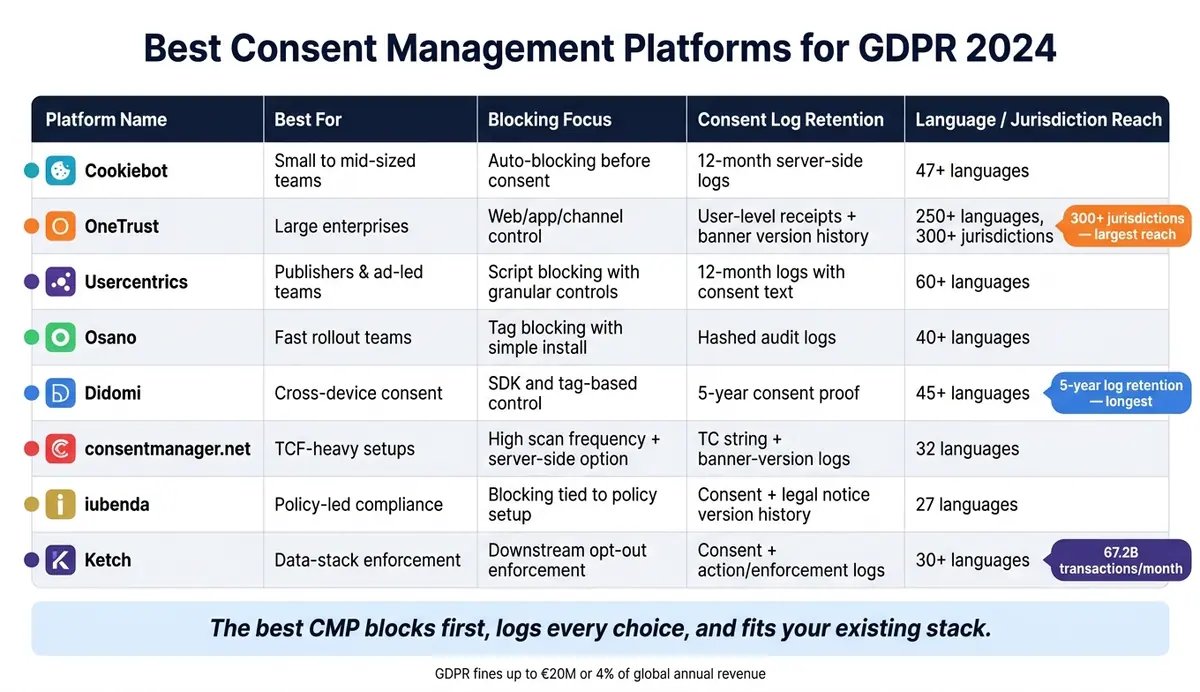
Best Consent Management Platforms for GDPR: Side-by-Side Comparison
| Platform | Best for | Blocking focus | Consent log focus | Region/language reach |
|---|---|---|---|---|
| Cookiebot | Small to mid-sized teams | Auto-blocking before consent | 12-month server-side logs | 47+ languages |
| OneTrust | Large companies | Web/app/channel control | User-level receipts and banner version history | 250+ languages, 300+ jurisdictions |
| Usercentrics | Publishers and ad-led teams | Script blocking with granular controls | 12-month logs with consent text | 60+ languages |
| Osano | Fast rollout | Tag blocking with simple install | Hashed audit logs | 40+ languages |
| Didomi | Cross-device consent | SDK and tag-based control | 5-year consent proof | 45+ languages |
| consentmanager.net | TCF-heavy setups | High scan frequency and server-side option | TC string and banner-version logs | 32 languages |
| iubenda | Policy-led compliance | Blocking tied to policy setup | Consent plus legal notice version history | 27 languages |
| Ketch | Data-stack enforcement | Downstream opt-out enforcement | Consent plus action/enforcement logs | 30+ languages |
If I had to reduce the whole article to one point, it would be this: the best CMP is the one that blocks first, logs every choice, and fits the way your stack already works.
1. Cookiebot
Cookiebot is a clear starting point for automated consent enforcement and broad regional coverage. It handles more than 8.8 billion user consents every month, which makes it a strong option for teams that want automated blocking, clear audit logs, and support across many markets.
GDPR Consent Controls
Cookiebot splits consent into four categories: Necessary, Preferences, Statistics, and Marketing. Its Auto-Blocker stops scripts before they run, so non-essential trackers stay off until a user gives explicit consent.
Consent Records and Audit Trails
Cookiebot logs each consent interaction server-side. Each record includes:
- A timestamp
- An anonymized IP address
- Browser user agent
- The URL where consent was given
- Which categories were accepted or rejected
Businesses can export timestamped records in CSV or XLS format from the dashboard, and consent logs are kept for 12 months.
Cookie Scanning, Categorization, and Blocking
Cookiebot crawls sites to find trackers, including HTTP/JavaScript cookies, local storage, pixel tags, and web beacons. It then matches what it finds against 13,000+ pre-categorized technologies. Scanning runs monthly by default.
Integrations and Multi-Region Support
Cookiebot is a Google-certified Gold Tier CMP Partner with support for Google Consent Mode v2 and Microsoft UET Consent Mode. It also connects natively with major CMS platforms like WordPress, Shopify, and Wix.
It supports 47+ languages with automatic translation based on browser settings, plus geo-targeting for CCPA/CPRA, VCDPA, LGPD, and POPIA. For multilingual, multi-region sites, that cuts down a lot of manual setup.
Its main edge is automation and reach. The next tools lean more toward deeper governance or tighter workflow control.
2. OneTrust
Where Cookiebot leans on automation, OneTrust leans on central control across channels.
It’s built for enterprise-scale privacy management and serves more than 14,000 organizations and 750,000 websites. In plain English, OneTrust is the enterprise pick for centralized consent and preference management.
GDPR Consent Controls
OneTrust’s Universal Consent & Preference Management (UCPM) module brings consent and user-level preferences into one place across the full customer journey by using persistent identifiers. That means a user’s choices can sync across domains, mobile apps, streaming apps, and connected TV, so they don’t keep seeing the same prompt in every channel.
For UK GDPR compliance, the platform lets you enable a Reject All button with the same prominence as Accept All. Users can also update or withdraw consent at any time through branded preference centers, with granular controls for data categories like functional, performance, and targeting.
Consent Records and Audit Trails
That cross-channel setup does more than cut repeat prompts. It also keeps proof of exactly which consent notice a user saw.
OneTrust stores consent receipts in a centralized consent log. Each entry records the user ID, timestamp, action type - such as opt-in or opt-out - plus the region and the exact banner version shown when consent was given. Logs are exportable for regulators or internal audits, and the mix of template version tracking, user-level tracking, and exportable receipts sets it apart from simpler audit methods.
Cookie Scanning, Categorization, and Blocking
OneTrust’s crawler detects cookies, pixels, tags, and beacons, including items behind logins or on hidden pages. It matches those findings against a proprietary database of 45 million+ pre-categorized trackers, then groups them by purpose.
Blocking can be handled with no-code options, tag manager integrations, or script rewriting. The goal is simple: stop non-essential trackers from loading before consent is given.
Integrations and Multi-Region Support
Privacy rules change by location, and OneTrust applies those rules at scale. The platform offers banners and templates in 250+ languages and covers 300+ jurisdictions. It uses geolocation rules to show the right consent model by region - opt-in in the EU and UK, opt-out in California.
It also connects with tools many enterprise teams already use, including Salesforce, Adobe, Marketo, HubSpot, and Snowflake, so consent signals stay aligned across the MarTech stack. For European deployments, OneTrust offers EU-hosted data residency on AWS Frankfurt and Dublin.
The downside is cost and complexity. OneTrust scores 7.9/10 for ease of use and 9.1/10 for features. Pricing starts at about $800–$1,100/month for a single domain and can scale to $1M+/year for full enterprise suites.
3. Usercentrics
Usercentrics puts the spotlight on fine-grained consent control, not just broad automation. The platform is built to manage consent across web, mobile apps, and connected TV, and it powers consent management for more than 2.4 million websites and apps across 195 countries.
GDPR Consent Controls
Usercentrics gives visitors a clear choice. They can consent by category - Marketing, Functional, and Essential - or go one step deeper and choose at the individual vendor level.
People can also change their minds later. They can update or withdraw consent through a persistent Privacy Trigger icon or a dedicated Preference Center. The platform applies GDPR or CCPA rules based on the visitor’s location. It’s also Google-certified and supports Google Consent Mode v2.
Consent Records and Audit Trails
Every consent action is logged automatically with timestamped logs with integrity checks. These records include the exact consent text shown to the user, the timestamp, and any later preference changes. Usercentrics stores them for 12 months by default.
That audit trail matters. If a company needs to handle an audit or respond to a proof-of-consent request, the records are already there. Data processing and hosting are based in Germany.
Cookie Scanning, Categorization, and Blocking
Usercentrics uses Smart Data Protector to block scripts and trackers until consent is granted. Its scanner detects and sorts cookies, including piggybacking technologies.
In plain English: tracking stays off until the user says yes.
Integrations and Multi-Region Support
Usercentrics supports more than 60 privacy regulations and 60+ languages. It also integrates with Google Tag Manager and is certified for IAB TCF 2.2/2.3. That makes it a strong fit for publishers that run programmatic advertising.
The platform goes past browser-based consent, too. It offers native SDKs for iOS and Android, along with connected TV support for Roku-style navigation.
Next, Osano takes a simpler, more service-led approach.
4. Osano
Osano is built for fast setup with a one-line JavaScript install. For teams that need compliance live fast, that’s a simple way to get moving.
GDPR Consent Controls
Osano gives visitors category-level toggles, so someone can accept analytics while turning down advertising trackers. Users can also change or withdraw consent at any time through a persistent drawer or pop-up. On top of that, the banner’s design, styling, and copy are fully editable.
Consent Records and Audit Trails
Osano keeps immutable, timestamped, hashed consent logs for opt-ins, opt-outs, and withdrawals. Its audit data includes:
- Timestamp
- Device type
- Banner version
- Consent status
The platform also tracks preference history over time. And if regulators come knocking, Audit Defense connects customers with a privacy team during regulatory inquiries.
Cookie Scanning, Categorization, and Blocking
AI-powered classification labels new trackers automatically and blocks unapproved tags until consent is granted.
"It is hard to keep track of third-party cookies in an enterprise where several departments can add cookies. Osano helps take that back under control."
- Martin V., Information Security Officer and Software Quality Manager
Integrations and Multi-Region Support
Osano covers 95+ global privacy regulations across 50+ countries and supports more than 40 languages. Geolocation rules show the right banner language and consent flow based on region, which matters when users in different markets face different privacy rules.
It’s also a certified Google CMP Partner with support for Google Consent Mode v2. Plus, it integrates with Google Tag Manager, HubSpot, Mailchimp, and Vanta. If your team also works on mobile, native SDKs for iOS, Android, and React Native extend consent management to apps.
Osano processes over 1 billion consents each month. Pricing starts with a free plan for one domain and up to 5,000 monthly page views, while paid plans start at $199/month. That mix of fast setup and hands-on support sets up a shift into a more governance-focused option next.
5. Didomi
If the last option leaned hard on speed, Didomi leans hard on central control.
It’s built to manage consent across web, mobile, and connected TV in more than one region. That matters when a single banner needs to cover many sites, apps, and devices at once. Yahoo used Didomi across hundreds of properties to manage consent for 274 million users.
GDPR Consent Controls
Didomi’s Preference Management Platform goes past basic cookie consent. It also adds communication and data-sharing controls, so users can manage things like email frequency and sharing settings in one place. Those preferences can sync with CRMs such as Salesforce and HubSpot.
Users can change or withdraw consent at any time through a "Consent Choices" link. And if someone switches to "refuse," the platform can trigger scripts that delete first-party cookies.
Consent Records and Audit Trails
Didomi stores consent proof for 5 years, and records become available 24 hours after capture. Each record includes:
- user ID
- timestamp
- country
- user agent
- the exact UI version shown
That level of detail helps during audits. Didomi can also export the end-user consent base and notice versions through its API. All consent records are stored on servers in France under EU jurisdiction. Enterprise plans also come with a DSR workflow module to manage and log data subject requests.
Cookie Scanning, Categorization, and Blocking
Didomi’s Advanced Compliance Monitoring runs scans weekly or monthly, based on the plan. These scans look for trackers, scripts, vendors, and tags that fire when they shouldn’t.
It also works with Google Tag Manager and uses an SDK so vendor tags and scripts fire only after valid consent is in place.
Integrations and Multi-Region Support
Didomi supports native iOS and Android SDKs, plus a headless REST API for web, mobile apps, and connected TV. It also supports more than 45 languages and can detect browser language automatically.
On the framework side, it supports:
- TCF v2.2
- GPP
- Google Consent Mode v2
- Microsoft UET Consent Mode
Pricing is custom, and the enterprise setup can be complex.
6. consentmanager.net
consentmanager.net powers more than 100,000 websites and apps around the world. That includes brands like GLS, DPD, and Porsche. It also connects with more than 2,500 third-party tools.
GDPR Consent Controls
Users can set consent choices at a very granular level, either by purpose or by vendor. consentmanager is a Google-certified CMP with Gold status and carries certification for IAB TCF v2.2 and v2.3. That matters because v2.3 is required by Google as of February 28, 2026. The platform also supports both Basic and Advanced Google Consent Mode v2.
Consent Records and Audit Trails
Every consent action is logged. That record includes the timestamp, the banner version, and the user’s purpose and vendor choices. Logs also store an anonymized visitor ID and the generated TC string, which helps meet GDPR Article 7 proof-of-consent requirements.
Admins can look up a specific visitor’s consent record by using a code shown on the cookie banner. Data exports are available in several file formats, which helps during audits or legal disputes. All consent data is stored on servers inside the European Union.
Cookie Scanning, Categorization, and Blocking
Scan frequency starts at weekly on the Free plan and goes up to 50 times per day on Professional. The platform also offers server-side deployment. In plain English, that can mean faster page loads and stronger protection against script-level consent bypasses. A/B testing is available starting with the Essential plan.
Integrations and Multi-Region Support
consentmanager.net includes native plugins for WordPress, Shopify, Joomla, Drupal, Magento, and several other platforms. It also supports tag management tools like Google Tag Manager, Adobe Analytics, and Tealium.
For companies serving users in different markets, the platform uses IP geolocation to show GDPR, CCPA/CPRA, or LGPD consent flows based on visitor location.
There are a couple of trade-offs. The platform supports 32 languages, which covers all official EU languages, but some rivals offer more. The interface also feels dated next to newer tools.
Its main appeal is control on the day-to-day side; the next CMP puts more weight on compliance built around legal documents.
7. iubenda
If you want consent management that stays closely tied to your policies and legal notices, iubenda leans hard in that direction. It’s the most policy-driven CMP in this group. Its Cookie Solution syncs the banner and TCF panel with the services listed in your privacy and cookie policies, based on the services you choose. In plain English, when your services change, updating the banner tends to be much faster. Its cookie banners also run on more than 7 billion pages each month.
GDPR Consent Controls
iubenda gives visitors granular consent options for categories like analytics, advertising, and personalization instead of forcing a simple yes-or-no choice. Non-essential scripts stay blocked until the user gives explicit consent, and that rule is enforced through the policy generator. Users can also reopen the interface at any time to change or withdraw consent.
Consent Records and Audit Trails
Each consent record is stored in a centralized Consent Database. It logs who consented, when they did it, how they did it, and which version of the legal notice applied at that time. iubenda also keeps older versions of its legal documents, which helps if you need to show what a user agreed to at a specific moment. It includes GDPR documentation tools too.
Cookie Scanning, Categorization, and Blocking
The built-in scanner finds cookies, pixels, and trackers, then updates the banner and policy on its own. Scan frequency depends on the plan:
- Essentials and Advanced: monthly scans
- Ultimate: hourly scans
Integrations and Multi-Region Support
iubenda is Google-certified and includes Google Consent Mode v2 on every plan, including the free one. It also works with WordPress and Shopify plugins, plus Google Tag Manager and IAB TCF 2.3. Advanced and Ultimate plans add geo-targeting, so you can show different consent settings based on a visitor’s location for GDPR, CCPA/CPRA, and other regional rules. The platform supports 27 languages, and its clauses are drafted by lawyers rather than generated by AI.
8. Ketch
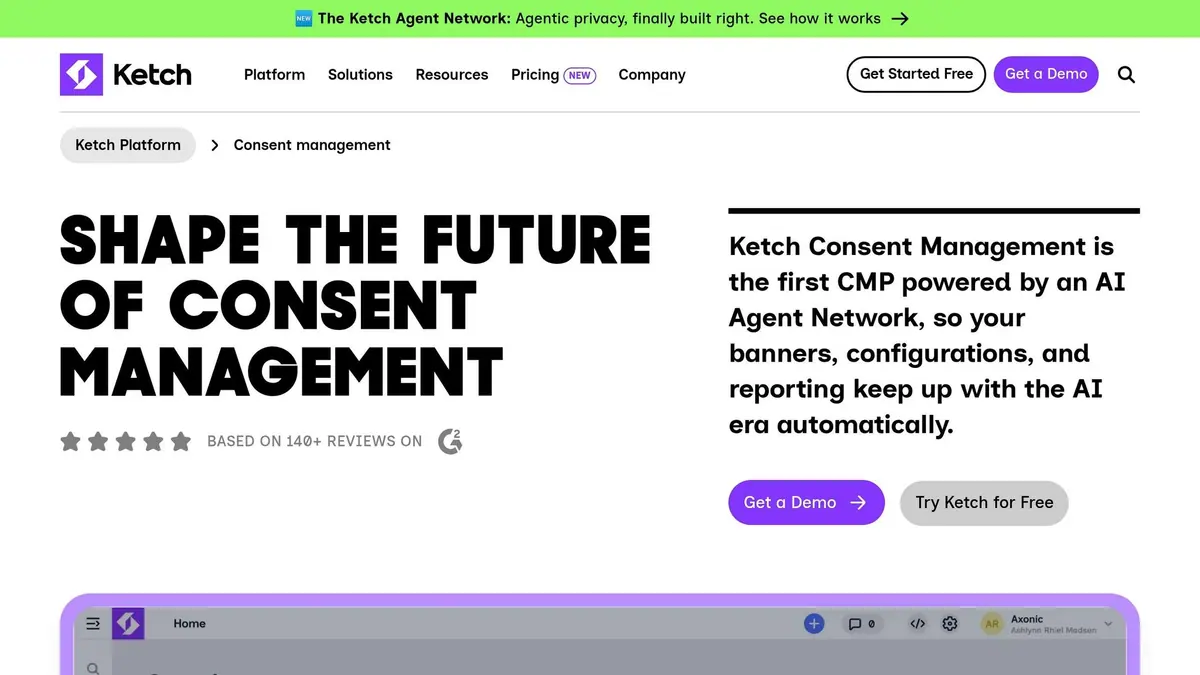
Ketch puts less weight on the banner itself and more on what happens after a person makes a choice. Its server-side Permission Vault stores consent in one central place, separate from browser sessions. That matters because browser storage can be cleared or blocked, which can leave holes in audit trails. Ketch is built to enforce consent across the full data stack, not just on the website.
The platform processes 67.2 billion consent transactions per month across more than 3,500 businesses, including LVMH, Paramount, and Equifax.
GDPR Consent Controls
Ketch supports step-by-step consent, which means you can place specific privacy choices at different moments in the user journey. Its Opt-Out Sync sends withdrawal signals in real time across CDPs, CRMs, and ad networks. So if a user opts out, that choice can still be honored even after data has already moved downstream.
That same server-side setup also makes proof of consent stronger.
Consent Records and Audit Trails
Ketch logs each consent decision, the context where it was collected, and the enforcement actions that followed. Its server-side record ties each choice to the actions taken across connected systems.
This also helps teams check whether consent updates are being enforced in practice, not just stored on paper.
Cookie Scanning, Categorization, and Blocking
Data Sentry handles automated tracker scanning and classification. It checks whether consent changes are enforced downstream, not just logged at the banner level, by monitoring live network traffic to confirm that connected systems are honoring consent.
Integrations and Multi-Region Support
Ketch connects to 1,000+ pre-built integrations, including Snowflake, Salesforce, and Braze, and can stop data flow after an opt-out. Geo-targeted banners support GDPR, CCPA, LGPD, and other regional frameworks.
Pricing starts at $0/month for up to 5,000 unique users, $150/month billed annually for up to 30,000 users, and from $499/month billed annually for up to 100,000 users, with custom enterprise pricing beyond that.
Ketch stands out most when consent has to sync across many systems, not just get collected at the front end.
Feature-by-Feature Comparison
The differences below matter most when you compare enforcement, recordkeeping, scanning, and global rollout.
Consent Controls and Withdrawal
The biggest gaps here come down to how deeply a platform enforces consent, how easy it is for people to withdraw it, and how well the setup works across regions.
| Platform | Key Consent Control | Notable Enforcement or Reporting Feature | Region Support |
|---|---|---|---|
| Cookiebot | Patented auto-blocking scanner | Easy opt-out link in banner | Geotargeting and auto-translation, 47 languages |
| OneTrust | Purpose-based consent capture | Intuitive preference centers | Geolocation-aware templates, 250+ languages |
| Usercentrics | A/B testing for consent rates | Scalable reporting and analytics | 60 languages |
| Osano | Vendor risk database for third-party tools | Unified Preference Hub | 40+ languages, EU/EEA-based data centers |
| Didomi | Cross-device consent unification | "Consent choices" link | Geo-targeting, 45+ languages |
| consentmanager.net | Machine-learning optimization for consent rates | Audit logging | EU-based storage |
| iubenda | Bundled consent and legal-document tools | Unified compliance record | 27 languages |
| Ketch | Downstream opt-out enforcement | Integrated audit trail for data activation | 30+ languages |
Control is a big deal. But if you can't prove what happened later, that control doesn't carry much weight.
Consent Records and Audit Trails
This is where the fine print starts to matter. The main points of separation are retention period, log detail, export options, and whether the platform can support audits across other systems too.
Cookiebot and Usercentrics store logs for 12 months. Didomi keeps consent records for 5 years. OneTrust keeps a full change history and provides exportable receipts. Ketch goes a step further by tying each consent decision to downstream enforcement actions across connected systems.
That kind of proof matters only if trackers are being blocked the right way in the first place.
Cookie Scanning, Categorization, and Blocking
This is the core enforcement test: Are trackers blocked before consent?
Cookiebot and OneTrust both provide auto-blocking by default. Cookiebot also runs monthly scans to categorize new cookies, which helps catch changes that can otherwise slip by. OneTrust uses AI-assisted classification for enterprise-scale discovery.
consentmanager.net uses machine learning to improve consent rates. Didomi and Ketch push enforcement past the banner itself, extending it downstream instead of stopping at the first user interaction.
Once blocking is in place, the next issue is scale: where the CMP works, what it connects to, and how well it handles different markets.
Integrations, Localization, and Multi-Region Support
OneTrust supports 250+ languages and covers 300+ jurisdictions. That's a large footprint for teams running sites across many markets.
Ketch connects to 1,000+ pre-built integrations, including Snowflake, Salesforce, and Braze, and it can stop data flow downstream after an opt-out. That matters if consent changes need to affect more than just the banner.
Cookiebot, OneTrust, Osano, and Didomi are certified Google Consent Mode v2 partners, which is required for accurate conversion modeling in the EEA.
Pros and Cons
No platform wins every category. The right pick depends on your team size, how much technical work you can handle, and how broad your compliance needs are.
| Platform | Pros | Cons | Best For |
|---|---|---|---|
| Cookiebot | Automated scanning with single-script setup | Pricing scales by subpage count; no legal document generation | SMBs to mid-market teams prioritizing automation |
| OneTrust | Comprehensive GRC suite covering web, mobile, and CTV | High cost; implementation can take months | Large enterprises with complex multi-jurisdiction requirements |
| Usercentrics | Strong ad-tech fit with consent-rate optimization | Usage-based billing can be hard to forecast | Publishers and media companies |
| Osano | Regulatory support promise; strong US state law coverage | Higher entry cost; WordPress integration is less polished | US-based mid-market SaaS and regulated industries |
| Didomi | Stable production performance; clean preference-center UX | Custom pricing; steep learning curve for initial setup | Global enterprises and marketing-heavy teams |
| consentmanager.net | A/B testing and DSAR tools included | Dense interface | Enterprise-level websites and mobile apps |
| iubenda | Policy and consent tools in one system; lawyer-maintained legal policies | Advanced features require modular add-ons; limited API on basic tiers | Solo founders, small businesses, and agencies |
| Ketch | API-driven; automates DSAR and consent enforcement across systems | High overhead; requires engineering resources; custom pricing | Enterprise data teams with complex data ecosystems |
In plain English, some tools are easier to get live fast. Others take more time and money, but give you deeper consent control across your stack.
If you want a simple setup, Cookiebot and iubenda are easier entry points. If you need enterprise-grade control across web, mobile, and data systems, OneTrust, Didomi, and Ketch sit on that end of the market. And if ad revenue, publisher workflows, or consent tuning matter most, Usercentrics and consentmanager.net are more aligned with that use case.
That’s the trade-off: ease of deployment on one side, deeper enforcement and system-level control on the other.
Conclusion
Choosing the right consent management platform comes down to three things: how wide your compliance scope is, how your tech stack is set up, and how much enforcement you need beyond a cookie banner.
Use the comparison above to line up each platform with the job it handles best.
| Business Need | Best Fit | Why |
|---|---|---|
| Automated cookie scanning | Cookiebot | Automated scanning and fast setup |
| Enterprise privacy operations | OneTrust | Centralized privacy operations across teams and regions |
| API-first or developer teams | Ketch | API-first, server-side architectures that pass consent to CDPs and AI pipelines |
| Multilingual or global sites | Didomi, iubenda | Didomi for cross-device consent; iubenda for policy-linked consent |
| U.S. state privacy compliance | Osano | Strong coverage for U.S. state privacy laws |
| High-consent-rate publisher and ad-tech workflows | Usercentrics, Didomi | Built for high consent rates and IAB TCF v2.3 compliance |
Once you’ve picked a fit, check the setup. Open browser dev tools and make sure non-essential scripts stay blocked until the user gives consent. If you use Google Ads or Google Analytics, choose a Google-certified CMP partner that supports Google Consent Mode v2.
The best choice depends on fit, enforcement, and verification. Match the platform to your compliance scope, your team’s technical capacity, and where your users are located.
FAQs
How do I verify scripts are blocked before consent?
Check whether the platform uses runtime blocking or parse-time blocking.
Here’s the plain-English difference: runtime blocking may allow scripts to run before the consent choice is applied. That can create a problem fast, because analytics or ad tags might send data before the user has said yes.
Parse-time blocking, or setups that rely on mutation observers, aim to stop those scripts before they execute. That’s usually the safer setup when you need to control tracking from the first moment the page loads.
You can test this with technical validation tools. The key thing to confirm is simple: no tracking requests from analytics or marketing tags should fire until the user has given explicit consent.
What CMP features matter most for GDPR compliance?
For GDPR compliance, a CMP has to do more than display a banner.
It should block non-essential scripts and cookies until users give explicit, granular consent. It also needs to keep an audit-ready record of that consent, including a timestamp and version.
Users should be able to withdraw consent or change their preferences without friction. Native integration with Google Consent Mode v2 also helps keep data accurate while respecting privacy.
How long should consent records be retained?
GDPR does not set one fixed retention period for consent records in the sources provided.
Instead, organizations should keep those records long enough to show when consent was given, how it was collected, and to prove compliance if an audit happens.
That matters because consent isn’t static. People can change their choices or withdraw consent later. So your records should let your organization piece together the full consent history, including:
- the legal basis
- the collection context
- any preference updates
In plain terms, if someone asks, “What did this person agree to, and when did that change?” your records should make that answer easy to show.
Related Blog Posts
Get new content delivered straight to your inbox

The Response
Updates on the Reform platform, insights on optimizing conversion rates, and tips to craft forms that convert.




Drive real results with form optimizations
Tested across hundreds of experiments, our strategies deliver a 215% lift in qualified leads for B2B and SaaS companies.
