
.webp)
How NLP Enhances Text-Based Lead Scoring



Text can tell you more than form fields alone. If many rule-based lead scores show little or no link to conversion, adding NLP helps me score leads based on what people actually say: urgency, budget, fit, and intent.
In plain terms, here’s the process:
- I connect text from high-converting lead forms, emails, chats, support messages, and CRM notes to each lead
- I clean the text, remove junk, keep timestamps, and use CRM outcomes as labels
- I turn text into model inputs with keyword flags, TF-IDF, text length, intent, sentiment, entities, and sometimes embeddings
- I mix those text inputs with firmographic and behavior data in a scoring model
- I judge success with metrics like precision at the top decile, not just AUC-ROC
- I send high scores into routing and nurture flows fast, because leads contacted within 5 minutes can convert at 21x the rate of those contacted after 30 minutes
- I watch for drift, bias, and weak sales acceptance so the model does not lose accuracy over time
A few points stand out to me:
- Words show buying intent that job titles and page views often miss
- Data prep takes 60–70% of the work in many NLP projects
- Closed-Won, opportunity created, and MQL-to-SQL are better labels than opens or page views
- A solid target is 20% more precision in the top decile versus a baseline model
- Time-based validation matters more than random splits for this type of scoring
This article is not about adding more complexity for its own sake. It’s about using text in a way that helps sales spend time on leads that are more likely to buy.
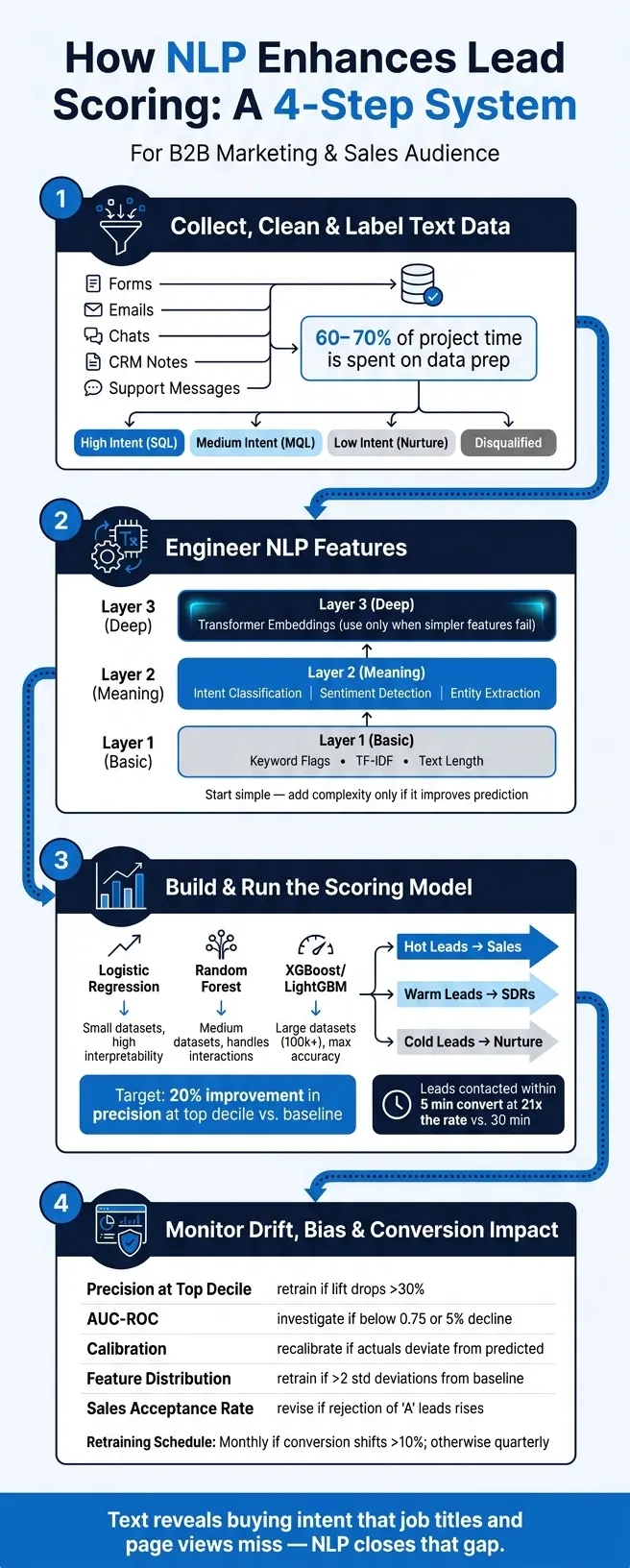
NLP Lead Scoring: 4-Step Process to Convert Text Into Revenue
Using Natural Language Processing to Understand Text Data
sbb-itb-5f36581
Step 1: Collect, clean, and label your text data
Data prep is the foundation of NLP lead scoring. The job here is simple: turn raw text into signals your model can use. This stage usually takes 60–70% of total project time, and if you cut corners, problems show up later when the model starts making weak calls.
Export text and connect it to lead records
Link each text record to a lead ID with an email address or phone number. From there, keep either:
- one row per lead
- one interaction table keyed by lead ID
Store extracted conversation tags as multi-select fields on the contact record through webhooks or native integrations. That way, you can use those tags later as structured inputs during feature building.
Clean text for U.S. business data
Raw text from form fills and email replies is often messy. People type half-sentences, vague answers, and duplicate submissions all the time. For U.S. business data, a solid cleaning pass should include:
- Remove vague or irrelevant responses
- Deduplicate early
- Preserve timestamps
- Keep processing compliant with applicable privacy laws, including CCPA
This step cuts noise before you apply outcome labels.
Define labels for model training
Use CRM outcomes as labels, not opens or page views. Those activity metrics can look useful, but they don't tell you much about buying intent. Pull labels from CRM data instead: Closed-Won deals, opportunities created, or MQL-to-SQL progressions.
For most B2B teams, a simple three-tier setup works well:
| Lead Tier | Business Outcome Label | Example Text Signal |
|---|---|---|
| High Intent (SQL) | SQL / Opportunity Created | "Budget approved for software" |
| Medium Intent (MQL) | MQL | "Does your product handle X?" |
| Low Intent (Nurture) | Long-term Prospect | "Just exploring options" |
| Disqualified | Disqualified / Low Intent | "I'm a student doing research" |
These labels tell the model which text patterns should count as positive signals and which ones should be pushed down. Be explicit with negative cases so the model learns what not to favor. It also helps to set a minimum deal size before using Closed-Won as a label.
With clean records and labels in place, the next step is turning that text into NLP features.
Step 2: Turn raw text into lead-scoring features with NLP
With clean, labeled data in place, the next step is to turn that text into numbers your model can use. That’s feature engineering: NLP converts raw language into model inputs. The goal is simple: use the smallest set of text features that can still predict buying intent with steady results. Start with basic text signals, then add meaning-based features only if they improve prediction.
Start with keywords, TF-IDF, and text length
Begin with keyword flags. Scan each text field for high-value terms such as "pricing", "demo", "budget", "timeline", or competitor names, then assign a point value when they appear. It’s a simple system, but it often works well.
TF-IDF helps you spot terms that show up often in one lead’s text but not across the rest of your dataset. That makes it useful for finding topics or concerns that stand out. Text length gives you a rough signal for how much effort a lead put into a response. But don’t overread it. A long reply doesn’t always mean strong intent.
| Feature Type | Strengths | Weaknesses | Best-Fit Use Case |
|---|---|---|---|
| Keyword Flags | Highly interpretable; low compute cost | Misses context; easily fooled by synonyms | Identifying specific "hot" terms like "budget" or "RFP" |
| TF-IDF Vectors | Captures recurring topics across many leads | Ignores word order and semantic meaning | Identifying common pain points in large datasets |
| Text-Length Features | Simple proxy for engagement/detail | High noise; long text doesn't always mean high intent | Filtering out low-effort or junk form responses |
Once those surface-level signals are working, add features that pick up meaning, tone, and named details.
Add intent, sentiment, and entity extraction
Intent shows buying stage, sentiment shows tone, and entities pull out concrete fit signals.
Intent classification maps language to the same lead tiers used in training. Phrases like "evaluating alternatives", "need this by Q3", or "budget approved" can push a lead into the high-intent tier.
Sentiment detection adds another layer by flagging tone, such as frustrated, curious, or excited, so sales can move on leads that may need fast attention.
Entity extraction pulls structured facts from unstructured text: company names, job titles, product mentions, and budget amounts. Those details often show ICP fit that would otherwise stay buried in free text. If you can extract them automatically, your model can use them without manual review.
Use embeddings when you need deeper meaning
Keyword flags and TF-IDF are good at picking up explicit signals. But sometimes intent is buried in longer email threads, multi-turn chat logs, or open-ended form responses. That’s where transformer embeddings come in. They’re worth using when simpler features miss the point.
| Factor | Bag-of-Words | Transformer Embeddings |
|---|---|---|
| Accuracy | Moderate; misses semantic nuance | High; captures deep meaning and similarity |
| Compute Cost | Low; runs on standard hardware | High; often requires GPU or API costs |
| Maintenance | Simple; requires manual keyword updates | Complex; requires retraining or LLM management |
| Explainability | High; easy to see which words triggered a score | Low; "black box" nature makes auditing harder |
Use embeddings only when simpler features fail to catch meaning in long, conversational text. These text features are then ready to combine with firmographic and behavioral data in the model.
Step 3: Build and run the lead-scoring model
Now it’s time to turn those text signals into a model your team can use day to day. The goal is simple: combine NLP features with firmographic and behavior data, then check if the text signals make your predictions better.
Combine NLP features with firmographic and behavioral data
Take the NLP features from Step 2 and merge them with structured lead data like company size, industry, title seniority, page visits, and email engagement.
Before you join everything together, clean up free-text job titles and map them into seniority bands with SQL or an NLP rule. If you skip that step, you end up with messy inputs and a model that’s harder to keep in shape over time.
Put NLP features and structured lead data into one scoring pipeline. Also add recency weighting so new signals matter more than old ones.
Once the data is merged, test whether text adds lift before you start tuning thresholds.
Choose a model and measure whether text improves results
Start with logistic regression. It’s fast, easy to read, and works well as a baseline. If you need to model more complex feature interactions or handle larger datasets, move to gradient boosted trees like XGBoost or LightGBM.
| Model Type | Best Use Case | Pros | Cons |
|---|---|---|---|
| Logistic Regression | Initial deployment, datasets <100k | Highly interpretable; fast | Misses complex interactions |
| Random Forest | Medium datasets | Handles feature interactions well | Can overfit small datasets |
| XGBoost / LightGBM | Large datasets (100k+) | Maximum predictive accuracy | Less interpretable; needs tuning |
Don’t judge the model by AUC-ROC alone. Track it, yes, but spend extra time on precision at the top decile and calibration. That’s where you see whether NLP features help the sales team focus on the right leads.
A good benchmark is at least a 20% improvement in precision at the top decile compared with your baseline. And when you validate the model, use time-based splits - for example, train on months 1–12 and test on months 13–15. Random splits can make results look better than they’ll be in production because they hide future performance issues.
After scoring, map each score tier to a routing action.
Send scores into routing and nurture workflows
A score that just sits in a database is dead weight. The payoff comes when you connect that score to action fast: hot leads go to sales, warm leads go to SDRs, and cold leads go into nurture.
Speed matters more than many teams think. Leads contacted within 5 minutes of reaching MQL status convert at 21x the rate of leads contacted after 30 minutes. That gap is huge.
For the highest-intent leads, use hard override rules. If NLP picks up a signal like demo-requested, send that lead to sales right away, no matter what the total score says.
Scores should also refresh on their own whenever new lead data comes in, like a page visit, email click, or form submission. And don’t just show a number. Show the top 3 reasons behind the score so reps know what to do next - for example, a competitor mention or a demo request.
After launch, track drift and conversion impact so the model stays accurate.
Step 4: Monitor drift, bias, and conversion impact
Once scores start guiding routing and nurture, monitoring is the thing that keeps them honest. A model that looked strong on day one won't stay that way by itself. Language changes. Buyer behavior shifts. New lead sources show up. Over time, all of that can wear down performance.
Track model quality and feature drift
Watch both input drift and output drift.
Input drift means the makeup of your data is changing. Maybe leads start using new phrases in multi-step form responses. Maybe one new industry starts pouring into your pipeline. This often happens when using forms with multiple outcomes that segment users dynamically. Output drift means the link between scores and conversions is getting weaker.
Here's the catch: stale models can still show high historical AUC while day-to-day precision slips.
Text-based models are extra sensitive to this. Keyword flags, TF-IDF weights, embeddings, and extracted entities all reflect buyer language at a given moment. And that language doesn't sit still. Review keyword triggers quarterly.
| Metric | What It Signals | When to Retrain or Revise |
|---|---|---|
| Precision at Top Decile | Conversion rate of your highest-scored 10% of leads | Retrain if lift falls >30% below initial deployment levels |
| AUC-ROC | Overall ability to separate converters from non-converters | Investigate if it drops below 0.75 or shows a 5% decline |
| Calibration | Whether predicted probabilities match actual conversion rates | Recalibrate if actual conversion significantly deviates from predicted rates |
| Feature Distribution | Shifts in lead sources, language patterns, or device types | Retrain if distributions shift more than 2 standard deviations from baseline |
| Sales Acceptance Rate | Percentage of high-scored leads accepted by sales reps | Revise if sales acceptance drops or rejection rates for "A" leads increase |
Don't leave this to occasional spot-checks. Set hard alerts. If top-decile lift drops more than 30% below your deployment baseline, trigger a review right away.
Check for bias and retrain on a schedule
Drift hurts performance. Bias hurts trust.
Audit for proxy bias, which means signals that latch onto geography, industry, or writing style instead of buyer intent. In regulated markets, check for protected-trait proxies. Also correct for label bias that comes from uneven sales effort.
For retraining, use a set rhythm. Retrain monthly when conversion rates move by more than 10% or lead volume is high. If not, retrain quarterly using the latest 12 to 18 months of data, with the most recent 30 days held out for validation.
Sales feedback matters here too. If a rep marks a lead as "wrong ICP", feed that back into the model as a negative label. That way, human judgment helps shape the next training run.
Conclusion: Build a practical NLP lead-scoring system
NLP lead scoring only works when capture, feature engineering, modeling, and monitoring stay linked. Treat it like a living system, not a one-time build.
FAQs
What text sources should I use first?
Start with contact and pricing form entries. These often include high-intent replies that rule-based routing tends to miss.
Then add email conversations, chat transcripts, transcribed sales call notes, and social media engagement. That gives you a better read on buying signals, budget details, sentiment, pain points, and urgency.
How much data do I need to train the model?
There’s no fixed number here. What matters more is data quality and steady labeling than raw volume.
Start with clean historical data. Then set a clear outcome window. For B2B, that’s often 90 to 180 days, based on how long conversion usually takes.
One more thing: leave out leads that are too recent to have reached that window. If you include them, you’re judging leads before they’ve had a fair chance to convert.
How do I explain NLP lead scores to sales?
NLP lead scores look at buying signals in a prospect’s own words, not just a stack of points from actions like content downloads.
That’s the big shift.
A basic lead score might give someone points because they grabbed an ebook or visited a pricing page. An NLP lead score goes deeper. It analyzes language in emails, chats, and form responses to spot signs of intent, urgency, sentiment, and cues like budget approval or a request for a demo.
In plain English: it pays attention to what the prospect is saying, not just what they clicked.
That makes the score a qualification tool for prioritizing outreach. High scores often point to active purchase intent, which means the lead may be ready for a sales conversation now. Lower scores usually suggest the person needs more nurturing before outreach turns into a productive call.
Related Blog Posts
Get new content delivered straight to your inbox

The Response
Updates on the Reform platform, insights on optimizing conversion rates, and tips to craft forms that convert.




Drive real results with form optimizations
Tested across hundreds of experiments, our strategies deliver a 215% lift in qualified leads for B2B and SaaS companies.
