
.webp)
How Mailchimp Enhances Form-Based Lead Generation



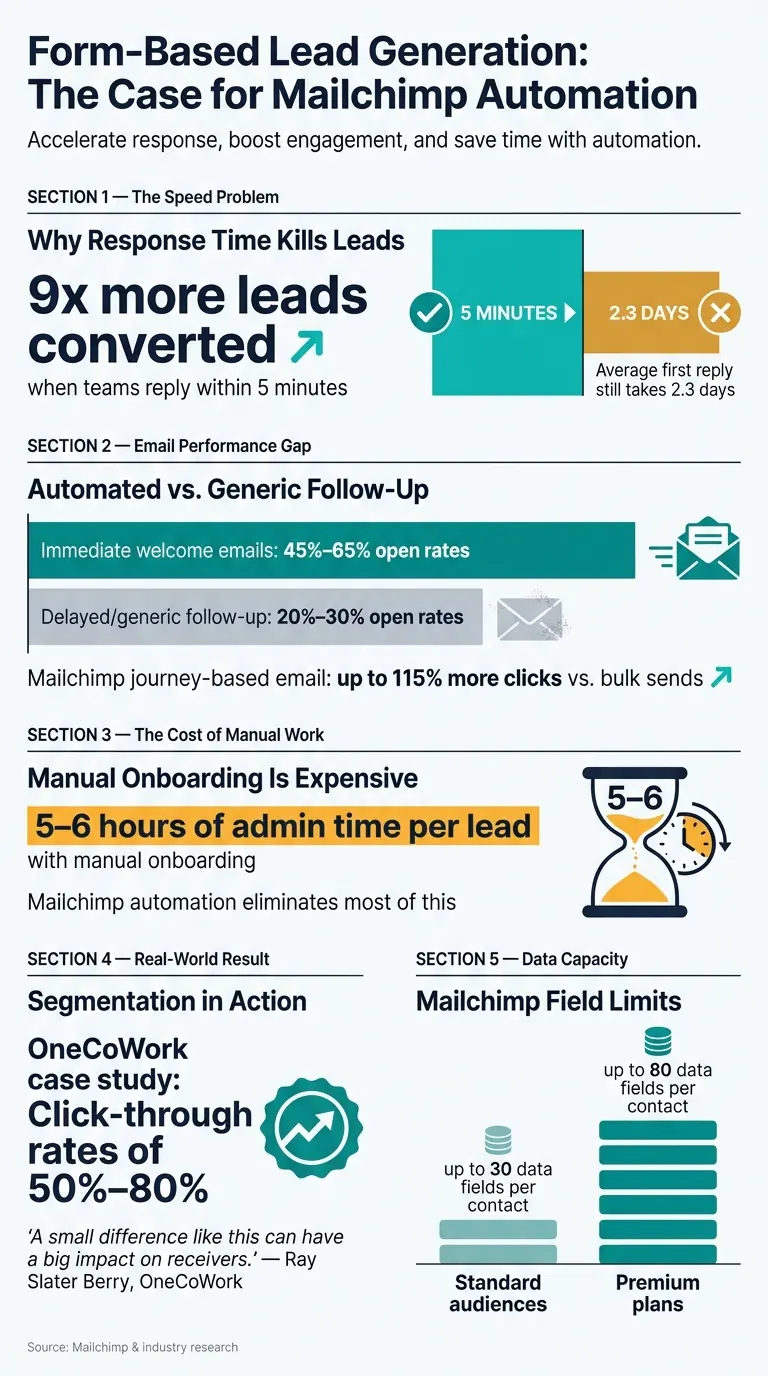
Most form leads go cold because the follow-up is late, the data is messy, or the email ignores what the person already said. I’d sum up the fix like this: send clean form data into Mailchimp, map it to the right fields and tags, and trigger email right away. That matters because teams that reply within 5 minutes can convert 9x more leads, while many first replies still take 2.3 days.
Here’s the short version:
- I need multi-step form answers to go into the right Mailchimp fields, like
FNAME,COMPANY, andPHONE - I need tags and groups based on what the person selected, such as product interest or funnel stage
- I need automated email to start within seconds, not days
- I need spam checks, validation, and duplicate control before bad data hits the list
- I need to track completion rate and drop-off, time-to-first-email, opens, clicks, and conversion
A few numbers stand out:
- Immediate welcome emails can get 45%–65% open rates
- Delayed or generic follow-up often lands at 20%–30%
- Manual onboarding can take 5 to 6 hours per lead
- Mailchimp journey-based email can drive up to 115% more clicks than bulk sends
Mailchimp works best when I treat it as the place where clean lead data ends up - not the place where messy data starts. That’s the core idea of the article: better field mapping, better tagging, and faster email lead to more relevant follow-up and more sales conversations.
Form-Based Lead Generation: Key Stats & Impact of Mailchimp Automation
How to Easily Automate Your Lead Generation with Mailchimp
sbb-itb-5f36581
Quick comparison
| Area | When it breaks | What works better |
|---|---|---|
| Form data | Blank fields, wrong mapping, duplicates | Clean mapping to fields, tags, and groups |
| Follow-up | Manual delay, lost intent | Instant automated journeys |
| Same message for everyone | Segmented email based on form answers | |
| Lead quality | Spam and weak submissions | Validation, bot blocking, and cleaner routing |
| Measurement | Only counting submissions | Tracking reply time, engagement, and conversion |
If I want form-based lead gen to work, I can’t stop at the submit button. I have to make sure the data is usable and the follow-up starts right away.
Where form-based lead generation breaks down before Mailchimp automation
Before Mailchimp automation, form data often shows up incomplete, duplicated, or too late to act on. And once the data is messy or delayed, segmentation and automation start to fall apart.
Disconnected forms create messy audience data
When forms send data into Mailchimp on their own, without one clear integration plan, audience data gets scattered. Field names often don’t line up from one form to the next, and merge tags end up blank or mapped the wrong way.
Repeated submissions can also create duplicate or rejected contacts unless the integration is set to update existing records. Then there’s bot traffic. If spam slips through and gets counted toward your contact limit, the list gets noisy in a hurry.
The fix is simple in principle: use multi-step form design to treat Mailchimp as the endpoint. Validate the submission, block spam, and only then pass clean data into Mailchimp.
That clean setup is what makes proper lead routing possible.
Manual follow-up slows response time and loses lead intent
Without automation, leads often sit in inboxes or spreadsheets until someone gets to them. That lag matters.
Manual onboarding, with all the back-and-forth emails and document sharing, can eat up 5 to 6 hours of administrative time per lead. Once automation is set up, most of that work disappears. More importantly, the lead doesn’t have to wait while interest cools off.
Generic email campaigns ignore what the form already revealed
When form responses aren’t mapped to Mailchimp tags or segments, you’re sitting on data that never gets used.
Ray Slater Berry, a marketer at OneCoWork, tied form responses like company size and workspace preference straight into Mailchimp segments. That meant each lead got messaging based on what they had already said they wanted. The result was click-through rates between 50% and 80%. On top of that, Mailchimp’s Customer Journey Builder can drive up to a 115% increase in click rates compared with bulk email sends.
"We deliver relevant content with Mailchimp based on the answers they give in the typeform. A small difference like this can have a big impact on receivers." - Ray Slater Berry, Marketer, OneCoWork
If those answers never enter Mailchimp’s segmentation logic, follow-up stays generic. And that’s the whole point here: the structure behind the form is what allows Mailchimp to turn responses into audiences, tags, and automated journeys.
How Mailchimp structures and activates form submission data
Use audiences, fields, tags, and interest groups to organize lead intent
Once a form submission lands in Mailchimp, the way you set it up decides whether that data is useful or just clutter.
Mailchimp stores contacts inside an audience. Each piece of data is matched to a field through merge tags like FNAME and LNAME. Tags work like internal labels that are added on submission, such as "Request a Demo" or "Whitepaper Download." Teams use them to sort contacts and send them down the right path.
Groups are a bit different. They reflect choices people make in the form, like product interests selected through checkboxes or dropdowns. That makes it easier to route people by segment without hand-sorting every submission.
Standard audiences support up to 30 data fields per contact. Premium plans increase that limit to 80 fields. The practical move is to keep forms lean. Only map the fields you plan to use for segmentation or personalization. You can also use hidden fields to collect source details like campaign IDs or landing page URLs without adding friction for the person filling out the form. For businesses that need to move faster, expert form strategies can help optimize these workflows in under 30 days.
Connect external forms for better routing and cleaner data
Native Mailchimp forms can do the job, but they’re not always enough.
If you need more control, external form builders can qualify and clean submissions before they ever hit Mailchimp. Tools with email validation, lead enrichment, and conditional routing can screen out weak submissions and send leads into different tags or automation journeys based on how they answered the form - all before the data enters your Mailchimp audience.
That extra layer helps keep your audience cleaner and makes routing less messy from the start.
Native Mailchimp Forms vs. External Form Builders: a side-by-side comparison
The right option comes down to how much control you want before the sync happens.
| Feature | Native Mailchimp Forms | External Form Builders |
|---|---|---|
| Pre-sync control | Basic mapping to audience fields | Advanced mapping, lead enrichment, and data cleaning before sync |
| Conditional logic | Limited; mostly for showing or hiding fields | Dynamic branching based on previous answers |
| Tagging flexibility | Static tags applied on submission | Dynamic tags based on specific responses or logic |
| Validation | Standard email and phone validation | Advanced validation, including email verification |
With clean, mapped data in place, Mailchimp can use those details to trigger segmented journeys.
How Mailchimp automation and targeted email improve lead conversion
Trigger automated email journeys from form actions and tags
Once your form data is mapped, Mailchimp can take over the follow-up. Its Customer Journey Builder uses a visual canvas where you connect a starting trigger - such as a contact joining an audience, a tag being applied, or a form submission - to a series of wait steps and emails. So if a lead gets tagged demo-requested, that tag can kick off the right journey right away.
This matters because not every lead is in the same place. Someone at the awareness stage needs a different message than someone close to a buying decision. That’s where tags come in. You can use separate tags for awareness, consideration, and decision-stage leads, then let Mailchimp send emails that fit that stage.
Mailchimp’s merge tags also help make those emails feel personal without extra manual work. Tags like *|FNAME|* and *|COMPANY|* pull in the exact details captured in the form, so each email speaks to the person who filled it out.
Build segmented campaigns from form responses instead of sending one email to everyone
A one-size-fits-all email misses the point of having a form in the first place. Using interactive multi-step forms can help gather this specific data without overwhelming the user. If a lead selected a "full service" option, they shouldn’t get the same message as someone who asked about a narrower service.
Mailchimp lets you target campaigns using the exact fields and tags collected at submission - things like service interest, the form they used, or their funnel stage. That makes each journey line up with what the lead already told you. And when the message matches intent, the next step feels natural instead of random.
| Funnel Stage | Tag Example | Email Content |
|---|---|---|
| Awareness | awareness-stage |
Educational guides, how-to content |
| Consideration | consideration-stage |
Case studies, testimonials |
| Decision | decision-stage |
Direct CTAs, demo invites |
| Re-engagement | no-engagement-30d |
Win-back sequences |
Manual follow-up vs. Mailchimp automation: a side-by-side comparison
Manual follow-up can work, but it often breaks down under pressure. A packed week slows replies. A missed task means a lead gets ignored. That kind of inconsistency adds up fast.
Mailchimp automation cuts out that swing from one lead to the next. Instead of relying on memory or manual sorting, it sends the right message based on the form data and tags already in place.
| Feature | Manual Follow-up | Mailchimp Automation |
|---|---|---|
| Personalization | Generic or requires manual research | Dynamic via merge tags and field mapping |
| Consistency | Prone to human error | 100% consistent for every lead |
| Tag-driven routing | Not possible without manual sorting | Routes leads automatically based on form responses |
How to measure and improve form-based lead generation over time
Track the metrics that show whether forms and email are working together
Once your forms are mapped to the right fields, tags, and journeys, the next step is straightforward: figure out what's working and what's leaking leads.
When Mailchimp receives clean field data and tags, you can track where people fall off across the full path, from first view to form submission to email action. That means looking at form views, completions, time-to-first-email, and email engagement together. Seen as a whole, these numbers tell you whether your setup is bringing in qualified leads or just filling a list.
| Metric | What It Tells You |
|---|---|
| Form completion rate | Share of visitors who submit |
| Drop-off points | Which fields create friction |
| Time-to-first-email | Delay between submission and first email |
| Open/click rate | Whether follow-up matches intent |
| ROI / conversion rate | Whether the combined process is driving business results |
One metric deserves extra attention: time-to-first-email. If a submission moves through another tool before it reaches Mailchimp, delays of 30 seconds to 3 minutes are common. That may not sound like much on paper, but it can cool off a lead who was ready to act right after submitting.
Use form analytics and submission quality signals to sharpen segmentation
Raw lead volume doesn't mean much if your list is packed with spam or bot submissions. Clean that up before bad data reaches Mailchimp. Honeypots and AI-based spam detection can help block junk entries early.
Then look at abandonment tracking to spot the fields that make real users quit halfway through. In many cases, multi-step forms can increase conversions, and cleaner inputs lead to more accurate tags and segments. That's the trade-off in plain English: less friction up front usually means better follow-up later.
Form platforms like Reform support real-time analytics and lead-quality controls, including spam prevention, email validation, and abandoned submission tracking. That makes this kind of steady tuning much easier to act on.
Conclusion: Clean form data plus Mailchimp automation creates faster, more relevant lead follow-up
Use the data to track completion, drop-off, response time, and conversion. Then trim friction, tighten segments, and refine subject lines. Small gains here can stack up into better lead quality and higher conversion.
FAQs
How should I map form fields in Mailchimp?
First, set up your audience fields in Mailchimp so data lands in the right place. Go to Audience, pick your audience, then open Audience fields and merge tags from More options. From there, use Edit audience fields to add each field and give it its own merge tag.
Next, add those fields to your form in the built-in form builder. Update the labels so they make sense to users, and mark any required fields.
If you're using the API instead, map each form input to the matching merge_fields object. That way, the data your form collects lines up with the fields you set in Mailchimp.
When should I use tags vs. groups?
Use groups when you want contacts to pick their own interests or preferences in your signup form. Subscribers can see these options, and Mailchimp stores their choices as audience field data.
Use tags for internal organization when you're working with details you already know, like funnel stage or past activity. Tags help you sort and manage contacts behind the scenes.
What metrics matter most after a form submission?
Monitor total form views, conversion rates, and bounce rates to measure lead generation performance.
You should also track which sources or channels bring in the most subscribers through audience segmentation. That makes it easier to spot what’s working, whether that’s a design tweak, a copy change, or a stronger incentive.
Reform’s real-time analytics can help you monitor performance and fine-tune your approach.
Related Blog Posts
Get new content delivered straight to your inbox

The Response
Updates on the Reform platform, insights on optimizing conversion rates, and tips to craft forms that convert.



Drive real results with form optimizations
Tested across hundreds of experiments, our strategies deliver a 215% lift in qualified leads for B2B and SaaS companies.
