
.webp)
Best Practices for Cloud Backup Security


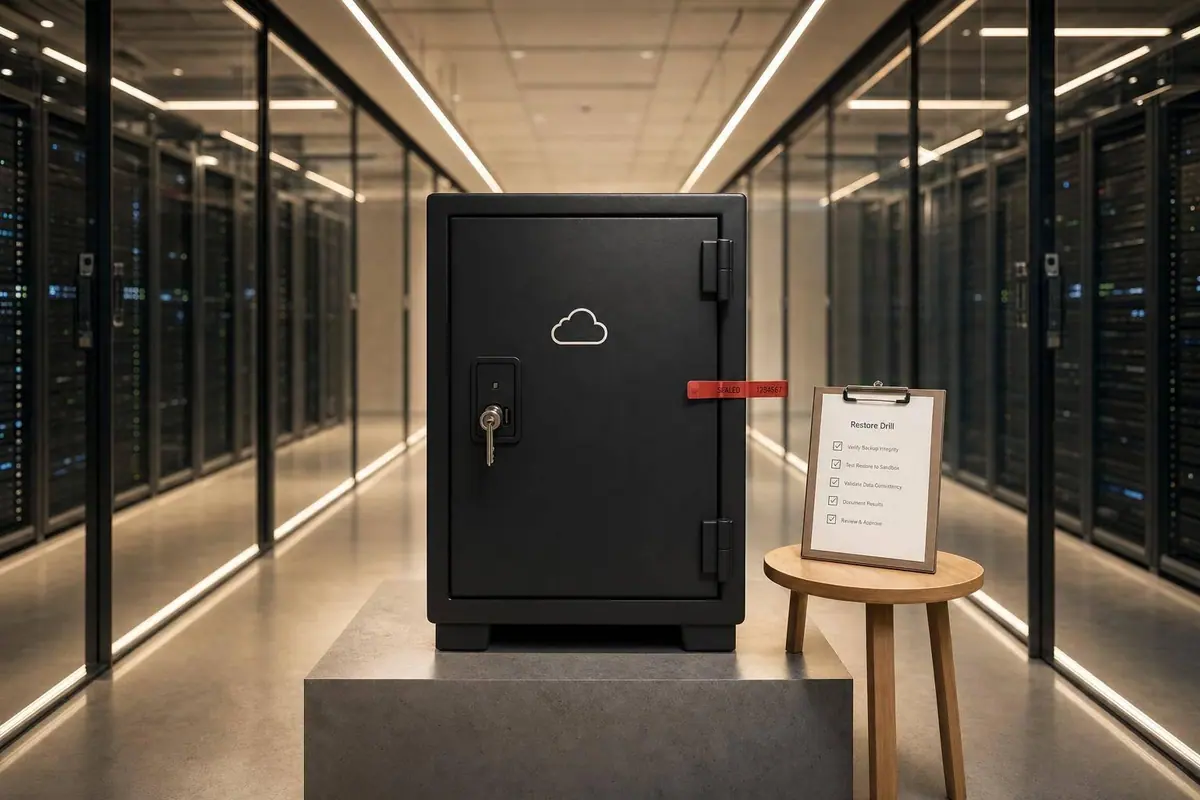
A cloud backup is only useful if an attacker can’t delete it and you can restore it on time. From the article, I’d boil cloud backup security down to this: encrypt backups, lock them with immutability, keep them separate from production, set retention by legal and recovery needs, and test restores on a set schedule.
If I store form data in the cloud, I still own the risky parts: access, keys, retention, and restore testing. That matters because attackers often go after backups first, and 39% of enterprises have either lost cloud data or can’t confirm their backups are secure. For U.S. teams handling PHI or financial records, backup settings also need to line up with rules like HIPAA and SEC/FINRA record retention.
Here’s the short version I’d keep in front of my team:
- Back up all form-related data, not just submissions: attachments, metadata, audit logs, synced CRM data, analytics, and abandoned submissions
- Encrypt data in transit and at rest: use TLS 1.2+ and AES-256
- Control encryption keys yourself when needed, with CMEK/CMK in KMS or HSM
- Use immutable storage so backups can’t be changed or deleted during retention periods
- Separate backup access from production access with different accounts, IAM, and no shared credentials
- Require MFA everywhere for backup consoles, APIs, and break-glass accounts
- Automate backup coverage so new databases, buckets, and VMs don’t get missed
- Set retention by RPO, RTO, and data type:
- Marketing leads: 30–90 days
- Employment applications: 1–3 years
- Financial records: 3–7 years
- PHI: 6 years minimum
- Monitor admin changes, deletions, restore attempts, and failed jobs
- Use 3-2-1-1-0 backup design and keep one isolated immutable copy
- Run restore drills every quarter for high-impact systems and log the results
I’d treat the article’s main point as simple: cloud backup security is not about having copies; it’s about making sure those copies survive an attack and can be restored when you need them.
| Area | What I’d focus on |
|---|---|
| Encryption | TLS 1.2+, AES-256, encrypted restore targets |
| Tamper protection | Object Lock in Compliance Mode |
| Access | Least privilege, MFA, separate backup admins |
| Isolation | Separate account/project, isolated vault or object storage |
| Retention | Match legal rules and recovery targets |
| Monitoring | Watch deletions, policy changes, key events, restore activity |
| Recovery | Test full and record-level restores on a schedule |
If I had to cut the whole piece down to one line, it would be this: an untested backup is a risk, not a fallback.
Five Steps to a Secure Cloud Backup Architecture
sbb-itb-5f36581
Cloud Backup Risks and the Shared Responsibility Model
Broad IAM roles, public buckets, and old permission exceptions often leave backups exposed. Ransomware makes this worse by going straight after backup repositories. In many cases, attackers get admin credentials, then delete backups, cut retention periods, or turn off backup jobs before they launch the main attack.
If your backup setup shares credentials with production, one hacked account can hit both at once. And it’s not just attackers. Accidental deletion is part of the risk too: 39% of enterprises have either lost cloud data or cannot confirm that their backups are secure.
For form data, that exposure lands on submissions, uploads, and restore points. Those are your last safety net when something goes wrong. So before you pick tools or storage, get clear on what your backups must include.
The shared responsibility model helps sort that out. The provider handles durability and infrastructure. You handle key management, access policies, retention settings, and restore testing.
| Area | Cloud Provider Responsibility | Customer Responsibility |
|---|---|---|
| Durability | Storage medium reliability and infrastructure-level redundancy | Backup scheduling and verifying restore points |
| Key Control | Encryption of the underlying service | Managing CMEK and data classification |
| Access Control | Providing IAM frameworks and authentication mechanisms | Implementing least privilege, MFA, and managing user permissions |
| Retention | Maintaining platform certifications (SOC 2, HIPAA) | Setting retention policies aligned to RPO and regulatory requirements |
| Recovery | Service availability | Restore testing, documentation, and recovery time validation |
With ownership mapped, the next step is to look at vendors based on the controls they can actually affect.
Define What Needs to Be Backed Up for Form Data Systems
The core data classes from the introduction matter, but they’re not the whole picture. Your backup scope should also cover analytics data, enrichment data, and incomplete or abandoned submissions. Teams miss these all the time, and that becomes a problem during recovery.
If you use Reform, pay close attention to abandoned submission tracking and enrichment data tied to downstream integrations.
How to Assess Provider and Vendor Risk Before Choosing Backup Storage
Before you choose a backup provider, review its SOC 2 Type II report. If you store PHI, confirm HIPAA support and make sure there’s a signed BAA. You should also check regional redundancy if your data has to stay in specific U.S. regions.
After that, focus on the controls that sit in your hands: encryption, immutability, and access control.
Core Technical Controls for Securing Cloud Backups
Once you've mapped provider risk, the next step is the part you control directly: encryption, immutability, isolation, and automation.
How to Encrypt Backups End-to-End and Protect Key Management
Encrypt backup traffic with TLS 1.2+ and store backups with AES-256. That covers data in transit and at rest. But don't stop there. Make sure restored data also lands in encrypted storage. Otherwise, you can protect the backup and still leave the recovery copy exposed.
For key control, use CMK/CMEK in KMS or HSMs. That gives you direct control over key rotation and revocation. It also puts more responsibility on your team, so write down the recovery steps if the key service is unavailable. In a bad moment, nobody wants to figure that out on the fly.
Use Immutability, Least Privilege, and MFA to Prevent Tampering
After encryption, lock backups so they can't be deleted. That's a big deal because ransomware often goes after backups before it encrypts production data. If attackers can wipe your recovery points, you're stuck.
Object Lock in Compliance Mode prevents any user - including root accounts - from deleting or modifying backups during a defined retention window. Governance Mode can be overridden by privileged users; Compliance Mode cannot. That's the line that matters.
Then tighten access around it:
- Use RBAC to separate backup administrator roles from production roles
- Enforce MFA on every backup management console, API path, and break-glass account - no exceptions
You should also alert on rapid snapshot deletion patterns and suspend the account automatically. If a deletion spike hits, speed matters.
Separate Backup Environments and Automate Full Coverage
Once backups are immutable, separate them from production trust. Keep backups in a separate account or project with distinct IAM and no persistent network trust to production. Think of it as putting your spare house key somewhere other than under the same doormat.
Automation matters just as much as isolation. Manual backup policies miss newly created resources all the time. A new database, bucket, or VM can slip through the cracks, and that's often the one you need later. Backup posture management tools continuously scan for unprotected resources and apply backup policies automatically, closing coverage gaps before they become recovery failures.
Use immutable object storage for regulated backups and isolated vault storage for the final recovery copy.
After these controls are in place, retention and monitoring determine how long backups stay useful and auditable.
Retention, Monitoring, and Compliance for US Organizations
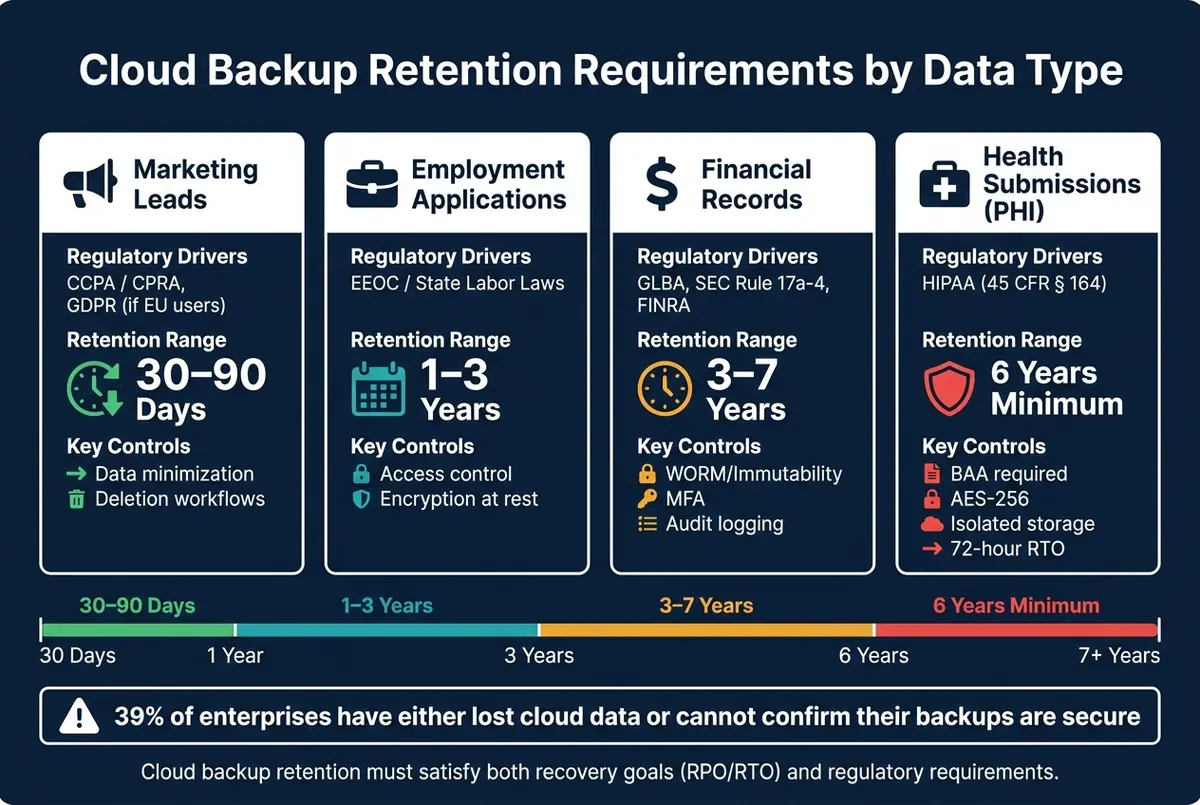
Cloud Backup Security: Retention Requirements by Data Type & Regulatory Driver
Retention policies and monitoring shape whether backups stand up during a regulatory audit or an incident review. For US organizations, the rules change based on the data and the legal duty tied to it. Form submissions, attachments, and synced records all need the same retention logic. In plain terms, your backup policy has to do two jobs at once: help you recover data and prove compliance.
Set Retention Policies Based on RPO, RTO, and Data Sensitivity
Start with your recovery goals. RPO (Recovery Point Objective) tells you how much data loss your business can live with. If losing more than one hour of form submissions is too much, you need backups at least every hour. RTO (Recovery Time Objective) tells you how fast systems need to come back online. In SaaS settings, 4–8 hours is a common place to start, and HIPAA's modernized 2026 standards stress the ability to restore critical systems within 72 hours.
After that, look at data sensitivity. Health forms with PHI often need six years of retention to meet HIPAA documentation rules. Financial records tied to SEC Rule 17a-4 may need 3–7 years, depending on the record type. Marketing leads usually need far less, often 30–90 days.
The table below lines up common form-data categories with usual retention windows and the controls that matter most.
| Data Category | Typical US Regulatory Drivers | Suggested Retention Range | Key Controls |
|---|---|---|---|
| Marketing Leads | CCPA / CPRA, GDPR (if EU users) | 30–90 days | Data minimization, deletion workflows |
| Employment Applications | EEOC / State Labor Laws | 1–3 years | Access control, encryption at rest |
| Financial Details | GLBA, SEC Rule 17a-4, FINRA | 3–7 years | WORM/immutability, MFA, audit logging |
| Health Submissions (PHI) | HIPAA (45 CFR § 164) | 6 years (minimum) | BAA required, AES-256, isolated storage, 72-hour RTO |
If EU residents submit forms, fold GDPR deletion rules into the policy too. That can create a tension between retention and deletion: privacy law may call for erasure while another rule says the data must stay put. Write down how your team handles that conflict, including when data gets deleted from backups during the next refresh cycle.
Once the retention windows are set, automate deletion so backups don't hang around past their purpose.
Reduce Risk with Data Minimization and Lifecycle Rules
The longer you keep data you don't need, the more risk you carry. Lifecycle rules are the day-to-day fix. Set expiration dates on backup objects so the system deletes them on schedule, without someone having to remember. For marketing leads, that might mean 90 days. For financial records, keep them only for the period the record type calls for.
Two cases need extra care:
- Legal holds must pause automated deletion for specific data sets during litigation or a regulatory inquiry. Your backup system needs a way to preserve those records without throwing off normal lifecycle rules.
- DSARs (Data Subject Access Requests) create another edge case. Backup systems should support record-level restores for DSARs, so teams don't have to restore full snapshots just to pull one record.
Document each retention decision. SOC 2 criteria A1.2 and A1.3 say backup processes must be monitored and that recovery plans must be documented and tested.
Monitor Backup Access, Changes, and Restore Activity
Track backup success, failure, missed schedules, storage exhaustion, and job duration. If a backup job fails, it should kick off a ticket automatically so there's a documented trail of what happened and how it was handled.
Don't stop at job status. You also need logs for admin changes and access events, including retention-policy updates, encryption key management, schedule changes, authentication events, unique user IDs, MFA usage, and privilege-escalation attempts. Restore attempts, data downloads, and deletions need close attention too. And logging a restore isn't enough by itself. You need proof the restored data actually worked, including database connectivity and user access. Store audit logs in separate immutable storage so a production breach can't wipe out the evidence.
"The question is shifting from 'Do you have backups?' to 'Can you restore this specific record from 90 days ago, and can you show me evidence that you've tested this?'" - David Lee, Solutions Architect, Eon
Review backup access at least once a year. Service accounts and people with backup access tend to pile up over time, and stale identities are a risk you can avoid.
With retention and monitoring in place, the next step is a backup architecture built to recover fast after an outage or attack.
Backup Architecture and Disaster Recovery Planning
Retention and monitoring decide what you keep. Architecture decides whether you can get it back when something goes wrong. For form systems, that comes down to a few plain questions: How many copies do you have? Where are they stored? And how fast can you restore one record, a set of submissions, or the full environment?
Apply 3-2-1-Style Backup Design to Cloud Form Data
Use 3-2-1-1-0: three copies, two media, one offsite copy in a separate U.S. region, one immutable or logically isolated copy, and zero errors checked through automated restore tests.
One point matters a lot here. Keep one immutable recovery copy in isolated storage so ransomware or stolen credentials can't wipe it out.
That backup setup only helps if it lines up with the recovery window the business can live with. Here's the tradeoff at a glance.
| DR Pattern | Approximate Cost Level | Complexity | Typical RTO/RPO | Suitable Use Cases |
|---|---|---|---|---|
| Backup-and-Restore | Low | Low | RTO: 24h+ / RPO: 24h | Non-critical internal forms, archives |
| Pilot Light | Medium-Low | Medium | RTO: Hours / RPO: Minutes | Standard lead capture, customer feedback |
| Warm Standby | Medium-High | Medium | RTO: Minutes / RPO: Seconds | High-volume transactional forms, payment portals |
| Multi-site (Active-Active) | High | High | RTO: Near-zero / RPO: Zero | Mission-critical healthcare or financial form systems |
For lead capture and customer communication workflows, Warm Standby is often the best fit. It gives you much shorter recovery windows without the cost and setup burden of full active-active deployment.
Granular recovery also matters. In many cases, teams don't need the whole database cluster back. They need one submission, one attachment, or one lead record restored fast so work can keep moving.
Test Restores on a Schedule and Document the Results
Design on paper doesn't prove much. A restore drill that works does.
A backup test should be a real recovery exercise, not a box-checking task. Run an actual restore drill for ransomware, accidental deletion, or a regional outage. Restore into an isolated sandbox, confirm row counts, checksums, and application function, then log the elapsed time and any gaps you found.
For critical systems like active lead capture or payment portals, run restore drills every quarter. Annual ransomware tabletop exercises also help. Organizations that run them recover 50% faster than those that don't.
Conclusion: The Security Controls That Matter Most
Cloud backup security isn't a single switch you flip. It's a stack of controls, and each one closes a different hole.
Focus on four controls first: end-to-end encryption, separate key control, immutable recovery copies, and verified restore testing.
Then tighten the rest of the setup. Use least privilege and MFA. Match retention to compliance needs and your RPO. Keep a close eye on access and changes. Activity monitoring is not optional - logs for mass deletions and policy changes are often the first sign that an attacker is going after backups before moving on production.
The control that shows whether the rest of this setup holds up is regular restore testing. A backup only counts when a restore drill works. For form data tied to lead capture and qualification, payment flows, or customer communication, an untested backup isn't a safety net. It's a liability.
Treat backup security as part of business continuity. For form data, that means protecting submissions, attachments, and CRM records so they can be restored after an attack or outage - and making sure you can prove it.
FAQs
How often should we test backup restores?
Test backup restores on a regular schedule to make sure your data is complete, can be restored, and can be recovered within your RTO.
A good rule of thumb is to run restore tests at least once a month in an isolated environment. Then run broader end-to-end recovery drills every quarter.
Write down the results, update your runbooks, and avoid testing in production.
What backup data do teams usually forget to include?
Teams often miss system configurations, cryptographic materials, and new resources that no one has tagged by hand yet.
Another gap shows up with newly created instances or databases that slip past backup setup. That’s how blind spots happen.
To cut down on those misses, inventory every workload, account, tenant, and storage target. Automated cloud backup posture management can also help flag and protect missed resources on a continuous basis.
When do you need immutable backups and customer-managed keys?
Use immutable backups to guard against ransomware and insider threats. With immutability in place, backup data can't be changed, encrypted, or deleted during a set retention window. That gives you a trusted path to recovery if production systems are hit.
Use customer-managed keys when you want direct control over encryption governance and access permissions. This is also a common requirement for regulatory compliance.
Related Blog Posts
Get new content delivered straight to your inbox

The Response
Updates on the Reform platform, insights on optimizing conversion rates, and tips to craft forms that convert.




Drive real results with form optimizations
Tested across hundreds of experiments, our strategies deliver a 215% lift in qualified leads for B2B and SaaS companies.
