
.webp)
Checklist for Secure Key Management in Data Transfers



If your team shares keys in code, chat, or email, encryption can fail fast. I’d boil this article down to one point: secure transfers depend on strict key handling from start to finish.
Here’s the short version of what matters most:
-
Set rules before any transfer starts
- Name an owner for each key
- Define where each key can be used
- Keep a current key inventory
-
Create, move, and store keys the right way
- Generate keys with approved methods
- Use KMS or HSM systems
- Keep keys out of source code, logs, and shared files
-
Control keys after deployment
- Rotate API keys every 90 days
- Rotate KEKs every 12 months
- Revoke keys at once after compromise, staff exit, or vendor changes
-
Watch for misuse
- Log every key action
- Alert on odd access patterns
- Check for spikes in decrypt activity or new IP ranges
-
Plan for failure
- Back up key material in encrypted form
- Use split recovery controls
- Test restore drills against your RTO
-
Apply the same rules to daily data flows
- Forms
- APIs
- Webhooks
- File exports
- Third-party handoffs
One stat stands out: GitHub found more than 12 million leaked secrets in public repositories in 2024. That tells me the risk is not rare. It usually comes from simple mistakes like hardcoded keys, stale credentials, weak offboarding, and missing revocation steps.
In plain terms: know every key, limit who can use it, rotate it on time, log every action, and test recovery before something breaks.
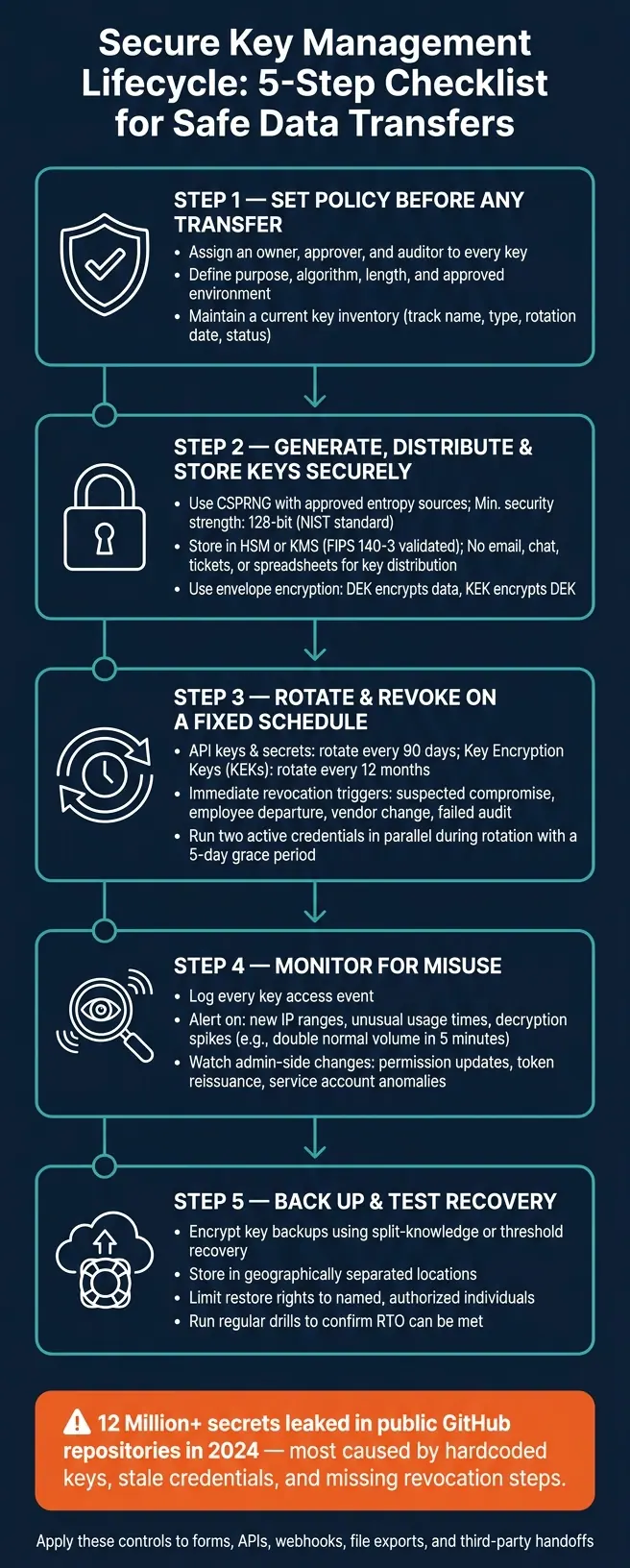
Secure Key Management Lifecycle: 5-Step Checklist for Safe Data Transfers
8 Cryptographic Key Management Best Practices
sbb-itb-5f36581
1. Set a key management policy before any transfer begins
Set the policy before any transfer starts. Write down who owns the key, what it can do, and who can approve changes.
Assign ownership, scope, and usage rules to every key
Give every key an owner, an approver, and an auditor. Split generation, approval, and review across different people. That way, no one person can create, approve, and deploy a sensitive key without someone else checking the work.
Do not reuse the same key across different cryptographic functions.
Spell out each key's purpose, algorithm, length, and approved environment. Production keys should stay in production. Never use them in staging or development.
Keep a current key inventory
Keep the inventory up to date. Track each key's name, type, purpose, algorithm, environment, owner, storage location, rotation interval, next rotation date, and status.
| Inventory Field | Description | Example |
|---|---|---|
| Key Name/ID | Unique identifier for the key | prod/sftp/transfer-key |
| Key Type | Cryptographic category | Symmetric, asymmetric, or certificate |
| Purpose | What the key is used for | SFTP authentication |
| Algorithm/Length | Approved standard | AES-256 or RSA-3072 |
| Environment | Deployment stage and dependent systems | Production |
| Owner/Manager | Responsible role or team | Lead DevSecOps Engineer |
| Storage Location | Where the key resides | AWS KMS or HashiCorp Vault |
| Rotation Interval | Scheduled rotation frequency | 90 days |
| Next Rotation Date | Next scheduled lifecycle event | 09/18/2026 |
| Status | Current lifecycle state | Active |
Review the inventory at least once a year or after any major system change. For high-risk production keys, rotate them every 90 days.
Use the inventory to run rotation, revocation, and audit checks. After the policy is in place, generate and distribute keys only through controlled channels.
2. Generate, distribute, and store keys using controlled methods
Once the policy is set, the next step is simple in theory and easy to mess up in practice: generate, move, and store keys through controlled paths. That applies to transfer credentials, service keys, and secrets used in integrations.
Use strong generation standards and approved algorithms
Generate keys with a CSPRNG and approved entropy sources. Never use a custom RNG.
Stick with vetted algorithms and key lengths that match the security strength you need. NIST recommends at least 112 bits of security strength through 2030 and 128 bits for data that needs protection beyond 2030.
Here’s a quick reference for common minimums:
| Algorithm | Minimum Key Length | Security Strength |
|---|---|---|
| AES | 128 bits | 128 bits |
| AES | 256 bits | 256 bits |
| RSA | 3,072 bits | 128 bits |
| ECDSA / ECDH | P-256 curve | 128 bits |
| 3DES (TDEA) | 112 bits | 112 bits |
For sensitive transfers, generate and store keys in HSM-backed or KMS-backed systems. If you’re setting up a new deployment, prioritize FIPS 140-3 validated modules.
Move keys only through approved channels
After generation, move keys only through controlled provisioning paths. No email. No chat. No ticket comments. No spreadsheets.
Instead, inject keys into services at runtime with a centralized secret manager. That keeps them out of code and plain-text config files. For service-to-service transfers, require mutual TLS (mTLS) so both endpoints prove who they are before any data is exchanged.
Each provisioning event should also be recorded in your audit trail. If a key moved, there should be a record of when it happened, where it went, and what system handled it.
Store keys separately from data and restrict access tightly
Keep keys out of source code, CI/CD logs, .env files, and shared drives. A common pattern here is envelope encryption: a DEK encrypts the data, and a KEK stored in your KMS encrypts the DEK.
Access should be locked down with least privilege. Grant encrypt and decrypt permissions only to the service accounts that need them. Use separate keys for each workload, and keep development, staging, and production isolated from each other - ideally in separate cloud accounts or projects.
Turn on audit logging for every key operation. Use key versioning too, so older data can still be decrypted after rotation.
3. Rotate, revoke, monitor, and recover keys during operations
Set rotation and revocation rules based on transfer risk
Once keys are live, the job shifts from setup to day-to-day control. That means managing the whole lifecycle, not just key creation. Rotate keys on a fixed schedule, and revoke them at once after compromise, employee departure, or a vendor change. Secrets used for APIs, webhooks, and file handoffs need active control after deployment.
Rotate API keys and secrets every 90 days. Rotate KEKs once a year.
Some events don’t wait for the next rotation window:
| Trigger | Required Action | Timing |
|---|---|---|
| Suspected compromise | Emergency rotation and audit log review | Immediately upon detection |
| Employee departure | Revoke privileged access | Within minutes of departure |
| Vendor or integration change | Rotate dependent secrets | Immediately |
| Failed audit control | Suspend or revoke the key | Immediately |
| Algorithm sunset | Migrate to an approved replacement | Per NIST transition guidance |
To keep transfers moving during rotation, run two active credentials in parallel: the current one and the previous one, until every dependent system has switched over. A short grace period, such as 5 days after expiry, helps surface failed automated rotations fast instead of letting them slip by quietly.
Rotation cuts down exposure. Monitoring helps you spot misuse when it happens.
Monitor key use and admin changes
Track access to transfer secrets, API credentials, and webhook tokens. Watch for signs that something’s wrong, including access from new IP ranges, unusual usage times, or sudden decryption spikes, such as double normal volume in 5 minutes.
It also helps to watch admin-side activity, not just key use. If permissions change, a token gets reissued, or a service account starts acting out of pattern, that’s worth a close look.
Back up key material and plan for recovery
If a key is lost or corrupted, recovery needs to be fast and tightly controlled. Encrypted backups of critical key material should use split-knowledge recovery or threshold recovery, where multiple parties must work together to reconstruct a key. That way, the backup process doesn’t turn into a new attack route.
Store backups in geographically separated locations and limit restoration rights to named individuals with documented authorization. Restore only what’s needed to resume encrypted transfers without exposing raw key material.
Then test recovery on a regular basis. Run drills around a lost-key event or a corrupted KMS scenario, and confirm the team can still meet its Recovery Time Objective (RTO) during an outage.
4. Apply the checklist to forms, APIs, and data collection workflows
Use the same controls on the systems that move data every day. That turns every form submission, webhook, export, and vendor handoff into a credential-control point.
Secure API keys and webhook secrets in form-to-CRM flows
When a form submission kicks off a CRM update or a marketing automation sequence, API keys and webhook secrets are what make that transfer happen. In these form-to-CRM flows, the main job is pretty clear: protect the API credentials tied to integrations, verify webhook secrets, and check event logs for odd submission spikes or routing failures.
Scope each integration key to the smallest set of actions it needs. For example, use customers:read for a marketing sync instead of one unrestricted key shared across connected tools. Keep separate credentials for development, staging, and production. For webhook security, use HMAC SHA-256 signatures, reject messages more than 5 minutes old, and keep both the current and previous signing secret active during rotation.
Protect sensitive exports, uploads, and third-party handoffs
The same rules apply when data leaves the system through files or outside partners. Treat exports, uploads, and handoffs with the same care as live integrations. When retiring a credential, inventory every place it’s used, roll out the replacement, verify traffic, and then revoke the old key.
For uploaded documents that contain sensitive information, keep file storage separate from application data and limit access to named service accounts. Log source IP, request volume, and file access so odd behavior shows up fast. That helps keep transfers moving without leaving old secrets exposed.
Conclusion: A secure key management checklist for every transfer
Secure transfers come down to one thing: disciplined key handling from start to finish. The key itself is only part of the story. The process around it matters just as much, across every form submission, API call, export, and vendor handoff.
That discipline isn't optional. Credential leaks happen all the time. In 2024, GitHub detected more than 12 million secret leaks in public repositories. That's not a rare failure. It's what happens when teams skip steps, store secrets carelessly, or let weak habits slide.
A solid process looks like this:
- Generate and store keys in an HSM using approved algorithms such as AES-256 or RSA-3072+
- Log every key access event
- Set alerts for unusual patterns
- Test recovery on a regular schedule
- Rotate keys on time and revoke them at once if compromise is suspected
Consistent key lifecycle discipline keeps transfers trustworthy. Skipping steps adds risk.
FAQs
What is a key inventory?
A key inventory is a central, up-to-date record of all cryptographic keys used across an organization. It usually includes details like ownership, encryption algorithms, approved uses, and the date each key was created.
Keeping this record accurate helps teams manage the key lifecycle, enforce security policies, and stay in control of cryptographic assets. That lowers the risk of unauthorized access and data loss.
When should a key be revoked?
Revoke or deactivate a key immediately if you suspect it has been exposed or you know it has been exposed, such as during a security breach or other incident.
You should also revoke a key when it’s no longer meant to be used. That includes cases where a client or user is offboarded, a key is retired, or internal policy changes. In practice, this only works well if the organization has automated emergency processes in place, so the key can be shut down fast across the full infrastructure.
How do you rotate keys safely?
Prioritize automation to cut human error and prevent missed manual updates. Support zero-downtime rotation by letting applications accept both the old and new keys during a set transition window.
Always test rotation in a non-production environment before moving to production. Use a clear lifecycle plan with regular rotations, such as once a year for encryption keys, and rotate at once after a suspected security incident.
Related Blog Posts
Get new content delivered straight to your inbox

The Response
Updates on the Reform platform, insights on optimizing conversion rates, and tips to craft forms that convert.




Drive real results with form optimizations
Tested across hundreds of experiments, our strategies deliver a 215% lift in qualified leads for B2B and SaaS companies.
