
.webp)
Best Practices for Storing API Keys Securely



API keys are like passwords for your application, granting access to services and sensitive data. If mishandled, they can lead to data breaches, financial losses, or service disruptions. Here’s how to keep them safe:
- Never hardcode keys into your source code or commit them to version control systems like Git.
- Use environment variables to separate keys from your codebase and exclude
.envfiles from version control. - Leverage secrets management tools like AWS Secrets Manager, HashiCorp Vault, or Azure Key Vault for secure storage and access control.
- Encrypt keys both at rest and in transit using strong encryption protocols.
- Rotate keys regularly (every 30–90 days) to minimize the risk of misuse if compromised.
- Monitor usage for unusual activity and set alerts for suspicious patterns.
- Limit permissions by applying the principle of least privilege - only grant access necessary for specific tasks.
One mistake - like exposing a key in a public repository - can lead to serious consequences, including automated bots exploiting it within seconds. Protect your API keys as you would any sensitive credential.
Best Practices for API Key Authentication in 2026
sbb-itb-5f36581
Common API Key Storage Mistakes
Even though API keys are crucial for securing applications, developers still make errors that leave their systems vulnerable. Recognizing these common pitfalls is a critical step toward safeguarding your applications.
Hardcoding API Keys in Source Code
Hardcoding API keys directly in your source code is one of the most frequent causes of credential leaks. While it might seem convenient for quick testing, this practice can lead to permanent exposure.
The problem becomes even more severe in version-controlled environments. Once a key is committed, it remains in the version history - even if you later delete it. Anyone who clones or forks the repository can retrieve it. Automated bots actively scan platforms like GitHub, exploiting exposed secrets within seconds. GitHub itself identifies thousands of exposed credentials daily, with millions of API keys leaked every year in public repositories.
Private repositories aren't immune, either. Many developers mistakenly believe private repos are secure, but this isn't always the case. As GitGuardian aptly explains:
"A secret in a private repo is like a password written on a $20 bill, you might trust the person you gave it to, but that bill can end up in hundreds of people's hands as a part of multiple transactions and within multiple cash registers".
Private repositories can be compromised through hacked accounts, insecure team member environments, or third-party integrations. Embedding keys in client-side code is just as risky, as browsers and mobile binaries can expose these keys to anyone who knows where to look.
Why does this happen so often? Hardcoding is tempting because it simplifies development. But accidents - like using wildcard commands such as git add * without properly configuring a .gitignore file - make it easy to unintentionally commit sensitive information. Unfortunately, convenience often comes at a steep cost.
Exposing API Keys in Public Repositories
Another common mistake is accidentally uploading API keys to public repositories, putting them at significant risk.
Public repositories are a goldmine for exposed credentials. For example, over 30,000 GitHub commits contain potential exposures for terms like "client_secret". These aren't isolated incidents - they're recurring patterns of failure.
Incomplete .gitignore files are a major reason for these exposures. Developers sometimes forget to exclude sensitive files like .env or secrets.json before making their first commit. Commands like git add . can then stage these files, leading to unintentional leaks.
The risks don’t stop there. Misconfigured CI/CD pipelines can inadvertently leak secrets through build logs, Docker layers, or other artifacts. The "GhostAction" campaign is a stark example, where attackers compromised CI workflows to harvest over 3,000 secrets from various organizations. Even brief exposures can be catastrophic - bots can grab keys within seconds, leading to unauthorized cloud charges, data breaches, and API quota exhaustion.
Sharing API keys through messaging platforms like Slack, Teams, or email is another risky habit. These platforms store messages on external servers, making credentials accessible to anyone in the workspace and creating a searchable record of sensitive information. Similarly, passing keys as URL parameters exposes them through browser histories and server logs, adding yet another layer of vulnerability.
These mistakes highlight why secure storage practices are essential. Without proper precautions, your applications and data remain at risk.
How to Store API Keys Securely
Protecting API keys is critical to maintaining the security of your application. Below are practical strategies to ensure your keys remain safe and shielded from exposure.
Store API Keys in Environment Variables
Using environment variables is a smart way to keep API keys out of your codebase. This approach separates sensitive information from your application code, allowing you to share your project without risking key exposure.
In Node.js, the dotenv package can load a .env file (just make sure it’s listed in .gitignore). For Python, the python-dotenv library and its load_dotenv() function are great for handling keys securely.
To prevent accidental leaks, exclude .env files from version control, and use pre-commit hooks like trufflehog to scan for secrets before they’re pushed to a repository. For better collaboration, include a .env.example file with placeholder values to guide team members without exposing real credentials.
It’s also a good idea to use separate environment variables for development, staging, and production environments. This minimizes the risk of configuration errors. Tools like zod (popular among TypeScript developers) can validate environment variables at startup, ensuring required keys like STRIPE_SECRET_KEY are present and providing clear error messages if they’re not.
Finally, configure your logs and error trackers (such as Sentry) to scrub sensitive patterns like _KEY, _SECRET, or _TOKEN. As the LearnSpace Blog aptly puts it:
"Assume any key present in the frontend is compromised. Design your system so the frontend never needs to hold or use a secret key directly." - LearnSpace Blog
Since frontend-stored keys are inherently vulnerable, delegate sensitive operations to a backend service or serverless function.
Use Secrets Management Tools
For more advanced security, secrets management tools are a powerful alternative to environment variables. These tools centralize and encrypt API keys, preventing them from being spread across less secure channels like chat messages or documentation.
Some popular options include HashiCorp Vault, AWS Secrets Manager, AWS Key Management Service (KMS), and Google Cloud Secret Manager. Platform-integrated solutions like GitHub Secrets and Vercel environment variables are also worth considering for seamless deployment workflows.
When evaluating a secrets management tool, prioritize features like AES-256 encryption, local "zero-knowledge" encryption, and robust role-based access controls. These tools should follow the principle of least privilege, ensuring keys are accessible only to those who absolutely need them. Many also support automated key rotation, which can be scheduled every 30, 60, or 90 days to reduce long-term risks. Audit trails are another helpful feature for meeting compliance requirements.
Some tools even simplify synchronization with deployment platforms. For instance, Netlify CLI can pull environment variables from its dashboard directly into your local environment, reducing the need for manual .env file management.
To complement these tools, always encrypt API keys both at rest and in transit.
Encrypt API Keys at Rest and in Transit
Encryption is a cornerstone of protecting API keys, whether they’re stored or being transmitted.
- At Rest: Encrypt stored keys to prevent plaintext exposure in case of a data breach. Symmetric encryption methods like AES are efficient for this purpose.
- In Transit: Use encryption to secure keys as they travel between services or from a client to a server. Asymmetric encryption (e.g., RSA) is particularly effective for open network communication, using a public/private key pair for added security.
Always require HTTPS for API endpoints to ensure keys are transmitted over secure TLS channels. Avoid passing keys through URL parameters, as these can be logged in plaintext. Instead, use secure headers for requests.
For automating encryption and decryption, consider a Key Management System (KMS). These systems handle encryption tasks and access control, ensuring keys are only accessible to authorized resources. If you’re working on smaller projects, tools like Blackbox or Git Crypt can encrypt secret files before they’re added to version control, offering a lightweight alternative.
Secrets Management Tools Compared
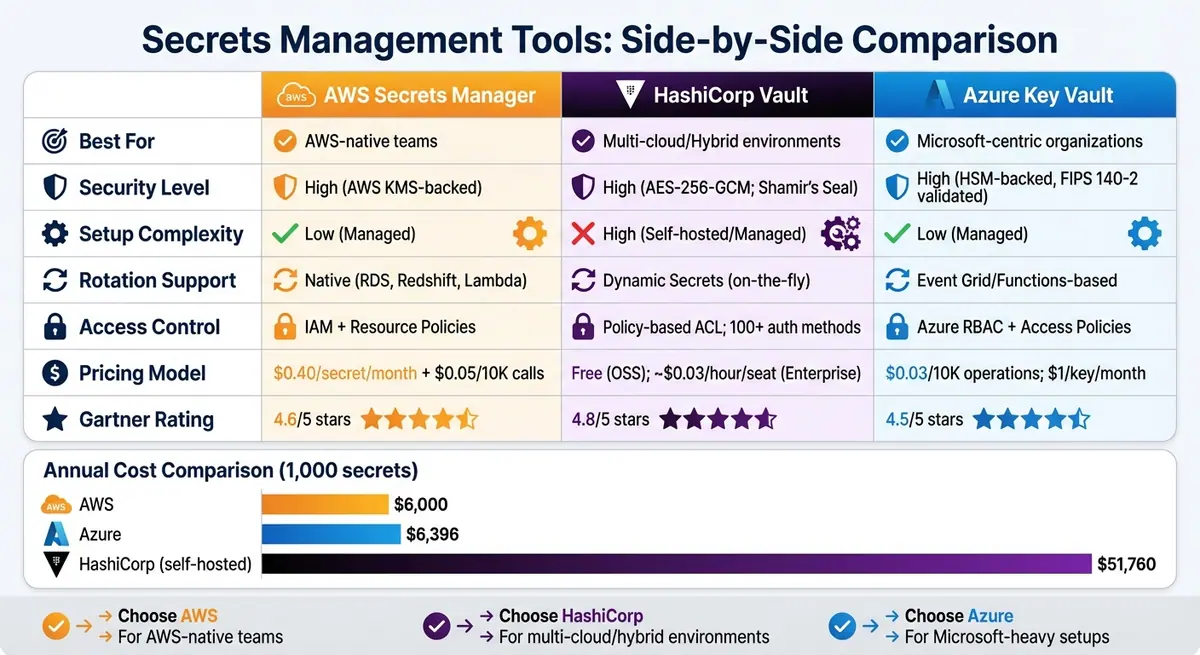
AWS Secrets Manager vs HashiCorp Vault vs Azure Key Vault Comparison
When it comes to securing API keys, choosing the right secrets management tool can make a big difference. Among the most popular options are AWS Secrets Manager, HashiCorp Vault, and Azure Key Vault. In 2024, 41% of organizations used HashiCorp Vault, which reportedly cut access incidents by up to 62% compared to plain-text storage. Meanwhile, 61% of AWS users opted for AWS Secrets Manager or Parameter Store to support their cloud-native deployments.
The main differences between these tools boil down to how well they fit into specific ecosystems. AWS Secrets Manager is designed for teams deeply embedded in AWS, offering seamless integration with AWS Identity and Access Management (IAM) and managed databases. Azure Key Vault works best for organizations that rely on Microsoft services, with strong ties to Azure Active Directory (Entra ID) and FIPS 140-2 validated Hardware Security Modules (HSM). On the other hand, HashiCorp Vault is a go-to for multi-cloud or hybrid setups, providing platform-agnostic flexibility and advanced features like dynamic secrets - temporary credentials that automatically expire when no longer needed.
"Vault offers broader control and flexibility but with more setup complexity, while AWS Secrets Manager provides seamless AWS integration and automated management with predictable AWS-native workflows." - Munim, Security Researcher
Pricing is another key consideration, and costs vary widely between these tools. AWS Secrets Manager charges $0.40 per secret per month, plus $0.05 for every 10,000 API calls. Azure Key Vault is priced at $0.03 per 10,000 operations for secrets, with keys starting at $1.00 per month. HashiCorp Vault’s open-source version is free, but its Enterprise tier costs roughly $0.03 per hour per seat or $2.00 per node per hour. For managing 1,000 secrets annually, AWS comes in at around $6,000, Azure at $6,396, and a self-hosted HashiCorp Vault setup can cost approximately $51,760. These differences can heavily influence your decision, especially when balancing security needs with budget constraints and compliance requirements.
Comparison Table
| Feature | AWS Secrets Manager | HashiCorp Vault | Azure Key Vault |
|---|---|---|---|
| Best For | AWS-native teams | Multi-cloud/Hybrid environments | Microsoft-centric organizations |
| Security Level | High (AWS KMS-backed) | High (AES-256-GCM; Shamir's Seal) | High (HSM-backed, FIPS 140-2 validated) |
| Setup Complexity | Low (Managed) | High (Self-hosted/Managed) | Low (Managed) |
| Rotation Support | Native (RDS, Redshift, Lambda) | Dynamic Secrets (on-the-fly) | Event Grid/Functions-based |
| Access Control | IAM + Resource Policies | Policy-based ACL; 100+ auth methods | Azure RBAC + Access Policies |
| Pricing Model | $0.40/secret/month + $0.05/10K calls | Free (OSS); ~$0.03/hour/seat (Enterprise) | $0.03/10K operations; $1/key/month |
| Gartner Rating | 4.6/5 | 4.8/5 | 4.5/5 |
When to Choose AWS Secrets Manager: Ideal for teams fully invested in AWS, offering a managed solution with tight integration into the AWS ecosystem.
When to Choose HashiCorp Vault: Best for organizations operating across multiple clouds or hybrid environments, especially when advanced credential management like dynamic secrets is a priority.
When to Choose Azure Key Vault: A strong choice for Microsoft-heavy setups, offering cost-effective secret management and HSM-backed security for compliance-focused needs.
This breakdown helps you align your choice of secrets management tools with your infrastructure, workflow, and security priorities.
Maintaining API Key Security
Keeping API keys secure is an ongoing task that requires constant attention. Even with strong storage methods, keys can still become vulnerable due to factors like employee turnover, accidental leaks, or new attack methods. A good maintenance strategy ensures your API keys remain safe throughout their use. Below, we’ll cover key rotation, usage monitoring, and applying the principle of least privilege to strengthen API key security.
Rotate API Keys Regularly
Regularly rotating API keys is one of the best ways to minimize risks. By changing keys frequently, you shorten the window of time an attacker could exploit a compromised key. Industry recommendations suggest rotating keys every 90 days in most production environments. For high-stakes scenarios - like financial systems or those handling sensitive data - rotation should happen every 30 to 60 days to meet stricter standards like PCI DSS[35,40].
For example, some systems enforce a 90-day rotation policy with a brief grace period to ensure smooth transitions.
"Regularly rotating API keys limits the window of opportunity for an attacker if a key is compromised. An old, leaked key becomes useless once it has been rotated." - Peakhour.io
Automation can simplify the rotation process. Tools like AWS Secrets Manager and HashiCorp Vault can handle key generation, distribution, and revocation, reducing human error[35,40]. Including a 14-day grace period allows for seamless updates without downtime. For urgent situations - such as a suspected breach, employee departure, or confirmed key exposure - rotate the affected keys immediately[35,36,5].
| Security Level | Recommended Rotation Frequency | Context/Requirement |
|---|---|---|
| High Security | 30–60 Days | Financial services, PCI DSS, sensitive PII [35,40] |
| Standard | 90 Days | General production environments |
| Low Risk | 6 Months – 1 Year | Internal tools, non-sensitive data [35,40] |
| Immediate | Instant | Key exposure, employee departure, or breach |
Monitor API Key Usage
Keeping an eye on how your API keys are used can help catch unauthorized access early. Start by establishing normal usage patterns - track metrics like request frequency, geographic location, and accessed resources. Any unusual activity could signal a problem. Always log metadata like timestamps, endpoints, and IP addresses, but avoid logging the full plaintext key.
Set up alerts for suspicious activity, such as sudden spikes in requests, access from unexpected locations, or attempts to use sensitive endpoints outside normal patterns. Monitoring failed login attempts or unauthorized permission changes can also reveal brute-force attacks or scanning attempts. Sending logs to a Security Information and Event Management (SIEM) system can enhance your ability to detect and respond to threats.
You can also use honeytokens - fake API keys planted to identify misuse. Rate limiting is another useful tool, as it prevents attackers from overwhelming your system or extracting large amounts of data.
| Monitoring Metric | Indicator of Unauthorized Access |
|---|---|
| Geographic Origin | Requests from regions where your organization doesn’t operate |
| Request Volume | Spikes exceeding rate limits or typical usage patterns |
| Resource Scope | Attempts to access sensitive or administrative endpoints outside the key’s scope |
| Error Rates | High numbers of 401 (Unauthorized) or 403 (Forbidden) errors |
| Time Patterns | Unusual activity during non-business hours for internal tools |
Apply the Principle of Least Privilege
Limiting API key permissions to only what’s necessary for specific tasks can greatly reduce risks. For instance, assign keys with restricted access - like read-only or write-only permissions - or tie them to specific resources, such as a key solely for managing invoices. This way, even if a key is compromised, the damage is contained[2,5,8].
Use separate keys for development, staging, and production environments to isolate risks[2,41]. You can also restrict key usage to trusted IP addresses or CIDR ranges with IP whitelisting, adding another layer of protection[5,8]. Temporary credentials or strict expiration dates further limit the time a key can be exploited - AWS STS credentials, for example, can expire in as little as 15 minutes[2,8,1].
Identity and Access Management (IAM) policies are essential for controlling who can create, view, or rotate keys[5,1]. Assigning unique keys to each team member or service creates a clear audit trail and limits the impact of a single compromised key. Lastly, always send keys in the Authorization header, not in URL query parameters, which can end up in browser histories or server logs[17,41].
Conclusion
API keys hold the same level of importance as usernames and passwords - protecting them is non-negotiable. A single compromised key can lead to unauthorized charges, data leaks, and service disruptions.
To keep your API keys safe, follow these essential practices:
- Avoid hardcoding keys directly into your source code.
- Use environment variables during local development to keep keys secure.
- Leverage secrets management tools like HashiCorp Vault or AWS Secrets Manager in production. These tools offer encryption, access controls, and audit capabilities.
- Limit permissions by creating scoped API keys that only allow the bare minimum access each task requires.
These steps build on earlier security measures and help ensure your API keys - essentially the "digital passports" of your applications - stay protected throughout their usage.
FAQs
What should I do right away if an API key gets exposed?
If an API key gets exposed, the first step is to rotate or revoke the compromised key. This action stops any unauthorized use immediately. To avoid similar incidents in the future, make sure to follow secure storage practices for all API keys.
How can I keep API keys out of CI/CD logs and build artifacts?
To keep your API keys safe from showing up in CI/CD logs or build artifacts, it's smart to store them in environment variables or use secure secret management tools. Be cautious with your pipeline scripts - make sure they don't accidentally print or echo sensitive information. Also, keep files like .env out of version control systems. By handling secrets carefully and avoiding exposure during the build process, you can reduce the risk of your API keys being leaked.
When should I use a secrets manager instead of environment variables?
When security is a top priority, using a secrets manager is the way to go. It provides advanced features like automatic rotation, access control, and auditing, which are critical for protecting sensitive information. While environment variables can handle basic secret management, they come with risks if not handled carefully.
A secrets manager offers several advantages: it centralizes control, reduces the chances of accidental leaks, and streamlines the entire secret lifecycle. This makes it an excellent choice for applications that demand heightened security across various environments.
Related Blog Posts
Get new content delivered straight to your inbox

The Response
Updates on the Reform platform, insights on optimizing conversion rates, and tips to craft forms that convert.




Drive real results with form optimizations
Tested across hundreds of experiments, our strategies deliver a 215% lift in qualified leads for B2B and SaaS companies.
