
.webp)
Custom API Integration with HubSpot: Security Guide



Custom API integrations with HubSpot can simplify operations, but they also introduce potential security risks. Mismanagement of tokens, improper validation, or weak encryption can expose sensitive customer data or disrupt workflows. To avoid these issues, follow these key practices:
- Authentication: Use OAuth 2.0 for multi-account setups or private apps for single accounts. Avoid hardcoding credentials and refresh tokens before expiration.
- Encryption: Secure data in transit with TLS 1.2/1.3 and encrypt stored tokens using AES-256. Use secrets managers to handle sensitive keys.
- Access Control: Implement role-based access control (RBAC), limit permissions to the minimum necessary, and use IP allowlisting.
- Monitoring: Regularly audit API usage, set up alerts for unusual activity, and track API call logs for anomalies.
- Webhook Security: Validate signatures and timestamps to prevent spoofing and replay attacks.
Secure Your HubSpot CLI with New Global Configuration
Authentication Methods for HubSpot API
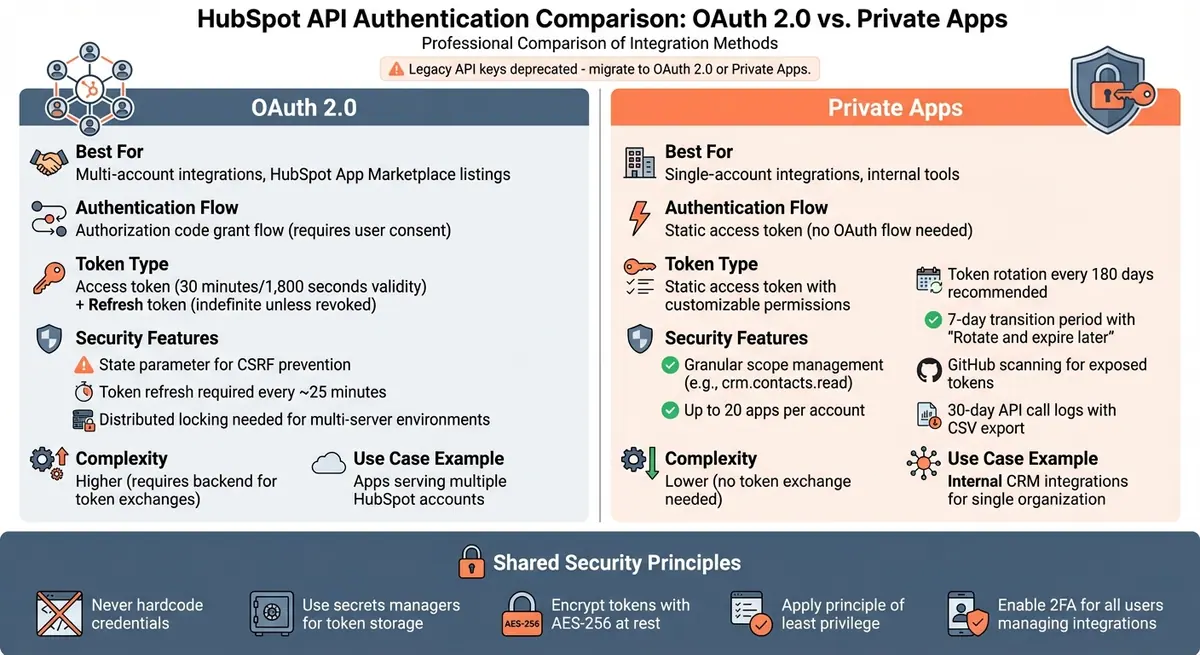
HubSpot API Authentication Methods: OAuth 2.0 vs Private Apps Comparison
HubSpot provides two main ways to handle authentication: OAuth 2.0 for multi-account integrations and private apps for single-account setups. OAuth 2.0 is ideal for apps that need to work across multiple accounts or are listed on the HubSpot App Marketplace. On the other hand, private apps are designed for single-account integrations, offering a static access token with customizable permissions.
OAuth 2.0 for Authorization
OAuth 2.0 uses an authorization code grant flow. Here’s how it works: you direct users to HubSpot’s OAuth server through an authorization URL. This URL includes your client ID, redirect URI, and the scopes you’re requesting. Once the user gives their consent, HubSpot redirects them back to your app with a temporary authorization code. Your app then exchanges this code for an access token and a refresh token.
- Access Token Expiry: Access tokens are valid for 30 minutes (1,800 seconds).
- Refresh Tokens: These remain valid indefinitely unless the app is uninstalled or revoked. To avoid issues, refresh tokens about five minutes before the access token expires.
If you’re working in a multi-server environment, use distributed locking mechanisms - like Redis with the Redlock algorithm - to prevent multiple servers from refreshing tokens at the same time.
To enhance security, always include a unique state parameter in your authorization URL. This helps prevent Cross-Site Request Forgery (CSRF) attacks. Generate a random nonce, save it in your session, and verify it when HubSpot redirects back to your app.
Next, let’s dive into private apps, which offer a simpler method for single-account integrations.
Private Apps and Scope Management
Private apps are perfect for single-account integrations, offering a static access token without the need for the OAuth process. Each HubSpot account can create up to 20 private apps, each with its own unique access token and scoped permissions.
A major benefit of private apps is their ability to enforce granular scope management. Unlike legacy API keys, which granted broad access, private apps allow you to specify only the permissions your integration needs - such as crm.contacts.read or crm.objects.contacts.read. This follows the principle of least privilege, improving security.
To further protect access tokens, HubSpot scans public GitHub repositories for exposed tokens and deactivates any that are found. However, it’s still best to rotate private app tokens every 180 days. Use the “Rotate and expire later” option to give yourself a 7-day transition period before the old token is invalidated.
Private apps also come with built-in monitoring tools. You can review API call logs from the past 30 days, filter them by request method or response code, and export the data as a CSV file for audits. Keep in mind, if the app creator is removed from the HubSpot account, some API calls might fail with a USER_DOES_NOT_HAVE_PERMISSIONS error. To fix this, simply rotate the token and assign it to a new admin user.
Transitioning Away from API Keys
With these modern authentication options, it’s time to move away from legacy API keys. HubSpot has deprecated API keys because they lacked fine-grained access controls. OAuth 2.0 and private apps solve this issue by using scope-based permissions and tokens that are either short-lived or easy to revoke.
For systems still relying on API keys, migrate to private apps for internal integrations or OAuth 2.0 for multi-account applications. Private apps are easier to adopt since they don’t require a backend for token exchanges. However, OAuth 2.0 is a must for integrations intended for the HubSpot App Marketplace or those used across multiple accounts.
During development, avoid hardcoding credentials into your codebase. Instead, use the HubSpot CLI with personal access keys to reduce the risk of accidental exposure in version control systems. This small step can save you a lot of trouble down the road.
Data Encryption and Protection Standards
Once secure authentication is in place, the next step is safeguarding data both during transmission and while stored. This involves encrypting all data in transit and at rest. HubSpot takes this seriously by encrypting sensitive communications with Transport Layer Security (TLS) 1.2/1.3 and securing stored data using AES‑256 encryption on physical and virtual drives, as well as in long-term storage solutions like Amazon S3.
Transport Layer Security (TLS) Guidelines
TLS is essential for preventing Man-in-the-Middle (MITM) attacks, which aim to intercept or alter requests between your application and HubSpot's API. To enhance security, HubSpot stopped supporting the outdated TLS 1.0 and 1.1 protocols on March 8, 2021. If you're hosting on HubSpot's CMS, it's recommended to set TLS 1.3 as the minimum version by navigating to Content > Domains & URLs.
"All sensitive interactions with the HubSpot products (e.g., API calls, login, authenticated sessions to the customer's portal, etc.) are encrypted in-transit with TLS 1.2, or 1.3 and 2,048 bit keys or better." - HubSpot Security Overview
To further protect your data, enable HTTP Strict Transport Security (HSTS) in your domain security settings. This ensures browsers automatically convert all HTTP requests to HTTPS, reducing the risk of protocol downgrade attacks. Setting a proper "max-age" duration and enabling the "Require HTTPS" option will also block any mixed content loaded over HTTP. These TLS measures work in tandem with the robust encryption protocols outlined below.
Encryption at Rest With AES‑256
For custom API integrations, it's crucial to encrypt OAuth access and refresh tokens at rest using AES‑256. This prevents unauthorized access in case your database is compromised. Avoid storing tokens in plain text. Instead, use environment variables or dedicated secrets managers like AWS Secrets Manager, Google Cloud Secret Manager, or HashiCorp Vault to store encryption keys separately from the encrypted data. Decrypt tokens only in memory during API calls, and ensure decrypted values are never logged. This approach ensures that even if attackers gain access to your database, they cannot use stolen tokens without the corresponding keys.
HubSpot adds an extra layer of security for data marked as "Sensitive Data" or "Highly Sensitive Data." This includes applying application-level encryption using AES‑256 with unique encryption keys for each customer. Root keys are managed through AWS Key Management Service (KMS), ensuring that even HubSpot engineers cannot access sensitive property values.
End‑to‑End Encryption Protocols
End-to-end encryption ensures data remains secure throughout its entire lifecycle - from creation to deletion. For integrations like IMAP, HubSpot encrypts data end-to-end during transit and at the field level within the database. If you're building custom integrations, consider adding customer-managed encryption on top of platform encryption for enhanced protection. Regularly rotate encryption keys to limit potential exposure if a key is compromised, and implement crypto-shredding by deleting encryption keys at the end of the data or hardware lifecycle. This ensures that data cannot be recovered.
For sensitive information such as Social Security numbers or health records, create custom properties and flag them as "Highly Sensitive." This triggers application-layer encryption and enforces a "click-to-decrypt" process for authorized users. These measures reflect HubSpot's commitment to securing sensitive data throughout its lifecycle.
Access Control and Monitoring Practices
Once data flow is secured, the next step is to control API access and keep a close eye on activity. With APIs now making up more than 80% of all internet traffic - and API-related data breaches increasing by 80% annually - it's clear that robust access control and continuous monitoring are essential. Let's dive into three key practices: IP allowlisting, role-based access control (RBAC), and activity monitoring.
Implementing IP Allowlisting
IP allowlisting limits API access to specific, trusted IP addresses. By using tools like an API Gateway or Web Application Firewall (WAF), you can centralize IP restrictions, encryption, and rate limiting, instead of securing each endpoint individually. This approach simplifies management while bolstering security.
Pair IP allowlisting with rate limiting to cap the number of requests from any single IP address. This combination helps prevent DDoS attacks and automated threats. If you're accessing APIs from public networks, always use a VPN to ensure requests come from a secure IP address. As Matthew Mazzariello, Development Manager at Artisan, puts it:
"If you don't have layers of security measures in place, you're not going to be at the table very long".
Avoid exposing sensitive API keys in frontend code like JavaScript or HTML. Instead, use serverless functions or backend logic to interact with HubSpot APIs. Regularly audit your allowlist to remove outdated or unnecessary IP addresses, such as those used for temporary data migrations. Additionally, set up automated alerts to flag suspicious activity, like repeated failed access attempts from a specific IP. For a comprehensive security setup, integrate IP allowlisting into a Zero Trust architecture, alongside mutual TLS (mTLS) and continuous authentication for every request.
Role-Based Access Control (RBAC)
HubSpot's move from legacy API keys to Private Apps has introduced a more secure way to manage permissions. With Private Apps, administrators can assign specific "scopes" (permissions) tailored to each integration. This ensures applications access only the data they need, minimizing potential risks. For example, permissions can be customized for CRM objects like Contacts, Companies, and Deals, with options to restrict actions such as View, Edit, Create, or Delete. You can even prevent certain users or integrations from editing specific properties to maintain data accuracy. Keep in mind that updates to permissions may take up to five minutes to fully propagate across HubSpot's systems.
To strengthen security, enforce the principle of least privilege by granting only the minimal permissions required. Use tools like the HubSpot Security Health Panel to audit for over-privileged users or unused permissions. Additionally, require Two-Factor Authentication (2FA) or Single Sign-On (SSO) for all users accessing the HubSpot portal to guard against unauthorized access via stolen credentials.
Monitoring API Activity and Alerts
Even with tight access controls, proactive monitoring is crucial for spotting unusual behavior early. HubSpot's API Dashboard offers a detailed view of API usage, including total requests, response times, and error rates. By tracking these metrics over time, you can establish a baseline and quickly detect anomalies that might signal security threats. For deeper insights, use the Accounts API to programmatically access account information, usage stats, and audit logs.
Real-time notifications are key to staying ahead of potential issues. Set up webhooks to alert you to changes in HubSpot data, enabling immediate responses to unauthorized modifications. Watch for sudden spikes in traffic or unusual delays, as these can indicate system problems or security risks. Configure your monitoring tools to flag common errors, like 500-level responses or timeouts, which might reveal vulnerabilities or ongoing attacks.
To streamline responses, integrate alerts into tools like Slack for instant notifications. Use HubSpot's activity index pages and record timelines to audit historical changes, such as edits to emails, calls, or notes. Finally, stay aware of HubSpot's rate limits and daily quotas - hitting these limits can cause service interruptions that might be misinterpreted as security breaches. Proactive monitoring helps ensure smooth operations and quick resolution of any issues.
sbb-itb-5f36581
HubSpot-Specific Security Features
To complement its authentication, encryption, and monitoring practices, HubSpot provides built-in tools to enhance the security of API integrations. These include the Security Health Panel, Forms API protection, and sensitive data management.
Using HubSpot's Security Health Panel
The Security Health Panel acts as a centralized dashboard to help you spot and address security gaps early. This tool is available across all HubSpot products and plans, tracking metrics like Super Admin counts, partner permissions, Two-Factor Authentication (2FA) enrollment, and inactive users. You can access it by navigating to Settings > Security > Permissions in your HubSpot portal.
Why is this important for API security? As Huble explains:
"The Security Health Panel offers a centralized view of security-related metrics and recommendations, enabling organizations to proactively identify and address security vulnerabilities and compliance gaps within the CRM environment."
Every feature in this panel ties directly to API security. For example, reducing the number of Super Admin users lowers the risk of accidental misconfigurations or exposure of Private Apps. HubSpot itself notes that "A lower number of super admins ensures that the risk of users taking risky actions is reduced". The panel also flags external agencies or consultants with Super Admin permissions, as these users can access billing and integrations, potentially introducing unnecessary risks.
Inactive users (those without activity for 90+ days) are another focus. These "ghost accounts" could be exploited if left unchecked. Super Admins receive quarterly reminders to review flagged items, and a Manage button allows for immediate fixes. For Starter, Professional, or Enterprise plans, the panel displays 2FA enrollment status for the first 30 days, while Free tools always show this information.
| Security Measure | API Security Impact | Recommended Action |
|---|---|---|
| Super Admin Count | Reduces risk of unauthorized API/Private App changes | Remove Super Admin status from users who don’t strictly need it |
| Partner Permissions | Limits external access to integration and billing settings | Downgrade Partner users to specific functional roles |
| 2FA Enrollment | Prevents credential hijacking of accounts with API access | Ensure all users managing integrations have 2FA enabled |
| Inactive Users | Closes "ghost" accounts that could be exploited | Deactivate or remove users inactive for 90+ days |
Next, let’s look at how HubSpot secures form submissions and sensitive data properties to round out your integration’s security setup.
Securing Submissions via Forms API
HubSpot’s Forms API builds on its encryption standards by adding extra safeguards for submission data. For Highly Sensitive Data, the "forms submissions authenticated API" ensures stricter handling of sensitive information.
To avoid exposing sensitive data, disable default submission notifications and instead create custom workflows to send generic alerts. This prevents personally identifiable information (PII) from being included in email notifications.
For Enterprise users, enabling the "Sensitive Data" setting applies extra encryption to files and properties submitted via forms. Note that this protection only applies to files uploaded after the setting is activated. Additionally, you can implement field-level permissions on properties populated by the Forms API, restricting access to specific users or teams.
It’s also critical to monitor API rate limits to avoid disruptions. HubSpot enforces a standard limit of 110 requests every 10 seconds for publicly distributed OAuth apps. Exceeding this "TEN_SECONDLY_ROLLING" limit results in 429 error responses. Enterprise accounts can handle up to 1,000,000 API requests daily, with an option to purchase additional increments of 1,000,000 calls each.
Managing Sensitive Data Properties
HubSpot provides two levels of protection for sensitive information: Sensitive Data (e.g., demographic data or partial account numbers) and Highly Sensitive Data (e.g., Social Security Numbers). These features, exclusive to Enterprise subscriptions, use application-layer encryption for enhanced isolation. As HubSpot explains:
"Marking a property as sensitive adds an additional layer of encryption, application layer encryption, which gives individual accounts and their Sensitive Data increased protection and isolation."
Before using sensitive properties, a Super Admin must enable the feature in Privacy & Consent settings and accept the terms.
Access to sensitive data via APIs is tightly controlled. Only Version 3+ of the CRM Object and Properties APIs support sensitive data, while older versions (V1 and V2) are incompatible. Private App developers can add sensitive data scopes directly, but Public Apps require a multi-step approval process from HubSpot’s Ecosystem Quality team.
One key limitation: sensitive data property definitions cannot be managed programmatically. These must be created and configured manually by a Super Admin in the HubSpot interface.
To ensure compliance, use HubSpot’s scanning tool to identify unsecured sensitive information already in your CRM. When granting API access, apply the principle of least privilege - request only the specific sensitive data scopes your application needs. This minimizes risk and ensures your API integration remains secure.
Common Security Risks and Mitigation Strategies
To complement the authentication and encryption measures covered earlier, addressing these common risks can further secure your API integration. Even with HubSpot's built-in protections, custom API integrations remain vulnerable to certain threats. As Jamie Juviler from HubSpot puts it:
"A poorly maintained and insecure API is an unlocked gate to your sensitive data."
While vulnerabilities often follow predictable patterns, they can be mitigated systematically with the right precautions.
Preventing Data Leakage
One major risk is plain-text credential storage. The HubSpot Developer Blog emphasizes:
"Never store tokens in plain text. Just don't. Not in your database, not in log files, not anywhere."
To safeguard tokens, encrypt them at rest using AES-256 encryption and store encryption keys separately from the data. Instead of embedding credentials directly, use secret management services. For AWS integrations, enable CloudTrail to log all API activity, creating a searchable audit trail to track credential usage.
Another common issue involves over-privileged scopes, where integrations request more access than they actually need . This increases the potential damage if credentials are compromised. Apply the principle of least privilege by requesting only the specific scopes your application requires. HubSpot's "optional scopes" feature allows apps to work with users on lower-tier plans without demanding excessive permissions.
Addressing Unsecured API Endpoints
Securing API endpoints is just as important as handling tokens properly. Issues like shadow APIs (unmanaged endpoints) and zombie endpoints (outdated or deprecated routes) can create hidden vulnerabilities. Unauthorized API access is expected to become the top cybersecurity risk for enterprises by 2025. Regular scanning can help identify these weaknesses before attackers exploit them.
Start with basic endpoint testing. For example, test endpoints with invalid credentials to ensure they return proper error responses. Use unsupported HTTP methods, like sending a HEAD request instead of GET, to confirm the endpoint doesn't incorrectly return a 200 OK response. Perform fuzz testing by sending large volumes of randomized requests, including SQL queries or system commands, to check if your API crashes or handles invalid inputs improperly.
In production, an API gateway can centralize security by managing rate limits, logging activity, and blocking malicious clients . This reduces the need to secure each endpoint individually. Enforce TLS 1.2 or higher for all API communications to protect against man-in-the-middle attacks. Adopting a Zero Trust model ensures every API call is authenticated and authorized, regardless of its origin .
HubSpot's rate limits vary by product tier, with enterprise accounts supporting up to 1,000,000 API requests daily. Additional increments can be purchased if needed. You can monitor usage under Development > Monitoring > API call usage in your HubSpot account. If you exceed the limit, HubSpot returns a 429 error code, along with headers like X-HubSpot-RateLimit-Daily-Remaining to help you manage request pacing. Apps seeking HubSpot App Marketplace certification must keep 429 errors below 5% of total daily requests.
Strengthening Authentication Mechanisms
Robust authentication is essential to prevent unauthorized access. Risks like stolen authentication credentials and Cross-Site Request Forgery (CSRF) attacks can compromise security during the OAuth handshake. Additionally, race conditions in multi-server environments can lead to token invalidation and rate-limiting issues.
To counter CSRF, include the state parameter in OAuth URLs. Generate a unique nonce and verify it when the user returns from authorization. For race conditions, use distributed locking mechanisms, like Redis with NX/EX options, to manage token refreshes across servers.
Webhook spoofing and replay attacks are other common threats. Attackers may send fake POST requests or resend legitimate ones to your webhook endpoints . To guard against these, validate the X-HubSpot-Signature-v3 header using HMAC SHA-256 with constant-time string comparison. Reject requests with an X-HubSpot-Request-Timestamp older than 5 minutes (300,000 milliseconds) .
Monitor for high rates of 401 (Unauthorized) or 403 (Forbidden) errors, as they often indicate mishandled tokens or revoked refresh tokens. Strengthen security further by enforcing Two-Factor Authentication (2FA) for users managing integrations and implementing IP allowlisting to restrict API calls and logins to trusted networks or specific VPCs .
| Vulnerability | How to Identify It | How to Fix It |
|---|---|---|
| Webhook Spoofing | Missing or invalid X-HubSpot-Signature header |
Validate V3 HMAC SHA-256 signature |
| Replay Attacks | Check X-HubSpot-Request-Timestamp header |
Reject requests older than 5 minutes |
| CSRF | Audit OAuth flow for state parameter |
Generate and verify a unique nonce in state |
| Injection Attacks | Run tests with SQL/LDAP commands | Implement strict input validation and WAF |
| Broken Auth | Simulate brute-force attempts | Enable 2FA and rate limiting on auth endpoints |
Security Audit and Checklist
After implementing authentication, encryption, and access control measures, the next step is conducting a thorough security audit. This process ensures your defenses are effective and helps uncover vulnerabilities. With API-related data breaches growing by 80% year over year, regular audits are no longer optional. Shockingly, only 27% of organizations maintain a complete, up-to-date API inventory.
Key Audit Categories
Start by gathering key information: logs, an updated list of active users and roles, and details of third-party integrations. This initial step helps identify who has access and highlights potential weaknesses.
Focus your audit on four critical areas:
- Authentication: Ensure Two-Factor Authentication (2FA) is enforced for all users. Remove inactive accounts, especially those of former employees.
- Access Control: Review Role-Based Access Control (RBAC) to confirm permissions align with current responsibilities. Always follow the principle of least privilege.
- API Management: Revoke unused API keys or those tied to deprecated applications. Verify that active integrations only use the minimum necessary scopes.
- Data Protection: Confirm data in transit is secured with TLS 1.2 or higher and check encryption protocols for data at rest.
Additionally, review login histories for anomalies and enable logging for every API request to maintain a detailed audit trail. Perform tests for vulnerabilities like authentication bypass, parameter tampering, injection, and fuzzing. As Matthew Mazzariello, Development Manager at Artisan, aptly states:
"If you don't have layers of security measures in place, you're not going to be at the table very long. We need to be ahead of the curve."
The checklist below translates these audit areas into actionable steps.
Do's and Don'ts of API Security
Strengthen your security posture by following these best practices. With APIs now responsible for over 80% of all internet traffic and 61% of organizations reporting exposed secrets like API keys in public repositories, the stakes are high.
| Recommended Practice (Do) | Common Pitfall (Don't) |
|---|---|
| Use OAuth 2.0 or Private Apps | Never hardcode deprecated API keys in source code |
| Apply the Principle of Least Privilege (PoLP) | Don't grant "Super Admin" or broad scopes to simple integrations |
| Enforce HTTPS with TLS 1.2+ for all communications | Don't allow unencrypted HTTP requests to API endpoints |
| Log every API request and set alerts for anomalies | Don't ignore failed login attempts or unusual IP activity |
| Use secret scanners to detect exposed tokens | Don't leave deprecated or "zombie" APIs active in production |
| Implement rate limiting to prevent abuse | Don't leave endpoints open to unlimited requests |
Leverage tools like HubSpot's Security Health Panel to monitor security settings across your portal and identify misconfigurations. Automate the discovery of undocumented endpoints and centralize controls using an API gateway. This allows you to manage authentication, rate limiting, and encryption from a single location. Finally, validate all inputs with strict data structure and size checks using libraries to prevent buffer overflow and injection attacks. These steps are crucial for maintaining a secure environment for HubSpot integrations.
Conclusion and Final Recommendations
Keeping HubSpot API integrations secure requires ongoing effort in managing tokens, validating requests, and monitoring activity. With REST APIs accounting for about 83% of usage, any vulnerabilities can quickly lead to data exposure. This section builds on the earlier strategies for authentication, encryption, and monitoring.
Key Takeaways
To safeguard HubSpot integrations, focus on three main areas: modern authentication, encryption, and continuous monitoring. Use OAuth 2.0 or Private Apps to ensure precise access control, and encrypt tokens with AES-256 or store them securely in a secrets manager. Always validate webhooks using the X-HubSpot-Signature-v3 header and HMAC SHA-256.
Adopt the principle of least privilege by regularly reviewing scopes and restricting integrations to only the data they need. When validating signatures, use constant-time comparison methods like crypto.timingSafeEqual in Node.js to avoid timing attacks. Additionally, reject webhook requests with timestamps older than 5 minutes to guard against replay attacks. The HubSpot Developer Blog offers a crucial reminder:
"Never store tokens in plain text. Just don't. Not in your database, not in log files, not anywhere".
These guidelines reinforce the best practices discussed throughout this guide.
Next Steps for Implementation
Start by auditing your integrations for any plain-text tokens, overly broad scopes, or outdated API keys. Set up alerts to flag key issues like token refresh failures or repeated 429 errors. In multi-server environments, use Redis with locking mechanisms to avoid token race conditions.
Take advantage of HubSpot's developer test accounts to test your configurations. Conduct fuzz testing by sending randomized requests to identify any unhandled vulnerabilities. Finally, verify your domain in HubSpot settings to eliminate "unverified" banners. Implementing these steps now will help ensure strong protection for both your business and customer data.
FAQs
What is the difference between using OAuth 2.0 and private apps for authenticating with the HubSpot API?
The key distinction between OAuth 2.0 and private apps for HubSpot API authentication lies in their intended use and how they are configured.
OAuth 2.0 is a secure authorization method best suited for apps that need to interact with multiple HubSpot accounts or be featured on the HubSpot App Marketplace. It operates through an authorization flow to generate tokens, which can be refreshed automatically for continuous access. This approach is ideal for managing permissions across various accounts and scaling integrations.
Private apps, by contrast, are designed for simplicity and single-account use. They generate a static access token tied to a specific HubSpot account, which is then used directly in API requests without requiring an authorization flow. That said, private apps are not designed for multi-account scenarios or marketplace inclusion.
If your goal is to support multiple users or accounts, OAuth 2.0 is the way to go. For single-account integrations, private apps offer a straightforward and efficient solution.
What are the best practices for securely storing and managing API tokens?
To keep your API tokens safe and well-managed, it's crucial to use encrypted storage solutions like secure databases or environment variables. This prevents unauthorized access and ensures tokens aren't exposed in your codebase. Always make sure tokens are only accessible to authorized systems or personnel.
Set up automatic token refresh mechanisms to avoid interruptions and reduce risks associated with long-lived tokens. Keep an eye on token activity for any unusual patterns, and restrict token permissions to only what’s absolutely necessary for your integration. Make it a habit to rotate tokens periodically and handle errors in a way that minimizes security risks.
These steps go a long way in safeguarding your API tokens and maintaining the security of your integrations.
How can I effectively monitor and secure API activity with HubSpot?
To keep a close eye on and secure your API activity with HubSpot, start by verifying incoming requests to ensure they're legitimate. HubSpot provides request signatures like v1, v2, or v3, which you can use to confirm that the requests come from trusted sources. This step is crucial for guarding against unauthorized or malicious access.
Next, make sure to log all webhook payloads and API calls. Keeping track of these events allows you to spot unusual behaviors, such as unexpected errors or anomalies. Regularly reviewing these logs can help you catch potential issues early. HubSpot's webhook features also let you manage retries and delivery attempts, adding another layer of reliability to your integration.
For even more robust monitoring, you might want to use external tools to analyze these logs and set up alerts for anything suspicious. This added oversight helps protect your API interactions and ensures your data stays safe and secure.
Related Blog Posts
Get new content delivered straight to your inbox

The Response
Updates on the Reform platform, insights on optimizing conversion rates, and tips to craft forms that convert.




Drive real results with form optimizations
Tested across hundreds of experiments, our strategies deliver a 215% lift in qualified leads for B2B and SaaS companies.
