
.webp)
7 Rules for Envelope Encryption Storage



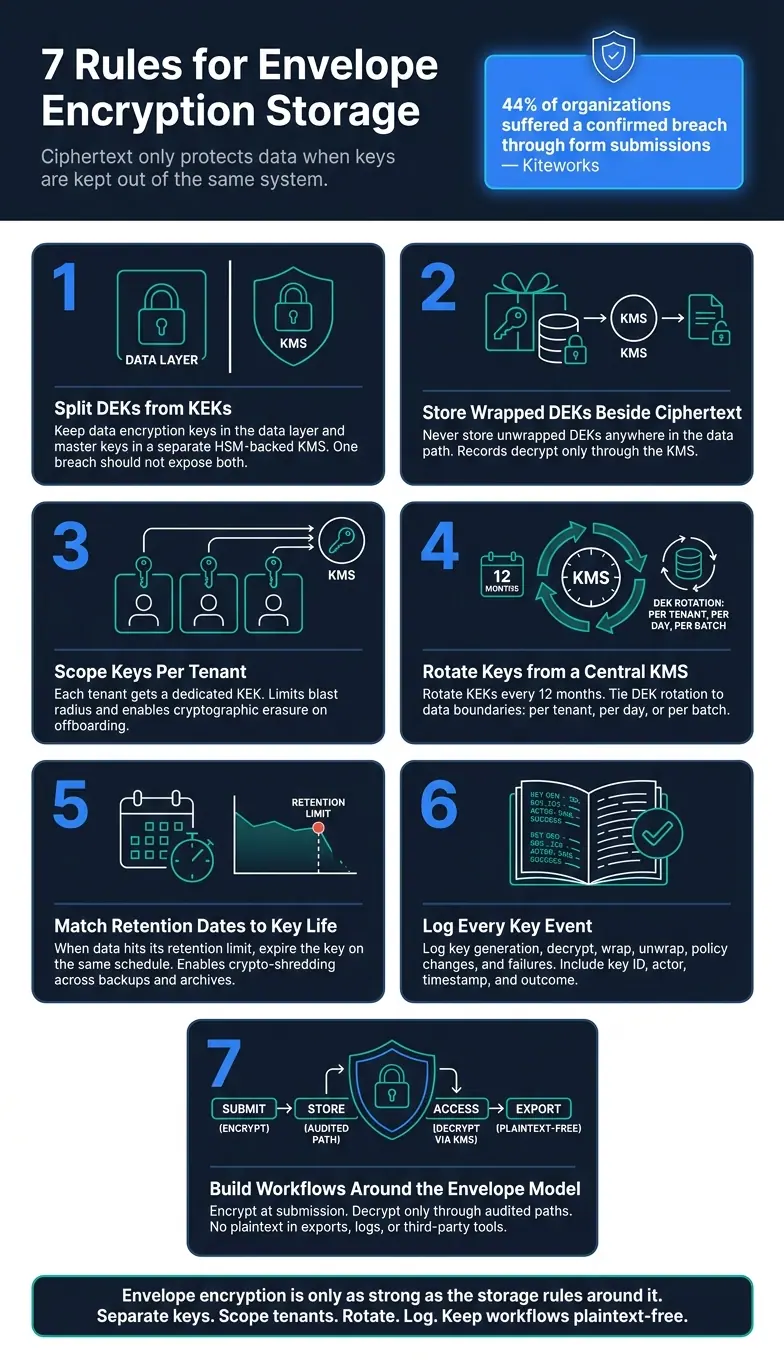
If your database gets hit, encrypted records only help when the keys are kept out of that same system. That’s the whole point of envelope encryption: one key locks the record, another key locks that key, and both should never live in the same place.
If I had to sum up the article in one line, it would be this: store ciphertext and wrapped data keys together, keep master keys in a separate KMS or HSM, scope keys by tenant, rotate them on schedule, tie key life to retention, log every key event, and build every form workflow around that model.
A few points stand out fast:
- 44% of organizations had a confirmed breach through form submissions
- Form data often includes more than names and emails
- Free-text fields, uploads, tokens, and billing details can increase risk
- A breach is less damaging when attackers get ciphertext + wrapped DEKs, not readable records
- Backups, exports, logs, and third-party tools matter just as much as the main database
What I’d take from this article:
- Keep DEKs and KEKs apart
- Store only wrapped DEKs with the encrypted record
- Use tenant-level key scope
- Run key control from one central KMS
- Match retention dates to key retirement
- Log every decrypt, wrap, policy change, and failure
- Keep plaintext out of storage, exports, and side workflows
| Rule | What it means | Why it matters |
|---|---|---|
| 1 | Split DEKs from KEKs | One breach should not expose both data and key access |
| 2 | Keep wrapped DEKs beside ciphertext | Records stay readable only through the KMS |
| 3 | Scope keys per tenant | Limits blast radius |
| 4 | Rotate keys from a central KMS | Keeps old data readable while new data uses newer key versions |
| 5 | Match retention to key life | Expired data should become unreadable |
| 6 | Log all key use | Gives you proof of access and policy use |
| 7 | Build workflows around the envelope model | Stops plaintext from leaking into side systems |
In short: I see this article as a storage guide, not just an encryption explainer. It shows that key separation, tenant boundaries, retention, backups, and audit logs all have to work together or the whole setup weakens fast.
Envelope Encryption Storage: 7 Rules for Secure Form Data
Envelope Encryption Explained: What It Is and Why It Matters in Cloud Security 🗝️
sbb-itb-5f36581
What Envelope Encryption Protects in Form and Lead Storage
U.S. intake forms collect more sensitive data than most teams think. Yes, they include the usual fields like names, email addresses, phone numbers, and mailing addresses. But that’s only the surface.
Free-text notes are often where things get messy. Someone types in an account number, shares health details, or adds private deal context. Now the record holds far more than a basic contact entry. Uploaded files push the risk even higher. Resumes, signed agreements, tax forms, and ID scans can expose identity and financial data at a much higher level than a standard form field. And payment-related fields can still bring PCI DSS review into the picture, even if you never store a full card number.
The problem gets bigger once that data starts moving around. Form data doesn’t stay in one place. It often ends up in backups, logs, exports, and third-party integrations. Every copy adds another place where something can go wrong. A Kiteworks report found that 44% of organizations suffered a confirmed breach through form submissions.
Envelope encryption helps by splitting access in a smart way. The DEK stays with the data, while the KEK lives in a separate key system. So if storage gets breached, the attacker gets ciphertext and wrapped keys - not readable records. Rule 1 starts with the main control: keep DEKs and KEKs separate.
The table below shows where risk tends to pile up across common form data types:
| Field Category | Common Examples | Primary Risk If Exposed |
|---|---|---|
| Primary PII | Name, email, phone, address | Identity theft, phishing, account takeover |
| Unstructured data | Notes, free-text fields | Leaks of financial, health, or deal-sensitive context |
| Uploaded documents | IDs, contracts, tax forms, resumes | Identity fraud, regulatory exposure |
| Payment-related | Billing address, invoice metadata | PCI DSS scope creep, financial fraud |
| Auth/integration tokens | OAuth tokens, API keys in payloads | Full downstream system access |
The next rules show how to store, scope, rotate, and audit that split.
1. Keep DEKs and KEKs Strictly Separate
Keep DEKs in the data layer, and keep KEKs in a separate key system. That split matters more than it may seem at first.
If someone breaches the database, the goal is to leave them with ciphertext only. Not plaintext. Not the keys needed to unwrap it. Just encrypted data and, at most, wrapped DEKs.
The risk shows up when both keys sit in the same environment. In that case, one compromise can expose everything. An attacker doesn’t just get ciphertext and wrapped DEKs - they can get plaintext too.
Use an external HSM-backed key manager so KEKs never enter the application or database environment. That changes the setup from a policy issue to a technical one. It’s no longer about what a provider says they won’t do. It’s about what the system does not allow them to do.
There’s another upside here: an external key manager gives you an emergency isolation point. If you shut off key access, new decryptions stop at once. That kind of hard stop only works when wrapped keys stay with the ciphertext, which Rule 2 covers.
2. Store Wrapped Data Keys Next to Ciphertext, Never in Plaintext
Store the wrapped DEK right next to its ciphertext. That way, a record can be decrypted only through the KMS. But this setup works only when the wrapped key stays attached to the record.
Never store an unwrapped DEK anywhere in the data path. And never let unwrapped DEKs pass into the app, database, or provider-managed systems.
Use a customer-managed external key service so the KEK never enters the provider's environment. That means stored records stay encrypted even if the storage layer is exposed. It also gives you audit logging, with a logged reason for each decryption request and a reliable record of access.
If the external key manager is unavailable, decryption fails closed. Every request still remains auditable. On top of that, the same storage pattern makes tenant-specific key scope easier to enforce, which Rule 3 covers.
3. Give Each Tenant Dedicated Keys With Clear Scope
If one storage layer serves many tenants, the key boundary needs to be tenant-specific. Each tenant should have its own KEK. Shared storage is fine. Shared KEKs are not.
That setup limits blast radius. If one tenant's KEK is compromised, only that tenant's data is exposed. It also makes cryptographic erasure much simpler. When a tenant closes an account or uses a right-to-be-forgotten request, you delete that tenant's KEK. Once that happens, every wrapped DEK tied to that key becomes unreadable, and you don't need to rewrite stored records.
There’s another upside here: audits get a lot cleaner. That tenant-by-tenant boundary makes access review and deletion easier to check and easier to explain. Your KMS logs can show which tenant's data was accessed, by whom, and when - so reviewers get a clear technical trail instead of a policy-only promise.
At the KMS layer, enforce scope by passing Tenant ID in the encryption context and requiring it to match the key's tenant scope. That blocks cross-tenant key use. Then pair it with IAM policies that limit which application services can access which KEKs.
4. Use a Central Key Management System and Enforce Rotation
Once you’ve defined tenant scope, put key control in a central KMS. Don’t leave secrets hardcoded in application code, config files, or databases.
A central KMS keeps KEKs out of the app and returns wrapped DEKs without exposing raw key material. In plain English, the application never handles raw KEKs. That single control layer makes rotation easier to manage and much easier to audit.
This is where centralization starts to pull its weight. When a KEK rotates, the KMS creates a new key version and still keeps older versions available for decryption. That means existing wrapped DEKs still work, because the KMS uses key metadata to locate the right version. New submissions use the latest version automatically, so you don’t have to re-encrypt old records.
For KEKs, rotate them every 12 months. If there’s suspected compromise or a key setup mistake, rotate them right away. For DEKs, tie rotation to a data boundary, such as:
- Per tenant
- Per day
- Per batch
That way, if one DEK is exposed, it only affects a limited set of form and lead submission records. One catch: rotation is only safe when retention follows that same lifecycle.
Managed KMS platforms also log key creation, rotation, policy changes, and decrypt events. So when an auditor asks what happened and when, you have a clear record of each KEK rotation.
5. Match Data Retention Limits to Key Retention Schedules
Rotation protects active keys. Retention needs to take care of the old ones.
When form submission data hits its retention limit, the DEK or KEK used to decrypt that data should expire on the same schedule. If the key is still available after the data expires, the ciphertext can still be decrypted. And once key lifecycle and data retention drift out of sync, expired records may stay readable when they shouldn’t.
That alignment makes crypto-shredding possible. Instead of hunting down every copy of a record, you retire the key when the retention period ends. The ciphertext becomes unreadable, even if it still sits on write-once, read-many storage. In plain terms, the data may still exist, but no one can read it anymore.
This gives you a clear, verifiable way to make expired form data inaccessible everywhere it exists, including backups and archives. It also lets you show that the key was retired at the right time.
A few controls matter here:
- Set KMS expiration dates to the maximum legal retention period for each data class.
- Automate key expiry.
- Require two-person approval for retention changes or key deletion.
This also gives auditors something solid to review. If a regulator asks whether expired data is actually inaccessible, you can point to KMS records showing the key was retired on the retention date and immutable storage records showing the ciphertext was never altered. That’s proof, not just a policy statement.
| Control | What It Does | Audit Evidence It Creates |
|---|---|---|
| Key expiry tied to retention | Blocks decryption after retention ends | Proof of cryptographic deletion |
| Post-expiry access denial | Prevents decryption of expired records | Proof of authorized access only |
| Two-person approval | Prevents unilateral schedule changes | Proof of segregation of duties |
| Data classification | Assigns the correct retention period per data type | Proof of retention alignment with regulations |
Once retention closes access, logging shows every remaining decrypt attempt.
6. Log All Key Access and Enforce Strict Access Controls
After rotation and retention, logging is what proves those controls were followed. It shows encrypted form data was handled the right way from encryption through deletion. Without logs, you can't show an auditor who used a key, when it happened, or which system made the request.
Log every meaningful key event, not just errors. That includes key generation, decrypt, wrap, unwrap, export attempts, policy changes, and deletion. Each entry should include the key ID, the operation, the actor (user or service account), the source system, a UTC timestamp, and the outcome. NIST guidance requires recording all key access, including failed attempts. Logs must never include plaintext keys or payloads. Stick to identifiers and metadata only.
Send KMS and application key events to a separate, hardened, append-only log store or SIEM. Limit log access to reviewers only, and block application write or delete access. Keep key-management logs for 12–24 months, or longer if rules require it.
Key access should follow strict least privilege. In plain English, each service should get only the encrypt/decrypt rights it needs for its own key. Human administrators should have separate roles for configuration and incident response, with no standing decrypt rights. Managed KMS platforms should also send API-call logs into the same audit pipeline.
Keep IAM policies, role definitions, access reviews, and approval tickets as audit evidence. That way, access control isn't just a rule on paper. It's something you can prove.
The comparison table below shows how key separation and tenant scope differ in practice.
7. Build Form and Lead Storage Workflows Around Envelope Encryption
The first six rules set the controls. With those in place, put them to work inside your submission, storage, and deletion flow.
Start at the moment of submission. When a form is submitted, validate the payload and split PII from non-sensitive fields. Then generate a new tenant-scoped DEK for each submission or lead record, encrypt the data in memory, wrap the DEK, and store the ciphertext, wrapped DEK, and metadata together. That metadata should include the KEK ID, key version, tenant ID, and algorithm. The plaintext DEK should exist in memory only.
From there, downstream services should decrypt data only through audited paths. A CRM sync service should request only the fields it needs, using a service account scoped to that tenant's KEKs. Analytics should work from hashed or redacted values and skip decryption altogether.
Carry the same envelope pattern into colder storage too. For archival, move ciphertext and wrapped DEKs into colder storage, or re-encrypt them under archival KEKs with separate rotation schedules. Then link key deactivation to your retention policy. Once all records under a given key scope are past their retention window, disable or schedule destruction of the KEK. If any ciphertext slips past a deletion job, it becomes unreadable once its KEK is destroyed.
The table below maps each workflow stage to its main encryption action and the audit evidence it leaves behind.
| Workflow Stage | Encryption Action | Audit Evidence |
|---|---|---|
| Data capture | Validate fields; generate fresh DEK; encrypt payload | Submission record ID, tenant ID, KEK identifier logged |
| Storage | Write ciphertext + wrapped DEK + metadata together | Database schema audit shows no plaintext DEKs; KMS wrap event logged |
| Downstream access | Tenant-scoped, on-demand decryption via KMS | KMS unwrap log: caller, tenant, record ID, timestamp, outcome |
| Archival | Re-encrypt under archival KEK or retain the existing envelope | KEK version change logged |
| Deletion | Expire records; disable or destroy KEK | Deletion job completion log; KMS key destruction event |
This workflow falls apart the second someone steps outside the envelope. That means no exporting decrypted CSVs to unmanaged desktops, and no plaintext snapshots sitting in shared drives. Support and sales tools should default to redacted data, with on-demand decryption triggered only for clearly authorized requests. When that happens, log both the reason and the user identity.
Key Separation and Tenant Isolation: Comparison Table
Once you've separated keys and moved to wrapped-key storage, the next call is scope. This is where the tradeoff gets practical: tighter isolation usually means more work, while simpler setups tend to increase blast radius.
The safest move is usually to choose the narrowest key scope that still fits your data model and deletion needs.
| Model | Scope | Security Benefit | Overhead | Blast Radius | Best Use |
|---|---|---|---|---|---|
| Per-record DEK | Individual form submission | Maximum granularity; enables crypto-shredding per lead | Very high - requires managing millions of keys | 1 record | Strong for record-level deletion |
| Per-tenant KEK | All data for one customer | Logical isolation; prevents cross-tenant data leaks | Moderate - one KEK per customer in KMS | 1 tenant | Strongest for multi-tenant isolation |
| Per-application KEK | Entire application | Basic encryption at rest; simple to implement | Low - single master key for the app | All tenants | Weak for multi-tenant personal data |
This choice affects more than storage design. It also sets the rhythm for rotation and destruction timing, which the next table covers.
A few practical takeaways:
- Use per-record DEKs for highly sensitive or regulated PII. If one key is exposed, only one record is at risk.
- Per-application KEKs have the biggest blast radius. That makes them a poor fit for multi-tenant form and lead storage.
Use the next table to line up retention rules with the key scope you pick here.
Rotation and Retention: Decision Table
Use this table to line up key rotation, retention, and recovery windows. Even if you use per-tenant DEKs, you still need a set schedule for rotation, retirement, and destruction.
NIST guidance puts symmetric DEKs and KEKs at an active life of 1–2 years, with immediate rotation after suspected compromise, personnel changes, or tenant offboarding.
One rule trips up a lot of teams: never destroy a key before all data it protects has been re-encrypted or has reached its retention horizon. If you destroy a KEK too soon, dependent lead data can become permanently unrecoverable.
| Asset | Typical Cadence | Trigger Events | Storage Impact | Recovery Implication |
|---|---|---|---|---|
| KEK (KMS master key) | Every 12 months | Suspected compromise; personnel change; tenant offboarding | Minimal; KMS manages versioning | Old lead data stays decryptable if key versions are retained; premature destruction makes wrapped data unrecoverable |
| Tenant-level DEKs | Every 6–12 months; on tenant offboarding | Customer offboarding; security incident; data deletion request | More keys in KMS; stronger tenant isolation | Destroying a tenant DEK irreversibly deletes that tenant's encrypted lead data, including backups |
| Archived lead records | Cold storage after 12–24 months; retain 3–5 years | Lead marked inactive; legal hold expiration | Lower cost on cold tiers; slower retrieval; keys must stay available until final destruction | Lead records remain available for audits until associated keys or archives are destroyed |
| Encrypted database backups | Daily snapshots; retain 30–90 days for ops, 1–3 years for compliance | Major schema change; infrastructure migration | Key lifetimes must exceed backup lifetimes | If backup keys are destroyed before backup expiry, restore attempts fail and RPO/RTO targets cannot be met |
| Audit and key-access logs | Retain 1–3 years | Incident investigation; compliance audit | Store separately from lead data | Short log retention or early key deletion can block incident investigation and weaken SOC 2 or HIPAA evidence |
The recovery column is the gut check. It helps you match key lifetimes to backup and restore windows. For example, if backups stay around for 90 days or 3 years, the keys tied to those backups must stay available for at least that long. Otherwise, your backups exist on paper only.
Once those timing rules are set, your storage workflow needs to enforce them.
Where Reform Fits in a Secure Form Stack
Reform sits at the intake layer. It handles form submission and conditional routing before data reaches your backend. Encryption, key management, and retention happen in your backend. After that, your backend applies the storage rules above.
Once Reform sends a submission, your backend should encrypt it before any long-term storage. If you route submissions through a webhook or API, the same rule applies: encrypt each submission before storing it.
That’s the clean split: intake upstream, encryption downstream.
| Workflow Stage | Handled By | Responsibility |
|---|---|---|
| Ingestion | Reform | Form intake, conditional routing |
| Encryption | Your infrastructure | Envelope encryption (DEK/KEK), wrapping keys, ciphertext storage |
| Key Management | Your infrastructure | Key rotation, central KMS, access logging |
| Retention | Your infrastructure | Matching data retention to key deletion schedules |
Conditional routing helps you send sensitive submissions into stricter paths. For example, you might route healthcare intake forms to a backend endpoint that enforces hardware-backed KEKs and shorter rotation windows.
Lead enrichment can add sensitive fields. That shifts the DEK scope and the retention window. Use submission timestamps, form IDs, and campaign IDs as log anchors.
Conclusion
With these seven rules in place, the main point is straightforward: envelope encryption is only as strong as the storage rules around it.
The system works when storage follows the same discipline as key handling. That means you separate DEKs from KEKs, wrap DEKs, scope tenants, rotate keys from one central place, match retention rules, log access, and keep workflows plaintext-free.
These rules don't stand alone. They lean on each other. Tenant isolation without audit logging, for example, leaves you blind to key access attempts.
When done the right way, envelope encryption can make unauthorized access technically impossible. And that distinction matters. A contract that says data won't be accessed is not the same thing as a system that makes access impossible by design.
The aim here is secure, recoverable, compliant storage for form and lead data. To get there, key separation, tenant isolation, retention, and logging need the same level of care as the encryption itself. The keys, the retention window, and the audit trail are all part of the security model - not side notes.
FAQs
What is envelope encryption?
Envelope encryption is a security method where data is encrypted with a data encryption key. That key is then encrypted, or wrapped, with a separate key encryption key.
The idea is pretty simple: protect the data, then protect the key that protects the data.
This setup helps keep the data encryption key safe. So even if someone gets access to backups or datasets, they still can't read the data without the separately managed key encryption key.
It also makes key rotation easier and gives teams tighter access control.
Why keep KEKs outside the database?
Keeping Key Encryption Keys (KEKs) outside the database adds a clean layer of separation. If someone gets into the database, they still won’t have the keys needed to decrypt the data.
The same idea applies to where those KEKs live. When you store them separately - ideally on secure hardware such as a Hardware Security Module (HSM) - you keep the keys out of the same place as sensitive lead and form data. That lowers exposure, gives you tighter control over your data, and makes forced decryption by providers under legal orders less likely.
How does key retention affect backups?
Key retention matters because a backup means nothing if you can't decrypt it. Lose the private key, and any data locked with that key is gone for good.
At the same time, holding on to keys forever creates more risk. If a key gets exposed, it may open up older data too. That’s why your key retention plan should line up with your backup lifecycle.
Related Blog Posts
Get new content delivered straight to your inbox

The Response
Updates on the Reform platform, insights on optimizing conversion rates, and tips to craft forms that convert.




Drive real results with form optimizations
Tested across hundreds of experiments, our strategies deliver a 215% lift in qualified leads for B2B and SaaS companies.
