
.webp)
How Multi-Step Form Logic Qualifies B2B Leads



You can qualify B2B leads before they submit the form. That’s the main idea here: use multi-step form logic to ask fewer questions, branch by fit, and send each lead to the right next step right away.
I’d boil the article down to this:
- Use a small set of signals: intent, company size, need, and region
- Branch the form by answer: show, skip, or end based on fit
- Route leads by path: sales, nurture, or self-serve
- Map each answer into CRM fields: no messy notes, no guesswork
- Test every branch: check routing, field mapping, and owner assignment
- Review results often: watch drop-off, reassignment rate, and pipeline results by branch
A few facts stand out:
- After the first five fields, each extra field can lower B2B form conversions by about 4.1%
- Only about 5% of companies were following up within five days
- That means mastering contact forms and fast routing can have a big effect on lead flow
In plain terms, I’d say the article makes one point: a form should do more than collect data. It should filter, route, and prepare the handoff before sales ever steps in.
If I were building this myself, I’d start with only the questions that change the outcome. Then I’d send high-intent, high-fit leads to sales, send mid-fit leads into email nurture, and point poor-fit leads to self-serve help. From there, I’d make sure the CRM gets clean values like Lead Intent, Company Size, Primary Use Case, and Sales Region.
The rest of the article explains how to set those rules, where forms usually break, and which metrics to watch once traffic starts coming in.
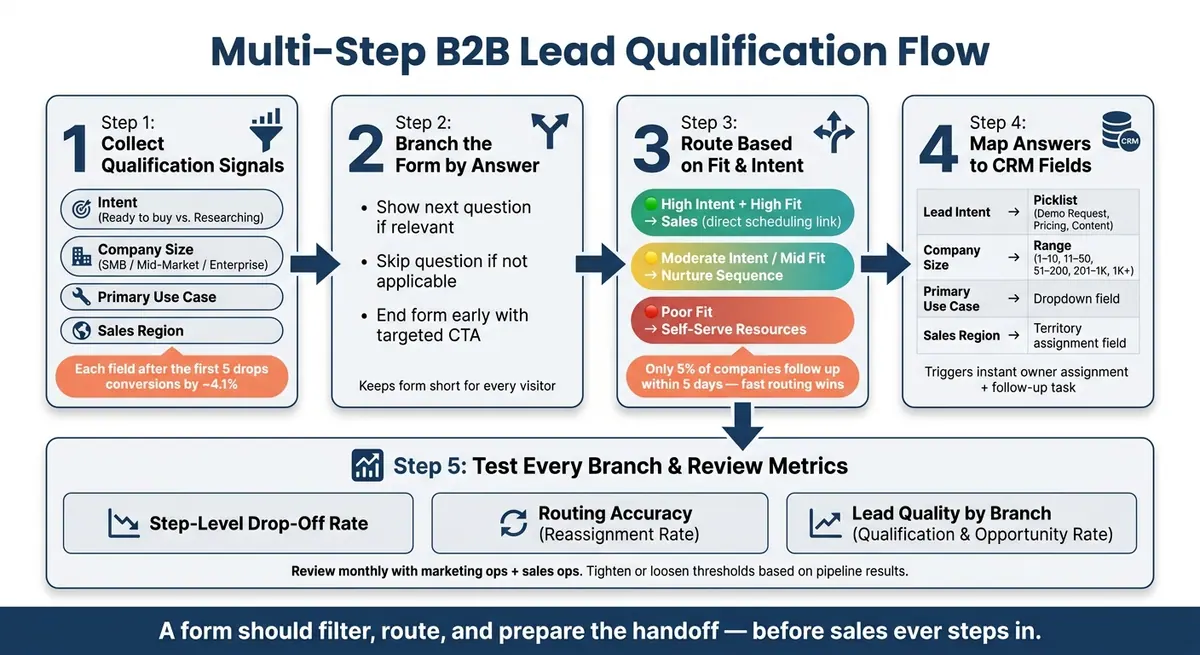
Multi-Step B2B Lead Qualification Flow: From Form Entry to Sales Handoff
Build the qualification flow around the right signals
Once you’ve defined your signals, split your fields into two groups: the ones that route leads and the ones that just fill out the record.
Routing fields decide where someone goes next. Enrichment fields like full addresses, secondary contacts, and detailed budget ranges can wait. If you leave those extra fields out of the form, you give completion rates a better shot by following high-converting form best practices.
Use intent to separate active buyers from early researchers
Intent is the fastest signal in the flow. One intent question can quickly tell you who’s ready to buy and who’s still in research mode.
That one answer changes a lot:
- priority
- the next question
- path length
- the final handoff
High-intent leads can handle a few more qualifying questions. Early researchers should get a shorter path that ends with self-serve resources. That split matters. You can even use expert form strategies to automate this logic without a dev team. Send high-intent leads straight to a scheduling link, and guide researchers to content that helps them learn more. Both groups keep moving, and neither gets bogged down.
Use team size, need, and region to measure fit
Once intent is clear, three more signals help round out the fit picture: team size, need, and region.
Team size helps you split SMB, mid-market, and enterprise paths. Each group should see a different experience. A smaller team may need a lean self-serve option, while a larger one may need questions about procurement and stakeholder roles.
Need confirms whether the problem a person wants to solve lines up with what your product does. It also gives sales a clearer view before the first call.
Use region only when it affects territory assignment, compliance, or ownership. When it does, that answer should feed the branch that decides the lead’s next step.
sbb-itb-5f36581
Route each lead based on their form answers
Collecting answers is only half the work. The other half is putting those answers to use while the person is still filling out the form. That means using each signal to shape what happens next: the next question, the path they take, and the result they see at the end.
Branch the form with conditional questions and paths
Each key answer should lead to a decision. Show the next question if it fits, skip it if it doesn’t, or end the form early with the right CTA. That’s the point of conditional logic: move each person to the next step that makes sense for them.
A high-intent lead can jump straight to scheduling. Someone who’s still researching can take a shorter path that ends with content or an opt-in. A small team might get a simple path, while an enterprise team sees questions about security, integrations, and decision-makers.
That matters because long forms can drag down conversions. Each added field after the first five can cut conversion rates by about 4.1% for B2B forms. Conditional logic helps keep the form short for each person, while still letting you collect the right details across different segments using powerful form templates.
Match routing outcomes to sales, nurture, or self-serve follow-up
Once the form has enough signal, the final step should give the person a clear next move, not a generic thank-you page. Route high-intent, high-fit leads to sales. Send moderate-intent leads into nurture. Point poor-fit leads to self-serve resources instead.
Reform sets up these paths without code. After that, map each answer to your CRM fields and assignment rules.
Set up CRM handoff for fast, accurate sales follow-up
Once routing is in place, your CRM needs the exact same signals. If that handoff gets messy, things slow down fast. Vague fields, missing mappings, or answers buried in free-text notes force reps to clean up data when they should be following up.
Map form answers to CRM fields and assignment rules
Each routing signal should go into a structured CRM field with fixed values. Intent should map to a picklist field like Lead Intent, with options such as Request demo, Pricing inquiry, or Content download. Company size should map to set ranges like 1–10, 11–50, 51–200, 201–1,000, and 1,001+ employees instead of raw numbers. That way, scoring and segmentation rules don't break. Use case should live in a field like Primary Use Case, and region should fill fields such as Country and State, plus a routing field like Sales Region for territory assignment.
Owner assignment also needs a clear order of operations. Start with intent, then territory, then segment. So if a U.S. demo request comes in from a company with 51–500 employees, that lead should go straight to a Mid-Market AE. If a submission is missing something, fallback rules should catch it so nothing sits unassigned. And if multiple reps share a territory, round-robin rules can spread the workload more evenly.
Trigger the right next step after submission
Once the fields are mapped, those values should kick off the next workflow on their own. For high-intent, high-fit leads, speed matters a lot. Only about 5% of companies were following up within a five-day timeframe, missing out on proven lead conversion playbooks. That's a huge opening for teams that respond right away.
When a lead meets your top-tier criteria, the workflow should fire instantly:
- Assign the owner
- Create a time-bound task such as Call within 2 hours
- Send the rep a direct notification with the key qualification details
Lower-fit leads should avoid sales assignment and go into a segmented nurture sequence based on what they shared. Small-team content should go to small teams. U.S. leads should get U.S.-specific examples. They should also stay out of sales cadences unless their behavior changes. It helps to store that branch in hidden fields so reporting shows the path taken, not just the answers submitted.
Reform can map answers to CRM fields, route leads on submit, and enrich records before sales sees them.
Test every branch and refine the qualification rules
Form logic drifts if you don’t test it. Before launch, run through every branch. After launch, review how it performs with live traffic. Once routing is active, check each path against the rules you set.
Check for dead ends, bad routing, and missing field mappings
Use a branch map as a pre-launch checklist. Write out every path through the form - high-intent buyer vs. early researcher, U.S. vs. EU, small team vs. enterprise - and go through each one from the first question to final submission. Every path should finish without errors and show only the conditional questions that fit that branch. Then confirm the CRM record, field values, and owner assignment line up with that path.
Three failure points deserve extra attention:
- Paths that miss required fields: Some answer combinations can skip contact details you need, which leaves you with a submission no one can use. Fix that by changing conditional visibility so every sales-ready path collects the basics.
- Wrong territory assignment: If a region field is mapped the wrong way, an EMEA lead can end up in a U.S. SDR queue. That slows follow-up and creates a mess for both teams.
- Missing field mappings: If intent or team size doesn’t land in a structured CRM field, reps may have to dig through notes to find it - or they won’t find it at all.
A simple field mapping checklist helps here. Track each form field, its CRM destination, and the values you expect to pass through. That gives you a clean way to verify the setup step by step.
After the flow clears QA, watch for issues that only show up in live submissions. Test each branch again for intent, team size, need, and region to make sure the logic still holds up with real inputs.
Review lead quality and adjust thresholds over time
Once live traffic starts coming in, shift from does it work? to is it working well? The main metrics to watch are step-level completion rates for drop-off points, routing accuracy through reassignment rate, and lead quality by branch, including qualification rate and opportunity creation rate by intent level, team size, and region.
Treat qualification thresholds like rules you can test and tune. If sales keeps saying teams under 25 employees rarely close, tighten the team-size cutoff for SDR routing. If research-stage leads do well when they enter nurture first, loosen the intent rule that’s keeping them out of that sequence.
This works best when marketing ops and sales ops review the data together every month or quarter. Use one standard report that shows conversion rates, routing accuracy, and lead quality by segment. Reform’s real-time analytics show step-level drop-off data, which makes it easier to spot which questions add friction and test shorter options. The point isn’t just cleaner routing. It’s better qualification, so more of the right leads move to sales and fewer of the wrong ones clog the pipeline.
Conclusion: Build form logic that qualifies and routes leads in real time
Conditional logic turns form answers into routing decisions on the spot. With multi-step form logic, you can qualify leads while they fill out the form, using a small set of strong signals: intent, company size, use case, and region.
Once those signals are set, branching and routing take over. Conditional branching shows each visitor only the questions that fit. Routing rules send each submission to the right owner or follow-up track. Clean field mappings make sure every answer lands in the right CRM property, so reps get full context the moment a lead comes in.
That also makes regular review part of the qualification system itself, not something you tack on later. Watch step drop-off, routing accuracy, and pipeline results, then tighten or loosen thresholds over time.
Reform's multi-step forms, conditional logic, real-time analytics, and CRM integrations support branching, tracking, and handoff.
The result is a real-time qualification system that gets better with each review cycle and gives sales the context to move fast.
FAQs
Which form questions should I ask first?
Start with simple, low-commitment, multiple-choice questions instead of high-friction form fields.
A good place to begin is with firmographic or intent-based questions, like team size or primary use case. These feel easy to answer, and they give your team useful context right away.
Those early answers can help you:
- segment leads
- route each lead to the right sales rep
- support lead scoring
- make later questions or follow-up feel more personal
It’s a small shift, but it makes the form feel easier while giving sales and marketing better information from the start.
How do I decide who goes to sales vs. nurture?
Use conditional logic in the form to judge lead quality as people answer. Then send high-value leads to sales for fast follow-up, and send mid-tier or lower-fit leads to nurture programs or self-service resources.
Base the routing on answers like company size, budget, and use case. You can also show different scheduling links so each lead goes to the right sales rep.
What CRM fields should I map from the form?
Map fields that help your CRM segment, prioritize, and route leads: company size, industry, annual revenue, country, state, ZIP code, product interest, page URL, form type, job title, seniority, campaign source, UTM parameters, and lifecycle stage.
Where you can, use dropdowns instead of open text fields. That keeps values standardized and makes automation workflows more consistent.
Related Blog Posts
Get new content delivered straight to your inbox

The Response
Updates on the Reform platform, insights on optimizing conversion rates, and tips to craft forms that convert.




Drive real results with form optimizations
Tested across hundreds of experiments, our strategies deliver a 215% lift in qualified leads for B2B and SaaS companies.
