
.webp)
Why Cross-Platform Backup Matters for SaaS



Data loss in SaaS platforms is more common than you think. In 2024, 87% of IT professionals reported SaaS data loss, with malicious deletion and human error as the top causes. Even worse, 93% of cyberattacks now target backups, leaving businesses vulnerable. If your business loses access to critical data for more than 10 days, the risk of bankruptcy surges to 93%.
Here's the problem: many businesses assume SaaS providers like Microsoft or Google handle data recovery. They don't. Providers focus on platform uptime, not safeguarding your data. Native recovery tools often have limited retention periods (14–93 days) and store backups in the same infrastructure, which increases risks.
The solution? Cross-platform backup. This approach stores your SaaS data independently, providing better protection and flexibility. It enables granular recovery, faster restoration, and centralized management across platforms. Plus, it helps meet compliance standards like GDPR and HIPAA by ensuring secure, long-term data retention.
Key takeaways:
- Native SaaS backups are limited and risky.
- Cross-platform backups protect against human error, ransomware, and insider threats.
- Compliance standards now require proof of recoverability and secure storage.
If your business relies on SaaS tools, cross-platform backup isn't optional - it’s essential for staying secure, operational, and compliant.
Choosing the Perfect SaaS Backup Solution: A Step-by-Step Guide
sbb-itb-5f36581
SaaS Data Risks and Backup Challenges
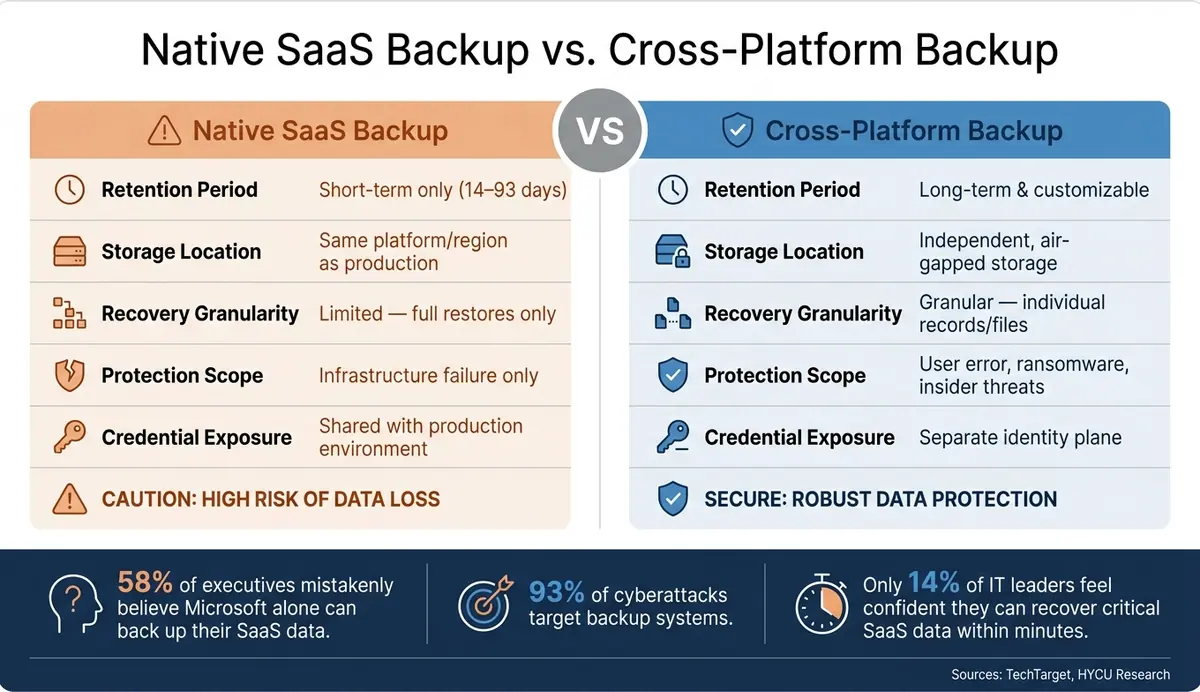
Native SaaS Backup vs. Cross-Platform Backup: Key Differences
Top SaaS Data Risks Backed by Research
The risks to SaaS data are both varied and alarming. Research shows that over 50% of SaaS data loss incidents are caused by malicious deletion. This could involve a disgruntled employee erasing critical records before leaving or an attacker deliberately targeting data. On top of that, human error accounts for 34% of data loss cases, often due to accidental deletions or misconfigured integrations.
Ransomware is another growing concern. Attackers have shifted their focus, with 93% of cyberattacks targeting backup systems, and 68% succeeding in destroying backup data. This strategy aims to eliminate recovery options, forcing victims to pay ransoms. A stark example is the 2025 ShinyHunters attack on Salesforce customers. This breach compromised 1 billion records from over 30 organizations, including major names like Adidas, Allianz Life, and TransUnion. Attackers used social engineering to trick employees into granting access, leaving companies without independent backups unable to recover.
A lesser-known but critical risk is delayed detection. Often, data loss isn't discovered until weeks or even months after it occurs - by which time, native recovery options are no longer available.
"The idea that you can't lose data in SaaS is dangerously outdated. We're not just talking about backup anymore. This is about business continuity." - Simon Taylor, Founder and CEO, HYCU
Where Native SaaS Backup Options Fall Short
As these risks grow, the shortcomings of native SaaS backup tools become increasingly apparent. These built-in tools are designed to ensure platform uptime, not comprehensive data protection. For instance, Microsoft 365 provides only 14–30 days of recovery for Exchange and 93 days for SharePoint and OneDrive recycle bins. If data loss isn't caught within these time frames - a common scenario - recovery becomes impossible using native tools.
But the issues go beyond short retention periods. Native backups are stored within the same infrastructure as the production environment, making them vulnerable to regional outages or account compromises. Worse, they share the same credentials as the production system, increasing exposure to attacks. Despite these flaws, 58% of executives mistakenly believe Microsoft alone can adequately back up their SaaS data, leaving their organizations at serious risk.
| Feature | Native SaaS Backup | Cross-Platform Backup |
|---|---|---|
| Retention Period | Short-term (14–93 days) | Long-term/Customizable |
| Storage Location | Same platform/region as production | Independent, air-gapped storage |
| Recovery Granularity | Limited (full restores only) | Granular (individual records/files) |
| Protection Scope | Infrastructure failure only | User error, ransomware, insider threats |
| Credential Exposure | Shared with production environment | Separate identity plane |
(Source: Compiled from TechTarget and HYCU research)
How Cross-Platform Backup Builds Data Resilience
Faster Recovery Across SaaS Platforms
Quick recovery is crucial when data is lost, yet only 14% of IT leaders feel confident they can retrieve critical SaaS data within minutes. This challenge often arises because native tools require slow, full-environment restores. Imagine losing a single record or misconfigured workflow - you’d have to roll back the entire system just to fix it.
Cross-platform backup systems solve this by enabling granular recovery. Instead of restoring everything, you can recover specific files, records, or even metadata. They also offer hot standby setups - secondary instances that are continuously synced in separate regions, cutting downtime to just minutes. For instance, if a SaaS provider experiences an outage, your data can be seamlessly migrated to another platform, keeping operations running smoothly.
"If your backup only allows 'same-to-same' recovery, you're stuck waiting, exposed to potential downtime and compliance breaches." - GitProtect
Another standout feature is relational integrity mapping. When restoring SaaS data, maintaining links between objects is critical. For example, a HubSpot contact tied to deals or tasks must retain those connections. Native tools often fail here, flattening data into disconnected pieces. Cross-platform systems, however, map the original structure, ensuring restored data remains functional and contextual.
This efficient recovery process aligns perfectly with the growing need for centralized oversight in managing complex SaaS ecosystems.
Centralized Management for Consistency and Efficiency
Fast recovery is just one piece of the puzzle. Centralized management ensures consistent and comprehensive protection across all SaaS platforms. Today’s enterprises juggle nearly 900 SaaS applications. Managing backups for each app individually creates gaps in data protection. Different interfaces, retention settings, and failure modes only add to the complexity.
A unified dashboard changes the game by consolidating backup management across platforms. IT teams can monitor backup health, enforce consistent retention policies, and initiate recovery actions for tools like Salesforce, Jira, and ServiceNow - all from one place. This approach also eliminates “silent failures,” where backup jobs quietly skip items or encounter API errors. Transparent reporting brings these issues to light before they become problems.
Centralized management also simplifies onboarding new SaaS tools. New applications automatically inherit established security policies, reducing manual configuration. And when audits or compliance reviews arise, consolidated reporting provides a complete, ready-to-share view of your data protection efforts.
Cross-Platform Backup and SaaS Compliance
Key Compliance Standards and Backup Requirements
Modern compliance regulations demand more than just having backups in place - they require proof that systems can be restored within specific timeframes. Frameworks like GDPR, HIPAA, SOC 2, and ISO 27001 now emphasize recoverability as a critical component of compliance.
The stakes are high. Under GDPR, penalties can soar to €20 million or 4% of global revenue, with fines expected to hit €1.2 billion by 2025. Similarly, HIPAA violations could exceed $60,000 per incident under the 2026 guidelines. Even a minor oversight, such as failing to back up a newly added SaaS tool, can lead to these severe consequences.
"The question is shifting from 'Do you have backups?' to 'Can you restore this specific record from 90 days ago, and can you show me evidence that you've tested this?'" - David Lee, Solutions Architect, Eon
Here's a breakdown of core backup requirements across major compliance frameworks:
| Framework | Key Backup/Recovery Requirement | Compliance Focus |
|---|---|---|
| GDPR | Article 32: Restore availability and access in a timely manner | Data Integrity & Availability |
| HIPAA | Backup and disaster recovery plans with regular testing | ePHI Protection & 72-hour Restoration |
| SOC 2 | Documented backup procedures and recovery testing evidence | Availability & Security Controls |
| ISO 27001 | Continuous monitoring of backup and recovery controls | Risk Management & Continuity |
| PCI DSS | Verify backup integrity and conduct regular restoration tests | Payment Data Integrity |
Another crucial aspect of compliance is ensuring backup data stays within specific geographic boundaries. For example, GDPR and the Schrems II ruling mandate that data remain within approved jurisdictions, such as the European Economic Area. Cross-platform backup solutions help organizations meet these requirements by allowing them to select regional data centers, ensuring data stays where it’s supposed to. As Acronis highlights, "Regulators do not distinguish between a live database and its backup". This reinforces the importance of centralized, automated compliance reporting.
Unified Reporting and Policy Enforcement
Meeting compliance standards requires more than just robust backup systems - it demands seamless policy enforcement and unified reporting. However, manual processes often lead to errors, particularly when new SaaS tools don’t automatically inherit existing backup policies.
Cross-platform backup solutions tackle this issue with Cloud Backup Posture Management (CBPM). These systems automatically detect new resources across multi-cloud environments and apply compliant backup policies instantly, preventing "policy drift." For instance, SoFi utilized Eon's agentless platform to update retention policies across five AWS regions in seconds, achieving over 100% ROI within a year.
Auditors now expect real-time evidence rather than periodic snapshots. This includes daily-updated logs, encryption verification, and restore test results to demonstrate that backup systems are operational, not just documented. Cross-platform solutions meet these demands by generating automated, timestamped audit logs stored in immutable archives. For example, HIPAA requires backup-related documentation to be retained for 6 years, and these logs now serve as essential evidence during investigations by the Department of Health and Human Services (HHS).
"In 2026, if an action isn't logged, it didn't happen. The HHS Enforcement Rule now looks for Immutable Audit Logs as primary evidence." - Gil Vidals, CEO, HIPAA Vault
How to Implement Cross-Platform SaaS Backup
Core Design Patterns for Cross-Platform Backup
At the heart of a reliable cross-platform backup system is API-based connectivity. This approach avoids the pitfalls of manual CSV exports, which often lose relational data and metadata. By connecting directly to each SaaS platform's public API, you can maintain important links between objects - like associating a HubSpot contact with its related deals and tasks. This concept, known as Relational Integrity Mapping, ensures that your data remains intact and functional.
There are two additional key design principles to keep in mind. First, backups should exist in a completely separate cloud ecosystem from your production data. For instance, storing Microsoft 365 backups within the same ecosystem creates a vulnerability - a single point of failure. Instead, use an independent provider like AWS or Wasabi to ensure redundancy. Second, employ immutable storage with Write-Once-Read-Many (WORM) policies. This protects your backup copies from being altered, even in the event of a ransomware attack. With ransomware incidents increasing by 37% in 2025, this safeguard is essential for both recovery speed and compliance requirements.
For organizations managing data across multiple clouds, a tri-cloud model provides robust redundancy. For example, you could use AWS for primary backups with frequent snapshots, Azure for incremental backups, and Google Cloud Platform (GCP) for long-term archiving. One property management software company demonstrated the effectiveness of this approach by cutting AWS backup costs by 40% in March 2026 through automated lifecycle policies on a multi-cloud management platform. These design choices form the backbone of a strong backup system, but ongoing daily practices are equally important for long-term reliability.
Day-to-Day Best Practices for Long-Term Success
Before selecting a backup tool, it’s critical to define your Recovery Point Objective (RPO) and Recovery Time Objective (RTO). RPO determines how much data loss you can tolerate, while RTO measures how quickly you need to restore operations. These benchmarks guide your choice of backup tiers - whether high availability, point-in-time snapshots, or long-term archives - based on the needs of each workload.
"A backup that has never been tested is not a backup." - AvePoint
This quote highlights a common oversight. Only 14% of IT leaders feel confident they could recover critical SaaS data within minutes. Regularly testing your backups is essential. Automate quarterly restore tests to meet compliance standards and generate audit-ready logs. Another best practice is using separate admin credentials for your backup systems. This prevents a compromised production account from endangering your backups.
Protecting Form Data in SaaS Workflows
Technical design and daily testing are crucial, but don’t overlook the importance of protecting customer-facing data - especially form submissions. These submissions often serve as the primary record for leads and customers, yet they’re sometimes neglected in backup planning. Outages, failed API syncs, or accidental deletions can result in the loss of this critical data, a problem referred to as "silent corruption".
This is particularly relevant for businesses using platforms like Reform to handle tasks such as lead generation, customer onboarding, or multi-step workflows. Submission records - including names, contact details, and routing responses - are operationally significant and should be treated as part of your SaaS inventory. They need to follow the same backup policies as other critical applications. Ensuring these records are backed up is vital for maintaining compliance and business continuity.
To get started, prioritize every SaaS tool that handles customer-facing data. Define a retention period, regularly export or sync the data to an independent storage system, and include these records in your restore tests. This approach ensures that even your form data is protected as part of your broader cross-platform backup strategy.
Conclusion: The Case for Cross-Platform Backup in SaaS
Key Takeaways for SaaS Businesses
SaaS data faces serious risks: a staggering 87% of IT professionals reported data loss in 2024, yet only 14% feel confident about recovering data quickly. These numbers highlight the urgent need for better backup strategies.
Consider this: if data loss lasts more than ten days, the risk of bankruptcy skyrockets to 93%. With 75% of enterprises expected to prioritize SaaS backup soon, there’s no time to delay.
"The organizations that survive 2026's enforcement environment won't be the ones with the most certifications. They'll be the ones who can recover in hours and prove it." - Rainier Gracial, Global Solutions Engineer, Spin.AI
Cross-platform backup offers a clear advantage by safeguarding data through independent storage systems, immutable WORM policies, relational integrity mapping, and unified compliance reporting. Together, these features create a resilient framework that spans all platforms, from CRMs to collaboration tools and customer-facing systems. As discussed earlier, these technical benefits make cross-platform backup a necessity for any SaaS business aiming to stay secure and compliant.
To meet growing expectations from regulators and auditors, take these steps: review your SaaS contracts, ensure retention policies align with compliance standards like GDPR, HIPAA, and SOX, adopt the 3-2-1-1 backup strategy with an immutable copy, and regularly test full-scale recovery processes. These measures are quickly becoming the baseline for success in 2026.
FAQs
What should my RPO and RTO be for each SaaS app?
Your Recovery Point Objective (RPO) and Recovery Time Objective (RTO) should align with the specific needs of your business.
- RPO refers to the amount of data your organization can afford to lose during an outage. In simpler terms, it’s the point in time to which data must be restored after a disruption.
- RTO, on the other hand, is the maximum amount of time your systems can be offline before it starts to significantly impact operations.
For essential applications like CRMs, a good starting point might be an RPO of 1–4 hours and an RTO of 4–8 hours. These benchmarks can be refined over time, taking into account factors like service level agreements (SLAs), potential revenue losses, and regulatory compliance needs.
How do I prove my SaaS backups are compliant in an audit?
To meet audit requirements, you need to present documented proof that backups are performed consistently and can be recovered successfully. Here’s what you’ll need to provide:
- Backup logs: System-generated logs that confirm backups were completed successfully throughout the audit period.
- Failure resolution records: Documentation showing how any backup failures were addressed, including workflows tracking their resolution.
- Immutability assurance: Evidence that backups are stored in a separate, secure domain to prevent tampering.
- Restoration test results: Logs from periodic restoration tests conducted in non-production environments, demonstrating that your data is both intact and recoverable.
These pieces of evidence will help ensure compliance and build confidence in your backup and recovery processes.
How do I protect and restore form submissions in SaaS workflows?
To keep form submissions secure in SaaS workflows, it's smart to establish an automated, separate backup system. Relying only on built-in archives or manual exports can be risky - they often miss critical context needed for full recovery.
With Reform, you can take advantage of webhooks to capture data as it comes in. These webhooks include SHA-256 HMAC signatures, allowing you to verify the data's integrity before securely storing submissions. Make it a habit to test your backups regularly to confirm they’re complete, accessible, and meet compliance standards.
Related Blog Posts
Get new content delivered straight to your inbox

The Response
Updates on the Reform platform, insights on optimizing conversion rates, and tips to craft forms that convert.



Drive real results with form optimizations
Tested across hundreds of experiments, our strategies deliver a 215% lift in qualified leads for B2B and SaaS companies.
