
.webp)
On-Prem Backup Compliance: Key Standards



If you store PHI, card data, or customer records on-prem, backup compliance usually comes down to four things: logs, retention, encryption, and restore proof. The hard part is that HIPAA, PCI DSS, SOC 2, ISO/IEC 27001, and NIST SP 800-53/800-34 do not ask for those controls in the same way.
Here’s the short version:
- HIPAA focuses on ePHI, 6-year documentation rules, and audit trails.
- PCI DSS is more strict on payment data, with 1 year of log retention and 3 months kept ready for access.
- SOC 2 is based on your written controls, so proof matters as much as the backup itself.
- ISO/IEC 27001 ties backup rules to risk, legal duties, and documented restore testing.
- NIST SP 800-53/800-34 connects backup plans to system impact, contingency testing, and crypto module rules.
A few points stand out fast:
- Encryption and immutability are not the same thing.
- Mixed backup sets should follow the strictest rule in scope.
- Lead forms, CRM records, and copied customer data still stay in scope after backup.
- Proposed January 2025 HIPAA changes would push harder rules, including 48-hour backup age, 72-hour restore targets, and monthly sample restores.
And the cost of getting this wrong is high. The article points to $14 billion in global noncompliance fines in 2024 and an average U.S. breach cost of $10.22 million in 2025.
Quick Comparison
| Framework | Main focus | Log/retention point that stands out | Encryption/recovery point that stands out |
|---|---|---|---|
| HIPAA | ePHI in any system or backup | Compliance records kept 6 years | Encryption is currently addressable; restore proof matters |
| PCI DSS | Cardholder data | Logs kept 1 year, with 3 months ready for access | Encrypted backups and restore testing are expected |
| SOC 2 | Evidence that your controls work | Retention is policy-based | Written restore records and access reviews matter |
| ISO/IEC 27001 | Risk-based ISMS controls | Retention follows legal/contract rules | Crypto policy, key lifecycle, and tested restores matter |
| NIST SP 800-53 / 800-34 | Contingency planning and system controls | Retention follows recordkeeping rules | Encryption at rest and annual full recovery tests for high-impact systems |
If I had to reduce the article to one rule, it would be this: classify the data inside each backup set, then match controls to the toughest standard that applies.
sbb-itb-5f36581
1. HIPAA Security Rule
For HIPAA, any on-prem backup that stores ePHI is in scope. The rule applies to all electronic protected health information your organization creates, receives, maintains, or transmits.
Backup Scope
Any on-prem backup media or device that stores ePHI is in scope. Under 45 C.F.R. § 164.308(a), covered entities must keep retrievable exact copies of ePHI and have procedures to verify the data was copied accurately.
That applies to more than patient charts. Lead and customer records that contain ePHI need the same controls as patient records.
Physical safeguards also matter here. Access to facilities and devices, including backup media, must be limited to help prevent theft or unauthorized access. That risk isn't theoretical: stolen backup devices and external hard drives account for 17% of data breaches.
Once you know what's in scope, auditors usually move to two things fast: logging and retention.
Access Logging
HIPAA's technical safeguards require mechanisms that log and review activity in information systems that contain or use ePHI. For on-prem backups, that means audit logs should show who accessed backup systems, when they accessed them, and what they did.
Audit logs and security incident reports must be kept for at least 6 years from the date they were created or were last in effect.
Retention Rules
HIPAA does not set one fixed retention period for medical records. State law controls that piece, and in some states the retention period can run up to 20 years.
HIPAA compliance records are a separate issue. Documentation such as risk assessments, security policies, and business associate agreements must be kept for at least 6 years.
Encryption and Recovery Proof
Encryption is currently an "addressable" implementation specification under HIPAA. In plain English, that means organizations must assess it and apply it when reasonable and appropriate, rather than treat it as an automatic hard requirement.
That may change soon. A January 2025 proposed rule would require encryption for ePHI at rest and in transit. The same proposal would also:
- Cap backup age at 48 hours
- Require critical systems to restore within 72 hours
- Require monthly sample restores of backed-up ePHI
PCI DSS shifts the focus from PHI to cardholder data and tighter payment-system controls.
2. PCI DSS
When on-prem backups include cardholder data, customer payment records, or lead records tied to transactions, PCI DSS puts backup controls front and center. Access control, logging, encryption, and recovery testing aren't optional checkboxes here. If payment data lives inside customer or lead records, those same protections need to follow that data into backup storage too.
Backup Scope
Backups of cardholder data must be complete, accurate, and protected from alteration. That means you can't treat backups like a dusty copy sitting in the background. They need to reflect the data as it is and stay protected once stored.
Organizations should also put a backup policy in writing. That policy should spell out backup frequency, scope, and which personnel are allowed to access the data.
Access Logging
Every backup access, restore, and change should be logged so investigators can trace activity back to a named user and timestamp.
If something goes wrong, that audit trail is what helps answer the hard questions: Who touched the backup? When did it happen? What changed?
Retention Rules
PCI DSS does not set a fixed retention period, so backup logs and restore evidence should be kept long enough to satisfy payment rules, related financial regulations, and internal audit needs.
In plain terms, there's no single magic number. Your retention window has to line up with the rules that apply to your business.
Encryption and Recovery Proof
Use encrypted, immutable backups to protect confidentiality and show that records were not altered. Encryption helps protect the data itself, while immutability helps show that no one tampered with it after the fact.
Regular recovery testing matters just as much. Document successful sample restores to verify integrity and accessibility, and confirm that backup data meets restore requirements.
SOC 2 shifts the focus from payment data to control evidence and broader trust reporting.
3. SOC 2
SOC 2 is control-based, not prescriptive. In plain English, that means your company sets its own controls and then shows they work. So the backup itself matters, but the paperwork matters just as much.
Backup Scope
For SOC 2, backup scope usually ties back to Availability and Security. That means you should include customer records, lead data, and the backup systems that help keep services running and control access.
Access Logging
Auditors don’t just want to hear that a process exists. They want proof that people followed it. Keep access reviews, provisioning approvals, and restore logs that they can inspect.
Retention Rules
Set retention rules in a written DRP, and match them to the longest legal, tax, or state rule that applies.
Encryption and Recovery Proof
Use encryption to protect confidentiality. Use immutable storage to show data hasn’t been altered. If you need tamper-evident backups, use WORM storage.
Recovery testing needs documentation too. Keep those test records in your DR and incident response plans to meet the Availability TSC.
ISO/IEC 27001 shifts the comparison away from audit evidence alone and toward a broader, risk-based control system.
4. ISO/IEC 27001
ISO/IEC 27001 is risk-based, not driven by a simple checklist. You identify the risks, pick the controls, and document why those controls make sense. That gives you more room to tailor things than NIST, which is more direct about controls and recovery steps.
Backup Scope
Annex A.12.3 requires documented restore procedures, routine testing, and backup frequency based on data criticality. In plain terms, start by classifying customer and lead records, then match the controls to the level of risk.
There’s also a hard line here: don’t copy sensitive customer data into test or development environments unless those environments have the same controls as production. If the protection doesn’t match, the data shouldn’t be there.
Access Logging
Annex A.12.4 requires event logs for user IDs, access attempts, and configuration changes. Those logs also need protection against deletion or tampering, including by administrators.
Time settings matter too. Backup and logging systems should use synchronized clocks so audit trails stay usable during an investigation. If timestamps don’t line up, piecing together what happened gets messy fast.
Retention Rules
ISO 27001 does not set one fixed retention period for everyone. Instead, Annex A.18.1.1 says you need to identify the laws that apply to you, and Annex A.18.1.3 says retention should be assigned by backup type.
One detail is easy to miss: if backups are encrypted, you must keep the decryption keys and software protected and available for the full retention period. A backup you can’t decrypt is basically just a locked box with no key.
Encryption and Recovery Proof
Annex A.10 requires a formal cryptographic policy that covers encryption at rest and in transit, along with the full key management lifecycle: generation, rotation, recovery, and secure destruction.
ISO 27001 also expects tamper resistance. That’s where WORM or immutable storage starts to matter, especially in high-compliance settings.
Annex A.17 requires documented restore testing that proves both integrity and functionality in a live environment. So it’s not enough to show that a backup job finished. You need to track things like:
- Successful restores
- Data integrity
- Live recovery results
NIST SP 800-53 and SP 800-34 go further by making control and recovery requirements more explicit.
5. NIST SP 800-53 and NIST SP 800-34
NIST SP 800-34 Rev. 1 lays out contingency planning and recovery strategy. NIST SP 800-53 Rev. 5 defines the CP controls that support that work. In backup planning, this turns contingency targets into plain rules for logging, retention, encryption, and recovery.
Backup Scope
Under NIST 800-34, scope starts with a Business Impact Analysis (BIA). The BIA sets acceptable downtime and data loss for each system. From there, you set backup frequency based on those limits.
For customer and lead databases, that means making a clear call on how much data loss and downtime your team can live with, then setting backups to match.
FIPS 199 impact level also affects how strict testing and recovery controls need to be. High-impact systems need more frequent backup testing and stricter alternate site capabilities.
Access Logging
NIST 800-53 requires audit controls that record who accessed backup media and when.
Retention Rules
NIST does not set a fixed retention period. Instead, retention should follow the recordkeeping rule that governs the data. In practice, backup retention should match the legal and business retention period for that data.
Encryption and Recovery Proof
SC-28 requires encryption at rest for sensitive information, including backup media, with validated cryptographic modules. Backup copies should also be stored off-site or in fire-rated storage.
Recovery proof comes from CP-4, which requires contingency plan testing. High-impact systems need at least one full-scale recovery test each year, and the information system contingency plan should be updated after exercises reveal deficiencies or after system changes.
Those controls tee up the side-by-side comparison that follows.
Logging, Retention, Encryption, and Recovery: A Side-by-Side Breakdown
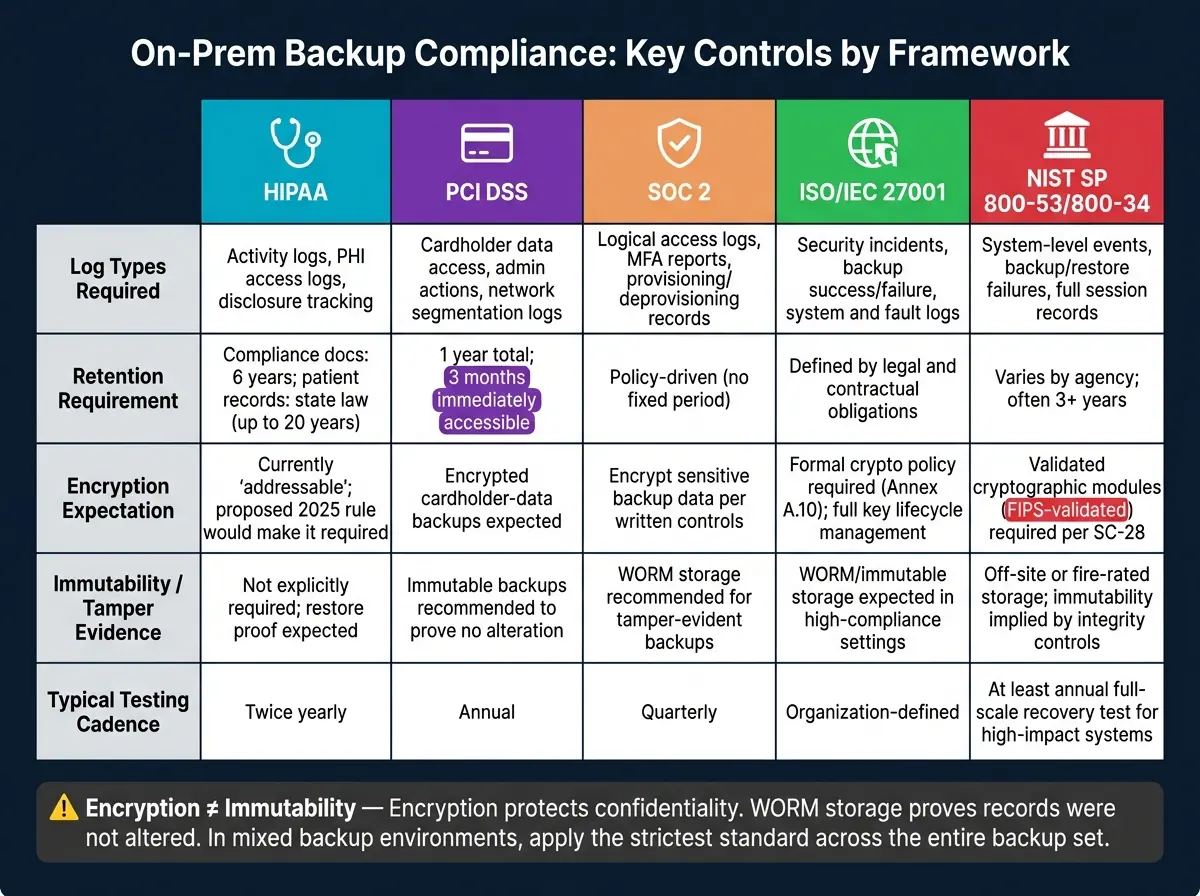
On-Prem Backup Compliance: HIPAA vs PCI DSS vs SOC 2 vs ISO 27001 vs NIST
These five frameworks don't just vary by scope. They also differ in how clearly they spell out logging, retention, encryption, and restore proof. That becomes a big deal when one backup set includes PHI, card data, and customer records.
Here’s a side-by-side look at the controls that usually matter most during on-prem backup reviews.
| Framework | Required Log Types | Audit Trail Depth | Retention Requirement | Encryption Expectation | Typical Testing Cadence |
|---|---|---|---|---|---|
| HIPAA | Activity logs, PHI access logs, disclosure tracking | User identifiers, activity type, date/time, disclosure tracking | Documentation: 6 years; patient-record retention: state law | Encrypt sensitive ePHI backups | Twice-yearly |
| PCI DSS | Access to cardholder data, administrative actions, network segmentation logs | User ID, event type, timestamp, success/failure | 1 year, with 3 months immediately accessible | Encrypt cardholder-data backups | Annual |
| SOC 2 | Logical access logs, MFA reports, provisioning/deprovisioning records | Detailed user access lifecycle tracking | Policy-driven | Encrypt sensitive backup data | Quarterly |
| ISO/IEC 27001 | Security incidents, backup success/failure, system and fault logs | Event logs, administrator activity, operational records | Defined by legal and contractual obligations | Encrypt sensitive backup data as part of internal controls | Organization-defined |
| NIST SP 800-53 / 800-34 | System-level events, backup and restore failures, full session records | Forensic-level detail; comprehensive audit and accountability controls | Varies by agency; often 3+ years | Use validated cryptographic modules where encryption is required | Defined by the documented policy |
PCI DSS stands out because it gives you a fixed audit-log retention period: 1 year, with 3 months immediately accessible. The other frameworks either tie retention to the record type or leave it to your written policy. That doesn't mean you can make up a loose schedule and move on. Auditors will still want to see the retention plan, plus proof that your team follows it.
Encryption rules also vary in how exact they are. NIST SP 800-53 goes further than most here. Its SC-28 control calls for validated cryptographic modules, which matters when federal information is in scope.
In mixed backup environments, it usually makes sense to line up testing and storage controls with the strictest framework that applies. A single annual restore test might check the box for PCI DSS, but it can still miss the mark for SOC 2. If the same on-prem backup system supports more than one regulated data type, use the toughest testing cadence that applies.
One point people often blur together: encryption is not the same as immutability. Encryption protects confidentiality. WORM storage enforces immutability. If your compliance duty includes proving that a record was not changed, including customer and lead records, encryption by itself won't do that job. WORM storage adds tamper evidence when immutability matters.
Pros and Cons of Each Standard for On-Prem Backup Planning
With logging, retention, encryption, and recovery already compared, the next step is simpler: which standard is easiest to put into practice?
There isn't one clear winner for on-prem backups. Each framework makes a different tradeoff between strict rules and room for judgment.
Here's where each one tends to help most - and where it can slow planning down.
| Standard | Pros | Cons | Best Fit for On-Prem Backups |
|---|---|---|---|
| HIPAA Security Rule | Flexible and scalable; covers the entire data lifecycle; proposed 2025 updates would add clearer encryption and MFA requirements | Complex "addressable" vs. "required" distinctions can create interpretation gaps | Healthcare providers, clearinghouses, and business associates handling ePHI |
| PCI DSS | Highly prescriptive; gives technical teams a clear checklist; widely adopted | Narrowly focused on cardholder data; rigid requirements don't adapt well to non-payment data types | Any U.S. team processing, storing, or transmitting credit card information |
| SOC 2 | Flexible Trust Services Criteria selection; builds customer trust in B2B relationships | Requires third-party assessment, not self-certification | SaaS and IT service providers proving security posture to enterprise clients |
| ISO/IEC 27001 | Internationally recognized; provides a holistic ISMS framework applicable across all data types | High admin burden; certification is costly and time-consuming; less prescriptive on specific retention timelines | Global organizations needing a standardized security posture across borders |
| NIST SP 800-53 / 800-34 | Most comprehensive catalog available; maps well to FISMA requirements | Can overwhelm smaller teams; it is a framework, not a law, so it requires significant mapping effort to connect controls to specific regulations | U.S. federal agencies, contractors, and organizations targeting the highest security maturity |
The main takeaway is pretty direct: these standards differ most in how much they spell out for you versus how much they leave to your team to decide.
That tradeoff hits hardest when form data and CRM data move into on-prem backup storage. A lot of teams miss this. Data doesn't lose its compliance duties just because it was copied into a backup repository.
If intake data includes health information, it can become ePHI once it lands in those systems. That means the same encryption, logging, and retention duties still apply. Tools like Reform can help keep lead data structured and flag PII or PHI fields before that data moves into backup sets. But once the data is there, the controls have to move with it.
That data-flow mapping is part of the more rigorous risk analysis called for in the proposed 2025 HIPAA updates.
Conclusion
These frameworks differ most in scope. Some apply only to PHI or card data, while others cover backup operations in a much broader way. In mixed environments, the safest rule is simple: apply the strictest requirement to each backup set.
The core controls stay the same across the board: access logging, defensible retention, encryption and key management, and documented restore testing. That matters even more when the stakes are this high. Global non-compliance fines hit a record $14 billion in 2024.
For U.S. organizations where customer, lead, healthcare, payment, and general business records all sit on shared backup infrastructure, the job starts with clear classification. Sort each dataset, document restore tests, and keep controls tied to the data inside the backup. That is the baseline for compliant on-prem backup planning.
FAQs
Which standard applies if one backup contains PHI, card data, and customer records?
If a single backup holds PHI, card data, and customer records, more than one rulebook kicks in at the same time.
That means you may need to follow:
- HIPAA for PHI
- PCI DSS for cardholder data
- Privacy laws such as the CCPA for customer records
The key point is simple: one backup can fall under multiple standards at once. If it does, you need to meet the requirements of each one that applies.
How do I prove a backup is compliant beyond just encrypting it?
Encryption protects confidentiality. But compliance asks for more than that.
You also need proof of integrity, recoverability, and governance.
That means showing auditable evidence that backups are complete, tamper-evident, and retrievable. In plain English: if someone checks your process, you should be able to prove the backup was created, wasn’t altered, and can be restored when needed.
A few controls do most of the heavy lifting here:
- Automated restore testing
- Immutable storage such as WORM
- An independent audit trail, like cryptographic hash anchoring
Your policy should spell out the basics in a way people can follow and auditors can verify. Include backup frequency, testing schedules, and recovery procedures.
What backup logs and restore records should I keep for audits?
Keep records that prove your backup setup is working, secure, and able to handle problems. That includes:
- backup activity logs
- records of successful recovery tests
- backup policies that spell out frequency, scope, and retention
- timestamped audit trails and access records
You should also keep proof that the data is complete, hasn't been changed, and is limited to authorized users only. If rules like SOX apply, keep audit documentation for seven years.
Related Blog Posts
Get new content delivered straight to your inbox

The Response
Updates on the Reform platform, insights on optimizing conversion rates, and tips to craft forms that convert.




Drive real results with form optimizations
Tested across hundreds of experiments, our strategies deliver a 215% lift in qualified leads for B2B and SaaS companies.
