
.webp)
10 Best Practices for Lead Routing in Multi-Channel Campaigns


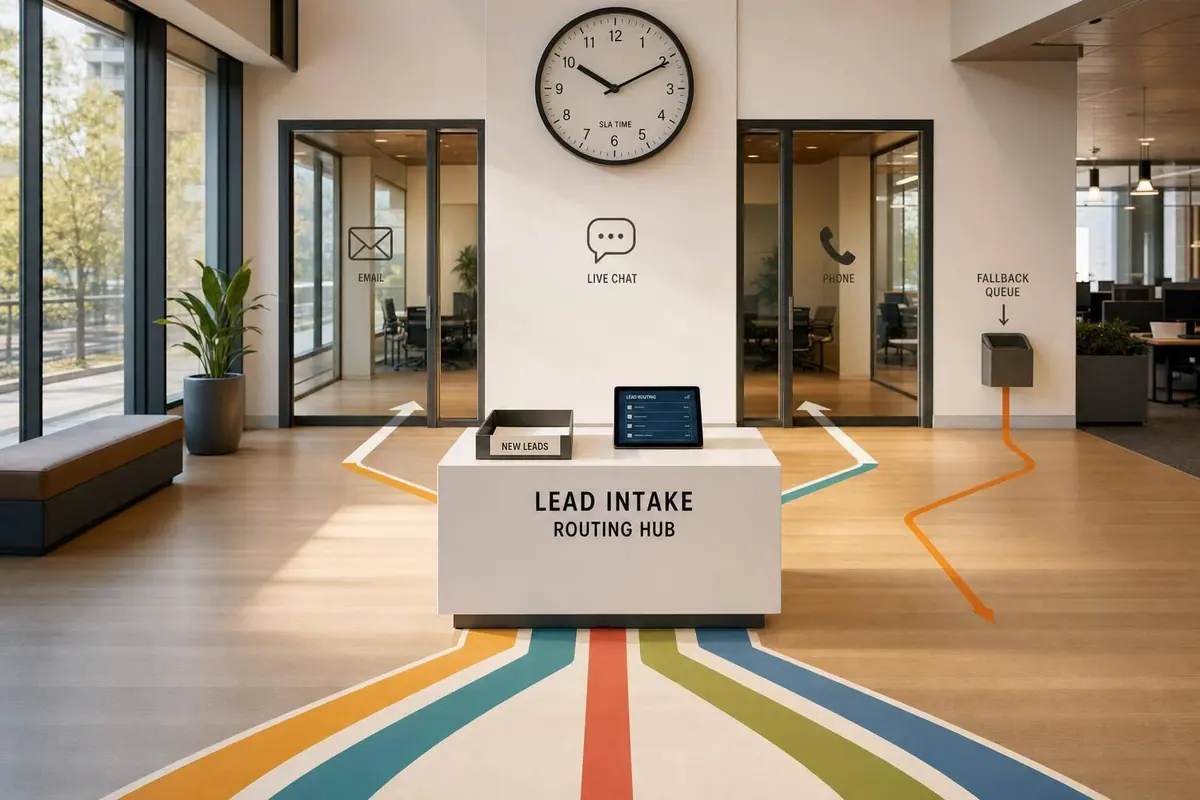
If your lead routing is slow or messy, you lose deals. The fix is simple: clean up form data, assign one clear owner, route leads right away, and track SLA misses before they pile up.
I’d sum up the article like this:
- Standardize form fields so routing rules don’t break on bad inputs like “CA” vs. “California”
- Collect routing signals at submission such as source, intent, company size, job title, and location
- Set clear ownership rules before leads hit a queue
- Route in real time because contacting a lead within 5 minutes can make qualification far more likely than waiting 30 minutes
- Route by channel and intent, not just territory
- Mix round-robin with specialization so reps get both a fair share and the right-fit leads
- Add fallback paths for missing data, duplicates, and rep availability issues
- Log routing history so attribution stays tied to source, owner, and outcome
- Track SLA and routing health with metrics like reassignment rate, fallback rate, match rate, and P95 response time
- Audit and simplify rules on a fixed schedule so the system doesn’t drift
A few numbers stand out fast: median B2B response time is 42 hours, fallback rate should stay under 10%, manual reassignment should stay under 3%, and lead-to-account match rate should be 85%+.
Optimising lead routing | Fix your Funnel Episode 2
sbb-itb-5f36581
Quick Comparison
| Practice | Main Goal | What to Watch |
|---|---|---|
| Standardize data | Clean inputs for routing | Bad field formats |
| Collect routing signals | Give rules enough detail | Missing source or firmographic data |
| Define ownership | One lead, one owner | Manual reassignments |
| Route in real time | Cut delay to first touch | SLA misses |
| Use channel + intent | Match follow-up to lead context | Territory-only routing |
| Blend round-robin + specialization | Balance volume and fit | Uneven distribution |
| Build fallback paths | Stop leads from sitting idle | Catch-all queue growth |
| Connect routing to attribution | Keep source-to-revenue history clean | Reassignments skewing reports |
| Track SLA and routing health | Spot slowdowns early | P95 response time |
| Test and simplify rules | Keep logic clean over time | Rule sprawl |
If you want multi-channel routing to work, every part has to line up: the form, the rule set, the CRM, and the follow-up clock.
1. Standardize Lead Data Across Channels
Lead routing falls apart when the same field shows up in different formats across channels. A paid ad, a webinar signup, and a demo request form can all collect the same detail in different ways. That’s where standardization comes in: use controlled field values from the start.
Take State as an example. If one lead says California, another says CA, another says ca, and another says Calif, territory routing will break. The fix is simple: use dropdowns and field validation for any field tied to routing logic. Fields like State, Industry, and Company Size should not be open text fields.
You also need to enrich firmographic fields during capture, before assignment happens. If your routing rules split SMB and enterprise leads, those rules can’t do much when a form only asks for a name and email. Your routing setup should line up with the fields below.
| Data Category | Key Fields | Routing Purpose |
|---|---|---|
| Firmographic | Company Size, Industry, Revenue | Segment routing (SMB vs. Enterprise) |
| Geographic | Country, State, Zip Code | Territory-based assignment |
| Intent | Form Type, Page URL, Product Interest | Priority and specialist routing |
| Ownership | Email Domain, Account ID | Account-based routing (ABM) |
| Contact | Job Title, Seniority | Persona-based routing |
Lead-to-account matching matters too. Without it, "Google Inc." and "Google" can route as two separate companies, which sends existing customers to new-business reps instead of their account managers. A good target is an 85%+ lead-to-account match rate. It also helps to review mappings on a regular basis as company names shift over time.
Once the data is standardized, capture routing signals at the form level. Using interactive flows can help qualify these signals before they reach your CRM.
2. Capture Routing Signals at the Form Level
After you standardize routing fields, the next step is simple: make sure your form collects them cleanly at the moment of submission. The form is your first routing decision point. By the time a lead lands in your CRM, the path it should take ought to be obvious.
Use one consistent form structure so each submission reaches the CRM with data your routing rules can act on. That means collecting signals like firmographic, geographic, intent, persona, and source data such as campaign channel, UTM parameters, and landing page. Hidden fields are useful here because they can collect source and intent data without adding extra friction for the person filling out the form. And when some fields are likely to come in incomplete, real-time enrichment can fill in missing details from the submitted email domain, so your routing logic isn't forced to judge half-finished records.
Multi-step forms and conditional logic help you gather more qualification data without making the form feel long. An enterprise lead can see a different set of follow-up questions than a startup lead. That keeps the experience short and focused while still giving your routing engine the detail it needs. Those inputs should feed routing rules right away, before the lead hits the CRM queue.
Assignment Logic
Once those signals are in place, routing rules can fire as clear conditions. For example: route large western accounts to enterprise reps. But before any of those rules run, the system should check whether the lead's email domain matches an existing CRM account. If there's a match, route the lead to the account owner. After the rule set goes live, track how often it makes the right assignment using a lead conversions playbook.
Measurement and Control
Track reassignment rate as a routing health metric. If more than 3% of leads are manually reassigned after the first routing decision, your form signals or routing rules likely need work. Also track fallback rate, which is the share of leads sent to a catch-all queue. If that number goes above 10%, your routing criteria have holes. When reassignment or fallback starts to climb, that's usually a sign the form isn't collecting the signals routing needs.
3. Define Clear Lead Ownership Rules
Once your form is pulling in clean routing signals, the next step is simple: decide who owns the lead. Do that before leads hit a queue. Ownership works best when the rules are clear and automatic, not when someone has to step in and sort things out by hand.
Assignment Logic
Build ownership rules around lead data, not rep names. Hard-coded names fall apart fast when people join, leave, or switch territories.
Instead, use the data your form already collects, like:
- company size
- geographic region
- product interest or use case
- job title or seniority
Account matching should happen before territory or persona assignment. If a submitted email domain matches an existing CRM account, send that lead straight to the current account owner. In practice, ownership should come from a mix of channel, intent, region, and account data.
Speed-to-Lead Impact
When ownership is fuzzy, everything slows down. Leads sit in queues. Teams waste time figuring out who should take what. Follow-up gets delayed.
Clear, automated ownership rules fix that. They keep one lead with one owner and remove the need for manual triage. Every lead should be assigned the moment it’s submitted, not later after someone reviews it.
Measurement and Control
Two metrics show whether your ownership rules are doing their job.
First is reassignment rate. If more than 3% of leads are being moved by hand after the first assignment, your rules or form data need work.
Second is first-pass assignment rate. That’s the share of leads assigned correctly on the first pass without falling into a backup path. The target is 99%+.
If either metric starts to drift, fix the rule or the missing data behind the problem. Don’t paper over it with manual workarounds.
Once ownership is set, the next move is instant assignment. With the rules in place, real-time routing turns that logic into action.
4. Use Real-Time Routing to Cut Response Time
Once your ownership rules are set, assign the lead the moment the form is submitted. That one move cuts the lag between form fill and first outreach.
The reason is simple: speed matters a lot. Contacting a lead within 5 minutes makes a rep 100x more likely to qualify them than waiting 30 minutes. And yet the median B2B response time is still 42 hours. That's a huge gap, and it's exactly where deals slip away.
Real-time routing takes manual queue triage out of the process. Instead of letting a lead sit in a shared queue, the system checks the submission right away. It looks at territory, account ownership, intent, and rep capacity, then assigns the lead and sends an alert. Manual review shouldn't sit in the middle of that path.
There's one catch: enrichment needs to happen before routing. If you route with missing data, misassignment goes up. Once the lead is assigned, the SLA clock starts ticking. For high-intent actions like demo requests or pricing-page visits, aim for a 5-minute response window. For general inbound, keep it under an hour. If the SLA expires, escalate or reassign the lead on its own.
Once speed is under control, the next problem shows up fast: sending the right lead to the wrong rep.
Measurement and Control
After routing is instant and accurate, you need to check that it keeps working that way.
Measure speed-to-lead from submission to the first human action, not from assignment.
Two metrics tell you if routing is doing its job:
- SLA attainment: target above 80%
- Routing coverage rate: target above 99%, which means leads aren't getting stuck in error states
If either number drops, start by checking enrichment failures. Then look at rep capacity.
Next, refine routing by channel and intent, not territory alone.
5. Route by Channel and Intent, Not Just Territory
Territory tells you where a lead is. It doesn't tell you why they came in or what they need next.
That's the problem with routing leads by ZIP code or region alone. One rep can get slammed while another has almost nothing to work on. A better move is to look at channel source and intent before the lead ever lands with a rep.
For example, a lead who clicked a paid brand keyword and submitted a "Talk to Sales" form is in a very different spot from someone who downloaded a whitepaper. Those two leads shouldn't be treated the same. Use the channel data you already collect to guide that first assignment. Intent-driven and behavioral leads convert 3x higher than leads sent through territory-only routing.
Channel source matters for ownership too. If someone replies to a cold outbound message, that lead should go back to the original rep. If it comes from a partner referral, it should go to the partner manager.
The routing order should be simple:
- Check account ownership first
- Then route by intent and channel
- Then by specialist
- Then by territory or round-robin
Use the matrix below to line up source, intent, and SLA.
| Lead Source | Intent Level | Target Response Time |
|---|---|---|
| Demo Request / Pricing Page | High | < 5 minutes |
| PPC (Brand Keywords) | High | 5–15 minutes |
| Cold Outbound Reply | High | 1 hour |
| Partner Referral | High | 1 hour |
| Content Download | Low–Medium | 4–24 hours |
Measurement and Control
Once the matrix is live, keep an eye on routing drift. The clearest signal is manual reassignment rate by source and intent. If that number goes above 3%, your routing rules no longer line up with the way leads are coming in.
6. Balance Round-Robin Distribution with Rep Specialization
Round-robin is great for balancing lead volume. But it doesn't always put the lead in front of the best-fit rep.
That's the tradeoff.
If every multi-channel lead goes into one big shared pool, you'll spread work evenly, but you won't always match the lead to someone with the right background. A better setup is to keep round-robin for balance and layer specialization on top for fit. For that to work, your form needs to collect enough detail up front to place each lead in the right pool.
Assignment Logic
After account ownership and channel or intent routing, use specialization to pick the best rep from the group that already qualifies. This only works if the form captures company size, role, location, and product interest at submission.
Use a hybrid model:
- Route by account ownership first
- Qualify next by industry, product, and seniority
- Then apply weighted round-robin across the reps still in the mix
Give heavier weights to senior specialists and lighter weights to reps who are still ramping. If ownership and qualification rules still leave more than one match, use specialization as the tie-breaker.
Once you've set the right rep pool, routing needs to happen instantly. A good match doesn't help much if the lead sits there waiting.
Speed-to-Lead Impact
Specialized routing still has to fire right away. If the matched specialist misses SLA, re-route the lead to a generalist pool.
Track whether specialized routing improves match accuracy without slowing first response. That's the key check. If fit gets better but response time slips, the system needs work.
Measurement and Control
Track two metrics: reassignment rate and distribution variance. Keep manual reassignment below 3% and keep lead volume within ±10% of the pool average. If manual reassignment starts to climb, your specialization rules may be too rigid, or your form data may be stale.
7. Build Fallback and Exception Paths for Unroutable Leads
Even with account, intent, and territory rules in place, some leads still won't match anything cleanly. That's where a fallback path comes in.
Add a catch-all rule at the bottom of your routing tree. Send unmatched leads to a default owner, a backup rep, or a manual-review queue with an SLA timer.
Routing Data Captured
Leads usually miss primary routing rules for a simple reason: the data is incomplete or off. Common trouble spots include company name, email domain, company size, industry, and location. Log missing or malformed fields, along with the channel or source name, so you can see why the lead missed your main rules and which channels are sending weak records.
Assignment Logic
The routing flow should be straightforward: check duplicates first, then firmographic rules, then fallback routing.
Each territory and specialized segment also needs a backup rep. If the primary rep is out, someone else should be ready to take ownership. Otherwise, leads just sit there.
Your CRM should also log the exact reason a lead landed in the fallback queue, such as missing industry, unmapped ZIP code, or rep unavailable, along with the originating channel. That turns the exception queue into more than a holding area. It becomes a way to spot rule gaps, channel issues, and staffing problems.
If fallback assignments start to spike, that's a sign your main routing rules are missing cases they should cover. And if the same source keeps showing up with bad records, you've found a data quality problem upstream.
Speed-to-Lead Impact
Fallback paths can't be slow. If a fallback lead sits untouched for more than 15 minutes, reassign it and alert the owner.
Measurement and Control
Track your fallback rate, which is the share of leads hitting the default route, and keep it below 10%. If it goes above that, your primary routing rules aren't covering enough scenarios.
Also track age-in-queue reports so you can catch leads sitting in exception queues longer than your SLA allows. Review fallback rate monthly, and audit routing rules quarterly.
8. Connect Lead Routing to Cross-Channel Attribution
After fallback routing kicks in, record every handoff so attribution follows the same path. This is where a lot of teams get tripped up. If routing history lives outside the lead record, attribution starts to fall apart.
Instead, log routing metadata on every lead record: the routing rule that fired, the assignment timestamp, the initial owner, the final owner, and the channel/source across paid, organic, webinar, partner, and outbound leads. That gives you a clean handoff trail from source to sales follow-up.
Assignment Logic
Two fields do most of the heavy lifting here: lead source and routing rule triggered. Put them together, and you can trace the attribution chain in order: source → routing rule → owner → outcome.
That makes it much easier to compare conversion rates by channel and by routing path. You can see not just where a lead came from, but how it moved through the system and what happened after that.
Bad lead-to-account matches can throw off segment-level revenue credit. High-performing RevOps teams aim for a lead-to-account match rate of 85% or higher.
Timing matters too. If routing runs before enrichment fills in firmographic or technographic fields, late enrichment can skew reporting. The fix is simple: run enrichment first, then route.
One more warning sign: if more than 3% of leads are manually reassigned within 48 hours, the attribution data for those leads is probably off.
Measurement and Control
Track conversion rate by routing path, then compare skills-based routing with round-robin routing by channel. That view can show patterns you’d miss in top-line channel reports.
Also review reassignment rates and match rates on a regular basis. If those numbers drift, attribution can start bending budget decisions in the wrong direction. Use these routing-path reports to feed SLA tracking in the next section.
9. Track SLA Compliance and Routing Performance
Routing history doesn't mean much unless you can show that leads were contacted on time. After you record the routing trail, the next step is simple: prove the lead moved fast enough from capture to first human response.
Track These Fields
Log five timestamps: capture, enrichment, assignment, notification, and first contact. Also record the fired rule, fallback reason, and rep workload. That gives you a clear way to spot where delays start and why they keep happening.
SLA Windows by Intent
Set SLA windows by intent so each source has a clear response target. A demo request shouldn't sit in the same queue as a lower-intent inquiry.
| Lead Source | Target Response Time |
|---|---|
| Demo Request / Pricing Page | 5 minutes |
| Contact Form | 15 minutes |
| Inbound Referral | 1 hour |
These targets start to matter when they show up in a live dashboard that your team can check in real time.
Measurement and Control
Track four core metrics:
- Manual reassignment rate under 3%
- Fallback hit rate under 10%
- SLA attainment over 80%
- P95 speed-to-lead, the time by which 95% of leads are contacted
Why use P95 instead of averages? Because averages can make a messy process look fine. P95 shows the slow edge of your system, where missed handoffs and late follow-up tend to pile up. That's usually where conversion takes the hit.
Set up automated escalation too. If a rep doesn't engage within the SLA window, reassign the lead automatically or alert a manager right away.
Review SLA attainment weekly and routing performance monthly. If misses keep showing up, the problem is often rule drift or a routing setup that's gotten too tangled.
10. Test, Audit, and Simplify Routing Rules Over Time
Once SLA tracking is live, look past the dashboard and inspect the rules driving those numbers. Routing logic tends to drift over time. Reps leave, territories move, and little exceptions pile up. If you audit on a steady cadence, you can catch that drift before it turns into a mess.
Audit Inputs
Start with your rule map. Then compare it against current territory data and ownership data. This matters because B2B data goes stale fast, and routing pools need updates when reps or territories change. If that doesn’t happen, leads can end up unassigned.
It also helps to keep a simple routing map outside the CRM. That way, anyone on the team can review it and make updates without digging through a maze of system logic.
Assignment Logic
Fallback spikes and reassignment spikes are strong audit triggers. They usually signal that something in the logic no longer matches how the team is set up.
Before rolling out new rules, test them with both historical leads and synthetic leads. Cover a mix of territories, intent levels, and company sizes so you’re not testing on a narrow slice of traffic. Then run the new rules beside the old ones for 2 to 4 weeks before making the switch.
Keep Routing Logic Simple
More rules don’t always mean better routing. In many cases, they just make the system brittle. A good gut check: if adding one new rep forces multiple rule changes, there’s probably too much overlap in the logic. Trim it down.
Measurement and Control
| Frequency | Focus | What to Check |
|---|---|---|
| Weekly | Distribution health | Fallback rates, distribution balance, active opportunities per rep |
| Monthly | Performance | Routing accuracy, speed-to-lead trends, manual reassignment rates |
| Quarterly | Strategic alignment | Full logic audit, territory recalibration, scoring criteria |
Log every rule change and the reason behind it. When a metric jumps out of nowhere, version history makes it much easier to trace the update that caused it and roll back fast.
Use these audit rules to keep the reference tables below current.
Lead Ownership Models at a Glance
Once your routing rules are live, this quick cheat sheet makes it easier to pick the ownership model behind them. The best fit comes down to one thing: which routing signals your forms and channels can count on.
| Model | Routing Trigger | Ideal Use Case | Strengths | Common Risks |
|---|---|---|---|---|
| Territory-Based | State, ZIP Code range, Metro area | Field sales; regional teams | Simple regional ownership | Uneven volume; stale geo data |
| Segment-Based | Company size (employees/revenue), Industry | Teams split by SMB, mid-market, and enterprise | Matches rep experience to deal size | Requires accurate firmographic data |
| Product-Based | Product fit or technical requirement | Multi-product or highly technical orgs | Better first-call fit; faster cycles | Needs documented rep skill profiles; breaks if data is missing |
| Hybrid | Combination of territory rules and round-robin distribution | Mature orgs with complex go-to-market motions | Balances fairness with specialization | Hard to audit; high maintenance |
A simple way to think about it: use the data you trust most. If geography is clean and easy to collect (perhaps via prefilled forms), territory-based ownership may be the easiest path. If company size or industry is more reliable, segment-based routing often makes more sense. And if product fit changes the whole sales conversation, product-based ownership can save a lot of back-and-forth.
Hybrid models sit in the middle. They can work well when one rule isn't enough, but they also bring more moving parts. That means more upkeep, more edge cases, and more chances for routing logic to drift over time.
Next, map these models to channel and intent.
Channel-by-Intent Routing Matrix
Channel and intent should drive where a lead goes and how fast your team responds. Put simply: source and intent should shape both the routing destination and the SLA.
The matrix below shows six common channel-and-intent combinations, along with the best routing destination and a realistic SLA target.
| Channel / Source | Intent Level | Routing Destination | Target SLA |
|---|---|---|---|
| Paid search (demo request) | High | Account executive (if ICP match) or high-priority SDR queue | 5 minutes |
| Webinar (declared buying timeline) | High | SDR queue or account executive (if immediate need) | 30 minutes–4 hours |
| Free-trial signup (product-qualified lead) | Medium–High | SDR queue or account executive (based on usage depth) | 1 hour |
| Event badge scan | Medium | SDR queue or nurture sequence (if low fit) | 4–8 hours |
| Content download (gated asset) | Low | Nurture sequence (unless score is very high) | 24–48 hours |
| Unmatched or missing data | Unknown | Default / catch-all queue | Same business day |
Here’s the key idea: the destination changes based on ICP fit and firmographic data. A demo request from a strong-fit account shouldn’t go down the same path as a low-intent content download.
And that last row matters more than it may seem. The catch-all path is not optional. When firmographic data is missing or incomplete, those leads still need a clear route. If they don’t have one, they slip through the cracks.
Use these SLA targets in the KPI dashboard below.
Routing Models: Territory vs. Round-Robin vs. Hybrid
Pick the simplest model that fits how your team works and how leads come in. That keeps routing easier to manage and easier to trust.
| Model | Best For | Where It Breaks Down |
|---|---|---|
| Pure Round-Robin | Small teams, early-stage startups, similar lead types | Ignores lead fit and rep workload |
| Pure Territory | Regional sales orgs, field teams, regulated segments | Uneven lead volume across regions; stale CRM data can cause misfires |
| Hybrid / Dynamic | Mature orgs, complex GTM motions, multi-channel campaigns | Hard to audit if the logic is not documented or separated from frequent data changes |
Round-robin is the simplest option. It moves leads fast and works well when reps handle about the same kind of buyer. The tradeoff is pretty clear: it doesn't account for rep skill, lead fit, or current workload.
Territory routing lines up leads with region-based coverage, which makes sense for field teams and sales orgs split by geography. But there's a catch. If one region gets far more inbound than another, some reps get buried while others sit idle. And if CRM data is old or wrong, leads can end up in the wrong place.
Hybrid routing usually makes the most sense for mature multi-channel teams that need both fit and a fair spread. A clean setup looks like this:
- Check for existing account ownership first
- Apply territory rules second
- Use weighted round-robin as the tiebreaker inside that territory
Weighted distribution also helps when you want senior reps to take more volume than newer reps. And routing to team queues, instead of routing only to individuals, makes life easier when someone is on PTO or when the team changes. You don't have to keep editing rules every time the roster shifts.
Once you've picked the model, the next step is to map channel and intent to the actual routing path.
KPI Dashboard for SLA and Routing Health
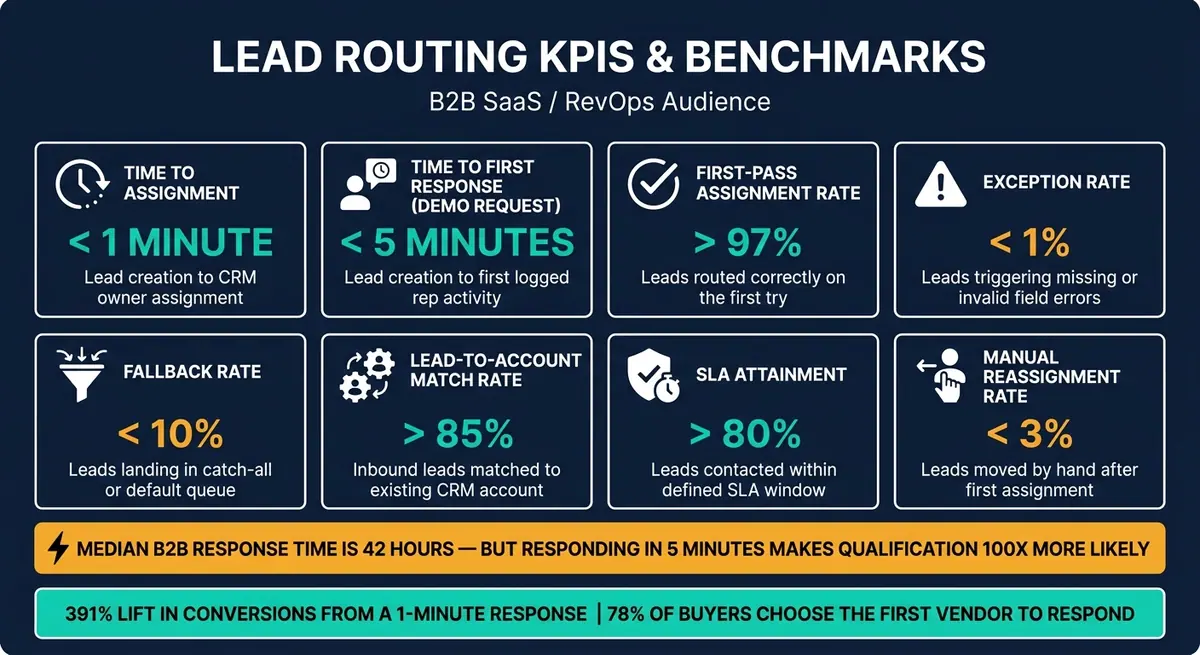
Lead Routing KPIs & Benchmarks: Key Metrics Every RevOps Team Should Track
Use this dashboard to spot routing drift before it turns into missed follow-up or attribution gaps.
Track these metrics in one view:
| Metric | Definition | Target | Source System |
|---|---|---|---|
| Time to Assignment | Time from lead creation to owner assignment in CRM | < 1 minute (automated) | CRM / MAP |
| Time to First Response | Time from lead creation to first logged rep activity (call or email) | < 5 minutes (demo request) / 15–30 minutes (high-intent MQL) | CRM |
| First-Pass Assignment Rate | % of leads routed to the correct rep on the first try | > 97% | CRM audit logs |
| Exception Rate | % of leads that trigger missing-field or invalid-field errors | < 1% | Form analytics / CRM |
| Fallback Rate | % of leads landing in the catch-all or default queue | < 10% | Routing analytics |
| Match Rate | % of inbound leads successfully matched to an existing CRM account | > 85% | CRM / enrichment tool |
| SLA Attainment | % of leads contacted within their defined SLA window | > 80% | CRM / MAP |
| Conversion by Routing Path | MQL-to-SQL conversion segmented by routing rule | Varies by segment | CRM / attribution tool |
When exception rate starts climbing, that's usually a sign of bad upstream data. Start with the basics: forms, field validation, and lead generation strategies. Reform's real-time analytics can show which forms or channels are sending unroutable submissions. If fallback rate goes above 10%, your main routing rules likely aren't covering enough cases.
Conversion by Routing Path is where routing meets revenue. It shows which assignment logic leads to stronger downstream conversion.
This dashboard shouldn't sit there as a weekly report nobody acts on. Use it to power automated alerts. Set intent-based SLA tiers in your CRM, then trigger alerts when a lead ages past its window.
Closing Takeaways
Once you measure routing health, the main point is pretty clear: lead routing is a living system. Clean data, clear ownership, and fast assignment have a direct effect on revenue.
The speed piece matters a lot. A 1-minute response can lift conversions by 391%, and 78% of buyers choose the first vendor to respond.
That kind of result doesn't come from one fix or one team. It comes from steady operating discipline across every channel. Every routing rule is a tradeoff between fit and speed.
The six pillars are clean data, clear ownership, fast assignment, intent-aware routing, fallback handling, and regular optimization. Multi-channel routing works only when the form layer, optimized lead forms, assignment logic, and attribution layer move together.
When campaigns, territories, or products change, update forms, routing rules, and attribution at the same time.
FAQs
How do I choose the right lead ownership model?
Match your sales motion and RevOps maturity to the model. No single approach works for every team, and most mature organizations mix methods instead of leaning on only one.
Start with account ownership. Then layer in segment, territory, and capacity-based rules. If you don’t have formal territories yet, round-robin is a fair place to begin.
For complex sales cycles, weighted routing can account for rep capacity, ramp stage, or specialized skills. Through all of it, keep two things at the top of the list: lead quality and response time.
What should happen when lead data is missing or invalid?
When lead data is missing or invalid, clean it up early and put clear guardrails in place. One smart move is to use real-time data enrichment to fill required fields before your routing logic kicks in.
If a lead still doesn't match any routing rule, don't let it fall through the cracks. Send it to a default catch-all queue, alert your operations team, and log the reason for the failure.
That way, leads don't get dropped, and your team gets a clear trail to spot gaps in the routing rules.
Which routing metrics matter most first?
Start with speed to lead: the time between lead creation and the first rep touch. This is the clearest sign of how well your routing works, and it directly affects conversion rates.
Then track routing accuracy, fallback rate, and distribution balance. These metrics show whether leads are getting to the right rep, whether any are getting stuck, and whether assignments are being spread in a fair way based on capacity and performance weighting.
Related Blog Posts
Get new content delivered straight to your inbox

The Response
Updates on the Reform platform, insights on optimizing conversion rates, and tips to craft forms that convert.




Drive real results with form optimizations
Tested across hundreds of experiments, our strategies deliver a 215% lift in qualified leads for B2B and SaaS companies.
