
.webp)
Ultimate Guide to Real-Time Lead Assignment



Real-time lead assignment ensures that incoming leads are instantly directed to the most suitable sales rep based on factors like location, company size, and prospect intent. This process is key to increasing conversion rates, as responding to leads within 1 minute can improve conversions by 391%. It eliminates delays, biases, and errors often seen in manual routing, making it a critical system for sales teams.
Key Takeaways:
- Speed Matters: Leads contacted within 5 minutes are 21x more likely to qualify than those contacted after 30 minutes.
- Core Process: Lead capture → data enrichment → rule-based routing → assignment → fallback/escalation.
- Models to Consider: Round-robin (simple teams), territory-based (regional expertise), or priority/SLA-based (high-value leads).
- Setup Essentials: Accurate data, clear rules, fallback mechanisms, and regular audits.
This guide explains how to build, test, and optimize a real-time lead assignment system, ensuring every lead reaches the right person quickly and efficiently.
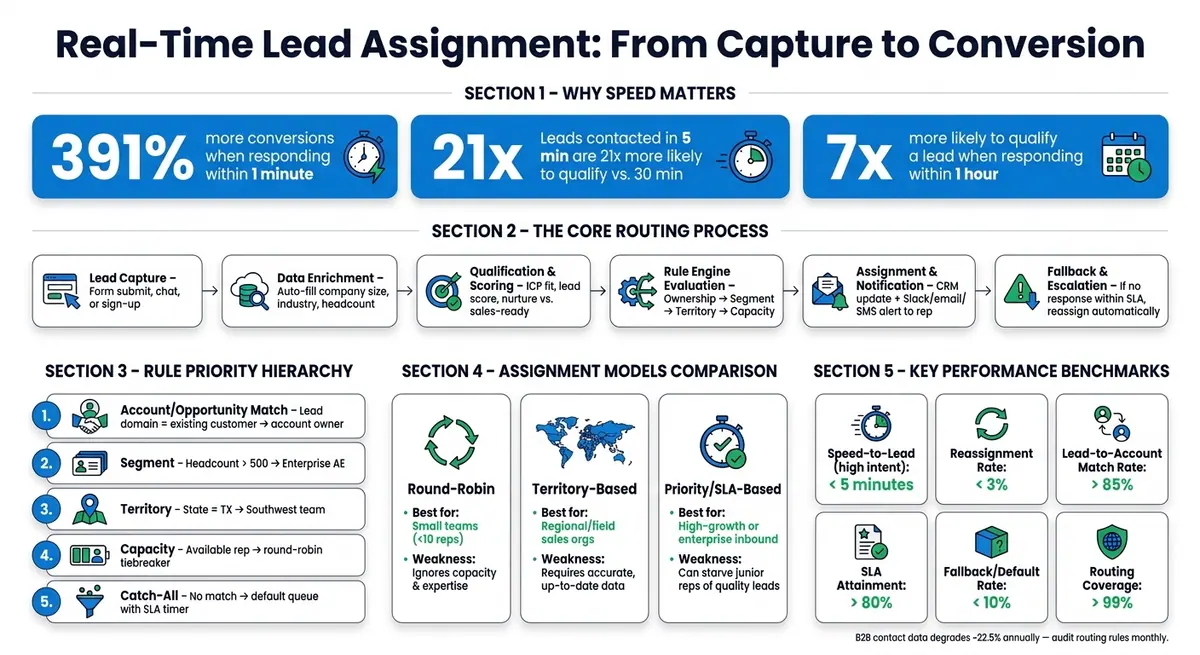
Real-Time Lead Assignment: From Capture to Conversion
The Basics of Real-Time Lead Assignment
Core Components of a Lead Assignment System
A real-time lead assignment system relies on several interconnected steps that work in sequence. It starts with lead capture, where a prospect engages with your business by submitting a high-converting lead form, initiating a chat, or signing up for a product. Once captured, the lead goes through enrichment, where missing details - like company size or industry - are filled in. Afterward, the system evaluates the lead through qualification and scoring to determine whether it’s ready for sales or needs to be nurtured further.
Next comes the rule engine, which uses defined logic to match leads with the most suitable sales representative. Factors such as location, account ownership, or specific expertise are considered during this step. After assignment, the system updates your CRM and notifies the sales rep through channels like Slack, email, or SMS.
A fallback and escalation mechanism ensures no lead slips through the cracks. If a sales rep doesn’t respond in time, the system reassigns the lead to someone else. Together, these components form the backbone of an efficient routing process.
"Manual routing depends on a person remembering to act. Automated routing depends on logic that never forgets." - Fullcast
How Real-Time Routing Works
Here’s how real-time routing moves from prospect submission to sales rep notification:
- Lead capture: A prospect fills out a demo request or other form.
- Enrichment: Missing data points, like the company’s industry or headcount, are automatically added.
- Lead-to-account matching: The system checks if the lead is tied to an existing account. If it is, the lead is routed to the account owner.
- Rule evaluation: Routing logic applies rules in a specific order, starting with ownership, then segment, territory, and finally, rep capacity.
- Assignment and notification: The lead is assigned in the CRM, and the appropriate sales rep is alerted immediately.
- Fallback: If the assigned rep doesn’t respond within the set SLA, the lead is escalated to another team member.
This process ensures leads are handled quickly, which is critical for higher conversion rates. Regional nuances can also be factored in. For example, in the United States, a lead from Texas might go to a Southwest regional rep, while one from New York would be routed to the Northeast team. Studies show that companies responding to leads within an hour are nearly 7x more likely to qualify them. Additionally, routing based on expertise can increase win rates from 5% to 40%.
"Speed-to-lead is a systems problem, and routing is the system that determines whether your response time is measured in seconds or days." - Jordan Rogers, RevenueTools
How Reform Supports Real-Time Lead Assignment
Accurate lead capture and enrichment are critical because any errors here can throw off the entire process. Reform tackles this issue by providing robust enrichment tools that ensure data accuracy right at the point of capture. It automatically populates company and contact details, so routing rules can function without hiccups before the lead even enters your CRM.
Reform also includes features like email validation, spam prevention, and conditional routing. Conditional routing is particularly useful for segmenting leads - for instance, directing enterprise prospects down one workflow and small-business leads down another. Additionally, real-time analytics allow you to track form performance and pinpoint areas where drop-offs might hurt lead quality.
Next, we’ll dive into assignment models that can further refine your routing strategy.
sbb-itb-5f36581
Stop Random Lead Assignment: Route Leads by Performance in Salesforce
Lead Assignment Models and When to Use Them
Picking the right lead routing model depends on factors like team size, sales process complexity, and the value of each lead. By understanding these factors, you can align your lead assignment system with your team's goals and overall business priorities. Here's a closer look at three common models and when they work best.
Round-Robin Assignment
Round-robin is the most straightforward approach: leads are assigned one by one to each rep in order - Rep A, then Rep B, then Rep C, and back to Rep A. It’s easy to set up and works well for small teams with fewer than 10 reps where leads are fairly similar, and reps have comparable skill levels.
That said, standard round-robin doesn’t account for differences in workload or expertise. For instance, a new hire could end up with the same high-value lead as a seasoned rep. To address this, you can use weighted round-robin, which applies multipliers (e.g., 1.5x for senior reps, 0.5x for new hires) to ensure more experienced reps handle higher-priority leads.
Territory-Based Assignment
Territory-based routing assigns leads based on geographic location - like regions, states, or zip codes - or by firmographic details such as industry or company size. This method is particularly effective for regional or field sales teams, where local expertise and ongoing relationships play a big role.
The downside? It relies heavily on accurate, up-to-date data. B2B data tends to degrade by about 22.5% annually, meaning outdated information can lead to misrouted leads. For instance, a lead’s IP address might reflect a satellite office instead of the company’s headquarters. Using real-time data enrichment to verify details, like the actual HQ location, is crucial to avoid routing errors on a larger scale.
"If territories are undefined, overlapping, or outdated, automated routing will send leads to the wrong reps at scale." - Fullcast
For situations where speed and lead value are critical, you might need an assignment model that prioritizes urgency over geography.
Priority and SLA-Based Assignment
This model routes leads based on urgency or potential value. For example, a high-intent demo request might bypass the regular queue and go straight to a senior rep , often facilitated by personalized lead generation paths with a 5-minute response time. Why? Because responding within 5 minutes makes companies 21 times more likely to qualify a lead, and 78% of B2B buyers tend to choose the first vendor to respond.
However, this model can create an imbalance, where top reps consistently get the best leads, leaving newer team members with fewer opportunities. To avoid this, consider balancing lead distribution by factoring in each rep’s current workload instead of relying solely on quota performance.
| Model | Best For | Main Weakness |
|---|---|---|
| Round-Robin | Small, balanced teams (<10 reps) | Ignores rep capacity and expertise |
| Territory-Based | Regional or field sales organizations | Highly dependent on data accuracy |
| Priority/SLA-Based | High-growth or enterprise inbound channels | Can starve junior reps of quality leads |
How to Design Rules for Real-Time Lead Routing
Effective lead routing isn't just about moving leads - it's about ensuring the right lead gets to the right rep as quickly as possible. The difference between a smooth, efficient system and a chaotic one often boils down to three things: the quality of your data, the logical order of your rules, and keeping the system as straightforward as possible.
Key Lead Fields to Use in Your Rules
Not all lead fields are equally useful when it comes to routing decisions. The most reliable ones include:
- Email domain: Helps match leads to existing accounts.
- Company size or headcount: Distinguishes paths for SMB, mid-market, and enterprise leads.
- Geographic location: Use the headquarters address (country and state) instead of relying on IP geolocation.
- Job title or seniority: Provides insight into the decision-making power of the lead.
- Product interest: Indicates what the lead is looking for.
- Lead score or ICP fit: Determines whether the lead should go to sales or stay in a nurture track.
It's crucial to enrich your data before routing begins. Tools like Reform’s built-in lead enrichment ensure that form submissions arrive in your CRM with all the information needed to make accurate routing decisions.
Once you've identified these key fields, the next step is sequencing the conditions within your routing rules.
How to Set Conditions and Rule Priority
Routing rules operate on a top-down hierarchy, where the first matching rule takes precedence. This means your most specific rules - like those for named accounts or existing customers - should be at the top, while broader fallback rules should be at the bottom. Here’s an example of a practical priority order:
| Priority | Rule Type | Example |
|---|---|---|
| 1 | Account/Opportunity Match | Lead domain = existing customer → route to account owner |
| 2 | Segment | Headcount > 500 → route to Enterprise AE |
| 3 | Territory | State = TX → route to Southwest team |
| 4 | Capacity | Available rep in territory → round-robin tiebreaker |
| 5 | Catch-all | No match → default queue with SLA timer |
The catch-all rule is essential. Without it, unmatched leads can fall into unassigned queues - what’s often referred to as a "lead black hole."
"If you cannot answer 'why did this lead go to this rep?' for any given lead, your routing system is a black box. That is not a system. That is a liability." - RevenueTools
After prioritizing your rules, it’s important to avoid common mistakes that can derail your routing system.
Common Rule Design Mistakes to Avoid
One major mistake is routing leads before data enrichment. Incomplete records can lead to misrouting, which wastes time and resources.
Another common error is hardcoding rep names into rules (e.g., "If State = CA, assign to Maria"). This approach breaks down if the rep leaves the company or goes on leave. Instead, use dynamic rules that reference a role or territory group. Similarly, leaving deactivated users in the routing pool - often called "ghost records" - can cause confusion during audits.
Lastly, resist the temptation to overcomplicate your system. While a 50-branch decision tree might feel thorough, it becomes nearly impossible to troubleshoot when something goes wrong.
"The best routing system is one that someone other than its creator can maintain." - RevenueTools
A good starting point is simple, territory-based routing with round-robin distribution. Add complexity only when your team size and data justify it. Overcomplicating your system or ignoring these pitfalls can hurt the efficiency and accuracy of your lead routing process - key elements for real-time success.
Setting Up and Improving Real-Time Lead Assignment
How to Configure Assignment Rules in Your CRM
Once you've mapped out your routing rules, it's time to implement them in your CRM. While the exact steps vary by platform, the general process is similar: enrich your lead data first, then match, route, and set SLA timers.
In Salesforce, start by creating Lead Queues tailored to your segments or territories, such as "Enterprise – West" or "SMB – East." Next, define Lead Assignment Rules, which are processed in a top-to-bottom sequence. For more advanced needs - like round-robin distribution or managing SLA timers - use Flow Builder to handle scenarios that standard assignment rules can't cover.
In HubSpot, routing is managed through contact-based workflows. Use form submissions as the enrollment trigger, then segment leads with if/then branches based on attributes like company size, territory, or product interest. The "Rotate record" action automates lead distribution among your reps.
No matter which CRM you use, ensure it's connected to your lead capture forms before activating routing. Tools like Reform integrate seamlessly with both HubSpot and Salesforce, ensuring your CRM receives complete, accurate records for routing.
How to Test and Validate Your Setup
Before going live, test everything thoroughly by submitting real leads through your web forms. This ensures the entire process works as intended - from form submission to data enrichment, routing evaluation, rep assignment, and notification delivery.
Run your new routing logic in shadow mode for two to four weeks. This lets you observe assignments without affecting live leads, helping you identify edge cases and misroutes early. Additionally, take a batch of 200 recently closed leads and run them through the new logic to confirm the assigned rep matches the one who closed the deal.
Here are some specific tests to include:
- Submit leads with incomplete data to confirm the catch-all rule activates.
- Test leads submitted during off-hours or weekends to verify time-zone routing and out-of-office fallbacks.
- Check that rep notifications (via Slack, email, or CRM) include essential details like name, company, and intent signal for quick follow-up.
After launch, keep an eye on your manual reassignment rate. If more than 10% of leads are reassigned within 48 hours, it signals gaps in your routing logic. Similarly, if over 10% of leads default to fallback rules, your primary criteria might be too restrictive.
"Measure SLA from form submission to first human action, not from form submission to assignment. Assignment is plumbing. Response is the thing the buyer notices." - Abhishek Singla, RevOps Specialist, ZielLab
Once your system is running smoothly, shift your focus to scaling it as your team grows.
Scaling Lead Assignment as Your Team Grows
With a solid foundation in place, you can now adjust your routing rules to handle larger lead volumes and team expansions. As mentioned earlier, clear and adaptable logic is crucial - here’s how to refine it further.
Avoid linking routing rules to individual reps. Instead, base them on roles, territory groups, or segments. This way, when someone leaves or joins, you’ll only need to update group memberships, not individual rules.
As your lead volume grows, simple round-robin distribution might not cut it anymore. Switch to weighted or capacity-based routing to ensure newer reps handle fewer leads while ramping up, and no one gets overwhelmed. For teams spread across U.S. time zones, create rules that consider working hours, routing leads to active regions.
Make it a habit to review your routing setup monthly - say, on the first Monday of each month. During these audits, check for changes in territories, team updates, and any misaligned rules. Keep in mind that B2B contact data degrades by about 22.5% annually, so outdated routing logic can quickly lead to errors. Pair these audits with a shared documentation system, like a wiki or flowchart, to ensure the logic remains accessible even if the original designer moves on.
"Speed-to-lead is a systems problem, and routing is the system that determines whether your response time is measured in seconds or days." - Jordan Rogers, Operator, RevenueTools
Tracking and Improving Lead Assignment Performance
Key Metrics to Track
Once your routing system is up and running, the next step is to measure its effectiveness. One of the most critical metrics to monitor is speed-to-lead - the time it takes from when a buyer submits a multi-step form to when they experience their first human interaction. For leads with high intent, the goal is to keep this time under 5 minutes. Why? Because speed-to-lead has a massive impact on conversion rates. Research shows that companies responding within an hour are nearly seven times more likely to qualify a lead compared to those that wait two hours.
In addition to speed, here are other key metrics to evaluate your system:
| Metric | Target Benchmark |
|---|---|
| Speed-to-Lead (high intent) | < 5 minutes |
| Reassignment Rate | < 3% |
| Lead-to-Account Match Rate | > 85% |
| SLA Attainment | > 80% |
| Fallback/Default Rate | < 10% |
| Routing Coverage | > 99% |
Another area to watch is workload balance. If some sales reps are overloaded while others have little to do, it may be time to reassess your distribution logic.
"If your dashboard shows a 2-minute SLA but your buyers feel ignored, you are measuring the wrong event." - Abhishek Singla, Founder, Ziellab
How to Find and Fix Bottlenecks
Your CRM is often the best place to uncover routing issues. Look for patterns like leads without an assigned owner, leads sent to inactive users, SLA breaches without notifications, or leads reassigned multiple times in a single day. These red flags often point to gaps in your routing logic.
For instance, a fallback rate above 10% suggests your primary rules are too restrictive. Leads may end up in generic queues because the system can't find a match. To fix this, consider adding real-time data enrichment tools. These tools can automatically fill in missing details like company size, industry, or territory, reducing the chances of leads getting stuck in limbo.
If your reassignment rate exceeds 3%, it’s a sign that leads aren’t being matched to the right reps on the first try. Dive into the data for manually reassigned leads - look for trends in lead source, segment, or deal size - and refine your rules. Before rolling out changes, test the updated logic in shadow mode for about two weeks. This allows you to compare results without disrupting live operations.
"If a human needs to click 'assign,' you're already too slow for competitive markets." - Hypergen
Documenting what you learn from these fixes is key to maintaining and improving your routing system over time.
Documenting and Managing Your Rules
To ensure long-term consistency, make it a priority to document your routing rules clearly. If your routing logic exists only within your CRM’s visual builder, you risk losing critical knowledge if the person managing it leaves. The metrics you’re tracking highlight the importance of having these rules accessible and well-documented.
"Routing logic should be documented outside the tool that executes it. If routing rules reside solely within a CRM's visual builder, institutional knowledge is at risk." - Jordan Rogers, Operator
Use a shared platform - such as a wiki, Notion, or Confluence - to store detailed information about your routing rules. Include the conditions, priority order, fallback behavior, SLA expectations, escalation paths, and the reasoning behind each rule. Assign ownership of this document to a specific individual, not just a team, to ensure accountability. Also, avoid tying routing rules to individual reps’ names. Instead, base them on territories, segments, or product interests to make your system more resilient to personnel changes.
"Routing built around rep names is one personnel change away from breaking completely. Build around territory, segment, or source - not individual names." - Brett Hovanec, Founder, On The Fly Ops
Set up a recurring review process - say, the first Monday of every month - to keep your rules up to date. This is especially important given that B2B contact data decays at a rate of about 22.5% per year. Even a few months without updates can cause your system to misfire. By monitoring performance, fixing bottlenecks, and keeping your documentation current, you can maintain a lead assignment system that’s both accurate and reliable.
Conclusion
Real-time lead assignment plays a crucial role in building a strong revenue system. Quick responses significantly boost lead qualification rates. Simply put, the time between a lead submitting a form and a rep responding can make or break a deal.
Key Takeaways
Effective real-time lead assignment depends on two things: accurate data and well-thought-out rules. The main takeaway here is simple: clear logic and complete data lead to better results. If your routing rules are unclear, your data is missing key details, or you lack fallback rules, no software can fix these issues. The most common reason for assignment failures isn’t the tool itself - it’s the absence of ownership, priority rules, and catch-all conditions.
Here are a few key principles to keep in mind, no matter your team size or tech stack:
- Enrich before routing. Your routing rules are only as good as the data they rely on. Real-time enrichment - adding important details to leads as they submit forms - helps prevent errors and misroutes.
- Always include a catch-all rule. Every routing system needs a fallback rule to handle leads that don’t meet specific criteria. Without it, leads can end up lost in queues with no assigned owner or service-level agreement (SLA).
- Document your logic outside the tool. If your routing rules live only inside your CRM’s visual builder, they’re at risk of being lost during personnel changes.
Tools like Reform can enhance lead data at the source, ensuring your routing system works smoothly and efficiently.
"Lead assignment software is not a nice-to-have productivity tool. It is revenue infrastructure." - Jordan Rogers, RevenueTools
Start with the basics: define your territories, set clear SLAs, create fallback rules, and regularly review your system. Only add complexity when your data supports it. A straightforward system based on clear, logical rules will always outperform an overly complicated one.
FAQs
What’s the best lead assignment model for my team?
The most effective lead assignment model depends on your team's size and how your sales structure is organized. A layered strategy tends to work well:
- Account match: Prioritize this first to preserve existing relationships.
- Territory-based routing: Align leads with compensation plans and geographic areas.
- Capacity rules: Distribute leads evenly to prevent overloading team members.
- Round-robin: Use this as a final step to fairly assign any remaining leads.
This step-by-step approach helps ensure leads are managed efficiently and by the right person for the job.
Which fields do I need for accurate real-time routing?
For precise real-time routing, it's crucial to include fields like geography, industry, company size, product interest, or deal tier in your routing logic. When this information is missing or incomplete, it can lead to misrouting and inefficiencies.
If your forms don’t capture key details, consider using data enrichment tools to fill in gaps with firmographic data like headcount, country, or technographics. Keep in mind, the quality of your routing system is only as good as the data in your CRM. High-quality, accurate data is the backbone of reliable routing.
How do I prevent leads from going unassigned?
To make sure no leads slip through the cracks, it's essential to have solid fallback rules in place. These should cover situations like undefined criteria, unassigned territories, or leads coming in during off-hours. A catch-all rule is a must - this ensures any unassigned leads are directed to an overflow queue or sent to a manager for review.
Another helpful tool is using service level agreement (SLA) timers. These timers can automatically reassign leads or send alerts if a lead hasn’t been claimed within a set period. This way, you can keep the process moving and ensure every lead gets the attention it deserves.
Related Blog Posts
Get new content delivered straight to your inbox

The Response
Updates on the Reform platform, insights on optimizing conversion rates, and tips to craft forms that convert.




Drive real results with form optimizations
Tested across hundreds of experiments, our strategies deliver a 215% lift in qualified leads for B2B and SaaS companies.
