
.webp)
Real-Time Lead Routing: Metrics To Watch



Responding to leads quickly can make or break your sales process. B2B companies often take 42 hours to respond to inbound leads, but data shows that reaching out within 5 minutes makes you 21 times more likely to qualify a lead. Real-time lead routing ensures leads are assigned instantly to the right sales reps, but speed alone isn’t enough. Tracking key metrics like speed-to-lead, lead acceptance rate, and misroute rate is essential to improving performance and driving conversions.
Here’s what you need to know:
- Speed-to-Lead: Responding within 60 seconds can boost conversion rates by 391%.
- Lead Assignment Time: Automating assignments can reduce delays by 73%.
- Lead Acceptance Rate: Measures how well leads are matched to reps.
- Misroute Rate: Tracks errors in lead routing and highlights areas for improvement.
- Conversion Rate by Routing Method: Shows which routing strategies deliver better results.
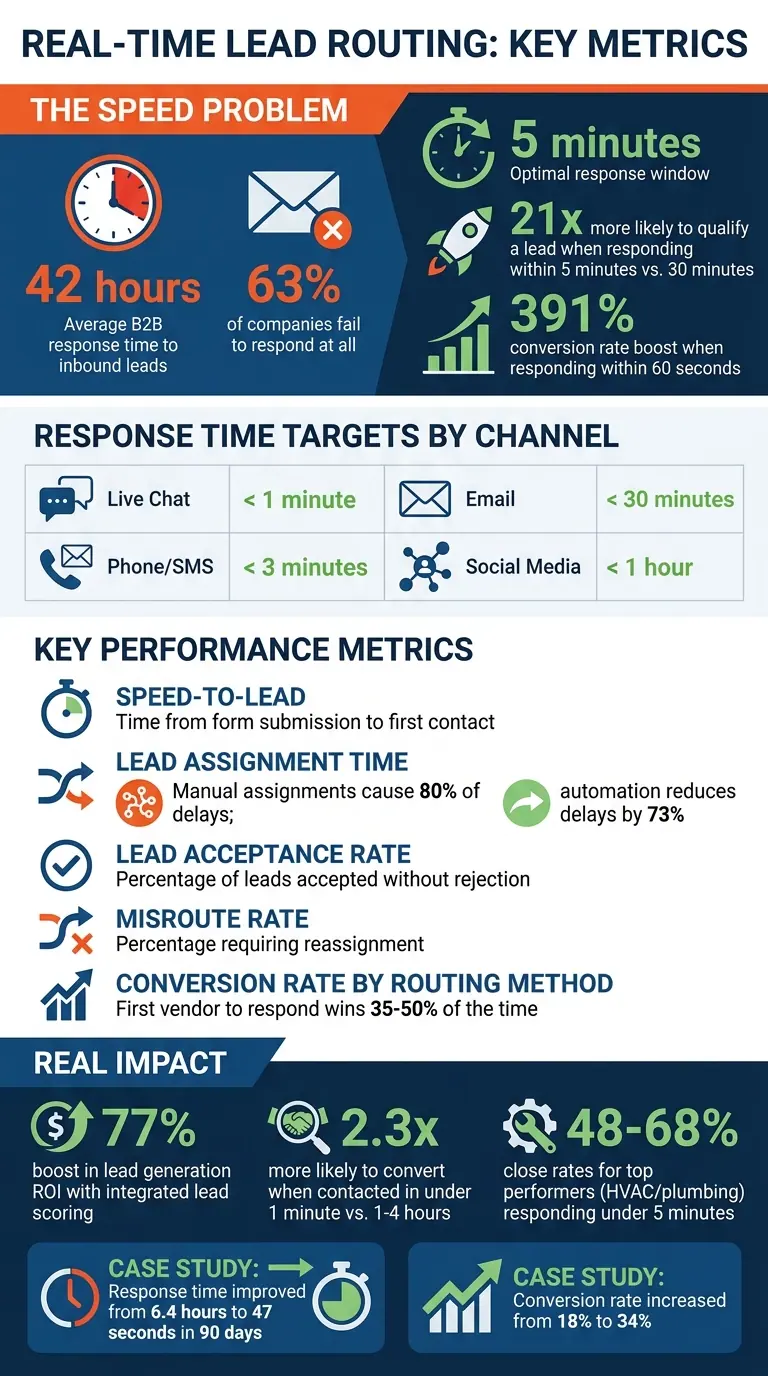
Real-Time Lead Routing Metrics: Key Statistics and Response Time Benchmarks
What Is Real-Time Lead Routing and Why Does It Matter?
Definition and Core Components
Real-time lead routing is an automated system that instantly assigns incoming leads to the right sales representative based on predefined criteria, such as location, deal size, product interest, or account ownership. Unlike older methods that rely on static queues, this approach uses software to match leads with the appropriate criteria the moment they are captured.
Here’s how it works: leads are collected through forms, chat systems, or other channels. Then, the system enriches the data with real-time enrichment, like firmographics, matches the lead to the right rep using rules (e.g., round-robin or specialized matching), and sends instant notifications through platforms like Slack, email, or CRM alerts. The objective? To close the gap between a buyer expressing interest and a sales rep following up.
Business Impact
Real-time routing doesn’t just speed things up - it ensures that high-value leads, like enterprise accounts, are matched with sales reps who have the right expertise. This prevents the risk of losing credibility. Leads that are routed and contacted in under a minute are 2.3 times more likely to convert into pipeline opportunities compared to those that take one to four hours.
Companies that integrate lead scoring into their routing process see even greater results, with a 77% boost in lead generation ROI. This system also reinforces Service Level Agreements (SLAs) between marketing and sales, ensuring leads are contacted quickly. Plus, by checking account ownership in the CRM, it avoids the confusion of multiple reps reaching out to the same account - critical in B2B sales where relationships are key.
Next, we’ll dive into the metrics that measure these real-time benefits.
sbb-itb-5f36581
How to Build a Revenue-First Lead Routing System
Key Metrics to Track in Real-Time Lead Routing
These metrics help identify where your lead routing process excels and where it might need improvement.
Speed-to-Lead
Speed-to-lead measures the time it takes from when a lead submits a form to the first contact attempt. Why does this matter? Responding within 5 minutes makes you 21 times more likely to qualify a lead compared to waiting 30 minutes. Even more striking, responding within 60 seconds can boost conversion rates by 391%. Yet, despite these numbers, the average B2B company takes a staggering 42 hours to respond, and 63% of companies fail to respond at all.
"Most teams don't have a lead quality problem. They have a lead speed problem masquerading as a quality problem." - Prospeo Team
Response time expectations vary by channel. For instance:
- Live chat: Under 1 minute
- Email: Up to 30 minutes
Certain industries, like HVAC and plumbing, see top performers responding in under 5 minutes, achieving close rates between 48% and 68%. To get an accurate picture of your team's performance, track the median response time rather than the average - this avoids skewed results caused by outliers like a single 6-hour delay.
Another critical aspect of speed-to-lead is how quickly leads are assigned to sales reps.
Lead Assignment Time
Lead assignment time measures how long it takes to assign a lead to a specific rep after it enters the system. This step often creates delays before a rep even has the chance to act. Manual assignments can account for up to 80% of delays. Automating this process - such as using round-robin routing with availability detection - can cut response times by 73%. You can also optimize lead generation by implementing expert routing strategies. By separating lead assignment time from the rep's response time, you can pinpoint whether delays stem from technical routing issues or slow follow-up by reps.
Lead Acceptance Rate
Lead acceptance rate reflects how well your routing system matches leads to the right reps. It measures the percentage of leads that reps accept without rejecting them. A low acceptance rate might indicate mismatches, such as enterprise leads being routed to SMB reps or healthcare leads going to reps without relevant expertise. On the other hand, a high acceptance rate shows that your routing logic and qualification criteria are aligning leads with the right team members.
Misroute Rate
The misroute rate tracks the percentage of leads that need reassignment due to being routed incorrectly. High misroute rates often point to outdated routing criteria, missing data fields, or qualification thresholds that no longer fit your sales structure. Manual routing, in particular, is prone to errors like timezone mismatches or misinterpreted form responses. As lead volume grows, these errors can pile up.
To reduce misroutes:
- Automate qualification at the form level by collecting essential data like company size, industry, and budget.
- Integrate your forms with your CRM to identify returning customers or existing accounts, ensuring leads go to the correct account manager.
Conversion Rate by Routing Method
This metric compares conversion or qualification rates across different routing strategies - such as round-robin versus territory-based routing - or even by individual rep performance. It helps you identify what works best and where adjustments are needed. For example, if a rep converts at half the team's average, it might signal a need for additional training or a better lead match.
Speed matters here too: the first vendor to respond wins the deal 35% to 50% of the time. Combining this data with speed-to-lead metrics can reveal whether your fastest responders are also your best closers.
| Channel | Target Response Time |
|---|---|
| Live Chat | < 1 minute |
| Phone / SMS | < 3 minutes |
| < 30 minutes | |
| Social Media | < 1 hour |
Using Real-Time Analytics to Improve Metrics
Real-time analytics can turn ordinary metrics into actionable insights. They help you quickly identify and address issues like bottlenecks where leads drop off due to broken workflows or mismatched data between platforms.
"If your reps have to ask, 'Why did this go to someone else?', your routing logic needs more visibility." - Candybox Tip
Set fallback alerts to catch unmatched leads immediately. For instance, one DevOps platform replaced their manual, twice-daily lead assignment process with real-time routing. The result? Their average response time plummeted from 6.4 hours to just 47 seconds in 90 days. Even better, their lead-to-meeting conversion rate shot up from 18% to 34%.
Tracking Metrics with Reform

Reform showcases the power of real-time analytics by offering detailed, live data on every form interaction. You can instantly see how your forms are performing and how leads behave. Reform highlights specific friction points, like which form fields cause the most drop-offs, so you can make targeted improvements. With insights from over 100 million form sessions, you’ll know exactly where prospects abandon forms and can adjust to keep them engaged.
Reform also tracks incomplete submissions, giving you the opportunity to follow up with partially completed leads. This data feeds directly into your speed-to-lead metrics, showing exactly how long it takes to assign a lead after submission. With CRM integration, you can monitor the entire journey seamlessly - from the moment a form is filled out to the first contact.
Reducing Errors with Conditional Routing
Conditional routing within Reform eliminates the guesswork from lead distribution. It uses specific criteria - like company size, industry, or budget - to ensure leads go to the right team member. This approach tackles the common issue of misrouted leads head-on. Instead of relying on manual sorting or basic round-robin distribution, conditional routing matches leads to reps based on qualification data collected directly in the form. For example:
- Enterprise leads go to enterprise reps.
- Healthcare inquiries are routed to specialists with relevant expertise.
- Existing customers are automatically connected to their assigned account managers using CRM lookups.
This level of precision boosts lead acceptance rates and improves rep efficiency - no more wasting time on misrouted leads.
"Most teams already have the tools to do routing well - they just don't understand how each system handles data differently." - Mark Spellman, Head of Delivery, Candybox
To keep your routing logic effective, conduct regular audits. Run daily checks for unrouted leads, monthly reviews to ensure fair distribution, and quarterly audits to refine your logic. Before implementing new routing rules, test them with dummy data to catch potential errors before they impact real leads.
How to Improve Lead Routing Performance
Automate to Eliminate Delays
Manual lead routing can slow things down, and that delay can hurt your conversion rates. Studies show that poor integration between systems can create a 45-minute lag between when a lead submits a form and when a sales rep gets notified. That’s a big window where you might lose potential customers. To fix this, [connect your high-converting lead forms directly to your CRM](https://docs.reform.app/category/6-integrations) and tools like Slack. This way, notifications and tasks can be triggered instantly.
Set up hierarchical rules for routing. Start with primary criteria like territory, industry, or company size, and add fallback rules to make sure no lead slips through the cracks. For high-value leads, create priority paths so they get immediate attention. You can also include calendar booking links in acknowledgment emails and use timezone-aware routing to match leads with reps who are available and have the right expertise.
Once you’ve automated the basics, keep improving by reviewing your process regularly.
Review and Update Routing Rules Regularly
Routing rules aren’t “set it and forget it.” Review them every quarter, and audit critical data fields monthly to clean up outdated rules or redundant logic. Make updates right away if there are major changes like team restructuring, shifts in territories, or new product launches.
When reviewing, apply the 80/20 rule: focus on the rules that handle 80% of your leads and consider simplifying or removing rules that apply to less than 5% of cases. Using flowcharts or visual tools can help make the logic easier to understand and can highlight inefficiencies or overlaps.
These reviews lay the groundwork for using real-time feedback to sharpen your system even further.
Use Real-Time Feedback Loops
Real-time analytics can turn your routing data into actionable insights. By linking routing data with sales outcomes, you can identify which paths or rep specializations lead to the best conversion rates. Set up automated alerts for issues like unassigned leads sitting for too long or a sudden spike in assignments to one rep.
Create escalation pathways so that if the primary rep doesn’t respond to a lead within 3–5 minutes, the lead gets reassigned to a backup rep or manager. Track leads that are assigned but never contacted - this can help you spot reps who might be overloaded or expose weak points in your fallback logic. Regularly check in with your sales team to uncover hidden issues, like leads that technically meet routing criteria but don’t align with the reps’ actual expertise.
Conclusion
Real-time lead routing goes beyond just speed - it’s about creating a system that ensures the right leads land in the right hands at the right moment. The metrics you track - like speed-to-lead, lead acceptance rate, misroute rate, and conversion rate by routing method - shine a light on where your process works well and where it needs fine-tuning. By focusing on these areas, you can uncover opportunities to close more deals and recover revenue that might otherwise slip through the cracks.
Data shows that responding quickly to leads has a huge impact on pipeline conversion and lead qualification. These small differences often determine whether you win or lose deals.
"Routing isn't a one-time setup. It's a living system that needs clean logic, accurate data, and regular care." – Chili Piper
To act on these insights effectively, technology plays a crucial role. Reform’s real-time analytics and conditional routing features provide actionable insights on the spot, track form interactions, identify bottlenecks, and route leads with precision - no coding required. By integrating Reform directly with your CRM and sales tools, you can cut out delays that might otherwise cost you valuable conversions.
FAQs
What’s a good speed-to-lead goal for my team?
Responding to leads within five minutes can make a huge difference in your chances of connecting with prospects and sealing the deal. A fast response time isn't just a nice-to-have - it’s a critical part of managing leads effectively and boosting conversions. Speed matters.
How can I tell if routing rules or reps are causing delays?
To figure out whether delays stem from routing rules or reps, keep an eye on key metrics such as the time leads remain in queues, the number of unassigned leads, and overall response times. Watch for signs like leads lingering in unassigned queues, duplicate leads, or routing issues that send leads to unavailable reps. Checking automation logs and integration statuses can also reveal the root of the problem, helping you tackle delays more efficiently.
How can I reduce misrouted leads without adding more form fields?
You can cut down on misrouted leads by leveraging conditional routing and improving data validation in your forms. Conditional routing works by directing leads based on specific actions or criteria, ensuring they’re assigned correctly without making your forms more complicated. On top of that, validating and enhancing lead data in real-time helps catch and correct errors early, streamlining lead routing without the need for extra form fields.
Related Blog Posts
Get new content delivered straight to your inbox

The Response
Updates on the Reform platform, insights on optimizing conversion rates, and tips to craft forms that convert.




Drive real results with form optimizations
Tested across hundreds of experiments, our strategies deliver a 215% lift in qualified leads for B2B and SaaS companies.
