
.webp)
Best Practices for B2B Lead Routing Workflows



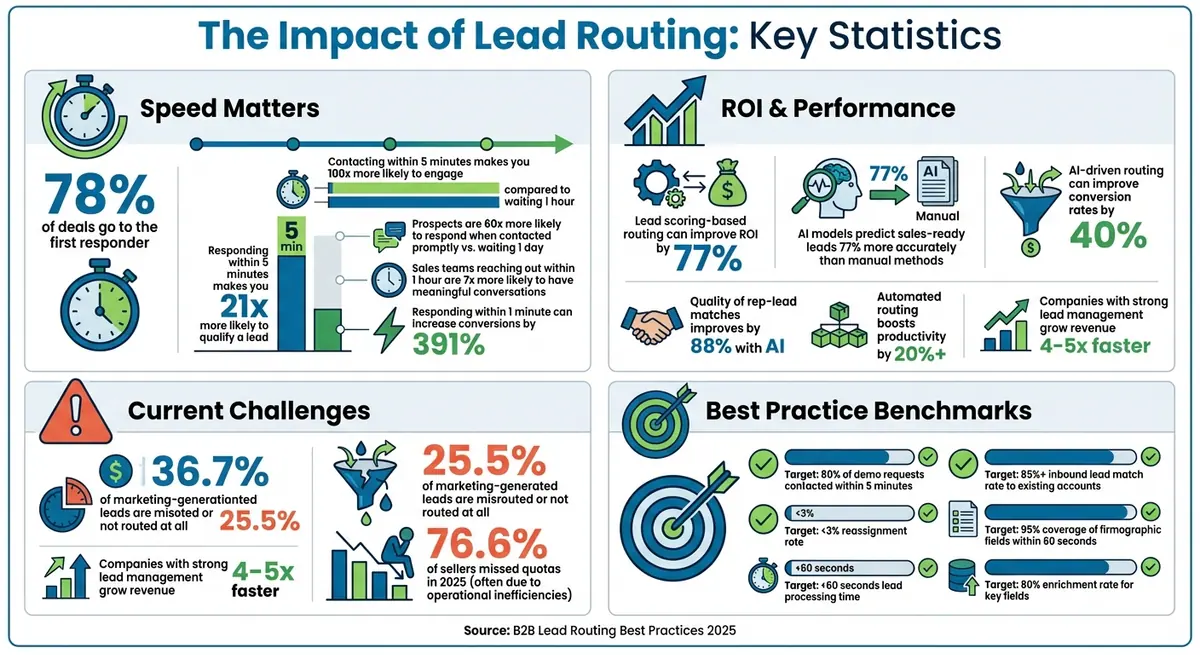
Lead routing is the backbone of efficient sales processes, especially for B2B tech companies. Here's the core takeaway: 78% of deals go to the first responder, yet most companies fail to act within the critical first five minutes, leading to missed opportunities and revenue loss. The solution? A well-structured, automated lead routing system that prioritizes speed, accuracy, and fair distribution.
Key Insights:
- Speed matters: Responding within 5 minutes makes you 21 times more likely to qualify a lead.
- Lead scoring boosts ROI: Routing based on lead scoring can improve ROI by 77%.
- Automation saves time: Automated workflows cut lead routing time from minutes to seconds.
- Balanced workloads: Capacity-aware systems prevent reps from being overwhelmed or underutilized.
Best Practices:
- Set clear criteria: Use geography, firmographics, and behavioral signals to route leads effectively.
- Layered models: Combine territory, skills-based, and round-robin routing for precision.
- Smart forms: Collect key data upfront and use integrations like Clearbit to auto-fill details.
- Automate workflows: Connect forms to CRMs and set up real-time notifications for faster action.
- Monitor and refine: Track metrics like response times and reassignment rates to improve efficiency.
By implementing these strategies, companies can reduce delays, optimize lead distribution, and maximize conversion rates. The goal is simple: get the right lead to the right rep at the right time.
B2B Lead Routing Statistics: Speed, ROI, and Conversion Impact
Route Leads to Sales Reps with HubSpot Workflows
sbb-itb-5f36581
Best Practices Checklist for B2B Lead Routing
Creating a solid lead routing system involves more than just connecting your form to a CRM. To ensure every lead is handled quickly and effectively, you need clear rules, automation, and contingency plans.
Set Clear Routing Criteria
Start by organizing leads based on geography - country, state, or postal code - to align with your sales team's regional structure. Next, include firmographic data like company size, industry, and annual revenue to match leads with reps who are familiar with their specific market. For instance, handling a financial services lead with 1,000+ employees requires a different strategy than working with a 50-person e-commerce startup.
Behavioral signals are another key factor. A demo request, for example, signals higher urgency than downloading a whitepaper. Lead scoring can help you prioritize prospects, categorizing them as hot, warm, or cold. Many mature organizations aim for an inbound lead match rate of 85% or higher to existing accounts. Additionally, account-based matching ensures leads with domains already in your CRM are routed directly to the appropriate account owner.
"The biggest mistake you can make is trying to get an enterprise AE to work [new] e-book leads, then complaining when your time to first touch is 27 days." – Armand Farrokh, Founder at 30 Minutes to President's Club
Integrate these criteria into a layered routing model for optimal results.
Use Layered Routing Models
Different types of leads call for different routing strategies. Territory-based routing assigns leads by region, while skills-based routing directs them to reps with expertise in specific products or industries. For high-volume teams, round-robin routing ensures workloads are evenly distributed among reps.
Combining these models is where the magic happens. Start with geography, then add firmographics, behavioral signals, and account-matching to avoid conflicts. Some high-performing teams are even using AI-driven routing, which analyzes historical data and buyer fit to pair leads with the reps most likely to convert.
To make these models work, your lead capture forms need to gather the right data.
Design Forms That Capture the Right Data
Accurate routing depends on forms that collect key information. Include fields for industry, company size, geographic region, and job title - these are critical for identifying your ideal customer profile (ICP). Use standardized picklists for details like industry and country to maintain consistency and avoid errors.
Simplify forms by using APIs like Clearbit or ZoomInfo to auto-fill firmographic data. Aim for at least 95% coverage of these fields within 60 seconds of a form submission. Tools like Reform can help you create forms optimized for conversions, with features like conditional routing and data enrichment - no coding required. You can even hide fields when the data is already available while still using it for routing.
In 2023, Smith.ai implemented instant qualification and routing via their forms, resulting in a 34% conversion of marketing qualified leads to appointments and a 26% increase in total demos booked.
Automate with CRM Integrations and Notifications
Automation speeds up lead routing, cutting the process from minutes to seconds. Connect your forms to a CRM like Salesforce or HubSpot and set up real-time triggers based on form submissions, chatbot interactions, or lead scores.
Use multi-channel notifications to keep your team informed. For example, Slack alerts provide instant updates, emails create an audit trail, and CRM tasks help with tracking. RCReports integrated Salesforce account matching into their lead routing system, eliminating manual reassignments and saving at least five hours of admin work monthly.
"Speed to lead isn't a metric - it's a revenue multiplier." – Sushma Shetty, LeadSquared
Set SLAs and Backup Protocols
Once your routing criteria and automation are in place, define service-level agreements (SLAs) and backup protocols to maintain response times. High-performing teams aim to contact at least 80% of inbound demo requests within 5 minutes. Responding within this window makes you 21 times more likely to qualify a lead compared to waiting 30 minutes.
Establish SLAs to ensure 80% of leads are contacted within 5 minutes and set up automated escalations if no action is taken within 60 minutes. Add fallback logic with a catch-all queue to make sure no lead goes unattended, even after hours. This ensures round-the-clock coverage and prevents leads from slipping through the cracks.
Balance Workload and Capacity
Even with the most precise routing criteria, your system can fall apart if some reps are overwhelmed with leads while others barely have any. To ensure fairness, it’s crucial to monitor capacity in real time - not just divide leads evenly on paper. Modern routing tools can evaluate a rep's active pipeline by deal stage and use lead capping to stop assigning new leads once a rep hits their limit.
Advanced systems also use availability-aware assignment. These tools sync with platforms like Google Calendar and Salesforce Business Hours to account for meetings, time off, or even time zone differences. If a rep doesn’t engage with a lead within two hours, fallback logic automatically reassigns it to someone else.
Sometimes, leads don’t align with specific territories or account criteria. In those cases, refining your distribution model is critical. A weighted round-robin model often works better than a basic sequential approach. It considers factors like a rep’s experience, past performance, and current capacity to create a more balanced distribution.
"A worthy lead distribution software allows for 'lead capping' or potentially even 'lead weighting' by pipeline stage, which will instantaneously assess a rep's current pipeline by deal stage as part of the assignment criteria." – Beth Abbott, Senior Manager of Revenue Operations at New Breed
Operational inefficiencies, like poor lead routing, are a major issue. A 2025 report revealed that 76.6% of sellers missed their quotas, often due to these kinds of problems. Companies that switch from manual to automated, capacity-aware routing systems typically see productivity jump by over 20%. Key metrics like lead response time, conversion rates, and quota attainment can help identify imbalances early. Regular audits, backed by data, are essential - especially when one region consistently generates more leads than reps can handle. Adjusting territories accordingly ensures fairness.
"The foundation of fair routing is effective territory balancing. By ensuring each territory holds a balanced potential, you give every rep an equal opportunity to succeed." – Fullcast
Use AI and Continuous Monitoring
AI and continuous monitoring take lead routing to the next level for B2B technology companies. By going beyond static rules, AI identifies patterns in historical data, rep performance, and lead characteristics to predict the best salesperson for each lead. According to Databar, AI models can predict sales-ready leads 77% more accurately than manual scoring methods. This leads to fewer misrouted leads and quicker conversions; in fact, responding within one minute can increase conversions by an impressive 391%. These predictive insights build on the structured routing methods already in place.
AI's ability to adapt over time makes it even more powerful. These systems continuously learn by analyzing CRM activity and conversion data, automatically fine-tuning routing rules as needed. They also monitor real-time capacity, balancing workloads to prevent reps from being overwhelmed. The Pedowitz Group reports that AI-driven routing can improve conversion rates by 40% and enhance the quality of rep-lead matches by 88%.
To fully benefit from AI, tracking key metrics is crucial. Aim for reassignment rates below 3% and ensure lead processing takes less than 60 seconds from optimized form submission to assignment. For high-priority leads like demo requests, the goal should be touching 80% of these leads within five minutes to meet SLA targets.
Start by using AI in "shadow mode", where it predicts lead assignments while your current rules remain active. Compare results over a few weeks before transitioning to full AI control. Nick Gaudio, Head of Brand & Content at Sweep, advises:
"AI should be treated less like an overlord and more like an advisor. Let it suggest an assignment, but keep those initial deterministic rules in place to confirm and enforce".
It's also essential to ensure data enrichment happens immediately after submission using multi-step forms with multiple outcomes so AI models can make decisions based on accurate, high-quality information.
To maintain and improve AI performance, regular monitoring and audits are necessary. Weekly audits should focus on unassigned leads, leads sitting in queues for over 24 hours, and those flagged as "wrong territory" to uncover logic issues. Track your enrichment rate - aim for 80% coverage of fields like industry, revenue, and company size. Use real-time pipeline velocity metrics to pinpoint bottlenecks and adjust routing rules to keep leads moving. This continuous feedback loop ensures your AI system stays sharp and effective.
Lead Routing Models Compared
Selecting the right lead routing model is a game-changer for improving workflow efficiency, response times, and lead conversion rates. Each model comes with its strengths and trade-offs, so understanding these nuances is key to making an informed choice.
Round-robin routing is straightforward: leads are assigned in a rotating order, ensuring every sales rep gets an equal share. It’s quick to set up and easy to manage, but it doesn’t factor in things like a rep’s expertise or their existing relationships with customers. This can lead to mismatches, like assigning a complex enterprise lead to someone less experienced.
Account-based routing takes a more personalized approach. It matches leads to the account owners already listed in your CRM. This keeps relationships consistent and prevents duplicate outreach. However, the downside is that it can lead to uneven workloads - some reps may end up juggling too many high-activity accounts.
AI-driven routing steps things up by using machine learning to analyze historical data, predicting which sales rep is most likely to close a lead. This model works particularly well for tech companies dealing with high lead volumes, offering a level of precision that manual methods simply can’t match.
A hybrid model combines elements of multiple approaches. For instance, it can prioritize account matching and territory assignments while using round-robin as a fallback. This layered approach minimizes errors - important when studies show that up to 25% of marketing-generated leads might otherwise be misrouted.
Here’s a quick breakdown of the pros, cons, and best scenarios for each model:
Comparison Table: Lead Routing Models
| Model | Advantages | Disadvantages | Best Use Case |
|---|---|---|---|
| Round-Robin | Quick setup, equal lead distribution, and simple to manage. | Ignores rep expertise and existing customer relationships, leading to mismatched assignments. | Works well for small teams with similar lead types or as a fallback system. |
| Account-Based | Maintains relationship continuity, prevents duplicate outreach, and enables more personalized follow-ups. | Can cause uneven workloads if some reps handle too many active accounts. | Ideal for account-based marketing, existing customer management, and complex sales. |
| Territory-Based | Utilizes local market expertise, aligns with time zones, and ensures clear ownership. | Less adaptable during regional downturns and can lead to siloed operations. | Great for field sales or companies with regional compliance needs. |
| AI-Driven | Matches leads with precision, balancing rep skills and capacity for better outcomes. | Requires high-quality data and can feel opaque if not well-documented. | Best for high-volume inbound leads and scaling companies with diverse products. |
| Layered (Hybrid) | Balances fairness, precision, and scalability while reducing misroutes. | Complex to set up and needs continuous RevOps oversight. | Perfect for B2B tech companies with intricate sales cycles. |
Ultimately, the right choice depends on your sales team’s structure, expertise, and the nature of your leads. Balancing efficiency with personalization is the key to success.
Measure and Refine Your Workflows
Getting the most out of your lead routing workflow requires constant measurement and tweaking. Why? Because without tracking its performance, you’re essentially flying blind. The stats paint a clear picture: about 25.5% of marketing-generated leads are either misrouted or not routed at all. This often results in missed follow-ups, wasting a significant chunk of your marketing budget.
To keep things on track, focus on key metrics like:
- Speed-to-lead: Measure how quickly leads are contacted after creation (look at both median and P95 response times).
- Demo request response rate: Aim for 80% of responses within five minutes.
- Reassignment rate: Keep this below 3% to maintain efficiency.
Here’s why speed is critical: contacting a lead within five minutes makes you 100 times more likely to engage and qualify them compared to waiting an hour.
Once you’re tracking these numbers, it’s essential to regularly audit your system. Weekly audits can help ensure data accuracy and prevent operational hiccups. For example, check for leads assigned to inactive users, leads sitting in queues past SLA limits, and uneven distribution of leads among team members. This way, you can avoid overloading one rep while another barely has work.
"Everyone thinks that their funnel is not leaking … But the truth is that leads are just disappearing. You don't know where they are going. You don't know what leads are leaking out. But it's happening. You just don't realize it." – Ash Kakhandiki, VP of Marketing
Another effective strategy is setting up a cross-functional routing council that meets quarterly. This team - comprising RevOps, Sales Ops, Marketing Ops, and SDR leadership - can review routing logic and manage updates in a structured way. To make troubleshooting easier, tag each routed lead with metadata like the routing method, assigning system, and Rule ID. Additionally, create a feedback loop where sales reps can flag misrouted leads and provide specific reasons. Review this feedback weekly to refine your rules.
The results speak for themselves. Companies that prioritize routing as a key revenue driver see a noticeable impact. In fact, businesses with well-developed lead management processes grow revenue four to five times faster than those without a disciplined approach. Treating your routing workflow as a strategic advantage can truly set you apart.
Conclusion
Lead routing is more than just assigning names to sales reps - it’s about building a system that transforms speed and accuracy into revenue growth. The checklist we’ve explored highlights four core areas: defining clear routing criteria, automating workflows to cut out manual delays, distributing workloads evenly across your team, and consistently tracking performance to fine-tune your process.
Here’s why it matters: Sales teams that reach out to prospects within the first hour are 7 times more likely to have meaningful conversations. Even more striking, prospects are up to 60 times more likely to respond when contacted promptly, compared to waiting a full day. Automation plays a key role here - shifting from manual to automated routing processes can boost productivity by over 20%. Plus, it ensures high-priority leads get to the right rep in seconds, not days. As Sarah Jackson, Head of Revenue Operations at Calendly, emphasizes: "Our lead qualification processes are critical for getting the right customers in front of sales quickly".
The process starts with collecting the right data. Tools like Reform can help you design forms that focus on conversions, with features like conditional routing, lead enrichment, and real-time validation. When these forms integrate directly with your CRM and routing systems, you remove the barriers that slow down your pipeline and risk losing leads.
Think of your routing workflow as a system that evolves over time. Conduct weekly audits, establish a cross-functional routing team, and create feedback loops so your sales reps can flag issues and suggest improvements. As LeadOps famously said: "Routing is where leads live or die". Make sure your system is built to thrive.
FAQs
What data fields are needed to route leads correctly?
To manage leads efficiently, focus on collecting crucial data points like location, company size, industry, lead source, behavior, purchase intent, and specific needs. These details allow you to establish straightforward routing rules based on factors such as geographic region, company characteristics, and how actively the lead is engaging.
How do I prevent leads from going unassigned after hours?
To make sure no leads slip through the cracks after business hours, consider using automated lead routing tailored to your schedule. You can set up rules to either queue leads for the next day or assign them immediately based on factors like location or team workload.
Adding automated notifications and fallback plans ensures that every lead gets attention. For high-priority leads, AI-powered tools can step in to identify urgency and alert sales reps right away. This keeps the communication flowing, helps maintain customer interest, and boosts your chances of converting leads into sales.
When should I add AI to my lead routing workflow?
You should consider integrating AI into your lead routing workflow when the goal is to enhance speed, accuracy, and efficiency. AI can automate tasks like lead enrichment, routing, and making real-time decisions based on factors such as behavior, firmographics, and intent data. This ensures that leads are matched with the right sales reps instantly, minimizes errors, and improves response times - all of which can play a key role in increasing conversions and optimizing your lead management process.
Related Blog Posts
Get new content delivered straight to your inbox

The Response
Updates on the Reform platform, insights on optimizing conversion rates, and tips to craft forms that convert.




Drive real results with form optimizations
Tested across hundreds of experiments, our strategies deliver a 215% lift in qualified leads for B2B and SaaS companies.
