
.webp)
Scaling Automation: Budgeting for Success



Scaling automation isn’t just about software costs - it’s about balancing upfront investments with long-term efficiency. Here’s the key takeaway: implementation takes up 50-70% of your budget, while software itself accounts for only 15-25%. For example, a $50/month platform can easily grow to $600/month once you include data enrichment, middleware, and other tools.
Two main paths exist for scaling workflows:
- Reform: A no-code platform starting at $15/month, ideal for quick deployment and smaller teams. It offers features like integrated lead enrichment, CRM integrations, and optimizing lead forms to reduce abandonment rates. Reform is perfect for businesses looking to scale without heavy technical resources.
- Custom Development: Costs range from $5,000 to $150,000 upfront, plus ongoing expenses. It’s best for complex, high-volume operations requiring tailored solutions. While more expensive and time-intensive (2-24+ weeks), custom setups provide scalability and robust integrations for unique needs.
The choice depends on your budget, timeline, and growth goals. Reform is faster and more affordable for most small-to-midsize businesses, while custom development suits enterprises with specific requirements. Start small, automate high-volume tasks, and focus on workflows that deliver measurable ROI.
1. Reform

Cost Efficiency
Reform offers straightforward pricing without "success taxes", allowing unlimited responses. The Basic plan starts at $15/month, while the Pro plan costs $35/month. Opting for annual billing provides a 16% discount - essentially two months free.
The Pro plan includes integrated lead enrichment powered by ExactBuyer. This feature automatically fills in lead data behind the scenes, keeping forms shorter and reducing the chances of abandonment. By simplifying the process, businesses can lower their cost per qualified lead without needing extra engineering resources. As Brian Casel, Founder of ZipMessage, puts it:
"A no-brainer to reach for anytime I need to (quickly!) throw up a form without hacking around with code".
This pricing model supports scalable lead generation while keeping costs manageable.
Scalability
Reform’s design makes it easy to grow without costs increasing at the same rate. It uses hidden fields to gather enriched data - like company size, industry, and personal details - without overwhelming the user interface. The Smart Form Shortening feature further enhances the experience by dynamically hiding fields that can be auto-filled via API, boosting completion rates without sacrificing data quality.
For longer forms, the Save Partial Progress feature (available in the Pro plan) allows users to save their progress and return via an emailed link. This ensures potential leads don’t abandon forms midway through the process.
Integration Capabilities
Reform supports integrations through a two-tier model. The Basic plan connects with tools like Google Sheets, Zapier, Notion, and ConvertKit. Meanwhile, the Pro plan caters to go-to-market teams with direct CRM integrations for platforms like HubSpot and Salesforce.
Integration setup is seamless, syncing enriched data directly to CRM properties through hidden fields. This enables efficient lead routing - high-value prospects go straight to sales, while others enter nurturing sequences. For businesses with custom tech stacks, the Pro plan also offers webhooks to trigger tailored workflows beyond standard integrations.
Time to Implementation
Speed matters when scaling workflows, and Reform delivers on this front. Users frequently highlight its rapid deployment. Derrick Reimer, Founder of SavvyCal, shares:
"Reform is what Typeform should have been - clean, fast, and effortless".
The no-code interface empowers marketing teams to create and launch forms quickly, eliminating delays tied to engineering dependencies. This agility is crucial, especially when 70% of startups fail during the scaling phase due to poor strategic planning. Additionally, organizations using budgeting automation report spending 63% less time managing budgets, freeing up 11% of their work week for other priorities.
sbb-itb-5f36581
2. Custom Development
Cost Efficiency
Custom development comes with a significant initial cost, ranging from $5,000 to over $150,000, depending on the system's complexity. For example, simple automations involving one to three integrations typically fall between $5,000 and $15,000, while enterprise-level systems can exceed $150,000. Beyond the upfront cost, ongoing expenses include software tools (ranging from $200 to $2,000 per month), data enrichment services ($0.10–$2.00 per contact), internal labor (15–40 hours per week), and maintenance retainers ($200–$3,000+ per month). However, custom solutions can become cost-effective within 12 months if your automation spending exceeds $500 monthly. Unlike task-based platforms, custom development avoids linear cost scaling, making it a practical choice for businesses with high-volume needs that justify the initial investment.
Scalability
Scalability is where custom solutions shine. Instead of being tied to task-based pricing models, custom infrastructure scales based on actual cloud resource usage. For instance, a single lead nurturing workflow with multi-step branching logic might rack up thousands of paid operations on task-based platforms. In contrast, a custom Python script running on AWS Lambda can handle the same workload for a fraction of the cost. Even if your business sees a tenfold increase in volume, hosting costs grow only slightly and remain predictable. By comparison, enterprise iPaaS tiers often start at $599 per month for high-volume workflows, while custom solutions can manage these demands much more affordably.
Integration Capabilities
Custom solutions excel at handling complex integrations and real-time operations. Unlike standard iPaaS platforms, which often experience polling delays of 5–15 minutes, custom setups use webhooks for instantaneous data processing. They also validate data at the point of ingestion, reducing the risk of "Frankenstein" data - an issue that costs enterprises an average of $12.9 million annually. However, API access fees can add to the cost; for example, Salesforce higher-tier plans and QuickBooks integrations may cost $50–$200 monthly. These robust integration capabilities are a major advantage, but they come with longer implementation timelines.
Time to Implementation
Custom development takes time - more than no-code alternatives. Simple automations typically require 2–4 weeks, medium-complexity projects take 4–10 weeks, and complex enterprise systems may need 12–24+ weeks to complete. Testing and quality assurance account for 20–30% of the total timeline. Keith Sayewitz, Commercial Managing Director at Auxis, highlights the ongoing nature of these solutions:
"Robots aren't a 'set it and forget it' investment – they inevitably require tweaking to adjust to unexpected process exceptions".
Without dedicated support, nearly 45% of companies report experiencing automation failures weekly or more frequently. This underscores the importance of planning for continuous monitoring and adjustments to ensure long-term success.
Advantages and Disadvantages
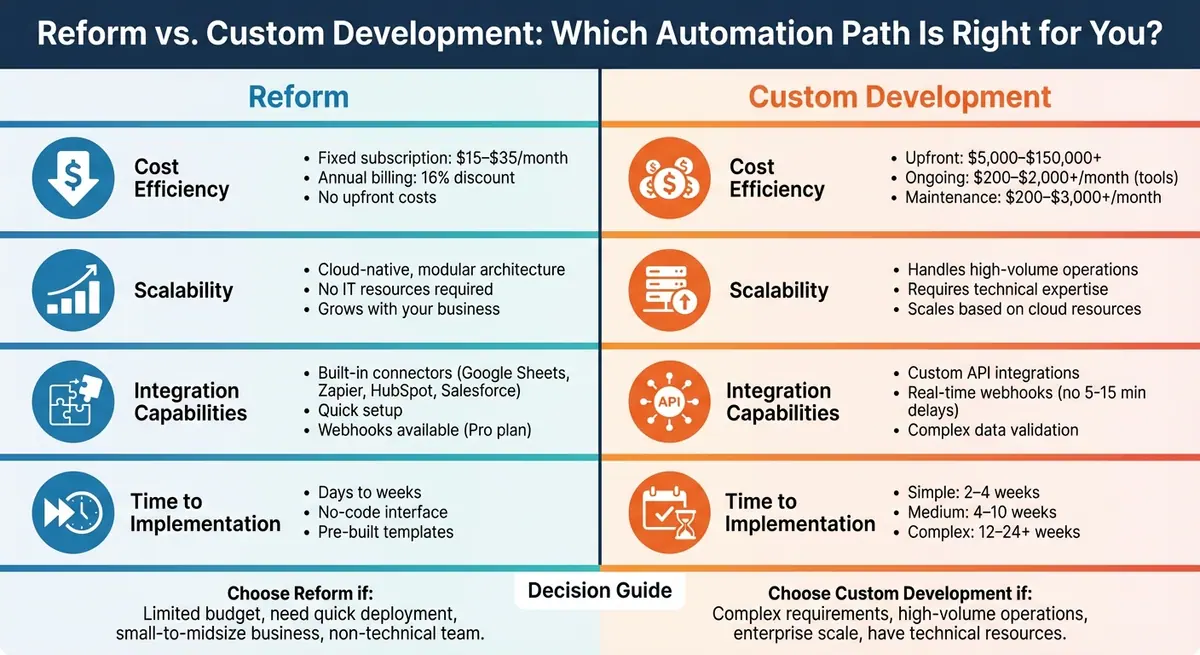
Reform vs Custom Development: Cost, Scalability, Integration & Implementation Comparison
When planning for scalable automation, deciding between a fixed subscription model like Reform and custom development is a key consideration. Reform's subscription starts at $15/month, which eliminates the need for specialized IT resources. On the other hand, custom development comes with a hefty upfront cost and ongoing maintenance expenses that can vary significantly.
Another critical factor is how each option handles growth. Reform’s cloud-native, modular architecture makes it easy for non-technical teams to tweak workflows, making it a great choice for businesses looking to start small and grow gradually. Custom development, while suitable for large-scale operations, requires advanced technical expertise to ensure smooth scaling and system reliability. This difference in scalability also impacts how these approaches handle integrations.
Reform offers quick deployment through built-in connectors, making it easy to get started. Meanwhile, custom development provides tailored integrations for more complex needs but can lead to data fragmentation if not managed carefully.
The time required to implement these solutions further underscores their trade-offs. With Reform, businesses can leverage pre-built templates and a no-code interface to deploy automations in just a few days. In contrast, custom development involves detailed planning and coding, with timelines ranging from weeks for smaller projects to several months for enterprise-level systems.
| Feature | Reform | Custom Development |
|---|---|---|
| Cost Efficiency | Fixed subscription ($15–$35/month) | High upfront costs and variable ongoing expenses |
| Scalability | Modular growth without IT hurdles | Scalable but requires expert technical oversight |
| Integration Capabilities | Built-in connectors for fast setup | Custom solutions for complex needs |
| Time to Implementation | Days to weeks | Weeks to months, based on project complexity |
Conclusion
Deciding between Reform and custom development hinges on factors like your budget, timeline, and growth goals. If you're working with tight financial resources and need quick results, Reform’s subscription model - starting at just $15/month - keeps upfront costs low. Its no-code platform empowers non-technical team members to create and tweak workflows, eliminating the need for costly developers. This makes it a great choice for businesses looking to start small and expand over time.
On the other hand, custom development is better suited for businesses with complex and unique needs. However, it comes with a hefty price tag, often ranging from $20,000 to $80,000 for enterprise-level projects, along with the need for ongoing technical management. As Michael Sacco, Managing Director at CBIZ, puts it: "Automation should simplify processes, streamline operations, remove friction, and not introduce new bottlenecks or operational headaches". In other words, automation should reduce complexity - not add to it. For many companies, this cost and complexity make speed a decisive factor.
Speed is critical when scaling automation. Reform can be deployed in days or weeks, while custom development may take months. For businesses focused on fast response times - like improving lead qualification odds by 21× with a 5-minute response window - a quicker implementation path is often more effective. Keep in mind, ROI doesn’t come from automating everything; it comes from automating the right processes. This is why well-designed workflows are key to success.
Before diving into automation, standardize your workflows. Automating inefficiencies will only make them worse. Start with tasks that are high in volume but low in complexity to demonstrate value, and then scale based on what your business will need in the next three years.
Ultimately, the best option isn’t necessarily the priciest or the most customizable - it’s the one that eliminates friction and aligns with your operational goals. For most businesses with big growth ambitions but limited resources, Reform delivers the speed, adaptability, and cost-effectiveness needed to scale without overextending your budget.
FAQs
What costs should I budget for beyond the monthly software price?
When budgeting for software, don't just consider the monthly subscription cost. Factor in implementation, integration, ongoing maintenance, support, and possible scaling fees. These additional expenses can account for 50–70% of the overall cost. Planning ahead can help you manage growth more effectively and avoid surprise charges.
When does custom development become cheaper than a no-code setup?
Custom development can prove to be a smarter financial choice when its overall costs - spanning building, maintaining, and scaling - are less than the recurring expenses tied to no-code platforms. While no-code tools might seem budget-friendly initially, their costs can rise quickly as your automation demands increase, particularly with task-based billing models. When dealing with high-volume or intricate workflows, custom solutions often deliver better long-term value by offering full ownership, greater control, and potentially reduced ongoing costs.
Which lead-nurturing workflow should I automate first to prove ROI?
Start by setting up automated responses to reach new leads within five minutes. This rapid follow-up greatly increases the likelihood of conversions and highlights the value of prompt engagement, offering a clear return on investment right from the start.
Related Blog Posts
Get new content delivered straight to your inbox

The Response
Updates on the Reform platform, insights on optimizing conversion rates, and tips to craft forms that convert.




Drive real results with form optimizations
Tested across hundreds of experiments, our strategies deliver a 215% lift in qualified leads for B2B and SaaS companies.
