
.webp)
Ultimate Guide to CRM and Marketing Integration



CRM and marketing tools are powerful on their own, but integrating them transforms how businesses operate. By combining customer data from CRM with marketing automation, you can create personalized campaigns, streamline lead management, and directly link marketing efforts to revenue. Here’s why it matters:
- Boost ROI: CRM systems deliver an average return of $8.71 per $1 spent, while integrated tools provide $5.44 per $1 spent.
- Improve Conversions: Companies using marketing automation see a 77% increase in conversions.
- Enhance Team Collaboration: Integration aligns sales and marketing, ensuring data accuracy and better customer experiences.
- Save Time: Automated workflows reduce repetitive tasks, giving sales teams 20% more capacity.
To succeed, start by auditing your tech stack, cleaning your data, and setting clear goals. Use tools like HubSpot, Zapier, or Reform to connect systems and automate lead workflows. Regularly monitor performance metrics like lead response time, conversion rates, and marketing-driven revenue to optimize results. Integration isn’t just about connecting tools - it’s about creating a unified strategy that drives growth.
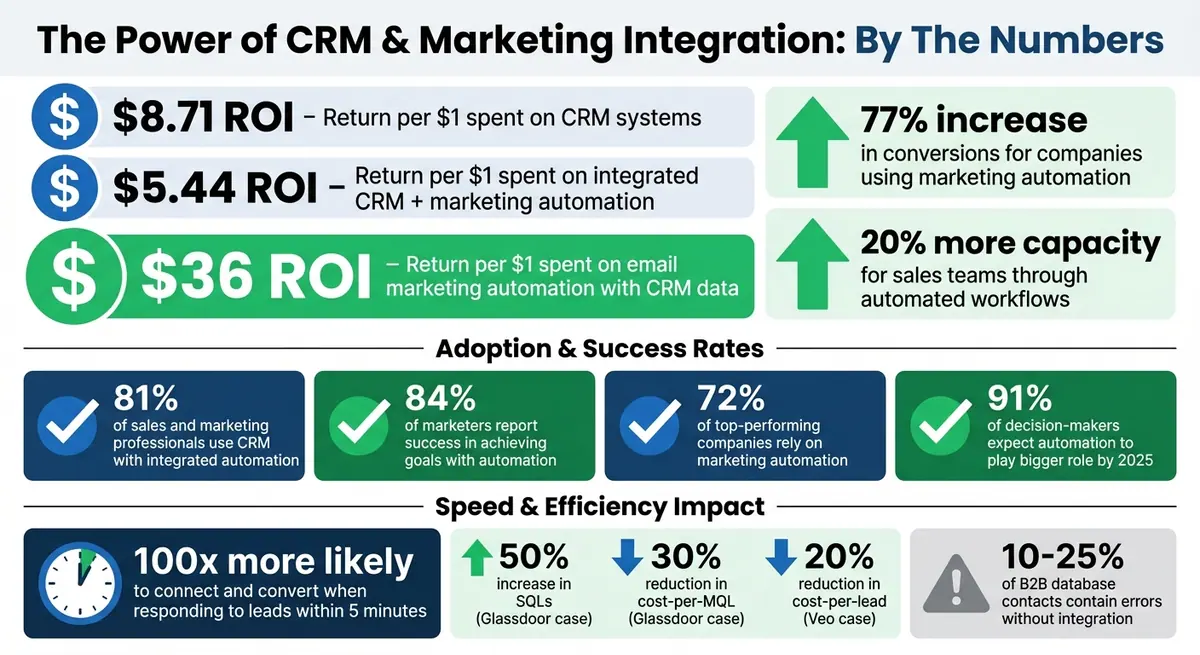
CRM and Marketing Integration ROI Statistics and Key Benefits
Integrating CRM and Marketing Automation: Unifying Data for a Complete Customer View
Benefits of CRM and Marketing Automation Integration
Integrating CRM with marketing automation isn't just a technical upgrade - it’s a game-changer for both operations and revenue. By merging these systems, businesses create a single source of truth, combining behavioral data like email clicks and website visits with sales data such as purchase history and support notes. This integration gives teams a complete 360-degree view of each customer, enabling smarter decisions and better outcomes.
The financial impact is undeniable. Companies see an average ROI of $5.44 for every dollar spent on integrated CRM and marketing automation tools. Email marketing automation, when backed by CRM data, delivers even more impressive returns - an average of $36 for every $1 spent. These numbers highlight how integration reshapes operations for the better.
| Operational Area | Siloed Systems | Integrated Systems |
|---|---|---|
| Lead Handoff | Leads lack context, leading to generic outreach | Full interaction history enables personalized follow-up |
| Campaign ROI | Revenue attribution is unclear | Clear tracking from spend to closed deals |
| Customer Journey | Disjointed experiences with conflicting messages | Aligned, seamless communication across teams |
| Data Accuracy | Risk of duplicates and outdated info across tools | Automated sync ensures accurate, up-to-date data |
Beyond the numbers, integration fosters better collaboration. It’s no surprise that 81% of sales and marketing professionals already use CRM systems with integrated automation, and 84% of marketers report success in achieving their goals with automation. This is more than a trend - it’s a necessity for staying competitive. Let’s dive into how integration streamlines lead management, enhances customer insights, and boosts ROI.
Streamlining Lead Management
The gap between marketing and sales is often where leads go to die. Without integration, sales teams receive leads with little to no context, forcing them to start from scratch. Integration solves this by automating lead qualification and scoring. Prospects are evaluated based on predefined criteria, and those deemed "sales-ready" are flagged in the CRM instantly.
Here’s how it works: when a lead reaches a certain score, automated workflows assign it to the appropriate sales rep based on territory or other rules. Tasks and alerts are created in the CRM automatically, eliminating delays and reducing errors. This speed matters - a lot. Companies that respond to leads within five minutes are 100x more likely to connect and convert compared to those that wait longer.
Take Veo, for example. In July 2025, the company automated its lead management by routing new leads from social channels directly into its CRM. This reduced cost-per-lead by 20% and increased conversion rates to 7.5%. Within 18 months, Veo doubled its size.
"It's helped us accelerate our sales cycle… and saved us thousands of hours and costs because we didn't have to hire a developer to make multiple systems talk to each other." - Lars Christensen, Social Ads Specialist, Veo
Automation also frees up time for sales teams. By handling non-selling tasks, it can reclaim 20% of a sales team’s capacity, giving reps an extra day each week to focus on engaging prospects instead of managing spreadsheets.
Improving Customer Insights
Integration isn’t just about moving data around - it’s about creating new, actionable insights. Sales teams gain access to a prospect’s complete behavioral history, including which web pages they visited, which blogs they read, and which emails they interacted with. Meanwhile, marketing teams can use CRM data like deal stage, company size, and purchase frequency to refine their audience segments.
This two-way data flow enables personalization at scale. Real-time CRM insights allow marketing to deliver tailored content, such as industry-specific case studies or loyalty rewards, based on where a prospect is in the buying journey. The results? Higher engagement and loyalty.
In October 2025, Blinkit, an instant delivery service, used CleverTap to unify customer data and segment users by purchase patterns. By identifying inactive users and loyal shoppers, Blinkit launched automated, region-specific campaigns via push notifications, SMS, and email. This approach not only re-engaged dormant users but also delivered highly personalized messages.
Integration also improves sales reps’ visibility into customer situations. For instance, they can see active support tickets or unresolved issues before attempting an upsell, ensuring smoother interactions. Additionally, real-time alerts for bottom-of-the-funnel actions, like downloading pricing guides, help sales teams strike while the iron’s hot.
Increasing ROI
The financial benefits of integration go beyond better insights and smoother workflows. One major advantage is the elimination of data quality issues. Between 10% and 25% of B2B marketing database contacts contain errors that can hurt deliverability. Integration ensures updates, like a phone number change, sync automatically across systems, reducing these risks.
Another benefit is closed-loop reporting, which allows marketers to track a lead’s journey from the first interaction to a closed deal. This visibility turns campaign planning into a data-driven process, helping marketers allocate budgets effectively.
The results speak for themselves. Marketing automation alone delivers a 544% ROI, and this figure grows when paired with CRM integration. It’s no wonder 72% of top-performing companies rely on marketing automation, and by 2025, 91% of decision-makers expect automation to play a bigger role in meeting personalization demands.
Integration also helps prevent revenue loss. For example, automated workflows can trigger "win-back" campaigns when a CRM record shows a customer has been inactive for a certain period (e.g., 60+ days). These proactive strategies ensure you don’t lose customers who might otherwise slip away.
How to Integrate CRM and Marketing Platforms
Integrating CRM and marketing platforms isn’t something you can just set and forget. It takes careful planning, clean data, and teamwork across departments to pull it off smoothly. A structured approach can save you a ton of headaches later. Here’s how to do it right.
Evaluate Your Current Tech Stack
Start by forming a team with members from Marketing, Sales, and IT. This group will assess whether your current tools can effectively communicate with one another.
Check if your CRM and marketing platforms offer native integrations. These vendor-supported connections are usually easier to set up. If you’re working with more specialized tools, you might need middleware like Zapier, Workato, or Tray.io to connect them.
Before diving in, conduct a pre-integration audit. This means standardizing key fields (like country codes or industry categories), removing duplicate records, and archiving outdated data. Poor-quality data can be expensive - companies lose an average of $12.9 million annually because of it.
Once your tools are vetted and your data is cleaned up, you can move on to mapping data and setting clear goals for the integration.
Map Data and Define Objectives
Decide which system will act as the “source of truth” for each type of data. For example, your CRM usually handles firmographic and sales data (like accounts, opportunities, and deal stages), while your marketing platform manages behavioral data (such as email clicks, website visits, and content downloads). Defining this ownership avoids conflicting updates.
Create a detailed mapping spreadsheet to document every object and field you need to sync. Match fields one by one - like aligning FirstName in both systems - and don’t forget to include custom fields, such as UTM parameters for marketing attribution. Standardize values in picklists (e.g., "USA" vs. "United States") to prevent sync errors.
Set up synchronization rules to handle conflicts. Common strategies include “Prefer Salesforce unless blank,” “Always use Salesforce,” or a two-way sync where the latest update wins. Use inclusion lists to ensure only high-quality data - like leads with scores above a certain threshold - flows into your CRM.
For example, Instructure, a learning management provider, used an iPaaS to integrate Marketo, Salesforce, Cvent, and ON24. This streamlined their lead follow-up process, cutting response times in half and enriching lead records with over 100 data points.
Test and Optimize the Integration
Before going live, conduct user acceptance testing (UAT) in a sandbox environment with test records (e.g., “Test Contact 001”). This helps identify mapping errors early. Include daily users from both sales and marketing to simulate real-world scenarios, such as submitting forms, verifying field updates, testing the MQL-to-SQL handoff, and ensuring unsubscribe statuses sync correctly for compliance.
Set up automated alerts for sync failures, API limit issues, or data mismatches. Keep an eye on technical performance metrics like sync latency (aim for under five minutes), identity match rates, and data freshness. Review error logs weekly to spot recurring issues, such as mismatched picklist values or permission errors.
Glassdoor, for instance, integrated Marketo, Salesforce, and Bizible to gain a complete view of their customer journey. This resulted in a 50% increase in SQLs and a 30% reduction in cost-per-MQL.
After launch, review error logs quarterly and audit your integration settings annually to keep up with changing business needs. Companies that automate lead management often see a revenue boost of 10% or more within six to nine months.
sbb-itb-5f36581
Top Tools for CRM and Marketing Integration
The right tools can make all the difference when integrating your systems. While the previous section explained how to approach integration, this section dives into the tools that help you connect your platforms and capture leads effectively.
Reform: High-Conversion Form Builder

Forms are often the first step in a customer's journey, but they can also be a major drop-off point - 68% of users abandon forms when the process feels too complicated or lengthy. Reform addresses this challenge by enabling the creation of branded, multi-step forms designed to keep users engaged without overwhelming them.
Reform ensures secure and efficient data collection by offering features like client/server validation, HTTPS/TLS encryption, and HMAC signatures. Its multi-step forms and conditional logic simplify the experience for users, breaking the process into manageable steps. What sets Reform apart is its ability to map form fields directly to your CRM. This eliminates the need for manual data entry or dealing with scattered touchpoints. Submissions flow seamlessly into platforms like HubSpot and Salesforce, giving your sales team a complete view of the lead's activity - what they downloaded, which pages they visited, and even their form responses.
Adding trust signals, such as client logos or privacy statements, can increase conversion rates by 10-14%. Reform makes this easy with custom CSS options and embedding capabilities to ensure forms align with your brand. Plus, its real-time analytics and abandoned submission tracking help identify and resolve friction points quickly.
Other Integration Tools
While optimizing forms is key for capturing leads, broader integration tools are essential for syncing data across your entire tech stack.
- HubSpot: A comprehensive CRM and marketing suite ideal for seamless lead segmentation and lifecycle tracking. It’s perfect for teams looking for native integration without middleware, though enterprise-level features come with a higher price tag.
- ActiveCampaign: Known for its email marketing and automation capabilities, ActiveCampaign allows you to create personalized nurture sequences. It also syncs contact data bidirectionally with your CRM, making it a solid choice for businesses focusing on email-driven campaigns and behavioral triggers.
- Zapier: For connecting niche tools or bridging gaps where native integrations fall short, Zapier serves as an orchestration layer. For instance, sports recording company Veo used Zapier to automate their lead lifecycle by sending new leads from Facebook and Instagram directly to ActiveCampaign and Pipedrive. This approach led to a 20% reduction in cost-per-lead, a 7.5% lead conversion rate, and a doubling of the company’s size within 1.5 years. Zapier also boasts 99.98% site uptime and a 99.94% execution rate for automated workflows.
| Tool | Primary Integration Strength | Key Use Case |
|---|---|---|
| Reform | High-conversion, branded forms | Lead capture for B2B and SaaS |
| HubSpot | All-in-one CRM and marketing suite | Lead segmentation and lifecycle tracking |
| ActiveCampaign | Email marketing and automation | Personalized nurture sequences and data syncing |
| Zapier | Multi-app orchestration | Automating workflows and connecting niche tools |
When choosing tools, think about whether you need native connectors (quick to set up but less customizable), APIs (highly flexible but requires technical expertise), or middleware (easy to deploy but may involve subscription costs). The right choice depends on your team's technical skills and the complexity of your workflows.
Best Practices for CRM and Marketing Integration
Connecting your systems is just the first step. The real challenge lies in keeping them running efficiently over time. Poor data quality can lead to costly mistakes. The upside? Most of these issues can be avoided with the right strategies in place.
Maintain Data Accuracy and Consistency
Clean, reliable data is the backbone of successful system integration. Before you kick things off, perform a pre-integration data audit. Look for problems like inconsistent formatting, missing fields, or outdated records. Ignoring these can lead to bigger headaches down the line.
Establishing a Single Source of Truth (SSoT) is key. For example, use your CRM to store firmographic data and your marketing platform for behavioral insights. This approach prevents mishaps like marketing data overwriting critical sales notes.
"Defining a source of truth is a business agreement, not just a technical setting. It prevents the common 'data tug-of-war' where a marketing list import accidentally overwrites valuable notes a sales rep just added." - MarTech Do
To keep your data clean, enforce consistent picklist values for fields like country, state, industry, and lead source. Replace free-text fields with dropdown menus to avoid messy records and enable precise segmentation. Also, remove duplicate records in both systems before integration to prevent reporting errors or mixed messages.
Use inclusion lists to control what data syncs. For instance, only sync leads that meet specific quality standards to avoid cluttering your CRM with unqualified contacts. Regularly audit your integration settings - annually for a full review and quarterly for error log checks.
Once your data is in good shape, you can take things a step further by automating repetitive tasks.
Automate Workflows for Efficiency
Manual tasks are not only time-consuming but also prone to errors. Automation can handle repetitive jobs like data entry, lead routing, and follow-up scheduling, freeing up about 20% of a sales team's time. Non-selling tasks often eat into productivity.
One of the most impactful areas for automation is the lead handoff process. When a lead becomes marketing-qualified, integrated systems should automatically update ownership, create tasks, and send real-time alerts to sales reps. This is crucial because the average B2B sales team takes 42 hours to respond to leads.
Implement lead scoring by assigning point values to user actions - like downloading a whitepaper or attending a webinar. When a lead reaches a certain score, the system can automatically notify sales reps to take action. This ensures your team focuses on promising prospects instead of wasting time on cold leads.
"A successful CRM and marketing automation integration is 90% strategy and only 10% technology." - MarTech Do
Ensure alignment between sales and marketing when defining Marketing-Qualified Leads (MQLs) and Sales-Qualified Leads (SQLs). Set up win-back workflows for contacts marked as "inactive" or "closed-lost" in your CRM, enrolling them in long-term nurture campaigns. The benefits are clear: 77% of businesses using marketing automation see higher conversion rates, and the average ROI is $5.44 for every dollar spent.
Once your workflows are humming along, the next step is keeping an eye on performance to ensure everything stays on track.
Monitor and Measure Success
To improve, you need to measure. Before integrating systems, establish benchmarks for metrics like lead-to-opportunity conversion, sales cycle length, and marketing-driven revenue. These will help you see if your integration efforts are delivering results.
Focus on metrics that show how well your integration is working. For example, the lead-to-opportunity conversion rate reveals if high-quality MQLs are turning into sales opportunities. Sales cycle length indicates whether shared data is speeding up deal closures, while marketing-sourced revenue highlights the campaigns driving revenue.
Keep an eye on technical metrics too, like data sync error rates. Regularly review error logs and set up alerts for sync failures or mismatched data to maintain the integrity of your SSoT. Even small technical issues can snowball into larger problems if left unchecked.
| Metric | What It Measures | Why It Matters |
|---|---|---|
| Lead-to-Opportunity Rate | Percentage of MQLs converted to SQLs | Shows lead quality and handoff effectiveness |
| Sales Cycle Length | Average time from first contact to deal closure | Highlights operational efficiency improvements |
| Marketing-Sourced Revenue | Revenue linked to specific campaigns | Demonstrates marketing's role in driving revenue |
| Data Sync Error Rate | Frequency of sync issues | Ensures data accuracy and trust |
| Lead Response Time | Time taken to follow up on leads | Directly impacts connection and conversion rates |
On average, CRM software delivers an ROI of $8.71 for every dollar spent. However, achieving these returns requires active monitoring and optimization. Use real-time dashboards to link A/B testing outcomes with changes in your sales pipeline. By 2025, 91% of decision-makers expect automation to play a larger role in meeting rising demands for personalized customer experiences. Staying on top of your metrics will ensure you're ready for these challenges.
Conclusion
Bringing together your CRM and marketing automation systems is a game-changer for achieving steady, predictable growth. When these tools are seamlessly integrated, you create a unified, actionable view of your customers. This not only allows marketing teams to clearly demonstrate their impact on revenue but also ensures both sales and marketing are working from the same playbook, breaking down internal silos in the process.
The numbers speak for themselves: businesses see an average return of $5.44 for every dollar spent on automation technologies, while CRM software delivers an even higher ROI of $8.71 per dollar invested. To set yourself up for success, start by auditing your data, defining your "source of truth", mapping out the customer journey, and establishing clear synchronization rules before connecting your systems.
Don’t underestimate the importance of high-quality lead capture as the gateway to your integrated setup. Tools like Reform make this easier by offering features such as email validation and lead enrichment. These tools ensure that only accurate, qualified data flows into your CRM right from the start. When forms automatically sync with your CRM and trigger precise workflows, you eliminate manual tasks and speed up response times - directly enhancing the efficiency of your marketing and CRM processes.
Integration doesn’t stop at setup; it requires ongoing management. Keep a close eye on key performance indicators like lead-to-opportunity conversion rates, sales cycle durations, and marketing-driven revenue. With 91% of decision-makers predicting higher automation demands to meet growing personalization needs by 2025, businesses that perfect their integrations now will be well-positioned to stay ahead of the competition.
Take the first step: evaluate your tech stack, address gaps in lead management, and connect your systems to unlock new revenue opportunities.
FAQs
How does integrating CRM and marketing tools enhance team collaboration?
Integrating CRM and marketing automation tools creates a seamless system where data flows effortlessly, providing teams with instant access to accurate, up-to-date customer details. This setup eliminates the need for manual data entry, minimizes errors, and ensures that sales and marketing work in harmony. For instance, sales teams can focus on high-priority leads using real-time updates, while marketing gains clear insights into which campaigns are delivering results.
With shared workflows and synchronized data, collaboration becomes much easier. Marketing teams can launch personalized campaigns driven by CRM insights, while sales teams can use data like email opens or website activity to craft more targeted outreach. Tools such as Reform make this process even simpler by collecting detailed lead information through customizable forms and automatically syncing it with your CRM and marketing platforms. This streamlined system enhances communication, smooths transitions between teams, and boosts overall efficiency.
How can I effectively integrate a CRM system with a marketing platform?
To successfully integrate a CRM system with a marketing platform, start by clarifying your objectives and ensuring alignment between your sales and marketing teams. Everyone should be on the same page about the specific metrics you aim to improve, such as boosting lead conversion rates or increasing revenue. This alignment sets the foundation for a smooth integration.
Next, organize and clean your data. Deduplicate records and standardize formats to ensure consistency across both systems. Clean data is essential for accurate syncing and better decision-making.
When it comes to integration, select the method that best suits your needs. Options include built-in connectors, middleware solutions, or custom APIs. Once chosen, map your data fields and define synchronization rules. Decide which records should sync one-way or bidirectionally and establish how frequently updates should occur. For instance, you can automate processes like sending new leads captured through a Reform form directly into your CRM, which can then trigger relevant marketing campaigns.
Before going live, test the integration thoroughly to ensure everything works as intended. Train your team to use the new system effectively and establish ongoing monitoring to track its performance. Regular checks will help you identify areas for improvement and keep the integration running smoothly. Following these steps will help you create a strong connection between your CRM and marketing tools, enabling better collaboration and results.
Why is accurate data essential for integrating CRM and marketing tools?
Accurate data forms the backbone of any successful integration between CRM systems and marketing efforts. When your records are clean and up-to-date, marketing platforms can work their magic - segmenting audiences, tailoring campaigns to individual preferences, and scoring leads with precision. This level of personalization doesn’t just boost engagement; it drives higher conversions and ensures your ROI hits its mark. On the flip side, inaccurate data leads to generic outreach and missed opportunities that could cost your business.
Beyond just campaigns, accurate data plays a crucial role in reliable reporting and forecasting. It eliminates common pitfalls like duplicate entries or outdated details, giving you a clear and trustworthy view of your performance metrics. This clarity empowers better decision-making and fosters stronger collaboration between sales and marketing teams, ensuring everyone is aligned and workflows run smoothly. In essence, keeping your data accurate is the secret to getting the most out of your CRM and marketing tools.
Related Blog Posts
Get new content delivered straight to your inbox

The Response
Updates on the Reform platform, insights on optimizing conversion rates, and tips to craft forms that convert.




Drive real results with form optimizations
Tested across hundreds of experiments, our strategies deliver a 215% lift in qualified leads for B2B and SaaS companies.
