
.webp)
How CRM and Marketing Automation Work Together



CRM and marketing automation are powerful tools for managing customer relationships and streamlining marketing efforts - but their real strength lies in integration. By combining these systems, businesses can track every customer interaction, automate repetitive tasks, and deliver personalized experiences, leading to better sales outcomes and higher ROI.
Key Takeaways:
- CRM focuses on managing customer data and sales pipelines.
- Marketing automation handles lead generation and nurturing through tools like email campaigns and lead scoring.
- Integrating both systems creates a unified view of the customer journey, improving lead management and personalization.
Why it Matters:
- Businesses earn an average of $5.44 for every $1 spent on integrated CRM and marketing automation.
- Automation frees up 20% of sales teams' time and reduces sales cycle lengths by 25%.
- Personalization is critical, with 87% of customers expecting tailored interactions.
Key Steps:
- Align sales and marketing teams to map the customer journey.
- Standardize data fields to avoid inconsistencies.
- Use lead scoring to prioritize and qualify prospects.
- Leverage tools like native integrations or APIs for seamless data sync.
- Test and refine workflows to ensure smooth operation.
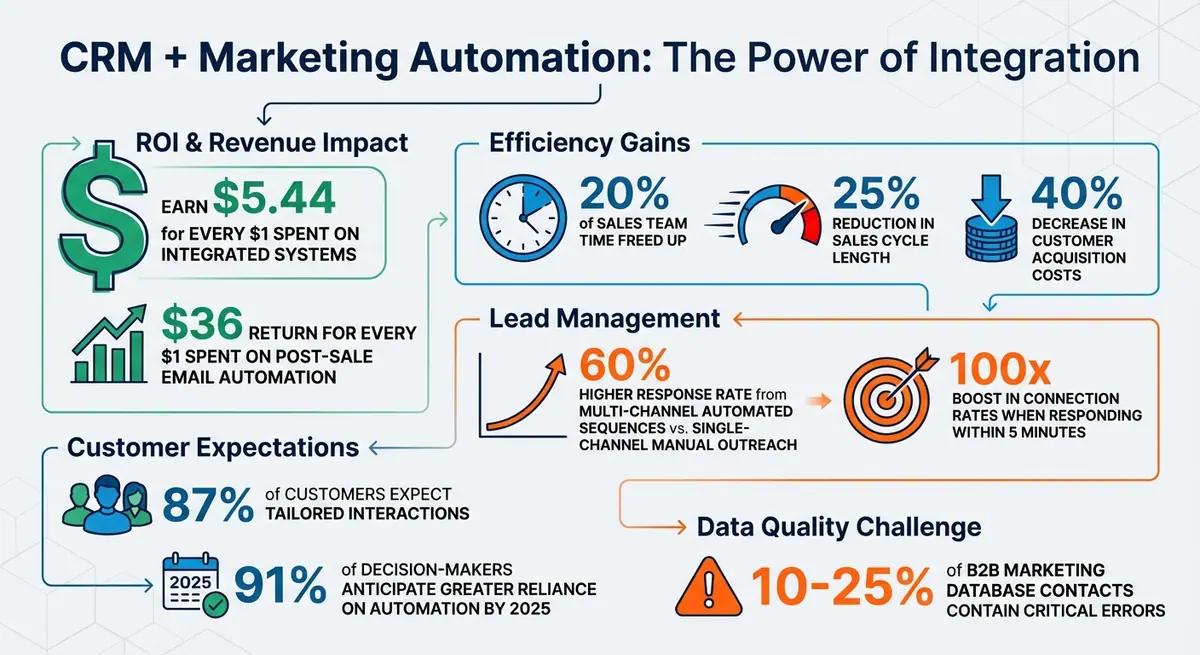
CRM and Marketing Automation Integration: Key Statistics and ROI
Integrating CRM and Marketing Automation: Unifying Data for a Complete Customer View
How to Structure Your CRM and Marketing Automation Workflow
"A successful CRM and marketing automation integration is 90% strategy and only 10% technology" – MarTech Do
To make your CRM and marketing automation work together effectively, start by aligning your sales and marketing teams. Together, map out the entire customer journey - from the first interaction to post-sale follow-ups. This teamwork ensures that while the systems may be technically connected, they’re also working in harmony. Once that foundation is set, focus on tracking the customer journey, standardizing your data, and implementing marketing automation strategies for a smooth, efficient workflow.
Tracking the Customer Journey
Your workflow should mirror the path a prospect takes. Start by breaking down the key stages: lead capture (when someone fills out a form), qualification (when marketing evaluates if they’re a good fit), sales handoff (when the sales rep steps in), closing, and post-sale engagement. Assign automation triggers to each stage. For instance, when a lead hits 100 points on your scoring system based on their activity, the CRM can automatically reassign them to a sales rep and create a follow-up task. This approach eliminates manual delays that might cause promising leads to lose interest.
Once the journey is mapped, the next priority is making sure your data is consistent and easy to work with.
Creating Consistent Data Fields
Data consistency is key to avoiding clutter and confusion. Replace free-text fields with dropdown menus for details like country, state, industry, and lead source. Without standardization, your database can quickly get messy with entries like "USA", "U.S.A.", and "United States" all meaning the same thing. Decide which system will manage specific data: typically, your CRM handles sales-related information (e.g., account names, phone numbers, opportunity stages), while your marketing platform tracks behavioral data (e.g., email opens, page visits, form submissions).
Additionally, use hidden fields in your forms to capture UTM parameters like utm_source and utm_campaign. Map these directly to your CRM so sales reps can instantly see where a lead came from and what campaign brought them in.
Setting Up Lead Scoring and Lifecycle Stages
Lead scoring works best when it combines both demographic and behavioral data. Before creating scoring rules, collaborate with your sales and marketing teams to define lifecycle stages like MQL (Marketing Qualified Lead) and SQL (Sales Qualified Lead). For example, an MQL might be a lead with a score of 75+ from a company with 50+ employees, while an SQL could be someone scoring 100+ who has requested a demo. Use selective sync rules to ensure only sales-ready leads make it to your pipeline. This prevents your sales team from being bogged down with cold leads - like someone who downloaded a whitepaper months ago but hasn’t engaged since.
How to Connect Your CRM, Forms, and Automation Tools
Once you've outlined your workflow and ensured your data is consistent, the next step is linking your systems. Most modern platforms provide several integration options, including native connectors, APIs, or middleware tools. The trick is to pick the method that fits your tech stack best and thoroughly test everything before going live.
This integration creates a seamless flow of data and processes between your sales and marketing teams.
Integrating Your CRM and Marketing Automation Platform
Start by checking if your CRM and marketing automation platform offer a native integration. These built-in connectors are often the easiest and most reliable way to sync contact records, form submissions, and lead scores - no coding required. If native integration isn’t available, APIs or an iPaaS (integration-platform-as-a-service) tool can fill the gap.
Before setting up the sync, decide whether it will be one-way or bidirectional. A bidirectional sync keeps data like email addresses and phone numbers updated across both systems, ensuring your sales and marketing teams always work with the same information. Be sure to define a "source of truth" for key fields - typically, your CRM handles sales-related data (like account names or deal stages), while your marketing platform tracks behavioral insights such as email opens or page visits.
To avoid cluttering your CRM, use selective sync rules. For instance, you might only sync leads that meet a specific lead score or those identified as Marketing Qualified Leads (MQLs).
Once you’ve set up your integration, it’s time to refine your lead capture process with smarter forms.
Improving Lead Capture with Reform Forms

Forms are the gateway to your system, so they need to do more than just collect basic contact information. Reform’s multi-step forms reduce drop-offs, and its conditional routing feature ensures leads are sent to the right team based on their answers. For example, enterprise inquiries can go to senior sales reps, while small business leads enter a nurturing sequence.
Reform also offers lead enrichment, which automatically pulls in additional details about prospects - like company size or industry - right after they submit a form. This gives your sales team valuable context before reaching out. To keep your data clean, Reform includes reCAPTCHA to filter out spam. Plus, hidden fields can capture UTM parameters (like utm_source or utm_campaign), mapping them directly to custom CRM fields so your sales team knows exactly which campaign brought in the lead.
Testing Your Integration
Testing is essential before launching any integration. Start by submitting a test form to check whether the lead appears in both your marketing platform and CRM within seconds. Confirm that all fields, including custom ones like lead source or UTM parameters, populate correctly. Adjust a test lead’s score to hit your MQL threshold and ensure ownership transfers to the correct sales rep in your CRM, complete with an assigned follow-up task.
Don’t forget to test the unsubscribe process. Click "unsubscribe" on a test email and verify that the "Opted Out" status syncs back to your CRM immediately. Regularly reviewing error logs is also a smart way to catch and fix technical issues before they become bigger problems.
sbb-itb-5f36581
Creating Automated Lead Management Workflows
Once your systems are connected and running smoothly, it’s time to build workflows that take over repetitive tasks and act on specific triggers - like a form submission or a lead reaching a certain score. These workflows aim to speed up lead conversion while giving your team more time to focus on meaningful, high-value interactions.
Here’s the payoff: businesses that automate their lead generation workflows report an average 40% decrease in customer acquisition costs, and multi-channel automated sequences achieve a 60% higher response rate compared to single-channel manual outreach. The secret lies in designing workflows that respond to prospect behavior and ensure every lead is nurtured without slipping through the cracks.
Setting Up Lead Nurturing Triggers
Lead nurturing workflows revolve around triggers - actions or conditions that enroll a prospect into a sequence. For instance, downloading a whitepaper, clicking a specific email link, or reaching a lead score threshold can all serve as triggers. A practical example: assign 25 points for a demo request, and when a lead surpasses 100 points, enroll them in a targeted email series.
To take it further, use behavioral branching to refine your workflows. If a lead actively engages with your emails and visits your pricing page, the system can fast-track them into a sales-ready sequence. On the flip side, leads who don’t interact might be placed in a re-engagement campaign with alternative messaging. This approach ensures your nurture tracks adapt dynamically based on how prospects engage with your content.
Automating the Sales Handoff Process
Once leads are nurtured, transitioning them to the sales team should be seamless. When a lead reaches Marketing Qualified Lead (MQL) status, your system can automatically assign them to a sales rep in the CRM, create a follow-up task, and send a notification to the rep. This eliminates delays, helping sales act quickly - automation can reduce sales cycle time by 25%.
To prevent leads from going cold, you can add escalation rules to your workflow. For example, if the assigned rep doesn’t follow up within a set timeframe (say, two hours), the system can reassign the lead to a backup or notify a manager. Another helpful workflow is a "Sales Re-engagement" sequence: if a rep marks "No Answer" in the CRM, the system can enroll the lead in a three-day email series to keep the conversation warm until the next call attempt.
| Workflow Type | Triggering Condition | Action | Business Goal |
|---|---|---|---|
| Sales Handoff | Lead score reaches 100 or Demo Request | Assign to rep, create CRM task, send Slack alert | Speed up lead response and improve conversion |
| Sales Re-engagement | Rep logs "No Answer" in CRM | Add lead to 3-day "gentle nudge" email sequence | Boost connect rates with minimal manual work |
| Closed-Lost Nurture | Opportunity marked "Closed-Lost" (Timing) | Enroll in long-term thought leadership nurture | Stay relevant for future opportunities |
Building Post-Sale Engagement Workflows
Automation doesn’t stop at closing the deal. When a lead is marked "Closed-Won", you can trigger actions like sending a "Welcome" email, setting up support or billing accounts, and scheduling a kickoff call. These workflows ensure every new customer experiences a smooth onboarding process, which can reduce churn and increase satisfaction.
You can also use CRM purchase data to trigger upsell and cross-sell campaigns. For example, if a customer buys a specific product tier, they can enter a sequence promoting a complementary add-on or upgrade. Additionally, milestone-based workflows can enhance customer loyalty: send a thank-you email with a discount on their one-year anniversary, or launch a win-back campaign if they haven’t purchased in over 60 days. Post-sale email automation has proven to deliver impressive returns, averaging $36 for every $1 spent.
Tracking and Improving System Performance
Once workflows and integrations are up and running, the next step is keeping tabs on performance. Tracking how your system operates helps you make smarter decisions and ensures it continues to align with your goals. Without reliable data, it’s tough to figure out what’s driving revenue or where leads are getting stuck.
Metrics to Track
Before making any changes, establish baseline metrics to measure progress accurately. Key metrics to monitor include:
- Lead conversion rate: The percentage of leads that turn into paying customers, often improved by optimizing lead conversion paths.
- Sales cycle length: The average time it takes to go from the first contact to a closed deal.
- Lead response time: How quickly your team reaches out to new leads. Studies show that responding within five minutes can boost connection and conversion rates by 100x.
You’ll also want to track funnel velocity, which measures how quickly leads move from Marketing Qualified Lead (MQL) to Sales Qualified Lead (SQL) to "Closed-Won". Don’t forget marketing-sourced revenue, which shows how much revenue comes directly from marketing campaigns. Finally, keep an eye on data sync health - monitor error rates and duplicate records to catch technical issues early.
| Metric | What It Measures | Why It Matters |
|---|---|---|
| Lead Conversion Rate | Percentage of leads becoming customers | Reflects overall system effectiveness |
| Sales Cycle Length | Time from first contact to deal closure | Highlights process bottlenecks |
| Lead Response Time | Speed of first contact after interest | Directly impacts connection rates |
| Marketing-Sourced Revenue | Revenue from marketing campaigns | Demonstrates marketing’s contribution |
| Pipeline Velocity | Speed of leads moving through the funnel | Identifies friction points in the process |
These metrics provide a roadmap for refining your system and improving results.
Using Attribution Data to Improve Results
Closed-loop reporting is a game-changer for understanding what works. By mapping UTM parameters to CRM fields, you can track campaigns from the first touchpoint all the way to revenue. This data helps you avoid wasting resources on channels that generate activity but don’t contribute to the bottom line.
Dive deeper into attribution data to see which content - like whitepapers, webinars, or case studies - leads to faster conversions. For example, if a sales rep knows a prospect downloaded a specific resource, they can tailor their first conversation to address that interest. Attribution data also reveals where leads stall, such as why some don’t progress from MQL to SQL, allowing you to fix those issues. Companies that use integrated attribution data report an average ROI of $5.44 for every dollar spent. However, this level of accuracy depends on clean and consistent data, making regular maintenance essential.
Keeping Your Data Clean
Even the best system can’t function properly with messy data. Between 10% and 25% of B2B marketing database contacts contain critical errors. Regular maintenance is crucial to avoid these pitfalls. Start by standardizing fields - use consistent picklist values for data like country, state, and industry. This eliminates variations like "USA" vs. "United States", which can create duplicates.
Take advantage of your platform’s built-in deduplication tools to merge duplicate records using unique identifiers like email addresses. Additionally, perform a full audit of your integration settings and data mapping at least once a year. This ensures your system stays aligned with your evolving business needs.
Conclusion
Bringing together CRM and marketing automation creates a unified system for managing leads and customers. This integration compiles every interaction - like form submissions and email clicks - into a single profile, enabling highly personalized and seamless customer experiences.
On average, businesses see a return of $5.44 for every dollar spent, thanks to faster sales cycles, automated lead transfers, and measurable campaign revenue. When sales teams receive leads enriched with detailed customer insights, they can craft tailored strategies that speed up conversions.
Reform's no-code form builder makes it easy to capture high-quality lead data right from the first interaction. When your form builder integrates smoothly with your CRM and marketing automation tools, every submission is automatically funneled into your workflows. This triggers nurture sequences, updates lead scores, and notifies sales reps - all without manual effort. The integration of form capture with workflow automation forms the backbone of the proactive growth strategy we've discussed.
As businesses adopt these connected systems, they move from reactive to proactive growth. By 2025, 91% of company decision-makers anticipate greater reliance on automation to meet rising demands for personalization. Whether you're a startup or a well-established company, combining smart form capture, automated workflows, and unified data creates a scalable revenue engine. This approach supports growth without adding complexity or increasing headcount, making it a powerful tool for sustainable success.
FAQs
How does integrating CRM and marketing automation boost ROI?
Integrating CRM with marketing automation tools creates a single, clear view of every lead, helping sales and marketing teams collaborate more efficiently. By sharing real-time data - such as user behaviors, email engagement, and content downloads - sales teams can zero in on high-priority leads and tailor their outreach. This streamlined approach not only minimizes manual tasks but also shortens the sales cycle and boosts conversion rates, often delivering a strong return on investment.
Automating routine tasks like lead scoring, follow-up communications, and nurturing emails frees up teams to focus on revenue-generating activities. Tools like Reform play a key role in this process by ensuring accurate, validated lead data flows seamlessly into both systems. This reduces data loss, improves lead quality, and leads to smarter budget use, ultimately maximizing the impact of every marketing dollar.
How can I effectively integrate CRM and marketing automation tools?
Integrating your CRM with a marketing automation platform requires careful planning to ensure everything works smoothly. Start by setting clear goals and making sure your sales and marketing teams are on the same page. Shared objectives - like speeding up lead conversion or creating a unified view of customers - can help streamline the process.
Before diving into the integration, take time to audit your data. This means cleaning up records, removing duplicates, and mapping fields between your CRM and the marketing automation platform. Once the data is in order, configure the integration by setting up data sync rules, linking lead-scoring models, and automating workflows. This ensures qualified leads flow effortlessly from marketing to sales. After setup, run thorough tests, train your teams on the new processes, and keep an eye on performance metrics like conversion rates and data accuracy to make ongoing improvements.
Tools like Reform, a no-code form builder, can make this process even easier. By capturing leads through branded, conversion-optimized forms and syncing them directly with your CRM and marketing automation platform, you kickstart workflows with clean, enriched data. This not only saves time but also improves lead quality and overall efficiency.
How can businesses keep CRM and marketing automation data consistent?
To keep your CRM and marketing automation platform on the same page, start by cleaning up your data. Go through your records to remove duplicates, outdated entries, and errors in key fields like email addresses, phone numbers, and mailing addresses. Starting with a clean slate ensures smoother synchronization between systems.
Once your data is tidy, set clear guidelines for how information will move between the two platforms. Map out fields carefully, decide on synchronization schedules, and determine which system will act as the main source for updates. This step helps avoid mismatched information and keeps critical fields like lead scores and contact statuses consistent.
Lastly, make data hygiene an ongoing effort. Use tools to spot duplicates, enforce validation rules (like email verification), and regularly check reports to identify and fix any discrepancies. By staying on top of these practices, you’ll keep both systems aligned and provide your teams with accurate, up-to-date information they can trust.
Related Blog Posts
Get new content delivered straight to your inbox

The Response
Updates on the Reform platform, insights on optimizing conversion rates, and tips to craft forms that convert.




Drive real results with form optimizations
Tested across hundreds of experiments, our strategies deliver a 215% lift in qualified leads for B2B and SaaS companies.
