
.webp)
Best Practices for GDPR-Compliant Data Deletion



If your business handles personal data, complying with GDPR's "Right to Erasure" (Article 17) is non-negotiable. This means securely deleting personal data when it's no longer needed or upon request, typically within one month. Non-compliance risks hefty fines - up to €20 million or 4% of annual turnover - and can damage customer trust.
Here’s how to stay on the right side of GDPR:
- When to Delete Data: Remove data if it's no longer necessary, consent is withdrawn, or processing is unlawful. Exceptions include legal obligations or public interest.
- Retention Policies: Define clear rules for how long data is kept and securely delete it afterward.
- Data Mapping: Know where personal data is stored, including backups and third-party systems.
- Secure Deletion Tools: Use certified tools to permanently erase data and ensure backups are "beyond use."
- Automation: Streamline deletion processes to reduce errors and meet deadlines.
- Audit Trails: Keep detailed logs of data deletion activities to demonstrate compliance.
Handling GDPR Right to Erasure Requests with Confidence
What Is GDPR's Right to Erasure?
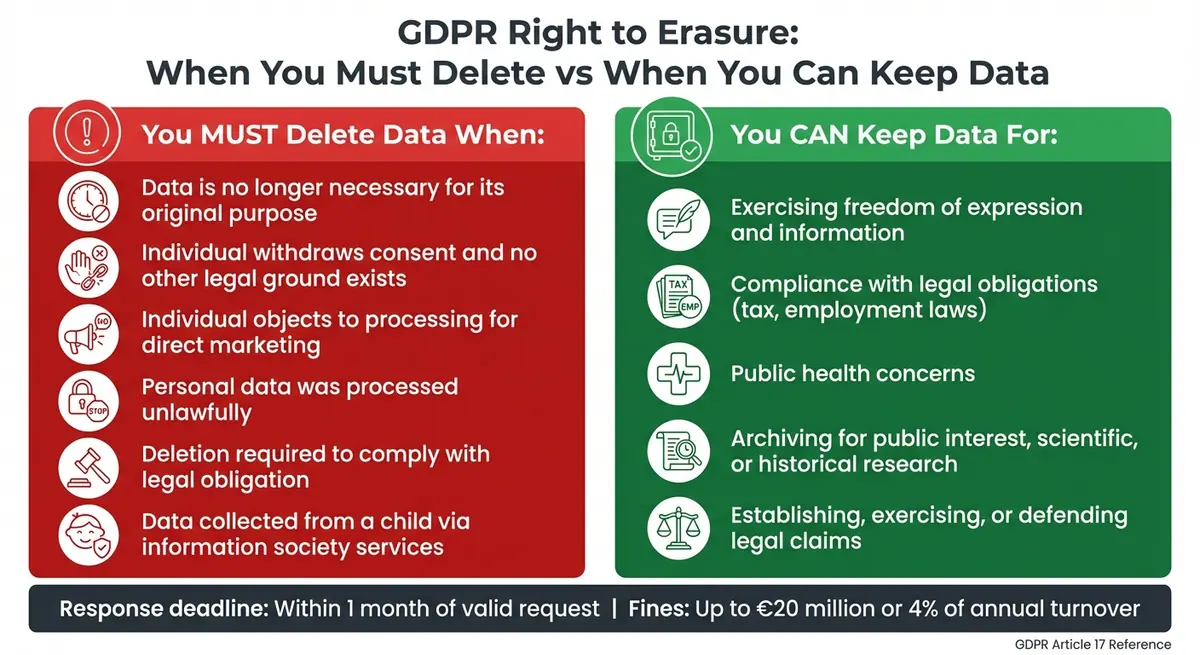
GDPR Right to Erasure: When to Delete vs When to Retain Personal Data
Article 17 of the GDPR introduces the "Right to Erasure", also known as the "Right to be Forgotten". This regulation gives individuals control over their personal data by allowing them to request its deletion under specific circumstances. Once a valid request is received, organizations are required to delete the data - typically within one month.
The concept gained attention following the 2014 Google Spain case, where Mario Costeja González set a legal precedent. The Court of Justice of the European Union ruled that search engines, as data controllers, must remove links to personal data under certain conditions. This landmark case laid the groundwork for what is now codified in Article 17.
"Article 17 reflects a core GDPR philosophy: personal data belongs to the individual, not the organization." - GDPR Article 17 Explained
However, the right is not absolute. It applies only in certain conditions and can be overridden by factors like freedom of expression or legal obligations. If personal data has been made public, the data controller must take reasonable steps to notify other controllers processing the data, so they can delete any links, copies, or replications.
When You Must Delete Data
You are required to delete personal data under the following circumstances:
- The data is no longer needed for its original purpose. For instance, if email addresses were collected for a one-time newsletter campaign that ended months ago, keeping those addresses would be a GDPR violation.
- The individual withdraws consent, and no other legal basis exists for processing.
- The individual objects to processing for direct marketing purposes, making immediate deletion mandatory.
- The data was processed unlawfully, meaning it was collected or handled in violation of GDPR requirements.
- Deletion is required to comply with a legal obligation under EU or Member State laws.
- The data involves children and was collected via information society services, even if the individual is no longer a child when requesting deletion.
When You Can Keep Data
There are exceptions where you can retain personal data, even when a deletion request is made. These include:
- Freedom of expression and information.
- Compliance with legal obligations, such as tax or employment laws.
- Public health concerns.
- Archiving in the public interest, or for scientific, historical, or statistical purposes.
- Establishing, exercising, or defending legal claims.
| Mandatory Deletion Scenarios | Permitted Retention (Exceptions) |
|---|---|
| Data is no longer necessary for its original purpose | Exercising freedom of expression and information |
| Individual withdraws consent and no other legal ground exists | Compliance with legal obligations (e.g., tax or employment laws) |
| Individual objects to processing for direct marketing | Public health concerns |
| Personal data was processed unlawfully | Archiving for public interest, scientific, or historical research |
| Data collected from a child via information society services | Legal claims (establishing, exercising, or defending) |
Before processing any deletion request, verify the identity of the requester to prevent accidental deletion of someone else's data. If you deny the request based on an exception, provide a clear explanation and inform the individual of their right to file a complaint with a supervisory authority. In complex cases, you may extend the one-month response period by an additional two months, but the individual must be notified within the first month.
Understanding these conditions helps in crafting effective data retention and deletion policies, ensuring compliance with GDPR requirements.
How to Create a Data Retention and Deletion Policy
Under GDPR, data deletion isn’t just a suggestion - it’s a requirement. That’s where a solid data retention and deletion policy comes into play. This policy lays out how you manage personal data from start to finish. Without it, you risk keeping data longer than necessary, which directly violates GDPR's storage limitation principle. Your policy should clearly outline what data you collect, why you need it, how long you’ll keep it, and the process for securely disposing of it.
"Personal data must not be kept longer than necessary for the purpose for which it was collected." – GDPR Article 5(e)
It’s also critical that your policy aligns with your Records of Processing Activities (ROPA). Misalignment can lead to outdated retention schedules, which might result in holding data for the wrong amount of time.
Document Your Data Categories and Retention Periods
Start by auditing all the systems and third-party processors that store personal data. Then, organize the data into categories based on its purpose - HR, marketing, finance, etc. - and by the type of individual it pertains to, such as employees or customers.
Next, research the legal and regulatory requirements for each category. For example:
- German Fiscal Code (AO) mandates keeping invoices and accounting records for 8 years.
- Employee payroll data often needs to be retained for 6 to 10 years to meet tax and employment regulations.
- Recruitment applications are generally held for 6 to 12 months to address potential discrimination claims.
Beyond legal requirements, think about operational needs. How long will the data be useful for things like warranty management or service history? For instance, CCTV footage is often kept for 30 days unless tied to an investigation, while website cookies should be retained for no more than 13 months.
Here’s a quick overview of typical retention periods:
| Data Category | Typical Retention Period | Justification / Legal Basis |
|---|---|---|
| Customer Invoices | 6–8 years | Tax and Commercial Law (e.g., AO/HGB) |
| Employee Payroll Data | 6–10 years | Tax and Employment Law |
| Recruitment Applications | 6–12 months | Legal defense against discrimination claims |
| Marketing Consent | Until withdrawal + 3 years | Consent management and evidence of withdrawal |
| CCTV Footage | 30 days | Security and incident analysis |
| Website Logs | 30–90 days | Security monitoring and troubleshooting |
Use this information to create a structured retention schedule. Include details like the data category, purpose, lawful basis, storage location, retention period, and disposal method. Assign someone to own this schedule and oversee the deletion process.
Set Clear Deletion Rules
Once you’ve nailed down retention periods, it’s time to spell out deletion rules. Be specific about what happens when data reaches the end of its retention period. Will it be securely deleted, anonymized beyond recovery, or archived with limited access? Keep in mind that pseudonymized data still requires a deletion date, while only fully anonymized data is exempt.
"The rule is: purpose before obligation – and obligation before deletion." – FTAPI
Automating deletion triggers can make this process smoother. Use system rules or alerts to ensure timely action and schedule regular reviews to avoid data buildup and reduce breach risks.
Your deletion rules should also cover third-party processors. Make sure vendors follow your retention instructions and provide proof of secure disposal. Don’t forget about backups and archived data - your policy should clearly state when and how these will be purged.
How to Map and Classify Personal Data
To delete data properly, you first need a clear understanding of what data you have and where it’s stored. This means looking beyond your primary databases and including all data repositories - like SaaS applications (e.g., Slack, Salesforce, Google Workspace), cloud databases, backups, and even physical records. Without a complete map of your data, you risk missing critical information during deletion requests, which could lead to non-compliance with GDPR. Mapping your data thoroughly ensures you can handle deletion requests accurately and meet legal requirements.
The mapping process should result in three key outputs: an Asset Register that outlines where data is stored and the security measures in place; Records of Processing Activities (RoPA), as mandated by GDPR Article 30; and Data Flow Maps to illustrate how information moves between systems. Not maintaining a proper RoPA can result in fines of up to €10 million or 2% of your annual turnover. By completing this step, you’ll create a solid foundation for building a detailed data inventory.
Create a Data Inventory
Start by identifying "system owners" - the employees responsible for specific tools or databases. These individuals can provide detailed insights into how their systems process data. Collaborate with departments like IT, HR, Marketing, and Legal to capture metrics, KPIs, and daily data usage. Taking this cross-departmental approach ensures that no important information slips through the cracks.
Automated scanning tools can help you detect personally identifiable information (PII) and uncover hidden data, such as deferred backups or archived logs. Considering that roughly 90% of an organization’s data is unstructured, automation is a critical part of the process.
Organize your findings by function - such as Accounting, Customer Support, or Legal - to keep the inventory manageable. Review the data lifecycle to uncover any unexpected uses, and don’t forget to include backups and system logs.
| SaaS Tool | Likely Personal Data Processed |
|---|---|
| Google Workspace | Emails, billing documents, audio recordings, files in G-Drive |
| Slack | Employee messages, shared customer details, timestamps |
| Salesforce | Customer profiles, financial data, employee profiling |
| Zendesk | Geolocation, audio-visual information, customer support history |
| Stripe | Shipping addresses, names, payment transaction data |
Once your inventory is organized, you can move on to classifying and securing sensitive data.
Identify Personally Identifiable Information (PII)
With your data mapped, the next step is to classify it into categories such as: Personal (name, email), Financial (credit card numbers), Identity Documents (passports), Employment details, Tracking data (cookies, CCTV), and Special Category data (health, biometrics). This classification determines the level of protection and deletion requirements for each type of data.
"It is quite difficult, for example, to prepare a privacy statement or an internal privacy policy without understanding what data is collected, how it is processed, and with whom it is shared." – Rita Heimes, General Counsel and Chief Privacy Officer, IAPP
Special Category data, like health records or biometric information, requires explicit consent and additional safeguards. For each category, document the legal basis for processing - such as Consent, Contract, Legal Obligation, Vital Interest, Public Task, or Legitimate Interest. This documentation is essential when handling deletion requests, as it shows whether the data can be retained or must be erased.
Finally, link each data category to a specific retention period in your inventory. This step clarifies when data should be deleted and ensures you can respond to erasure requests accurately. This classification not only simplifies deletion processes but also lays the groundwork for automated data management practices discussed later.
sbb-itb-5f36581
How to Securely Locate and Delete Data
Once you've mapped and classified your data, the next step is to locate and securely delete it across all systems. Standard deletion methods often fall short, as they only remove pointers to the data. To ensure compliance with regulations, use specialized tools that can permanently erase data.
Use Data Discovery and Deletion Tools
Personal data is often scattered across various systems, making manual searches inefficient. Instead, rely on specialized discovery tools that can scan your entire digital environment for specific pieces of personally identifiable information (PII) - like Social Security numbers, tax IDs, email addresses, and phone numbers. For example, Microsoft Purview eDiscovery lets administrators search for PII across platforms like Exchange, SharePoint, OneDrive, and Teams, which collectively store a significant portion of organizational data. Similarly, tools like BCWipe offer GDPR templates to identify and securely erase data on local devices and shared storage.
To refine your searches, use Boolean operators. For instance, combining terms like "email AND filetype:docx" can help you zero in on relevant files, saving time and effort. When dealing with large datasets, platforms like Delta Lake allow point deletes using ACID transactions, making it easier to remove PII in response to erasure requests.
Once you've located the data, ensure it's deleted in a way that prevents recovery, even by forensic methods. Follow standards like NIST Special Publication 800-88 (Revision 2), which outlines three levels of sanitization:
- Clear: Software-based overwriting
- Purge: Secure erase commands or degaussing
- Destroy: Physical destruction of media
Certified tools that meet U.S. DoD 5220.22-M standards can help you achieve these levels of sanitization. Don't forget to clear secondary locations, such as email "sent" folders, recycle bins, and temporary storage areas.
"Media sanitization refers to a process that renders access to target data on the media infeasible for a given level of effort." – NIST Special Publication 800-88
Once you've securely deleted active data, turn your attention to backups and archived information.
Handle Backups and Archived Data
Backups present unique challenges in the deletion process, as they are often immutable or stored on systems that don’t allow immediate removal. While active records must be deleted promptly - usually within 30 days under GDPR guidelines - backup data can remain until overwritten, provided it is rendered "beyond use."
For encrypted backups, crypto-shredding is a reliable option. By deleting or overwriting encryption keys, you make the data inaccessible. Store these keys in secure locations like a Hardware Security Module (HSM) or Trusted Platform Module (TPM) to ensure they cannot be retrieved after deletion. If you rely on third-party vendors for hardware destruction, always obtain Certificates of Sanitization to maintain a compliance audit trail.
"The key issue is to put the backup data 'beyond use', even if it cannot be immediately overwritten." – Information Commissioner's Office (ICO)
For physical media that has reached the end of its lifecycle, use methods like cross-cut shredding, degaussing, or incineration to ensure data is irrecoverable. Keep hardware awaiting destruction in locked, restricted areas and maintain an access log to prevent unauthorized access before disposal.
How to Automate and Document Data Deletion
Relying on secure deletion methods is a great start, but incorporating automation takes things further by reducing errors and ensuring deadlines are met. Manual deletion can be tedious and prone to mistakes, but automation offers consistency and helps meet GDPR deadlines. By setting up automated workflows and maintaining detailed audit trails, you can simplify compliance and demonstrate accountability during regulatory inspections. Here's how to get started with automated deletion schedules and audit trail documentation.
Set Up Automated Deletion Schedules
Automating deletion workflows eliminates the need for manual tracking and ensures data is removed based on your retention policies. A good approach is to create a centralized control table that tracks user IDs and deletion requests. Scheduled jobs can then query this table to perform bulk deletions across all data layers.
In cloud-based systems, tools like Microsoft Priva can automate deletions by applying retention labels, triggering deletion within 30 days. Similarly, Microsoft Entra ID (formerly Azure AD) can automatically purge personal data across services like Power Automate and Intune when a user account is deleted. Power Automate also enforces a 28-day retention policy for system-generated logs, run histories, and activity feeds.
For data lakes and warehouses, built-in functions like VACUUM or REORG TABLE ... APPLY (PURGE) can permanently delete unused data files. For instance, Delta Lake keeps table history for 30 days by default, after which running the VACUUM command removes the data from storage. Streaming pipelines can use flags like skipChangeCommits to prevent disruptions to downstream processes.
API-driven integrations can also streamline deletion of personal data across third-party platforms. Tools like DataGrail automate the entire Subject Rights Request (SRR) process, from verifying the user’s identity to completing the deletion across all connected systems.
Once your automated deletion schedules are in place, documenting each action is crucial to maintaining compliance.
Keep an Audit Trail
Even with automation, maintaining a thorough audit trail is essential for proving compliance during regulatory reviews. Your audit log should record every step of the deletion process, including details like who authorized it, when it occurred, and whether it was successful. A dedicated action execution log - commonly stored as a CSV file - should track key details such as the Approval UPN, Approval Date, Action Status (True/False), and Action Date for every processed item.
"The right of erasure allows data subjects to request the removal of their personal data from an organization's customer data. This personal data includes system-generated logs but excludes audit logs." – Microsoft
Systems should be configured to flag any deletion failures automatically, enabling immediate corrective actions. If you use third-party vendors for hardware destruction, always request and securely store Certificates of Sanitization to maintain a complete compliance record. Tools like BigID and Microsoft Priva can generate audit logs to support regulatory reviews. For example, Microsoft Intune keeps audit logs for user and device actions for 2 years before they are automatically deleted.
In cases where legal holds or retention conflicts arise, automated workflows should flag these items in the execution log for manual review. This ensures that data subject to legal obligations is preserved, while still complying with GDPR for all other records.
How to Maintain Long-Term GDPR Compliance
Sustaining GDPR compliance isn’t a one-and-done task - it requires constant vigilance through employee training and regular data audits. By equipping your team to handle deletion requests effectively and proactively reviewing your data practices, you can minimize risks and stay ahead of potential violations. The key is to prevent human error and organizational drift by making compliance an ongoing priority.
Train Employees on Data Deletion Policies
Your employees are the first line of defense when it comes to GDPR compliance. Since GDPR allows individuals to submit data erasure requests in any format, all staff members should be trained to recognize and escalate these requests promptly. This includes customer service representatives, sales teams, and even front-desk staff.
"You must respond to a request for erasure without undue delay and at the latest within one month, letting the individual know whether you have erased the data in question, or that you have refused their request." – Information Commissioner’s Office (ICO)
For employees directly involved in data management, more specialized training is essential. IT teams, for example, need to understand secure methods for permanently deleting data, ensuring it cannot be recovered, rather than just moving files to the recycle bin. Customer-facing staff, on the other hand, should be trained to recognize when the right to erasure doesn’t apply, such as in cases involving tax reporting, legal obligations, or public interest exemptions.
To maintain transparency and compliance, document verbal requests and provide staff with clear checklists detailing retention periods and review dates. Since GDPR mandates a response to erasure requests within one month (with a possible two-month extension for complex cases), training should emphasize the importance of documenting and escalating requests without delay.
Run Regular Data Audits
Regular audits are your safety net for catching compliance gaps before they escalate. GDPR requires "regular" and "periodic" audits, but their frequency should align with your organization’s risk profile. For instance, businesses handling large volumes of sensitive data or engaging in complex processing activities may need more frequent reviews. Some companies even schedule annual visits to third-party records storage providers as part of their compliance checks.
"As a general rule, the greater the risk, the more robust and comprehensive the measures you should put in place." – Information Commissioner’s Office (ICO)
Audits should confirm that data retention schedules are followed and that automated deletion systems are working as intended. Assign a team member to verify that destruction certificates from third-party disposal services match the records sent for destruction. Additionally, automated alerts can help flag outdated or excessive data for removal, ensuring nothing slips through the cracks. After each audit, create a detailed remediation plan that specifies actions, assigns responsibilities, and sets deadlines to address any issues identified.
Accountability is crucial for sustaining compliance. Appoint a dedicated staff member or Data Protection Officer to oversee retention schedules and deletion processes. Formalize these responsibilities within their job descriptions and integrate them into regular team meetings. This ensures that data protection remains a priority, even as your organization evolves or grows.
Conclusion
GDPR-compliant data deletion isn't just about following the law - it's also a smart move for your business. By setting up clear retention schedules, verifying the authenticity of deletion requests, and using secure methods to remove data, you create a system that respects privacy while improving efficiency.
Consider this: in July 2021, Amazon was hit with an $888 million fine for GDPR violations. Plus, research reveals that 66% of companies failed at least one data privacy audit. These examples make it clear - compliance isn't just about avoiding fines; it's a cornerstone of long-term business stability. Automating deletion processes and keeping detailed audit trails can help you stay compliant while cutting storage costs, bolstering data security, and showing your commitment to accountability.
"Compliance should not be seen as a burden but instead as an opportunity to strengthen relationships, protect reputation, and reduce risks." – GoTrust
The challenge? Personal data often hides in backups, employee devices, cloud systems, and third-party platforms. Successfully locating and securely deleting this data requires effective tools and regular audits. For data in backups that can't be deleted right away, you can render it "beyond use" by restricting access and documenting its status.
Forward-thinking businesses treat data deletion as a continuous process, not a one-time task. By embedding privacy into your operations, centralizing data management, and conducting regular reviews, you'll not only safeguard customer rights but also build trust and strengthen your reputation in a world that values privacy more than ever. These efforts ensure your data management strategy stays strong and GDPR-compliant for the long haul.
FAQs
What are the best tools for securely deleting data under GDPR?
Businesses aiming to meet GDPR standards for data deletion can turn to specialized tools that integrate data discovery and secure wiping techniques. These tools are designed to locate personal data across systems and ensure it’s permanently deleted in a way that makes recovery impossible. Common methods include cryptographic erasure, degaussing, and even physical destruction of storage media.
Some advanced tools come equipped with search features to pinpoint sensitive data, even in backups or on diverse storage media. It’s equally important to maintain detailed logs of the deletion process, which can serve as proof of compliance with GDPR regulations.
When should I delete or retain data to comply with GDPR?
To meet GDPR requirements, you need to delete data once it has served its original purpose or when its retention period has expired. Start by creating a clear data retention schedule that specifies how long various types of personal data should be stored. This schedule should align with legal, operational, or contractual obligations. Make it a habit to review and update this schedule regularly to ensure it complies with current regulations.
Keep data only if there's a valid legal or operational reason to do so. When the retention period is over, make sure the data is securely deleted or anonymized. This approach not only protects sensitive information but also reduces the risk of compliance issues and potential security threats.
What are the steps to create a GDPR-compliant data retention policy?
Creating a GDPR-compliant data retention policy involves a few key steps to ensure personal data is handled responsibly and in line with regulations.
Start by defining retention periods for different types of personal data. These timeframes should be grounded in legal, regulatory, or business requirements. Document these periods in a schedule that’s easy to reference, and make sure to review and update it regularly to reflect any changes in laws or business needs.
Next, set up secure processes for deleting or anonymizing data once it’s no longer needed. Automating these processes can save time and reduce errors - for example, using systems that automatically purge expired data. Ensure every deletion is properly approved and logged for accountability. Also, verify that third-party processors handling your data adhere to the same rules.
Lastly, thoroughly document your policy to demonstrate compliance with GDPR. This includes outlining procedures, retention schedules, and security measures. Regularly revisit and refine your policy to keep pace with changes in regulations or internal practices. Make sure the policy is communicated clearly within your organization so everyone understands their role in maintaining compliance.
Related Blog Posts
Get new content delivered straight to your inbox

The Response
Updates on the Reform platform, insights on optimizing conversion rates, and tips to craft forms that convert.



Drive real results with form optimizations
Tested across hundreds of experiments, our strategies deliver a 215% lift in qualified leads for B2B and SaaS companies.
