
.webp)
Common GDPR and CCPA Audit Mistakes to Avoid


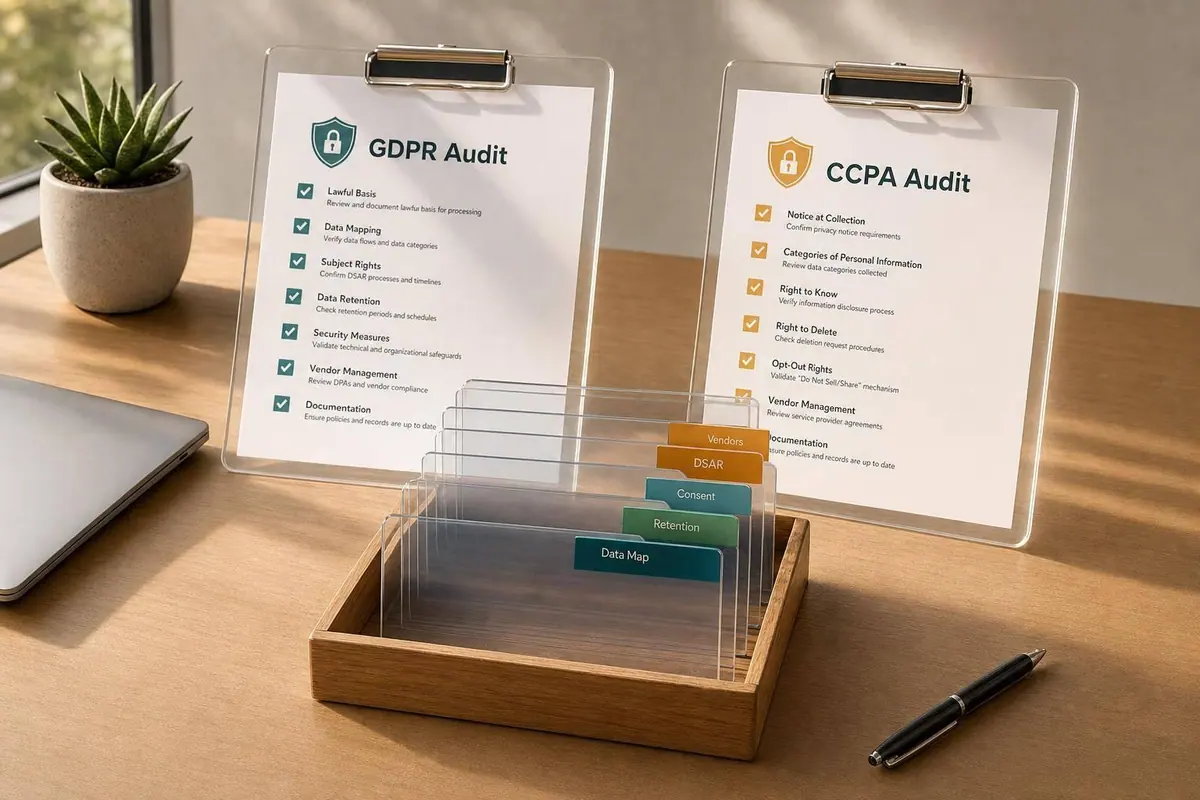
Most privacy audits fail for a simple reason: what your site says and what your systems do don’t match. If I had to cut this article down to the few points that matter most, I’d focus on these: split GDPR and CCPA reviews instead of using one checklist, keep data maps and retention rules up to date, fix consent and opt-out flows, and track rights requests and vendor actions in one place.
Here’s the short version:
- Don’t merge GDPR and CCPA into one audit. GDPR asks for a lawful basis. CCPA looks hard at opt-out rights, including sale/share controls.
- Map the full data path. Forms, cookies, CRM syncs, ad tools, and server-side events all count.
- Keep proof. You need time-stamped consent logs, notice versions, request records, and deletion records.
- Fix dark-pattern consent flows. If “accept” is one click, “reject” should not take extra steps.
- Set retention rules inside the system. Old lead records should not sit in the CRM for years with no delete job.
- Centralize DSAR intake and vendor follow-through. CCPA gives 45 days to respond, and GDPR gives 30 days.
- Test breach response. Under GDPR, regulator notice may be due within 72 hours.
One stat stands out: 90% of GDPR audit findings are tied to documentation gaps, not security failures. That’s why the biggest problems often come from missing records, stale notices, weak ownership, and broken request workflows - not from the privacy policy itself.
| Area | What usually goes wrong | What I’d fix first |
|---|---|---|
| Scope | One checklist for both laws | Split controls by law and geography |
| Data mapping | Forms and vendor flows missing | Update ROPA and vendor lists after each change |
| Consent | Tags fire before consent or after opt-out | Test cookie, pixel, and server-side suppression |
| Notices | Policy doesn’t match site behavior | Tie notice updates to site and tool changes |
| Retention | Lead data kept with no delete rule | Add automated deletion and review logs quarterly |
| Rights requests | Manual inbox handling and missed deadlines | Use one intake form and deadline tracking |
| Vendors | Deletion stops at your main system | Push requests to all vendors and sub-processors |
| Incidents | Breach plan exists only on paper | Run tabletop drills and save results |
If you want an audit to hold up, I’d start with the controls that regulators can test in minutes: forms, cookies, opt-outs, request handling, and vendor propagation.
Misunderstanding the Scope of a GDPR and CCPA Audit
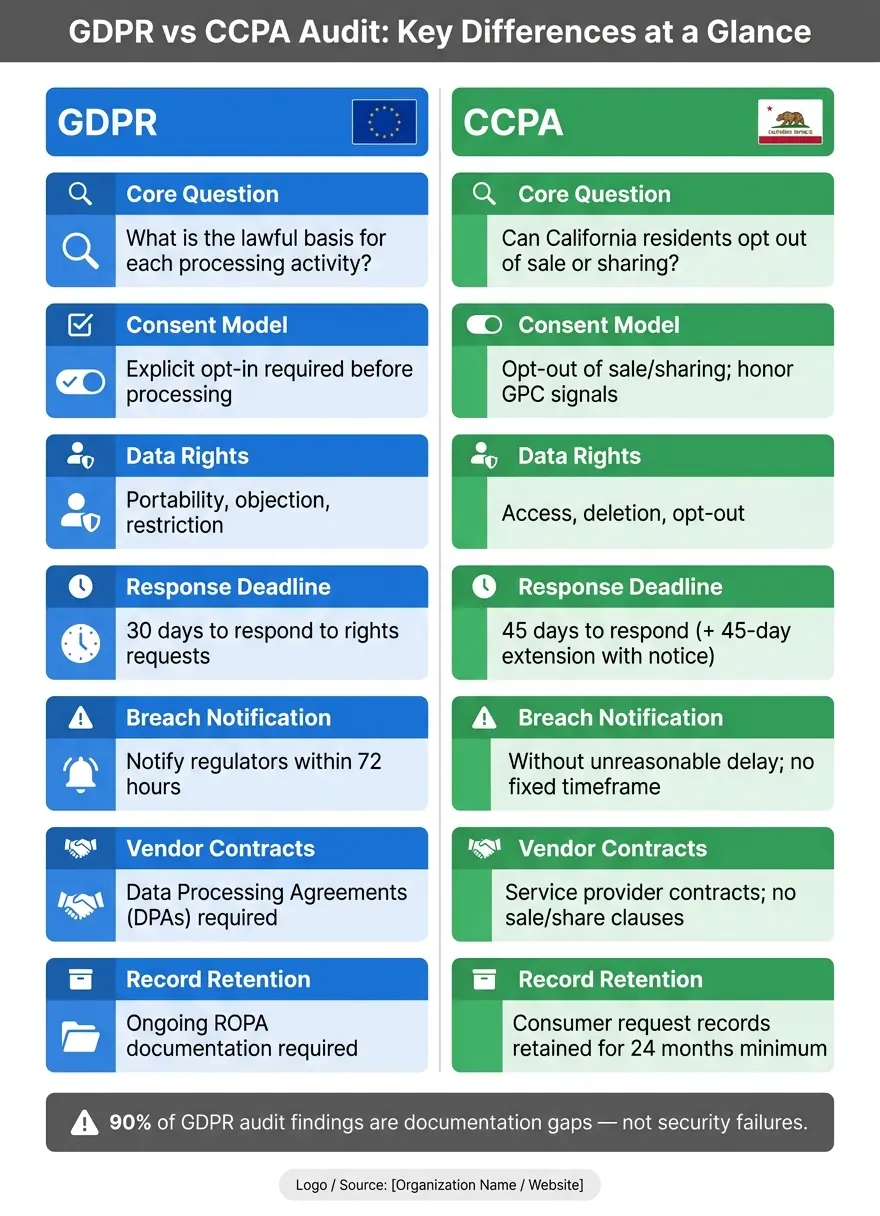
GDPR vs CCPA Audit: Key Differences at a Glance
Mistake: Treating GDPR and CCPA as One Audit
A common mistake is using one checklist for both GDPR and CCPA. On the surface, that can seem reasonable. Both deal with privacy notices, data rights, and vendor oversight. But under the hood, they work in different ways, and that shows up fast in forms, cookies, CRM workflows, and vendor tools.
GDPR asks a basic question for each processing activity: what is the lawful basis? CCPA looks at a different issue: can California residents opt out of sale or sharing? GDPR applies based on data processing. CCPA applies to qualifying for-profit businesses and puts the spotlight on sale and share rights.
That gap matters in practice. A lead generation form collecting EU visitor data has to meet GDPR’s explicit opt-in model. That same form for California residents needs a clear "Do Not Sell or Share My Personal Information" link - a control with no direct GDPR equivalent. If you mash both laws into one audit, you’ll almost always miss one side of the job. Once you split the scope the right way, the next problem tends to show up fast: weak ownership.
Solution: Build Separate Audit Controls for Each Law and Data Geography
Use separate audit trackers for GDPR and CCPA, tagged by geography or by the rule that applies. The table below lays out the main control areas for each law.
| Audit Area | GDPR Focus | CCPA Focus |
|---|---|---|
| Consent model | Explicit opt-in before processing | Opt-out of sale/sharing; honor GPC signals |
| Data rights | Portability, objection, restriction | Access, deletion, opt-out |
| Vendor review | Data Processing Agreements (DPAs) | Service provider contracts; no sale/share |
| Breach notification | 72 hours to regulators | Without "unreasonable delay"; no fixed timeframe |
Separate controls help, but only if someone clearly owns them.
Mistake: Running an Audit Without Clear Ownership or a Set Schedule
Even teams that get the GDPR/CCPA split right often fall apart here. No one is named as the privacy owner. Legal, marketing, IT, and sales don’t have a clear handoff. The audit gets treated like a one-and-done project instead of a recurring process.
The result is pretty predictable. When California regulators send an inquiry letter, businesses often have only 30 days to produce years of logs, data maps, and proof of technical compliance. In early 2026, Todd Snyder, a men's apparel company, was found at fault by the CPPA because its opt-out tool stayed misconfigured for 40 days - the kind of drift a recurring review would have caught.
A practical schedule usually includes:
- A full-scope annual audit
- Quarterly reviews of high-risk areas, such as consent mechanisms and vendor lists
- A new review after any material change, like a new form, a new tracking tag, or entry into a new market
Ownership also needs to be spelled out in plain terms. Legal should own lawful basis documentation. Marketing should own form and notice content. IT should own consent and signal testing. Sales should own downstream data handling. If that isn’t written down, ownership stays fuzzy, and the same problems keep coming back.
That ownership then needs to connect to a live map of forms, cookies, CRM flows, and retention rules.
sbb-itb-5f36581
Data Mapping, Record-Keeping, and Retention Gaps
Mistake: Incomplete Data Maps for Forms, Cookies, and CRM Flows
Once ownership is set, the next place teams slip is the data map. Many document the big systems - the main CRM, the primary email platform - and then stop. The problem is everything between those tools: embedded lead forms, tracking pixels and SDKs, automation rules that copy data into other lists, and the back-and-forth flow between CRM and email systems. The map ends at the center, even though the data does not.
This gap shows up far more often than teams think. 90% of GDPR audit findings are documentation gaps - missing Records of Processing Activities (ROPA) entries and undocumented vendor relationships - not security failures. On the surface, a form that asks for a name and email seems simple. In practice, that same submission may trigger enrichment, create list copies, sync into a CRM, and fire a pixel to a third-party analytics or ad tool. That means there are several steps in how data is collected, used, shared, stored, and deleted.
Auditors want the full path, not just the first stop. And that same map needs deletion rules too. If it doesn't, over-retention often starts right there.
Solution: Keep Living Records of Processing Activities and Consent Evidence
A ROPA that was made during GDPR rollout and never touched again is one of the most common findings in inspections. Treat your data map like a living record. If a tool changes, a form changes, or an integration changes, the ROPA should change too.
Each ROPA entry should show:
- the data categories collected
- the purpose
- the recipients
- any international transfer safeguards
- the retention period
Where teams often fall short is the evidence layer. You need time-stamped logs that show which version of the privacy notice was shown at the moment of collection, plus proof that consent was captured before any tracking tags fired. If a form sends data into your CRM and marketing platforms, record every downstream transfer in the ROPA - what was passed, when it was passed, and why. The form is a processing activity. Every integration connected to it is one too.
Keep request and response records long enough to show compliance over time.
Mistake: Storing Lead Data Indefinitely Without Enforceable Retention Rules
Marketing and sales databases are where over-retention tends to pile up quietly. Someone fills out a form, never becomes a customer, and the record just sits in the CRM. Months pass. Then years. No one removed it because no one owned the job. That's not just messy database management. It's a compliance issue.
Set retention periods in policy, then enforce them inside the system. A policy that says data will be deleted after a set period does not mean much if no automated workflow backs it up and no log shows it happened. When you attach automated deletion rules to CRM data categories, you do two things at once: carry out deletion and create a trail auditors can check.
Review retention jobs and suppression logs every quarter. That record should line up with the consent and notice flow captured on the form.
Consent, Notice, and Form Design Failures
Mistake: Noncompliant Consent Flows and Unclear Opt-Out Paths
The most common consent problem usually isn't a missing checkbox. It's a form or banner that makes saying no harder than saying yes. That's exactly the kind of thing auditors check for: one-click acceptance, then a longer, more frustrating path to reject.
Honda was fined after users could accept cookies in one click but had to go through more steps to opt out. California rules say the opt-out path cannot be longer or harder than the opt-in path.
"The path for a consumer to exercise a more privacy-protective option shall not be longer or more difficult or time-consuming than the path to exercise a less privacy-protective option." - 11 CCR § 7004(a)
That same rule applies to sale/share opt-outs and authenticated user settings.
If tracking pixels or ad tags fire before consent is given, or keep firing after someone opts out, that counts as unauthorized processing.
Solution: Redesign Forms and Notices Around Data Minimization and Proof
Start with data minimization. Every field in a lead generation form should serve a clear business purpose. Optional marketing consent should stand apart from the required submission step. If a field doesn't help complete the transaction or support a lawful follow-up, cut it.
A simple approach works best:
- Keep only the fields you need
- Separate marketing consent from form submission
- Show geography-specific disclosures through conditional routing
- Place just-in-time notices right next to the fields where data is collected
That placement matters. People should see how their data will be used at the exact moment they hand it over. And from an audit point of view, those proof records do double duty: they help show that the notice matched the form at the time of collection.
Mistake: Privacy Notices and Cookie Disclosures That Do Not Reflect Actual Data Collection
Privacy notices break down when they stop matching your current scripts, vendors, and data flows. Regulators now compare the notice against what the site is actually doing, including network traces that show which scripts fire, which data categories are sent, and which vendors get that data.
This can happen fast. Add a new pixel, SDK, or CRM connection, and a notice can be out of date overnight. If no one owns the update process, the notice can end up describing a data setup that no longer exists.
Disclosed data categories, recipients, and purposes must line up with actual data flows. If data goes to an ad platform or analytics partner that is not listed as a recipient, that gap can reclassify the transfer as a "sale" under CCPA and trigger stricter opt-out rules. The safest move is to tie notice updates to change management, not just an annual legal review.
Once disclosures match reality, auditors usually move to the next check: whether request handling and vendor controls still work the way the notice says they do.
Rights Handling, Vendor Review, and Ongoing Monitoring Gaps
Mistake: Manual DSAR Handling and Untested Breach Response
Once your notices line up with what you actually do, auditors move to the next check: can you handle requests, vendors, and incidents on time?
Rights-request problems often start with a messy intake setup. If deletion requests come in through DMs, support email, and contact forms, it gets hard fast. You can't track every request in one place, confirm who sent it, or show that you replied by the deadline.
Deadlines matter. CCPA gives you 45 days to respond, with one extra 45-day extension if you notify the consumer before the first deadline runs out. GDPR requires a response within 30 days.
Identity checks are another common tripwire. Some organizations verify too little and release data based on only an email address. Others go too far and ask for too much sensitive data for a low-risk request. A tiered approach works better: lighter checks for routine requests, tighter checks for sensitive ones.
Incident response is the other weak spot. A lot of teams have a breach plan on paper, but they've never tested it. That's a problem. Run tabletop exercises and document the results. Under GDPR, you must notify supervisory authorities within 72 hours after becoming aware of a breach.
Solution: Use Structured Workflows for Requests, Vendors, and Control Reviews
Use one workflow for intake, routing, and logging. Reform can help with a single rights-request form, conditional routing, and submission logs.
Vendor review should live in that same workflow. If you delete data in-house but fail to notify your CRM, email platform, analytics provider, or form tool, auditors will notice. Keep a live inventory of every vendor and sub-processor that touches personal data so deletion requests move beyond your main database.
CCPA timing misses usually come back to the same issues:
- missed acknowledgments
- weak deadline tracking
- extension notices that never go out
- vendor propagation failures
| Common CCPA Timing Mistake | Regulatory Risk | Operational Fix |
|---|---|---|
| Missed acknowledgment or deadline | Failure to confirm receipt or respond on time | Automate confirmations and deadline tracking |
| Silent extension or missed 90-day maximum | No notice to consumer; exceeding allowed timeframe | Require notification before day 45; track full lifecycle in a central dashboard |
| Vendor delay impact | Third-party delays | Include vendors in automated workflows |
CCPA record-keeping rules require you to retain records of consumer requests and responses for at least 24 months. So your tracking system can't just log completed requests. It also needs to record denials, along with the legal basis for each one. Structured dropdown fields in the intake form help keep that process consistent and audit-ready.
Conclusion: The Audit Mistakes Worth Fixing First
The issues that hurt most in audits are often the ones teams put off the longest: rights requests buried in untracked inboxes, vendor propagation that stops at the main database, and breach plans that have never been tested.
Fix the intake workflow. Extend deletion across every vendor in the chain. Run tabletop exercises before a live incident puts you on the clock.
Those three gaps - not policy language - are usually what auditors spot first.
FAQs
How often should we audit GDPR and CCPA compliance?
Treat compliance as an ongoing responsibility, not a one-time project.
A common best practice is to run internal audits every quarter for high-risk areas, do a full audit once a year, and bring in external or independent reviews every one to two years. Keep records, such as consumer request logs, for at least 24 months so you're ready for regulator inquiries.
What records should we keep for an audit?
Keep records that are accurate, current, and lined up with how your business actually handles data. That includes:
- a data inventory and ROPA
- signed Data Processing Agreements
- documented lawful bases for processing
- evidence of data subject request fulfillment
You should also keep privacy notices, security logs, breach response plans, and Data Protection Impact Assessments up to date. Review them on a regular basis so they still match your current business processes.
Who should own privacy audit tasks internally?
Ownership depends on your organization’s size, risk profile, and maturity.
In many companies, internal teams handle this work. That often includes compliance, information security, or a designated Data Protection Officer. The reason is simple: they already know the business, understand day-to-day processes, and can usually do the work at a lower cost.
For CCPA cybersecurity audits, an external team can be the better fit. Outside specialists bring independence and deeper technical skill, which matters when you need a more objective review.
A lot of organizations split the work. Internal staff take care of documentation, system access, and remediation. External specialists then review the higher-risk areas, where an outside perspective can help spot issues that an in-house team might miss.
Related Blog Posts
Get new content delivered straight to your inbox

The Response
Updates on the Reform platform, insights on optimizing conversion rates, and tips to craft forms that convert.




Drive real results with form optimizations
Tested across hundreds of experiments, our strategies deliver a 215% lift in qualified leads for B2B and SaaS companies.
