
.webp)
7 Tips for Storing OAuth Tokens Securely


If someone steals your OAuth token, they may not need your password or MFA at all. That’s the core issue: tokens are bearer credentials, so possession can be enough to get in.
If I had to boil this article down to a few moves, I’d say: keep tokens on the server, avoid browser storage, use short lifetimes, rotate refresh tokens, split token storage, protect encryption keys, and support revocation. Those seven steps cut the time, place, and ways a stolen token can be used.
Here’s the whole playbook in one view:
- Store tokens server-side in encrypted storage, not in
localStorageorsessionStorage - Never commit tokens to source code, Git history, or
.envfiles tracked by Git - Keep tokens off public clients when possible; use a BFF for SPAs
- Use short-lived access tokens and rotate refresh tokens on every use
- Store access and refresh tokens separately because they carry different risk
- Protect encryption keys with KMS, envelope encryption, and tight IAM rules
- Check token status and revoke fast with deny lists, introspection, and
/revoke
One stat stands out: 68% of API breaches in 2025 involved OAuth2 misconfigurations. So when I look at token storage, I don’t treat it like a small setup detail. I treat it like part of access control.
Stop Storing Tokens in Local Storage! (OAuth 2.1 Guide)
sbb-itb-5f36581
Quick Comparison
| Tip | Main action | Main reason |
|---|---|---|
| 1 | Store tokens in encrypted server-side storage | Keeps tokens away from page JavaScript |
| 2 | Never store tokens in code or version control | Stops leaks through repos, laptops, and CI |
| 3 | Keep tokens off public clients | Lowers theft risk in browsers and other exposed apps |
| 4 | Use short lifetimes and rotate regularly | Cuts the window of abuse after a leak |
| 5 | Store access and refresh tokens separately | Limits damage if one store is exposed |
| 6 | Secure the encryption keys | Stops encryption from turning into a false sense of safety |
| 7 | Check validity and support revocation | Lets you shut down stolen or replayed tokens |
If you want the short answer, it’s this: don’t let the browser hold sensitive tokens, don’t let refresh tokens sit in plain text, and don’t wait until expiry to deal with compromise.
1. Store Tokens in Encrypted Server-Side Storage
Store OAuth tokens on the server, not in the browser. If you keep them in localStorage or sessionStorage, any JavaScript on the page can read them. And that’s the problem.
"A single XSS vulnerability - an injected ad script, a compromised npm package, a browser extension with overly broad permissions - could silently exfiltrate [tokens in localStorage]." - BackendBytes Engineering Team
Storage Location and Encryption
Keep refresh tokens in a server-side database and encrypt them at rest. When possible, store only a hash of the refresh token. For browser session state, use a server-issued HttpOnly, Secure, SameSite=Strict cookie.
That setup matters because JavaScript can’t read those cookies. So if malicious code lands on the page, it has a much harder time grabbing session data through XSS.
The BFF Pattern
For single-page apps, use a Backend for Frontend (BFF). That way, tokens stay on the server, and the browser gets only a secure session cookie.
"Treat the browser as untrusted." - OpenReplay Team
Once tokens stay server-side, the next risk is accidental exposure in source code and version control.
2. Never Store Tokens in Source Code or Version Control
Hardcoding an OAuth token in source code is a security risk. Bearer tokens grant direct access, so your code should never include them. If one gets committed, anyone with repo access can use it.
Version control is the next problem. Git keeps history, so deleting a token in a later commit does not erase it from earlier commits. And private repos aren't a safe zone. They still get cloned to developer laptops and CI systems, which means a lost or compromised machine can take those tokens outside the organization.
A safer setup is to load tokens at runtime through environment variables or a secret manager. Add .env files to .gitignore. It also helps to block token patterns with a pre-commit hook, so mistakes get caught before they land in Git.
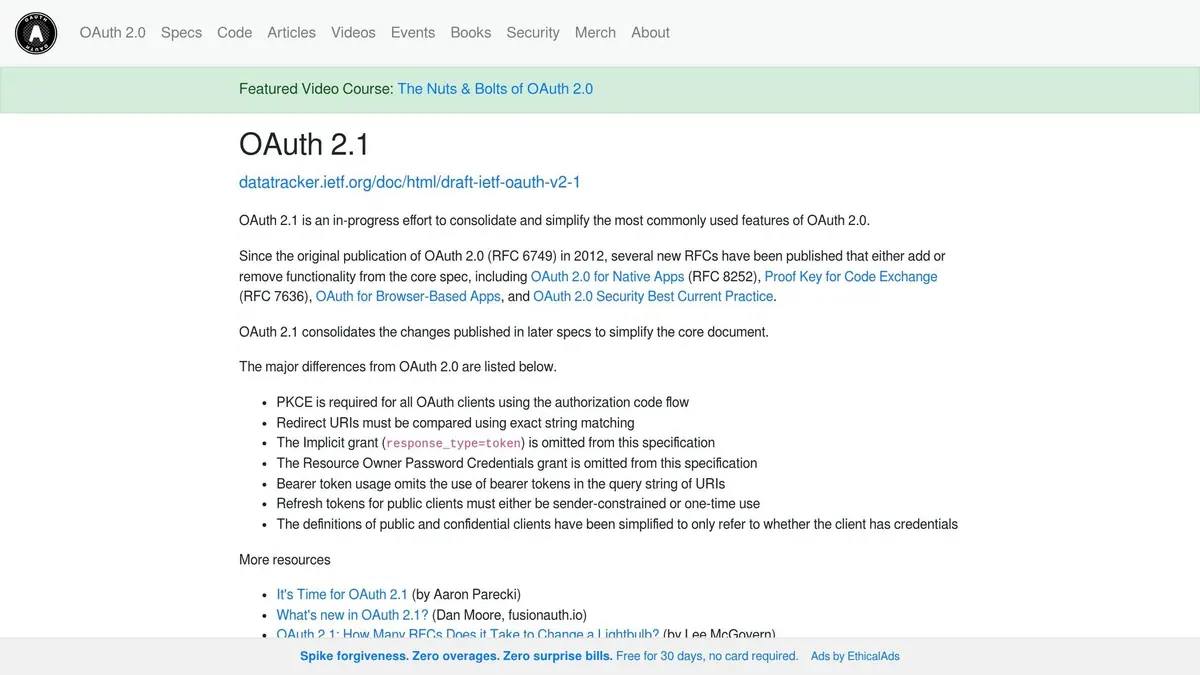
If a token does get committed, treat it as compromised right away. Call the OAuth provider's revocation endpoint (RFC 7009) to invalidate it, then remove it from storage and caches.
Even if source control stays clean, the browser can still expose tokens.
3. Keep Tokens Off Public Clients
Clean source control helps, but the browser is still a common leak point. A public client is any app that can't keep a secret safe. If JavaScript can read a token, bad code can steal it.
Treat browser apps as untrusted. Any script running on the page can access exposed tokens. That includes data in localStorage, sessionStorage, and any cookie that JavaScript can read. Third-party scripts, compromised packages, and malicious extensions can all exfiltrate tokens without any visible sign.
Storage Location
For SPAs, use a Backend for Frontend (BFF). That way, the browser gets only an httpOnly, Secure, SameSite=Strict session cookie.
Encryption and Key Handling
Encrypting a token before putting it in localStorage doesn't fix the core problem if the browser can also read the key. It's like locking a door and leaving the key under the mat.
Use DPoP instead. DPoP binds each request to a client-held key, so a stolen token can't be replayed on its own. After storage, token lifetime becomes the next control.
4. Use Short Token Lifetimes and Rotate Regularly
Short-lived access tokens cut down the blast radius of a leak. But that only works if refresh tokens are rotated the right way.
Keep access tokens short-lived:
- 5 to 15 minutes for sensitive APIs
- Up to 60 minutes for general use
That way, if a token gets exposed, the attacker has a much smaller window to use it.
Token Lifetime and Rotation
Here’s how this should work in practice. When a client uses a refresh token to get a new access token, the server should issue a new refresh token at the same time and invalidate the old one right away. That’s refresh token rotation, and it helps surface token reuse.
"The invariant: at any moment, exactly one refresh token in the family is active. Presenting any other (rotated or revoked) token triggers family-wide revocation." - BackendBytes Engineering Team
To make this work, servers track each refresh-token family with a family_id. If an attacker gets hold of an old refresh token and tries to use it after rotation, the server can spot that reuse and revoke every token in that family at once.
Revocation Risk
Short lifetimes lower risk, but they don’t erase it. If a token is stolen one minute into a 15-minute lifetime, an attacker may still have 14 minutes to use it.
Once rotation is set up, keep access tokens and refresh tokens separate so a single leak doesn’t expose both.
5. Store Access Tokens and Refresh Tokens Separately
After rotation, the next safeguard is simple: don't store access tokens and refresh tokens in the same place. They don't carry the same level of risk, so they shouldn't get the same treatment. If one leaks, the other should still be out of reach.
Storage Location
Keep access tokens in memory or in short-lived server session data. They should be easy to discard and short-lived by design.
Refresh tokens need tighter storage. Put them in encrypted backend storage or a hardware-backed keystore. On mobile, that means iOS Keychain or Android Keystore.
Encryption and Key Handling
Refresh tokens should never sit in plain text.
"Refresh tokens are far more dangerous if stolen because they provide persistent access. Store them with the same care as passwords." - Yukti Singhal, Security Researcher, Safeguard
A good rule here: treat a refresh token like a house key, not a visitor pass. Encrypt it with a KMS, or store only a hash if you don't need to retrieve the original value later.
Exposure and Revocation Risk
Keeping tokens apart shrinks the damage from a breach. If an access token leaks, the window is short. If a refresh token leaks, an attacker may keep getting new access tokens over and over.
So the handling should stay separate too:
- Access tokens stay ephemeral
- Refresh tokens stay locked down
Once the tokens are split, the next step is to protect the keys used to encrypt them.
6. Secure the Encryption Keys Used to Protect Tokens
Once you've split access tokens from refresh tokens, the next job is to protect the keys behind them.
Storage Location
Store encryption keys in a KMS or secret manager, separate from both the app server and the database. That way, if the app server or database gets compromised, the keys aren't sitting there waiting to be taken too. It also makes access control much cleaner. You can audit who touched what and limit permissions by role or environment.
Encryption and Key Handling
Use envelope encryption. In plain English, that means you encrypt the token data with a DEK, then wrap that DEK with a KMS-managed KEK. If something goes wrong, this setup helps limit the blast radius of the breach.
Also, keep signing keys separate from storage keys. The key used to sign a JWT should not be the same key used to encrypt tokens at rest. Treat those as two different jobs, because they are. Rotate both on a fixed schedule, and rotate them right away if you suspect a leak.
Exposure and Revocation Risk
Dedicated key management also speeds up incident response. Hardcoded keys are a headache. They slow rotation and often force a redeploy. That's time you may not have during an incident.
Set alerts for unusual decryption activity, such as:
- unexpected users or service accounts
- spikes in decryption requests
Those patterns can point to bulk exfiltration attempts. Also lock down decryption permissions to the IAM role used by your token service, so only the intended service can reach the keys.
Next, verify token validity and revoke anything compromised.
7. Check Token Validity and Support Revocation
After storage and rotation, the last control is checking token status before each use.
Encryption and rotation help. But they don't solve the whole problem. If someone steals a token, that token can still be used until the server says no. That's why validity checks and revocation support matter so much. They shut down that window of abuse.
Exposure and Revocation Risk
JWTs stay valid until they expire unless you add a deny list. Opaque tokens are different. They can be revoked through central lookup or introspection, which makes them a better fit for sensitive APIs.
"If a previously invalidated refresh token is presented to the authorization server, it signals compromise. The entire token family must be invalidated immediately." - Obsidian Security
Once you define revocation, the next job is enforcement. That usually means short-lived server-side state and clear invalidation rules.
Token Lifetime and Rotation
When refresh token rotation is on, reuse of an old token should trigger family-wide revocation. In plain terms, if an older refresh token shows up again, treat it like a replay attempt and revoke the whole token family right away.
That makes revocation state the last checkpoint before trust.
Storage Location
A common setup looks like this:
- Store revoked token hashes in Redis with TTLs that match the token's remaining lifetime
- Expose an RFC 7009
/revokeendpoint - Use RFC 7662 introspection for real-time token checks
OAuth Token Storage Options Compared
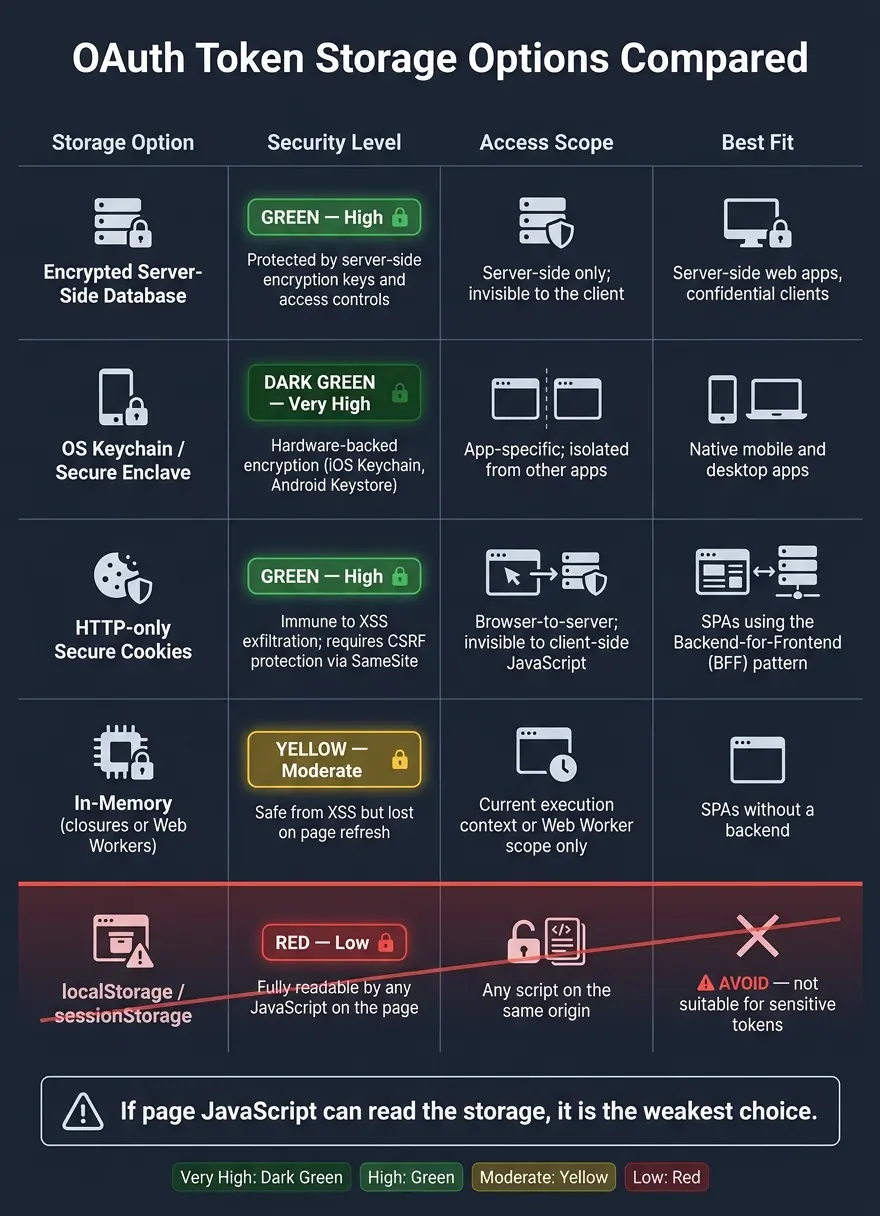
OAuth Token Storage Options: Security Levels Compared
Different clients need different token storage. So the right choice depends on the kind of client you're building.
Here’s the quick match-up:
| Storage Option | Security Level | Access Scope | Best fit |
|---|---|---|---|
| Encrypted Server-Side Database | High - protected by server-side encryption keys and access controls | Server-side only; invisible to the client | Server-side web apps, confidential clients |
| OS Keychain / Secure Enclave | Very High - hardware-backed encryption (iOS Keychain, Android Keystore) | App-specific; isolated from other apps | Native mobile and desktop apps |
| HTTP-only Secure Cookies | High - immune to XSS exfiltration; requires CSRF protection via SameSite |
Browser-to-server; invisible to client-side JavaScript | SPAs using the Backend-for-Frontend (BFF) pattern |
| In-memory (closures or Web Workers) | Moderate - safe from XSS exfiltration but lost on page refresh | Current execution context or Web Worker scope only | SPAs without a backend |
| localStorage / sessionStorage | Low - fully readable by any JavaScript on the page | Any script on the same origin | None - avoid for sensitive tokens. |
One point jumps out from the table: if page JavaScript can read the storage, it’s the weakest choice.
That’s why localStorage and sessionStorage are a bad place for sensitive tokens. Any JavaScript running on the page can read them, which makes token theft much easier if your app ever gets hit by XSS.
The safer pattern is pretty straightforward:
- Use a BFF with
HttpOnly,Secure,SameSitecookies for browser apps - Use hardware-backed key storage for mobile apps
- Use encrypted server-side storage for server apps
Conclusion
OAuth token security works in layers. Where tokens live, how long they last, how you split them, how you protect keys, and how fast you can revoke access each close a different hole.
And the risk isn’t abstract. 68% of API breaches in 2025 involved OAuth2 misconfigurations.
The main takeaway is simple: review your token storage and make sure revocation happens fast - before a breach does.
FAQs
What is a BFF in OAuth?
A Backend for Frontend (BFF) is a server-side proxy that manages OAuth flows so sensitive tokens stay out of the browser.
Instead of letting the frontend handle tokens directly, the BFF swaps authorization codes for tokens, keeps those tokens in secure server-side sessions, and sends the browser an HttpOnly, secure session cookie. The big win is simple: client-side JavaScript never sees the tokens, which helps reduce the risk of XSS attacks.
Should I store refresh tokens as hashes?
Yes. Refresh tokens can keep access alive for a long time, so treat them like passwords. Store them as hashes, not plain text.
If your database gets compromised, hashes make immediate misuse much harder. You should also keep tokens encrypted at rest, store them in a secure, non-public location, and use refresh token rotation to limit the damage if one gets stolen.
When should I use token introspection?
Use token introspection when your application needs immediate token revocation. Unlike JWTs, opaque tokens don't carry their own claims in a self-contained format, so the authorization server has to check the token's status on each request.
That gives you real-time revocation when your security needs call for instantly invalidating access.
Related Blog Posts
Get new content delivered straight to your inbox

The Response
Updates on the Reform platform, insights on optimizing conversion rates, and tips to craft forms that convert.



Drive real results with form optimizations
Tested across hundreds of experiments, our strategies deliver a 215% lift in qualified leads for B2B and SaaS companies.
