
.webp)
How to Handle Expired API Tokens



When API tokens expire, your application may lose access to key resources or services, leading to errors and interruptions. Here’s a quick guide to managing expired tokens effectively:
- Why Tokens Expire: Tokens have expiration dates to limit security risks. Short-lived tokens reduce the risk of misuse, while long-lived refresh tokens help maintain session continuity.
- Detect Expired Tokens: Look for
401 Unauthorizederrors or specific error codes likeinvalid_token. Use proactive checks by tracking token expiration timestamps. - Refresh Expired Tokens: Use a refresh token to request a new access token. Automate this process to avoid disruptions, using proactive or reactive strategies.
- Secure Token Storage: Store tokens in secure locations (e.g., HTTP-only cookies for SPAs, secure storage APIs for mobile apps). Avoid insecure methods like
localStorage. - Token Expiration Policies: Balance security and usability by setting short lifetimes for access tokens (e.g., 60–90 minutes) and longer durations for refresh tokens (e.g., 24 hours to 14 days).
Managing tokens securely and efficiently ensures smooth API interactions while reducing security vulnerabilities.
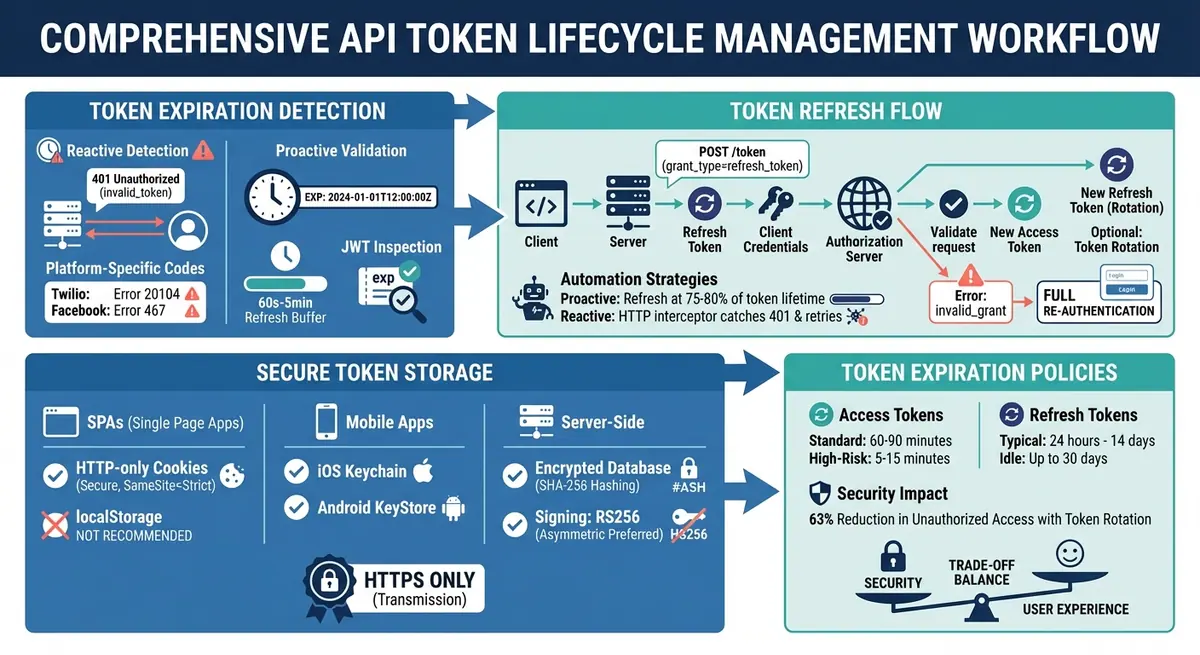
Complete API Token Lifecycle Management Workflow
Authentication With Refresh Tokens Implementation
sbb-itb-5f36581
How to Detect Expired Tokens
Detecting expired tokens quickly is key to avoiding failed API calls and ensuring smooth integrations. A good strategy blends reactive error handling with proactive checks.
Identifying Expiration Errors
When an access token expires, most APIs respond with a 401 Unauthorized status code. The response often includes a WWW-Authenticate header with details like Bearer error="invalid_token" and an error description such as "The access token expired". Additionally, the JSON response body often contains {"error": "invalid_token"} to highlight the issue.
Some platforms provide extra error codes for expired tokens. For example:
- Twilio: Returns error code
20104for expired tokens. - Facebook: Indicates an expired token with error code
467.
If you're using refresh tokens, keep an eye out for invalid_grant errors. These typically indicate that the refresh token has either expired or been revoked.
It's also helpful to monitor application logs for these error patterns. For instance, GitLab logs include a meta.auth_fail_reason field that specifies token_expired as the reason for authentication failures. Setting up alerts for 401 errors with messages like invalid_token can help you address token expiration issues immediately.
Validating Tokens Before Use
Instead of waiting for an API call to fail, you can validate token expiration proactively. When you receive a token, extract its expires_in value, convert it into an absolute UTC timestamp, and store it.
Before making an API call, compare the current time with the stored expiration timestamp. To avoid last-minute failures, implement a refresh buffer of 60 seconds to five minutes. This accounts for network delays and possible clock differences between systems. By refreshing tokens slightly ahead of their expiration, you can prevent unnecessary errors.
For JWTs (JSON Web Tokens), you can decode the token locally to inspect the exp claim in its payload. This allows you to verify the token's validity without an external API call. Always use UTC for time comparisons to avoid complications caused by time zones or daylight saving changes. Combining timestamp tracking with preemptive validation ensures stable API connections and reduces downtime.
Next, we’ll explore how to automatically refresh expired tokens.
How to Refresh Expired API Tokens
When an API token expires, refreshing it is essential to restore access without forcing users to log in again. By combining token detection methods with an automated refresh process, you can ensure uninterrupted API connectivity. This process relies on a long-lived refresh token to obtain a new access token from the authorization server.
How the Refresh Token Flow Works
A refresh token allows your application to request a new access token when the current one expires (usually after about an hour). To do this, send a POST request to the token endpoint with the grant_type set to "refresh_token." Include the refresh token, and for confidential clients, add your client_id and client_secret.
The authorization server verifies the refresh token and issues a new access token. The new token's permissions (or scope) will not exceed those initially granted. If you omit the scope parameter, the server typically provides the same permissions as before. As noted by OAuth.com:
"The most secure option is for the authorization server to issue a new refresh token each time one is used. This... enables authorization servers to detect if a refresh token is stolen".
Atlassian Cloud provides a practical example of this process. When a client exchanges a refresh token at https://auth.atlassian.com/oauth/token, a new refresh token is issued. If the exchange fails - due to an expired token or a password change - the server returns a 403 Forbidden error with an invalid_grant message. Similarly, Okta includes a configurable grace period (defaulting to 30 seconds) to keep the old refresh token valid briefly after rotation, allowing for network interruptions.
If the refresh token has expired or been revoked, the server will return an invalid_grant error, requiring users to re-authenticate through a full login process.
Automating Token Refresh
Automating the token refresh process eliminates manual errors and delays, ensuring seamless API access. This can be achieved through two approaches: proactive refreshing and reactive refreshing.
- Proactive Refreshing: Monitor token expiration timestamps and initiate a refresh within a safe buffer (30–60 seconds before expiration) or after 75–80% of the token's lifetime has passed.
- Reactive Refreshing: Use HTTP interceptors to catch 401 Unauthorized errors and retry the request after refreshing the token. This serves as a fallback for unexpected token revocation.
In distributed or multi-threaded environments, use locking mechanisms like threading locks or Redis-based distributed locks to ensure only one instance attempts to refresh the token at a time. This prevents race conditions during token rotation.
Many official SDKs simplify this process. For example, Auth0 SDKs for Node.js, .NET, and PHP include built-in support for the offline_access scope, enabling automatic token acquisition and rotation. Similarly, the Elastic Path Shopper SDK handles token storage, proactive refreshing, and retries for 401 errors automatically.
Secure storage of both access and refresh tokens is critical. Since refresh tokens are long-lived (lasting days or weeks compared to the hours for access tokens), they require robust security measures. When rotating tokens, update both access and refresh tokens atomically to avoid issues with revoked credentials. Following these practices reduces downtime and maintains security for your API integrations.
Securing Token Storage and Rotation
Once you've automated token refresh, the next step is safeguarding tokens against unauthorized access. A stolen refresh token can give attackers prolonged access - sometimes days or even weeks. Choosing the right storage methods and implementing token rotation are critical to keeping your authentication system secure.
How to Store Tokens Securely
For single-page applications (SPAs): Store tokens in browser memory, such as through Web Workers or JavaScript closures, to isolate them from the global scope. Another option is using HTTP-only cookies with the Secure and SameSite=Strict attributes. This approach reduces the risk of Cross-Site Scripting (XSS) attacks by preventing JavaScript from accessing the cookies. As Descope's documentation highlights:
"It is recommended to store your refresh tokens in cookies, rather than in the browser localStorage... since tokens in localStorage are accessible via JavaScript".
Avoid using localStorage or sessionStorage for sensitive tokens, as they are more vulnerable to attacks.
For mobile applications: Use native secure storage solutions, such as Keychain on iOS or KeyStore on Android.
For server-side applications: Store tokens in encrypted databases or hash them using algorithms like SHA-256. Systems like Redis can also be used for secure token storage.
When signing tokens, opt for asymmetric algorithms like RS256 instead of symmetric algorithms like HS256. RS256 allows for key rotation without requiring a complete system redeployment if a private key is compromised.
Auth0, for example, limits users to 200 active refresh tokens per application to prevent token hoarding. Additionally, session cookies typically have a maximum size of 4 KB. Always transmit tokens over HTTPS and configure cookies with options like Secure, HTTP-only, and domain-specific restrictions (e.g., app.company.com) to minimize exposure.
While secure storage is crucial, token rotation adds an extra layer of protection.
Token Rotation for Better Security
Rotating refresh tokens each time they’re used limits the window of opportunity for attackers. Nawaz Dhandala, Author of OneUptime, emphasizes:
"A token that never expires or rotates is a ticking time bomb. If an attacker captures it, they have indefinite access until someone notices".
To enhance security, implement token family tracking. This groups related tokens into chains, and if any token in the family is reused, the server should invalidate the entire chain. This approach revokes all active sessions for the user and serves as an early warning. For instance, if a refresh token is reused and rejected, it could indicate a potential compromise. Okta employs this strategy by automatically invalidating the most recent refresh token and related access tokens when reuse is detected.
To prevent unnecessary logouts caused by network hiccups, Okta also includes a small grace period (typically 30 seconds) to allow for retries.
In distributed systems, consider using Redis-based distributed locks during the token refresh process. This ensures that only one instance handles the token rotation at a time, avoiding race conditions. Additionally, store refresh tokens in a persistent database rather than in-memory, ensuring session continuity even after server restarts.
Setting Token Expiration Policies
Determining token lifetimes is a delicate balancing act between security and user convenience. Set tokens to expire too quickly, and users will face constant re-authentication. Let them last too long, and your system becomes more exposed to potential threats.
Choosing Expiration Durations
For access tokens, shorter lifetimes are ideal. These tokens typically expire within 60–90 minutes. In higher-risk environments, even shorter durations - like 5–15 minutes - are recommended to minimize exposure.
Refresh tokens, on the other hand, need to last longer to maintain seamless session continuity without requiring users to log in repeatedly. Most applications find a range of 24 hours to 14 days effective. Some systems allow idle refresh tokens to remain valid for up to 30 days. To strike the right balance, consider your system's specific security needs.
Using idle expiration policies can extend sessions for active users while setting a maximum lifetime ensures periodic re-authentication. This approach helps close abandoned sessions quickly while allowing uninterrupted access for engaged users.
Additionally, automating the cleanup of expired tokens can help maintain system efficiency and performance.
These settings significantly impact the trade-offs discussed in the next section on token lifespan strategies.
Short-Lived vs. Long-Lived Tokens
Short-lived tokens reduce the risk of credential misuse. In fact, organizations utilizing token rotation strategies have reported a 63% drop in unauthorized access attempts from expired or stolen credentials. However, frequent token refreshes can increase the load on authentication servers and require robust error-handling mechanisms to prevent session disruptions.
Long-lived tokens, while offering a smoother user experience (for example, in Smart TV streaming), pose greater risks if compromised. As Apigee explains:
"An access token should have a short lifetime, probably around 30 minutes or less, and that lifetime should be substantially shorter than the lifetime of the refresh token".
Microsoft also highlights the trade-off:
"Adjusting the lifetime of an access token is a trade-off between improving system performance and increasing the amount of time that the client retains access after the user's account is disabled".
This balance becomes especially critical in compliance-heavy industries. For instance, PCI DSS standards mandate session termination after 15 minutes of inactivity in payment card environments.
When setting token durations, consider the sensitivity of the resource, the type of client, and any regulatory demands. Public clients, such as Single-Page Applications, are at higher risk because they can't securely store long-lived tokens. For these scenarios, shorter token lifetimes combined with refresh token rotation offer a safer solution.
Conclusion
This guide has walked you through how to identify expired tokens, refresh them efficiently, and securely store them to maintain uninterrupted API access. Managing expired API tokens isn't just about preventing failures - it’s a critical step in reducing security vulnerabilities. As OAuth.com explains:
"The most secure option is for the authorization server to issue a new refresh token each time one is used... which enables authorization servers to detect if a refresh token is stolen."
Successful token management depends on three key practices: secure storage, automated refresh processes, and well-defined expiration policies. Secure storage ensures your credentials are safe from theft, automated refresh mechanisms keep your services running without interruptions, and carefully planned expiration policies minimize the impact of compromised tokens. For instance, short-lived access tokens render stolen credentials useless within a short time frame, while refresh token rotation helps detect breaches as they happen.
To take your token management strategy to the next level, configure applications to handle 401 errors automatically, establish clear token expiration rules, and keep a close eye on API activity logs. These steps transform token management from a reactive chore into a proactive safeguard, ensuring the security and reliability of your systems and protecting your users.
FAQs
Should I refresh tokens before they expire or only after a 401?
Refreshing tokens before they expire is a smart move to keep your API access running smoothly and avoid failed requests. If you wait for a 401 Unauthorized response, you risk disrupting the session and negatively affecting the user experience. By renewing tokens ahead of time, you ensure uninterrupted and seamless interactions with the API.
How can I prevent multiple servers from refreshing the same token?
To prevent multiple servers from refreshing the same API token simultaneously, consider using a distributed lock (like one based on Redis). This ensures that only one server manages the token refresh at any given time. The process is straightforward: acquire the lock before starting the refresh and release it immediately afterward.
Additionally, set up token rotation with reuse detection. This allows you to monitor refresh attempts and avoid race conditions. Together, these practices help maintain secure and consistent token management across all servers.
What should I do when a refresh token returns invalid_grant?
If you encounter an invalid_grant error with a refresh token, it typically means the token has either expired, been revoked, or is otherwise no longer valid. When this happens, the solution is to initiate a new authorization flow. This will allow you to obtain fresh access tokens, ensuring your access to the API remains seamless.
Related Blog Posts
Get new content delivered straight to your inbox

The Response
Updates on the Reform platform, insights on optimizing conversion rates, and tips to craft forms that convert.


Drive real results with form optimizations
Tested across hundreds of experiments, our strategies deliver a 215% lift in qualified leads for B2B and SaaS companies.
