
.webp)
OAuth vs. API Keys: CRM Sync Security



When syncing your Close CRM integration or other tools, security is critical. Two popular methods for authentication are API Keys and OAuth 2.0. Here's a quick breakdown:
- API Keys: Simple to implement, ideal for server-to-server tasks. However, they lack granular permissions, don't expire automatically, and can expose sensitive data if mishandled.
- OAuth 2.0: Offers short-lived tokens and fine-grained access control, making it better for user-facing apps or sensitive data. But it is more complex to set up and maintain.
Key Takeaways:
- Use API Keys for internal, machine-to-machine tasks with controlled environments.
- Use OAuth for user-facing apps or when handling sensitive information.
- A hybrid approach (using both methods) can balance simplicity and security.
Quick Comparison:
| Criteria | API Keys | OAuth 2.0 |
|---|---|---|
| Security Level | Medium | High |
| Best Use Case | Server-to-server tasks | User-facing apps |
| Permissions | Broad, app-level only | Granular, user-context |
| Token Lifespan | Long-lived (static) | Short-lived (15-60 mins) |
| Implementation | Simple | Complex |
Choose based on your integration's purpose, sensitivity, and complexity.
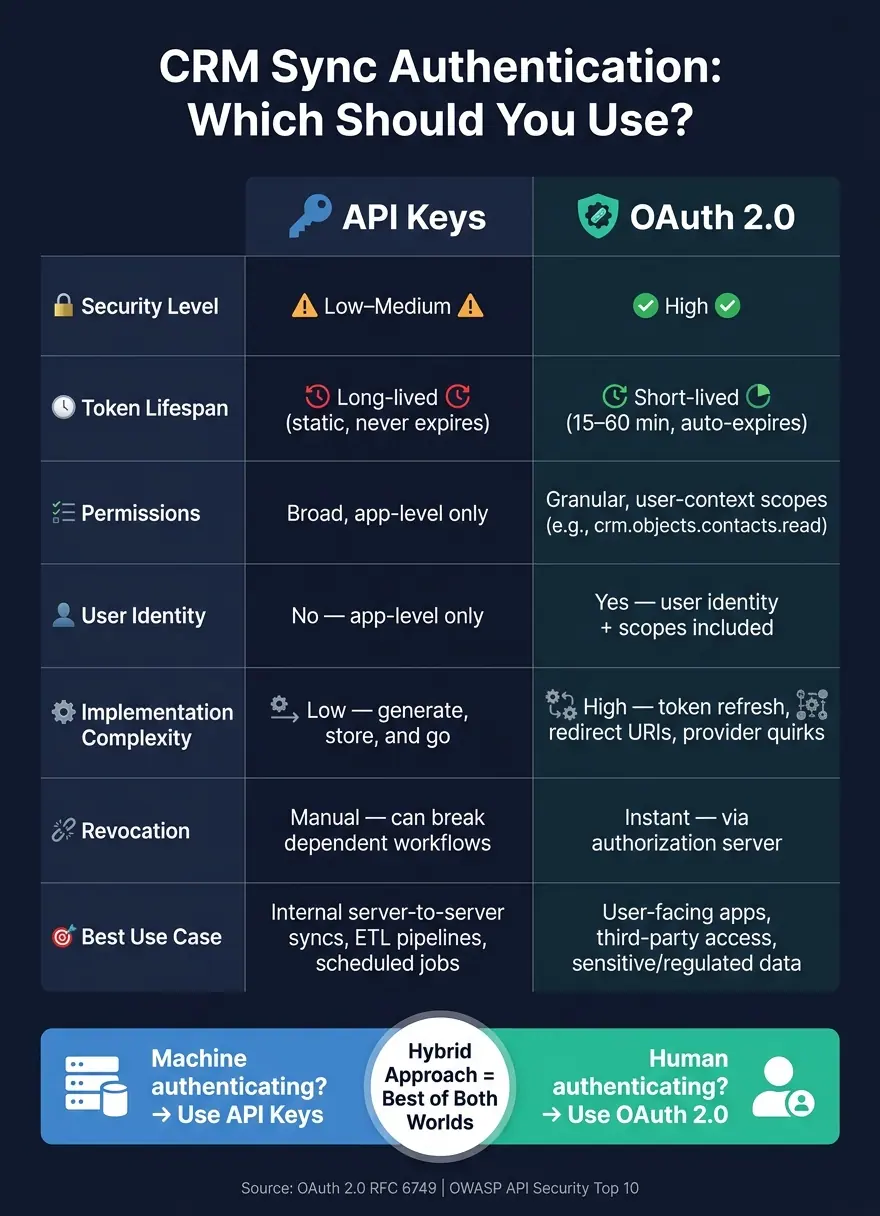
OAuth 2.0 vs. API Keys: CRM Sync Security Comparison
How API Keys Secure CRM Sync
What API Keys Are and How They Work
An API key is a unique string, usually 32 to 64 characters long, that servers use to identify and authenticate applications making API calls. Think of it as a password for your integration. Every time a sync job runs, the key is sent along with the request, and the CRM server verifies it before granting access.
Typically, the key is included in an HTTP header, such as X-API-Key or Authorization: Bearer. The server then validates the key against a stored hash to verify the caller's identity. For security, production systems store only a hashed version of the key - often using SHA-256 - so even if the database is compromised, the plaintext key remains protected.
This straightforward approach works particularly well for server-to-server tasks and scheduled jobs, like syncing CRM data to a warehouse overnight. The simplicity of API keys makes them an attractive option for these scenarios.
Advantages of API Keys for CRM Sync
The main appeal of API keys lies in their simplicity. There’s no need for token exchanges, redirects, or worrying about token expiration. Developers can generate a key, add it to an environment variable, and have a working CRM sync up and running in no time. This ease of use also makes API keys a great choice for webhook verification, where a service needs to quickly validate incoming data.
As Guilliano Molaire, Founder of Skycloak, explains:
"API keys prioritize simplicity for trusted, machine-to-machine scenarios."
For internal workflows in controlled environments, this low-complexity approach is ideal. In fact, as APIScout notes:
"API keys with proper rotation get you 90% of the security at 10% of the complexity [compared to OAuth] for server-to-server auth."
But while API keys are simple and efficient, they aren’t without their challenges.
Limitations and Risks of API Keys
One major downside of API keys is that they don’t expire automatically. Unlike OAuth tokens, which are designed to be short-lived, API keys remain valid indefinitely unless manually revoked. If a key is exposed - say, through a public GitHub repository - it could go unnoticed and be exploited for months.
For example, in December 2024, approximately 30,000 Postman workspaces were compromised because API keys and credentials were accidentally shared in public collections. This wasn’t the result of a sophisticated attack but rather simple human error.
Another limitation is that API keys lack user-level context. They identify the application making the call but don’t provide information about the person behind it. This lack of granularity makes auditing difficult - logs might show what connected but not who initiated the action. Additionally, most API key setups grant broad access rather than fine-tuned permissions, which can lead to significant data exposure if a key is compromised. In August 2025, this exact issue led to the exposure of 1.1 million records at Farmers Insurance when overprivileged API credentials tied to a vendor's Salesforce integration were exploited.
| Feature | API Keys |
|---|---|
| Lifespan | Indefinite unless manually revoked |
| Permissions | Broad; limited options for fine-tuning |
| User Identity | App-level only; no individual user tracking |
| Revocation | Manual; can disrupt dependent workflows |
| Best For | Internal, server-to-server background jobs |
Revoking a compromised key can also cause significant disruptions. If a single key is shared across multiple workflows - which often happens when managing several integrations - revoking it to stop a breach can break every process that relies on it. To avoid this, security experts recommend using a unique key for each integration. This ensures that if one key is compromised, the impact is contained to just that integration.
As Ben Entwistle from Red Team Worldwide warns:
"Pick the wrong mechanism and you're not just adding technical debt. You're creating exploitable gaps that show up in OWASP API Security Top 10 findings."
These challenges highlight the importance of careful API key management in CRM integration workflows.
sbb-itb-5f36581
How OAuth Secures CRM Sync
What OAuth Is and How It Works
OAuth 2.0 is a framework that allows an app to access CRM data on a user's behalf without needing their credentials. Instead, it uses short-lived access tokens. The process involves four key players: the user (Resource Owner), the sync app (Client), the system that handles authentication and token issuance (Authorization Server), and the CRM API (Resource Server).
Here’s how it works: the user grants consent once, the authorization server issues a token, and the sync app uses that token for future API calls. This approach eliminates the need to store or share passwords, significantly reducing security risks.
Clifford Spielman, CEO of Duende Software, explains this risk of credential sharing:
"Credential sharing creates an all-or-nothing trust relationship. Once an application or service has a username and password, it can typically do anything the credential owner can, with no practical way to limit scope, duration, or behavior." - Clifford Spielman, CEO, Duende Software
OAuth, finalized in 2012 by the IETF, was specifically designed for modern web, mobile, and API-centric environments, making it an ideal choice for managing CRM sync permissions and access.
Advantages of OAuth for CRM Sync
OAuth offers a key advantage over traditional API keys: granular scoping. For example, in HubSpot, you can limit permissions to just crm.objects.contacts.read or to user_impersonation in Dynamics 365. This ensures the integration only accesses what it needs. If the token is compromised, the damage is contained.
Another benefit is the short lifespan of OAuth tokens, typically ranging from 15 minutes to 2 hours. In contrast, API keys remain valid until manually revoked. If a connection needs to be terminated - like ending a vendor relationship - you can instantly revoke the token without affecting other integrations.
OAuth is also particularly useful in multi-tenant SaaS environments. A single sync app can connect to multiple CRM tenants, with each tenant administrator granting access independently.
However, OAuth’s benefits come with a level of complexity that requires careful management.
Limitations and Risks of OAuth
While OAuth improves security with its granular control, implementing it for CRM syncs can be challenging. You’ll need to manage token refresh cycles, store tokens securely, and adapt to the unique scope formats of each provider. Handling edge cases, such as race conditions during simultaneous token refreshes, adds another layer of difficulty.
Providers also vary in how they handle token lifetimes and refresh behavior. For instance, HubSpot tokens expire in 30 minutes, Salesforce tokens last around 2 hours, and Microsoft 365 tokens rotate with every refresh. This means your sync logic must account for these differences.
As Airbyte points out:
"Every SaaS provider makes different decisions about token lifetimes, refresh behavior, scope formats, and error responses, and no generic OAuth implementation covers them all." - Airbyte
Token theft is another significant risk. Bearer tokens, which OAuth relies on, don’t validate the sender, so they can be reused by attackers until they expire. The rise of Adversary-in-the-Middle (AiTM) phishing attacks highlights this vulnerability, with a 146% increase in such incidents by 2025. Mitigations like PKCE (Proof Key for Code Exchange) and DPoP (Demonstrating Proof-of-Possession) can help, but they add extra complexity to the implementation.
| Feature | OAuth 2.0 |
|---|---|
| Token Lifespan | Short-lived (15 min–2 hours, varies by provider) |
| Permissions | Scoped; principle of least privilege |
| User Identity | Yes; user context included |
| Revocation | Instant via authorization server |
| Best For | Third-party, multi-tenant, user-facing integrations |
| Main Risk | Token theft; implementation complexity |
Choosing Between OAuth and API Keys for CRM Sync
How to Decide: OAuth vs. API Keys
Antoine Duno, Founder of ZeriFlow, offers this straightforward guideline:
"If a human is authenticating, use OAuth. If a machine is authenticating, use API keys or mTLS."
The key question is: Is a human involved? If, for example, a sales rep is granting your app access to their Salesforce contacts via high-converting lead forms, OAuth is the way to go. On the other hand, if your internal ETL pipeline is syncing records overnight without any user interaction, an API key - or even OAuth's Client Credentials flow - is a better fit.
But it’s not just about human vs. machine. Data sensitivity plays a critical role. CRMs that handle sensitive information like personally identifiable information (PII) or financial data benefit from OAuth's short-lived tokens and granular permission scopes. API keys, which are often static and over-permissioned, can pose a security risk. OAuth’s fine-grained controls help mitigate these risks.
Another factor to weigh is implementation complexity. OAuth provides stronger security but introduces challenges like managing redirect URIs, token storage, refresh logic, and adapting to provider-specific quirks. For smaller teams or internal-only integrations with moderate sensitivity, a well-managed API key - rotated every 90 days and securely stored in a secrets manager - can be a practical solution.
Using OAuth and API Keys Together
In many CRM sync scenarios, both methods are used in tandem. A common approach is to use OAuth for the initial user-facing connection (to capture consent and establish identity) and then rely on short-lived JWTs or API keys for background data syncs.
As APIScout explains:
"The trend is toward combining methods. mTLS at the transport layer plus JWT at the application layer. API keys for the app plus OAuth for the user."
This hybrid setup allows you to tailor the authentication method to the specific context. OAuth is ideal for user-facing flows, offering security and auditability. Meanwhile, API keys work well for internal, high-frequency data syncs, keeping things simple and efficient without exposing sensitive keys to end users.
Side-by-Side Comparison: OAuth vs. API Keys
| Criteria | API Keys | OAuth 2.0 |
|---|---|---|
| Security Level | Low–Medium | High |
| Implementation Complexity | Low | High |
| Best Use Case | Internal, server-to-server syncs | User-facing apps, third-party access |
| User Context | No (app-level only) | Yes (user identity + scopes) |
| Developer Experience | Excellent | Complex |
| Token Lifetime | Long-lived (static) | Short-lived (15–60 min) |
| Revocation | Instant | Instant |
| Recommended Rotation | Every 90 days (30 days for sensitive data) | N/A (tokens expire automatically) |
For server-to-server CRM integrations - like syncing Salesforce or Dynamics 365 backends - the JWT Bearer or Client Credentials flows offer OAuth's security without needing a human in the loop. Notably, NetSuite plans to phase out its older Token-Based Authentication (TBA/OAuth 1.0) in favor of OAuth 2.0 Machine-to-Machine by 2027, signaling the industry's shift toward more secure standards.
Best Practices for Securing CRM Sync APIs
General Security Tips for CRM Sync APIs
When it comes to CRM sync APIs, securing them properly is non-negotiable. Authentication plays a central role here, but there are several other practices that can help safeguard sensitive data and mitigate risks.
Whether you're using OAuth or API keys, start by enforcing TLS 1.3 (or at least TLS 1.2) for all API traffic. Adding HSTS headers is another must to prevent protocol downgrade attacks. Stick to the principle of least privilege, ensuring your CRM sync integration only accesses the bare minimum - just the objects and fields it absolutely needs. Using optimized conversion paths for data entry can further streamline how these fields are populated. And don’t overlook rate limiting: a sliding window or token bucket approach that allows around 500 authenticated read requests per minute can help block bulk data theft while keeping normal operations smooth.
Another critical step is centralized logging. Retain your API logs for at least 12 months and set up real-time alerts for unusual activity. For example, if a single API key tries to access more than 5–10% of your contact database in a short time, you should be notified immediately. As the ZTABS Developer Blog aptly puts it:
"Security without observability is security theater." - ZTABS Developer Blog
Now, let’s dive into specific practices for securing API keys.
API Key Security Practices
API keys, if mishandled, can lead to severe breaches. To avoid common pitfalls, consider these tips.
First, never store raw API keys in a database. Instead, store a SHA-256 hash of the key and display the plaintext version only once - right when it’s created. This minimizes the risk of accidental exposure.
When transmitting keys, always use the Authorization: Bearer header. Avoid putting keys in URL query strings, as these can end up in browser histories, server logs, or even CDN logs. To make detecting leaks easier, prefix your keys (e.g., crm_prod_ or sk_live_). Tools like gitleaks or trufflehog can be integrated into your CI/CD pipeline to scan for exposed keys.
Key rotation should be automated. Manual rotations often lead to inconsistencies, so use a secrets management tool like AWS Secrets Manager or HashiCorp Vault to handle this process programmatically. Allow a 24–48 hour overlap between old and new keys to avoid disruptions. Pair this with IP allowlisting to restrict API key usage to trusted IP ranges.
OAuth Security Practices
OAuth is another powerful tool for securing CRM sync APIs, but only when implemented correctly. Here are some best practices to keep it secure.
Always use the Authorization Code flow with PKCE for public clients like single-page apps or mobile apps. This flow is also recommended for confidential clients to prevent code interception attacks. If your CRM integration still uses outdated flows like Implicit Grant or Resource Owner Password Credentials, prioritize migrating away from them - they’ve been deprecated for good reason.
Keep access token lifetimes short, ideally between 15–60 minutes. Enforce refresh token rotation with family tracking: every time a refresh token is used, issue a new one and invalidate the old one. If a rotated token is reused, revoke the entire token family immediately, as this could indicate theft. Store tokens in httpOnly cookies rather than localStorage to protect against XSS attacks.
The Farmers Insurance breach in August 2025, which exposed 1.1 million records due to overprivileged API credentials in a Salesforce integration, is a stark reminder of why least-privilege access is vital. Use resource-specific scopes like read:contacts instead of broad permissions like full_access. Additionally, always verify JWT claims - such as iss (issuer), aud (audience), and exp (expiration) - on the resource server. Make sure CRM admins can quickly revoke tokens when users log out, change their passwords, or in case of a suspected compromise.
"OAuth2 without the right token lifecycle controls - short TTLs, refresh token rotation, revocation - is a persistent XSS vulnerability waiting to happen." - BackendBytes
OAuth vs API Keys Explained: Which Authentication Method Should You Use?
Conclusion: Key Takeaways
Choosing between OAuth and API keys isn't about deciding which is better - it’s about finding the right tool for your specific CRM sync needs. API keys work well for server-to-server tasks, like nightly ETL jobs, where there's no need for human authorization. On the other hand, OAuth is ideal when users need to delegate access to a third-party app or when dealing with sensitive data subject to compliance rules like SOC 2, HIPAA, or GDPR. The real danger lies in using these methods incorrectly - examples of breaches discussed earlier highlight the risks of static API keys in user-facing apps or OAuth scopes that are too broad.
Antoine Duno, Founder of ZeriFlow, sums it up perfectly:
"If a human is authenticating, use OAuth. If a machine is authenticating, use API keys or mTLS."
For most CRM sync setups, a hybrid approach often works best. Use OAuth for user-delegated access and administrative tasks, while relying on API keys for high-volume, low-sensitivity operations or internal services. Regardless of the method, certain practices remain essential: enforce least-privilege access, use short-lived credentials, store keys securely (hashed), and monitor behavior for anomalies. This balanced approach ensures your API security strategy is tailored to your needs while offering strong protection.
As Ben Entwistle, Cybersecurity Expert at Red Team Worldwide, explains:
"The practitioners who advance in API security roles are the ones who can walk into an architecture review and explain why they chose OAuth client credentials over an API key for a specific integration, with a threat model to back it up."
That’s the benchmark to strive for - not just picking a method, but being able to articulate why it’s the right choice for your integration’s security needs.
FAQs
Can I start with API keys and switch to OAuth later?
Switching from API keys to OAuth is definitely doable, but it does take some planning. API keys are straightforward and work fine for simple integrations, but they fall short when it comes to security. They don’t offer features like granular permissions or token lifecycles, which are crucial for more secure and flexible access.
OAuth, on the other hand, brings stronger security and allows for user-specific or delegated access, making it a better choice for modern applications. The transition process involves several steps, such as updating your integrations, managing tokens, and implementing OAuth flows. To ensure things go smoothly, it’s important to address these challenges early in the process.
How do I prevent API keys or OAuth tokens from leaking?
When it comes to keeping your credentials safe, never commit them to source control. Instead, make use of a .gitignore file to exclude .env files from being tracked. Pair this with secret management tools such as AWS Secrets Manager to ensure sensitive data stays secure.
A few more tips:
- Always encrypt tokens and store them in a secure location.
- Mark environment variables as sensitive to avoid accidental exposure.
- Use fine-grained scopes to limit access permissions.
- Opt for short-lived tokens to reduce the risk of misuse.
- Implement OAuth 2.0 with PKCE for secure authorization flows.
And one golden rule: never store raw tokens in plain text. Always prioritize security when handling sensitive information.
What’s a safe hybrid setup for CRM sync auth?
A secure hybrid setup for syncing CRM systems involves combining OAuth 2.0 and API keys effectively. Use OAuth 2.0 for tasks that require delegated permissions or user-specific actions, ensuring secure user authentication. On the other hand, rely on API keys for backend operations, especially those involving high-volume, server-to-server communications.
To maintain security, stick to these best practices:
- Enforce least-privilege access to limit permissions to only what's necessary.
- Regularly rotate API keys to reduce the risk of unauthorized access.
- Avoid exposing API keys in client-side code or any public repositories.
Finally, keep endpoint usage well-documented to ensure smooth and consistent management across your system.
Related Blog Posts
Get new content delivered straight to your inbox

The Response
Updates on the Reform platform, insights on optimizing conversion rates, and tips to craft forms that convert.


Drive real results with form optimizations
Tested across hundreds of experiments, our strategies deliver a 215% lift in qualified leads for B2B and SaaS companies.
