
.webp)
Custom API vs. Native CRM Integration



If you need a CRM and email sync live today, native integration is usually the better pick. If you need custom routing, custom objects, or real-time logic, a custom API is often the better fit.
Here’s the short version:
- Native integrations are faster to set up, often in under 30 minutes
- Custom APIs cost more, often $1,500 to $30,000+
- Native sync works best for standard fields and common workflows
- Custom sync works better when leads need scoring, enrichment, routing, or multi-system processing before they hit the CRM
- Native tools shift maintenance to the vendor
- Custom builds put monitoring, retries, version changes, and fixes on your team
In other words: this is mostly a choice between setup time and control.
If I were choosing, I’d use native integration when leads can go straight from multi-step forms into the CRM with simple field mapping. I’d use a custom API when the lead has to be changed, checked, routed, or sent through other systems first.
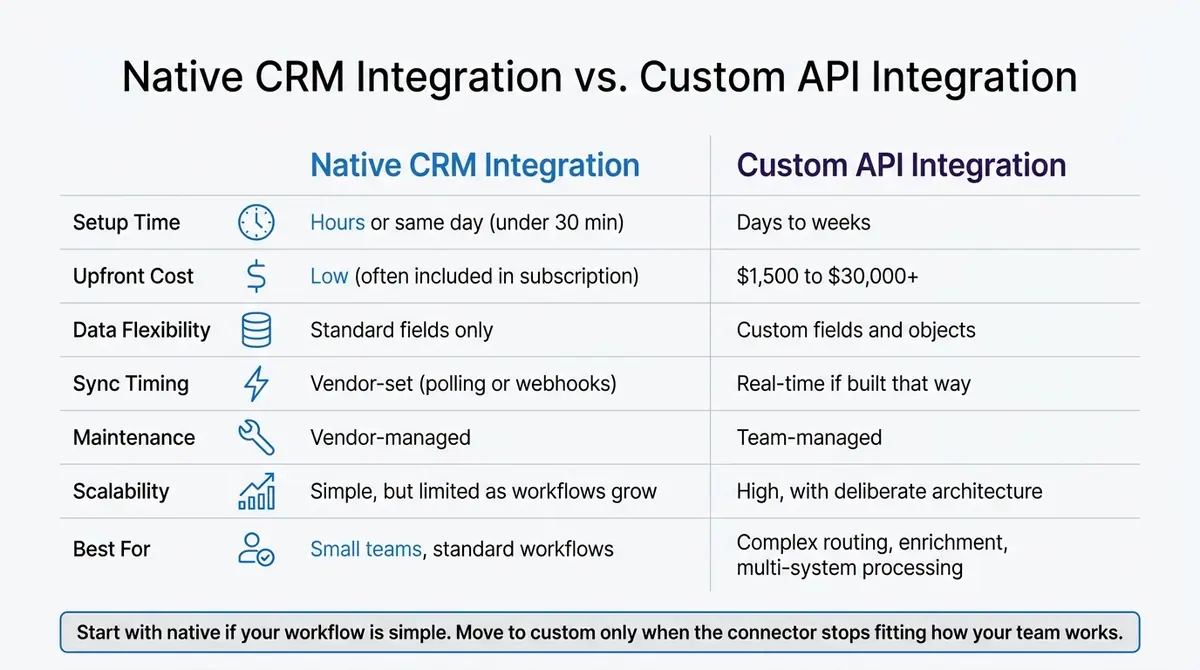
Native CRM Integration vs. Custom API: Side-by-Side Comparison
The 3 types of software integrations
sbb-itb-5f36581
Quick Comparison
| Criteria | Native CRM Integration | Custom API Integration |
|---|---|---|
| Setup time | Hours or same day | Days to weeks |
| Upfront cost | Low, often included | $1,500 to $30,000+ |
| Data flexibility | Standard fields | Custom fields and objects |
| Sync timing | Vendor-set | Real-time if built that way |
| Maintenance | Vendor-owned | Team-owned |
| Best for | Small teams, standard workflows | Complex routing and processing |
One simple rule helps: start with native if your workflow is simple; move to custom only when the connector stops fitting how your team works.
Native CRM Integration: Faster Setup, Less Control
How native sync works
Native integrations are usually the first pick for standard sync jobs. They’re easy to turn on, but the limits tend to show up once your workflow gets more specific.
Most native integrations connect two platforms through OAuth-based authentication. In plain English, that’s the familiar “Connect account” button that lets data move between tools without writing API code. After that, you map form fields like Email, Name, and Phone to CRM properties, and the sync runs on its own.
For high-converting lead forms, this often means new submissions go straight into the CRM with very little setup. Native sync can handle one-way or two-way data flow, and updates usually happen through webhooks or scheduled polling. Engagement data can also flow back into CRM records, which gives sales and marketing teams more context on a contact’s history.
When native integrations are a good fit
This is where native sync tends to shine: simple workflows that happen over and over.
It works well for common B2B use cases like syncing contacts, companies, and deals, while keeping engagement data visible inside the CRM. If your data model follows the usual pattern and your team doesn’t have engineering help on hand, using powerful form templates with native integrations is a solid option. The vendor also takes care of API updates and security patches.
Native integration tradeoffs
The same thing that makes native sync easy is also what boxes it in.
Native connectors usually expose only part of the CRM API, so custom fields, custom objects, and advanced segmentation may not sync. That can become a problem later. A setup that feels simple on day one can be tough to change once your workflow outgrows those built-in limits.
| Factor | Native CRM Integration |
|---|---|
| Setup time | Same-day (often under 30 minutes) |
| Upfront cost | Low (often included in the subscription) |
| Flexibility | Low - fixed sync rules, pre-defined fields |
| Maintenance ownership | Vendor-managed |
| Common limitations | Custom objects, conditional routing, advanced segmentation |
That’s the core tradeoff: native integrations save time up front, but they give you less room to shape the sync around your process.
Custom API Integration: More Control, Higher Cost
How custom API sync is built
When native connectors can't handle custom fields, routing rules, or timing logic, custom APIs step in. They put the sync setup in your team's hands.
Most custom API syncs are built around an event-driven workflow that connects your form tool, CRM, and other systems. That real-time trigger model matters when follow-up needs to happen fast after a lead comes in.
Your team also has to manage the hard parts: retry logic, error handling, conflict resolution, and monitoring. That includes deciding which system wins when records don't match.
When custom APIs make sense
For lead forms, custom APIs matter when a submission needs real-time enrichment, scoring, and routing before it reaches the CRM.
They also make sense when your CRM uses custom objects or field structures that native connectors can't access. The same goes for setups where lead data has to move across several systems before it's ready to use. This approach also fits stacks built around centralized routing or event-based workflows.
Custom API tradeoffs
The control is real, but so are the costs and risks.
Build costs for custom API integrations usually range from $1,500 to $30,000+ based on complexity. And that's just the start. You still have hosting, maintenance, and engineering time to deal with when an API changes. Unlike native integrations, custom builds don't come with a provider watching the connection for you. If something breaks, your team has to catch it and fix it.
Security can get tricky too. Custom middleware may log sensitive data while it's in transit, which can create compliance risk in regulated industries. Native integrations cut some of that burden because the provider manages the connection.
| Factor | Custom API Integration |
|---|---|
| Build cost | $1,500 – $30,000+ |
| Monthly maintenance | Ongoing - developer resources required |
| Sync speed | Real-time |
| Workflow flexibility | High - full control over custom objects and logic |
| Operational risk | High - requires active monitoring and retry logic |
Custom APIs can match your workflow with far more precision. But that extra control comes with engineering dependence and long-term upkeep.
Custom API vs. Native CRM Integration: Side-by-Side Comparison
Implementation speed and time-to-value
Native integrations are the fastest way to get live sync up and running. In most cases, a team can connect a CRM to a form tool or email platform in a single day with pre-built connectors. If you need a simple sync now, this is usually the fastest route.
Custom APIs take more time. Most builds need days to weeks for setup, testing, and validation. That extra time can make sense when the workflow is already more complex and a basic connector won't cut it.
Flexibility, reliability, and total cost
The biggest gap with native integrations is data model flexibility. They’re built for standard fields and supported workflows. So if your CRM relies on custom objects, or your forms collect non-standard fields that need mapping before they land in a contact record, native connectors often hit a wall.
Custom APIs handle that kind of setup much better. They give your team more control over how data moves, how fields are mapped, and what happens before records reach the CRM. But there’s a tradeoff: your team also owns reliability. Native connectors are managed by the vendor. With a custom build, your team takes on updates, breakage risk, versioning, rate limits, and the technical debt that spreads across connected systems.
Cost follows the same pattern. Native integrations usually come with a subscription, so pricing is easier to forecast. Custom APIs tend to cost more upfront, and they also need room in the budget for maintenance and monitoring over time.
Best choice by business scenario
The best fit comes down to two things: how complex your workflow is and how much engineering support you have. The table below lays out the tradeoffs in plain terms.
| Native CRM Integration | Custom API Integration | |
|---|---|---|
| Setup time | Hours to same day | Days to weeks |
| Upfront cost | Low | High |
| Ongoing cost | Predictable subscription | Maintenance and monitoring budget |
| Data model flexibility | Standard fields | Custom objects and fields |
| Sync latency | Vendor-set, via polling or webhooks | Configurable, real-time possible |
| Maintenance responsibility | Vendor-managed | Team-managed |
| Scalability | Simple, but can become harder to manage | High, if built on a deliberate architecture |
For small teams with standard workflows, native integrations usually make the most sense. You get faster time-to-value, and the vendor handles the day-to-day upkeep.
For teams with advanced segmentation or routing needs, a custom API gives you more control. That matters when lead submissions need enrichment and routing before they hit a CRM record. With lead forms, the big question is simple: can submissions go straight into the CRM, or do they need processing first?
That’s where the sync method starts to matter a lot more for the form workflow.
How to Choose for Form-Based Lead Generation
Decision criteria for U.S. teams
Once you understand the tradeoffs, workflow complexity is usually the deciding factor. The goal is simple: pick the sync method that fits how your team actually works.
A few questions help narrow it down.
How many leads do you process per month? If your team handles a high volume of leads across several campaigns, you’ll likely need tighter routing and better error handling. That’s often where custom API logic starts to make sense.
How complex is your routing? If leads need to move based on several rules across teams, territories, or product lines, custom APIs are usually the better fit.
How fast does data sync need to happen? If your team depends on real-time alerts or follow-up within seconds, custom or webhook-based sync is a stronger option.
Do you have compliance or data governance requirements? Custom APIs give you more control over how data moves and how long it’s kept.
What’s your budget? Native integrations tend to cost less upfront. Custom APIs usually mean more engineering time at the start, plus maintenance later.
Who owns the integration? If you don’t have an engineer available to manage the connection, native integrations hand more of that work to the vendor.
Where Reform fits in the workflow
The form layer comes first. After all, even the best integration won’t fix messy input.
Form quality shapes sync quality. Multi-step forms, conditional routing, email validation, spam prevention, and lead enrichment help clean the data before it reaches your CRM. Reform supports built-in integrations, along with API and webhook connections, so it can work in both native and custom setups.
Practical rule of thumb
At that point, the choice is usually pretty straightforward. Use native integrations for simpler workflows. Use custom APIs when you need more control.
A lot of teams start with native integrations, then add custom API logic only in the places where standard connectors stop doing the job.
FAQs
When should I switch from native integration to a custom API?
Consider switching when native integrations hit their limit or stop fitting the way your team works.
A custom API starts to make sense when basic contact syncing isn't enough, rigid connectors slow things down, or you need a scalable, custom setup that can keep up with growing data needs.
Can I start with native sync and add custom logic later?
Yes. You can start with native sync and add custom logic later, but it takes careful planning.
Native integration is often the most budget-friendly option for basic needs, like simple field mapping. But these choices can get hard to change over time. So if you expect more complex workflows later, make sure your initial setup can handle that growth.
What internal resources do I need to maintain a custom API?
Maintaining a custom API takes steady engineering time. Your team needs to handle day-to-day development, monitoring, and the underlying architecture that keeps everything running.
That also means owning the nuts and bolts, like:
- Authentication
- Request formatting
- Error handling
- API rate limits
On top of that, you need infrastructure that keeps endpoints stable and available for real-time webhooks. Reform can take some of that work off your plate by handling integrations, secure data transfer, and field validation for you.
Related Blog Posts
Get new content delivered straight to your inbox

The Response
Updates on the Reform platform, insights on optimizing conversion rates, and tips to craft forms that convert.




Drive real results with form optimizations
Tested across hundreds of experiments, our strategies deliver a 215% lift in qualified leads for B2B and SaaS companies.
