
.webp)
Custom API vs Pre-Built Integration: Key Differences



When deciding how to integrate your software tools, you’re often faced with two choices: Custom API development or Pre-Built Integrations. Here’s the short version:
- Pre-Built Integrations: Quick, affordable, and easy to set up. Perfect for standard workflows, SaaS platforms, and creating high-converting lead forms. However, they lack flexibility for complex needs and may not work with legacy systems.
- Custom APIs: Tailored to your exact requirements, offering full control and scalability. Ideal for unique workflows or connecting older systems. But they’re costly, time-intensive, and require ongoing maintenance.
Quick Comparison
| Feature | Custom API Development | Pre-Built Integration |
|---|---|---|
| Setup Time | 4–8 weeks | Minutes to hours |
| Cost | $15,000–$50,000+ upfront | $99+/month or included |
| Flexibility | High | Limited |
| Technical Skill | Required | Minimal |
| Maintenance | Your responsibility | Handled by the vendor |
| Legacy Support | Excellent | Limited |
Bottom line: Pre-built integrations are great for fast, low-cost solutions. Custom APIs are better for businesses with unique needs or legacy systems, but they require more resources. Many companies use both to balance speed and customization.
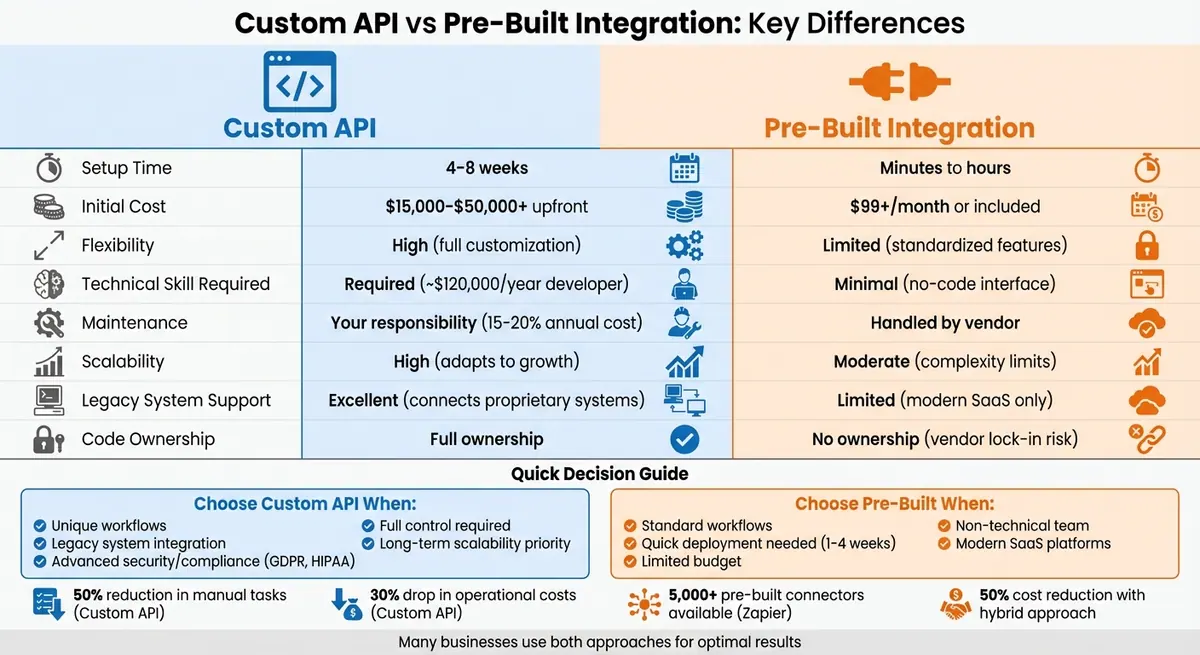
Custom API vs Pre-Built Integration: Complete Comparison Guide
API-led vs Point-2-Point integration: compare costs and benefits
sbb-itb-5f36581
What Are Pre-Built Integrations?
Pre-built integrations, often referred to as "native" or "plug-and-play" integrations, are ready-made connectors that seamlessly link your CRM and marketing automation platforms without the need for custom coding. Think of them as tools that automatically sync critical data - like contact details, lead scores, and campaign engagement metrics - between systems in real time. For instance, when a prospect fills out a form on your website, their information instantly updates across both platforms, saving you from manual data entry.
Most of these integrations use a no-code or low-code interface, featuring drag-and-drop modules and pre-configured connectors. This user-friendly setup allows marketing teams to implement them without needing IT assistance. Platforms like HubSpot's App Marketplace offer over 1,000 pre-built integrations, while tools like Zapier provide access to more than 5,000 connectors. Vendors also handle all the maintenance - like updates, bug fixes, and security patches - ensuring the integration stays functional as platforms evolve. This simplicity and reliability make pre-built integrations an excellent choice for businesses with standard workflows. Below, we’ll break down their key features and benefits.
Features of Pre-Built Integrations
Pre-built integrations make it easy to sync essential data - such as contacts, companies, deals, leads, and activities - across your systems. They often include pre-configured workflows for common tasks like lead assignment, email automation, and task scheduling. For example, if a lead reaches a specific score, the integration can automatically notify a sales rep or create a follow-up task.
Another standout feature is vendor-supported maintenance. The provider manages updates, bug fixes, and security patches, ensuring the integration remains secure and compatible. Built-in security measures protect data during exchanges, while centralized data management ensures that sales and marketing teams work with unified information. These integrations are typically accessed through visual, no-code builders, making them easy to use even for non-technical teams.
Benefits of Pre-Built Integrations
One major perk is speed. Pre-built integrations can typically be set up in just 1–4 weeks, compared to the 8–12 weeks required for custom development. This means you can start leveraging automated workflows and real-time data syncing much faster by following a lead conversions playbook.
Cost is another big advantage. Many native integrations are included in your software subscription or come at a minimal additional cost. For middleware tools like Zapier or Make, monthly fees usually range from $100 to $500, with professional setup for simple connectors typically costing under $5,000.
"If a native integration covers your needs (e.g. syncing contacts or basic fields), it's often the best choice budget-wise." - No Bounds Digital
No-code interfaces also empower non-technical teams to connect tools with just a few clicks, allowing IT teams to focus on more complex projects.
Drawbacks of Pre-Built Integrations
While pre-built integrations are great for standard workflows, they do have limitations. They’re designed to address common use cases, which means they may not support unique data transformations or highly complex workflows. If your business has specialized needs, you could run into integration gaps. This is where custom API development may be a better fit.
Another potential downside is vendor dependency. You’re reliant on the provider’s roadmap for updates and new features. If the vendor discontinues support, significantly raises prices, or shuts down, your automated workflows could be disrupted. Additionally, these integrations are primarily designed for modern cloud-based platforms, which can create challenges if you’re working with older, on-premise systems. In such cases, middleware platforms or custom solutions might be necessary.
What Is Custom API Development?
Custom API development involves creating tailored connections between software applications - like CRMs such as HubSpot or Salesforce and marketing automation tools - using logic crafted specifically to meet your business's unique needs. Unlike pre-built integrations that come with standardized workflows, custom APIs are built from scratch to align perfectly with your requirements. Think of it as the difference between buying an off-the-rack suit versus having one custom-made.
"Custom APIs are the bespoke suits of system integration. They're designed from the ground up to fit your specific business workflows and goals." - Smartt Team
This approach enables complex, multi-step logic across platforms that goes far beyond the capabilities of standard connectors. For instance, you could implement AI-powered lead scoring or set up Slack alerts triggered by specific CRM updates. It also supports unique data formats and metrics that pre-built solutions can't handle, making it a go-to option for integrating legacy or proprietary systems that lack modern API support.
The real strength of custom API development lies in creating a "single source of truth" by keeping data synchronized in real time across sales, marketing, and support channels. This ensures all teams work with the most up-to-date information, eliminating the data silos that often hinder efficiency. Companies using custom API integrations report up to a 50% reduction in manual tasks like onboarding and reporting, along with an average 30% drop in operational costs through workflow automation. These advantages set the stage for a deeper dive into its features, benefits, and challenges.
Features of Custom API Development
Custom APIs offer complete customization, allowing you to design workflows that standard connectors simply can't support. This includes managing unique data formats, handling industry-specific metrics, and building complex, multi-step processes that span multiple platforms.
Another key feature is legacy system integration. Custom APIs can connect older, on-premise software or proprietary systems that aren't included in any app marketplace. This is a game-changer for businesses relying on specialized or older technology that still plays a critical role in their operations.
Custom APIs also excel in security and compliance. They let you implement tailored security measures and meet strict regulatory standards like GDPR, HIPAA, or SOC 2. This level of control is vital for industries with stringent data protection needs. Additionally, with custom development, you own the code and integration logic, giving you full intellectual property rights and avoiding vendor lock-in.
On the technical side, custom APIs include components like connectors, authentication handlers (supporting OAuth 2.0), schedulers for automation, webhook handlers for real-time updates, and orchestration layers for managing complex workflows. These tools enable advanced data handling and error management that pre-built solutions can't match.
Benefits of Custom API Development
One of the biggest advantages is flexibility. Custom APIs adapt to your specific business processes, rather than forcing you to conform to the limitations of pre-built tools. This means your workflows can reflect how your teams actually operate, accommodating unique business rules and data structures.
Scalability is another key benefit. Custom APIs are built to handle high data volumes and real-time automation without being limited by the rate caps or quotas that often come with SaaS-based connectors. As your business grows, your custom API can grow with it, ensuring your systems remain relevant and effective.
"Unlike rigid, out-of-the-box solutions, a custom integration grows with you, ensuring that your technology stack remains relevant and adaptable." - DataCose
Custom APIs also eliminate vendor dependency. You’re not reliant on a third-party vendor to add features, and you avoid risks like sudden price hikes or a vendor discontinuing their service. By developing a custom solution, you retain full control over its functionality and future direction.
Drawbacks of Custom API Development
The most notable downside is higher costs. Custom development requires a significant upfront investment, whether you're paying developer salaries (averaging $120,000 annually in the U.S.) or outsourcing to specialized agencies. Building even a single custom connector can take 4–8 weeks, and more complex components - like a dedicated authentication microservice - can take months.
Another challenge is the need for technical expertise. Unlike no-code, pre-built integrations, custom APIs require skilled developers who understand both API design and your business's specific needs. This often means hiring in-house talent or partnering with an external development team.
Finally, ongoing maintenance is a critical factor. Custom APIs demand regular updates to stay compatible with evolving software versions. You'll need to allocate resources for bug fixes, security patches, and performance optimization. This isn’t a one-time project - it’s a long-term commitment that requires consistent attention.
Custom API vs Pre-Built Integration: Main Differences
When weighing the choice between custom APIs and pre-built integrations, the differences boil down to control versus convenience. Custom APIs provide complete control over data flows, security protocols, and unique business needs. On the other hand, pre-built integrations focus on speed and simplicity, often allowing businesses to get started in a matter of minutes rather than months.
One of the most noticeable differences is the timeline. Pre-built integrations can be deployed in hours, making them ideal for businesses that need a quick solution to meet tight deadlines or launch new products. In contrast, building a custom API can take months, but the payoff is in its ability to handle non-standard data, such as specific customer satisfaction scores or unique business metrics that off-the-shelf options overlook.
Cost is another key factor. Pre-built integrations are budget-friendly, starting at around $99 per month. Custom APIs, however, require a much larger upfront investment, starting at $15,000 and climbing to over $50,000 for more complex projects. While custom APIs eliminate ongoing subscription fees and grant full ownership of the code, they come with a long-term maintenance commitment, typically costing 15–20% of the initial development budget annually.
"Most applications today are only 20–40% original code - the rest comes from third-party components and dependencies." - Tanya Janca, Author, Alice and Bob Learn Application Security
Maintenance is another area where these options diverge. Pre-built integrations are maintained by the vendor, including automatic updates and fixes, which reduces the burden on your internal team. Custom APIs, on the other hand, require dedicated resources to handle updates, API version changes, and bug fixes, adding to the long-term costs. Many businesses opt for a hybrid approach, leveraging pre-built solutions for standard workflows and custom APIs for more niche requirements.
Here’s a quick comparison to highlight the key differences:
Comparison Table: Custom API vs Pre-Built Integration
| Feature | Custom API Development | Pre-Built Integration |
|---|---|---|
| Customization | High; tailored to unique workflows | Limited; standardized features |
| Deployment Time | Long; months for design and testing | Fast; ready in minutes or hours |
| Initial Cost | High; $15,000–$50,000+ | Low; $99/month or included in subscriptions |
| Technical Skill Required | Requires specialized developers (~$120,000/year) | Minimal; little to no coding needed |
| Scalability | High; adapts to business growth | Moderate; struggles with added complexity |
| Security | Advanced; custom protocols | Standardized; vendor-dependent |
| Maintenance | High; internal team required | Low; vendor handles updates |
| Intellectual Property | Full ownership | No ownership; vendor lock-in risk |
| Legacy System Support | Excellent; connects with proprietary systems | Limited; supports modern SaaS platforms |
Each option has its strengths and trade-offs, making the decision largely dependent on your specific business needs, timeline, and budget.
How to Choose the Right Solution
Selecting the best solution for your business requires evaluating factors like workflow complexity, system compatibility, budget, and timeline. Often, combining different approaches can provide the most effective results.
When to Use Pre-Built Integrations
Pre-built integrations are ideal for connecting mainstream SaaS platforms to standard workflows. With over 150 IPaaS platforms available - and Zapier alone offering more than 5,000 pre-built integrations - your basic needs are likely already covered.
For businesses working with limited budgets, pre-built solutions are a cost-effective choice. Starting at roughly $99 per month, these ready-to-use packages save you from the high costs of custom development. They’re especially useful for startups or MVPs, where getting to market quickly is crucial.
If your team lacks technical expertise, pre-built integrations also have you covered. These solutions are designed to require minimal coding, and the vendor typically handles updates, security patches, and bug fixes. This allows your team to focus on what matters most - your core business.
When to Use Custom API Development
Custom API development is the way to go when your needs extend beyond standard workflows. For example, if you rely on legacy systems like Sage ERP or proprietary on-premise applications, pre-built connectors may not be sufficient. Custom APIs can bridge these gaps and handle outdated file formats that modern IPaaS platforms might not support.
"Your business is unique, and it's unlikely that any packaged solution will be a precise fit for your needs. It will always be a compromise."
– Pell Software
Custom APIs are also essential if your operations require specialized functionality. Whether it’s managing complex workflows, implementing advanced security measures, or working with proprietary data structures, custom APIs provide the control and flexibility you need. For instance, over 8,000 companies, including Lyft and Snapchat, use the Google Maps API to power their services.
While custom APIs come with higher upfront costs, they give you full code ownership and avoid vendor lock-in. However, remember that ongoing maintenance typically requires dedicated resources, which can cost 15–20% of the initial development budget each year.
Combining Both Approaches
Blending pre-built integrations with custom API development can help you strike a balance between speed and customization, aligning your integration strategy with your business goals.
"Making deliberate, case-by-case decisions separates effective integration strategies from chaotic ones."
– PolyAPI
This hybrid approach is particularly useful during modernization efforts. For example, custom APIs can connect legacy systems to a central API management layer, while pre-built connectors link that layer to modern cloud applications. This method allows you to preserve existing systems while transitioning to the cloud at a comfortable pace.
For businesses focused on optimizing lead generation through customer-facing forms and data collection workflows, tools like Reform offer a no-code solution that bridges the gap. Reform allows for quick deployment of pre-built connectors to integrate with marketing and CRM tools. Over time, features like conditional routing and lead enrichment can be extended with custom APIs as your needs grow. This flexible approach lets you start quickly and scale later without needing to rebuild from scratch.
To optimize your resources, reserve your engineering team for creating custom endpoints that provide unique value, while handling routine tasks with off-the-shelf components. This balanced strategy can reduce integration costs by up to 50% and cut workloads by as much as 90% compared to building everything from the ground up.
Conclusion
Our look at integration strategies highlights the balancing act between speed and customization. Deciding between custom API development and pre-built integrations boils down to your specific business needs, available resources, and project timeline. Pre-built integrations shine when it comes to quick, cost-effective solutions for standard workflows. On the other hand, custom APIs provide the control and adaptability essential for unique processes or linking legacy systems.
"Integrations are no longer an afterthought. They are the backbone of operational efficiency, automation, and customer experience."
– PolyAPI
Many successful businesses leverage a mix of pre-built solutions and custom APIs. This approach not only simplifies routine tasks but also creates opportunities to gain a competitive edge.
Before making a decision, take a close look at your workflows. Pinpoint areas of friction and outline critical requirements such as compliance standards or data residency needs.
For lead generation specifically, Reform offers a practical solution: it allows you to quickly deploy pre-built connectors while leaving room for custom API enhancements as your business grows and evolves.
FAQs
How do the costs of custom APIs compare to pre-built integrations?
Custom APIs come with hefty upfront costs and recurring maintenance expenses, while pre-built integrations often operate on a subscription model, offering more predictable pricing.
The cost of developing a custom API can vary widely. Simple projects might start at $2,000, but more intricate builds can exceed $30,000. For some organizations, the first-year expenses alone can climb to $50,000–$150,000. On top of that, annual maintenance and staffing can add another $50,000–$150,000 to the bill.
On the other hand, pre-built integrations are generally easier on the wallet. They usually come with a smaller setup fee and subscription costs that range from $50/month for basic plans to $5,000/month for enterprise-level options. These subscriptions often include updates and maintenance, making them a cost-effective and predictable choice for many businesses.
How do custom APIs integrate with legacy systems?
Custom APIs work as a bridge between older legacy systems and modern applications by introducing a contemporary API layer. This layer ensures compatibility by translating protocols, data formats, and communication methods, enabling seamless data exchange between the systems.
Developers typically rely on middleware or adapters to address the differences between legacy systems and newer technologies. These tools help maintain scalability while adhering to modern standards, allowing businesses to improve functionality without needing to replace their existing systems entirely.
When should a business use both custom APIs and pre-built integrations?
When a business needs both speed and adaptability, combining custom APIs with pre-built integrations can be a smart move. Pre-built integrations are great for quickly linking common systems - like syncing data between a CRM and a marketing automation tool - and they’re easy to maintain. But they often struggle with more unique requirements, such as handling proprietary data, complex workflows, or specialized business rules.
That’s where custom APIs come in. They allow for tailored solutions, like real-time data enrichment, custom validation, or advanced routing. This hybrid approach is perfect for businesses aiming to balance efficiency with personalization. It’s especially helpful for scaling operations: most processes can run smoothly with standard integrations, while critical, unique tasks get the customization they need to stay accurate and efficient.
Related Blog Posts
Get new content delivered straight to your inbox

The Response
Updates on the Reform platform, insights on optimizing conversion rates, and tips to craft forms that convert.




Drive real results with form optimizations
Tested across hundreds of experiments, our strategies deliver a 215% lift in qualified leads for B2B and SaaS companies.
