
.webp)
Ultimate Guide to Key Rotation Policies



If you don’t rotate keys on a set schedule and after security events, you leave old access in place longer than you should.
I’d sum this up in plain terms: a key rotation policy should tell you what must be rotated, how often, who owns it, what events force rotation, how rollback works, and what logs you keep for audits. The article also points to clear timing targets, like 30–90 days for critical API keys, 90–180 days for high-sensitivity symmetric keys, 3–6 months for privileged SSH keys, and rotation within 24 hours after a suspected compromise.
If I were scanning this guide for the answer fast, here’s what matters most:
- Scope the policy well: include encryption keys, API keys, OAuth tokens, service account tokens, SSH keys, TLS certs, PSKs, and signing keys.
- Use two trigger types: scheduled rotation and event-based rotation.
- Set intervals by risk: higher sensitivity and higher usage usually mean shorter cryptoperiods.
- Write down control fields: purpose, owner, classification, interval, storage, generation, validation, revocation triggers, exceptions, and logging.
- Keep keys in KMS or HSM: not in source code or loose config files.
- Use overlap during cutover: let old and new keys work at the same time for a short window to avoid outages.
- Deactivate, then destroy: keep old keys only for legacy decrypt or verification, then erase them at the end of retention.
- Track proof: usage logs, failed rotations, deprecated-key traffic, and anomaly alerts.
- Aim for measurable targets: the guide cites 99.9% rotation success, under 5 minutes for infrastructure key rotation, and 12–24 months of logs.
Here’s a fast snapshot:
| Area | What the guide says |
|---|---|
| Main goal | Limit exposure if a key leaks |
| Main trigger types | Time-based and event-based |
| Event examples | Compromise, offboarding, vendor incident, migration, crypto flaw |
| High-priority response time | Within 24 hours |
| Common intervals | 30 days to 2 years, based on key type and risk |
| Storage rule | Use KMS/HSM, avoid plaintext storage |
| Cutover rule | Allow short overlap, then retire old key |
| Audit proof | Logs, inventory, exception register, usage data |
So if I had to reduce the whole article to one line, it would be this: build a written, automated, measurable process for replacing secrets before they become a long-term risk.
AWS KMS Key Rotation Explained | Secure Key Management for the Exam
sbb-itb-5f36581
What Key Rotation Policies Are
A key rotation policy is a written set of rules for replacing active keys on a schedule or after a trigger event. Put simply, it answers one practical question: when should a key be replaced?
NIST SP 800-57 defines the cryptoperiod as the policy-defined time window for using a key. When that window ends, the key should stop being used for new operations. After that, keep it only as long as needed for old decryption or signature verification.
Regular rotation cuts down exposure to data encrypted since the last rotation. It also helps with overuse. Keys that handle high volumes for long stretches can become easier targets for analysis-based attacks. On top of that, rotation helps with access hygiene by retiring stale keys and cutting off access tied to former employees or old services.
Rotation is planned. Revocation is what you do in an emergency. A solid policy spells out both.
Where Rotation Applies in Practice
In practice, the schedule and trigger depend on the system and the job the key handles.
| Environment | Key/Secret Type | Rotation Logic |
|---|---|---|
| Cloud KMS | Customer-managed encryption keys | Scheduled rotation; older versions retained for legacy decryption |
| Databases | Symmetric DEKs and KEKs | Rotate the KEK; no need to re-encrypt all data |
| API integrations | API keys, OAuth tokens | Replace, then revoke the old key |
| Admin access | SSH keys | Periodic and event-based rotation |
| TLS certificates | TLS/SSL certificates | Short overlap during rollout |
For businesses using Reform, rotation also needs to cover webhooks, CRM syncs, and other connected secrets, not just the form app. That broader scope is what turns a policy from a document into something teams can actually enforce.
Rotation Triggers and Timing
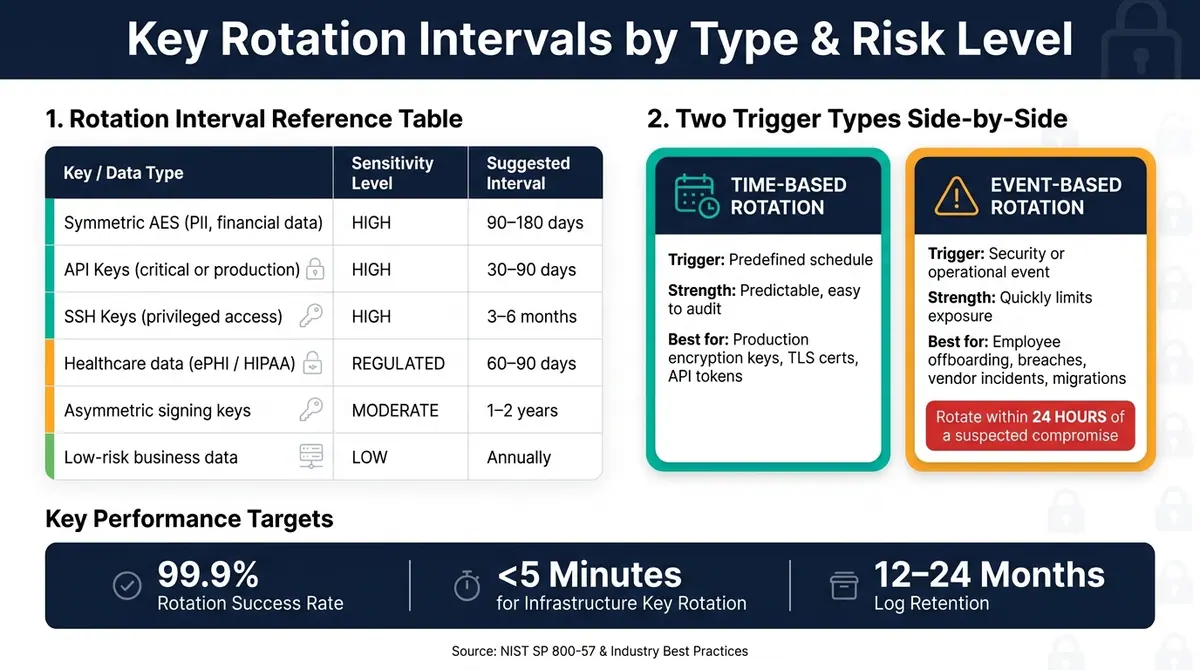
Key Rotation Intervals by Type & Risk Level
Once the policy is set, define the rules for when rotation happens. The timing should match key risk, usage, and compliance pressure. In plain English: higher-risk or heavily used keys should rotate more often.
Time-Based Rotation vs. Event-Based Rotation
Most policies use two models: time-based rotation and event-based rotation.
Time-based rotation follows a set schedule. Event-based rotation happens when a security or operational issue shows up.
| Feature | Time-Based Rotation | Event-Based Rotation |
|---|---|---|
| Trigger | Predefined schedule or usage threshold | Security or operational event |
| Strength | Predictable and easier to audit | Quickly reduces exposure after a known or suspected issue |
| Limit | A compromise can remain active until the next cycle | Harder to predict and can be disruptive without automation |
| Best Use | Routine maintenance for production encryption keys, TLS certificates, and API tokens | Employee offboarding, suspected breaches, vendor incidents, and infrastructure changes |
Your policy should name event-based triggers directly. That way, there is no guessing during an incident. Common triggers include suspected or confirmed key compromise, employee offboarding, a vendor incident that affects your keys or tokens, system migrations, and a major cryptographic vulnerability.
If one of those events happens, rotate the affected key within 24 hours.
How to Set Reasonable Rotation Intervals
Set intervals based on sensitivity, usage, and compliance. Shorter intervals can limit exposure, but only if your systems can handle the load. A key used for bulk encryption or heavy transaction volume usually needs a shorter cycle than one used only now and then for signing.
| Key / Data Type | Sensitivity Level | Suggested Interval |
|---|---|---|
| Symmetric AES (PII, financial data) | High | 90–180 days |
| API keys (critical or production) | High | 30–90 days |
| SSH keys (privileged access) | High | 3–6 months |
| Healthcare data (ePHI / HIPAA) | Regulated | 60–90 days |
| Asymmetric signing keys | Moderate | 1–2 years |
| Low-risk business data | Low | Annually |
PCI DSS requires rotation at least once a year for cardholder data keys, and quarterly rotation is recommended in high-risk environments. For highly sensitive data like PII or PHI, monthly or quarterly rotation is common.
One more thing: don’t keep dormant keys on a rotation schedule. If a key is no longer used, retire or destroy it under your retention rules.
Next, turn these timing rules into policy fields and control points that teams can enforce.
Policy Requirements Every Team Should Document
A written policy turns key rotation from a loose guideline into something teams can enforce and auditors can check. Rotation intervals tell you when to rotate. Policy fields spell out how teams must handle keys the same way every time.
Required Policy Fields and Control Points
Each key rotation policy should spell out what the key is for, who owns it, how it's managed, and when it should be retired. If those details are missing, teams drift into inconsistent habits and audit evidence gets messy. These fields only work if access and storage are locked down.
| Policy Field | What to Document | Audit Evidence It Produces |
|---|---|---|
| Key Purpose | Specific use case, such as database encryption, API authentication, TLS, or code signing | Purpose field in the key inventory |
| Owner | Named individual or role accountable for the full lifecycle | Access logs and responsibility matrix |
| Classification | Data sensitivity tier, such as Public, Confidential, or Restricted | Classification field in the inventory |
| Rotation Interval | Defined cryptoperiod | Automated rotation schedule |
| Storage Location | Approved KMS or HSM only; no plaintext keys in source code or config files | Storage configuration records |
| Generation Method | Trusted entropy source within a KMS or HSM | Key generation logs |
| Validation Steps | Confirm the new key is functional before retiring the old one | Usage metrics showing old-key and new-key activity |
| Revocation Triggers | Compromise, staff departure, decommissioning | Revocation status logs |
| Exception Handling | Document the reason, compensating control, risk owner, and expiry date | Exception register with expiry dates |
| Logging/Audit | All generation, access, rotation, and destruction events | Immutable audit log entries |
One field teams often miss is exception handling. That’s where trouble starts. Every exception should include a clear reason, a compensating control, a named risk owner, and a firm expiration date - no more than 12 months. If you skip that structure, the “temporary” exception has a way of sticking around for years.
Once these policy fields are in place, the next step is making sure teams follow them through least privilege, separation of duties, and centralized storage.
Least Privilege, Separation of Duties, and Centralized Storage
Key access should follow a plain rule: only people and systems with a specific job should get access to a key. That’s least privilege. In practice, that means using Role-Based Access Control (RBAC) to limit what each person or system can do. A DevOps engineer may need to use a key to encrypt or decrypt data, but that doesn’t mean they should be allowed to export the raw key material.
Separation of duties adds another layer of control. The team that creates a key should not be the same team that approves it for use. For high-sensitivity keys, such as code-signing keys, require two-person approval before export or deletion. That extra checkpoint can stop a process mistake from turning into a serious incident.
As the ITU Online Editorial Team put it:
"Most key-related incidents are not cryptographic failures. They are process failures wrapped around a cryptographic asset."
Keys should live in an approved KMS or HSM so rotation and audit logs stay in one place. Keep KEKs separate from DEKs to limit blast radius.
How to Implement, Monitor, and Maintain Key Rotation
The Secure Rotation Workflow
Once the policy is set, rotation needs to follow the same path every single time.
Start with a complete key inventory. Then generate a new key with your KMS or HSM and distribute it through authenticated channels or with envelope encryption. During the handoff, keep an overlap window so systems accept both the old and new keys. That buffer helps avoid auth failures while the new key spreads across services, which can take anywhere from one hour to more than 24 hours.
After all traffic moves to the new key, check that application error rates stay normal. Then deactivate the old key. At that point, it should be used only for legacy decryption. When the retention window ends, destroy the old key with cryptographic erasure, not simple file deletion.
Rollback planning is not optional. Test the full rotation flow in staging before you touch production, and keep a path to return to the prior key version if the new one causes service issues.
After the swap, confirm that the old key no longer receives traffic and that no new errors show up.
Monitoring, Audit Evidence, and Compliance Readiness
The table below shows the main evidence types auditors and incident reviewers want to see. This material supports audit review and incident response, not just day-to-day checks.
| Evidence Type | What It Reveals | Why Reviewers Need It |
|---|---|---|
| Usage Logs | Who accessed the key, when, and for what operation | Helps spot unauthorized access or shadow usage outside approved apps |
| Old-Key Usage Ratio | Percentage of requests still hitting the deprecated key version | Shows whether the transition is done before the old key is destroyed |
| Failed Rotation Events | KMS errors, distribution lag, or permission mismatches | Points to process gaps that could cause outages |
| Anomaly Detection | Spikes in usage or access from unexpected locations | Gives early warning of a possible credential leak or insider threat |
Well-run teams should target a 99.9% rotation success rate, rotation time under 5 minutes for infrastructure keys, and 100% audit coverage. Keep key management logs for 12 to 24 months to meet SOC 2, PCI DSS, and HIPAA requirements.
With the workflow and monitoring in place, the policy stops being wishful thinking and starts working like an actual control.
Conclusion: Build a Policy That Is Automated, Measurable, and Enforceable
A key rotation policy works only when it is specific, automated, and measurable. In plain terms, that means setting a clear scope, choosing rotation intervals based on data sensitivity and regulatory rules, documenting every required control field, and automating the workflow wherever you can.
Manual rotation opens the door to human mistakes and missed updates. Automation cuts that risk down.
Retire old keys on purpose: deactivate first, destroy later, and keep logs at each step. The aim is a policy that is secure, auditable, and fully automated.
FAQs
How do I choose the right rotation interval?
Choose a rotation interval by balancing security with day-to-day stability. The right timing depends on data sensitivity, how often the key is used, and any regulatory rules you need to follow.
If you're protecting highly sensitive data, a shorter schedule often makes sense. That can mean rotating keys every month or every quarter. For standard business data, annual rotation is often enough.
Common ranges look like this:
- Symmetric keys: 90–180 days
- Asymmetric keys: 1–2 years
- TLS/SSL certificates: 90–398 days
One practical note: don't rotate too often unless you have automation in place. If the process is manual, frequent changes can create outages, missed updates, or plain old human error.
And if there's a suspected breach or an employee leaves under risky circumstances, rotate the key right away.
What should I do if a key is suspected to be compromised?
If a key may have been compromised, do an immediate emergency rotation. Don't wait for the next maintenance window.
Stop using the key right away. Then assess the impact, re-encrypt any affected data, replace the key with a new one, distribute the new key to the systems that need it, revoke or destroy the old key, and fix the root cause that led to the issue.
How can I rotate keys without causing downtime?
Use key versioning and a dual-active rotation approach. That means keeping more than one key version live at the same time, so older keys can still decrypt data that already exists while the new key takes over for current encryption.
For a zero-downtime switch, roll out the new key next to the old one first. Then verify that your systems are using the new key for encryption before you phase out the old key. This avoids the kind of handoff that breaks things in the middle of normal traffic.
A KMS can automate much of this work, which cuts down on human mistakes. And before you do any of it in production, run the rotation in a non-production environment and make sure the process works as expected.
Related Blog Posts
Get new content delivered straight to your inbox

The Response
Updates on the Reform platform, insights on optimizing conversion rates, and tips to craft forms that convert.




Drive real results with form optimizations
Tested across hundreds of experiments, our strategies deliver a 215% lift in qualified leads for B2B and SaaS companies.
