
.webp)
How To Create a Third-Party Security Questionnaire


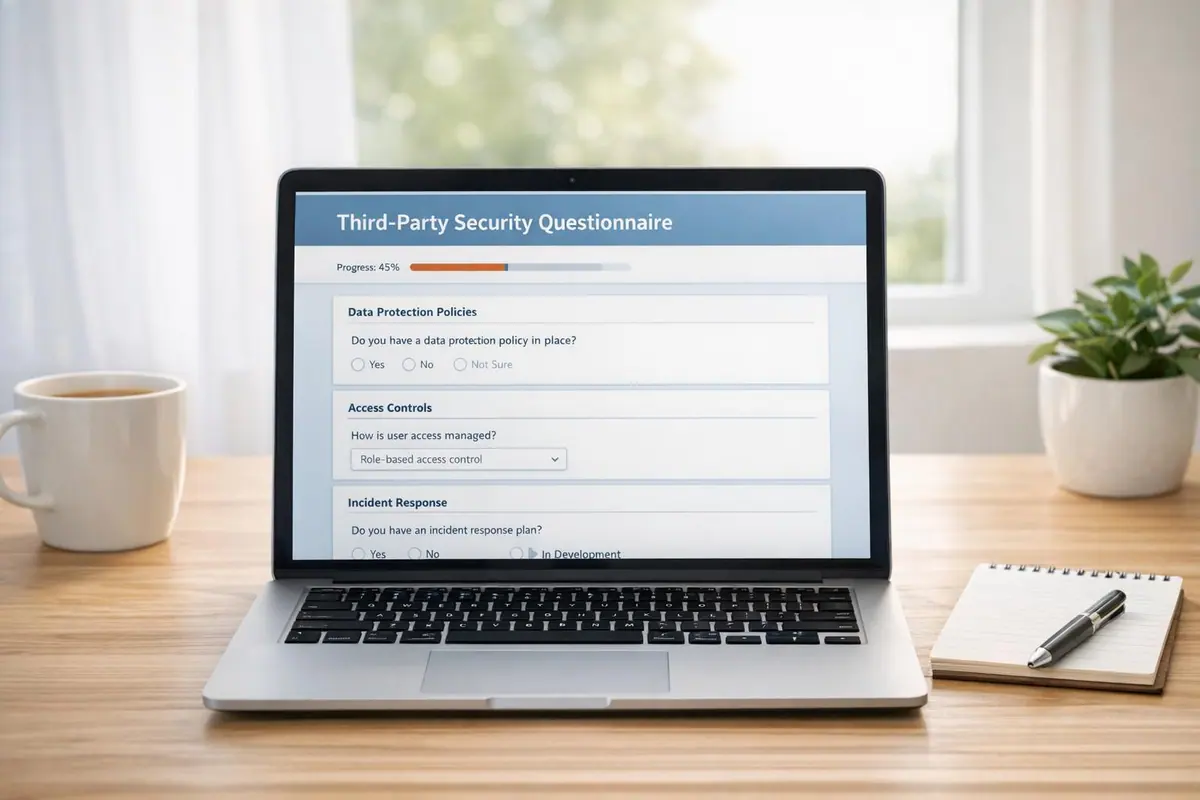
Third-party security questionnaires are critical for assessing vendor risks and protecting sensitive data. With 82% of organizations experiencing third-party breaches since 2021, these tools help identify vulnerabilities before they become costly problems. A well-designed questionnaire evaluates a vendor’s security practices, compliance, and safeguards, ensuring your data stays protected.
Key Takeaways:
- Why it matters: Third-party breaches cost an average of $7.5 million to remediate.
- What to include: Focus on data protection, access control, compliance (e.g., SOC 2, GDPR), and incident response.
- How to streamline: Use standardized templates like SIG or CAIQ and tools with conditional logic to simplify the process.
- Actionable steps: Tailor questions to vendor risk levels, verify responses with documentation, and maintain regular updates.
Start by identifying high-risk vendors, ask clear and specific questions, and use automation to manage responses efficiently. These steps ensure a robust approach to mitigating third-party risks.
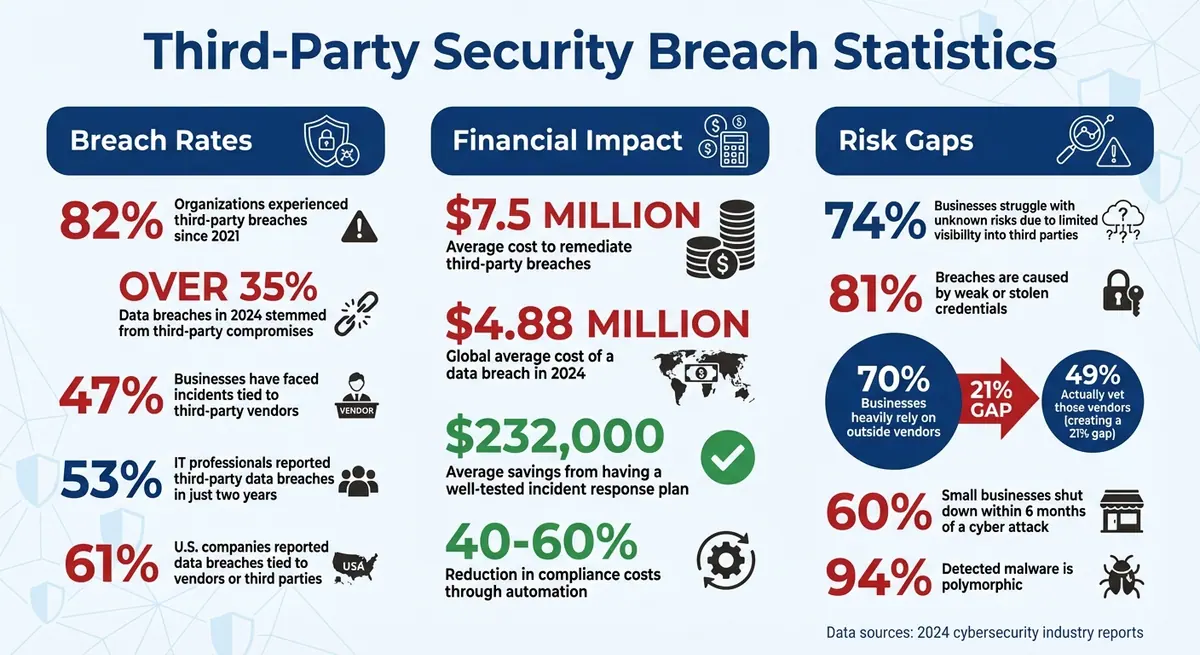
Third-Party Security Breach Statistics and Costs 2024
Best Practices on Handling Cybersecurity Questionnaires from Third Parties
sbb-itb-5f36581
What Are Third-Party Security Questionnaires?
A third-party security questionnaire is a tool filled with technical questions designed to evaluate a vendor's security practices, compliance levels, and operational readiness before you entrust them with sensitive data. These questionnaires dig into specifics that vendors might skip over during sales discussions - like whether they encrypt data at rest, conduct regular penetration tests, or hold certifications such as SOC 2.
In the vendor selection process, these questionnaires play a vital role. They provide a structured way to uncover risks - both technical and procedural - that might otherwise go unnoticed during early negotiations. Instead of relying solely on marketing claims or verbal assurances, you get documented proof of the vendor's security measures, incident response strategies, and regulatory compliance with frameworks like GDPR or HIPAA.
Multi-step standardized templates simplify the process. For example, the Standardized Information Gathering (SIG) questionnaire examines 21 risk areas aligned with NIST and ISO standards. The Consensus Assessment Initiative Questionnaire (CAIQ) focuses on cloud service providers, while the HECVAT (Higher Education Community Vendor Assessment Toolkit) offers a free, sector-specific option. These templates help quantify a vendor's controls and directly address potential risks. Grasping these basics highlights why these assessments are so important.
Why Third-Party Security Assessments Matter
The numbers tell a sobering story. Over 35% of data breaches in 2024 stemmed from third-party compromises. On top of that, the global average cost of a data breach soared to $4.88 million in 2024. When a vendor's security fails, the fallout can include financial losses, regulatory fines, and a tarnished reputation.
Here’s a startling statistic: 74% of businesses struggle with unknown risks due to limited visibility into the third parties managing their data. Without a structured assessment process, you're left to take vendors at their word. Security questionnaires flip the script by requiring vendors to provide concrete evidence of their practices.
This push for transparency is gaining momentum. Instead of relying on self-reported claims, organizations increasingly demand documented proof - like SOC 2 reports, penetration test results, and audit summaries - to make informed vendor decisions. This shift elevates questionnaires from being a mere formality to becoming a powerful risk management tool.
Main Goals of Security Questionnaires
Security questionnaires are more than just paperwork; they serve several key purposes.
First, they help identify compliance gaps by checking whether a vendor meets specific regulations and follows industry-standard security practices. This allows you to fine-tune contracts or service level agreements before committing to a partnership.
Second, they evaluate how well a vendor protects data. By examining encryption protocols, access controls, and incident response plans, you can ensure the information you share is safe. This is crucial, especially since 81% of breaches are caused by weak or stolen credentials. Knowing a vendor’s access control policies can make all the difference.
Third, they establish accountability for identifying and addressing risks. Vendors are expected to maintain strong IT governance, and security questionnaires provide a way to measure that. As Cynomi puts it:
"A security questionnaire is not just a checklist; it's a formalized method to uncover potential weaknesses in your vendors' cybersecurity and compliance posture before those weaknesses become your problem." - Cynomi
The responses to these questionnaires act as your "source of truth" when deciding whether to move forward with a vendor, request additional safeguards, or set deadlines for fixing any issues. This structured approach is especially critical when you consider that 60% of small businesses shut down within six months of a cyber attack. Conducting thorough vendor assessments isn’t just a one-time task - it’s an ongoing necessity.
Determining Your Organization's Requirements
First, figure out what needs protection - because not all vendors carry the same level of risk. Here's a startling fact: 70% of businesses say they heavily rely on outside vendors, but only 49% actually vet those vendors. This leaves a significant number of companies vulnerable to risks that could have been avoided.
Start by identifying which vendors need closer inspection. The level of scrutiny depends on the type of data they handle and how critical their services are to your operations. For instance, a marketing agency managing public-facing content isn't as risky as a payroll processor handling sensitive Social Security numbers and bank details. Alarmingly, 47% of businesses have faced incidents tied to third-party vendors, many of which could have been avoided with proper upfront checks.
Your industry regulations and the types of data you manage will also shape your approach. A healthcare provider must prioritize patient data under HIPAA, while an e-commerce business needs to focus on PCI DSS compliance for payment security. Tailor your questions to address these specific risks.
Selecting Which Vendors to Assess
The easiest way to decide which vendors to assess is to look at data access. Any vendor that deals with sensitive data - like personally identifiable information (PII), financial records, or intellectual property - should complete a security questionnaire. This includes cloud storage providers, payment processors, and even less obvious candidates like customer support platforms that might store sensitive conversations.
Network and system access is another critical factor. Vendors with access to your internal networks or administrative privileges can be a gateway for cyberattacks. For example, a ransomware attack targeting a cloud provider could expose your data.
The importance of a vendor's service also matters. If a vendor’s failure would disrupt your operations - think payment gateways for online stores or authentication services for SaaS platforms - they need thorough evaluation, even if they don’t handle sensitive data directly. It's worth noting that 53% of IT professionals reported third-party data breaches in just two years, showing how common these incidents are.
Don't forget about physical access. Vendors with access to data centers, offices, or facilities where sensitive equipment is stored should also be assessed. And then there’s the issue of fourth-party risk - your vendor’s subcontractors. Even if your vendor has strong security measures, their subcontractors might not, putting your data at risk.
Steve Tcherchian, CISO and Chief Product Officer at XYPRO, sums it up perfectly:
"Security questionnaires are part of due diligence today. Just like you would do your due diligence in any other business transaction, security needs to be considered part of that effort... vendors are most targeted, and if something happens to them, it happens to you as risk can no longer be deflected to third-parties without consequence."
Once you've identified the vendors to assess, the next step is to focus on the specific security concerns that need addressing.
Choosing Your Security Focus Areas
The questions you ask should depend on the type of data the vendor handles. For example, vendors managing financial data should be asked about PCI DSS compliance and encryption protocols, while those handling health information need to meet HIPAA requirements. Avoid using the same questionnaire for vastly different vendors, like a SaaS analytics tool and a medical records system - the risks they pose are completely different.
Access control is a must-have focus area. With 81% of breaches caused by weak or stolen credentials, it’s critical to know if vendors enforce multi-factor authentication, follow the principle of least privilege, and regularly audit permissions. Ask detailed questions: How often do they review access logs? Do they promptly revoke credentials when employees leave? How do they manage privileged accounts?
For vendors providing essential services, business continuity and disaster recovery are key. Request their Recovery Time Objectives (RTOs) and Recovery Point Objectives (RPOs) to understand how quickly they can restore services and how much data might be lost. This is especially crucial when you consider that 60% of small businesses shut down within six months of a major cyberattack.
To streamline the process, use a tiered approach based on vendor risk levels. High-risk vendors handling sensitive data or critical services should undergo a full assessment, covering all security domains. Medium-risk vendors can go through a lighter version focusing on key areas, while low-risk vendors with minimal data access can complete a basic evaluation. This helps avoid overwhelming vendors with unnecessary questionnaires while still addressing the most important risks.
Standardized frameworks can help you get started. The SIG (Standardized Information Gathering) questionnaire covers 21 risk areas aligned with NIST and ISO standards, making it a solid choice for general vendor assessments. For cloud service providers, the CAIQ (Consensus Assessments Initiative Questionnaire) is a better fit. These templates can save time while ensuring all critical areas are addressed.
| Assessment Criteria | What to Evaluate | Key Questions to Answer |
|---|---|---|
| Data Classification | Type of data the vendor handles | Does the vendor process PII, financial data, or intellectual property? |
| Access Level | Depth of system and network access | Does the vendor have admin rights, API access, or physical facility access? |
| Business Impact | Consequences of vendor failure | Would vendor downtime halt critical operations or revenue streams? |
| Compliance Scope | Legal and industry requirements | Which regulations apply: SOC 2, HIPAA, GDPR, PCI DSS? |
| Supply Chain | Vendor's own third parties | Does the vendor use subcontractors in high-risk locations? |
Building Your Security Questionnaire
Once you've identified which vendors to evaluate and the risks to prioritize, it's time to create the actual questionnaire. A well-designed questionnaire should cover all critical security areas while being straightforward enough for vendors to complete without confusion. The goal? To gather accurate, actionable data about a vendor's security practices.
Key Sections to Include
Each section of the questionnaire is crafted to uncover vulnerabilities and enable smarter decisions about vendor risks. A thorough security questionnaire typically includes 11 essential sections, each focusing on a specific aspect of security.
Start with Company and Vendor Information to gather foundational details like company size, geographical operations, and organizational structure. This helps establish a baseline understanding of the vendor’s scope and profile.
The Data Security and Privacy section should dive into how the vendor manages data. Ask about encryption methods (e.g., for data at rest and in transit), data retention policies, and procedures for handling deletion requests. With over 35% of data breaches in 2024 linked to third-party compromises, these questions are critical for assessing a vendor's safeguards.
Access Control and Identity Management is another must-have. Since 81% of breaches stem from weak or stolen credentials, include questions about multi-factor authentication (MFA), the principle of least privilege, and how often they audit permissions.
Network and Infrastructure Security should focus on protections like firewalls, intrusion detection/prevention systems, and audit logging practices. Meanwhile, Compliance and Certifications ensures vendors meet industry standards such as SOC 2, ISO 27001, HIPAA, GDPR, or PCI DSS. Always request proof - certification documents provide more credibility than claims alone.
The Incident Response and Disaster Recovery section evaluates how vendors handle breaches or outages. Ask about breach notification timelines, business continuity plans (BCP), and disaster recovery plans (DRP). A well-tested incident response plan can save an organization an average of $232,000 in breach-related costs.
Other important sections include:
- Governance, Risk, and Compliance (GRC): Assess the vendor's internal risk management practices.
- Third-Party/Supply Chain Management: Evaluate risks posed by the vendor’s own subcontractors or partners.
- Physical Security: Focus on protections for data centers or facilities.
- Human Resources and Training: Gauge employee awareness and training on security protocols.
- Threat and Vulnerability Management: Ask about vulnerability scanning and penetration testing practices.
Each section adds another layer of insight into the vendor's security posture, helping you identify and address potential risks.
Crafting Clear and Specific Questions
The clarity of your questions directly impacts the quality of the responses you’ll receive. Keep your language simple and direct. For example, instead of asking, "Does your organization implement appropriate technical and organizational measures to ensure a level of security appropriate to the risk?" opt for, "Do you encrypt customer data at rest using AES-256 or equivalent?"
Follow yes/no questions with requests for evidence. For instance, "Describe your incident response plan with notification timelines and attach recent tabletop exercise results." This ensures vendors provide tangible proof of their claims.
Augustus Arnold of Targhee Security highlights the importance of transparency:
"A vendor's refusal to answer security questions is a major red flag. It may suggest they have something to hide or lack a mature security program." - Augustus Arnold, Targhee Security
Tailor your questionnaire to the vendor’s services. For example, skip physical security questions if the vendor doesn’t operate physical data centers. This prevents unnecessary "not applicable" responses and reduces what’s often called "questionnaire fatigue." For critical controls, always request documentation - such as SOC 2 reports or MFA screenshots - for added verification. This step is essential, especially since 62% of network intrusions originate from third-party vulnerabilities.
Using Conditional Logic for Smarter Questionnaires
Once you've drafted clear questions, take it a step further by applying conditional logic to make the questionnaire more targeted. Conditional logic customizes the questionnaire based on a vendor's responses, ensuring only relevant questions are displayed.
For example, if you ask, "Does your service access or store customer personally identifiable information (PII)?" and the vendor answers "yes", the questionnaire can automatically reveal sections related to data privacy and compliance. If the answer is "no", those sections are hidden, saving time and reducing irrelevant queries.
Similarly, a question like "Do you operate physical data centers?" can act as a gatekeeper. If the vendor answers "no", all subsequent physical security questions can be skipped, avoiding redundant "not applicable" responses.
Conditional logic also helps with compliance mapping. If a vendor indicates they handle protected health information (PHI), the system can trigger questions specific to HIPAA compliance.
Modern tools can even use AI to filter out irrelevant questions or pre-fill answers based on previously uploaded documents, like SOC 2 reports. This automation not only saves time but also improves accuracy. For instance, the SIG (Standardized Information Gathering) questionnaire uses a modular approach, covering 21 risk domains that can be tailored to a vendor's specific services.
Platforms like Reform also allow for dynamic, multi-step forms with conditional routing, ensuring vendors only address relevant security domains. This method enhances both the efficiency and accuracy of your risk assessment process, making it easier to identify potential issues while minimizing the burden on vendors.
Sending and Tracking the Questionnaire
Sending the Questionnaire to Vendors
When your questionnaire is ready, it’s crucial to set a clear deadline for vendors to complete it. A firm due date keeps everyone aligned and ensures the assessment process moves forward smoothly. Forget about juggling email threads and spreadsheets - they not only create unnecessary manual work but can also pose security risks.
It’s smart to prioritize high-risk vendors, especially those handling sensitive company or customer data. Steve Tcherchian, CISO and Chief Product Officer at XYPRO, explains why this step is so important:
"Security questionnaires are part of due diligence today. Just like you would do your due diligence in any other business transaction, security needs to be considered part of that effort".
Whenever possible, use standardized templates like SIG, CAIQ, or VSAQ. These formats allow vendors to reuse previous answers, making the process faster and more accurate. Regular check-ins with vendors can help clarify any issues and keep things on track. This collaborative approach ensures potential roadblocks are addressed early.
After sending out the questionnaire, keeping an eye on progress is key to ensuring vendors meet the deadline.
Using Digital Tools to Simplify the Process
Digital tools can take the headache out of tracking and managing questionnaires. With real-time dashboards, these platforms allow you to monitor multiple questionnaires at once, providing instant visibility into each vendor’s progress. This level of transparency is critical, especially when considering that 74% of businesses face unknown risks due to limited insight into third-party data handlers.
Modern platforms also automate follow-ups, removing the need to manually chase vendors via email. Some tools even leverage AI to cross-check vendor responses with uploaded evidence, like SOC 2 reports or policy documents. This can lead to acceptance rates of up to 95% for pre-filled answers. Organizations adopting automated tools report a dramatic improvement in completion times - up to five times faster compared to manual methods.
Tools like Reform take it a step further with multi-step forms that adapt dynamically based on vendor responses. These branded, professional questionnaires not only improve user experience but also provide real-time analytics to track completion rates. Integrations with CRM systems ensure vendor data flows seamlessly into your existing processes, while features like email validation and spam prevention help maintain data accuracy throughout the collection process.
Reviewing Vendor Responses and Taking Action
Reviewing Responses and Spotting Risks
A thorough vendor risk management process requires careful examination of vendor responses. Once you receive their responses, verify their claims with supporting documents like SOC 2 Type II reports, ISO 27001 certifications, or audit logs . Internally, review these submissions, while external validation can rely on automated monitoring tools to assess the vendor's actual security posture.
To assess risk levels, calculate a risk score by multiplying the likelihood (1–5) of an issue occurring by its impact (1–5). Based on the score, classify vendors into categories: Critical (20–25), High (12–16), Medium (5–10), or Low (1–4). Many modern vendor risk management platforms can automate this scoring process.
Be on the lookout for warning signs. Red flags might include missing incident response plans, outdated audit reports, insufficient encryption for sensitive data, or reliance on high-risk subcontractors. Flag any concerning responses for further review and discussion.
Considering that 46% of organizations have reported data breaches tied to third-party vendors and that non-compliance costs can be about three times higher than maintaining compliance, a detailed review of vendor responses is crucial. These steps help ensure only vendors with proven security measures advance to the next stage of evaluation.
Requesting Additional Information
If your initial review reveals gaps or unclear responses, follow up with vendors to gather more details. Ambiguities or missing information can hide vulnerabilities that may expose your organization to risk. Be specific in your requests - ask for items like recent penetration test results, documentation of tabletop exercises, or certificates confirming data destruction .
When security gaps are identified, collaborate with the vendor to create a formal remediation plan, complete with clear deadlines for addressing the issues . The goal isn't necessarily to reject vendors but to work together toward solutions. Many vendors see this as an opportunity to strengthen their security measures and build trust.
If a vendor cannot meet your minimum requirements, return the questionnaire and revise contracts to include explicit security expectations . Keep all remediation plans, communication records, and updated evidence in a centralized system to maintain a clear audit trail for future assessments .
Lastly, plan follow-up evaluations to confirm that vendors have implemented the agreed-upon improvements. Increasingly, organizations are using automated tools to track remediation progress and send reminders for upcoming deadlines . This ongoing review process demonstrates a strong commitment to managing third-party risks effectively.
Updating and Maintaining Your Questionnaires
Keeping Your Questionnaires Current
Security questionnaires aren’t something you can just set and forget. To keep them relevant and accurate, review and update them at least once a year. Some fast-moving companies go even further, revisiting their questionnaires quarterly to stay aligned with rapid technological advancements. As Travis Good, an expert in security and privacy programs at Workstreet, explains:
"To maintain relevance and accuracy, security compliance questionnaires should typically be reviewed and updated at least once a year. But many companies do this quarterly."
Certain events demand immediate updates. These include legislative changes, new technologies, process overhauls, or even security breaches. Such updates help address new threats as they arise. The need for frequent updates becomes even clearer when you consider that nearly 94% of detected malware is polymorphic - it constantly changes its code to evade detection.
To make updates more effective, align your questionnaire with established frameworks like the Standardized Information Gathering (SIG) questionnaire, which is updated annually to reflect changes in the threat landscape. Assign responsibility for each section to relevant teams, such as IT, Legal, or Operations, so subject matter experts can handle updates for their areas. This approach spreads the workload and ensures no single team is overwhelmed.
Once your updates are complete, store and organize these records systematically to support ongoing risk management efforts.
Storing and Organizing Vendor Assessments
A centralized repository is your best friend when it comes to managing completed questionnaires, supporting evidence, and vendor documentation. Use tags or filters to organize past responses by client, framework templates, or date, making it easier to retrieve what you need quickly. Your repository should include critical documents like SOC 2 reports, ISO 27001 certifications, remediation plans, and risk ratings - essential items that auditors often request.
Version control is another must-have. It allows you to track which version of the questionnaire each vendor completed, ensuring you’re always referencing the latest data. Additionally, maintain a complete audit trail that logs when assessments were conducted, who reviewed them, and any actions taken.
Automating this process can be a game changer. Companies that embrace automation often cut compliance costs by 40% to 60% while reducing the likelihood of manual errors. A well-organized system not only saves time but also strengthens your overall compliance program.
Conclusion
Creating a custom third-party security questionnaire is more than just a compliance exercise - it’s a critical defense against vendor-related breaches. With the average cost of addressing such breaches reaching $7.5 million and 61% of U.S. companies reporting data breaches tied to vendors or third parties, a well-thought-out questionnaire can help uncover risks before they escalate into expensive problems.
The secret lies in customization. While industry-standard frameworks like SIG or CAIQ offer a good starting point, tailoring your questionnaire to your organization’s unique risk profile and regulatory needs ensures you’re asking the right questions of the right vendors. As SecurityScorecard highlights:
"The need for specific answers and more control often leads teams to build custom questionnaires".
This approach not only improves the quality of vendor responses but also minimizes the fatigue that comes with answering overly generic or irrelevant questions.
To take it a step further, digital tools can streamline the entire process. Platforms like Reform make it easy to create branded, multi-step questionnaires that include conditional logic, adapting questions based on vendor responses. Features like automated workflows, real-time tracking, and CRM integrations cut down on the manual work that often bogs down security teams.
Vendor security assessment should be an ongoing effort, not a one-and-done task. Regularly updating questionnaires, categorizing vendors by risk level, and maintaining a centralized repository of assessments and evidence can transform your vendor risk management from a reactive process into a proactive strategy.
Take a moment to evaluate your current approach. By incorporating customization and automation, you can strengthen your security measures while saving valuable time.
FAQs
How can I decide which vendors need a security questionnaire?
To figure out which vendors should complete a security questionnaire, start by evaluating their role and the potential risks they pose to your business. Key factors to consider include:
- Data sensitivity: Will the vendor have access to personal, financial, or other sensitive information?
- Service criticality: How vital is their service to your daily operations?
- Regulatory requirements: Are there compliance standards that demand security checks for this vendor?
- Risk impact: What would be the financial or operational fallout if a security breach occurred?
Vendors dealing with sensitive data, delivering essential services, or operating under strict compliance rules should complete a comprehensive questionnaire. For medium-risk vendors, a shorter, more focused form may be enough. Low-risk vendors, such as those offering non-critical services, might only need a basic checklist.
This tiered approach helps you gather the appropriate level of detail without overwhelming vendors. Tools like Reform’s no-code form builder can simplify this process. You can design detailed multi-step questionnaires for high-risk vendors or use streamlined forms for lower-risk ones, tailoring them to fit different levels of risk while keeping the process efficient and accurate.
What should be included in a third-party security questionnaire?
When creating a third-party security questionnaire, it's crucial to gather essential information about the vendor’s profile and evaluate their security practices. Focus on areas like access management, encryption methods, vulnerability management, and governance policies. These aspects help provide a clear picture of how the vendor handles security.
Don’t overlook their compliance certifications, data privacy protocols, incident response strategies, and breach notification procedures. These elements are vital for understanding how prepared they are to handle potential security issues.
You should also ask about their approach to sub-vendor management and request documentation, such as audit reports or certifications, to confirm their security practices. Customize the questionnaire to align with your specific business risks and compliance requirements, ensuring it addresses the unique challenges your organization might face.
How can I simplify the process of creating and managing third-party security questionnaires?
Using digital tools can significantly simplify the process of creating and managing third-party security questionnaires. For instance, a no-code form builder like Reform lets you design branded, multi-step forms with ease. Features like conditional routing ensure that vendors are only presented with questions relevant to them, saving everyone time and effort. Plus, you can upload pre-existing questionnaires to get started even faster.
Automation takes it a step further. Scheduled email reminders reduce the need for manual follow-ups, while real-time data validation ensures responses are accurate and complete. Analytics dashboards add another layer of efficiency by letting you monitor completion rates and response times. And with integrations to other platforms, exporting results or syncing with your current systems becomes seamless. These tools collectively create a more efficient workflow and improve data management throughout the entire questionnaire process.
Related Blog Posts
Get new content delivered straight to your inbox

The Response
Updates on the Reform platform, insights on optimizing conversion rates, and tips to craft forms that convert.




Drive real results with form optimizations
Tested across hundreds of experiments, our strategies deliver a 215% lift in qualified leads for B2B and SaaS companies.
