
.webp)
Demo request scoring in HubSpot: 5 examples


If I had to sum up this article in one line: score every demo request on fit and intent, then route high-score leads fast.
That’s the whole point. In HubSpot, I’d set up five form inputs, split scoring into Fit, Urgency, and Total, and use one of five scoring models based on how the sales team works. The article also makes one thing very clear: speed matters. Leads contacted within 1 hour are far more likely to qualify, and even a 5-minute callback can lift connect rates by a huge margin.
Here’s the article in plain English:
- To optimize lead generation, I score demo requests with 5 inputs:
- Role / buying authority
- Company size
- Tech stack
- Pain point
- Buying window
- I store scores in 3 HubSpot score properties:
- Fit score
- Urgency score
- Total demo score
- I route by score:
- High score: AE follow-up fast
- Mid score: SDR follow-up
- Low score: nurture
- I can pick from 5 models:
- Enterprise - more weight on role and company size
- Mid-market ops fit - more weight on process owner and stack
- Tech-stack switcher - more weight on replacement intent
- Pain-driven buyer - more weight on pain and deadline
- Fast-moving decision-maker - more weight on authority and short buying window
The big takeaway: not all demo requests should be treated the same. A VP at a 1,000-person company with a live issue and a near-term timeline should move to the front of the line. A low-fit lead with no deadline should not.
HubSpot Lead Scoring Explained: Setup, Thresholds, and Sales Handoff

sbb-itb-5f36581
Quick Comparison
| Model | Best for | Main scoring focus | Suggested action |
|---|---|---|---|
| Enterprise | Large accounts | Role + company size | Send top scores to enterprise AE |
| Mid-market ops fit | 100–1,000 employee teams | Role + stack fit | Route strong fits to AE/SDR |
| Tech-stack switcher | Buyers replacing tools | Stack + timeline | Fast follow-up with switch-focused pitch |
| Pain-driven buyer | Leads with a clear problem | Pain + urgency | Prioritize high-pain requests |
| Fast-moving decision-maker | Short sales cycles | Authority + buying window | Contact top leads within hours |
If I were setting this up today, I’d start with one model, run it for 30 days, and then check which score bands turn into meetings, SQLs, and pipeline before changing the weights.
How demo request scoring works in HubSpot
HubSpot scoring has three moving parts: contact properties store the answers, score properties turn those answers into points, and workflows send the lead to the right next step. Every model in this article uses a 100-point framework.
The first job is simple: capture the right inputs in high-converting lead forms.
Capture qualification inputs with contact properties
Before you build any scoring rule, create the contact properties that will store your form responses. Each qualification input needs its own property so HubSpot can reference it the same way every time.
Use dropdowns or radio buttons for each scoring input. Skip open text fields. Free-form responses are messy, and they don't fire point rules in a steady way. A property like Company size band with options such as 1–50, 51–200, 201–1,000, and 1,001+ gives you clean data. A blank field where someone types “about 300” does not.
The five properties to create first:
| Input | Property type | Example values |
|---|---|---|
| Role and buying authority | Dropdown | Economic buyer, Decision maker, Influencer, User, Student/Researcher |
| Company size and account fit | Dropdown | 1–50, 51–200, 201–1,000, 1,001+ |
| Tech stack fit | Dropdown | HubSpot, Salesforce, Marketo, Other |
| Primary pain point | Dropdown | Unqualified leads, Slow routing, Poor conversion, Disconnected tools |
| Buying window | Dropdown | Within 30 days, 30–90 days, 3–6 months, >6 months, Just researching |
If you need to separate seniority from buying authority, add a second job seniority property too.
Use score properties for fit, urgency, and total score
Create three separate score properties: Fit score, Urgency score, and Total demo score.
This split matters. A great-fit account with a long buying window should not be handled the same way as a mid-market company that needs help within 30 days. Keeping fit and urgency apart makes the model easier to read and easier to explain when sales asks, “Why did this lead get that score?”
Fit score should cover role, company size, and tech stack. Urgency score should cover pain point and buying window. Then split the full 100 points across fit and urgency so the model stays simple.
HubSpot documentation uses High (70–100), Medium (40–69), and Low (-100–39) score bands. Those bands work well as routing cutoffs.
Once those scores are in place, workflows do the rest.
Use workflows to assign owners and next steps
After a contact submits the demo form and the scores are calculated, workflows step in:
- 80+ points: assign an owner, mark SQL, and create a 2-hour follow-up task
- 50–79: route to SDRs with a 24-hour follow-up
- Below 50: keep in nurture
This kind of routing cuts out the lag that comes with manual review. That matters because high-intent demo requests can go cold fast if nobody jumps on them.
Next, define the five inputs that will feed the scoring model.
The five scoring inputs to define before building any model
Every model in this article uses the same five inputs. Nail these down before you build anything in HubSpot, and the rest gets a lot easier.
Role and buying authority
Use these five inputs to score both fit and urgency. The person submitting your demo form might control the budget, or they might just be gathering options. That gap should show up in the score.
C-suite/VP: +20 to +25. Director/Head: +15 to +20. Manager: +8 to +12. IC/Specialist: +3 to +7.
Company size and account fit
Base this on your ICP bands, not random employee ranges.
| Employee band | Fit signal | Suggested points |
|---|---|---|
| 1–10 employees | Very small team, limited budget | +0 to +3 |
| 11–50 employees | SMB, smaller budget | +5 to +8 |
| 51–200 employees | Growing mid-market | +10 to +15 |
| 200–1,000 employees | Core ICP for many B2B SaaS vendors | +15 to +20 |
| 1,001+ employees | Enterprise; fit depends on product | +10 to +20 |
Tech stack fit
This is where replacement intent matters most. If someone names a tool you replace, or calls out a direct integration need, score that at +5 to +15. If they also have RevOps or IT support ready to help with setup, add another +5 to +8. The big thing here is structure. Clean answer options make scoring far more consistent than open-ended text.
If you're using Reform for your demo request form, its lead enrichment and conditional routing features can collect tech stack details before the lead even lands in HubSpot. That makes point assignment easier and cuts down on messy free-text responses.
Pain point clarity and urgency
There’s a big difference between mild interest and a problem that’s actively causing pain. Your score should reflect that. Specific, measurable pain should earn +15 to +20. General curiosity should sit around 0 to +5. Put simply: the more specific the pain, the higher the score.
Your form setup matters here too. Skip the generic interest question. Ask what problem they want to solve, then give them structured answer choices plus a free-text field.
Buying window timing
Timing tells you a lot. A prospect planning to move in 0–30 days usually has budget set aside and an active buying process, so assign +15 to +20 points. This quarter (0–90 days) should get +10 to +15. A 3–6 month window is still a live chance and fits +5 to +10 points. 6–12 months should get +0 to +5 points. Anything beyond 12 months, or leads that are just researching, shouldn’t get urgency points at all.
Use these point bands as the base rules for the five models below.
Sample point rules you can reuse in HubSpot
Use this table as the starting point map across all five models.
Point tiers for all five inputs
Keep the same tier labels for all five models. Then shift the weights based on the use case. Think of these tiers as your default score map, and then reassign points in each model below.
| Tier | Role & buying authority | Company size & fit | Tech stack fit | Pain point & urgency | Buying window |
|---|---|---|---|---|---|
| High | +30 to +40 (VP, C-level, Owner) | +25 to +35 (best-fit segment) | +25 to +30 (direct integration or replacement target) | +30 to +35 (explicit, urgent, measurable) | +30 (0–30 days) |
| Medium | +20 to +25 (Director, Head of, Senior Manager) | +20 to +25 (strong fit segment) | +15 to +20 (compatible, adjacent tools) | +20 to +25 (clear problem, no hard deadline) | +20 to +25 (31–90 days) |
| Low | +10 to +15 (Manager, Specialist, individual contributor) | +10 to +15 (smaller but workable fit) | +0 to +10 (weak fit) | +10 to +15 (general interest, exploring) | +10 to +15 (91–180 days) |
| Minimal | 0 to +5 (unclear title, no authority) | 0 to +5 (micro account or poor fit) | 0 to -10 (unknown stack or poor fit) | 0 to +5 (vague or blank) | 0 to +5 (>180 days or no timeline) |
If your ideal customer profile isn't enterprise, shift the company-size row so your best-fit segment gets the top score. That's the key idea here. You want the tiers to stay mutually exclusive so you don't double-count the same signal.
Before you set thresholds, put three guardrails in place.
First, subtract points for low-fit signals like personal domains, competitor domains, and student or intern titles—often collected via multi-step forms.
Second, most U.S. B2B teams set MQL thresholds between 60 and 80 points. A common place to start is 65. Enterprise teams often land between 75 and 100.
Next, the five models below show how to weight these same tiers based on buyer type.
1. Enterprise demo request model
Here’s the enterprise version of the same five-input framework. It helps you spot demo requests that are most likely to move into a formal buying cycle.
The big idea is simple: put more weight on authority and company size than on intent. In this setup, account size and buyer seniority matter more than softer signals like mild interest or loose timing.
Routing thresholds:
- 90–100: assigned enterprise AE, 1-hour response SLA
- 60–89: enterprise SDR, same-day follow-up
- Below 60: nurture
Role points
Role still does a lot of the heavy lifting here. If the person filling out the form has budget power or direct influence, that request should move up the queue.
- C-level/VP (e.g., CIO, Chief Revenue Officer): +25
- Director-level (e.g., Director of RevOps): +18 to +20
- Manager-level influencers: +10 to +12
- Unclear authority: +5 or less
Company size points
For enterprise deals, company size matters. A request from a 10,000-person company usually deserves more attention than one from a 50-person team, even if both say they’re interested.
| Employee count | Points |
|---|---|
| 10,000+ | +25 |
| 2,000–9,999 | +20 |
| 500–1,999 | +12–15 |
| 200–499 | +8 |
| Under 200 | 0 or -5 |
Use negative points for poor-fit small accounts.
Tech stack points
Tech stack tells you how easy the account may be to support and how well your product fits their setup. If they already use systems you connect with natively, that’s a strong signal.
- Strong native integrations (e.g., Salesforce, HubSpot, supported ERP): +15 to +20
- Legacy or custom systems: 0 to +5
- Unsupported stacks: -5
Pain point points
This is where you separate mild curiosity from an active business problem. A buyer trying to replace an old platform is in a very different spot from someone who just wants to “learn more.”
- Specific, urgent problem (e.g., replacing a legacy platform): +18 to +20
- Moderate alignment (e.g., better automation): +12 to +15
- General interest: +5 or less
Buying window points
Timing still matters, but in this model it plays a supporting role. A near-term project gets a boost. No timeline gets none.
- Within 3 months: +20
- 3 to 6 months: +15
- 6 to 12 months: +8 to +10
- Beyond 12 months or no timeline: 0
Use the next model when operational fit matters more than enterprise scale.
2. Mid-market operations fit model
Unlike the enterprise model, this one puts more weight on process ownership than on account size alone. It works best for 100–1,000-employee accounts where operations or RevOps usually owns the purchase. In the mid-market, operational fit matters more than headcount by itself.
Routing thresholds:
- 90+ points: assign to a mid-market AE and contact within 2 business hours
- 60–89 points: route to SDR for lead qualification with a standard SLA
- 40–59 points: pooled owner or nurture
- Below 40 points: marketing nurture
Role points
Put the most weight on titles that own or strongly shape process, systems, and tooling decisions.
| Role | Points |
|---|---|
| Director/Head of Operations, Director of Revenue Operations, VP of Operations, Director of Business Systems | +25 |
| Operations Manager, Revenue Operations Manager, Marketing Operations Manager, Sales Operations Manager | +20 |
| Ops team leads or senior ICs | +10–15 |
| Non-ops managers | +5 |
| Individual contributors with no process or budget influence | 0 or −5 |
Company size points
Mid-market fit is strongest in the 100–500 employee range, where process complexity is real but enterprise-level procurement is less of a hurdle.
- 100–500 employees: +25
- 51–99 employees: +20
- 501–1,000 employees: +10–15
- 11–50 employees: 0–5
- 1–10 employees: −10
Tech stack points
A mature stack is a strong sign here. If a company already uses a core CRM plus tools around it, there’s usually more process complexity to solve.
- HubSpot or Salesforce plus a marketing automation or sales engagement tool, such as Marketo, Pardot, Outreach, or Salesloft: +20–25
- Major CRM alone: +15
- Workflow and integration tools like Zapier, Make, or Workato: +10–15
- Spreadsheets or basic email tools only: 0–5
- Misaligned or unsupported tools: −5
Pain point points
The strongest signals usually show up as process friction and data gaps. Score based on how specific the problem is and how urgent it feels.
- Leads not routed correctly, form conversion issues, or data handoff breakdowns: +25
- Too many disconnected tools, no single view of the customer journey: +15–20
- General efficiency goal: +10
- Vague or exploratory interest: 0–5
Buying window points
Mid-market ops deals can move fast once the pain is clear, but internal alignment still takes time.
- Within 30 days: +25
- Within 60 days: +20
- Within 90 days: +10–15
- More than 90 days: 0–5
- No specific timeline: 0
Use the next model when replacement intent, not ops pain, drives the request.
3. Tech-stack switcher model
This model scores replacement intent, role, stack fit, pain, and timing for buyers who are already trying to make a switch. Use it when someone is replacing a tool they already have, actively planning a change, and working with a deadline.
Routing thresholds:
- 100+ points: Send to a senior AE or solutions consultant, reach out the same day, and lead with a replacement-focused demo
- 60–99 points: Route to an AE or SDR for discovery centered on pain and timeline
- Below 60 points: Nurture with migration, integration, and ROI content
Role points
Focus on roles that can review, approve, or carry out the switch.
| Role | Points |
|---|---|
| VP of Operations, VP of RevOps, CTO, Director of Marketing Operations | +25 |
| Head of Operations, Marketing Operations Manager, Revenue Operations Lead | +20 |
| Marketing Technologist, CRM Administrator, Salesforce Engineer | +15 |
| Senior Marketer, Growth Manager (feels the pain, may not own budget) | +10 |
| Junior coordinators, interns, non-buying roles | 0 or −5 |
Company size points
Company size matters because it usually affects migration difficulty and deal size.
- 200–2,000 employees: +25 - more complex stacks, multiple teams, higher-value deals
- 50–199 employees: +20 - building out RevOps and moving toward tools that can scale
- 20–49 employees: +15 - moving from basic tools to more advanced stacks
- 1–19 employees: +10 - smaller budgets, but still a fit in some cases depending on pricing
- 5,000+ employees: −5 - unless your product is built for enterprise procurement, security, or custom setup
Tech stack points
Make tech stack the highest-weighted category. If the buyer names the tool they want to leave, that tells you a lot more than a vague “we’re evaluating options.”
| Current stack situation | Points |
|---|---|
| Named direct competitor they want to migrate off within 90 days | +25 |
| Uses HubSpot CRM plus a modern email platform (e.g., Mailchimp, Customer.io) - strong integration fit | +20 |
| Fragmented stack: separate form builder, email tool, and spreadsheet-based routing | +15 |
| Homegrown or generic tools with reported data quality or maintenance issues | +10 |
| Heavy reliance on tools your product doesn't integrate with | −10 |
Pain point points
Score for specificity and urgency. Clear operational pain should get the most points.
- Integration failures between CRM and forms, sync issues, manual workarounds: +25
- Low conversion rates from demo or contact forms, poor lead routing: +20
- Too much manual qualification, weak lead enrichment: +20
- No conditional logic or automation in current tool: +15
- Branding and UX complaints, forms look generic: +10
- "Just exploring" or no current issues reported: −10
If your form has a free-text field, your workflows can scan for terms like "migrate", "integrations", "routing," or "manual" and add extra scoring on the spot.
Buying window points
Ask this directly: "When are you planning to make a decision about changing your current tools?" Contract end dates matter a lot here. If a prospect is trying to avoid another renewal cycle, that usually means a firm deadline and real urgency.
- Within 30 days: +25 - trigger same-day outreach and assign to a senior rep
- Within 60 days: +20 - active evaluation, high-priority sequences
- Within 90 days: +15 - planned project, nurture with migration and ROI content
- 3–6 months: +5 - longer-term, with periodic check-ins
- More than 6 months or just exploring: 0 or −5
If pain intensity matters more than replacement intent, move to the pain-driven buyer model.
4. Pain-driven buyer model
This model puts the most weight on pain. It works best when the problem someone is dealing with matters more than company size. In HubSpot, you can keep the same properties and just change the weights. Put role, company size, and tech stack under fit. Put pain and timing under urgency.
Routing thresholds:
- 80+ points (urgency score 50+): Assign to an AE right away, create a same-day follow-up task, and schedule discovery this week
- 60–79 points: Route to an SDR for fast follow-up and deeper qualification
- Below 60 points: Add to a nurture sequence with educational, problem-focused content
Role points
In this model, lean toward day-to-day operators. These are the people who deal with the issue up close, not leaders who are a step away from the daily mess.
| Role | Points |
|---|---|
| Operations Manager, Marketing Manager, RevOps Lead, Customer Support Lead, or Team Lead | +25 |
| Marketing Specialist, Sales Ops Analyst, or similar senior ICs who own the process | +15 |
| VP Marketing, VP RevOps, COO, or other senior leaders aware of the issue but not hands-on daily | +10 |
| HR-only, Finance-only, or roles with no connection to the pain area | 0 or −10 |
These hands-on operators often give the clearest signals that something is wrong.
Company size points
Score the accounts where the pain tends to hit hardest and where change can happen fast.
| Company size | Points |
|---|---|
| 50–500 employees | +20 |
| 10–49 employees if they describe heavy manual work or limited resources | +15 |
| 500+ employees | +10 |
| 1–9 employees | 0 unless your historical data shows strong close rates here |
Mid-market teams often land in the sweet spot. The problem hurts enough to justify a purchase, but the company usually isn't so tangled up that a decision drags on for 18 months.
Tech stack points
Score tool-related pain, not just the names of the tools.
| Tech stack signal | Points |
|---|---|
| Multiple disconnected tools, manual reconciliation, or data quality/sync issues | +25 |
| Partially compatible tools with missing capabilities they've named | +15 |
| No structured solution yet; they're patching things together with spreadsheets or email | +10 |
| Low-fit stack or a setup they say is working well | 0 or −10 |
For example, a prospect using three disconnected tools and manually reconciling data every week should score higher than someone with a modern stack who has no complaints.
Pain point points
This is your highest-weighted category. It should account for 40–60% of the total score. The goal is to score both the kind of pain and how clearly the prospect explains it.
| Pain signal | Points |
|---|---|
| Critical - blocking goals this quarter, with a specific, outcome-focused description | +30 |
| High - causing significant rework or lost leads, with concrete examples | +20 |
| Moderate - annoying but manageable | +10 |
| Just exploring or vague, with no specific problem stated | 0 |
Pain detail matters just as much as pain itself. Someone who says they're losing track of demo requests and reps are following up days late, which is costing them deals, should score higher than someone who just says they want more efficiency.
Buying window points
Then turn timing into urgency points. Score timing directly: +30 within 30 days, +20 within 60–90 days, +10 within 6 months, and 0 for just researching.
A 40-person SaaS company with an Operations Manager (+25), basic tools plus spreadsheets (+15), critical pain (they're dropping 20–30% of demo leads due to slow follow-up, +30), and a 30-day deadline (+30) gets to 100 points. In this model, that account goes straight to the top of the queue. That score should trigger immediate AE routing.
Use these weights to compare thresholds in the next model.
5. Fast-moving decision-maker model
Unlike the pain-driven model, this one puts speed to decision ahead of pain depth. Use it when closing fast matters more than chasing the biggest accounts.
Routing thresholds:
- 85+ points: Assign to a senior AE; contact within 2 hours.
- 60–84 points: Route to an SDR for same-day follow-up.
- Below 60 points: Keep in nurture and enrich lead data to rescore on future activity.
Role points
| Role | Points |
|---|---|
| C-level, VP, or Director with direct budget authority in the relevant function | +30 |
| Senior Manager or Team Lead who is a strong champion but needs executive sign-off | +15 |
| Individual contributor, analyst, or non-buying department | 0 or −5 |
Company size points
| Company size | Points |
|---|---|
| 11–100 employees | +20 |
| 101–500 employees | +15 |
| 501–2,000 employees | +10 |
| 2,001+ employees | +5 |
Tech stack points
| Tech stack signal | Points |
|---|---|
| Already uses tools your product integrates with natively (e.g., HubSpot, Salesforce, Slack) | +20 |
| Modern cloud stack with standard integrations | +15 |
| Legacy or custom/on-prem systems requiring deep technical review | 0 or −5 |
Pain point points
Here, clear and urgent pain should get the most weight.
| Pain signal | Points |
|---|---|
| Critical - specific problem with a deadline this quarter | +25 |
| Important - clear problem, no hard deadline | +15 |
| Vague - no specific problem | +5 |
Buying window points
| Buying window | Points |
|---|---|
| Within 2 weeks | +30 |
| Within 30 days | +25 |
| Within 3 months | +15 |
| More than 3 months or not sure | +5 |
Example: a VP of Operations at a 200-person SaaS company scores 115 (+30 role, +15 company size, +20 tech stack, +25 pain, +25 buying window), so the lead should route right away.
That speed matters more than most teams think. A 5-minute callback can be up to 100x more likely to connect, and 1-hour responses are nearly 7x more likely to qualify leads.
Use the threshold comparison next to choose the right cutoff.
Score threshold comparison across all five models
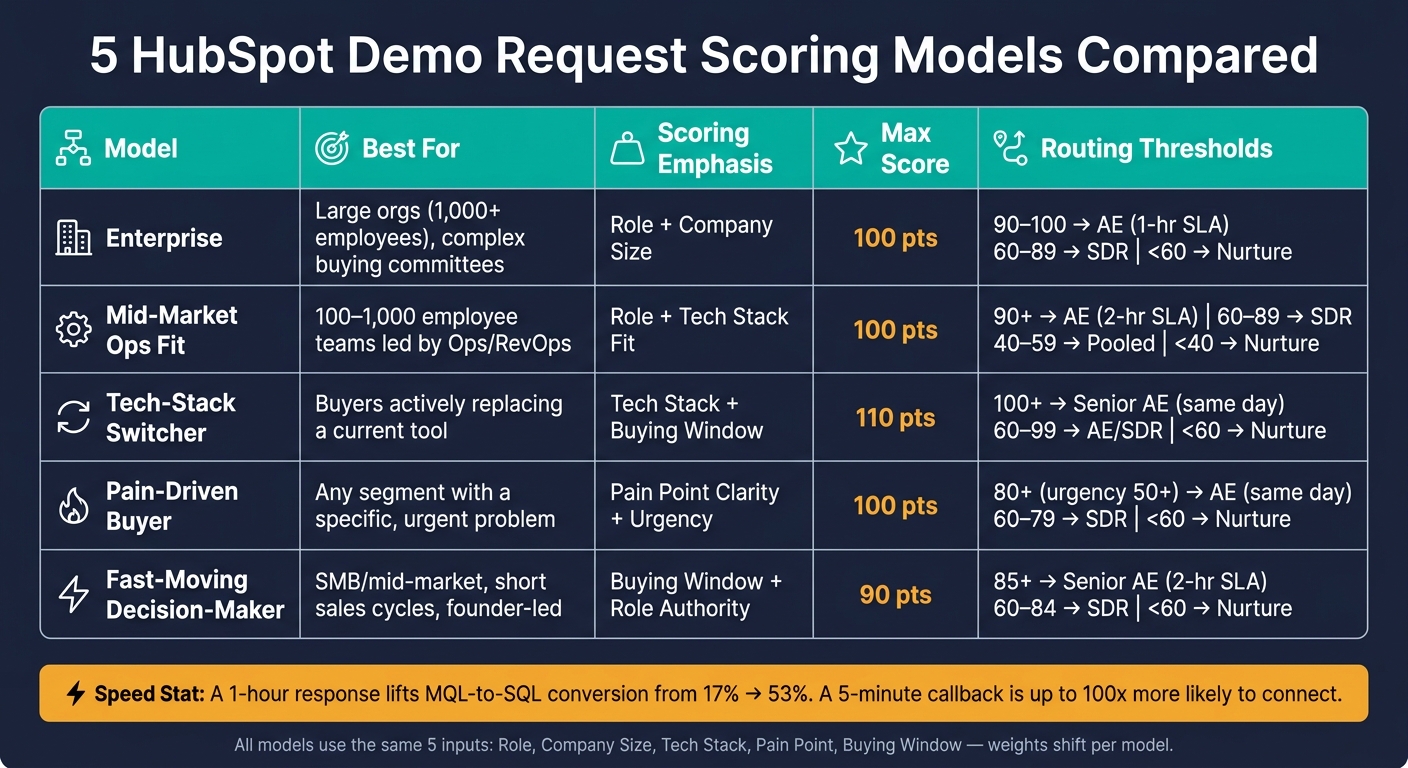
5 HubSpot Demo Request Scoring Models Compared
Not every lead scoring model should push people down the same path.
Some models lean harder on job role. Others care more about tech stack, urgency, or buying timing. That’s why your cutoff matters so much. Set it too low, and sales gets flooded with weak leads. Set it too high, and good opportunities sit in nurture longer than they should.
Here’s how the five models compare:
| Model | Target audience | Scoring emphasis | Total possible score | Recommended cutoff |
|---|---|---|---|---|
| 1. Enterprise | Large orgs (1,000+ employees) with complex buying committees | Role + company size | 100 | 60–89 → SDR; 90–100 → AE |
| 2. Mid-market ops fit | Mid-market teams (100–1,000 employees) led by Ops or RevOps | Role + tech stack fit | 100 | 40–59 → pooled owner/nurture; 60–89 → SDR; 90+ → AE |
| 3. Tech-stack switcher | Teams actively replacing a current tool | Tech stack + buying window | 110 | 60–99 → AE/SDR discovery; 100+ → senior AE |
| 4. Pain-driven buyer | Any segment with a specific, urgent problem | Pain point clarity + urgency | 100 | Below 60 → nurture; 60–79 → SDR; 80+ → AE or solutions call |
| 5. Fast-moving decision-maker | SMB and mid-market teams with short sales cycles, often founder-led or with a single senior decision-maker | Buying window + role authority | 90 | Below 60 → nurture; 60–84 → SDR; 85+ → senior AE same-day |
One rule should override everything else: route any completed demo request right away, even if the lead falls below the score threshold. Speed matters here. A 1-hour response can lift MQL-to-SQL conversion from 17% to 53%.
It also helps to treat your cutoff as a working number, not a fixed law. Every quarter, review the last 50–100 MQLs and look at which score bands actually turned into SQLs and opportunities. If the handoff points are off, adjust them and then update your HubSpot routing rules to match.
Once you land on the right cutoff, the next step is simple: tie that score range to the right HubSpot properties and workflow rules.
HubSpot setup: forms, properties, and routing
Once you've picked a scoring model, the next step is to set it up in HubSpot using properties, form logic, and workflows.
Create properties before you build the form
Start by creating the HubSpot contact properties that will feed your model. In Settings → Properties → Contact properties, add properties for the five inputs defined above. Use dropdowns or radio buttons with tightly controlled values, not free text. That way, your scoring rules work with clean, consistent data.
Then create three score properties with the data type set to Score:
| Property Name | What It Measures |
|---|---|
| Fit Score – Demo Requests | Role, company size, tech stack alignment |
| Urgency Score – Demo Requests | Pain point clarity, buying window timing |
| Total Score – Demo Requests | Combined value used for routing and reporting |
Set up each score property to match your model's point rules. Use Total Score for routing and reporting.
Once those properties are in place, your form can collect clean values from the start.
Use form logic to get better answers
Make every field that affects scoring required: role, company size, tech stack, pain point, and buying window. Then use conditional questions to dig deeper only when it makes sense.
If a contact selects I'm replacing an existing tool, show follow-up questions about which tool they use and their biggest frustration. If they select Just exploring, keep the form shorter. You still get the basics without adding extra friction.
Reform feeds standardized data directly into HubSpot through multi-step forms, conditional logic, email validation, and lead enrichment.
Each Reform field maps to the contact properties you already created, so your scoring setup gets clean inputs from day one.
Then pass those answers into your score properties and routing rules.
Route leads based on score thresholds
Use the cutoff from the model above to trigger routing. In Automation → Workflows, create a contact-based workflow that enrolls anyone who submits a demo request form. Then branch by score range:
- High score: Assign to an AE and set lifecycle stage to SQL.
- Mid score: Route to an SDR queue.
- Low score: Add to nurture until re-engagement or a higher score.
Route leads by your chosen cutoff: send high scores to an AE, mid scores to SDRs, and low scores to nurture. Turn off re-enrollment so the same contact doesn't get routed twice.
Conclusion
There’s no one demo request scoring model that fits every team. The right setup depends on your sales motion, ACV, and ICP. If you sell high-ACV enterprise deals, you’ll usually need tighter thresholds and more weight on buying authority and company fit. If your ACV is lower, you can often get away with a lighter model and softer qualification rules. The main point is simple: match the model to how you sell today.
Once you pick a model, stick with it long enough to get clean data. Choose the one that lines up most closely with your current motion - Enterprise, Mid-Market Operations, Tech-Stack Switcher, Pain-Driven Buyer, or Fast-Moving Decision-Maker - and run it without changes for 30 days. In HubSpot, track booked meetings, opportunities created, and pipeline created. Then, after 60–90 days, compare results across score bands. If your top band isn’t converting at a clearly higher rate than your mid band, that’s a sign your point weights need recalibration.
From there, look at which inputs are doing the heavy lifting. Treat the five inputs as variables, then adjust their weights based on what the data shows. For one vertical SaaS company, company size may matter more than role titles. For a product that replaces legacy software, tech stack fit may end up being the strongest signal. Give more points to inputs that predict booked meetings, and trim back the weight on the ones that don’t. Set up version 1 this week, commit to a 90-day review, and refine it on a set schedule.
FAQs
Which scoring model should I start with?
If you’re an early-stage business or you’re building your first system, start simple with a rule-based scoring model.
Give points to lead attributes and actions that hint at conversion potential, like job title, company size, industry, and demo requests.
A common setup uses a 0–100 scale. Add points for strong intent. Subtract points for weak signals or disqualifying answers.
Treat that as your starting point. Then refine it as you collect performance data.
How often should I adjust score weights?
Review and adjust your score weights quarterly. That gives you time to check conversion rates, catch false positives, and keep the model in line with shifts in buyer behavior and current sales results.
If your data changes or lead flow in your pipeline starts to look different, update your thresholds and weights sooner. Some dynamic systems may also retrain automatically every 15 days.
What if a low-scoring lead requests a demo?
Treat it as a qualified-intent signal for routing, not an automatic handoff to sales.
Use fit + behavior scoring. A demo request can start with high base points, but you should subtract points - or send it for review - if the person’s role, company size, email quality, or segment fit looks weak.
Also apply negative scoring for red flags like unsubscribes or spam signals.
From there, route low-fit, low-score demo requesters to a nurture path or SDR review. If there’s no follow-up activity, let the score decay over time.
Related Blog Posts
Get new content delivered straight to your inbox

The Response
Updates on the Reform platform, insights on optimizing conversion rates, and tips to craft forms that convert.




Drive real results with form optimizations
Tested across hundreds of experiments, our strategies deliver a 215% lift in qualified leads for B2B and SaaS companies.
