
.webp)
7 Form Fields Worth Keeping on Short Lead Forms


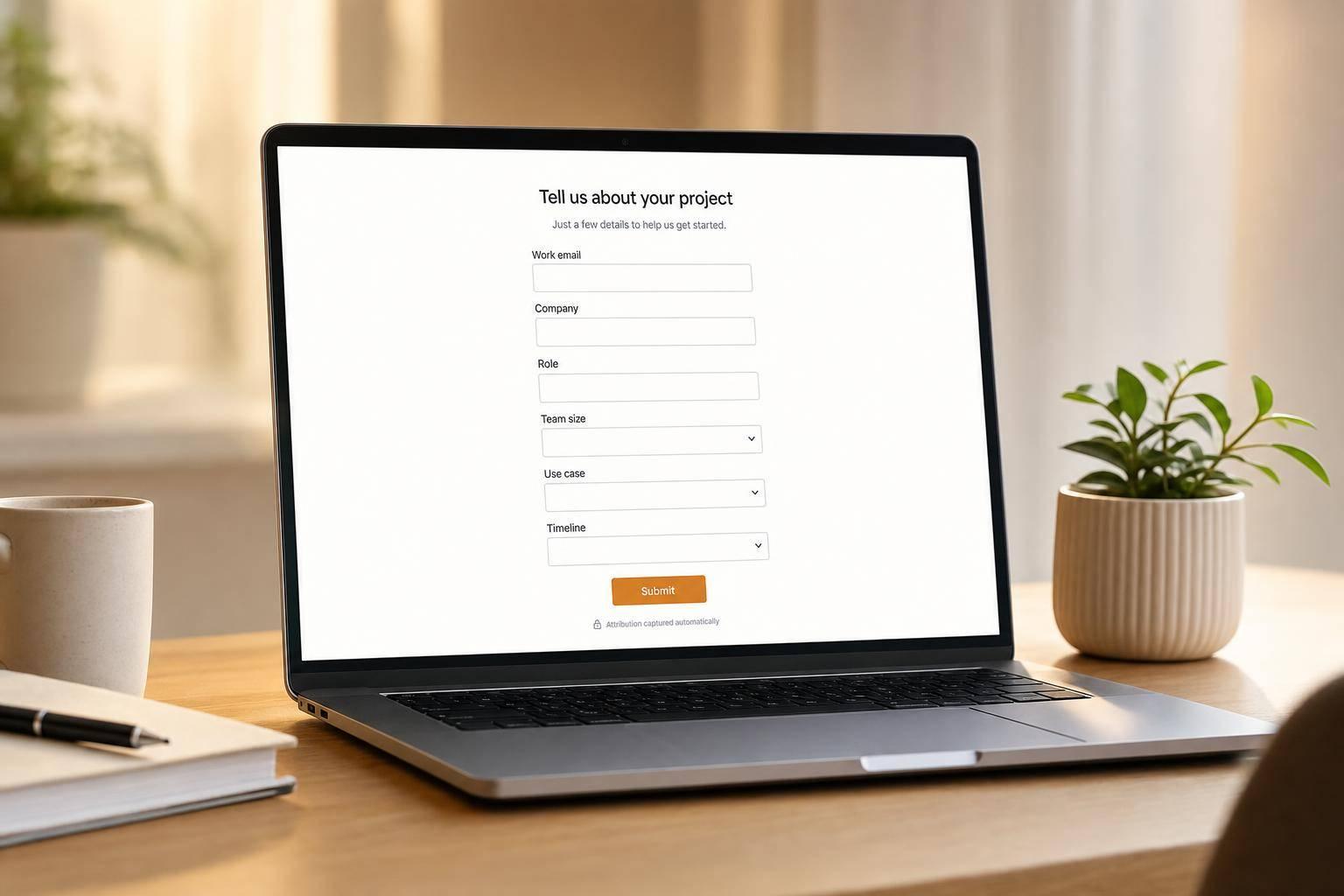
Cut too many form fields, and you may get more leads but worse pipeline. If I had to keep only the fields that still do real work on a short lead form, I’d keep these 7: work email, company name, role, team size, primary use case, timeline, and hidden attribution fields.
Here’s the short version:
- Work email helps filter junk and match leads to accounts
- Company name helps with routing and account ownership
- Role helps score buyer fit
- Team size helps sort SMB vs. mid-market vs. enterprise
- Primary use case tells sales what the person wants
- Timeline shows urgency
- Hidden fields keep source tracking and CRM automation in place
If a field does one of four jobs - improves data quality, cuts spam, supports routing, or helps scoring - I’d think twice before removing it. If it does none of those, I’d cut it.
About 40% to 60% of marketers say form length affects conversion rates, but more submissions do not always mean more revenue. A short form works best when every field changes what happens after the submit.
Quick comparison:
| Field | What it helps with | What happens if I remove it |
|---|---|---|
| Work email | Validation, account match, follow-up | More junk and weaker enrichment |
| Company name | Account routing | More routing errors |
| Role | Lead scoring | Less clear buyer fit |
| Team size | Segment and handoff | Poor-fit leads mix together |
| Primary use case | Sales context | Generic follow-up |
| Timeline | Urgency and queue priority | Hot leads get buried |
| Hidden fields | Attribution and automation | Broken tracking and reporting |
So the main idea is simple: keep visible fields that shape follow-up, and use enrichment or hidden fields for the rest.
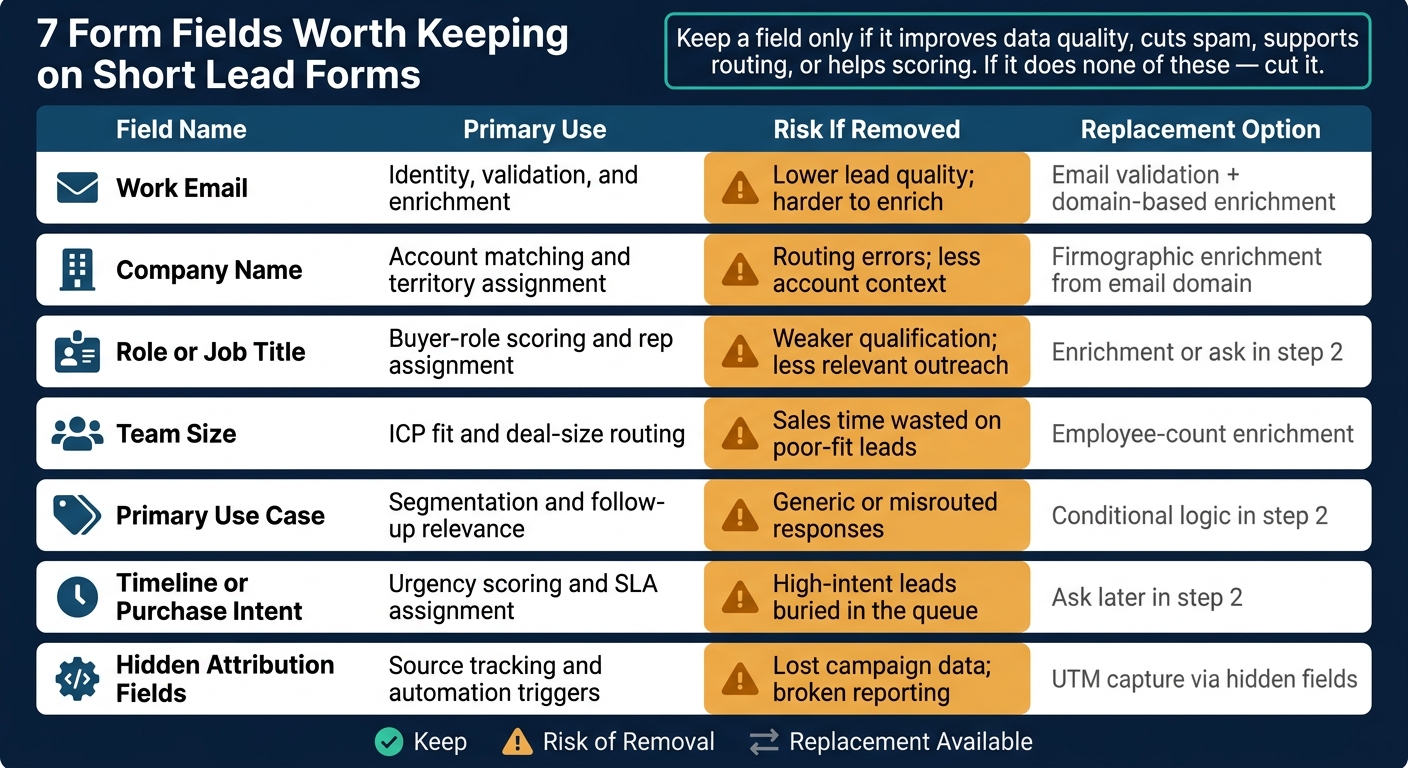
7 Form Fields Worth Keeping on Short Lead Forms: What Each Does and What You Risk Removing
How To Get Higher Quality Leads Using Lead Forms
sbb-itb-5f36581
Fields 1 through 4 to review before removal
These four fields are usually the toughest to cut. They have a direct effect on routing, scoring, and follow-up, so removing them without a close look can create problems fast.
Field 1: Work email
Work email helps with account matching and follow-up. It also supports enrichment and routing. If you don't get a corporate domain, data quality often slips before the lead even gets to a rep.
For demo requests, pricing pages, and trial sign-ups, blocking free domains like gmail.com or yahoo.com is usually the right move. Real-time inline validation can catch typos and flag personal domains before someone submits the form. A short helper message that explains why a work email is needed can keep things clear without adding friction.
Field 2: Company name
Company name supports account-based follow-up. It helps sales check named-account status and territory ownership fast.
For lower-intent offers, enrichment may fill in the company name. But coverage tends to drop for smaller or less common companies.
Field 3: Role or job title
Role shows buying power. A VP-level lead shouldn't get the same follow-up as a coordinator. Without role data, your scoring model treats both the same.
The best move here is to use structured options instead of free text. Open-text job title fields can turn into a mess, with hundreds of variations that are hard to normalize in routing rules. A simple dropdown with options like Executive/VP, Director, Manager, Individual Contributor, and Founder/Owner gives you cleaner data that maps straight to scoring tiers and CRM fields.
Field 4: Team size
Team size separates SMB, mid-market, and enterprise follow-up. If you route all of them the same way, you waste time on both sides.
Use ranges such as 1–10, 11–50, 51–200, and 201+. These brackets are easy for buyers to answer fast, and they're also easy for ops teams to map to territory and SLA rules. If enrichment already covers company size, this field can still act as a check when enrichment falls behind a company's actual growth.
Fields 5 through 7 that protect follow-up quality
These fields can look optional at first glance. They’re not. Each one affects routing, scoring, or follow-up. The first four fields tell you who the lead is. These three tell you how to respond.
Field 5: Primary use case
Primary use case tells sales why someone is interested, not just the fact that they filled out the form. That small bit of context can change the whole opening of a sales conversation.
Stick with 4 to 8 options tied to your main playbooks, plus one "Other" option. Score your best-fit use cases higher than edge-case ones. You can also use conditional logic to route by use case, show the right thank-you page, and tag the CRM record.
Put simply: use case explains why they reached out. Timeline tells you when to move.
Field 6: Timeline or purchase intent
A timeline field helps you separate ready buyers from casual browsers, so your follow-up matches the level of urgency.
For U.S. B2B teams, these ranges tend to work best:
- "Within 30 days"
- "1–3 months"
- "3–6 months"
- "More than 6 months"
- "Just researching"
These options line up cleanly with response priorities. If a lead picks "Within 30 days" and also shows strong fit based on company size and use case, that’s your top-priority mix. That lead should get same-business-day outreach, an immediate booking link, and a spot in the priority queue.
On the other hand, "Just researching" belongs in a long-term educational nurture track, not a hard outbound sequence. The wording matters here too. Keep it helpful, not pushy.
Field 7: Hidden fields for attribution and automation
Once you’ve captured intent, the next job is protecting the backend data that keeps routing and attribution clean.
Hidden fields collect attribution and routing data without adding friction for the person filling out the form. That usually includes UTM source and medium, campaign ID, form ID, owner ID, and territory tags.
These fields connect each submission back to the campaign and channel that brought the lead in. Campaign IDs make sure leads are added to the right campaign record in your CRM the moment the form is submitted. Routing tags assign territory and rep ownership on the fly, which cuts out manual triage.
Take those fields away, and attribution, routing, and CRM sync start to break down, even though the user experience doesn’t improve at all. Reform captures and passes these values to CRM and marketing automation tools, so they’re a core part of a well-structured lead form.
How to keep forms short without losing key data
Cutting fields is only half the job. You also need to keep the data your team uses for routing and scoring, without making the form feel like a chore.
Once you know which fields matter, the next step is form design.
Use conditional logic and multi-step flows
One of the easiest ways to shorten a form without losing qualification depth is simple: stop showing every question to every person.
Conditional logic lets you show questions only when they apply. A timeline question might appear only if someone selects Book a demo. A team-size question might show up only when a person's role suggests they're a manager or another decision-maker.
That changes the experience in a big way. People who don't match those conditions never see those extra fields, so the form feels shorter, even though you're still collecting more detail from the right segments.
Multi-step flows help for the same reason. They keep the first screen short, which lowers the chance that someone bails right away. Start with basics like name and work email, then show deeper qualification questions after step one.
Replace some visible fields with enrichment
You don't need to ask for every detail directly.
Enrichment can fill in firmographic data like industry, company size, revenue, and headquarters location. That removes clutter from the form and saves people from typing information you may be able to get another way.
But here's the line you don't want to cross: enrichment should support routing fields, not stand in for them.
If your sales team assigns reps based on self-reported use case or role, those fields should stay visible. Use enrichment for firmographics. Keep self-reported fields like use case and timeline on the form, because the person's own answer is the thing you're trying to learn.
Validate data before it reaches sales
Shorter forms can go sideways if they let more junk into the system. A few checks help stop that without making life harder for real users.
- Email validation catches bad formats and blocks disposable domains before a submission reaches your CRM.
- Spam prevention through honeypot fields or rate limiting helps stop bot submissions without adding friction.
- Number fields with min/max rules for inputs like team size let you filter leads outside your target profile automatically.
Reform brings these controls together in one place: built-in email validation, spam detection, and real-time analytics that show completion rates and field-level drop-off. After you change a field, you can see if conversion went up and whether lead quality stayed steady.
If removing a visible field leads to a jump in unqualified submissions, the data will show it before it turns into a pipeline problem.
With those safeguards in place, use the checklist below to decide which fields stay visible.
A simple checklist for field removal decisions
Ask whether the field drives routing, scoring, or enrichment
Use this quick test before you remove any field: remove a field only if its value is preserved somewhere else.
If a field decides which rep owns a lead or kicks off a nurture sequence, it does more than sit on a form. It feeds work that happens after submission. Remove it without a backup, and you can end up with gaps that stay hidden until pipeline quality starts to slide.
Keep any field that affects routing, scoring, qualification, or enrichment.
The table below turns that rule into a fast, field-by-field review.
Field review table before making changes
Use this table as a quick reference before touching any field on a short lead form. It shows what each of the seven fields does, what you give up by removing it, and what can take its place.
| Field | Primary use | Risk of removal | Replacement |
|---|---|---|---|
| Work email | Identity, validation, and enrichment | Lower lead quality; harder to enrich | Email validation and domain-based enrichment |
| Company name | Account matching and territory assignment | Routing errors; less account context | Firmographic enrichment from email domain |
| Role or job title | Buyer-role scoring and rep assignment | Weaker qualification; less relevant outreach | Enrichment or ask later in step 2 |
| Team size | ICP fit and deal-size routing | Sales time wasted on poor-fit leads | Employee-count enrichment; hide it after enrichment fills it in |
| Primary use case | Segmentation and follow-up relevance | Generic or misrouted responses | Conditional logic in a second step |
| Timeline or purchase intent | Urgency scoring and SLA assignment | High-intent leads buried in the queue | Ask later in step 2 |
| Hidden attribution fields | Source tracking and automation triggers | Lost campaign data; broken reporting | UTM capture via hidden fields |
The goal is simple: a short form where every visible field has a clear job. You can start building these optimized flows using powerful lead generation form templates designed for high conversion.
FAQs
When can I remove company name or team size?
Remove company name only when it’s no longer needed for routing or scoring, or when enrichment or auto-fill can fill it in with a good level of confidence. If not, keep it on high-intent or demo forms so sales can qualify and route leads right away.
Keep team size as long as it still helps with routing by qualification tier. If you split SMB, mid-market, and enterprise into different paths, remove it only from branches where earlier answers already make it irrelevant.
Should I ask timeline on every short lead form?
Not always.
Ask about purchase or evaluation timing only when you need it to route the lead or score it.
If not, keep the form simple. Then use progressive profiling to gather that detail later.
Timeline works best when it helps you make a branching decision. More in-depth questions, like geography or timing, can usually wait until earlier answers show they matter.
Which fields should stay visible or hidden?
Keep contact fields like name and work email visible. Those are the basics, and people expect to see them.
For firmographic details like company size, industry, revenue, and job seniority, it’s often better to keep them out of sight if backend enrichment can supply that data. If enrichment doesn’t return anything, then show those fields and ask for them directly.
You can also use hidden fields for static backend data tied to CRM routing, territory rules, or lead scoring. Just don’t hide fields that are required for submission. That can stop the form from processing at all.
Related Blog Posts
Get new content delivered straight to your inbox

The Response
Updates on the Reform platform, insights on optimizing conversion rates, and tips to craft forms that convert.




Drive real results with form optimizations
Tested across hundreds of experiments, our strategies deliver a 215% lift in qualified leads for B2B and SaaS companies.
