
.webp)
How to Use Behavioral Data in Lead Forms


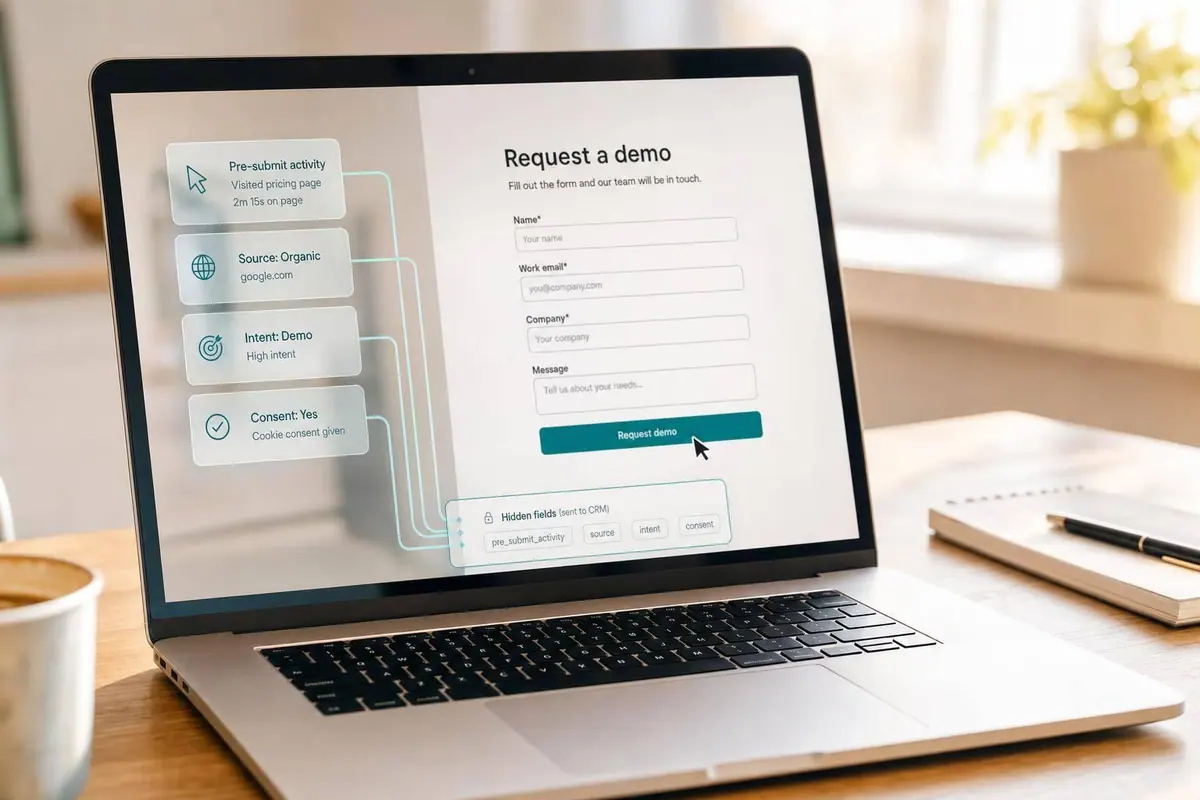
Most lead forms miss the part that explains intent. I’d use behavioral data to pass source, timing, page history, form friction, and consent into the CRM so each form fill is easier to route, score, and follow up on.
Here’s the short version:
- I’d track where the lead came from: landing page, referrer, UTM tags, and ad click IDs
- I’d track what happened before submit: form starts, errors, repeat submit attempts, and page visits
- I’d store first-touch and last-touch source data so attribution is not lost
- I’d send that data through hidden fields, not extra visible questions
- I’d log consent status + timestamp in the CRM as its own record
- I’d test for duplicate events before launch, because even a small tracking bug can skew reports
Why does this matter? Because a lead record with only a name and email tells sales almost nothing. A record with source, behavior, and consent gives a much better starting point. Even small fixes can help: Baymard has long found that checkout and form friction often hurts completion rates, and poor CRM data can distort lead scoring by far more than a few percentage points.
What I’d focus on first:
- Track events before changing the form
- Store attribution across visits
- Pass data with hidden fields
- Map every field into the CRM
- Use behavior + fit for segmentation
- Keep the setup clean after launch
If I had to sum it up in one line: don’t make the form longer—make the submission smarter by using multi-step logic.
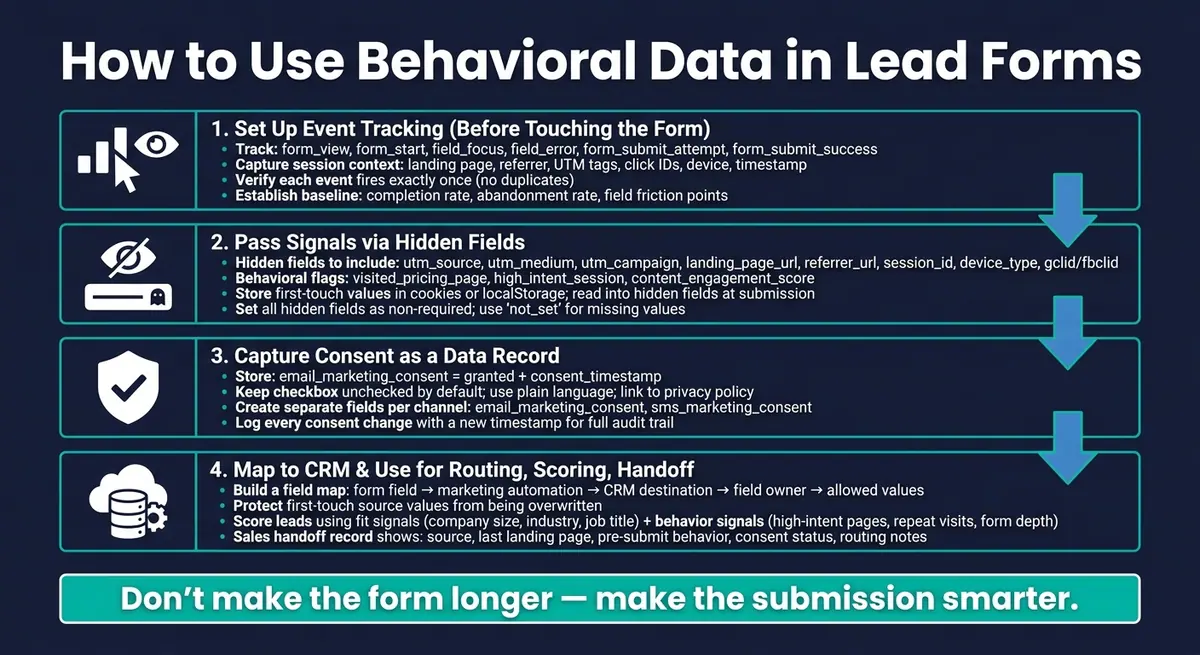
Behavioral Data Lead Form Workflow: From Tracking to CRM Handoff
Set up event tracking before you change the form
Once you know which signals matter, track them before you touch the form.
Set up tracking first so you can measure your baseline for completion, abandonment, and field friction. Those events create the behavior trail the form will later pass into the CRM.
Track pre-submit events that show intent and friction
Start with a core event set: form_view, form_start, field_focus, field_blur, field_error, partial form fill, form_submit_attempt, and form_submit_success.
You want to track both purchase intent and form friction. Intent signals can include finishing most required fields and spending a long time on the form. Friction signals can include repeated focus-and-blur cycles on the same field, validation errors, abandonment after a certain question, or drop-off at the same step in a multi-step form design.
Field-level analysis helps you see which fields push people to leave.
That baseline tells you whether later form updates improve completion rates or just move the drop-off point somewhere else.
Capture session and page context with each submission
After event tracking is live, attach submission context to the same record.
Include the landing page, referrer, UTM, click ID, device, browser, OS, session ID, and timestamp with each submission. If someone submits on a different page or comes back later, keep the original attribution values. Store first-touch UTM values, referrer data, and click IDs in first-party cookies or localStorage on the first visit. Then read those values into hidden fields at submission time.
Keeping both first_utm_source and latest_utm_source in the CRM gives marketing and sales the full picture.
Confirm events fire once and persist correctly
Think of this as three data-integrity checks:
- Verify that each interaction creates one event for each intended action. Use browser dev tools and your analytics logs to confirm the submit event doesn't fire twice because of a double click, page redirect, or script retry.
- Confirm that stored source values survive page refreshes, return visits, and delayed submissions.
- For the final submit event, send it only after the server confirms the submission was accepted. A single-fire check in JavaScript or your tag manager helps prevent duplicate CRM records.
Use the baseline to compare later changes.
With tracking verified, the next step is passing those signals into hidden fields and consent records.
sbb-itb-5f36581
Pass behavioral signals with hidden fields and clear consent
Next, pass those signals into the form without adding friction. Start with hidden fields for attribution, then store consent as its own record.
Use hidden fields for source and session context
Hidden fields stay invisible to the user. That means they add context without adding extra steps.
A good starting set includes utm_source, utm_medium, utm_campaign, landing_page_url, referrer_url, session_id, device_type, and click IDs like gclid or fbclid. You can also pass behavioral flags such as visited_pricing_page when they help with routing or lead scoring.
Always set hidden fields as non-required. Their job is to enrich the record, not stop a submission. Use not_set instead of leaving values blank so reporting stays consistent. And keep sensitive personal data out of hidden fields. They should hold operating metadata like routing tags, campaign IDs, and session context.
Populate hidden fields from URLs, cookies, or JavaScript
Use URL parameter mapping for simple setups, and use JavaScript when values need to stick across sessions.
For example, if utm_source=google appears in the URL, the hidden field can capture it as soon as the page loads. If the journey spans more than one page, store those attribution values in a first-party cookie or localStorage on the first visit. Then read them into hidden fields when the form opens.
Some signals need to survive more than one visit. In that case, save them before you populate the hidden fields. A small behavioral profile in localStorage works well as the user browses - something like high_intent_session=true or content_engagement_score=72. Then pull that data into hidden fields before submit. The key is to keep that profile tight and focused on a small set of meaningful flags, not a raw event log.
Reform supports this with hidden fields, mapping from URL parameters, and JavaScript hooks like onFormLoaded and onPageSubmitted.
Capture and store consent status as an authoritative field
Once attribution and behavior are flowing into the form, handle consent the same way every time. Consent is a data field, not just a checkbox. Track it across the form, your automation platform, and your CRM. If that process gets sloppy, trust in the CRM starts to slip.
Use a canonical field pair for consent: a status value such as email_marketing_consent = granted and a timestamp such as consent_timestamp. Capture both at submission and write them straight into the CRM. If a contact unsubscribes later, keep the original value and add a new timestamp for each update. That gives you a clean audit trail if you ever need to show when and how consent was collected.
For the visible consent checkbox, use plain language, leave it unchecked by default, and link to your full privacy policy. US-based teams don’t deal with one federal rule that mirrors GDPR, but state-level rules make clear disclosure the right default. It also helps to create separate consent fields for each channel from day one, such as email_marketing_consent and sms_marketing_consent, so you don’t have to bolt them on later when suppression rules get messier.
Map fields into the CRM and use the data for segmentation
Once hidden fields start collecting attribution and behavior data, the next step is simple: map that data into your CRM and put it to work for routing, scoring, and handoff.
Build a field map before launch
A field map is just a working document that spells out, for every form field, where the data goes and who owns it. Before launch, document the form field name, data source, destination field in your marketing automation platform, destination field in the CRM, field owner, and allowed values. It also helps to mark whether each field is standard, hidden, computed, or manual so the meaning stays the same across systems.
A few ground rules can save you a lot of cleanup later:
- Assign one owner to each field so conflicting writes don't corrupt the record
- Use standardized picklist values instead of free text when the CRM expects them
- Protect first-touch source values so they aren't overwritten later
Before you go live, test every submission path - paid ads, organic, email, and internal QA links. Then confirm that the expected values appear in the lead record, contact record, and any synced opportunity.
Segment and score leads using fit and behavior together
Once the field map is in place, use that same data to power routing and scoring. Behavioral data adds timing and intent to segmentation. Two leads with the same job title at similar companies can be in very different buying stages based on what they did before they submitted.
The most useful segments combine fit signals like company size, industry, and job title with behavior signals like high-intent page visits, repeat visits in a short window, form completion depth, and campaign source. Send leads to sales when both fit score and recent high-intent activity pass your threshold. Leads who only spent time with blog content should stay in nurture until they reach a set activity score. Giving more weight to recent, high-signal actions than passive engagement keeps scoring tied to actual purchase intent.
Give sales the context they need for a faster handoff
Once scoring is live, show that same behavioral context inside the sales record. The field map doesn't just protect attribution. It also shapes what sales sees right away.
The handoff view should answer three questions: where did this lead come from, what did they do before submitting, and can we legally follow up. The record should show source, last landing page, pre-submit behavior, consent status, and routing notes. Enrichment data - company size, industry, and role - helps fill in firmographic gaps so the rep isn't starting cold.
Reform supports this workflow directly. Its conditional routing sends high-intent leads to the right queue as soon as they submit. Lead enrichment adds missing firmographic details automatically. Real-time analytics show where routing or scoring may need changes. And its CRM integrations send the enriched record into the system sales already uses - no manual copy-paste, no delay. Behavioral data only starts to matter when the CRM record shows source, intent, and consent in one place.
Conclusion: Build a behavioral data workflow that stays reliable
Once tracking, hidden fields, and CRM mapping are live, the last step is keeping the workflow clean and consistent. The goal isn’t more data. It’s reliable data that people can still use after handoff.
Bad data throws off attribution, scoring, and handoff. Clean tracking and disciplined field mapping help keep those systems trustworthy.
Key takeaways for implementation
Use this checklist to keep the system in shape:
- Standardize only the fields you already use for attribution, routing, and consent. Add a field only when it supports scoring, routing, or reporting.
- Use the field map as your launch checklist. Test each main entry path using a multi-step lead gen template and confirm the expected values land in the right CRM fields.
- Treat duplicate events as a launch blocker. Don’t go live until submit events fire once, and only after backend acceptance.
- Store consent as a separate CRM record with status and timestamp so legal and marketing teams can audit any record later.
That’s what makes behavioral data useful long after launch.
FAQs
What behavioral data should I track first?
Start with the core interaction milestones that show intent and forward movement. Focus first on form engagement events like onFormLoaded, onFormCompleted, and step events such as form_step_1_complete.
Then give extra attention to high-value lead fields like company size, industry, and professional details. Sending these signals and enriched fields into hidden fields can improve lead scoring, segmentation, and CRM routing without adding friction for the user.
How do hidden fields work in lead forms?
Hidden fields in Reform are static data points users never see while filling out a form. They help with backend jobs like lead routing, lead scoring, and CRM syncing.
Because Reform fills them in behind the scenes, you can collect behavioral signals or metadata without cluttering the form itself. For example, hidden fields can track UTM parameters and map them to CRM properties.
How should consent be stored in the CRM?
Store consent in your CRM by mapping the right form fields, like agreement checkboxes, to the matching CRM consent properties.
You can also use hidden fields to capture and sync consent status on autopilot. When field mapping stays consistent, your first-party data stays accurate, reliable, and clean for compliance and segmentation.
Related Blog Posts
Get new content delivered straight to your inbox

The Response
Updates on the Reform platform, insights on optimizing conversion rates, and tips to craft forms that convert.




Drive real results with form optimizations
Tested across hundreds of experiments, our strategies deliver a 215% lift in qualified leads for B2B and SaaS companies.
