

API Retry Checklist for Lead Pipelines



A timed-out lead submission may already have succeeded. I start with four total attempts within 15 minutes as a policy to test - not a fixed rule - and retry writes only when duplicate protection is in place.
My checklist covers six controls:
- Sort failures: Retry temporary errors, stop invalid requests, and review uncertain results.
- Bound retries: Set attempt limits, backoff with jitter, and a deadline measured from the original submission.
- Set timeouts: Keep requests and worker leases within the delivery window.
- Prevent duplicates: Preserve operation keys and check uncertain writes before sending them again.
- Keep failed leads recoverable: Use a secure dead-letter queue with owners, deletion deadlines, and approved replay limits.
- Verify recovery: Assign alerts, fix the cause, and test a small replay batch before expanding.
My production rule: <u>test failure paths before launch</u>. Recovery must stay within its limits and leave no duplicate contacts or enrollments.
Automatic Retries with Exponential Backoff: Build Resilient APIs & Microservices
sbb-itb-5f36581
Set Request Timeouts and Lead Deadlines
Once you’ve capped retry count and backoff, limit how long each attempt can run. Set explicit timeouts for each destination rather than relying on one global value or an SDK default you haven’t reviewed.
Over several representative days, measure connection time, time to first byte, total request duration, timeout rate, response status, payload size, and latency by destination and time of day. Compare your results with the provider’s published limits, and track reads and writes separately.
Keep Attempts Within the Lead Deadline
Set separate connection and overall request limits where supported. Use 2 seconds to connect and 10 seconds overall as starting points, not fixed rules. Tune both to measured latency. Keep the overall timeout above normal high-percentile latency, but within the time left before the lead deadline.
The original submission deadline must cover queue wait, request attempts, backoff, and processing overhead. Before each attempt, check how much time remains and cap the request to that window. Stop retrying when there isn’t enough time left for useful work.
Set Worker Leases and Test Timeouts
A timeout doesn’t prove that a request failed. Worker leases and replay tests must account for that uncertainty to prevent duplicate leads and improve conversion rates.
Set the queue visibility timeout or worker lease long enough to cover the full lead-processing path, including backoff, response handling, and acknowledgment or deletion. Amazon SQS defaults to 30 seconds, which may be too short for your worker. If work takes longer, renew the lease before it expires. If renewal fails, stop new work and record the event.
Test slow responses, connection failures, DNS or TLS delays, dropped connections, provider 4xx and 5xx responses, read timeouts, worker crashes, lease expiration, and late responses after a client timeout. Treat a timed-out write as potentially completed. Before replaying it, reconcile through a provider lookup or a supported idempotency key.
Tests pass only when processing stays within its limits, retries stop at the deadline, and duplicate deliveries are safely deduplicated or reconciled. Record the timeout, lease, renewal interval, and test evidence in the destination’s configuration.
Use Idempotency to Prevent Duplicates
Downstream integrations must preserve submission IDs and check delivery status. A success response does not prove the destination committed the write. When a timeout or crash leaves the outcome unknown, use idempotency and reconcile the result using the operation key.
Keep Operation Keys Stable Across Attempts
Keep these three identifiers separate:
- Submission ID: Identifies the original form response.
- Operation key: Identifies one destination action. Creating a contact and enrolling that contact need separate operation keys.
- Attempt ID: Identifies each HTTP execution.
Before retrying, persist the payload or a stored payload reference, payload hash, operation key, status, attempt log, and destination response.
Reuse the same operation key through the provider’s supported mechanism for every retry and unchanged replay. Reject retries whose payload no longer matches. Check the provider’s key scope, supported endpoints, parameter-matching rules, and retention period.
If key retention expires, reconcile the destination record before replaying. If the outcome is still uncertain, send it for review rather than creating another record.
Prevent Duplicates Across Workers
Use an atomic claim so two workers cannot own the same operation. Enforce a unique operation key in your database, and return the stored result if processing has already succeeded.
Local deduplication does not replace destination idempotency. A worker can crash after the destination accepts a write but before it saves the success status. If the destination does not support native keys, prefer supported upserts or destination-side unique constraints. A lookup followed by a create can race, so neither lookups nor local deduplication alone guarantee exactly-once delivery.
Check whether repeated keys return the original result or an error, and whether the provider rejects changed parameters. Contacts and enrollments each need duplicate protection.
Restrict access to correlation metadata, redact sensitive payloads from logs, and retain evidence linking each attempt to its result.
Require timeout and concurrency tests to produce no duplicate contacts or enrollments and to return the stored result.
If the write still cannot be verified, route it to the dead-letter queue.
Send Failed Leads to a Dead-Letter Queue
When a lead runs out of retries or passes its deadline, move it to the dead-letter queue (DLQ) for review and controlled replay. Give each failure class a named owner and a disposition: investigate, approve replay, or discard.
Set Queue Limits and Retention
Record the destination, HTTP status, provider error code, and failure category to distinguish provider outages from poison messages. Acknowledge each success individually so failed records remain recoverable.
| Setting | Source queue | Retry path | Dead-letter queue |
|---|---|---|---|
| Responsibility | Receive and distribute new leads | Delay transient failures | Isolate persistent or unclassified failures |
| Retention | Long enough for normal processing | Long enough to cover the retry schedule | Long enough for investigation and approved replay, with a defined deletion deadline |
| Attempt limit | Short, bounded attempt count | Finite delivery attempts with backoff | No automatic cycling |
| Visibility or lease | Covers expected processing time | Covers delayed reprocessing | Covers inspection, classification, and controlled replay |
| Required metadata | Lead ID, payload reference, destination, idempotency key, created time | Attempt count, next-attempt time, last error | Original payload or secure reference, destination, idempotency key, error history, timestamps, owner, replay status |
Set a deletion deadline that matches retention. Visibility controls ownership; retention controls deletion. Monitor queue depth and oldest-message age. Preserve submitted_at or first_seen_at separately: DLQ age metrics may measure time since transfer, not the message’s original age. Use those timestamps to decide whether to replay or discard the lead, ensuring you are creating high-converting lead forms that maintain data integrity.
Store Replay Data Securely
Replay requires a complete, auditable history. Keep the payload or a secure reference, destination, operation type, stable idempotency key, IDs, error history, timestamps, attempt history, status, and replay state.
Encrypt records and backups both in transit and at rest. Set separate permissions for viewing payloads, replaying leads, and deleting records. Redact diagnostics, exclude credentials, and align retention and deletion rules with applicable privacy and contractual requirements.
Replay DLQ messages only through an approved batch process. Require a replay batch ID, operator or policy approval, a maximum replay count, and a defined destination or time window. Keep the original failure history, append replay history, and stop if the same error class occurs again. Before approval, recheck consent, lead age, and destination access.
Set Alerts and Verify Recovery
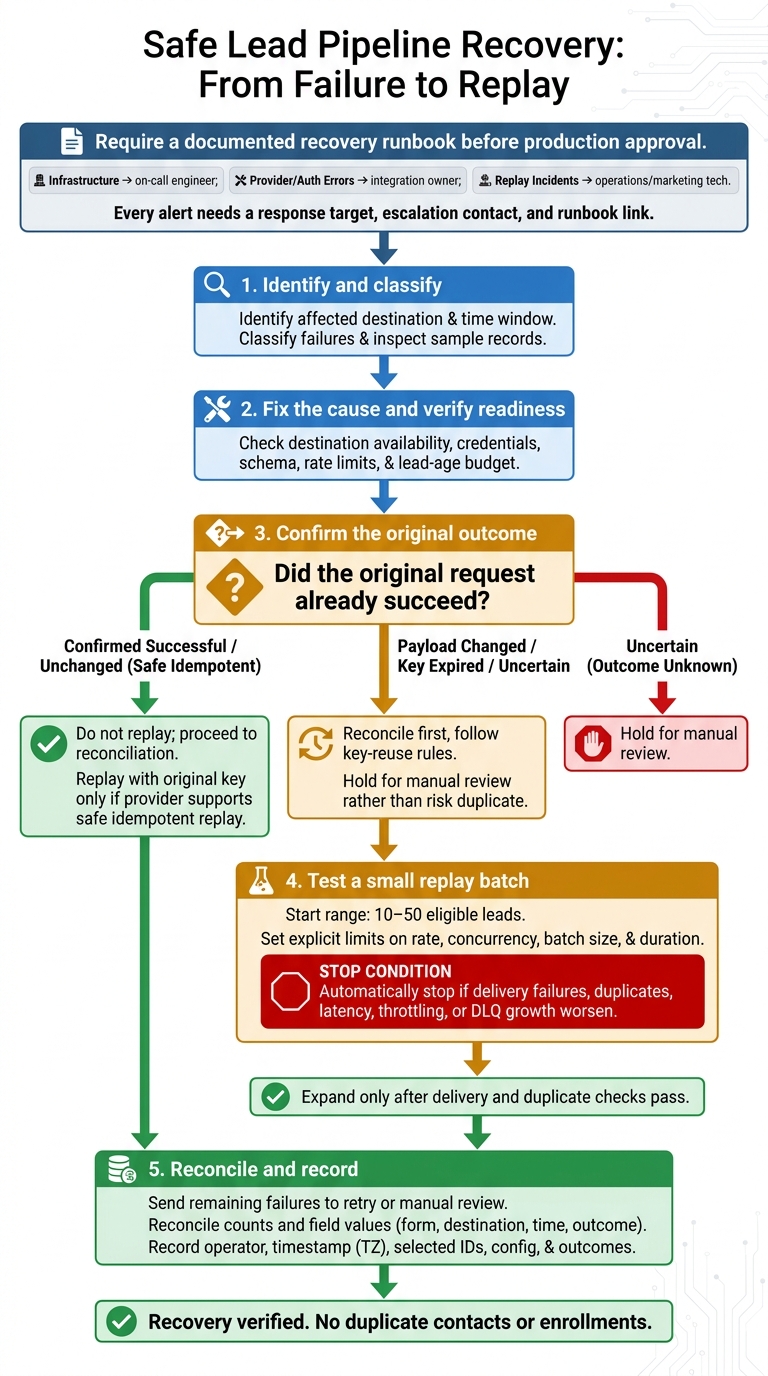
Safe Lead Pipeline Recovery: From Failure to Replay
Once failures are isolated in the DLQ, use alerts to decide when it’s safe to recover.
Define Alert Thresholds and Owners
Track delivery success, end-to-end latency, attempts per lead, timeout rate, 5xxs, rate limits, authentication failures, duplicate-blocking results, replay volume, and DLQ depth and age. Base thresholds and evaluation windows on normal traffic and delivery goals - not defaults. Page for active delivery failures; create tickets for recurring defects that aren’t urgent.
Assign infrastructure alerts to the on-call engineer, provider and authentication errors to the integration owner, and replay incidents to operations or marketing technology. Every alert needs a response target, escalation contact, and runbook link. Group alerts by destination, endpoint, error class, and multi-step form design.
Keep submission, correlation, idempotency, and provider request IDs in access-controlled logs - never in metric labels. Leave sensitive payloads out of those logs.
Fix the Cause Before Replaying Leads
Require a documented recovery runbook before production approval. Follow this sequence for each recovery:
- Identify the affected destination and time window. Classify the failures and inspect a sample of records.
- Fix the cause. Then check destination availability, credentials, schema, rate limits, and the remaining lead-age budget.
- Before replaying anything, confirm whether the original request already succeeded. Replay unchanged operations with the original key only if the provider supports safe idempotent replay. If the payload changed or the key expired, reconcile first and follow the provider’s key-reuse rules.
- Start with 10–50 eligible leads, with explicit limits on rate, concurrency, batch size, and duration. Set automatic stops if delivery failures, duplicates, latency, throttling, or DLQ growth worsen. Expand only after delivery and duplicate checks pass.
- Send remaining failures to retry or manual review. Reconcile counts and field values by form, destination, time window, and outcome. Record the operator, timestamp with time zone, selected record IDs, configuration, and outcomes.
Conclusion: Confirm Production Readiness
Pass only with evidence: bounded retries, tested request timeouts and worker leases, stable idempotency keys, secure DLQ handling, enough capacity and retention, named alert owners, and a rehearsed replay procedure.
Test 5xx errors, rate limits, authentication failures, malformed payloads, worker crashes, duplicate replay attempts, and timeouts after a write that may have succeeded. Approve production only when failures recover, retries stay bounded, and destination records reconcile without duplicates. A missing owner, untested failure mode, or unexplained discrepancy is a fail.
FAQs
How should I handle Retry-After headers within my retry deadline?
If an API returns a Retry-After header, use its specified wait time when it exceeds your calculated backoff delay. For that request, the header takes priority over your default backoff timing.
Once that wait ends, add a small amount of jitter before retrying. This staggers workers’ requests instead of letting them restart at once, helping prevent another traffic spike as the service recovers.
How can I prevent retries from overwhelming a recovering API?
Avoid retrying requests immediately or after a fixed delay - both can cause synchronized traffic spikes. Use exponential backoff with jitter to spread requests over time, and follow the API’s Retry-After header when provided.
Use circuit breakers to stop traffic when error rates exceed set thresholds. Set a retry budget to limit the percentage of traffic used for retries. Send failed requests to a dead-letter queue to prevent endless retries and wasted resources.
How do I safely retry a partially completed lead workflow?
Save lead data in durable storage before making API calls. Retry only transient failures, using exponential backoff with jitter and a limit of 3–5 attempts. Prevent duplicates with idempotency keys or an external ID paired with an upsert.
If a timeout might have occurred after a write, check the destination state before retrying. Once retries are exhausted, send the payload, attempt history, and error details to a dead-letter queue for manual investigation.
Related Blog Posts
Get new content delivered straight to your inbox

The Response
Updates on the Reform platform, insights on optimizing conversion rates, and tips to craft forms that convert.




Drive real results with form optimizations
Tested across hundreds of experiments, our strategies deliver a 215% lift in qualified leads for B2B and SaaS companies.
