
.webp)
How Form Queues Handle Marketing Cloud API Limits


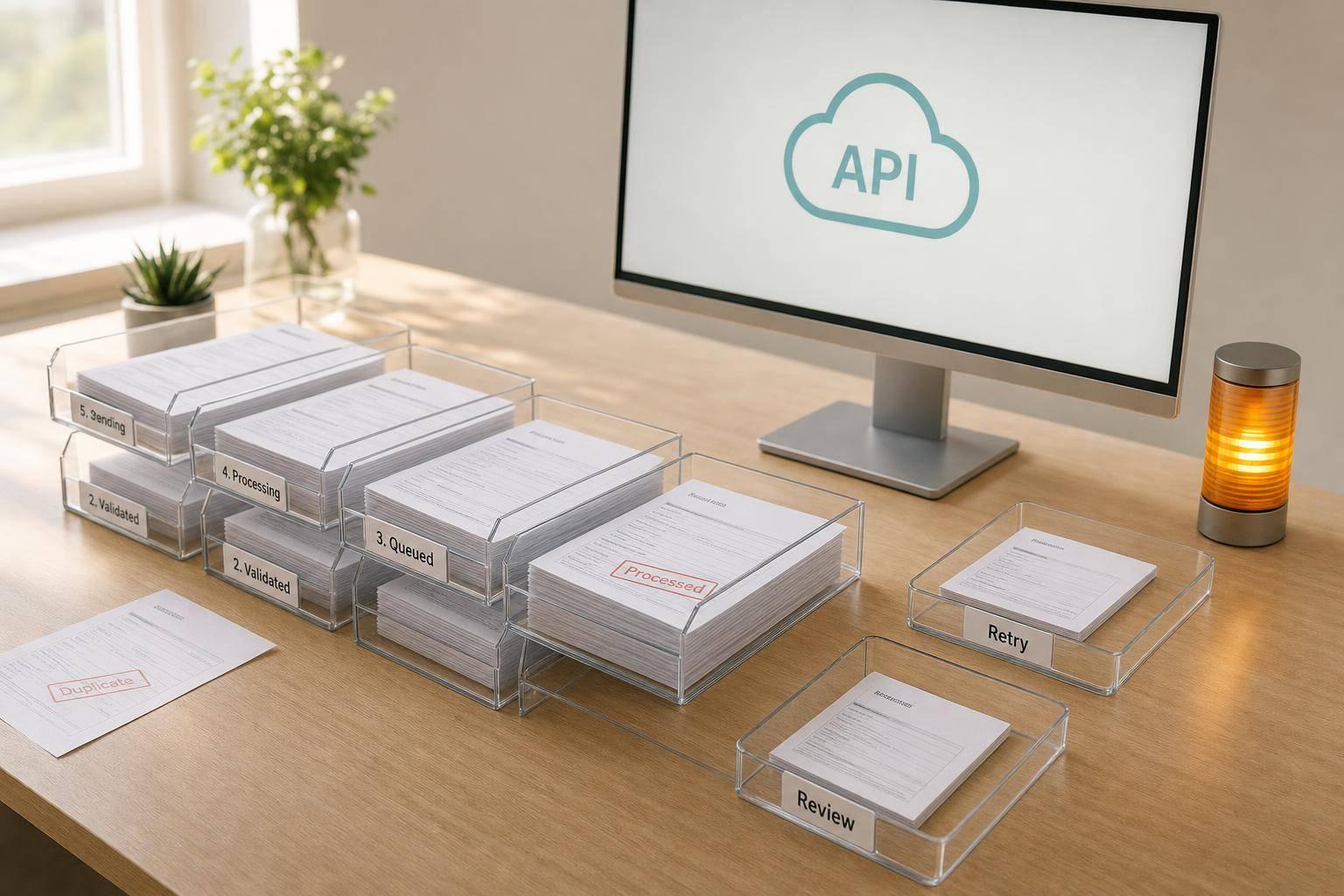
If you send form submissions straight to Salesforce Marketing Cloud, a timeout or 429 can cost you a lead. I’d treat the submission as accepted only after it is written to a durable queue, then let workers send it to Marketing Cloud at a controlled pace.
Here’s the full idea in plain English:
- Accept fast: write the form submission to a durable queue first
- Process later: let background workers send jobs to Marketing Cloud
- Prevent duplicates: use idempotency keys on every job
- Control API pressure: stay below published limits and cache OAuth tokens
- Retry the right failures: back off on
429s,5xx, and network timeouts - Stop bad retries: send
400s, repeated401s, and404sto a DLQ - Watch for lead loss: track queue depth, oldest job age, retry rate, and DLQ count
- Verify totals: reconcile accepted, delivered, pending, and dead-lettered jobs so the numbers match 100%
In short, I’d use a queue as a buffer between the form and the API. That keeps the form response fast for the user, lowers the chance of dropped leads during traffic spikes (especially when using multi-step forms), and gives you a clear path for retries, replay, and audits.
A few details matter most:
- A job should store the job ID, timestamp, attempt count, status, payload, last error, and next retry time
- Workers should claim jobs one at a time with a lease or visibility timeout
- Retry timing should use exponential backoff with jitter
- Ambiguous timeouts should trigger a lookup first, not a blind resend
- Dead-letter replay should keep the same idempotency key
If you want the short version, it’s this: queue first, deliver second, monitor everything. That pattern is what keeps form intake steady when Marketing Cloud slows down or pushes back.
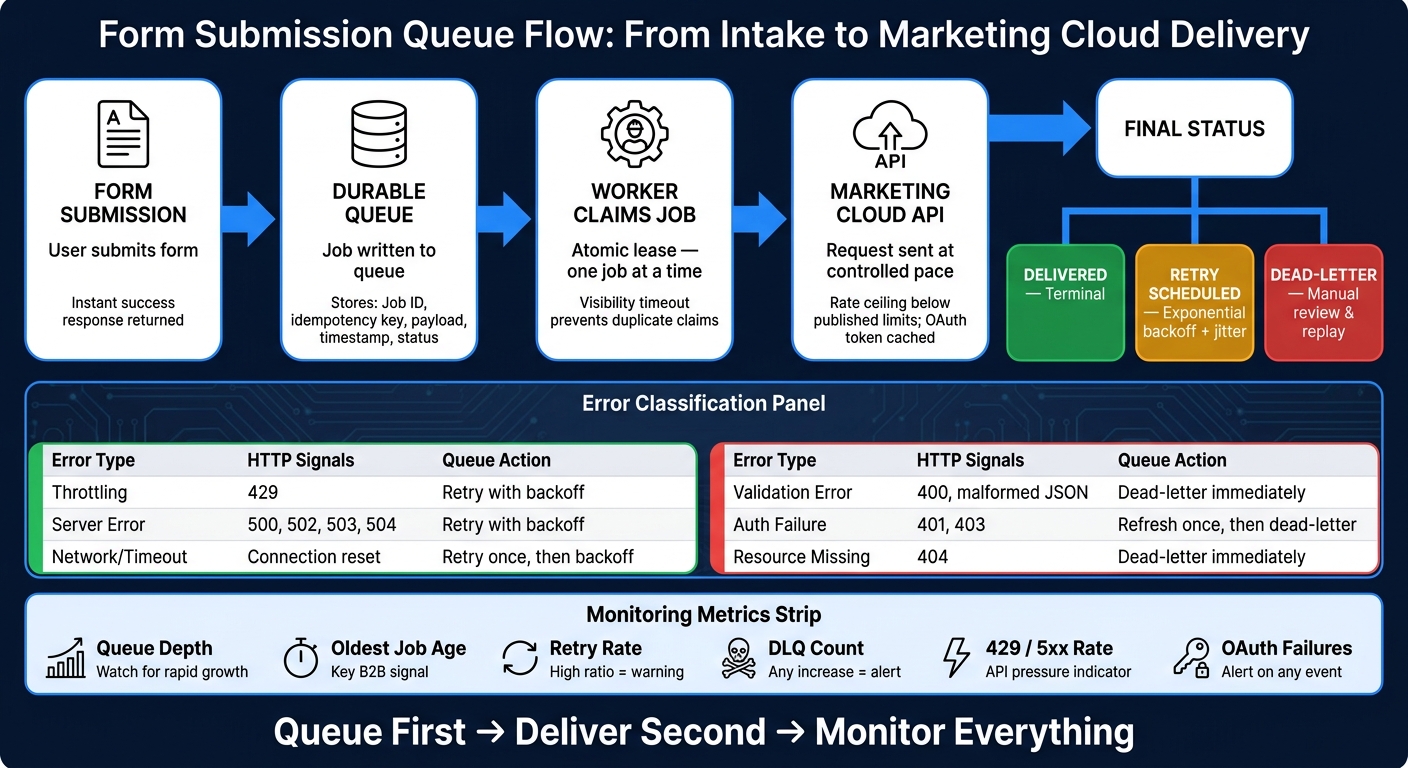
Form Submission Queue Flow: From Intake to Marketing Cloud Delivery
Build a Durable Queue Between Your Form and Marketing Cloud
A durable queue keeps leads from slipping through the cracks when Marketing Cloud slows down or pushes back on traffic spikes. Once a submission is stored, it stays safe even if Marketing Cloud is slow, throttled, or down for a bit. Your form can return a success response right away, while a worker sends the data later at a steady pace.
That setup only works if each job carries enough detail to support retries, deduplication, and delivery audits.
Queue Record Fields and Data Protection Rules
Each job should store:
- Job ID
- Idempotency key
- Submission timestamp
- Form or business-unit ID
- Sanitized payload
- Attempt count
- Next retry time
- Last response
- Last error
- Status
Encrypt sensitive data at rest, and keep only the fields needed for delivery. Set a retention policy to delete or archive records after successful delivery.
With the record shape locked in, the next step is deciding how jobs move through the queue.
Job States, Leases, and Idempotency
Every job should follow a clear lifecycle. Here’s how each state works, what transitions are allowed, and what your team should watch for.
| State | Meaning | Allowed Transitions | Operator Notes |
|---|---|---|---|
| Queued | Submission received and stored; waiting for processing. | In Progress | Default state for new jobs. |
| In Progress | A worker has leased the job and is attempting API delivery. | Delivered, Retry Scheduled, Dead-letter | Watch for jobs that exceed the lease window. |
| Delivered | Successfully written to Marketing Cloud. | None (Terminal) | Store the API response ID for reconciliation. |
| Retry Scheduled | Temporary failure occurred; waiting for backoff period. | In Progress | Use attempt count to prevent infinite loops. |
| Dead-letter | Max retries reached or permanent error encountered. | Queued (Manual Replay), Canceled | Requires manual review of the last_error field. |
| Canceled | Job invalidated - duplicate detected or test data. | None (Terminal) | Useful for filtering spam or internal test submissions. |
These states only hold up if one worker owns a job at a time. Use an atomic claim that moves a single job from Queued to In Progress, so only one worker can lease it. Set a visibility timeout on that lease. If the worker crashes or gets stuck, the job should move back to Queued after the timeout expires.
If some jobs take longer, let the worker renew the lease before it runs out. Idempotency keys help here too. If a timeout leaves the delivery result unclear, the key helps stop duplicate leads from being sent.
Controls to Put in Place Before Going Live
Before launch, put a few guardrails in place.
Keep worker concurrency and rate limits a little below the published API limits. That buffer leaves room for other traffic using the same credentials. Cache OAuth tokens as well, since auth requests can eat into API capacity too. And make sure dead-letter handling is set up, so jobs that hit max retries or permanent errors can be reviewed and replayed by hand.
Before launch, test durable writes under load, verify duplicate protection with repeated idempotency keys, enable OAuth token caching, and configure dead-letter replay.
Once the queue is stable, rate limits and backoff rules control how fast workers can drain it.
sbb-itb-5f36581
Set Rate Limits, Retries, and Backoff Rules
Once jobs are in the queue, the next step is controlling worker throughput. The goal is simple: let the queue absorb traffic spikes without dropping submissions. And before workers retry anything, decide which failures are temporary and which ones should stop on the spot.
Set a Safety Ceiling Below Published API Limits
Salesforce Marketing Cloud uses account-level budgets and endpoint-specific throttling. So don’t run workers right up against the posted limit. Set your ceiling lower than the documented maximum, and make that ceiling configurable so you can adjust it without touching code.
That gives you some breathing room. If traffic jumps or an endpoint starts pushing back, you can dial throughput down fast instead of shipping a code change.
Tell Retryable Failures Apart from Permanent Ones
Not every API error should get another shot. If a payload is malformed, retrying it just burns request budget and slows down other jobs. It’s better to sort failures as they happen and send each one down the right path.
| Error Type | Example Signals | Queue Action | Operator Action |
|---|---|---|---|
| Throttling | HTTP 429, "Rate limit exceeded" | Retry with backoff | Monitor ceiling settings; lower throughput if 429s persist |
| Server Error | HTTP 500, 502, 503, 504 | Retry with backoff | Check the Salesforce Trust site for service outages |
| Network / Timeout | Connection reset, request timeout | Retry once immediately, then apply backoff | Investigate network stability or payload size |
| Validation Error | HTTP 400, "Invalid field", malformed JSON | Dead-letter immediately | Fix form field mapping or data validation logic |
| Auth Failure | HTTP 401, 403 | Refresh once, then dead-letter | Verify credentials and permissions |
| Resource Missing | HTTP 404, "Object not found" | Dead-letter immediately | Confirm object IDs and check sandbox vs. production environment |
Auth failures need one extra check. The worker should try a single token refresh before giving up. If the second attempt, using a fresh token, still returns a 401, treat it as a permanent failure and move the job to the dead-letter queue.
Retry rules only help if workers space requests the right way and avoid retry storms.
Apply Exponential Backoff with Jitter and Cache OAuth Tokens
When a retryable failure happens, don’t fire the next request right away. If a batch of jobs retries at the same moment, you can slam the API again before it has time to recover. That’s how small failures turn into a pileup.
Exponential backoff increases the wait time after each failed attempt. Jitter adds a small random delay so jobs that failed together don’t retry in lockstep. Add a retry cap too, so jobs that keep failing end up in the dead-letter queue instead of sitting in the pipeline forever.
Token requests also consume API capacity under load. So it’s worth being careful here. Cache valid tokens, and refresh them only when they expire or after a confirmed 401. That keeps auth calls from eating up room that should go to valid submissions.
These retry rules connect directly to worker claims, lease renewal, and dead-letter handling.
Run Workers Safely and Handle Failed Jobs Without Losing Leads
With retry rules and backoff in place, the next move is making sure workers handle jobs cleanly and that failed submissions don't quietly drop leads.
Worker Flow from Claim to Final Status
A worker should claim one job at a time so another worker can't grab the same job at the same time.
From there, the flow is simple:
- Claim the job
- Send the request to Marketing Cloud
- Classify the response using the retry rules defined above and move it to Delivered, Retry Scheduled, or Dead-letter
Sending the request after the claim helps keep the backlog moving. It also avoids tying job acceptance to API latency.
Once jobs can move from claim to a final state without friction, track those states closely. That way, stuck claims and growing DLQs show up early instead of becoming a mess later.
Dead-Letter Queue Setup and Replay Controls
A job should move to the dead-letter queue (DLQ) when it uses up its retry budget or hits a permanent error. Store the original payload, correlation ID, attempt history, and final error message in the DLQ.
Replay should be limited to selected jobs or selected error classes after the root cause is fixed. Keep idempotency keys unchanged during replay. And replay at the same safety ceiling used for live traffic.
Those DLQ records also power the monitoring checks that tell you whether failed jobs are quietly stacking up.
Handle Ambiguous Outcomes and Set Retention Rules
Timeouts are awkward because they leave delivery status unknown. In that case, rely on your idempotency key instead of firing off an immediate retry, and run a delivery lookup before sending the job again.
Keep delivered records long enough for reconciliation. Keep DLQ records long enough for audit and replay. Then purge both on a fixed schedule that matches your operations and compliance needs.
Those retained records make the next monitoring and reconciliation step possible.
Monitor Queue Health and Confirm That Submissions Were Delivered
Metrics, Alerts, and Structured Logs to Track
Once workers and DLQs are live, don't just set them up and walk away. Watch them closely so you can spot backlog growth before it turns into dropped leads. These signals tell you if the claim, retry, and DLQ flow is still doing its job when traffic picks up.
| Metric Category | Signal to Track | Alert Trigger |
|---|---|---|
| Queue Health | Queue depth and oldest job age | Rapid growth or age exceeds service target |
| Delivery Success | Delivery success rate vs. retry rate | High ratio of retries to successes |
| Failure Handling | Dead-letter queue (DLQ) count | Any increase in DLQ size |
| API Performance | HTTP 429 and 5xx distribution | Repeated throttling or server errors |
| Worker Status | Worker utilization | Workers stopped or throughput at zero |
| Authentication | OAuth token failures | Any auth failure event |
For B2B teams, oldest queued-job age matters a lot. It shows when submissions are sitting in line too long, which is often the first sign that something is slipping. Your structured logs should make each step easy to follow: the submission, each retry, the response code, and the final status.
Load Testing and Reconciliation Checks
Run peak-load tests to check that queue depth, worker throughput, retry timing, and DLQ growth stay within target.
But activity alone isn't enough. A busy queue can still hide delivery problems. You need to confirm that the queue is draining from end to end, not just moving jobs around.
That's where reconciliation checks come in. Compare accepted submissions with delivered, pending, and dead-lettered jobs. Those numbers should always match up. If they don't, you've got a lost lead somewhere between acceptance and delivery. Investigate any mismatch before release or replay.
Conclusion: The Queue Pattern That Stops Dropped Leads
Track queue depth, oldest-job age, retry rate, DLQ growth, worker status, and auth failures so you can catch dropped leads early.
FAQs
How large should the queue be?
Size the queue by starting with your API provider’s rate limits and daily quotas, then work backward. Don’t push for max capacity. Leave headroom for retries and manual replays, or you’ll box yourself in the moment traffic spikes.
Watch queue depth and P95 job completion time closely. Those two numbers tell you a lot, fast. If the queue keeps getting deeper, your processing speed isn’t keeping pace with incoming traffic. And if you let high-volume, low-value activity pile in, the queue can get jammed with work that doesn’t matter much.
When should a job go to the DLQ?
Move a job to the DLQ when the failure is permanent or when it has used up all automated retries.
Send it there right away for non-retryable errors, such as 400 or 403 responses. Do the same for payload problems like missing required fields, identity conflicts, or data that breaks CRM custom rules.
If the retry budget is exhausted, route the job to the DLQ for manual review.
How do idempotency keys prevent duplicate leads?
Idempotency keys give each submission its own ID. That lets the CRM treat repeat requests as the same action instead of creating a new lead.
Here’s why that matters: if a write fails and the system retries it, the same key goes out again. The CRM can then spot the match and skip duplicate creation.
Reform webhooks include a unique event ID for this exact job. If the CRM doesn’t support idempotency headers, you can get the same outcome with an external ID and an upsert.
Related Blog Posts
Get new content delivered straight to your inbox

The Response
Updates on the Reform platform, insights on optimizing conversion rates, and tips to craft forms that convert.




Drive real results with form optimizations
Tested across hundreds of experiments, our strategies deliver a 215% lift in qualified leads for B2B and SaaS companies.
