
.webp)
REST vs SOAP API for Salesforce Forms



If I’m building a new Salesforce Marketing Cloud form integration today, I’d start with REST. It’s usually simpler to build, easier to debug, and a better fit for form flows that need instant feedback, Data Extension writes, and Journey Builder entry.
Here’s the short version:
- REST uses JSON and standard HTTP
- SOAP uses XML and a stricter contract
- REST fits most new lead forms, demo requests, webinar signups, and preference updates
- SOAP still fits older subscriber flows, list-based email work, and tightly controlled backend setups
- Salesforce guidance in the article points to about 2,500 REST calls per minute vs 2,000 SOAP calls per minute
- REST is often the first choice when you need form submissions to land in SFMC within seconds
- SOAP still matters when older Marketing Cloud actions or governed email processes are part of the flow
Before I choose, I’d check four things:
- where the form data needs to go
- how fast the response must be
- how much traffic the form will handle
- whether the setup depends on older SFMC subscriber or email processes
REST vs SOAP in Fun Way (With EXAMPLE) | Salesforce Integration
Quick Comparison
| Criteria | REST | SOAP |
|---|---|---|
| Data format | JSON | XML |
| Best fit | New form flows and journey triggers | Older subscriber and email flows |
| Setup effort | Lower | Higher |
| Debugging | Easier with HTTP status codes | Harder with XML faults |
| Burst traffic | Handles spikes better | Better for steady, controlled traffic |
| SFMC use case | Data Extensions, API Events, modern features | Lists, Subscribers, older backend actions |
My takeaway: use REST by default, and use SOAP only when your SFMC setup still depends on older subscriber models, governed middleware, or actions REST doesn’t cover well.
Below, I break down when each one makes sense, what can go wrong, and what I’d test before launch.
REST API for Salesforce Marketing Cloud Forms
For Salesforce Marketing Cloud forms, REST is usually the cleaner fit for modern workflows. It uses compact JSON over HTTPS and lines up neatly with current Engagement features. Salesforce treats REST as the default route for modern Marketing Cloud form workflows, and it powers tools like Journey Builder, Contact Builder, and Content Builder. In form integration, the big call is simple: where does the submission go, and how fast does it get into SFMC?
Where REST Fits in Form Workflows
A user submits a form built in React, Vue, Next.js, or a no-code form builder like Reform. That submission then hits an internal endpoint such as /api/forms/lead-submit. From there, server-side code checks the fields, maps them to SFMC attributes, and sends the REST call.
Two workflows show up again and again in form-related REST setups:
- Contact creation and updates: A POST or PATCH to a sendable Data Extension - for example,
hub/v1/dataeventsasync/key:DE-EXTERNALKEY/rowset- writes the lead record as soon as the form is submitted. - Journey Builder entry via API Events: Set up an API Event as the entry source, then POST to
interaction/v1/eventswith the contact key and attributes such asleadScoreorproductInterestto trigger near-real-time follow-up.
Teams working in JavaScript-heavy stacks tend to like this pattern because REST fits naturally with async, JSON-based middleware they already use.
REST Strengths and Trade-offs for Marketers and Developers
REST’s biggest day-to-day win is how fast it is to set up and debug. JSON responses come back with standard HTTP status codes and readable error messages. So if a field mapping breaks or an auth token expires, engineers can usually spot the problem fast in Postman or browser dev tools instead of digging through nested XML fault elements.
Still, REST isn’t the answer for everything. Some older Marketing Cloud operations - such as certain Email Studio subscriber list actions, complex triggered sends, or advanced configuration options - may still need SOAP or a hybrid setup. Teams also have to deal with token refresh, retry logic, and endpoint version changes. And if a form needs to update several related objects, REST may mean multiple calls plus custom consistency handling.
You see these differences most clearly in daily form operations:
| Aspect | REST for Forms | SOAP for Forms |
|---|---|---|
| Payload format | JSON - compact and human-readable | XML - verbose and envelope-based |
| Ease of implementation | High; aligns with modern web and JavaScript skills | Lower; requires WSDL handling and XML parsing |
| Performance | Faster due to smaller payloads | Slower due to XML overhead |
| Best for forms | Real-time lead capture, Journey Builder entry, preference centers | Batch imports, legacy system sync, governed email operations |
| Debugging | Standard HTTP codes and readable JSON errors | XML fault elements and more specialized tooling |
There’s also one limit worth calling out: Journey Builder API Events work one record at a time and can’t run batch sends, so high-volume form backfills or bulk imports are better handled with middleware or ETL pipelines. For bulk backfills or older subscriber operations, SOAP still has a place.
sbb-itb-5f36581
SOAP API for Salesforce Marketing Cloud Forms
When REST feels a little too loose for a form workflow, SOAP is the stricter route. It uses XML envelopes and a WSDL contract. That fixed schema helps the backend handle each submission in the same way, which makes SOAP a good match for form setups that need to follow set backend rules.
Where SOAP Still Applies for Form Submissions
SOAP works well when a server-side process needs tight control over specific Marketing Cloud objects. It gives broad access to core Marketing Cloud objects, including Subscribers, Lists, and Data Extensions. So if a form submission needs to connect with legacy Email Studio assets or core subscriber data, SOAP may be the better pick.
There’s also a practical limit to know before you build: SOAP allows 10 callouts per transaction, a combined timeout of 120 seconds, and a 3 MB response cap. For form integrations, don’t trigger SOAP callouts inside a loop. Instead, batch lead data into a single collection before sending it.
SOAP Strengths and Trade-offs for Tightly Controlled Environments
SOAP’s formal WSDL contract gives teams a clear, machine-readable service definition. Its security settings are also direct: SOAP integrations support IP filtering, SSL certificates, and Basic Authentication out of the box.
The trade-off is rigidity. If the schema changes, teams often need to regenerate the client proxy from the WSDL. And at higher volume, XML overhead and callout limits can slow things down. That’s why SOAP tends to fit controlled, legacy-heavy form pipelines, rather than serving as the first pick for new lead-capture flows.
REST vs SOAP: Side-by-Side Comparison for Salesforce Forms
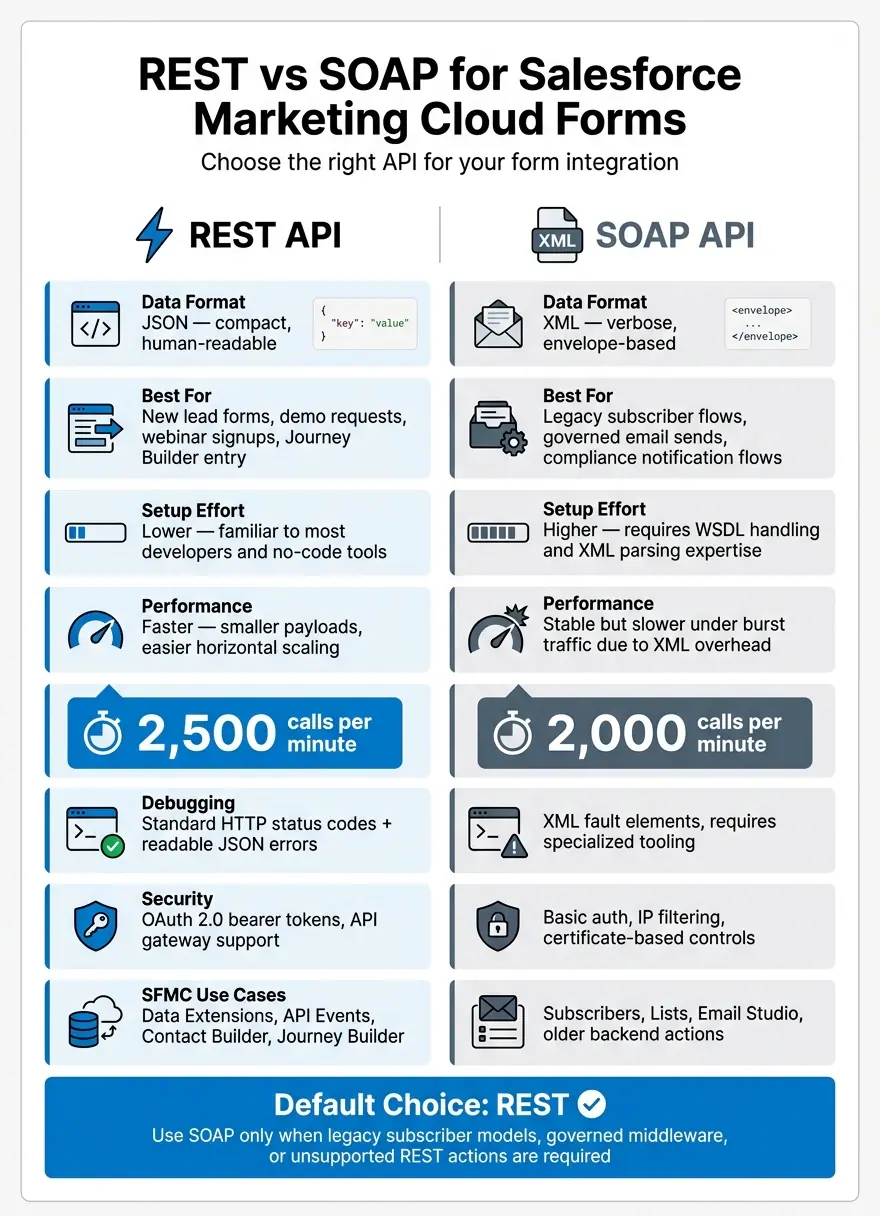
REST vs SOAP API for Salesforce Marketing Cloud Forms: Side-by-Side Comparison
Pick the API based on the workflow, expected form volume, and how tightly the process is controlled.
The matrix below helps match each API to the kind of form you’re building.
| Criterion | REST | SOAP |
|---|---|---|
| Typical form scenarios | Multi-step lead-gen forms, demo requests, webinar signups, and real-time journey triggers | Newsletter signups tied to legacy subscriber models, compliance notification flows, and governed email sends |
| Performance | Smaller JSON payloads, faster parsing, and easier horizontal scaling | Larger XML envelopes and more verbose parsing; stable, but slower under burst traffic |
| Security & governance | OAuth 2.0 bearer tokens and API gateway support | Basic auth, IP filtering, and certificate-based controls in governed enterprise workflows |
| Implementation effort | Lower; JSON and HTTP are familiar to most developers and no-code tools like Reform | Higher; requires XML/WSDL expertise and often a middleware translation layer |
Performance, Maintenance, and Scalability Under Lead Volume
Fit matters, but volume changes the picture fast. When submission traffic jumps, REST usually holds up better because JSON payloads are smaller and easier to process. It’s also simpler to retry failed requests. Since REST is stateless, you can queue submissions, replay them later, and use standard HTTP retry logic like exponential backoff for 5xx responses and limited retries for 4xx responses.
Salesforce Support guidance puts limits at about 2,500 REST calls per minute and 2,000 SOAP calls per minute.
SOAP can still work well for steady, predictable traffic. But when submissions spike, XML overhead can slow response times. Retries also need tighter idempotency controls so you don’t create duplicate records.
Maintenance is another dividing line. REST integrations are usually easier to keep up over time because Salesforce often ships new Marketing Cloud features through REST first. REST versioning is also built into the URL, which makes it easier to move form workflows over in stages without disrupting live campaigns.
Which API to Choose for Common Salesforce Form Scenarios
Once you move from theory to day-to-day use, the choice is often pretty clear. For most new forms - demo requests, content downloads, and progressive profiling - REST is the default pick. It connects straight to the Marketing Cloud objects that modern campaigns use, and no-code tools like Reform can map fields and send data to REST endpoints without custom code. That keeps setup lighter and cuts down on moving parts.
SOAP still makes sense for legacy compliance and subscriber flows that depend on classic SOAP rules. If that’s your setup, it’s usually smarter to keep the SOAP layer in place and map out a careful migration later, when the rest of the architecture is ready for the change.
Implementation Steps and Final Recommendation
Once you've picked REST or SOAP, don't rush the launch. First, check credentials, field mapping, and error handling. That's where most integrations go sideways. In practice, auth issues, bad mappings, and duplicate problems cause the bulk of failures, so start there.
For REST, use an OAuth 2.0 Connected App. Store the Client ID and Client Secret in a secrets manager, not in source code or browser JavaScript. For SOAP, use a dedicated integration user. Keep credentials in encrypted config or environment variables, and use IP allowlisting if your setup calls for it.
What to Check Before Going Live
Each mapped field needs to match the target Data Extension name and data type exactly. Even a small mismatch can break things. A date in the wrong format, or a phone number with dashes sent to a numeric field, can trigger errors like 10003 Incorrect Format or 10001 Invalid Data Type. Run test submissions in staging, then confirm the records land in the correct Data Extension or Contact record before you move to production.
After that, check the day-to-day details that tend to trip teams up:
- Duplicate handling: Submit the same email again and make sure the record updates instead of creating a duplicate.
- Consent fields: Check that opt-in flags, timestamps, and source data map the right way. This supports CAN-SPAM, CCPA, and internal compliance rules.
- Server-side validation: Send a malformed email on purpose, or leave a required field blank. The backend should reject it cleanly and avoid writing bad data to Salesforce.
- Rate limits: Make sure batching and retry logic are ready before launch.
- Logging and alerts: Each submission should log a unique ID, timestamp, and Salesforce response code. Set alerts before you hit rate limits.
A no-code form builder like Reform can take care of front-end validation, spam prevention, and email checks before submissions hit Salesforce.
Key Takeaways
REST is the right default for new Salesforce Marketing Cloud form integrations. It's faster to set up, easier to scale when lead volume changes, and better supported by modern tooling. SOAP still has its place when you're dealing with legacy subscriber flows, governed middleware, or specific Marketing Cloud tasks that REST doesn't fully cover yet.
The choice comes down to four things: the objects and actions your form needs, expected traffic volume, governance rules, and your team's current API experience. Use REST for new form workflows. Use SOAP only when legacy subscriber or governed email operations call for it.
FAQs
When should I use SOAP instead of REST?
Use SOAP when you need complex, transactional work or legacy system connections that depend on structured messages and strict contract rules.
For standard CRUD tasks and modern web form connections, REST is usually the better fit because it’s more flexible and easier to use. SOAP still makes sense in enterprise workflows where formal security standards and standardized error handling matter.
How do I avoid duplicate records from form submissions?
To avoid duplicate records when integrating forms with Salesforce, build duplicate prevention into your API connection.
That usually comes down to two things: checking your field mapping and using a unique identifier during sync.
When those pieces are set up the right way, form submissions can be matched with existing records instead of creating new ones every time. The result is cleaner processing and fewer duplicate leads or contacts in your CRM.
What should I test before launching the integration?
Before launch, test the core components that protect data integrity and system stability:
- OAuth connection security
- Exact field mapping
- Validation logic
- Duplicate prevention
- Consent tracking
- Rate-limit handling under load
This helps ensure data moves accurately and requests are handled reliably.
Related Blog Posts
Get new content delivered straight to your inbox

The Response
Updates on the Reform platform, insights on optimizing conversion rates, and tips to craft forms that convert.




Drive real results with form optimizations
Tested across hundreds of experiments, our strategies deliver a 215% lift in qualified leads for B2B and SaaS companies.
